Android Architecture MVVM Room DB & Hilt DI
Introduction
Modern Android apps are no longer built with just Activities and Fragments. Instead, they follow structured architectural patterns that make apps scalable, testable, and maintainable. One of the most popular and industry-recommended approaches is MVVM (Model-View-ViewModel) combined with Room Database for local storage and Hilt Dependency Injection for managing dependencies.
In this tutorial, you’ll learn Android Architecture: MVVM, Room DB & Hilt DI in a practical, real-world way tailored for Pakistani students. Whether you’re building a student management app in Lahore or an expense tracker in Karachi using PKR, these concepts will help you write clean and professional Android code.
Learning this stack is important because:
- It’s widely used in real-world Android jobs
- It improves app performance and maintainability
- It prepares you for modern Android development practices
Prerequisites
Before starting this tutorial, you should have:
- Basic knowledge of Kotlin programming
- Understanding of Android Studio
- Familiarity with Activities & Fragments
- Basic idea of RecyclerView
- Some exposure to Coroutines (helpful but not mandatory)
Core Concepts & Explanation
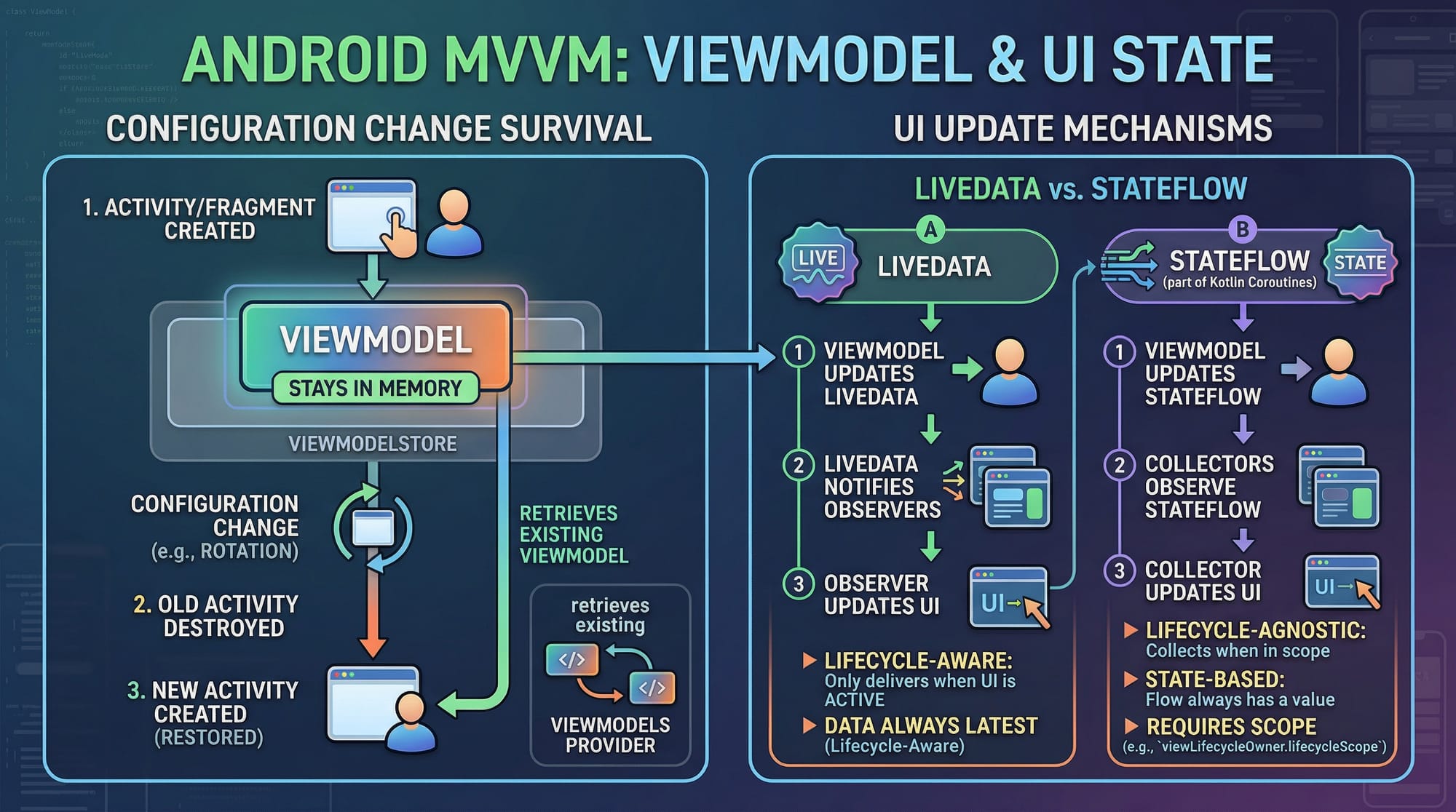
MVVM Architecture in Android
MVVM stands for:
- Model → Data layer (Room, APIs)
- View → UI layer (Activity/Fragment)
- ViewModel → Connects View & Model
Example Flow:
- Ahmad opens an expense app
- View (Activity) asks ViewModel for data
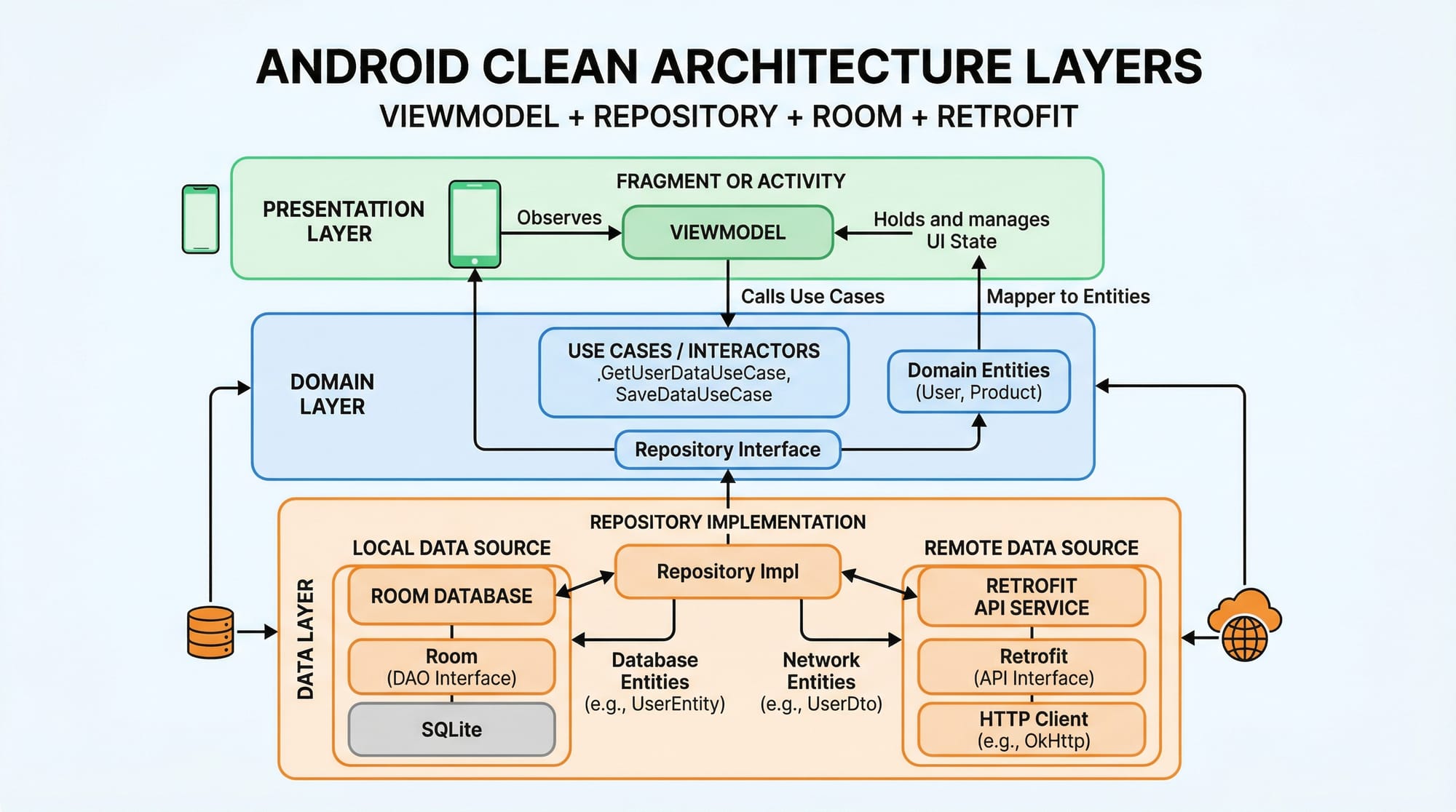
- ViewModel fetches from Repository
- Repository gets data from Room DB or API
Benefits:
- Separation of concerns
- Lifecycle-aware UI updates
- Easy testing
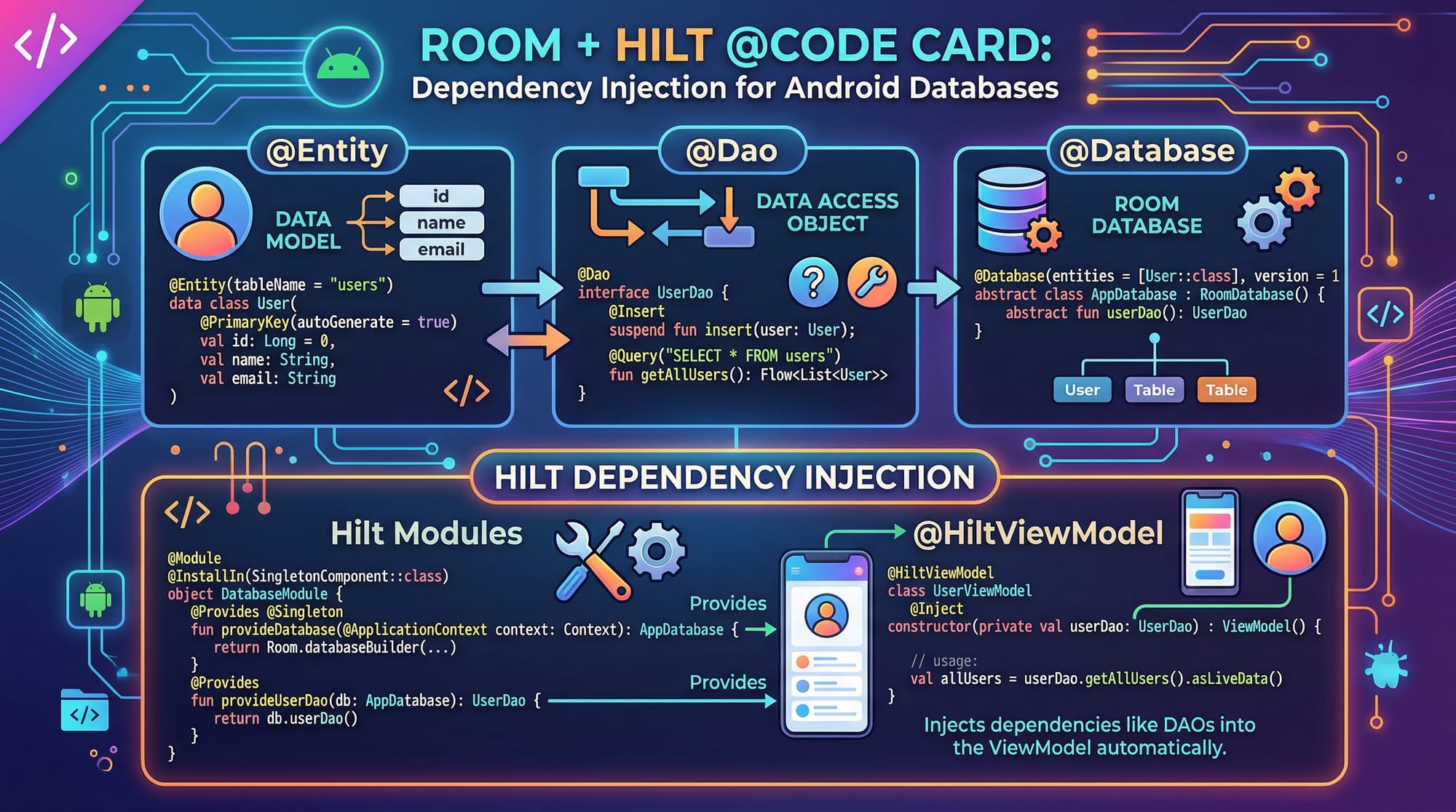
Room Database in Android
Room is an abstraction over SQLite that makes database handling easier.
Key Components:
- Entity → Table
- DAO → Queries
- Database → Main database holder
Example:
If Fatima wants to store student data:
- Entity = Student table
- DAO = Insert, Delete, Fetch queries
Hilt Dependency Injection
Hilt simplifies dependency injection in Android apps.
Why Use Hilt?
- Reduces boilerplate code
- Automatically provides dependencies
- Improves scalability
Example:
Instead of manually creating Repository objects, Hilt injects them automatically.
Repository Pattern (Glue Between Layers)
Repository acts as a mediator between:
- ViewModel
- Data sources (Room + API)
Why Important?
- Centralizes data logic
- Allows switching between local DB and API easily
Practical Code Examples
Example 1: Basic MVVM + Room Setup
@Entity(tableName = "students")
data class Student(
    @PrimaryKey(autoGenerate = true) val id: Int = 0,
    val name: String,
    val city: String
)
Explanation:
@Entity→ Creates a table named "students"id→ Primary key, auto-generatedname,city→ Columns
@Dao
interface StudentDao {

    @Insert
    suspend fun insertStudent(student: Student)

    @Query("SELECT * FROM students")
    fun getAllStudents(): LiveData<List<Student>>
}
Explanation:
@Dao→ Data Access ObjectinsertStudent()→ Inserts data into DBgetAllStudents()→ Fetches all recordsLiveData→ Updates UI automatically
@Database(entities = [Student::class], version = 1)
abstract class AppDatabase : RoomDatabase() {
    abstract fun studentDao(): StudentDao
}
Explanation:
@Database→ Defines DBentities→ Tables includedstudentDao()→ Provides DAO
class StudentRepository(private val dao: StudentDao) {

    val students = dao.getAllStudents()

    suspend fun insert(student: Student) {
        dao.insertStudent(student)
    }
}
Explanation:
- Repository wraps DAO
- Exposes data to ViewModel
- Handles logic centrally
class StudentViewModel(private val repo: StudentRepository) : ViewModel() {

    val students = repo.students

    fun addStudent(student: Student) {
        viewModelScope.launch {
            repo.insert(student)
        }
    }
}
Explanation:
- ViewModel holds UI data
viewModelScope.launch→ Runs coroutine- Prevents UI blocking
Example 2: Real-World Application (Expense Tracker in PKR)
@Entity(tableName = "expenses")
data class Expense(
    @PrimaryKey(autoGenerate = true) val id: Int = 0,
    val title: String,
    val amount: Double,
    val city: String
)
Explanation:
- Stores expense data
- Example: "Food", 500 PKR, Islamabad
@Dao
interface ExpenseDao {

    @Insert
    suspend fun addExpense(expense: Expense)

    @Query("SELECT * FROM expenses ORDER BY id DESC")
    fun getExpenses(): Flow<List<Expense>>
}
Explanation:
- Uses
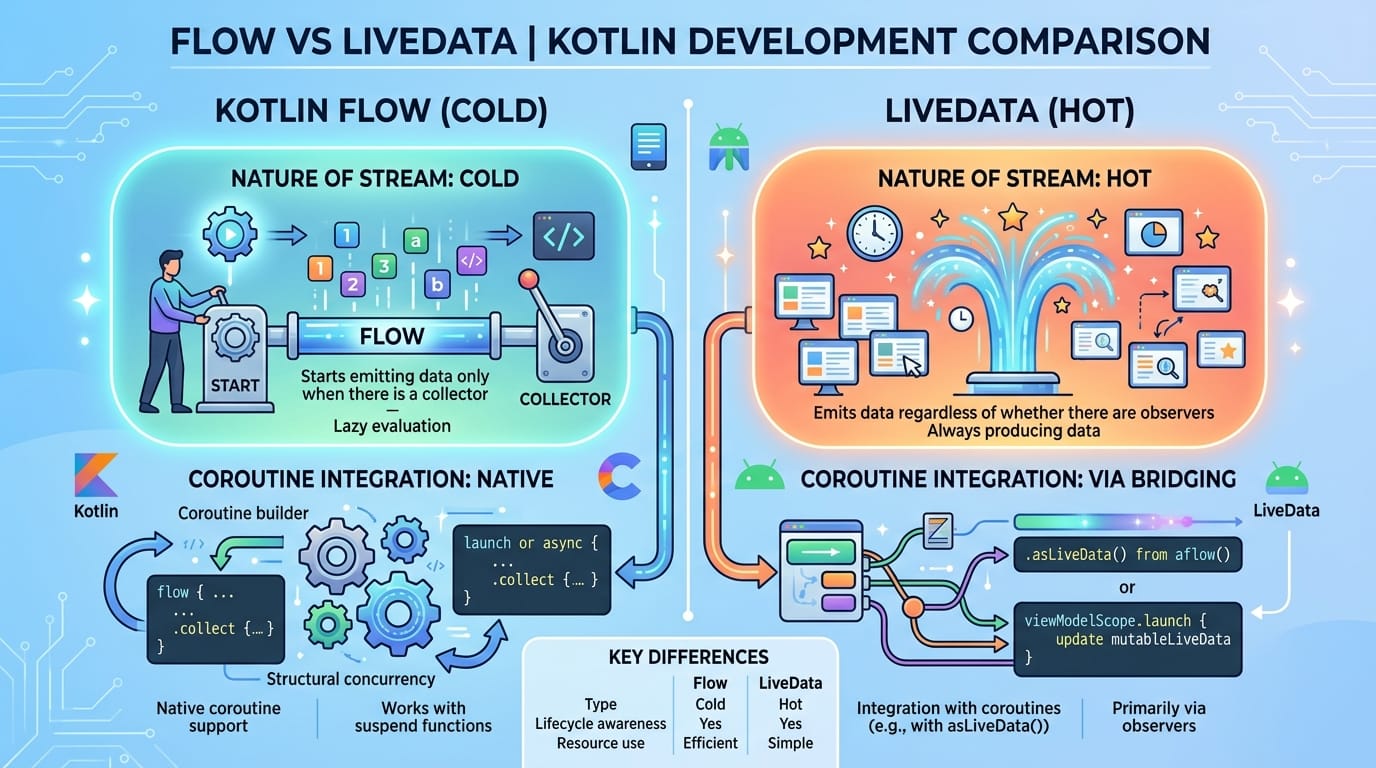
Flowinstead of LiveData - Flow supports coroutines better
- Sorted results
@HiltViewModel
class ExpenseViewModel @Inject constructor(
    private val repository: ExpenseRepository
) : ViewModel() {

    val expenses = repository.expenses

    fun addExpense(expense: Expense) {
        viewModelScope.launch {
            repository.insert(expense)
        }
    }
}
Explanation:
@HiltViewModel→ Enables DI@Inject constructor→ Hilt provides repository- Clean and scalable
Common Mistakes & How to Avoid Them
Mistake 1: Doing Database Work on Main Thread
❌ Wrong:
dao.insertStudent(student)
✔️ Correct:
viewModelScope.launch {
    dao.insertStudent(student)
}
Why?
- Main thread blocking causes app crashes (ANR)
- Always use coroutines
Mistake 2: Skipping Repository Layer
❌ Direct DAO usage in ViewModel
✔️ Use Repository:
class Repo(private val dao: Dao)
Why?
- Keeps code clean
- Easier to scale (add API later)
Mistake 3: Not Using Hilt Properly
❌ Manually creating dependencies
✔️ Use:
@Inject constructor()
Why?
- Reduces boilerplate
- Better lifecycle handling
Practice Exercises
Exercise 1: Student Manager App
Problem:
Create an app where Ali can add students from Karachi and display them.
Solution:
- Create Entity (Student)
- DAO with insert + fetch
- ViewModel to handle UI
- Display in RecyclerView
Exercise 2: Expense Calculator
Problem:
Fatima wants to track daily expenses in PKR.
Solution:
- Create Expense Entity
- Use Flow for updates
- Display total expense dynamically
Frequently Asked Questions
What is MVVM in Android?
MVVM is an architecture pattern that separates UI, data, and business logic. It improves maintainability and makes apps easier to test and scale.
How do I use Room database in Android?
You define Entities, DAOs, and a Database class. Room then handles SQLite operations automatically with less boilerplate.
What is Hilt dependency injection?
Hilt is a library that automatically provides dependencies like repositories and databases, reducing manual object creation.
Should I use LiveData or Flow?
Use Flow for modern apps with coroutines. LiveData is still useful but Flow is more powerful and flexible.
Is MVVM required for small apps?
Not required, but recommended. Even small apps benefit from clean architecture and easier future scaling.
Summary & Key Takeaways
- MVVM separates UI, logic, and data effectively
- Room simplifies local database operations
- Hilt automates dependency injection
- Repository pattern improves code structure
- Coroutines + Flow provide modern async handling
- Clean architecture is essential for real-world apps
Next Steps & Related Tutorials
To continue your Android learning journey on theiqra.edu.pk, explore:
- Learn UI development with Jetpack Compose Tutorial
- Strengthen your programming basics with Kotlin Tutorial
- Build APIs with Retrofit Android Tutorial
- Explore advanced architecture in Clean Architecture Android Guide
These tutorials will help you become a professional Android developer ready for jobs in Pakistan and globally 🚀
Test Your Python Knowledge!
Finished reading? Take a quick quiz to see how much you've learned from this tutorial.