API Authentication JWT OAuth2 API Keys & Sessions
Introduction
API authentication is the process of verifying who is making a request to your server or application. In modern web development, especially when building REST APIs or microservices, authentication ensures that only authorized users can access protected resources. In this tutorial, we will explore four widely used API authentication methods: JWT (JSON Web Tokens), OAuth2, API Keys, and Sessions.
For Pakistani students learning web development, understanding these methods is crucial. Whether you’re building a freelancing project in Lahore, a startup in Karachi, or a university assignment in Islamabad, secure APIs are a must. Many real-world platforms like banking apps, e-commerce systems (Daraz-style apps), and ride-sharing systems rely heavily on authentication.
By the end of this guide, you’ll have a strong understanding of:
- jwt authentication
- oauth2 tutorial concepts
- api authentication methods used in industry
Prerequisites
Before starting this tutorial, you should have:
- Basic knowledge of JavaScript (ES6+)
- Understanding of Node.js and Express.js
- Familiarity with HTTP methods (GET, POST, PUT, DELETE)
- Basic idea of REST APIs
- Some experience with JSON data format
Core Concepts & Explanation
JWT Authentication (Stateless Token-Based Security)
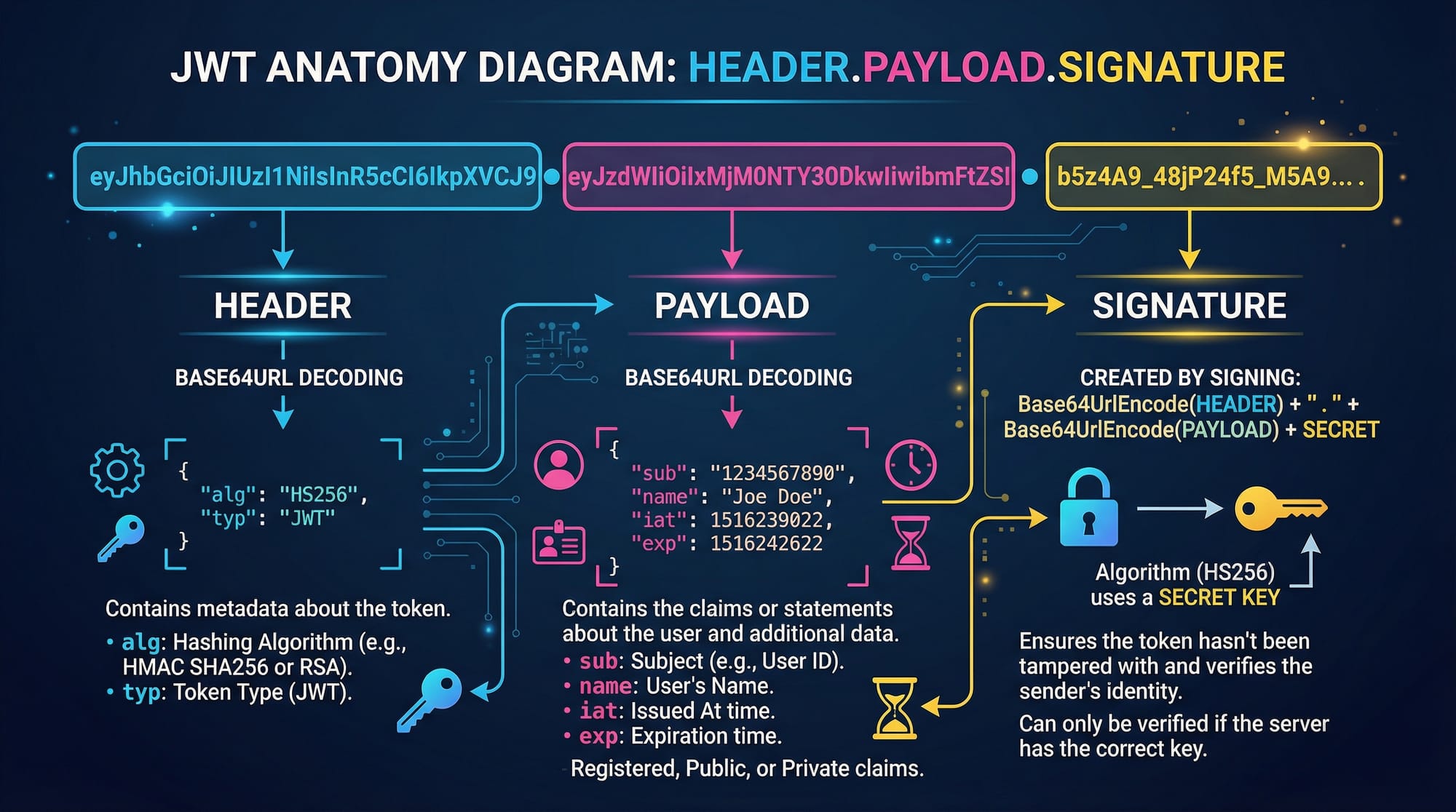
JWT (JSON Web Token) is a compact, URL-safe token used for securely transmitting information between parties.
A JWT consists of three parts:
- Header – Contains algorithm and token type
- Payload – Contains user data (e.g., user ID, role)
- Signature – Verifies token authenticity
Example JWT:
xxxxx.yyyyy.zzzzz
How it works:
- User logs in (e.g., Ahmad enters email/password)
- Server verifies credentials
- Server generates JWT and sends it to client
- Client stores token (usually in localStorage)
- Client sends token in every request
Authorization: Bearer <token>
Why use JWT?
- Stateless (no server memory needed)
- Fast and scalable
- Widely used in modern apps
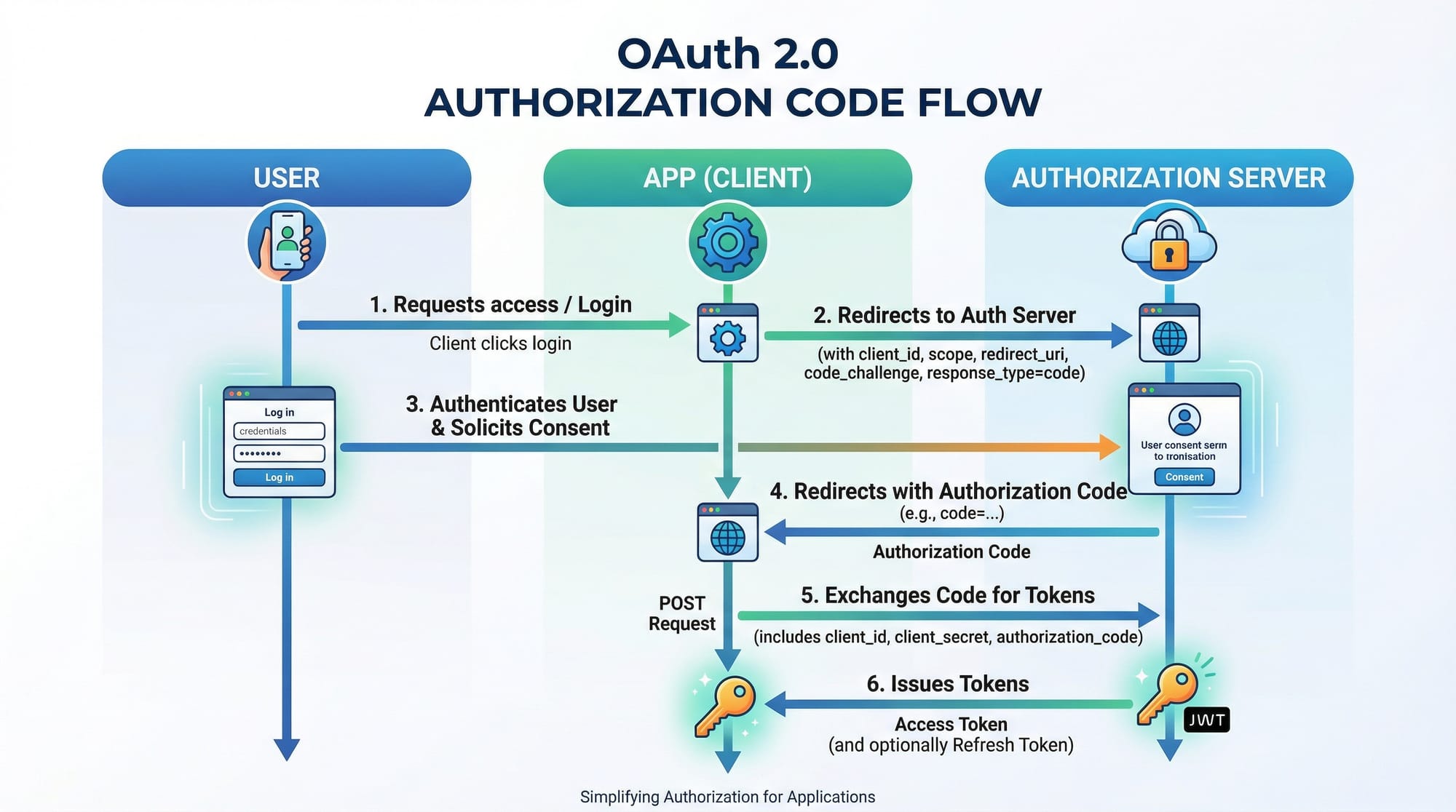
OAuth2 (Third-Party Authorization System)
OAuth2 is used when you want users to log in using external providers like Google, Facebook, or GitHub.
Example:
- Fatima logs into your app using her Google account
Key roles:
- Resource Owner (User)
- Client (Your App)
- Authorization Server (Google)
- Resource Server (API)
OAuth2 is more complex but very powerful for real-world applications.
API Keys (Simple Access Control)
API Keys are simple tokens used to identify applications.
Example:
- A weather API gives you:
API_KEY = "abc123xyz"
You include it in requests:
GET /weather?apikey=abc123xyz
Use case:
- Public APIs
- Low-security environments
Session-Based Authentication (Stateful)
Sessions store user data on the server.
Flow:
- User logs in
- Server creates session
- Session ID stored in cookies
- Server verifies session on each request
Used in:
- Traditional web apps (e.g., PHP apps)
- Banking dashboards
Practical Code Examples
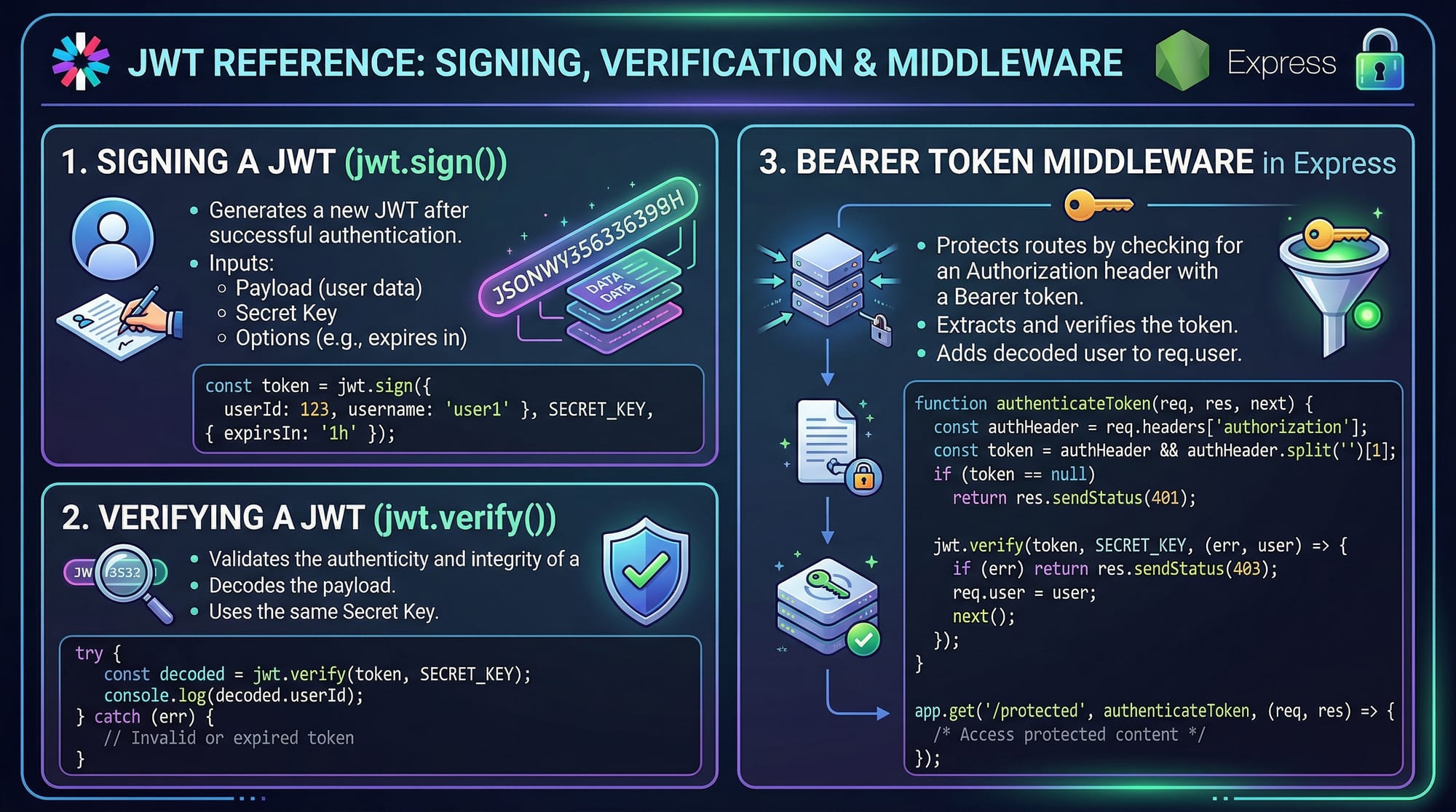
Example 1: JWT Authentication in Node.js
// Import required packages
const express = require('express');              // Web framework
const jwt = require('jsonwebtoken');            // JWT library

const app = express();
app.use(express.json());                        // Parse JSON body

const SECRET_KEY = "mysecretkey";               // Secret key (keep secure)

// Login route
app.post('/login', (req, res) => {
    const { username } = req.body;              // Extract username

    const user = { name: username };            // Create user object

    const token = jwt.sign(user, SECRET_KEY, { expiresIn: '1h' });
    // Generate token valid for 1 hour

    res.json({ token });                        // Send token to client
});

// Middleware to verify token
function authenticateToken(req, res, next) {
    const authHeader = req.headers['authorization'];
    // Get Authorization header

    const token = authHeader && authHeader.split(' ')[1];
    // Extract token after "Bearer"

    if (!token) return res.sendStatus(401);     // No token = Unauthorized

    jwt.verify(token, SECRET_KEY, (err, user) => {
        if (err) return res.sendStatus(403);    // Invalid token

        req.user = user;                        // Attach user to request
        next();                                 // Continue
    });
}

// Protected route
app.get('/profile', authenticateToken, (req, res) => {
    res.json({ message: "Welcome " + req.user.name });
});

app.listen(3000, () => console.log("Server running"));
Explanation:
express()creates serverjwt.sign()generates tokenjwt.verify()checks token validity- Middleware protects routes
- Token is passed in
Authorizationheader
Example 2: Real-World Application (E-commerce API)
Imagine Ali is building an online store in Pakistan where users must log in to place orders.
// Middleware to check API Key
function apiKeyAuth(req, res, next) {
    const apiKey = req.headers['x-api-key'];   // Read API key

    if (apiKey !== "pakistan123") {            // Check key
        return res.status(403).json({ error: "Invalid API Key" });
    }

    next();                                   // Allow request
}

// Order route
app.post('/order', apiKeyAuth, (req, res) => {
    const { product, price } = req.body;

    res.json({
        message: `Order placed for ${product}`,
        amount: `PKR ${price}`
    });
});
Explanation:
x-api-keyheader is used for authentication- Simple comparison ensures validity
- Useful for internal APIs or small apps
Common Mistakes & How to Avoid Them
Mistake 1: Storing JWT in Insecure Places
Problem:
Storing JWT in localStorage can be risky (XSS attacks).
Fix:
- Use HTTP-only cookies
res.cookie('token', token, {
    httpOnly: true,
    secure: true
});
Mistake 2: Not Validating Token Expiry
Problem:
Expired tokens still being accepted.
Fix:
Always check expiry during verification.
jwt.verify(token, SECRET_KEY, (err, user) => {
    if (err) return res.status(403).send("Token expired");
});
Practice Exercises
Exercise 1: Build JWT Login System
Problem:
Create a login system that returns a JWT token.
Solution:
app.post('/login', (req, res) => {
    const token = jwt.sign({ user: "Ahmad" }, "secret", { expiresIn: "1h" });
    res.json({ token });
});
Explanation:
- Generates token for user Ahmad
- Expires in 1 hour
Exercise 2: Protect Route Using Middleware
Problem:
Secure /dashboard route.
Solution:
app.get('/dashboard', authenticateToken, (req, res) => {
    res.send("Welcome to dashboard");
});
Explanation:
- Middleware ensures only logged-in users can access
Frequently Asked Questions
What is JWT authentication?
JWT authentication is a token-based method where the server generates a signed token and the client sends it with each request for verification.
How do I use OAuth2 in my app?
You integrate with providers like Google using libraries such as Passport.js, which handle authorization flows and token exchange.
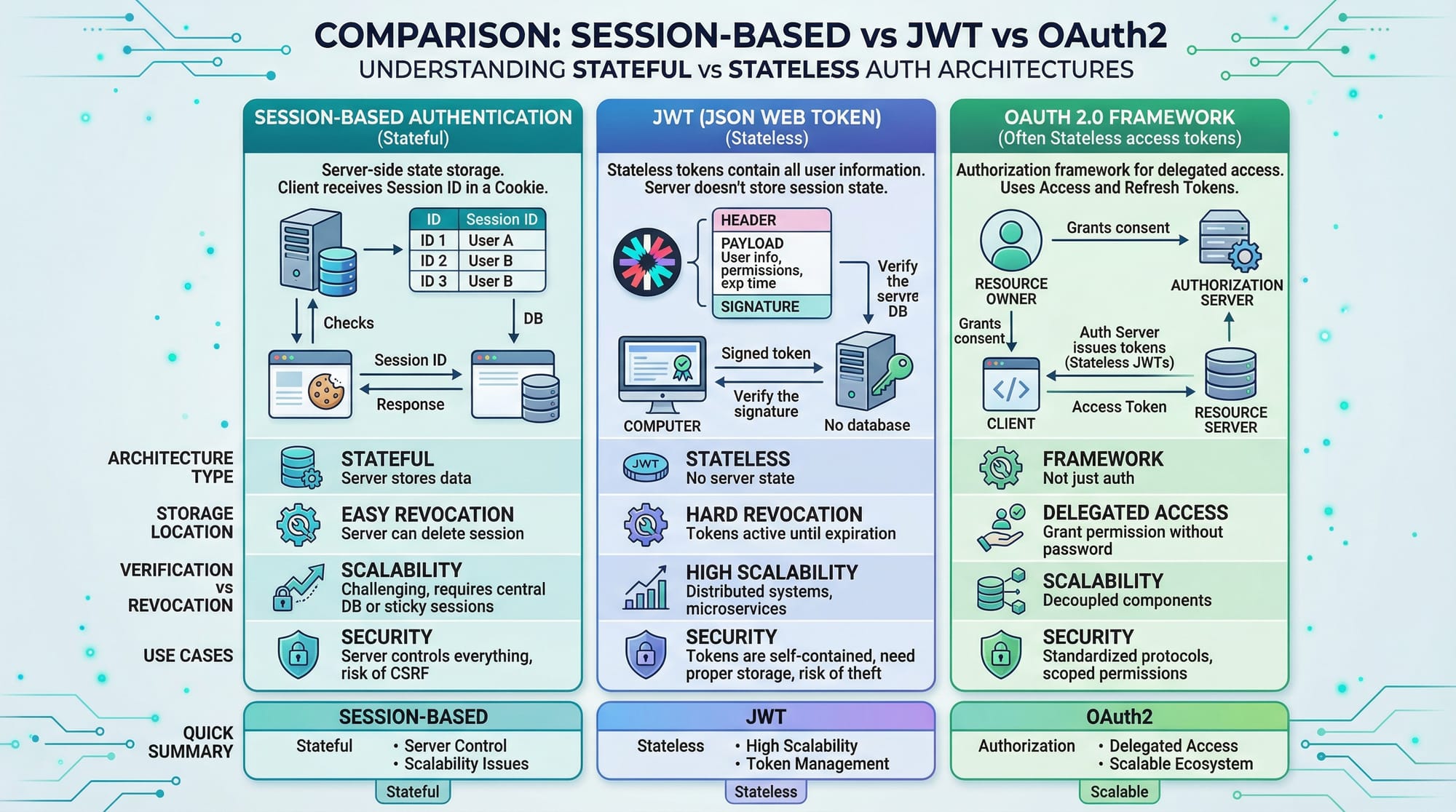
What is the difference between JWT and Sessions?
JWT is stateless and stored on the client, while sessions are stateful and stored on the server.
When should I use API Keys?
Use API keys for simple access control, especially in public APIs or internal services with low security requirements.
Is JWT secure for production?
Yes, if implemented correctly with HTTPS, proper storage, and expiration handling, JWT is secure and widely used.
Summary & Key Takeaways
- JWT is a stateless authentication method widely used in modern APIs
- OAuth2 enables third-party login systems like Google and Facebook
- API Keys are simple but less secure than JWT and OAuth2
- Sessions are stateful and stored on the server
- Always secure tokens properly using HTTPS and expiration
Next Steps & Related Tutorials
To continue your learning journey on theiqra.edu.pk, check out:
- Learn how APIs work in detail with the REST API Tutorial
- Improve backend performance with Node.js Async Programming
- Build scalable apps using Express.js Middleware Guide
- Understand data flow with GraphQL vs REST API
These tutorials will help you become a professional backend developer in Pakistan’s growing tech industry 🚀
Test Your Python Knowledge!
Finished reading? Take a quick quiz to see how much you've learned from this tutorial.