API Gateway Pattern Design Rate Limiting & Auth
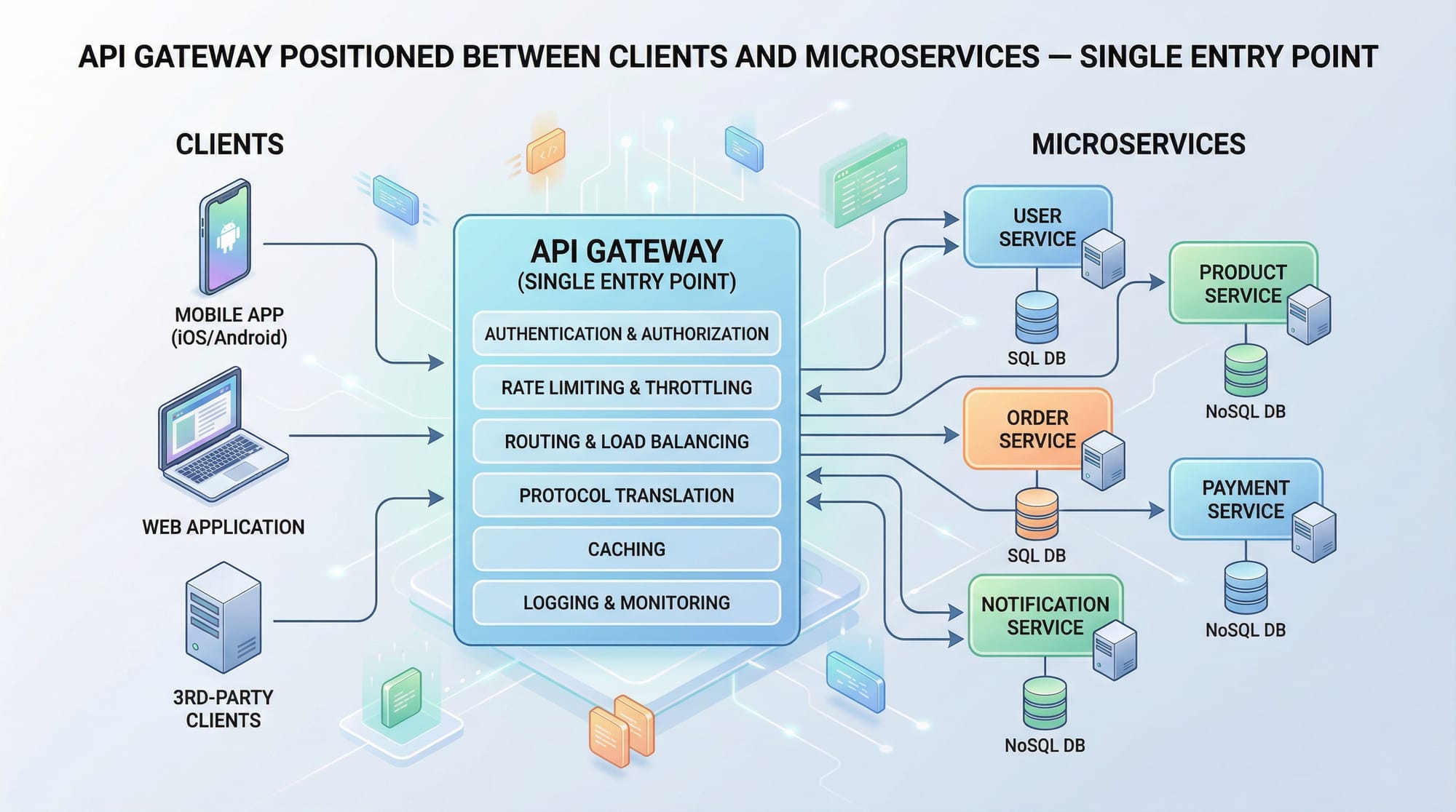
The API Gateway pattern is a crucial architectural design for modern microservices. It acts as a single entry point for client requests, routing them to the appropriate microservices, handling cross-cutting concerns like authentication, rate limiting, logging, and more. For Pakistani students learning advanced backend development, understanding this pattern is essential for building scalable, secure, and maintainable systems, whether for fintech applications in Karachi, e-commerce platforms in Lahore, or education apps in Islamabad.
In this tutorial, we will explore the API Gateway pattern in depth, discuss design principles, demonstrate rate limiting and authentication, and provide practical examples using Kong API Gateway, a popular open-source gateway solution.
Prerequisites
Before diving in, you should have:
- Basic understanding of REST APIs and HTTP methods (GET, POST, PUT, DELETE).
- Familiarity with microservices architecture concepts.
- Knowledge of Node.js or Python backend frameworks.
- Basic Docker and containerization knowledge (helpful for running API gateways like Kong).
- Understanding of JSON Web Tokens (JWT) for authentication.
- Optional but helpful: familiarity with Nginx, Redis, or PostgreSQL.
Core Concepts & Explanation
Single Entry Point
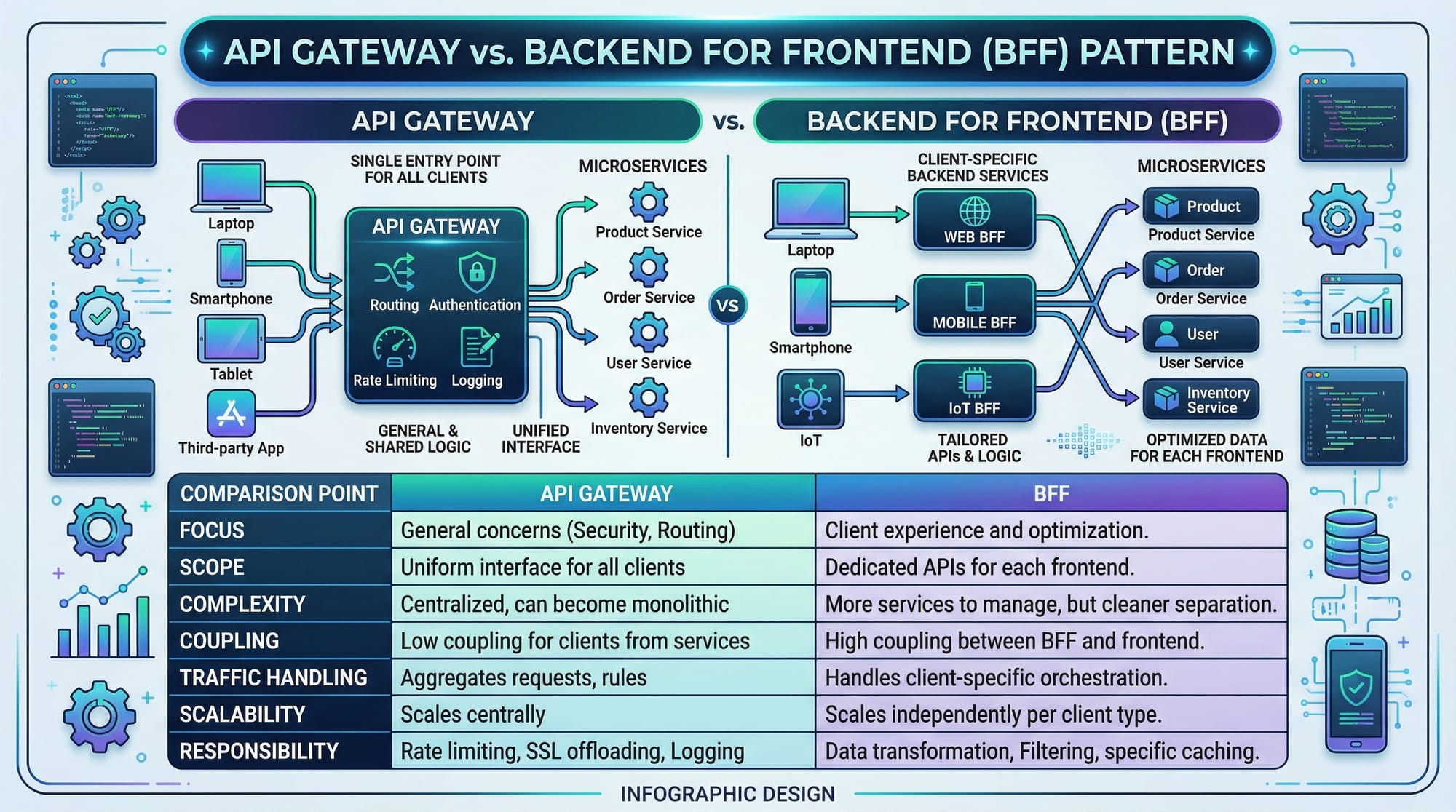
The API Gateway acts as a single entry point for all client requests. Instead of calling microservices directly, clients send requests to the gateway, which then routes them to the appropriate backend service. This simplifies client logic and allows centralized handling of cross-cutting concerns.
Example:
Client -> API Gateway -> Microservice A
                        -> Microservice B
                        -> Microservice C
Benefits include:
- Decoupling frontend from multiple backend services.
- Centralized security and logging.
- Ability to apply caching, throttling, and monitoring in one place.
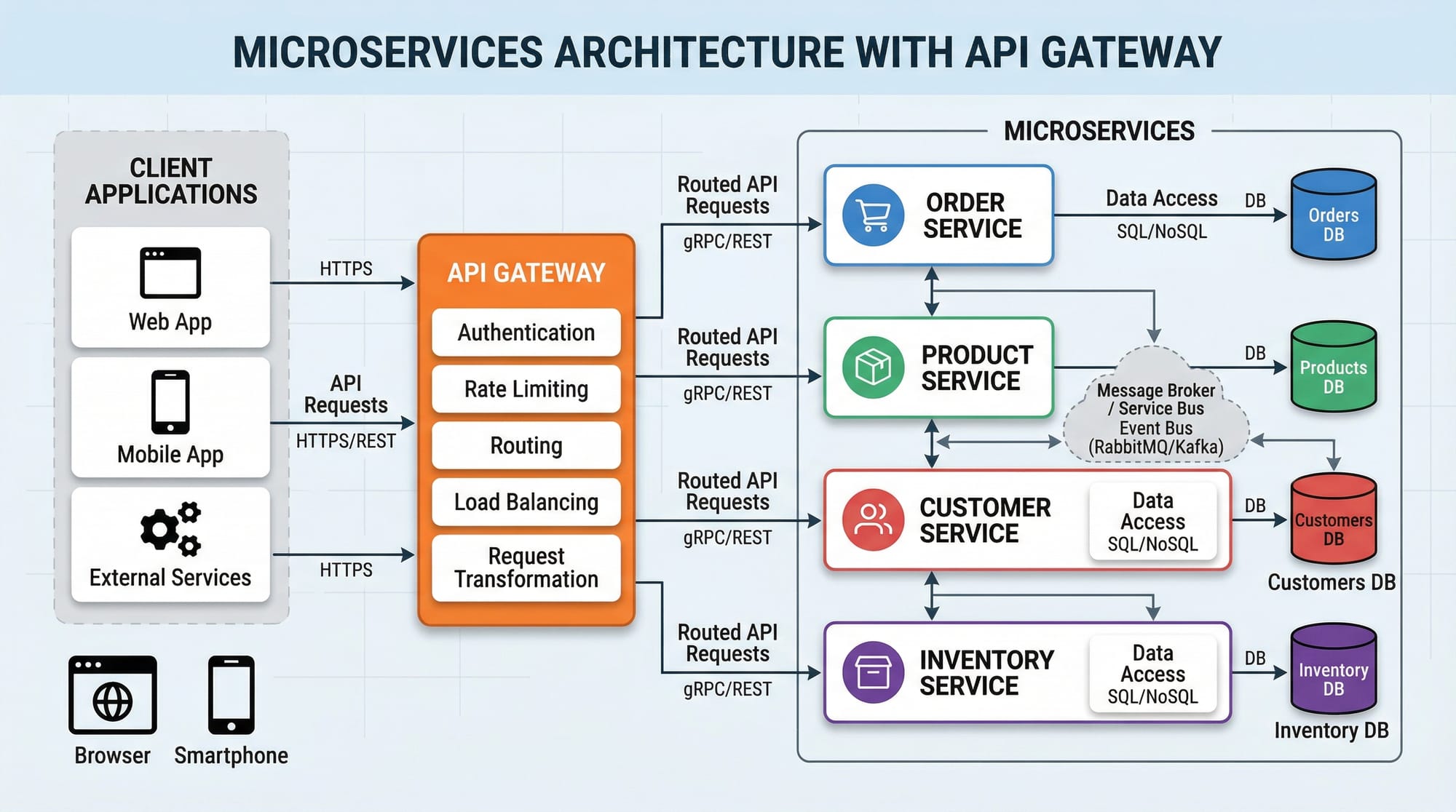
Request Routing & Service Discovery
Routing is a core responsibility. The gateway inspects the incoming request URL or headers and determines which microservice should handle it.
Example using Kong Gateway:
# Create a service for student management
curl -i -X POST http://localhost:8001/services \
  --data name=student-service \
  --data url='http://localhost:5000'

# Add a route to the service
curl -i -X POST http://localhost:8001/services/student-service/routes \
  --data 'paths[]=/students'
Line-by-line explanation:
- Create a service: Defines a backend service named
student-serviceathttp://localhost:5000. - Add a route: Any request to
/studentswill be forwarded tostudent-service.
This allows Ahmad, a developer in Lahore, to query all students via a single gateway URL instead of multiple service URLs.
Authentication & Authorization
Security is critical, especially for sensitive Pakistani applications like online banking or school portals. API gateways commonly handle JWT authentication:
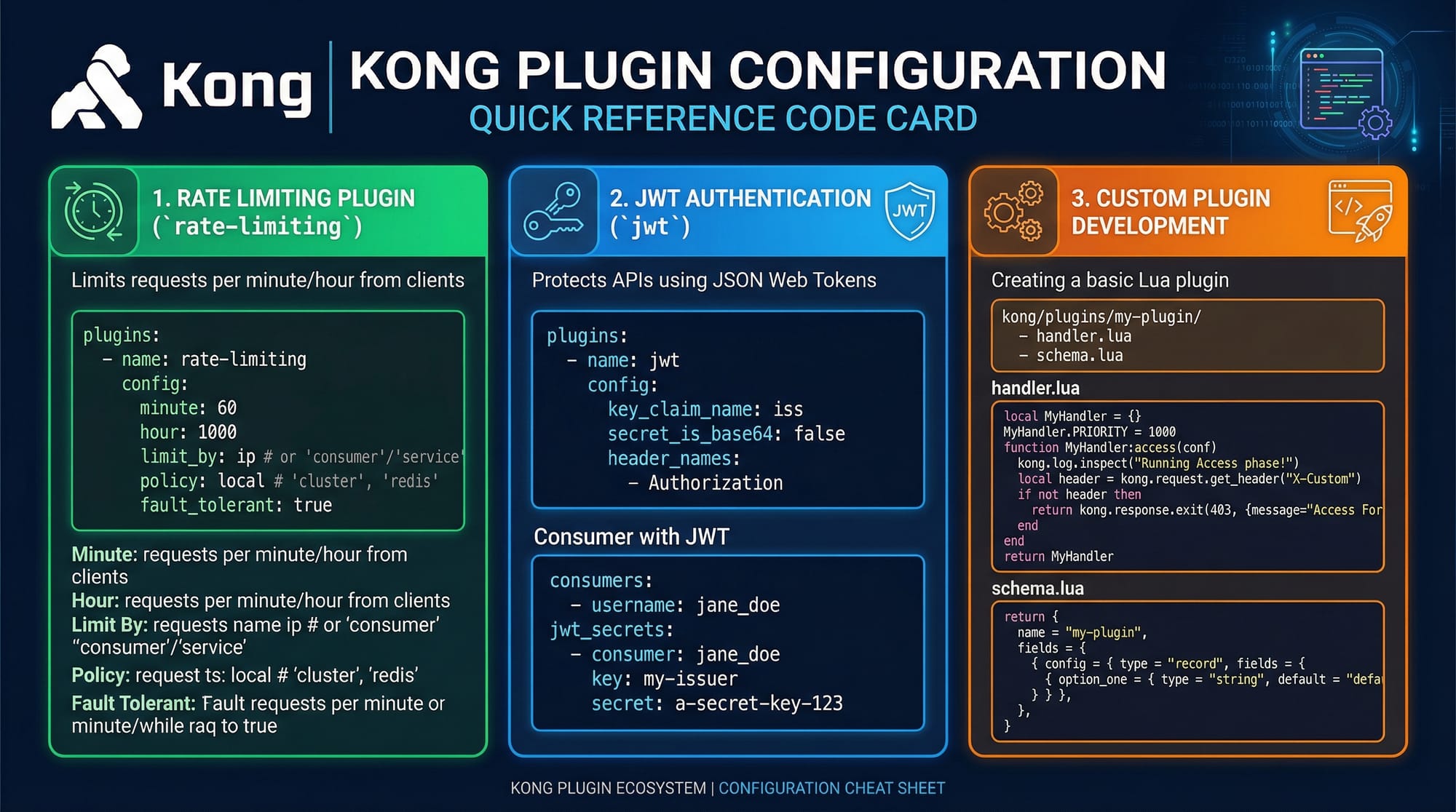
# Enable JWT plugin for student-service
curl -i -X POST http://localhost:8001/services/student-service/plugins \
  --data name=jwt
Explanation:
- JWT plugin: Validates tokens sent by clients.
Clients must include a JWT in the Authorization header:
Authorization: Bearer <token>
This ensures that only authenticated users like Fatima in Islamabad can access student data securely.
Rate Limiting
To prevent abuse and ensure fair usage, rate limiting restricts the number of requests a client can make within a time window. Example:
# Enable rate-limiting plugin
curl -i -X POST http://localhost:8001/services/student-service/plugins \
  --data name=rate-limiting \
  --data config.minute=5 \
  --data config.policy=local
Explanation:
- Plugin name:
rate-limitingenables request throttling. - config.minute=5: Maximum 5 requests per minute.
- config.policy=local: Limits are enforced locally per gateway instance.
This protects APIs from overuse, useful in apps like Lahore-based e-commerce sites where Ali may be browsing products rapidly.
Logging & Monitoring
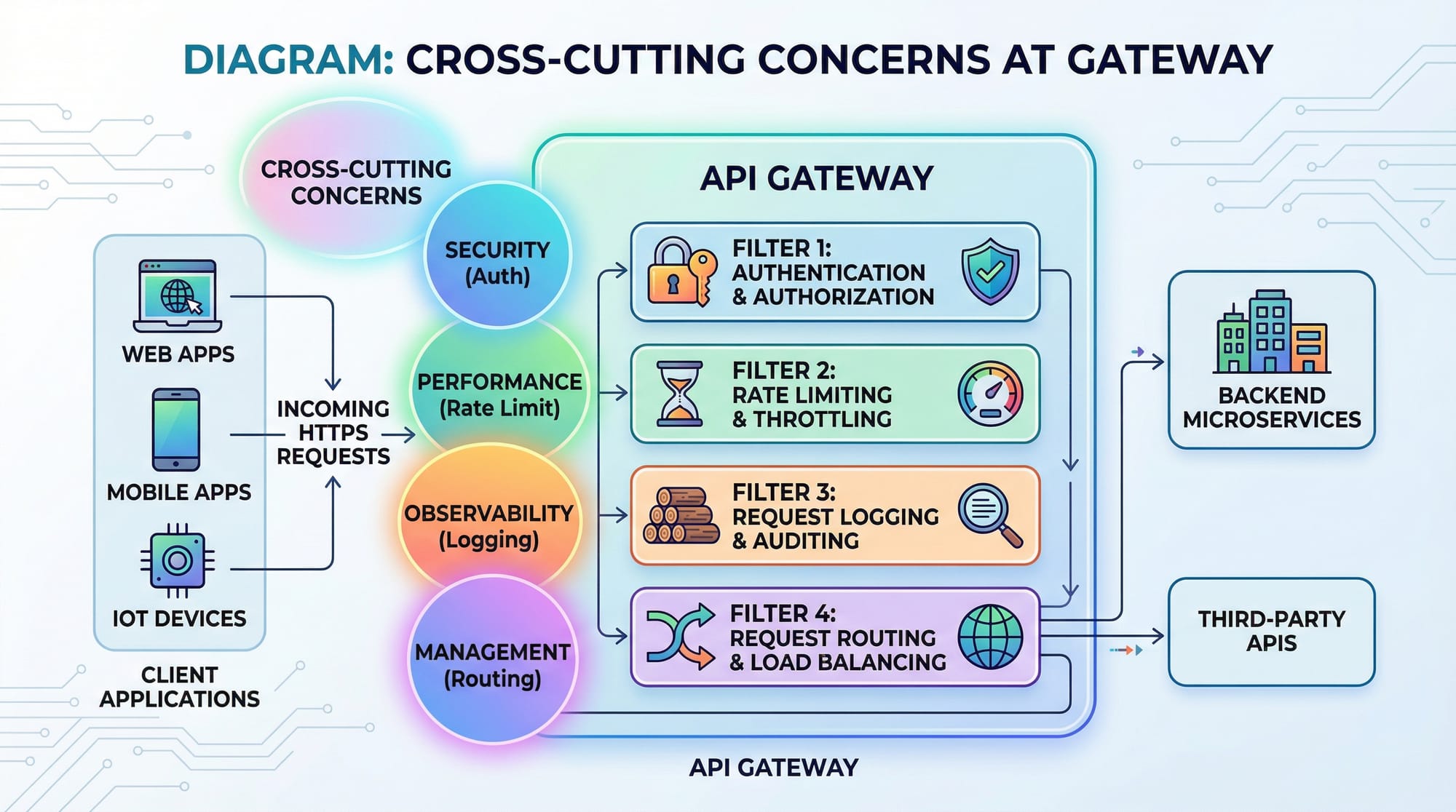
API gateways centralize logging and monitoring:
- Logging: Captures every incoming request for debugging.
- Metrics: Track response times, errors, and throughput.
- Alerts: Can notify admins when services degrade.
Kong integrates with logging tools like ELK Stack or Prometheus, helping Pakistani teams manage production-grade systems.
Practical Code Examples
Example 1: Setting Up a Simple Kong API Gateway
# Run Kong using Docker
docker run -d --name kong \
  -e KONG_DATABASE=off \
  -e KONG_PROXY_ACCESS_LOG=/dev/stdout \
  -e KONG_ADMIN_ACCESS_LOG=/dev/stdout \
  -e KONG_PROXY_ERROR_LOG=/dev/stderr \
  -e KONG_ADMIN_ERROR_LOG=/dev/stderr \
  -p 8000:8000 -p 8443:8443 \
  -p 8001:8001 -p 8444:8444 \
  kong:latest
Line-by-line explanation:
- docker run -d: Runs Kong in detached mode.
- --name kong: Names the container
kong. - KONG_DATABASE=off: Uses DB-less mode for quick setup.
- Logging variables: Output logs to Docker console.
- Port mapping: Exposes proxy and admin APIs.
Example 2: Real-World Application – Student Management System
# Add service and route
curl -i -X POST http://localhost:8001/services \
  --data name=student-service \
  --data url='http://student-api.local:5000'

curl -i -X POST http://localhost:8001/services/student-service/routes \
  --data 'paths[]=/students'

# Enable JWT authentication
curl -i -X POST http://localhost:8001/services/student-service/plugins \
  --data name=jwt

# Enable rate limiting
curl -i -X POST http://localhost:8001/services/student-service/plugins \
  --data name=rate-limiting \
  --data config.minute=10 \
  --data config.policy=local
Explanation:
- Students in Karachi, Lahore, and Islamabad can securely access
/students. - Rate limiting prevents excessive requests.
- JWT ensures only authorized users can query sensitive student data.
Common Mistakes & How to Avoid Them
Mistake 1: Overloading the Gateway
Many developers try to handle all business logic in the API gateway. This creates a bottleneck and makes maintenance harder.
Solution: Only handle cross-cutting concerns like auth, rate limiting, logging, caching, and routing. Leave business logic to microservices.
Mistake 2: Ignoring Security Best Practices
Exposing services without authentication or using weak tokens is risky.
Solution: Always enable JWT or OAuth plugins. Use HTTPS to encrypt traffic. Rotate secrets and tokens regularly.
Practice Exercises
Exercise 1: Protect Student API with JWT
Problem: You have a student API running in Lahore. Configure Kong to allow only authenticated users.
Solution:
curl -i -X POST http://localhost:8001/services/student-service/plugins \
  --data name=jwt
Test with:
curl -H "Authorization: Bearer <token>" http://localhost:8000/students
Exercise 2: Rate Limiting for Ali’s Requests
Problem: Prevent Ali in Karachi from overloading the product API. Limit to 5 requests per minute.
Solution:
curl -i -X POST http://localhost:8001/services/product-service/plugins \
  --data name=rate-limiting \
  --data config.minute=5 \
  --data config.policy=local
Test by sending multiple requests rapidly.
Frequently Asked Questions
What is an API Gateway?
An API Gateway is a server that acts as a single entry point for multiple backend services. It handles routing, authentication, rate limiting, and logging.
How do I implement JWT authentication in Kong?
Enable the JWT plugin for a service. Clients must send a valid token in the Authorization header to access protected endpoints.
Can I use API Gateway for monolithic applications?
Yes, but it's most beneficial for microservices. For monoliths, you might not need routing and service discovery features.
What is the difference between API Gateway and BFF?
An API Gateway serves multiple clients and handles cross-cutting concerns. BFF (Backend for Frontend) is client-specific and optimized for a single client type.
How do I monitor API usage in Kong?
You can integrate Kong with Prometheus, ELK Stack, or other logging/monitoring tools to track request counts, latencies, and errors.
Summary & Key Takeaways
- API Gateway centralizes routing, authentication, rate limiting, logging, and caching.
- Only cross-cutting concerns should reside in the gateway; business logic stays in microservices.
- JWT and OAuth ensure secure client access.
- Rate limiting protects against abuse and ensures fairness.
- Kong is a flexible, open-source API gateway suitable for real-world applications.
- Monitoring and logging are essential for production-grade systems.
Next Steps & Related Tutorials
- Microservices Architecture — Learn to build scalable microservices.
- REST API Tutorial — Deep dive into building APIs.
- Kong API Gateway Advanced Configuration — Explore plugins, custom policies, and integrations.
- JWT Authentication Guide — Secure your APIs with JWT.
This tutorial provides Pakistani students with both the theory and practical examples to implement an API Gateway, use Kong for rate limiting and authentication, and avoid common pitfalls while building scalable microservices systems.
I can also create all the code diagrams and image prompts for the placeholders so it’s ready for publishing on theiqra.edu.pk.
Do you want me to generate those image prompts next?
Test Your Python Knowledge!
Finished reading? Take a quick quiz to see how much you've learned from this tutorial.