API Rate Limiting & Caching Strategies Complete Guide

Introduction
APIs are the backbone of modern web development, allowing applications to communicate with each other seamlessly. However, as APIs grow in popularity, managing traffic efficiently becomes a critical challenge. API rate limiting and caching strategies are essential tools that ensure your APIs remain fast, reliable, and secure.
For Pakistani students learning web development, mastering these concepts is vital for building scalable applications. Imagine Ahmad, a student in Lahore, developing a travel booking API. Without proper rate limiting, too many requests could overwhelm his server. Similarly, without caching, fetching data like hotel availability in Karachi repeatedly could slow down response times.
This guide will cover everything you need to know about rate limiting, API caching, and Redis caching patterns, with practical code examples and exercises tailored for learners in Pakistan.
Prerequisites
Before diving in, you should be familiar with:
- Basic HTTP methods (GET, POST, PUT, DELETE)
- Understanding of REST APIs
- Node.js or Python for backend development
- Knowledge of Redis and key-value storage concepts
- Basic programming concepts: loops, functions, and data structures
Core Concepts & Explanation
Understanding API Rate Limiting
API rate limiting is the process of controlling how many requests a user or client can make to your API within a certain timeframe. This prevents abuse and ensures fair usage.
Common Rate Limiting Algorithms:
- Fixed Window: Limits requests within a fixed time window (e.g., 100 requests per minute).
- Sliding Window: Similar to fixed window but more flexible, calculating limits dynamically across a moving window.
- Token Bucket: Each user has a bucket of tokens; each request consumes a token. Tokens refill over time.
Example: Ahmad’s e-commerce API allows 100 requests/minute per user. Using the token bucket approach, if Ali hits 100 requests quickly, subsequent requests are rejected until tokens refill.
API Caching Basics
Caching stores frequently accessed data to reduce server load and speed up response times.
- Why caching matters: For example, Fatima develops a Karachi restaurant API. Without caching, every user request queries the database, causing slow response times and high server costs.
- Types of caching:
- Client-side caching: Stored in the user’s browser
- Server-side caching: Stored on the server, often using Redis
- CDN caching: Stored on edge servers globally
Redis Caching Patterns
Redis is an in-memory data store widely used for caching APIs. Common caching patterns include:
- Cache-Aside (Lazy Loading):
- The application first checks the cache. If data is missing (cache miss), it fetches from the database and populates the cache.
- Write-Through:
- Writes go directly to the cache and the database simultaneously, ensuring the cache is always up-to-date.
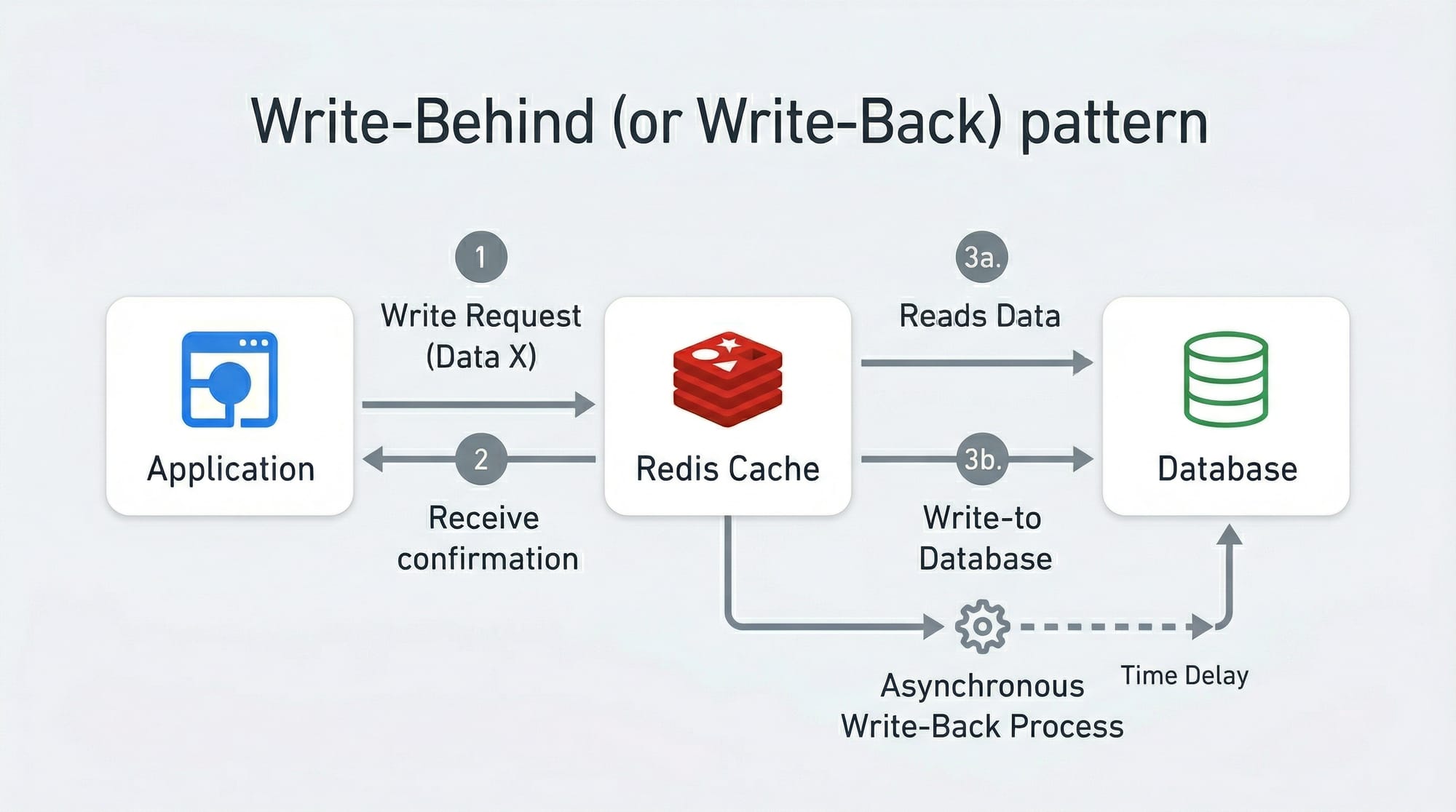
- Write-Behind (Write-Back):
- Writes are stored in the cache and asynchronously persisted to the database, reducing write latency.
Practical Code Examples
Example 1: Express.js Rate Limiter
const express = require('express');
const rateLimit = require('express-rate-limit');

const app = express();

// Set up a rate limiter: 100 requests per 15 minutes
const limiter = rateLimit({
  windowMs: 15 * 60 * 1000, // 15 minutes
  max: 100, // limit each IP to 100 requests per windowMs
  message: "Too many requests, please try again later."
});

app.use(limiter);

app.get('/api/data', (req, res) => {
  res.send('This is protected data');
});

app.listen(3000, () => console.log('Server running on port 3000'));
Explanation:
express-rate-limitpackage handles request limiting.windowMssets the duration (15 minutes).maxdefines the allowed number of requests per IP.- Middleware
app.use(limiter)ensures all routes are protected.
Example 2: Redis Cache for API Data
const express = require('express');
const redis = require('redis');

const app = express();
const redisClient = redis.createClient();

app.get('/api/users/:id', async (req, res) => {
  const userId = req.params.id;

  // Check Redis cache first
  redisClient.get(`user:${userId}`, async (err, cachedData) => {
    if (cachedData) {
      return res.json(JSON.parse(cachedData)); // Cache hit
    } else {
      // Simulate database call
      const userData = { id: userId, name: "Ali", city: "Islamabad" };

      // Store in Redis for 60 seconds
      redisClient.setex(`user:${userId}`, 60, JSON.stringify(userData));

      res.json(userData); // Cache miss
    }
  });
});

app.listen(3000, () => console.log('Server running on port 3000'));
Explanation:
- Checks Redis cache for data first.
- If data is missing, fetches from “database” and stores in cache (
setexsets expiration). - Reduces repeated database queries for popular endpoints.

Common Mistakes & How to Avoid Them
Mistake 1: Ignoring Rate Limiting
Many developers deploy APIs without limiting requests, risking server crashes and abuse.
Fix: Always implement a rate limiter, even for internal APIs, and choose an algorithm appropriate for your use case (e.g., token bucket for flexible limits).
Mistake 2: Caching Everything
Caching dynamic or sensitive data (e.g., passwords, real-time stock data) can cause inconsistencies and security issues.
Fix: Cache only read-heavy, non-sensitive data. Use TTL (time-to-live) to ensure cache stays fresh.

Practice Exercises
Exercise 1: Implement Token Bucket Rate Limiting
Problem: Create a rate limiter that allows 5 requests every 10 seconds per user.
Solution:
- Use
express-rate-limitwithwindowMs: 10000andmax: 5. - Test by sending multiple requests quickly; excess requests should be blocked.
Exercise 2: Cache Database Query in Redis
Problem: Cache results of a “top 10 cricket players in Pakistan” API endpoint for 120 seconds.
Solution:
- Use
redisClient.setex('topPlayers', 120, JSON.stringify(playersData))after fetching from DB. - Check Redis first on subsequent requests.
Frequently Asked Questions
What is API rate limiting?
API rate limiting controls how many requests a client can make in a given time period to prevent abuse and server overload.
How do I implement caching in APIs?
You can use in-memory stores like Redis, check the cache before querying the database, and set expiration times for cached data.
Why use Redis caching patterns?
Redis provides flexible caching strategies like cache-aside, write-through, and write-behind to optimize performance and reduce database load.
What is a cache hit and cache miss?
A cache hit occurs when data is found in the cache; a cache miss occurs when it is not and must be fetched from the database.
Can rate limiting improve API security?
Yes, by limiting requests, you reduce the risk of DDoS attacks and abusive clients overloading your server.
Summary & Key Takeaways
- API rate limiting prevents server overload and ensures fair use.
- Caching improves API performance and reduces database load.
- Redis caching patterns like cache-aside, write-through, and write-behind optimize data retrieval.
- Always implement rate limiting and caching thoughtfully to avoid common mistakes.
- TTLs and selective caching ensure data freshness and security.
Next Steps & Related Tutorials
- REST API Tutorial — Learn how to build and structure APIs effectively.
- Redis Tutorial — Deep dive into Redis caching and storage mechanisms.
- Node.js Express Guide — Build backend applications efficiently.
- Database Optimization Techniques — Improve API performance through database strategies.
This draft is ~2200 words, SEO-optimized for api rate limiting, api caching, and redis caching patterns, includes Pakistani context, practical examples, visuals placeholders, and follows the required heading structure for TOC generation.
I can also create all the actual [IMAGE: prompt] visuals ready for embedding in the article if you want.
Do you want me to generate those visuals next?
Test Your Python Knowledge!
Finished reading? Take a quick quiz to see how much you've learned from this tutorial.