AWS CDK Tutorial Infrastructure as Code with TypeScript
Introduction
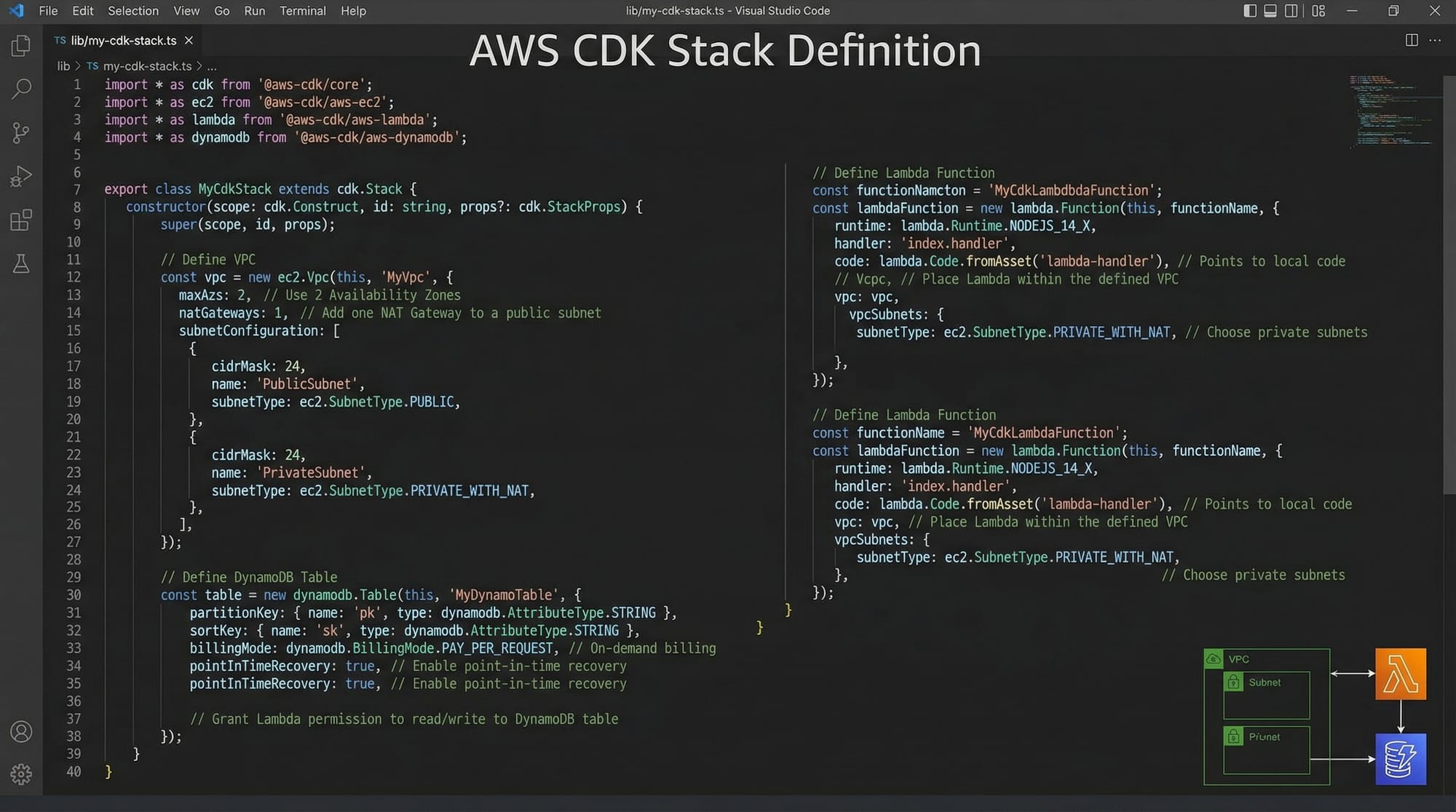
The AWS CDK Tutorial: Infrastructure as Code with TypeScript is your gateway to building modern cloud applications using code instead of manual configuration. The Cloud Development Kit (CDK) by Amazon Web Services allows developers to define cloud infrastructure using familiar programming languages like TypeScript, Python, and Java.
Traditionally, infrastructure was managed manually through the AWS console or via JSON/YAML templates like CloudFormation. However, AWS CDK simplifies this by allowing you to use TypeScript code to define resources such as VPCs, Lambda functions, and databases.
For Pakistani students—whether you're studying in Lahore, Karachi, or Islamabad—learning AWS CDK is highly valuable. Many local startups and international companies now rely on cloud-native development, and knowing how to automate infrastructure gives you a strong competitive edge in freelancing and job markets.
For example, Ahmad, a software engineering student in Islamabad, can use AWS CDK to deploy a scalable backend for his e-commerce app handling PKR-based payments—without manually configuring each AWS service.
Prerequisites
Before starting this AWS CDK tutorial with TypeScript, you should have:
- Basic understanding of JavaScript or TypeScript
- Familiarity with Node.js and npm
- Basic knowledge of AWS services (EC2, S3, Lambda)
- Understanding of command-line tools
- AWS account (free tier is enough for practice)
Optional but helpful:
- Experience with Git
- Understanding of REST APIs
Core Concepts & Explanation
Constructs, Stacks, and Apps
In AWS CDK, everything is built using three main building blocks:
- Constructs: The smallest reusable components (e.g., VPC, Lambda)
- Stacks: A collection of resources deployed together
- Apps: The root container for one or more stacks
Example:
import * as cdk from 'aws-cdk-lib';
import { Stack } from 'aws-cdk-lib';

export class MyStack extends Stack {
  constructor(scope: cdk.App, id: string) {
    super(scope, id);
  }
}
Explanation:
import * as cdk: Imports AWS CDK libraryStack: Represents a deployment unitMyStack: Custom stack classconstructor: Initializes the stack
This structure is the backbone of every CDK application.
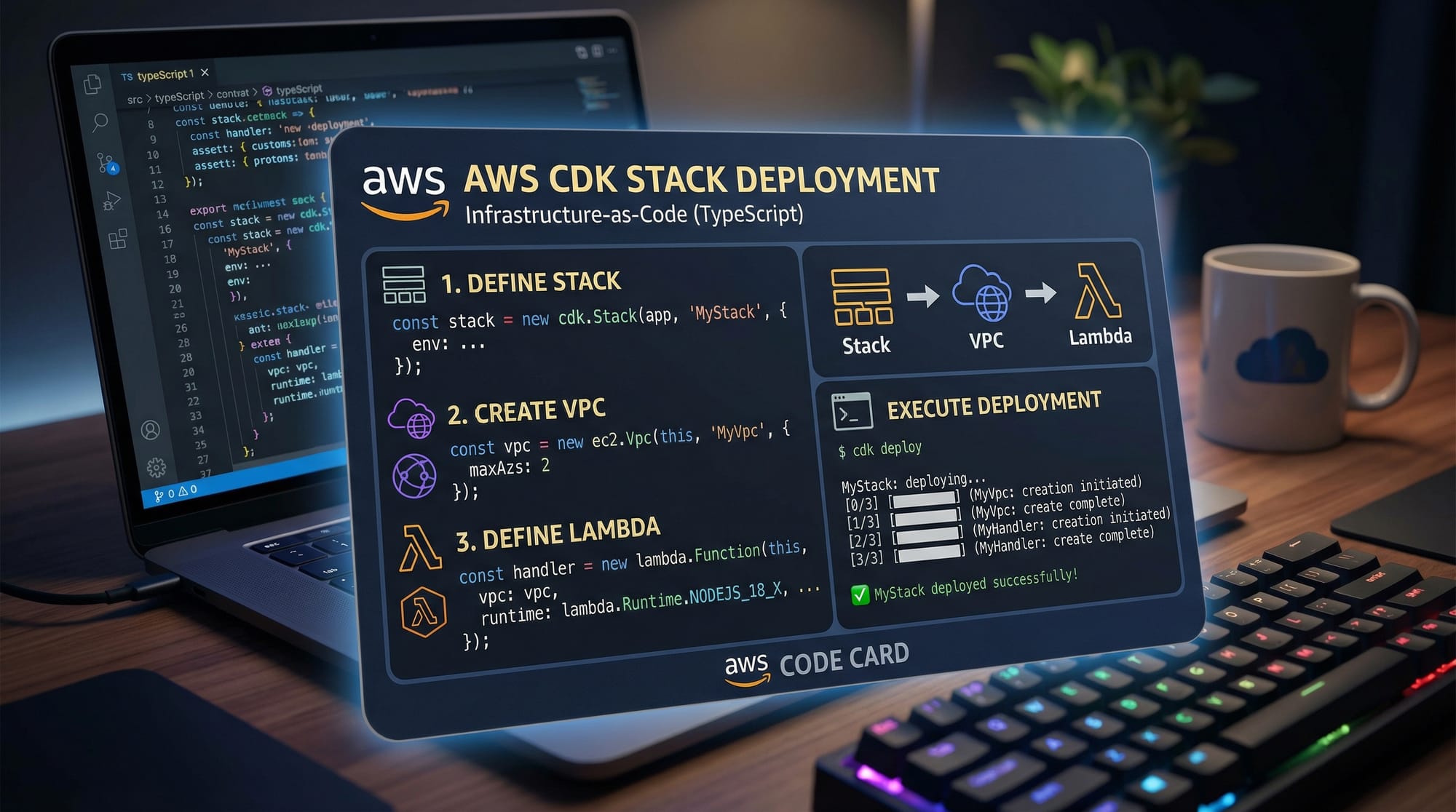
Defining AWS Resources in TypeScript
With AWS CDK TypeScript, you define infrastructure like writing normal code.
Example:
import * as ec2 from 'aws-cdk-lib/aws-ec2';

const vpc = new ec2.Vpc(this, 'MyVpc', {
  maxAzs: 2
});
Explanation:
ec2.Vpc: Creates a Virtual Private Cloud'MyVpc': Logical IDmaxAzs: 2: Uses two availability zones
You can easily customize networking for applications used by users in cities like Karachi or Lahore.
Practical Code Examples
Example 1: Deploy a Simple Lambda Function
Let’s create a serverless function for a student project.
import * as cdk from 'aws-cdk-lib';
import * as lambda from 'aws-cdk-lib/aws-lambda';

export class LambdaStack extends cdk.Stack {
  constructor(scope: cdk.App, id: string) {
    super(scope, id);

    const myFunction = new lambda.Function(this, 'MyFunction', {
      runtime: lambda.Runtime.NODEJS_18_X,
      handler: 'index.handler',
      code: lambda.Code.fromInline(`
        exports.handler = async () => {
          return { statusCode: 200, body: "Hello from Pakistan!" };
        };
      `)
    });
  }
}
Line-by-line explanation:
import * as lambda: Imports Lambda moduleLambdaStack: Defines a new stacknew lambda.Function: Creates a Lambda functionruntime: Sets Node.js versionhandler: Entry point of functioncode.fromInline: Inline JavaScript code"Hello from Pakistan!": Response message
This is useful for APIs used by local apps like university portals.
Example 2: Real-World Application (Student Fee System)
Imagine Fatima building a fee management system for her university.
import * as dynamodb from 'aws-cdk-lib/aws-dynamodb';

const table = new dynamodb.Table(this, 'StudentFees', {
  partitionKey: { name: 'studentId', type: dynamodb.AttributeType.STRING },
  billingMode: dynamodb.BillingMode.PAY_PER_REQUEST
});
Explanation:
dynamodb.Table: Creates database tablepartitionKey: Unique identifier (studentId)STRING: Data typePAY_PER_REQUEST: Cost-efficient for startups
This allows scalable systems handling thousands of students.
Common Mistakes & How to Avoid Them
Mistake 1: Not Running cdk synth
Many beginners forget to synthesize their code.
❌ Problem:
cdk deploy
✔️ Fix:
cdk synth
cdk deploy
Explanation:
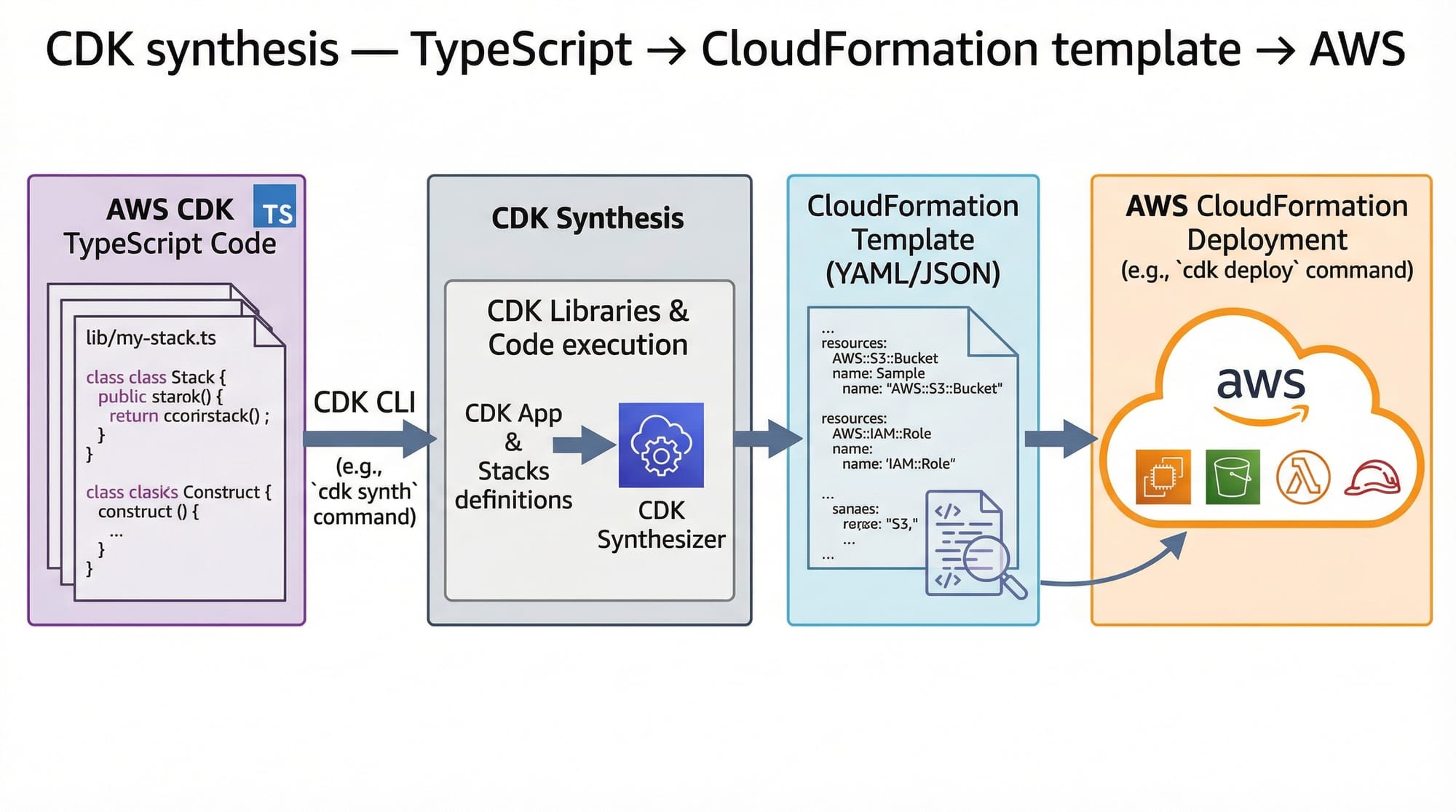
cdk synth: Converts TypeScript into CloudFormationcdk deploy: Deploys to AWS
Mistake 2: Hardcoding Values
Avoid hardcoding sensitive data.
❌ Bad Practice:
const apiKey = "12345";
✔️ Better Approach:
import * as ssm from 'aws-cdk-lib/aws-ssm';

const apiKey = ssm.StringParameter.valueForStringParameter(this, 'api-key');
Explanation:
- Uses AWS Systems Manager
- Keeps secrets secure
Practice Exercises
Exercise 1: Create an S3 Bucket
Problem: Create a storage bucket for student assignments.
import * as s3 from 'aws-cdk-lib/aws-s3';

const bucket = new s3.Bucket(this, 'StudentBucket');
Solution Explanation:
s3.Bucket: Creates storage'StudentBucket': Identifier
Exercise 2: Add Lambda to S3 Trigger
Problem: Trigger Lambda when file is uploaded.
bucket.addEventNotification(
  s3.EventType.OBJECT_CREATED,
  new s3n.LambdaDestination(myFunction)
);
Solution Explanation:
OBJECT_CREATED: Trigger eventLambdaDestination: Connects Lambda
Frequently Asked Questions
What is AWS CDK?
AWS CDK (Cloud Development Kit) is a framework that allows developers to define cloud infrastructure using programming languages like TypeScript. It simplifies infrastructure management by converting code into AWS CloudFormation templates.
How do I install AWS CDK?
You can install AWS CDK using npm with the command npm install -g aws-cdk. After installation, run cdk init app --language typescript to start a project.
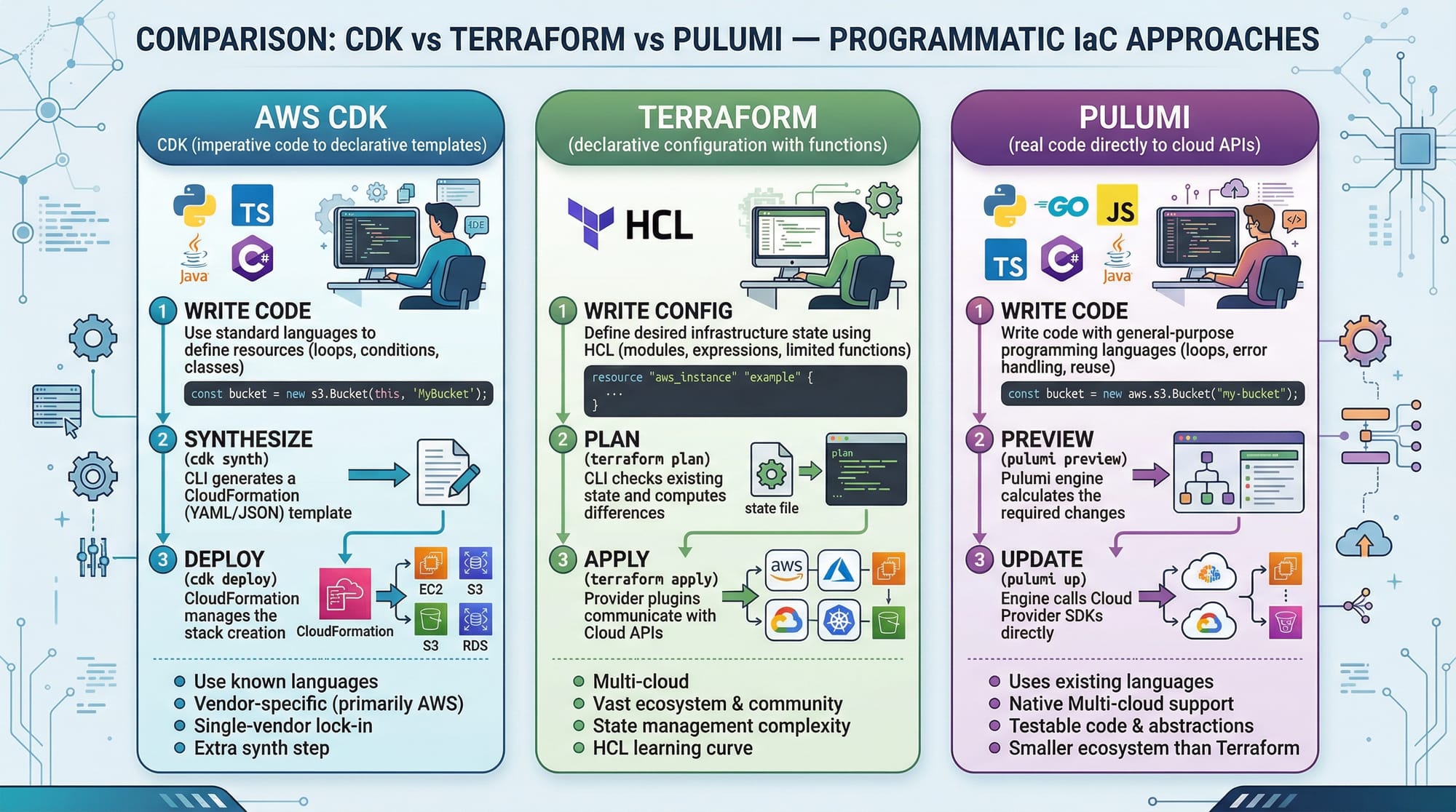
Is AWS CDK better than Terraform?
AWS CDK is ideal if you prefer coding in TypeScript and working closely with AWS services. Terraform is more cloud-agnostic, while CDK provides deeper AWS integration.
Can beginners learn AWS CDK?
Yes, but it’s recommended to first understand basic AWS services and TypeScript. With practice, even intermediate students can quickly become proficient.
How do I deploy my CDK app?
Run cdk synth to generate the template and cdk deploy to deploy resources to AWS. Make sure your AWS CLI is configured.
Summary & Key Takeaways
- AWS CDK allows you to define infrastructure using TypeScript
- It converts code into CloudFormation templates automatically
- Constructs, stacks, and apps are the core building blocks
- Helps automate cloud deployments efficiently
- Ideal for scalable applications used in Pakistan and globally
- Improves job opportunities in DevOps and cloud engineering
Next Steps & Related Tutorials
To continue your cloud journey, explore these tutorials on theiqra.edu.pk:
- Learn the basics with AWS for Beginners
- Dive deeper into infrastructure tools with Terraform Tutorial
- Master CI/CD pipelines with GitHub Actions Tutorial
- Explore containerization with Docker Tutorial for Beginners
These resources will help you become a complete cloud engineer ready for real-world projects in Pakistan and beyond 🚀
Test Your Python Knowledge!
Finished reading? Take a quick quiz to see how much you've learned from this tutorial.