AWS Lambda Advanced Layers VPC & Performance Tuning
Introduction
AWS Lambda Advanced: Layers, VPC & Performance Tuning is the next step for students who already understand basic serverless computing and want to build production-ready, scalable applications on AWS.
At a beginner level, AWS Lambda lets you run code without managing servers. But in real-world applications—especially in Pakistan’s growing tech ecosystem (freelancing, startups in Lahore, fintech in Karachi, and SaaS in Islamabad)—you need more control over performance, security, and code reuse. That’s where advanced concepts come in.
In this tutorial, you will learn:
- How Lambda Layers help you reuse code across multiple functions
- How to connect Lambda to a VPC (Virtual Private Cloud) for secure networking
- How to optimize performance and reduce costs
For Pakistani students like Ahmad building a freelancing backend, or Fatima creating a fintech API handling PKR transactions, mastering these advanced concepts will make your applications faster, cheaper, and production-ready.
Prerequisites
Before starting this advanced tutorial, you should already know:
- Basics of AWS Lambda (functions, triggers, deployments)
- Basic programming knowledge (JavaScript, Python, or Node.js preferred)
- Understanding of REST APIs
- Familiarity with AWS services like:
- IAM (permissions)
- S3 (storage)
- CloudWatch (logging)
If you haven’t covered these, it’s recommended to first go through a Serverless Tutorial and AWS for Beginners on theiqra.edu.pk.
Core Concepts & Explanation
Lambda Layers for Code Reusability
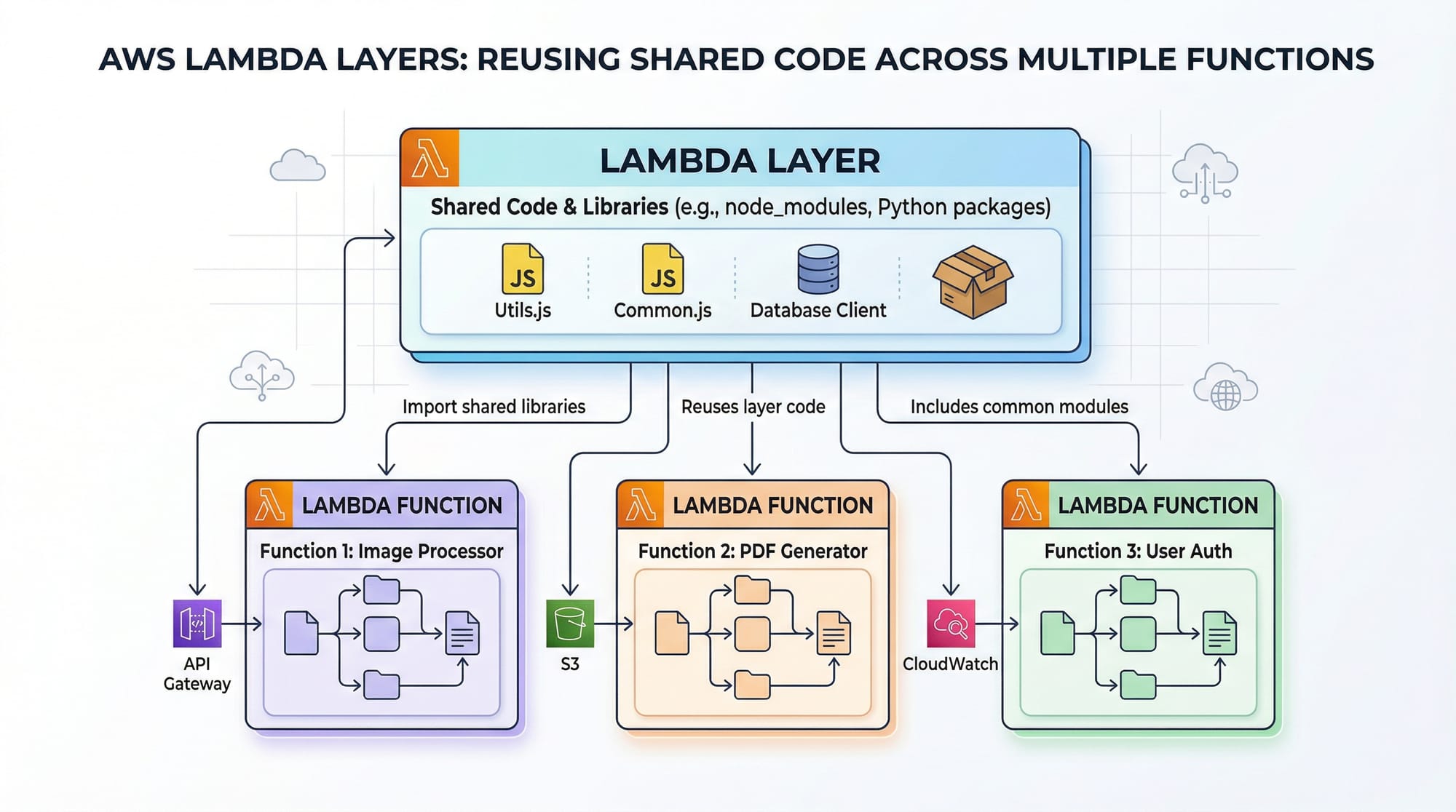
Lambda Layers allow you to package libraries, dependencies, or even custom code separately and reuse them across multiple Lambda functions.
Why Layers Matter
Imagine Ali is building multiple APIs:
- Payment service
- User authentication
- Notification system
All of them use:
- Same logging utility
- Same database helper
- Same third-party libraries
Without layers, you would duplicate code in every function → bigger deployments + harder maintenance.
With layers:
- Write once
- Use everywhere
Example Structure
layer/
 └── nodejs/
     └── node_modules/
         └── axios/
Benefits
- Smaller deployment packages
- Faster updates
- Clean architecture
Lambda VPC Integration for Secure Networking
By default, AWS Lambda runs outside your VPC. But in real-world apps, you often need access to:
- Private databases (RDS, Aurora)
- Internal APIs
- Secure microservices
What is a VPC?
A Virtual Private Cloud (VPC) is a private network inside AWS.
Why Connect Lambda to VPC?
Fatima is building a banking API in Karachi. Her database must:
- Not be publicly accessible
- Only accessible internally
So she connects Lambda to a VPC.
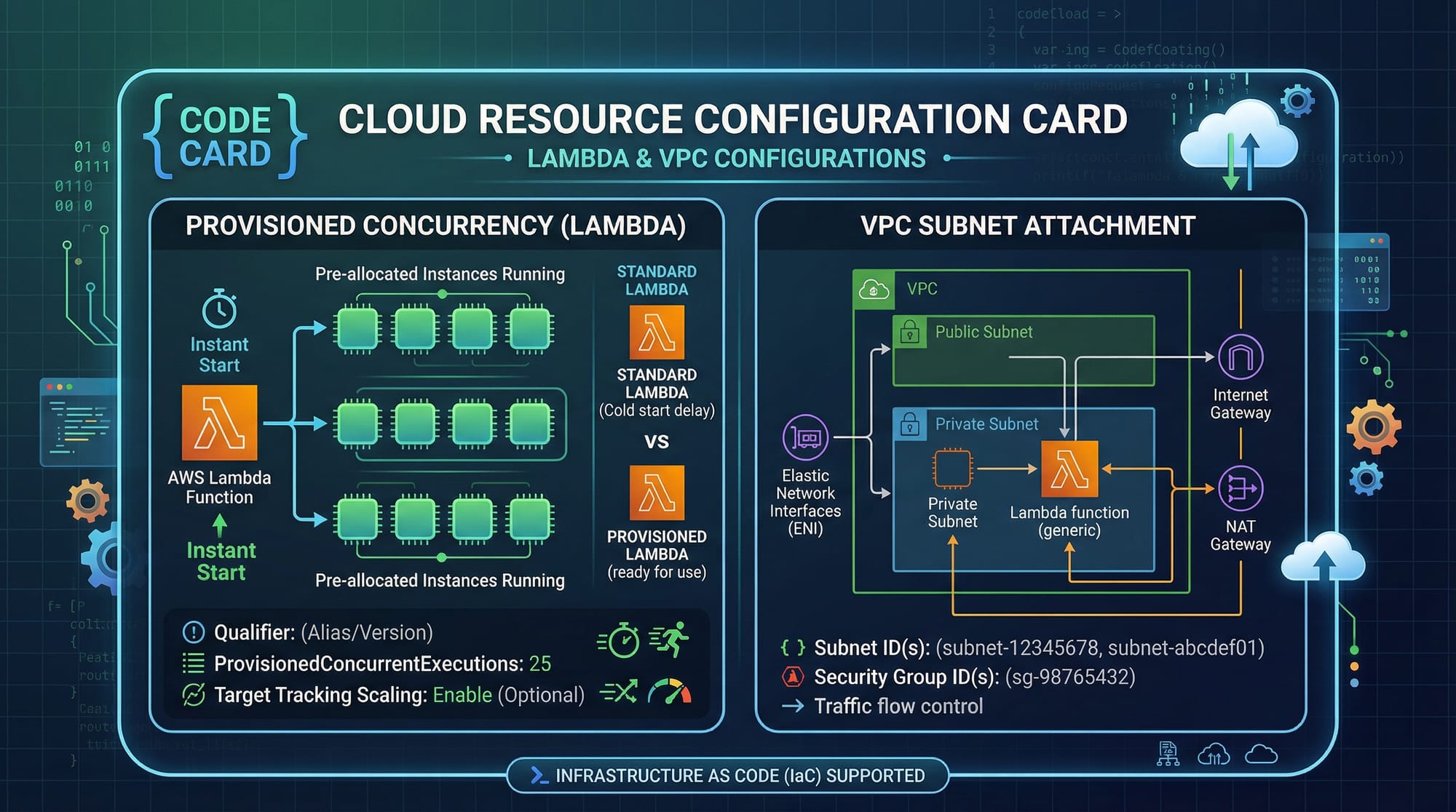
Key Components
- Subnets (private/public)
- Security Groups (firewall rules)
- NAT Gateway (for internet access)
Important Note
When you attach Lambda to a VPC:
- Cold start time increases slightly
- Proper subnet configuration is critical
Lambda Performance Optimization Techniques
Performance tuning is crucial for both speed and cost.
Key Factors Affecting Performance
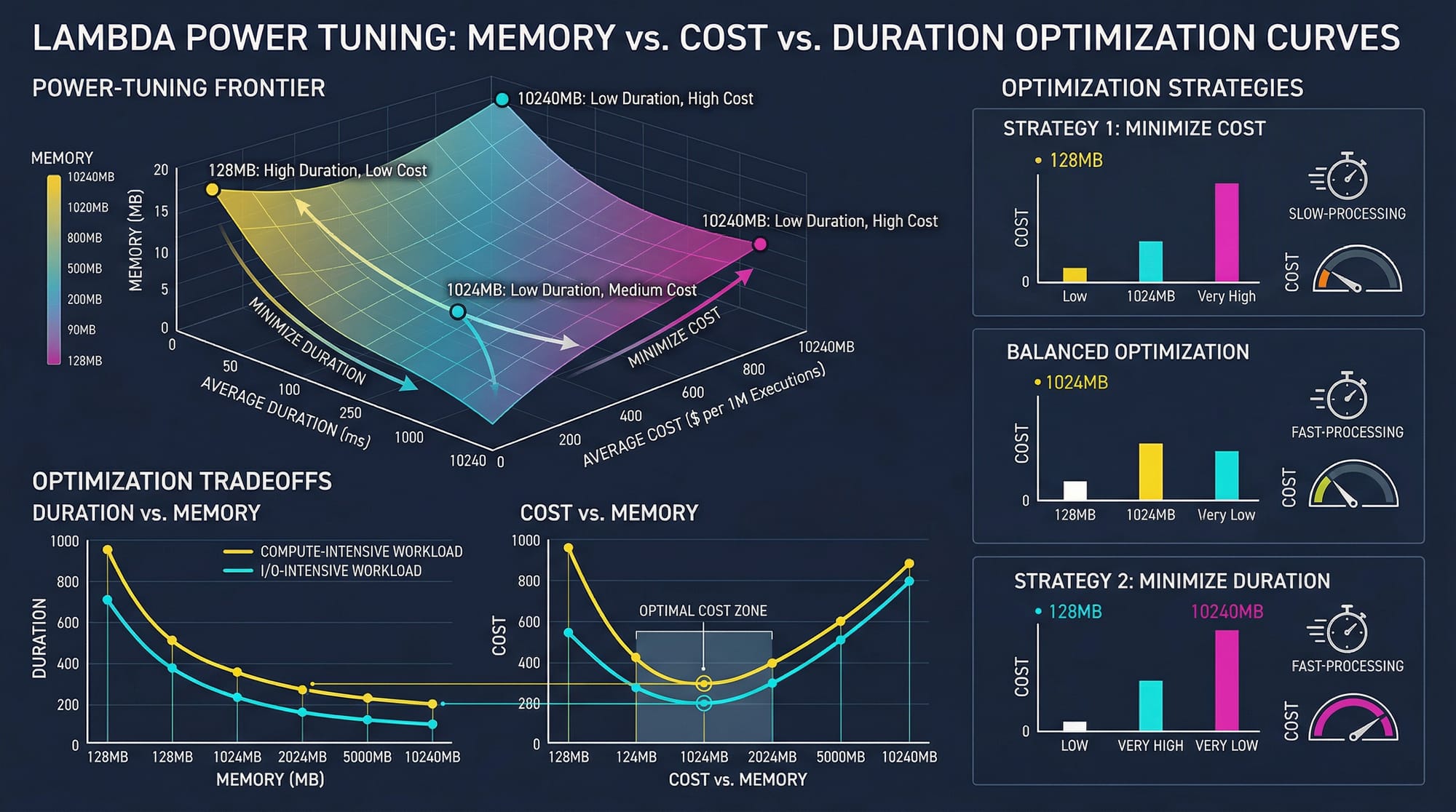
- Memory Allocation
- More memory = more CPU power
- Faster execution
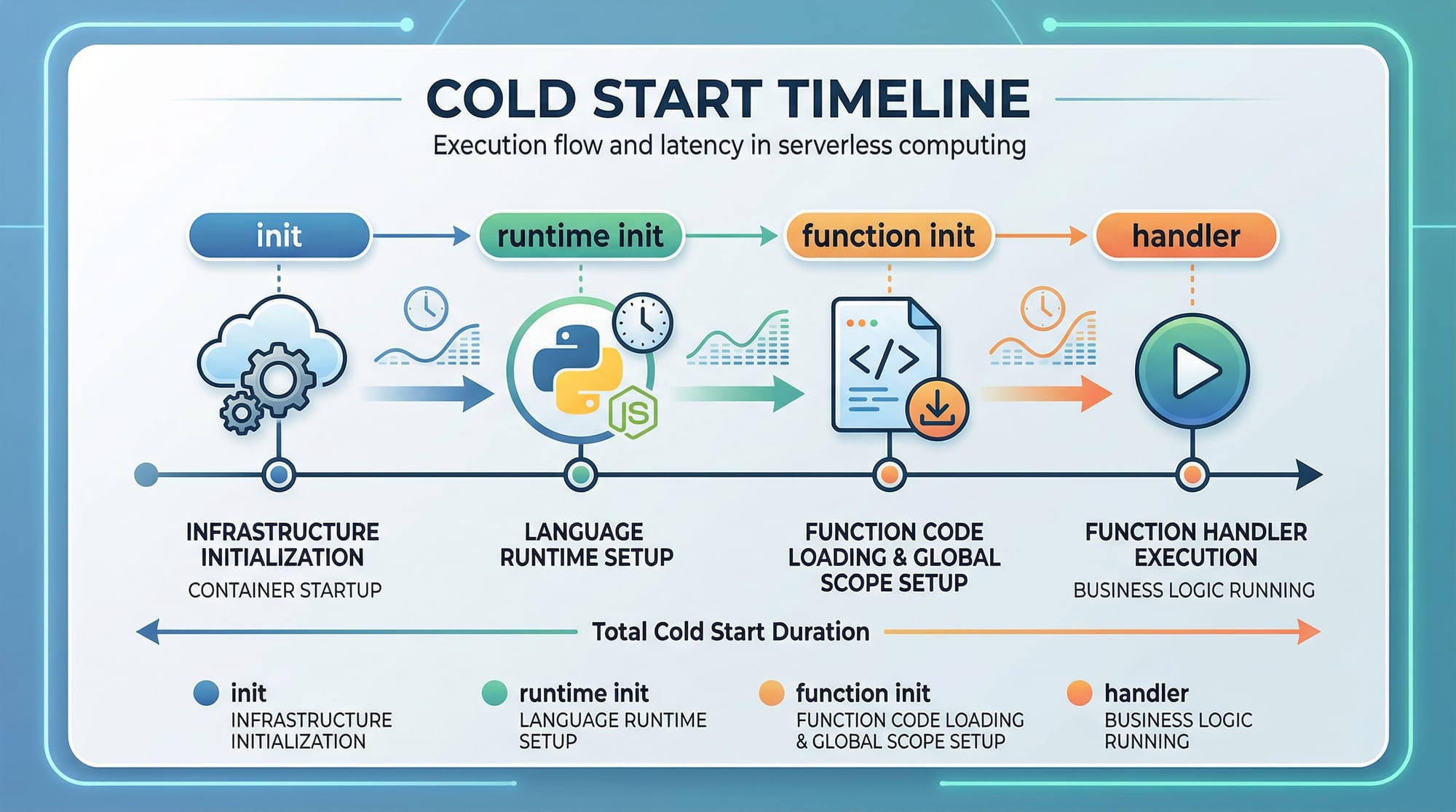
- Cold Starts
- Occur when Lambda initializes
- Slower for first request
- Provisioned Concurrency
- Keeps functions warm
- Eliminates cold starts
- Package Size
- Smaller packages = faster initialization
Real Example
Ahmad runs an e-commerce API in Lahore:
- Without optimization: 2 seconds response
- With tuning: 200 ms response
That’s a 10x improvement!
Practical Code Examples
Example 1: Creating and Using a Lambda Layer
Step 1: Create Layer Code
mkdir layer
cd layer
mkdir nodejs
cd nodejs
npm init -y
npm install axios
Explanation
mkdir layer→ Creates main folder for layernodejs→ Required structure for Node.js Lambda layersnpm init -y→ Initializes packagenpm install axios→ Adds dependency
Step 2: Zip the Layer
cd ..
zip -r layer.zip nodejs
Explanation
zip -r→ Recursively compress folderlayer.zip→ File to upload to AWS
Step 3: Use Layer in Lambda
const axios = require('axios');

exports.handler = async (event) => {
    const response = await axios.get('https://api.exchangerate-api.com/v4/latest/PKR');

    return {
        statusCode: 200,
        body: JSON.stringify(response.data)
    };
};
Explanation (Line by Line)
require('axios')→ Loads library from layerexports.handler→ Lambda entry pointaxios.get(...)→ Fetch exchange ratesJSON.stringify→ Converts object to JSON
Example 2: Real-World Application (VPC + Performance Optimization)
Scenario
Ali builds a backend API that:
- Connects to a private MySQL database
- Uses provisioned concurrency
Lambda Function Code
const mysql = require('mysql2/promise');

let connection;

exports.handler = async (event) => {
    if (!connection) {
        connection = await mysql.createConnection({
            host: process.env.DB_HOST,
            user: 'admin',
            password: 'password',
            database: 'students'
        });
    }

    const [rows] = await connection.execute('SELECT * FROM users');

    return {
        statusCode: 200,
        body: JSON.stringify(rows)
    };
};
Explanation (Line by Line)
require('mysql2/promise')→ MySQL librarylet connection→ Declare reusable connectionif (!connection)→ Prevent reconnect on every requestcreateConnection(...)→ Connect to DB inside VPCconnection.execute(...)→ Run SQL queryJSON.stringify(rows)→ Return result
Key Optimizations Used
- Reusing DB connection → reduces latency
- Running inside VPC → secure database
- Can combine with provisioned concurrency
Common Mistakes & How to Avoid Them
Mistake 1: Large Deployment Packages
Many beginners include unnecessary files.
Problem
- Slower cold starts
- Higher costs
Bad Practice
node_modules/
tests/
logs/
Solution
Use .npmignore or .zip only required files.
Mistake 2: Incorrect VPC Configuration
Lambda cannot access internet or DB.
Problem
- Timeouts
- Connection errors
Solution
- Use private subnets
- Add NAT Gateway for internet
- Configure Security Groups properly
Mistake 3: Not Using Layers
Code duplication across functions.
Solution
- Extract shared code
- Create reusable layers
Mistake 4: Ignoring Memory Tuning
Low memory = slow execution.
Solution
- Test different memory sizes
- Use AWS Power Tuning tool
Practice Exercises
Exercise 1: Create a Shared Utility Layer
Problem
Create a Lambda layer that contains a custom logging function and use it in two Lambda functions.
Solution
// logger.js
module.exports.log = (message) => {
    console.log(`[LOG]: ${message}`);
};
Explanation
module.exports.log→ Export functionconsole.log→ Print message
Exercise 2: Optimize Lambda Performance
Problem
Reduce cold start time for a function handling Pakistani e-commerce orders.
Solution
- Enable provisioned concurrency
- Reduce package size
- Increase memory to 512 MB
Frequently Asked Questions
What is Lambda Layer in AWS?
A Lambda Layer is a reusable package of code or dependencies that can be shared across multiple Lambda functions. It helps reduce duplication and improves maintainability.
How do I connect Lambda to a VPC?
You can attach a Lambda function to a VPC by selecting subnets and security groups in the AWS console. This allows secure access to private resources like databases.
What causes Lambda cold starts?
Cold starts happen when AWS initializes a new Lambda execution environment. Large package size and VPC configuration can increase cold start time.
How do I improve Lambda performance?
You can improve performance by increasing memory, reducing package size, using provisioned concurrency, and optimizing code execution.
Is Lambda suitable for production in Pakistan?
Yes, many startups and freelancers in Pakistan use Lambda for scalable and cost-effective backend services, especially for APIs and automation tasks.
Summary & Key Takeaways
- Lambda Layers help you reuse code and reduce duplication
- VPC integration ensures secure communication with private resources
- Performance tuning can significantly reduce latency and cost
- Cold starts can be minimized using provisioned concurrency
- Proper memory allocation improves execution speed
- Real-world optimization is essential for production apps
Next Steps & Related Tutorials
To continue your learning journey, explore these tutorials on theiqra.edu.pk:
- Learn the basics in Serverless Tutorial
- Start from scratch with AWS for Beginners
- Build CI/CD pipelines with GitHub Actions Tutorial
- Master containers with Docker & Kubernetes Guide
These will help you move from beginner to advanced cloud engineer and prepare you for real-world freelancing or job opportunities in Pakistan’s tech industry 🚀
Test Your Python Knowledge!
Finished reading? Take a quick quiz to see how much you've learned from this tutorial.