Azure Container Apps & Azure Functions Guide 2026
Introduction
Cloud computing is rapidly transforming how modern applications are built, deployed, and scaled. In this Azure Container Apps & Azure Functions Guide 2026, you’ll learn how to build powerful, scalable, and cost-efficient applications using two key Azure services: Azure Container Apps and Azure Functions.
These technologies fall under the category of azure serverless, which means you don’t have to manage servers manually. Instead, you focus on writing code, and Azure handles scaling, infrastructure, and availability.
For Pakistani students—whether you're in Lahore, Karachi, or Islamabad—learning these tools opens doors to global freelance opportunities, remote jobs, and cloud certifications. Many startups and companies now prefer serverless architectures to reduce costs and improve scalability.
Azure Container Apps are ideal for microservices and containerized workloads, while Azure Functions are perfect for event-driven tasks like APIs, automation, and background processing.
Prerequisites
Before starting this tutorial, you should have:
- Basic knowledge of cloud computing concepts
- Familiarity with Docker containers
- Understanding of JavaScript, Python, or C#
- Basic command-line knowledge (Linux/Windows terminal)
- An active Azure account (free tier is enough)
Optional but helpful:
- Knowledge of Kubernetes basics
- Experience with REST APIs
Core Concepts & Explanation
Azure Container Apps — Serverless Containers Made Easy
Azure Container Apps allow you to run containerized applications without managing Kubernetes directly.
Key features:
- Automatic scaling (including scale-to-zero)
- Built-in load balancing
- Dapr integration for microservices
- Supports HTTP and event-driven apps
Example:
Ahmad builds an e-commerce backend in Karachi using multiple services:
- Product service
- Order service
- Payment service
Instead of managing Kubernetes, he deploys them as container apps. Azure handles scaling automatically during sales events like Eid.
Azure Functions — Event-Driven Serverless Compute
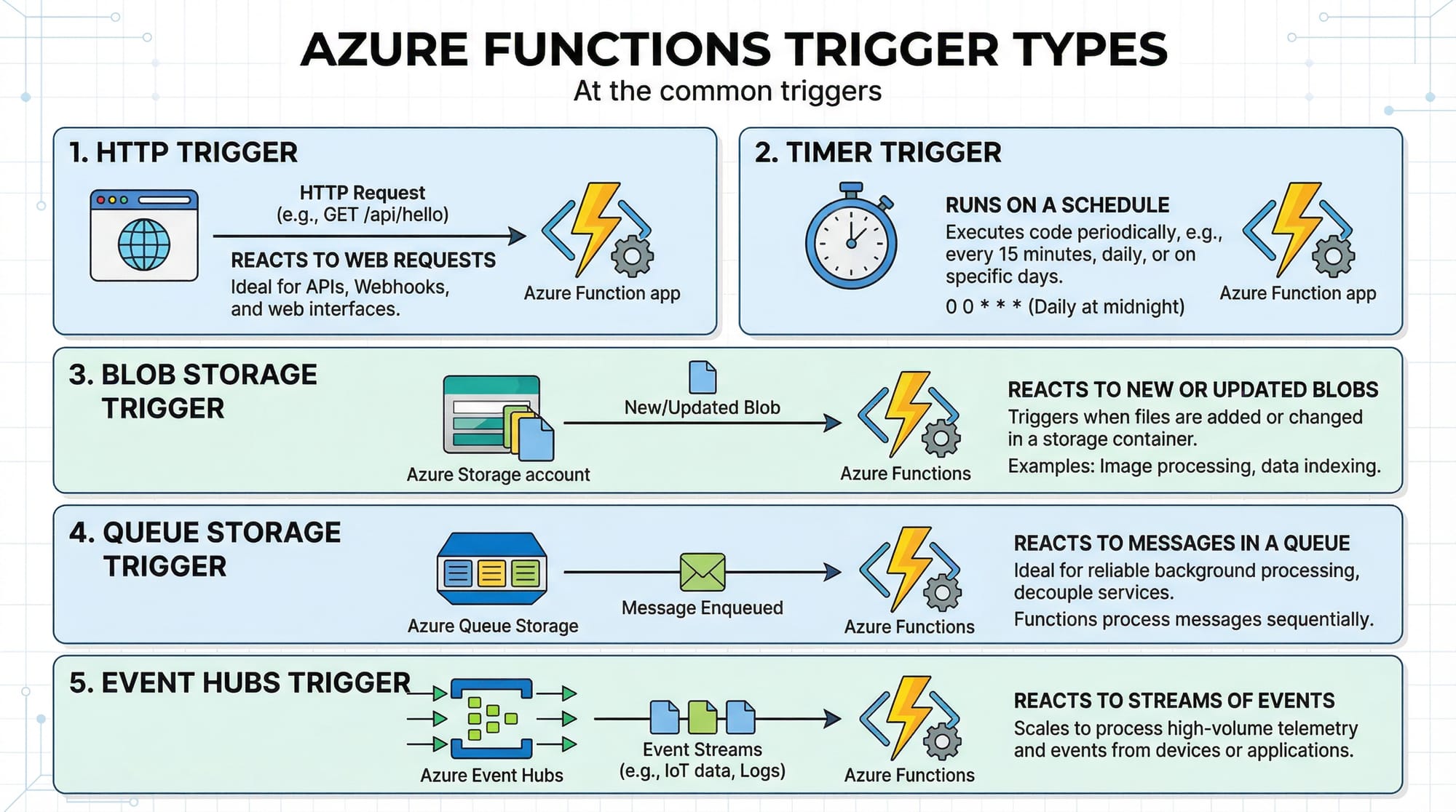
Azure Functions let you run code in response to events like:
- HTTP requests
- File uploads
- Timers
- Message queues
You only pay for execution time, making it very cost-effective.
Example:
Fatima creates a function that sends SMS alerts when a customer places an order. The function triggers automatically when a message is added to a queue.
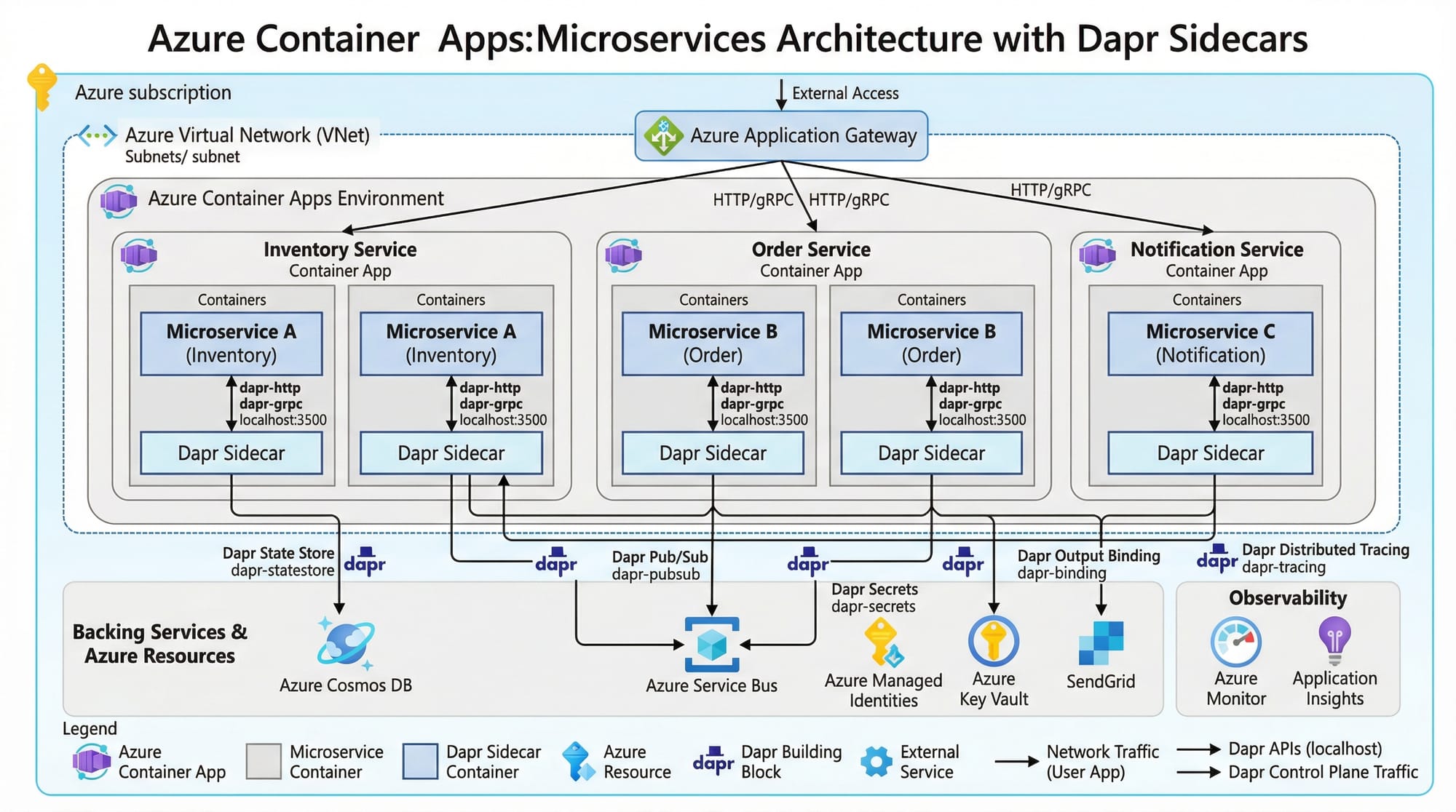
Dapr Integration in Azure Container Apps
Dapr (Distributed Application Runtime) simplifies microservices communication.
Benefits:
- Service-to-service calls
- State management
- Pub/Sub messaging
- Secret management
Example:
Ali builds a food delivery system in Islamabad. Using Dapr:
- Order service communicates with delivery service
- State (orders) is stored easily
- Messaging handles notifications
Practical Code Examples
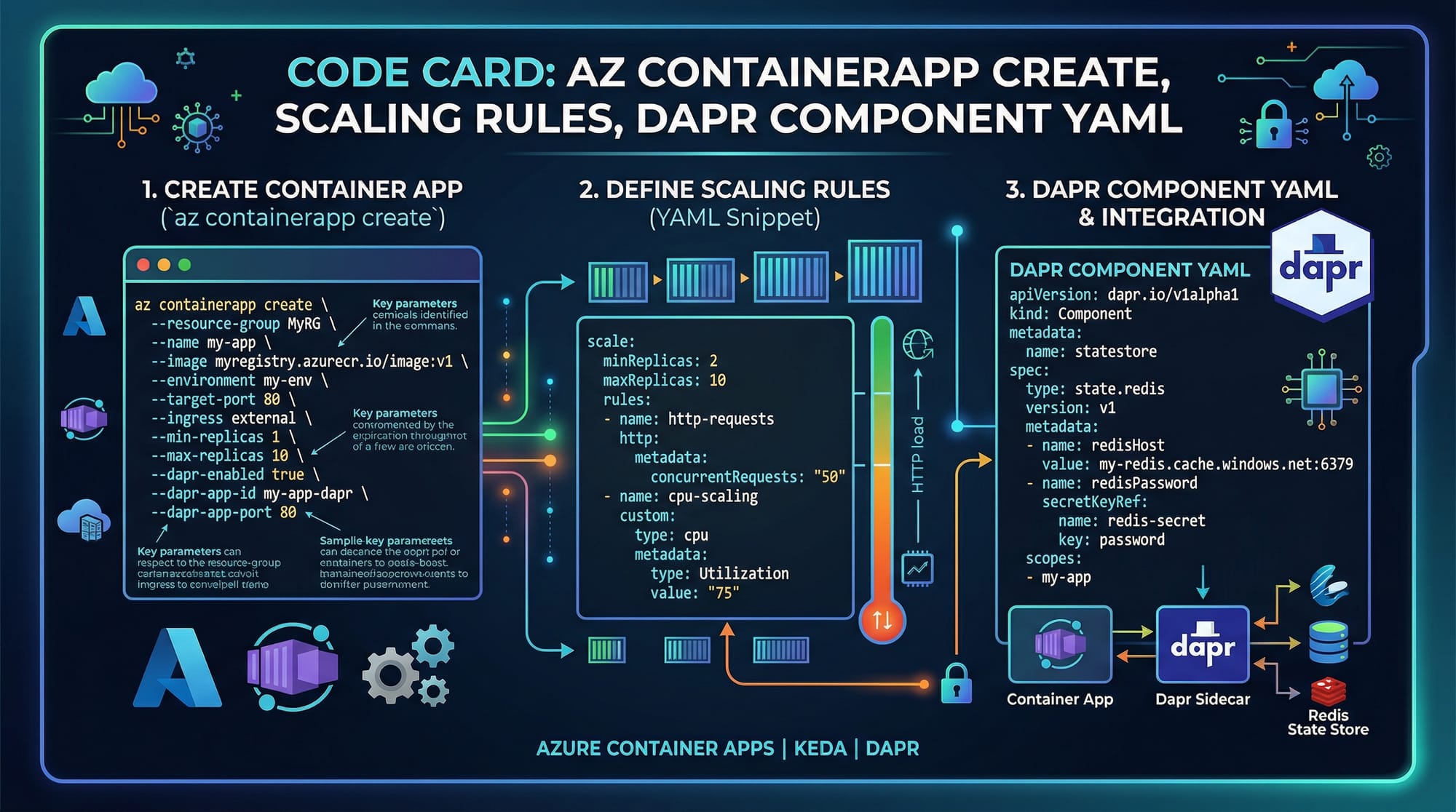
Example 1: Deploying an Azure Container App
az containerapp create \
  --name myapp \
  --resource-group mygroup \
  --environment myenv \
  --image nginx \
  --target-port 80 \
  --ingress external \
  --min-replicas 1 \
  --max-replicas 5
Line-by-line explanation:
az containerapp create
Command to create a container app in Azure.--name myapp
Sets the name of your app.--resource-group mygroup
Specifies the Azure resource group.--environment myenv
Defines the container apps environment.--image nginx
Uses the NGINX Docker image.--target-port 80
Exposes port 80 for HTTP traffic.--ingress external
Makes the app publicly accessible.--min-replicas 1
Ensures at least one instance is running.--max-replicas 5
Allows scaling up to 5 instances during high traffic.
Example 2: Azure Function HTTP Trigger (Real-World API)
module.exports = async function (context, req) {
    const name = req.query.name || (req.body && req.body.name);

    if (!name) {
        context.res = {
            status: 400,
            body: "Please provide a name"
        };
        return;
    }

    context.res = {
        status: 200,
        body: `Hello ${name}, welcome to Azure Functions!`
    };
};
Line-by-line explanation:
module.exports = async function (context, req)
Defines the Azure Function with request and context objects.const name = req.query.name || ...
Gets the name from query or request body.if (!name)
Checks if the name is missing.context.res = { status: 400 ... }
Returns an error response if no name is provided.context.res = { status: 200 ... }
Returns a success message.
Real-world use case (Pakistan):
A university portal in Lahore uses this API to greet students dynamically when they log in.
Common Mistakes & How to Avoid Them
Mistake 1: Not Configuring Scaling Properly
Many beginners forget to set scaling rules, causing performance issues or high costs.
Problem:
App crashes during high traffic.
Fix:
--min-replicas 0
--max-replicas 10
- Use
min-replicas 0for cost-saving - Adjust
max-replicasbased on expected load
Mistake 2: Ignoring Cold Start in Azure Functions
Azure Functions may take time to start if idle.
Problem:
Slow response for first request.
Fix:
- Use Premium Plan
- Enable Always On
{
  "functionTimeout": "00:10:00"
}
- Adjust timeout settings in configuration
Practice Exercises
Exercise 1: Deploy a Simple API
Problem:
Create a container app that returns "Hello Pakistan".
Solution:
FROM node:18
WORKDIR /app
COPY . .
RUN npm install
CMD ["node", "server.js"]
Explanation:
FROM node:18
Uses Node.js base image.WORKDIR /app
Sets working directory.COPY . .
Copies project files.RUN npm install
Installs dependencies.CMD ["node", "server.js"]
Starts the app.
Exercise 2: Timer-Based Azure Function
Problem:
Run a function every day at 9 AM PKT.
Solution:
{
  "schedule": "0 0 9 * * *"
}
Explanation:
0seconds0minutes9hours (9 AM)* * *means every day
Frequently Asked Questions
What is Azure Container Apps?
Azure Container Apps is a serverless platform that allows you to run containerized applications without managing Kubernetes infrastructure. It automatically scales based on demand and integrates with microservices tools like Dapr.
How do I deploy Azure Functions?
You can deploy Azure Functions using the Azure CLI, Visual Studio Code, or GitHub Actions. The process involves creating a function app, writing your code, and publishing it to Azure.
What is azure serverless?
Azure serverless refers to cloud services where you don’t manage servers manually. Azure automatically handles scaling, infrastructure, and execution, allowing developers to focus only on code.
Which is better: Azure Functions or Container Apps?
It depends on your use case. Azure Functions are ideal for event-driven tasks, while Container Apps are better for long-running services and microservices architectures.
Can I use Azure for freelancing in Pakistan?
Yes, many Pakistani developers use Azure for freelancing. Skills in Azure Functions and Container Apps are highly in demand on platforms like Fiverr and Upwork.
Summary & Key Takeaways
- Azure Container Apps simplify deployment of containerized microservices
- Azure Functions enable event-driven, serverless applications
- Both services support automatic scaling and cost optimization
- Dapr integration enhances microservices communication
- Proper configuration of scaling and performance is crucial
- These skills are highly valuable for Pakistani students and freelancers
Next Steps & Related Tutorials
To continue your cloud journey, explore these tutorials on theiqra.edu.pk:
- Learn the basics with our Microsoft Azure Tutorial for beginners
- Deep dive into Serverless Tutorial to master cloud automation
- Explore Docker & Kubernetes Guide to understand container orchestration
- Build real-world apps with Cloud DevOps Tutorial
By mastering Azure Container Apps and Azure Functions, you’re taking a big step toward becoming a professional cloud developer in 2026. Keep practicing, build projects, and start applying your skills in real-world scenarios across Pakistan and beyond.
Test Your Python Knowledge!
Finished reading? Take a quick quiz to see how much you've learned from this tutorial.