Backstage Tutorial Developer Portal by Spotify 2026
Introduction
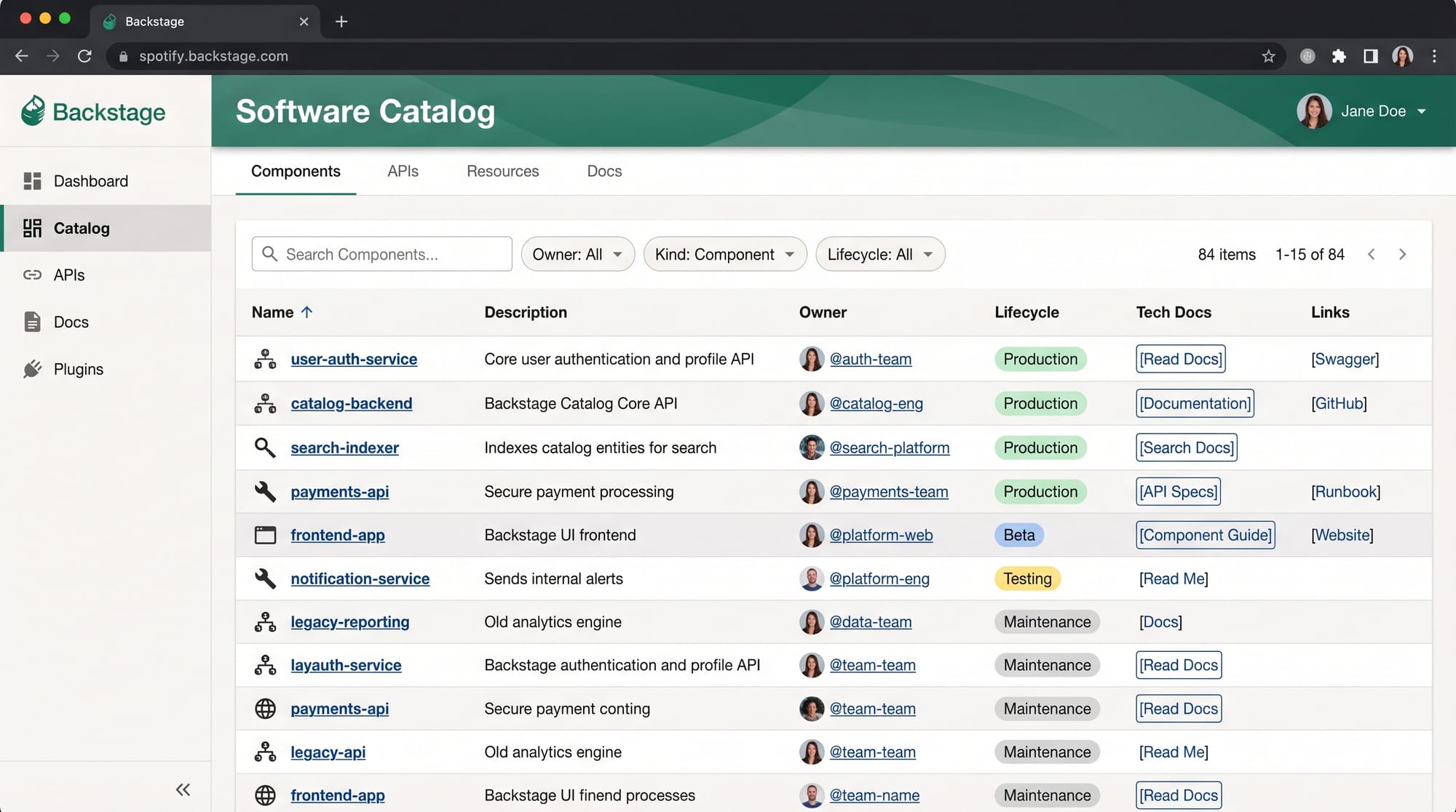
Backstage Tutorial: Developer Portal by Spotify 2026 is a modern, open-source approach to building internal developer platforms that help engineering teams manage software at scale. It was originally created by Backstage and is now widely adopted by companies worldwide to centralize documentation, services, APIs, and development tools in one unified portal.
In simple terms, Backstage acts like a “Google for your engineering team.” Instead of searching through scattered GitHub repositories, Slack messages, and outdated wiki pages, developers can use a single dashboard to find everything they need.
For Pakistani students learning DevOps, cloud computing, or backend engineering, understanding Backstage is extremely valuable. Companies in Lahore, Karachi, and Islamabad are rapidly moving toward microservices and cloud-native architectures. This means developers must manage hundreds of services, APIs, and deployments — and tools like Backstage solve exactly this problem.
For example, imagine Ahmad, a junior developer in a Karachi-based fintech startup. Every time he joins a project, he spends hours asking seniors about service ownership, API documentation, and deployment pipelines. With Backstage, all of this information is already organized in one place.
By the end of this backstage io tutorial, you will understand how Spotify Backstage works, how to build your own developer portal backstage system, and how to apply it in real-world DevOps environments.
Prerequisites
Before starting this Spotify Backstage tutorial, you should have a basic understanding of:
- JavaScript or TypeScript fundamentals
- Node.js and npm package management
- Basic understanding of microservices architecture
- Git and GitHub workflows
- Basic DevOps concepts (CI/CD, containers)
Optional but helpful:
- Kubernetes basics
- Docker fundamentals
- REST API concepts
If you are a student from Pakistan studying at universities like NUST, FAST, or COMSATS, you may already have covered most of these topics in your software engineering courses.
Core Concepts & Explanation
Software Catalog (Central Service Registry)
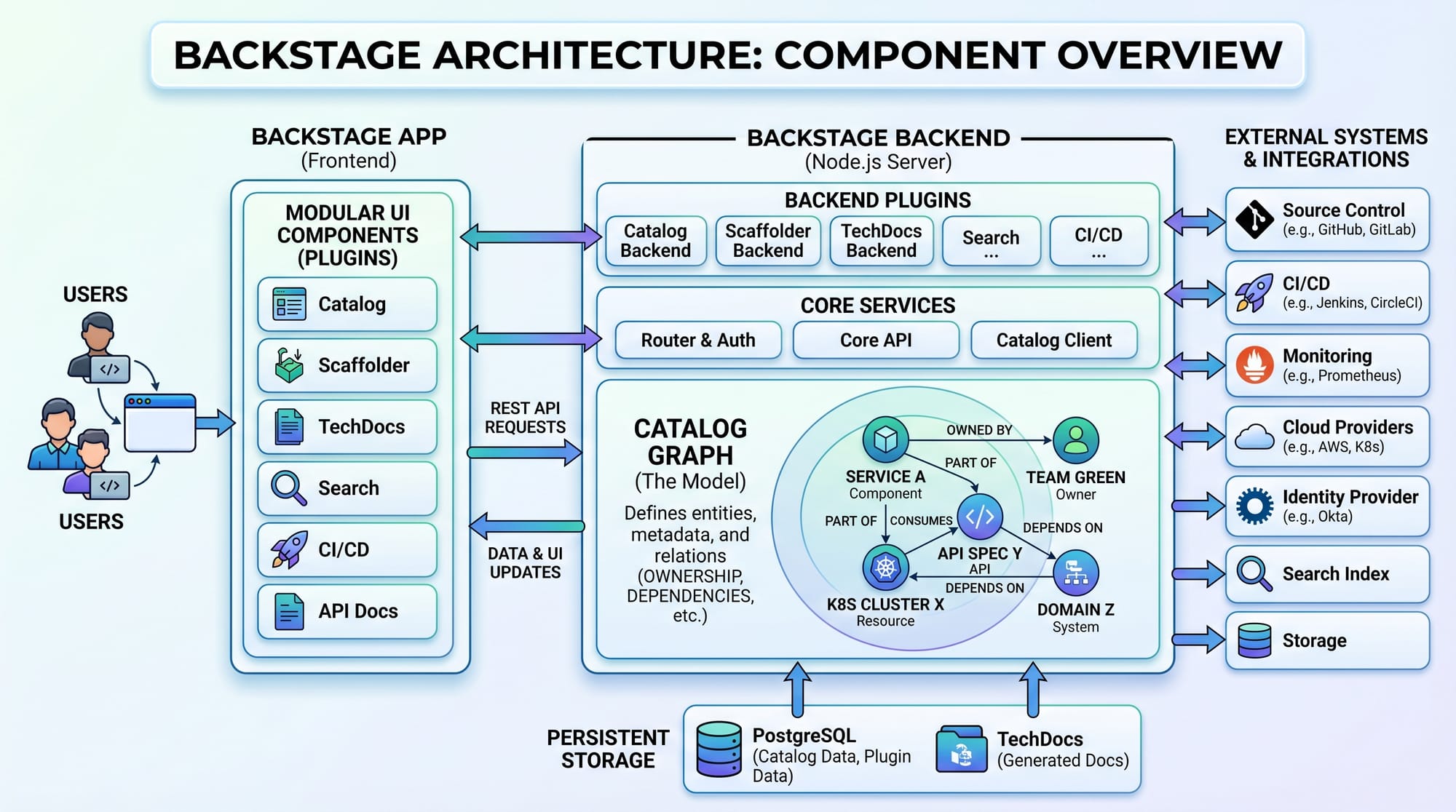
The Software Catalog is the heart of Backstage. It stores information about all services, APIs, libraries, and data pipelines in your organization.
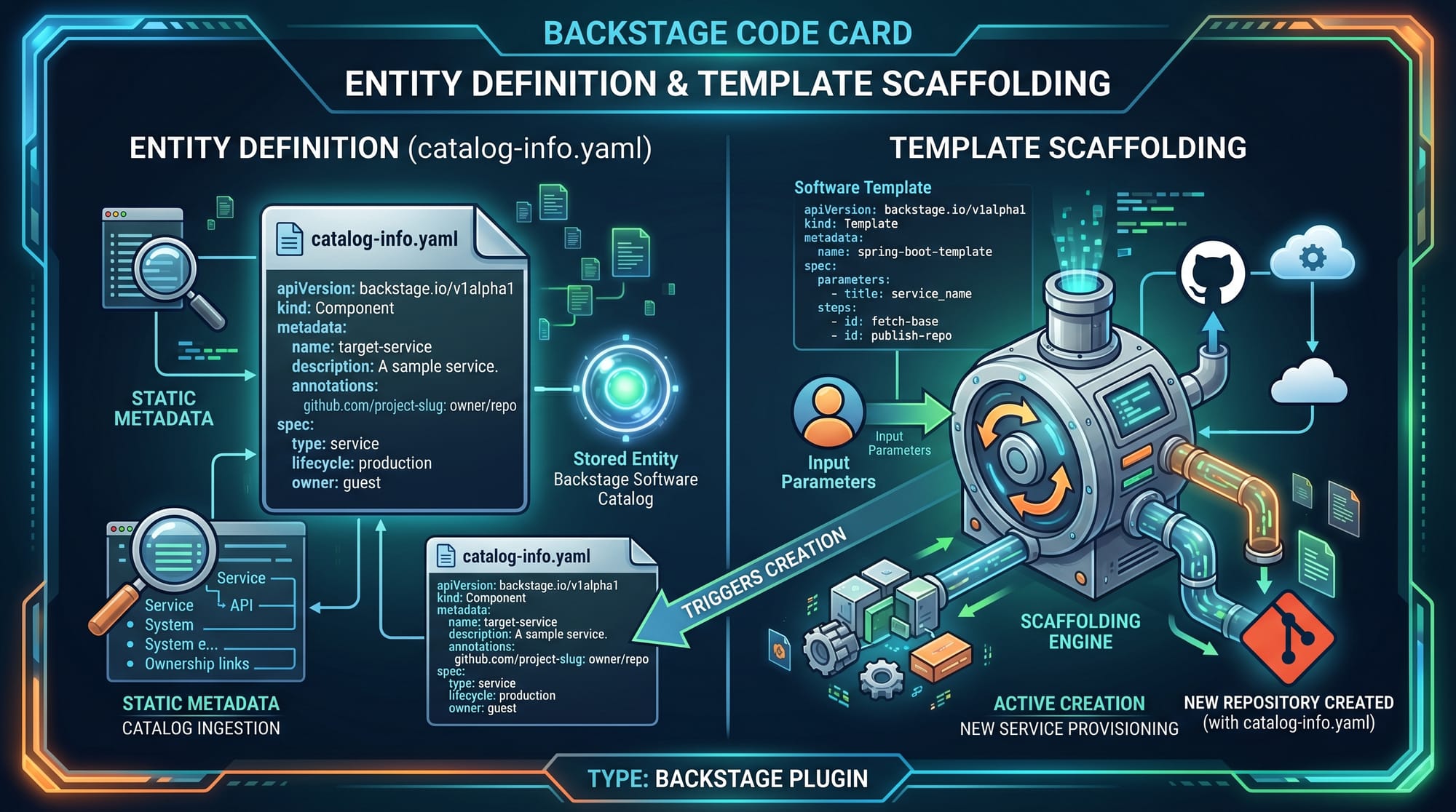
Each entity in the catalog is defined using a catalog-info.yaml file.
Example:
apiVersion: backstage.io/v1alpha1
kind: Component
metadata:
  name: payment-service
  description: Handles online payments for Pakistani users
spec:
  type: service
  owner: team-finance
  lifecycle: production
Explanation:
apiVersion: Defines Backstage schema versionkind: Type of entity (Component, API, System)metadata.name: Unique service namedescription: Human-readable explanationspec.type: Type of service (backend/frontend/library)owner: Team responsible (e.g., team-finance in Karachi office)lifecycle: Stage of service (development, production)
This helps teams instantly understand who owns what service and how it behaves.
Software Templates (Scaffolding System)
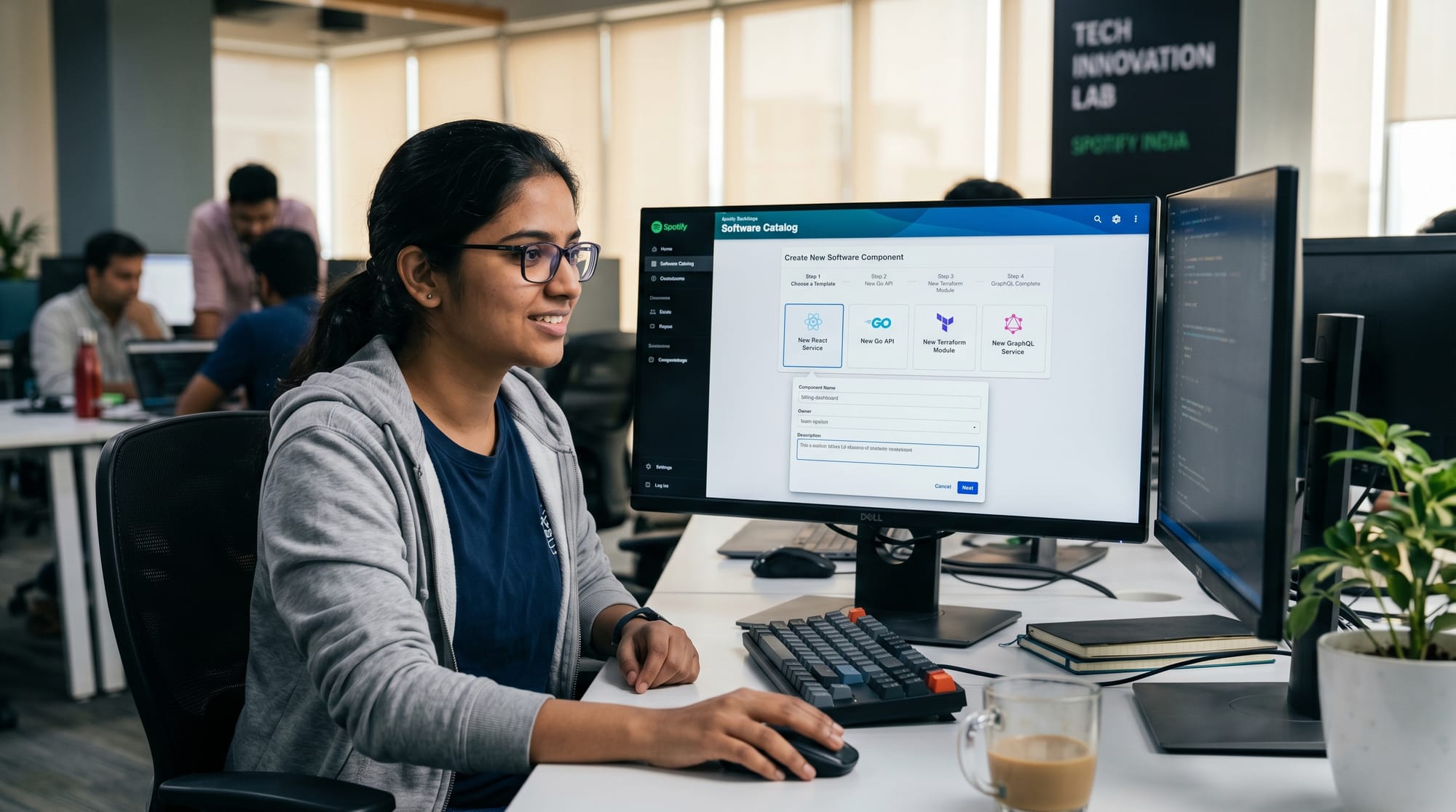
Software Templates allow developers to generate new services quickly using predefined structures.
Instead of manually creating folders, configs, and pipelines, developers simply fill a form in Backstage and get a ready-to-use project.
Example template:
apiVersion: scaffolder.backstage.io/v1beta3
kind: Template
metadata:
  name: nodejs-service-template
spec:
  parameters:
    - title: Service Info
      properties:
        name:
          type: string
        owner:
          type: string
  steps:
    - id: fetch
      action: fetch:template
      input:
        url: ./template
Explanation:
kind: Templatedefines scaffolding templateparametersdefine form inputs (service name, owner)stepsdefine automated actionsfetch:templatecopies starter code
For example, Fatima from Islamabad can create a new “student-portal-service” in seconds without writing boilerplate code.
TechDocs (Documentation System)
TechDocs allows teams to write documentation in Markdown and publish it inside Backstage.
Instead of using separate platforms like Confluence, everything stays inside the developer portal.
Example:
site_name: Payment Service Docs
nav:
  - Home: index.md
  - API Guide: api.md
Explanation:
site_name: Title of documentationnav: Navigation structureindex.md: Main documentation page
This ensures documentation is always close to the code, reducing confusion for developers.
Plugins (Extending Backstage)
Backstage is highly extensible using plugins. You can integrate:
- GitHub/GitLab
- Jenkins CI/CD
- Kubernetes dashboards
- Monitoring tools (Prometheus, Grafana)
Plugins allow customization for specific organizational needs.
For example, a startup in Lahore can build a custom “Billing Plugin” to track customer payments in real-time.
Practical Code Examples
Example 1: Creating a Catalog Entry for a Microservice
apiVersion: backstage.io/v1alpha1
kind: Component
metadata:
  name: order-service
  description: Manages customer orders in Karachi e-commerce platform
spec:
  type: service
  owner: team-ecommerce
  lifecycle: production
Line-by-line explanation:
- Line 1: Defines Backstage schema version
- Line 2: Declares entity type as Component
- Line 3: Metadata block starts
- Line 4: Service name is “order-service”
- Line 5: Description of service purpose
- Line 6: Specification section begins
- Line 7: Declares it as backend service
- Line 8: Assigns ownership to team-ecommerce
- Line 9: Marks service as production-ready
This helps organizations avoid confusion about ownership and service status.
Example 2: Real-World Developer Portal Setup
apiVersion: scaffolder.backstage.io/v1beta3
kind: Template
metadata:
  name: express-api-template
spec:
  parameters:
    - title: Project Details
      properties:
        projectName:
          type: string
        owner:
          type: string
  steps:
    - id: init
      action: fetch:template
      input:
        url: ./skeleton
    - id: publish
      action: publish:github
Explanation:
- Defines a reusable Express.js API generator
- Takes project name and owner as inputs
- Fetches starter code
- Publishes directly to GitHub
This is useful for Pakistani startups that want to rapidly scale engineering teams without repetitive setup work.
Common Mistakes & How to Avoid Them
Mistake 1: Missing or Incorrect catalog-info.yaml
Many beginners forget to add catalog-info.yaml in their repository.
Problem:
Backstage cannot detect the service.
Solution:
Always place catalog-info.yaml in the root directory of your repository.
Mistake 2: Not Defining Ownership Properly
Without ownership metadata, services become unmanageable.
Problem:
No one knows who maintains the service.
Solution:
Always define:
owner: team-name
Example:
- team-finance (Lahore office)
- team-ecommerce (Karachi office)
Mistake 3: Overcomplicating Plugins
Some teams try to install too many plugins at once.
Solution:
Start small:
- GitHub plugin
- TechDocs plugin
Then scale gradually.
Practice Exercises
Exercise 1: Create a Service Entry
Problem:
Create a Backstage catalog entry for a “Student Result Service” used in a university system in Islamabad.
Solution:
apiVersion: backstage.io/v1alpha1
kind: Component
metadata:
  name: student-result-service
  description: Handles exam results for Pakistani universities
spec:
  type: service
  owner: team-education
  lifecycle: development
Exercise 2: Build a Simple Template
Problem:
Create a template that generates a basic Node.js API.
Solution:
apiVersion: scaffolder.backstage.io/v1beta3
kind: Template
metadata:
  name: simple-node-template
spec:
  parameters:
    - title: App Info
      properties:
        name:
          type: string
  steps:
    - id: fetch
      action: fetch:template
Frequently Asked Questions
What is Backstage in DevOps?
Backstage is an open-source developer portal created by Spotify that helps teams manage services, documentation, and infrastructure in one place. It simplifies complex microservices environments.
Why should Pakistani students learn Backstage?
Because companies in Pakistan are adopting cloud-native and DevOps practices. Learning Backstage improves job opportunities in startups and multinational companies in Karachi, Lahore, and Islamabad.
Is Backstage difficult to learn?
No, it is intermediate-level. If you know Node.js, Git, and basic DevOps concepts, you can easily learn it within a few weeks.
Can Backstage be used in small companies?
Yes. Even small startups can use Backstage to organize services and documentation. It becomes more powerful as the company grows.
How does Backstage improve developer productivity?
It reduces time spent searching for documentation, service ownership, and setup instructions. Everything is centralized, saving hours of developer effort every week.
Summary & Key Takeaways
- Backstage is a developer portal created by Spotify for managing software systems
- It centralizes services, documentation, and tools in one dashboard
- Software Catalog is the core feature for tracking services
- Templates help automate project creation
- TechDocs simplifies documentation management
- Plugins extend functionality for DevOps workflows
- It is highly useful for modern Pakistani software companies
Next Steps & Related Tutorials
Now that you understand this backstage io tutorial, you can move forward to advanced DevOps topics:
- Learn about Microservices Architecture to understand service decomposition
- Explore Kubernetes Tutorial to manage containerized applications
- Study CI/CD pipelines for automated deployment workflows
- Learn Docker fundamentals for containerization
Backstage becomes extremely powerful when combined with Kubernetes and CI/CD pipelines, making it a must-know skill for modern DevOps engineers in Pakistan.
Test Your Python Knowledge!
Finished reading? Take a quick quiz to see how much you've learned from this tutorial.