Big O Notation Time & Space Complexity Explained
Introduction
Understanding Big-O Notation: Time & Space Complexity Explained is one of the most important steps in becoming a skilled programmer. Whether you are studying at a university in Lahore, preparing for coding interviews in Islamabad, or learning online from Karachi, this concept helps you write efficient and scalable code.
In simple terms, Big-O notation is a way to measure how fast an algorithm runs (time complexity) and how much memory it uses (space complexity) as the input size grows.
Imagine Ahmad writes a program to search student records. It works fine for 10 students, but what happens when there are 10,000? This is where Big-O helps us predict performance before problems occur.
Learning this topic will help Pakistani students:
- Crack technical interviews
- Optimize code for real-world apps
- Understand Data Structures & Algorithms deeply
Prerequisites
Before starting this big o notation tutorial, you should have:
- Basic programming knowledge (Python, Java, or C++)
- Understanding of loops and conditionals
- Familiarity with arrays and simple functions
- Basic mathematical thinking (no advanced math required)
Core Concepts & Explanation
What is Big-O Notation?
Big-O notation describes the worst-case scenario of an algorithm's performance.
For example:
- If a function takes the same time regardless of input → O(1)
- If time grows with input size → O(n)
👉 Example:
If Fatima checks every student record one by one, the time increases as the number of students increases → O(n)
Time Complexity Explained
Time complexity measures how long an algorithm takes to execute.
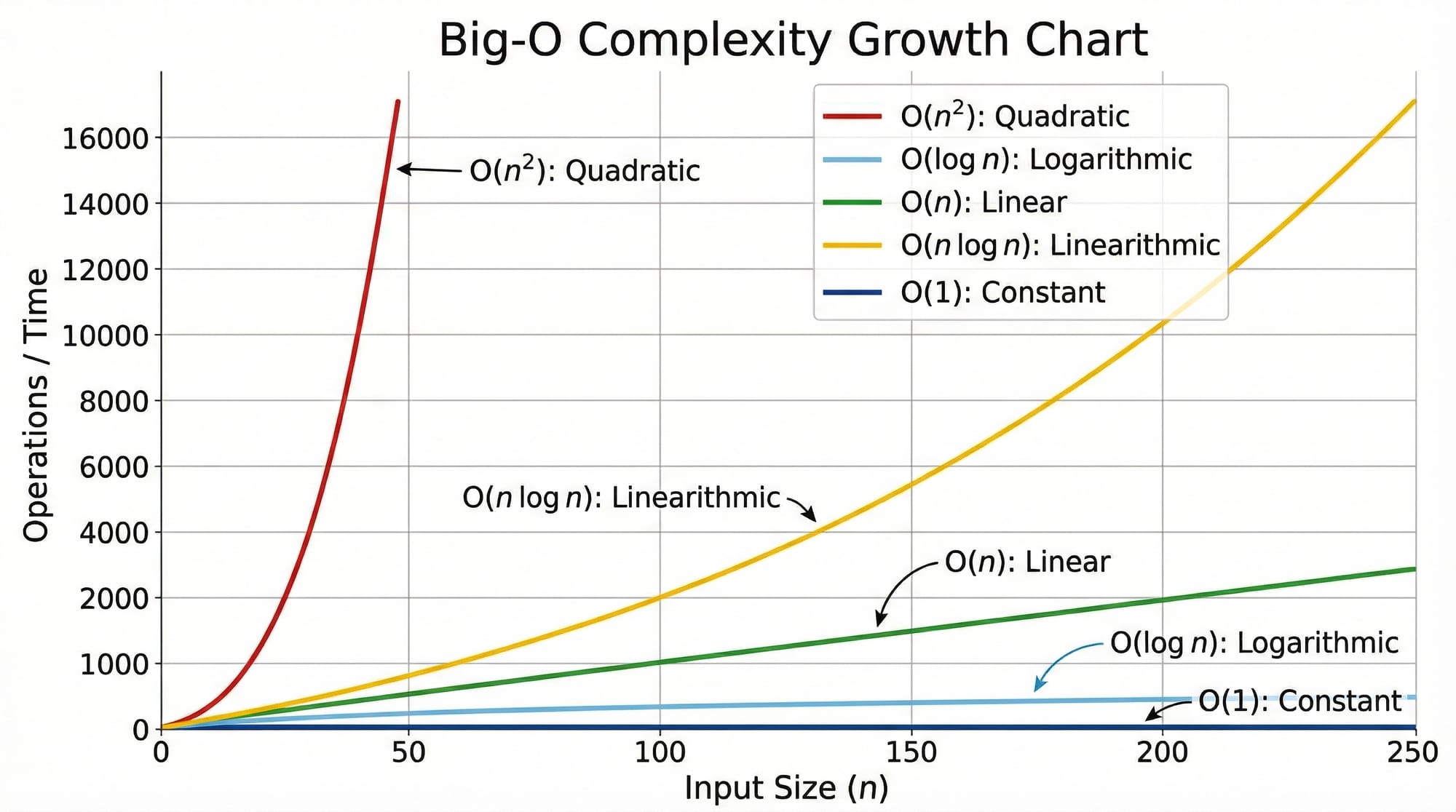
Common Time Complexities:
- O(1) → Constant time
- O(log n) → Logarithmic time
- O(n) → Linear time
- O(n log n) → Efficient sorting
- O(n²) → Nested loops (slow)
👉 Real-life analogy:
- Searching a contact in a sorted phone list → O(log n)
- Checking each student manually → O(n)
Space Complexity Explained
Space complexity measures how much memory an algorithm uses.
Example:
If Ali stores all student marks in a new list, memory usage increases → higher space complexity.
- Constant memory → O(1)
- Growing memory → O(n)
Key Concept 1 — Growth Rate of Algorithms
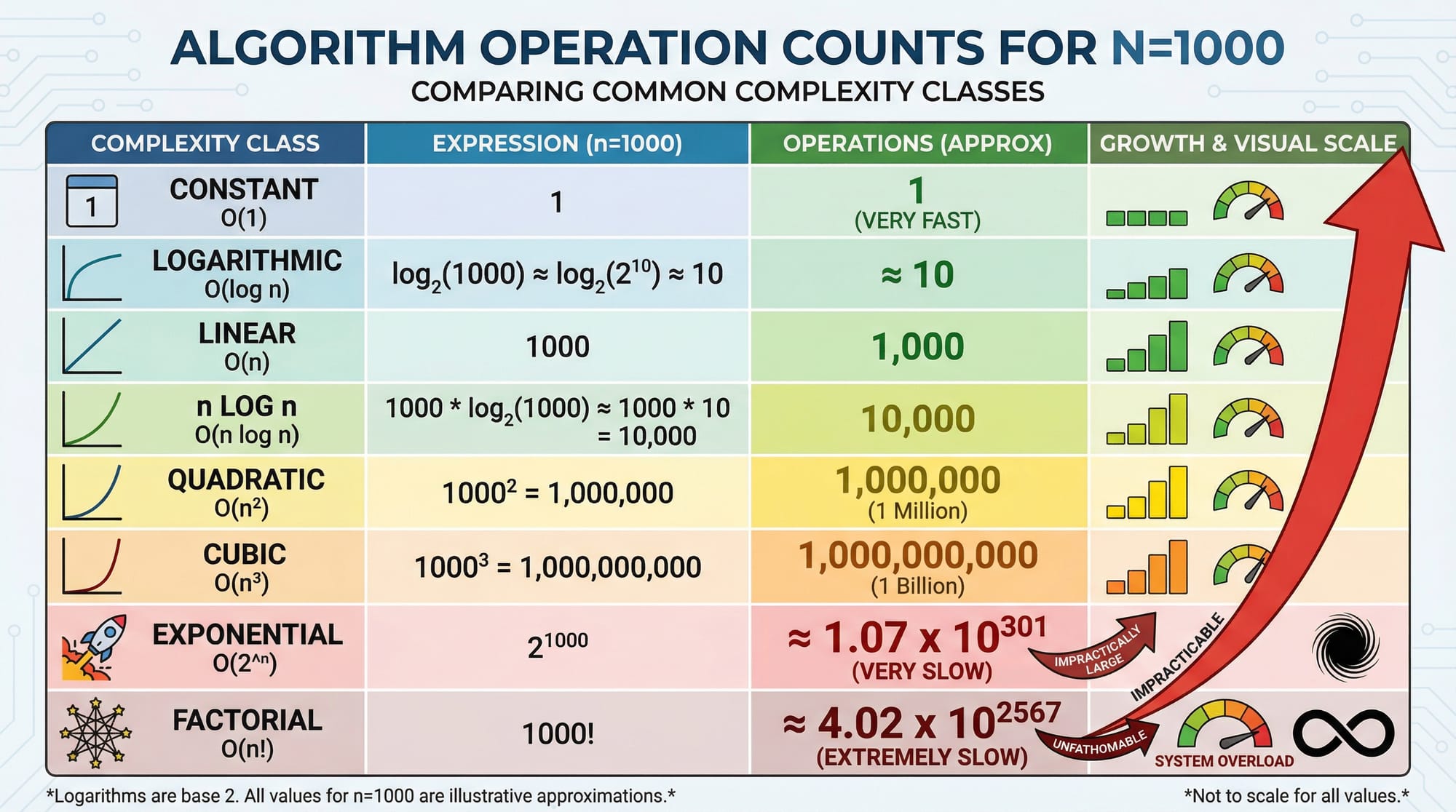
The most important idea is how fast complexity grows.
Let’s compare:
| Input Size (n) | O(1) | O(n) | O(n²) |
|---|---|---|---|
| 10 | 1 | 10 | 100 |
| 100 | 1 | 100 | 10,000 |
| 1000 | 1 | 1000 | 1,000,000 |
👉 Even a small inefficiency becomes huge at scale.
Key Concept 2 — Ignoring Constants & Lower Terms
In Big-O:
- Ignore constants → O(2n) = O(n)
- Ignore smaller terms → O(n² + n) = O(n²)
👉 Why?
Because for large inputs, only the dominant term matters.
Practical Code Examples
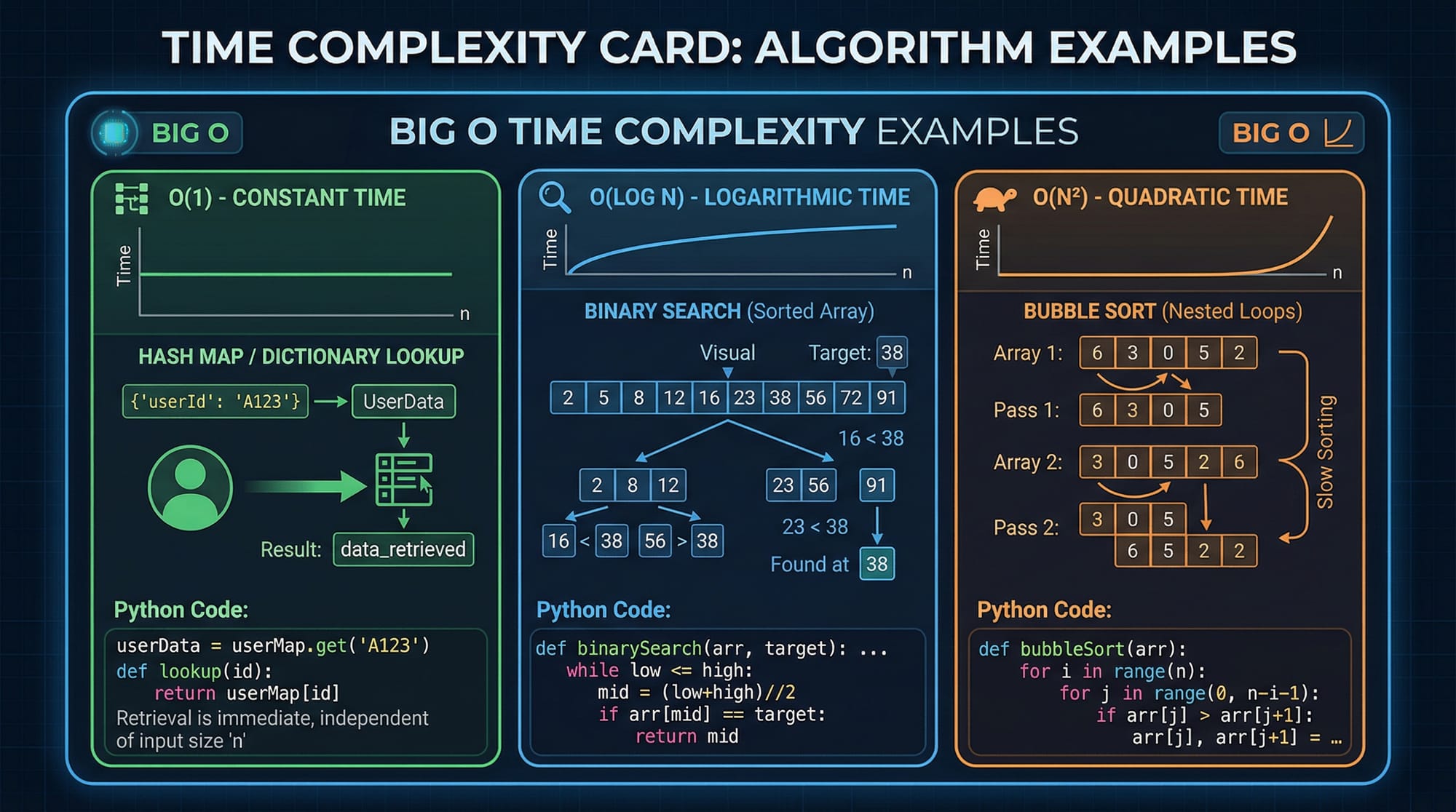
Example 1: Linear Search (O(n))
def linear_search(arr, target):
    for i in range(len(arr)):
        if arr[i] == target:
            return i
    return -1
Line-by-line Explanation:
def linear_search(arr, target):
Defines a function to search for a target value.for i in range(len(arr)):
Loops through the entire array → runs n times.if arr[i] == target:
Checks each element one by one.return i
Returns index if found.return -1
If not found, return -1.
👉 Time Complexity: O(n)
👉 Space Complexity: O(1)
Example 2: Real-World Application — Student Record Lookup
students = {
    "Ahmad": 85,
    "Fatima": 92,
    "Ali": 78
}

def get_marks(name):
    return students.get(name, "Not Found")
Line-by-line Explanation:
students = {...}
A dictionary storing student names and marks.def get_marks(name):
Function to retrieve marks.students.get(name, "Not Found")
Direct lookup using key.
👉 Time Complexity: O(1) (instant lookup)
👉 Space Complexity: O(n) (stores data)
👉 Real-world example:
A university database system in Pakistan retrieving student grades instantly.
Common Mistakes & How to Avoid Them
Mistake 1: Ignoring Worst-Case Scenario
Many students only think about best-case performance.
❌ Example:
Binary search seems fast, but only works on sorted data.
✅ Fix:
Always analyze worst-case complexity.
Mistake 2: Confusing Time and Space Complexity
Students often mix both concepts.
❌ Example:
Thinking a fast algorithm always uses less memory.
✅ Fix:
- Time = speed
- Space = memory
👉 Sometimes faster algorithms use more memory.
Practice Exercises
Exercise 1: Count Elements
Problem:
Write a function to count elements in a list.
def count_elements(arr):
    count = 0
    for i in arr:
        count += 1
    return count
Solution Explanation:
- Loop runs for each element → O(n)
- Only one variable used → O(1)
👉 Time: O(n)
👉 Space: O(1)
Exercise 2: Nested Loop Problem
Problem:
Print all pairs of students.
students = ["Ahmad", "Fatima", "Ali"]

for i in students:
    for j in students:
        print(i, j)
Solution Explanation:
- Outer loop runs n times
- Inner loop runs n times
👉 Total operations = n × n = O(n²)
👉 Space Complexity: O(1)
Frequently Asked Questions
What is Big-O notation?
Big-O notation is a mathematical way to describe how an algorithm performs as input size increases. It focuses on the worst-case scenario and helps compare efficiency.
How do I calculate time complexity?
Count how many times the main operation runs. Loops usually indicate O(n), nested loops indicate O(n²), and logarithmic behavior often comes from dividing data.
Why is Big-O important for students?
It helps you write efficient programs and prepares you for coding interviews in companies like software houses in Lahore or Karachi.
What is the difference between O(n) and O(log n)?
O(n) grows linearly with input size, while O(log n) grows much slower, making it more efficient for large datasets.
Is space complexity as important as time complexity?
Yes, especially in memory-limited systems like mobile apps or embedded systems. Sometimes you must balance both.
Summary & Key Takeaways
- Big-O notation measures algorithm efficiency
- Time complexity = speed of execution
- Space complexity = memory usage
- Focus on worst-case scenarios
- Ignore constants and smaller terms
- Efficient algorithms are crucial for large data
Next Steps & Related Tutorials
Now that you understand time complexity and space complexity, continue your learning journey:
- Learn the basics in our DSA Tutorial for Beginners
- Dive deeper into Sorting Algorithms Explained
- Understand searching better in Searching Algorithms Tutorial
- Explore data storage in Hash Tables Guide
These tutorials on theiqra.edu.pk will help you master Data Structures & Algorithms step by step.
💡 Final Tip:
Start analyzing every program you write. Ask yourself:
👉 “What is its Big-O complexity?”
That habit will make you a stronger programmer faster than anything else.
Test Your Python Knowledge!
Finished reading? Take a quick quiz to see how much you've learned from this tutorial.