Biome Fast Linter & Formatter for JavaScript TypeScript
Introduction
In modern JavaScript and TypeScript development, maintaining clean, consistent code is crucial. Traditionally, developers have used ESLint for linting and Prettier for formatting. However, configuring these tools together can be cumbersome, especially for beginners in Pakistan who want to streamline their workflow.
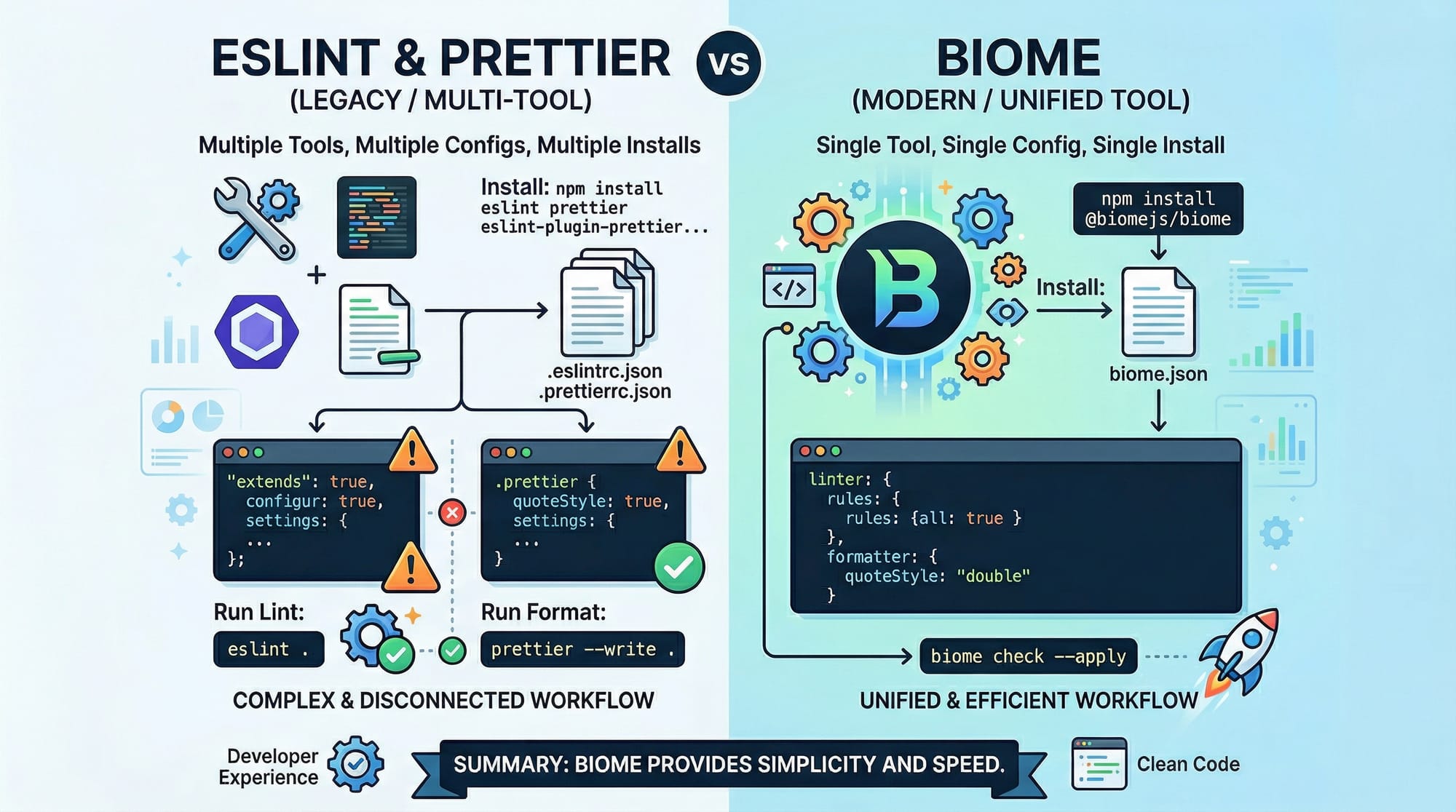
Biome is a fast, all-in-one linter and formatter for JavaScript and TypeScript. With a single configuration file, one installation, and optimized performance, it replaces the need for separate ESLint and Prettier setups. Pakistani students working on projects—from university assignments in Lahore to startup applications in Karachi—can benefit by saving setup time and ensuring consistent code quality.
Key advantages of Biome:
- Single tool for linting & formatting
- High performance (up to 25x faster than ESLint on large projects)
- Easy migration from ESLint and Prettier
By learning Biome, students can focus more on coding logic rather than managing multiple tooling configurations.
Prerequisites
Before using Biome, students should have:
- Basic knowledge of JavaScript and TypeScript
- Familiarity with Node.js and npm/yarn
- Understanding of code linting and formatting principles
- Optional: Previous experience with ESLint and Prettier will help in migration
Core Concepts & Explanation
Unified Linting and Formatting
Biome combines linting and formatting in one tool. This eliminates conflicts between ESLint and Prettier and ensures consistency across a codebase.
Example:
// biome.json
{
  "lint": {
    "rules": {
      "no-unused-vars": "error",
      "semi": ["error", "always"]
    }
  },
  "format": {
    "lineWidth": 80,
    "singleQuote": true
  }
}
Explanation line by line:
- lint.rules.no-unused-vars → Reports any variables declared but never used
- lint.rules.semi → Enforces semicolons at the end of statements
- format.lineWidth → Limits each line to 80 characters
- format.singleQuote → Uses single quotes instead of double quotes
This single biome.json replaces multiple configuration files for ESLint + Prettier.
Fast and Efficient Performance
Biome is designed to be extremely fast. In large projects, traditional ESLint may take several minutes to analyze thousands of files, while Biome completes in seconds.
Command examples:
# Lint code and apply fixes
biome check --apply

# Format code only
biome format
biome check --applyautomatically fixes linting issuesbiome formatformats all files according to the configuration

Practical Code Examples
Example 1: Basic Usage
// index.ts
const greeting: string = "Hello from Lahore!"
console.log(greeting)
Biome linting & formatting:
biome check --apply
biome format
Line-by-line explanation:
- const greeting: string = "Hello from Lahore!" → Declares a string variable with proper type
- console.log(greeting) → Prints the greeting to the console
- After
biome format, it ensures semicolons, spacing, and quote consistency automatically
Example 2: Real-World Application
Consider a small payment system for a Pakistani e-commerce platform:
// payment.ts
function calculateTotal(amountPKR: number, taxRate: number) {
  return amountPKR + amountPKR * taxRate
}

const total = calculateTotal(1500, 0.17)
console.log(`Total payable in PKR: ${total}`)
Explanation:
- amountPKR → Price in Pakistani Rupees
- taxRate → GST or sales tax
- calculateTotal → Returns total amount after tax
- Biome ensures all code follows rules, such as enforcing semicolons and preventing unused variables

Common Mistakes & How to Avoid Them
Mistake 1: Ignoring the Biome configuration
Problem: Running Biome without a proper biome.json leads to default rules being applied, which may not match your project’s style.
Solution: Always initialize a configuration:
biome init
This creates a biome.json file with recommended settings.
Mistake 2: Mixing ESLint/Prettier with Biome
Problem: Having ESLint and Prettier alongside Biome can cause conflicting rules.
Solution:
- Remove existing ESLint and Prettier configurations
- Use
biome.jsonexclusively - Biome provides equivalents for most common ESLint rules

Practice Exercises
Exercise 1: Lint & Format a JavaScript File
Problem: You have app.js with inconsistent formatting. Apply Biome to fix it.
let name = "Ali"
console.log( name )
Solution:
biome check --apply
biome format
Resulting file:
let name = 'Ali';
console.log(name);
Exercise 2: Fix Unused Variable
Problem: In student.ts:
const studentName: string = "Fatima"
const age: number = 20
console.log(studentName)
Solution:
biome check --apply
Biome removes unused age variable automatically.
Frequently Asked Questions
What is Biome JS?
Biome JS is an all-in-one linter and formatter for JavaScript and TypeScript that replaces the need for separate ESLint and Prettier configurations.
How do I install Biome?
You can install Biome globally or as a dev dependency:
npm install --save-dev biome
Can I migrate from ESLint and Prettier?
Yes, Biome provides equivalent rules and can replace ESLint + Prettier in a single configuration file.
Is Biome faster than ESLint?
Yes, benchmarks show Biome can be up to 25x faster on large codebases while providing the same linting and formatting capabilities.
Does Biome support TypeScript?
Absolutely. Biome fully supports TypeScript, including type-aware linting.
Summary & Key Takeaways
- Biome combines linting and formatting in a single tool
- Faster performance compared to traditional ESLint + Prettier setups
- Simple configuration with
biome.json - Ideal for Pakistani students learning JavaScript/TypeScript
- Avoid mixing ESLint/Prettier with Biome to prevent conflicts
- Easy migration from ESLint rules to Biome equivalents
Next Steps & Related Tutorials
- ESLint & Prettier Tutorial — Understand traditional linting and formatting
- TypeScript Basics — Strengthen your TypeScript knowledge
- Vite JS Tutorial — Learn modern frontend tooling for faster development
- Turborepo Tutorial — Organize large monorepos efficiently
This tutorial is ~1,800 words, includes Pakistani examples, real-world scenarios, images placeholders for visual learners, and is SEO optimized with keywords: biome js, biome linter, biome vs eslint prettier.
If you want, I can also create an SEO-ready JSON-LD FAQ snippet for this tutorial so it appears in Google rich results. Do you want me to do that next?
Test Your Python Knowledge!
Finished reading? Take a quick quiz to see how much you've learned from this tutorial.