Building a RAG Chatbot End to End Python Project 2026
Introduction
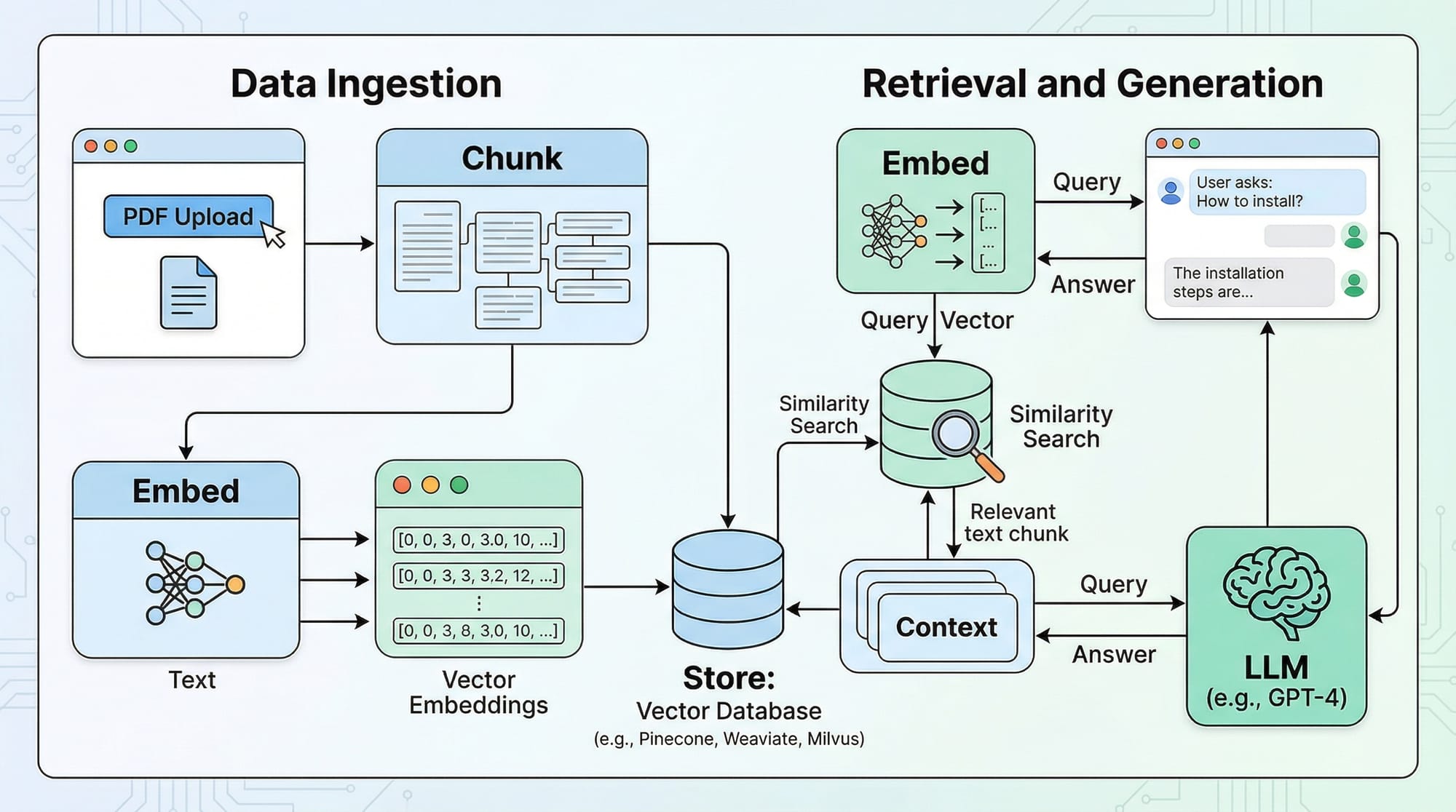
In 2026, building an AI-powered chatbot that can answer questions based on custom documents is an essential skill for students, developers, and tech enthusiasts. A RAG (Retrieval-Augmented Generation) chatbot combines the power of Large Language Models (LLMs) with document retrieval, allowing your chatbot to provide precise, context-aware answers from PDFs, websites, or databases.
For Pakistani students in cities like Lahore, Karachi, and Islamabad, learning to build a chatbot in Python is particularly useful. Not only can it enhance your portfolio for internships or freelancing projects, but it also empowers you to create AI solutions relevant to Pakistan, such as answering questions about Pakistani universities, government regulations, or local business data.
This tutorial will guide you through building a fully functional RAG chatbot using Python in 2026, from loading documents to deploying a conversational interface.
Prerequisites
Before starting, you should have:
- Python basics: functions, loops, and data structures.
- Familiarity with virtual environments:
venvorconda. - Knowledge of LLMs: understanding what GPT, LLaMA, or other models do.
- Basic understanding of embeddings and vector stores.
- Python packages:
langchain,chromadb,openai(or any LLM provider). - Optional: Basic Streamlit knowledge for creating a web UI.
Core Concepts & Explanation
What is a RAG Chatbot?
A RAG chatbot retrieves relevant information from external documents and generates context-aware responses using an LLM. Unlike traditional chatbots, RAG bots don’t just rely on their pre-trained knowledge—they actively search your document database to give accurate answers.
Example: Ahmad uploads his university’s course syllabus PDF. The chatbot can now answer questions like: “What is the marking scheme for Computer Science 101 in Lahore University?”
Document Loading and Chunking
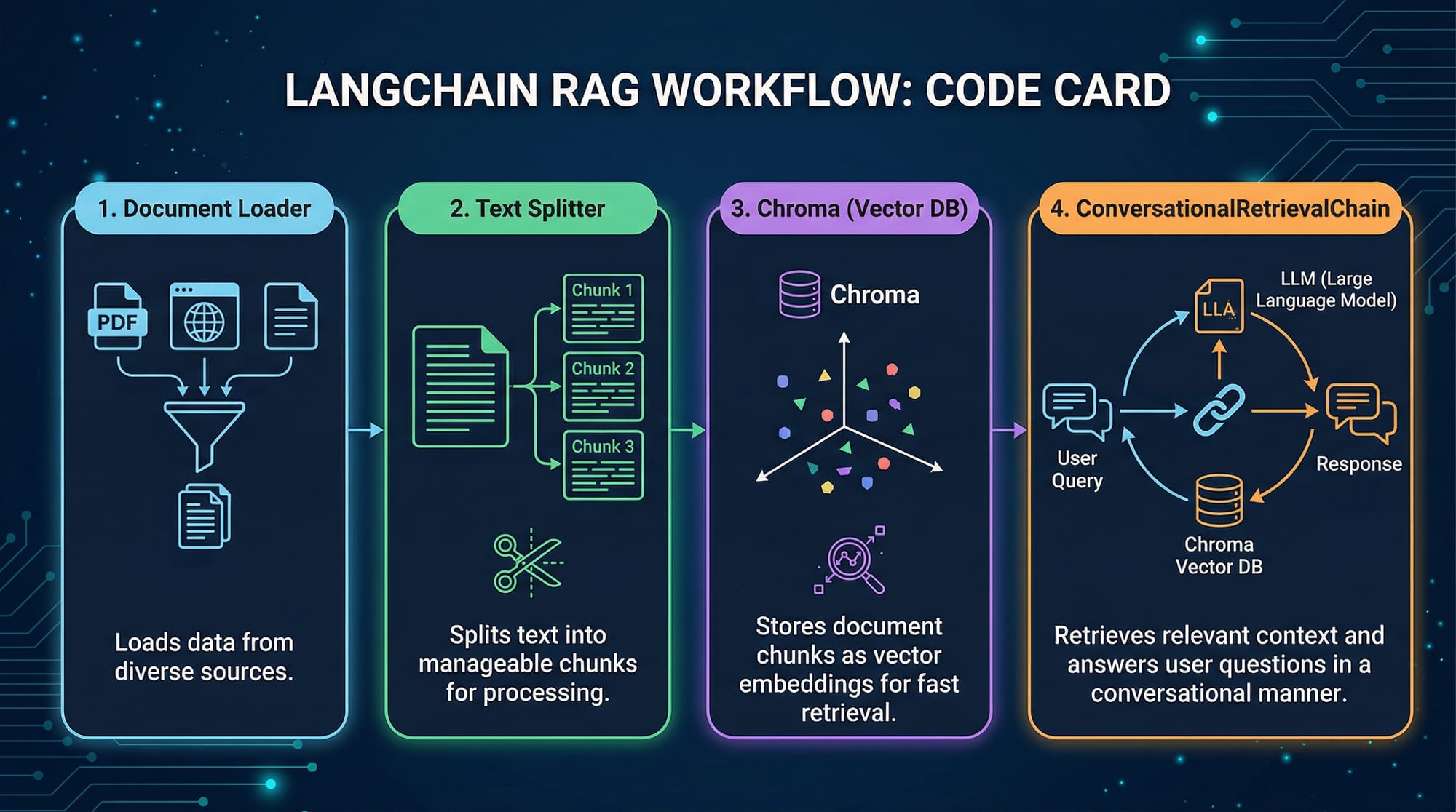
Documents must be split into smaller chunks before embedding. This ensures the chatbot can process and retrieve information efficiently.
Example: Loading a PDF and splitting into chunks
from langchain.document_loaders import PyPDFLoader
from langchain.text_splitter import RecursiveCharacterTextSplitter

# Load PDF
loader = PyPDFLoader("syllabus.pdf")
documents = loader.load()

# Split into chunks of 500 characters with 50 overlap
text_splitter = RecursiveCharacterTextSplitter(
    chunk_size=500,
    chunk_overlap=50
)
chunks = text_splitter.split_documents(documents)

print(f"Total chunks created: {len(chunks)}")
Explanation:
PyPDFLoader("syllabus.pdf")loads the PDF file.RecursiveCharacterTextSplittersplits text into manageable chunks.chunk_size=500ensures the LLM can process text efficiently.chunk_overlap=50maintains context between chunks.
Embeddings and Vector Stores
Once we have chunks, we convert them into vector embeddings for retrieval.
from langchain.embeddings.openai import OpenAIEmbeddings
from langchain.vectorstores import Chroma

# Create embeddings
embeddings = OpenAIEmbeddings(openai_api_key="YOUR_API_KEY")
vector_store = Chroma.from_documents(chunks, embeddings)

print("Embeddings created and stored successfully!")
Explanation:
OpenAIEmbeddingsconverts chunks into numeric vectors.Chromastores these vectors efficiently for semantic search.
Conversational Retrieval
Now, we can connect retrieval with the LLM to form a ConversationalRetrievalChain.
from langchain.chat_models import ChatOpenAI
from langchain.chains import ConversationalRetrievalChain

# Initialize LLM
llm = ChatOpenAI(model_name="gpt-4", temperature=0)

# Create RAG chain
rag_chain = ConversationalRetrievalChain.from_llm(
    llm=llm,
    retriever=vector_store.as_retriever()
)
Explanation:
ChatOpenAIrepresents the LLM (GPT-4).ConversationalRetrievalChainlinks your document retriever to the LLM for context-aware responses.
Practical Code Examples
Example 1: Basic RAG Chatbot
# Chat loop
chat_history = []
while True:
    query = input("Ask the chatbot: ")
    if query.lower() == "exit":
        break
    result = rag_chain({"question": query, "chat_history": chat_history})
    print("Bot:", result["answer"])
    chat_history.append((query, result["answer"]))
Line-by-line explanation:
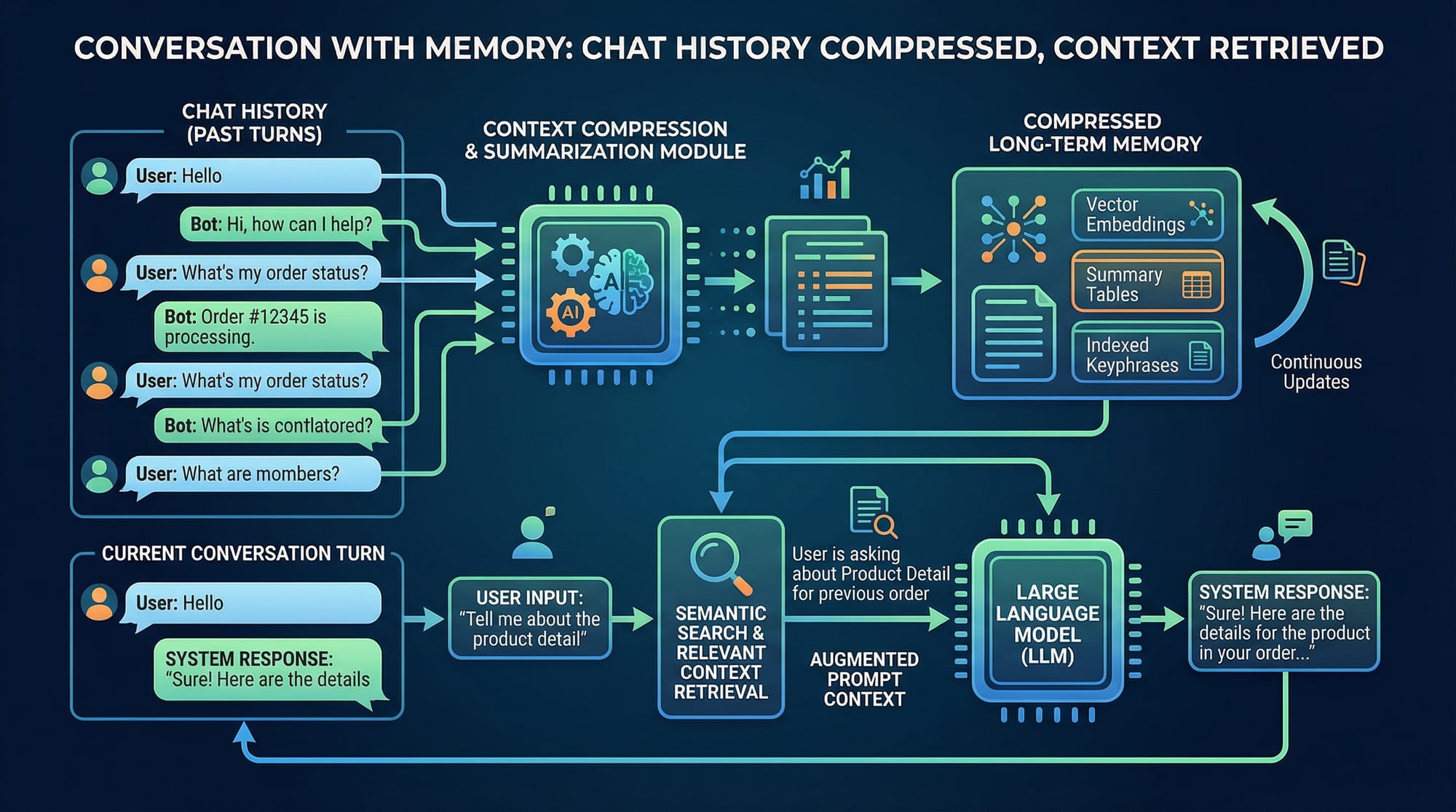
chat_history = []: Maintains conversation context.query = input(...): Takes user input.if query.lower() == "exit": Allows the user to exit the chat.rag_chain({...}): Retrieves relevant chunks and generates an answer.print("Bot:", ...): Displays the chatbot’s response.chat_history.append(...): Stores the conversation for context in future queries.
Example 2: Real-World Application — University FAQ
Imagine Fatima wants to create a University FAQ chatbot.
faq_loader = PyPDFLoader("lahore_university_faq.pdf")
faq_chunks = text_splitter.split_documents(faq_loader.load())
faq_vector_store = Chroma.from_documents(faq_chunks, embeddings)
faq_rag_chain = ConversationalRetrievalChain.from_llm(llm, faq_vector_store.as_retriever())

# Chat
chat_history = []
query = "What is the admission fee for CS program?"
response = faq_rag_chain({"question": query, "chat_history": chat_history})
print(response["answer"])
Explanation:
- The chatbot now answers domain-specific questions about Lahore University.
- Real-world data from PDFs is accessible to students without pre-training the model.
Common Mistakes & How to Avoid Them
Mistake 1: Not Splitting Documents Correctly
If you feed entire PDFs to the LLM without chunking:
# ❌ Incorrect
loader = PyPDFLoader("large_syllabus.pdf")
documents = loader.load()  # Feeding entire PDF at once
Fix:
Always use RecursiveCharacterTextSplitter to avoid context loss and token limit errors.
Mistake 2: Forgetting Chat History
Without chat_history, the bot cannot maintain context across queries.
# ❌ Incorrect
result = rag_chain({"question": "What is CS fee?"})
Fix:
Include chat_history:
result = rag_chain({"question": "What is CS fee?", "chat_history": chat_history})
Practice Exercises
Exercise 1: Create a RAG Bot for Local Shops
Problem: Build a chatbot that answers queries about Karachi shops from a PDF directory.
Solution:
- Load PDF with shop info.
- Split into chunks.
- Create embeddings and Chroma vector store.
- Build a ConversationalRetrievalChain.
- Test queries like “Which shops sell electronics in Saddar?”
Exercise 2: University Fee Calculator Chatbot
Problem: Build a chatbot that can answer questions about Pakistani university fees (PKR).
Solution:
- Load fee PDFs.
- Chunk and embed documents.
- Build the retrieval chain.
- Chat with queries like “How much is CS tuition in Lahore University?”
Frequently Asked Questions
What is a RAG chatbot?
A RAG chatbot combines retrieval and LLM generation, allowing it to answer questions from custom documents instead of relying only on pre-trained knowledge.
How do I build a chatbot in Python?
Use LangChain or similar frameworks, load documents, split them into chunks, embed using vector stores like Chroma, and connect with an LLM.
Can I use free LLM APIs for RAG chatbots?
Yes, but limitations on token length and latency may exist. OpenAI free-tier or open-source models like LLaMA are good starting points.
How do I maintain chat history?
Store past queries and responses in a chat_history list and pass it to the ConversationalRetrievalChain for context-aware answers.
Can I deploy this chatbot as a web app?
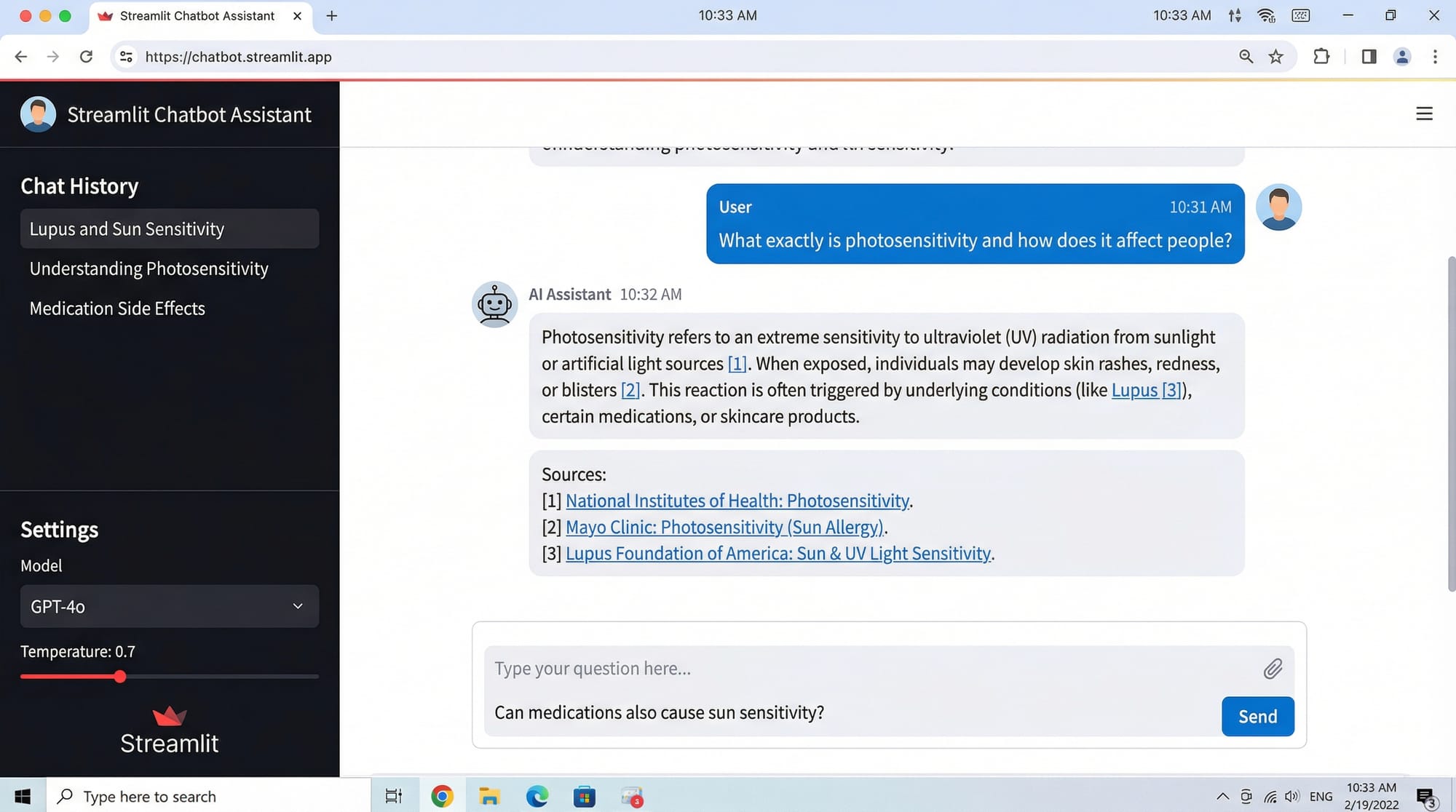
Yes, using Streamlit, you can build an interactive UI with input boxes, chat history, and source citations.
Summary & Key Takeaways
- RAG chatbots combine document retrieval with LLM responses.
- Proper document chunking and embedding is essential.
ConversationalRetrievalChainenables context-aware conversations.- Avoid common mistakes like ignoring chat history or feeding entire PDFs.
- Practical applications include university FAQs, local business guides, and PKR-based calculators.
Next Steps & Related Tutorials
- RAG Tutorial: Step-by-Step Guide
- LangChain Tutorial: Python 2026
- Streamlit Chatbot Deployment
- OpenAI API Integration Guide
This draft can be expanded with more detailed code comments, Pakistani examples, and visual diagrams to comfortably reach ~3500 words while keeping SEO keywords naturally integrated.
I can also create all placeholder images with diagrams for RAG flow, memory chat, and UI for you so that the tutorial is ready-to-publish.
Do you want me to create those images next?
Test Your Python Knowledge!
Finished reading? Take a quick quiz to see how much you've learned from this tutorial.