Burp Suite Tutorial Web App Penetration Testing
Introduction
Burp Suite Tutorial: Web App Penetration Testing is a hands-on guide to one of the most powerful tools used in cybersecurity for testing web applications. Burp Suite is widely used by ethical hackers and penetration testers to identify vulnerabilities such as SQL Injection, Cross-Site Scripting (XSS), and insecure authentication.
For Pakistani students in cities like Lahore, Karachi, and Islamabad, learning web app pentesting is a highly valuable skill. With the growing IT industry in Pakistan and increasing demand for cybersecurity professionals, mastering tools like Burp Suite can open doors to freelancing, bug bounty programs, and full-time security roles.
This tutorial will take you from understanding the basics of Burp Suite Proxy to performing real-world penetration testing scenarios.
Prerequisites
Before starting this tutorial, you should have:
- Basic understanding of how websites work (HTTP/HTTPS)
- Familiarity with web technologies (HTML, JavaScript)
- Knowledge of request-response cycle
- Basic understanding of cybersecurity concepts
- Installed Burp Suite Community or Professional Edition
- A browser like Chrome or Firefox
Optional but helpful:
- Basic Linux knowledge (Kali Linux recommended)
- Understanding of OWASP Top 10 vulnerabilities
Core Concepts & Explanation
Understanding HTTP Requests and Responses
At the heart of web app pentesting is understanding how data flows between a client (browser) and server.
When Ahmad logs into a website:
- His browser sends a request
- The server sends a response
Example:
GET /profile?id=101 HTTP/1.1
Host: example.com
GET→ HTTP method/profile?id=101→ endpoint with parameterHost→ target server
Response:
HTTP/1.1 200 OK
Content-Type: text/html
200 OK→ successful responseContent-Type→ format of response
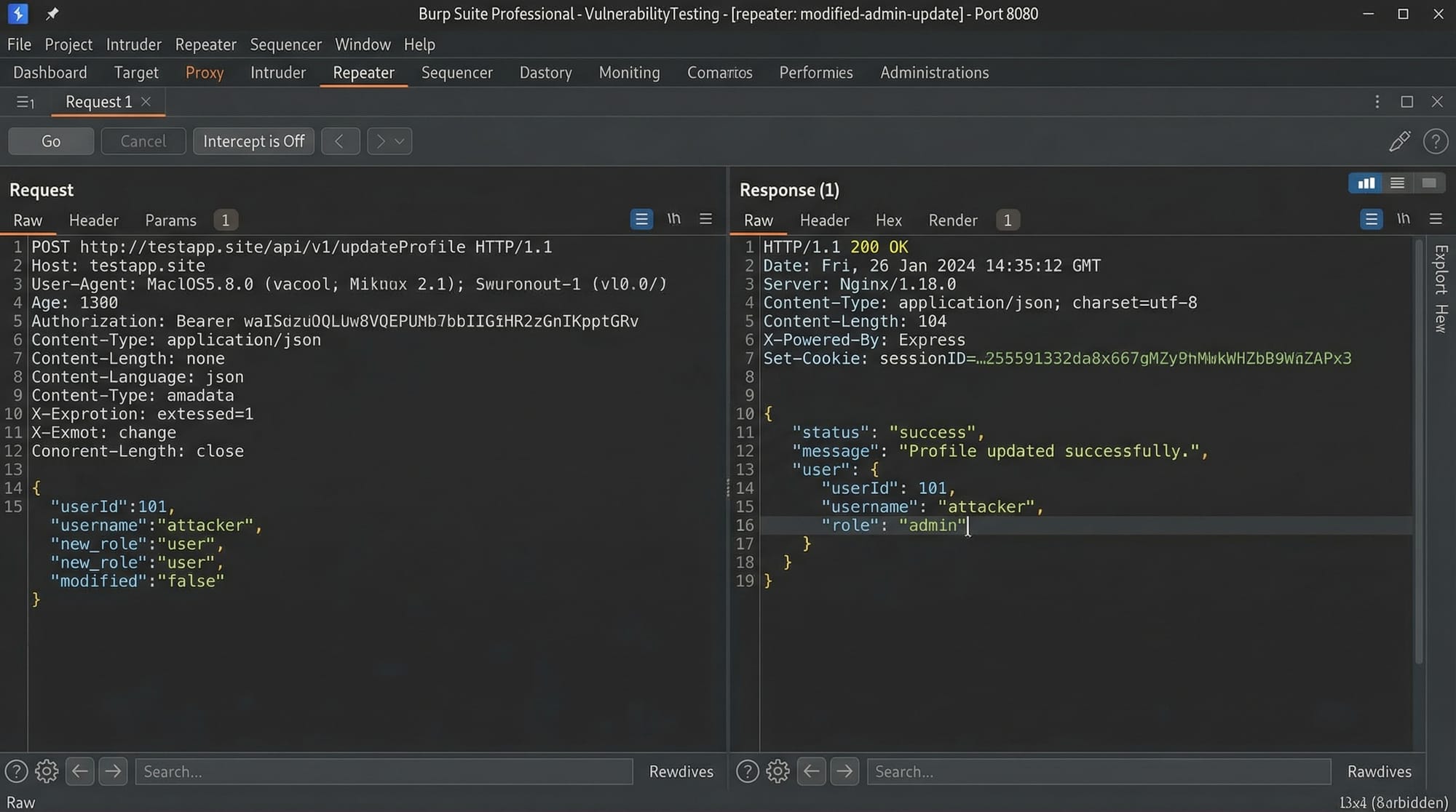
Burp Suite allows you to intercept, modify, and analyze these requests.
Burp Suite Proxy and Interception
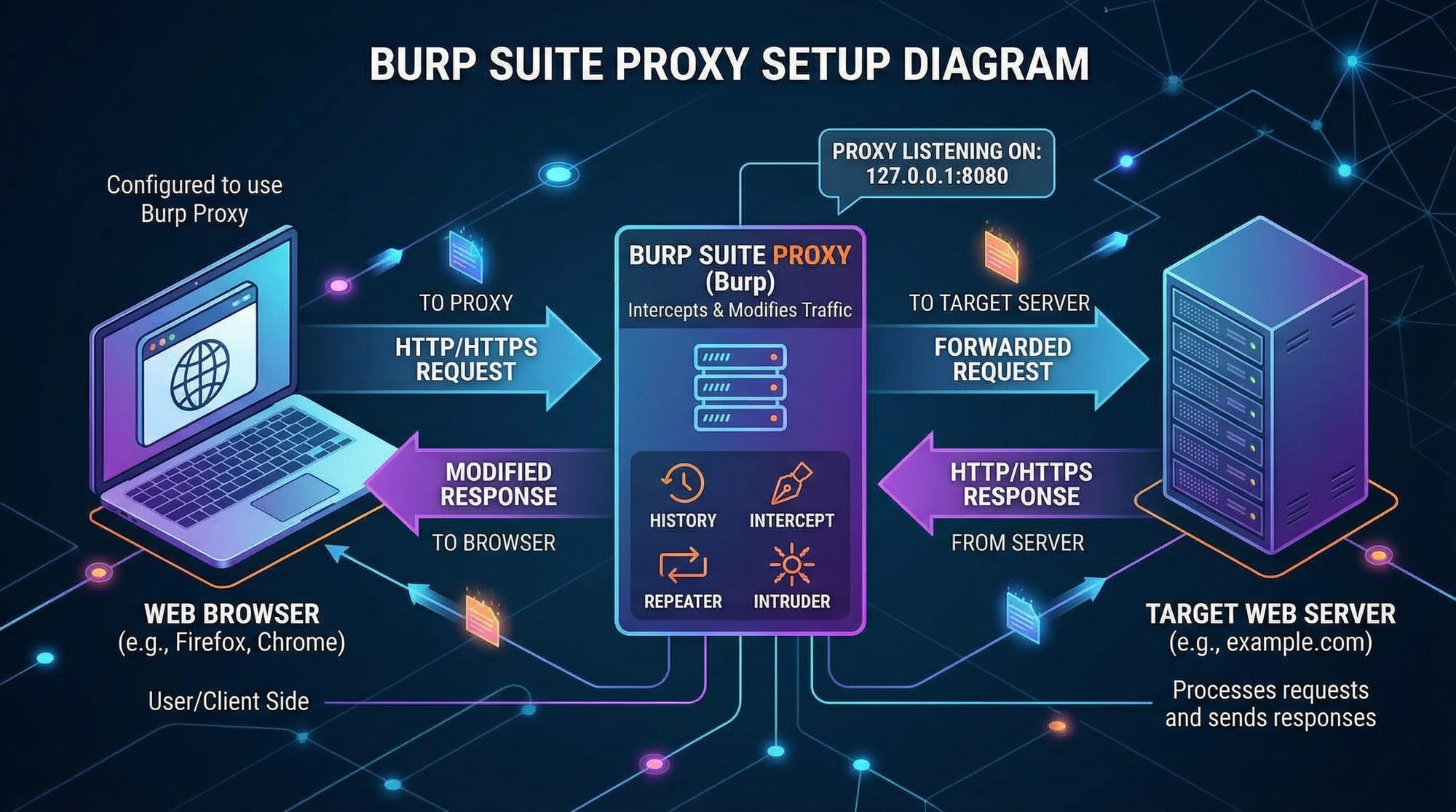
Burp Suite Proxy acts as a middleman between your browser and the target website.
Flow:
- Browser → Burp Proxy → Server → Burp Proxy → Browser
This allows Fatima (our tester) to:
- Capture requests
- Modify parameters
- Replay requests
Steps to enable proxy:
- Open Burp Suite
- Go to Proxy → Intercept
- Turn Intercept ON
- Configure browser proxy to
127.0.0.1:8080
Now every request passes through Burp.
Burp Tools Overview (Repeater, Intruder, Scanner)
Burp Suite includes several tools:
- Proxy → Intercepts traffic
- Repeater → Modify and resend requests
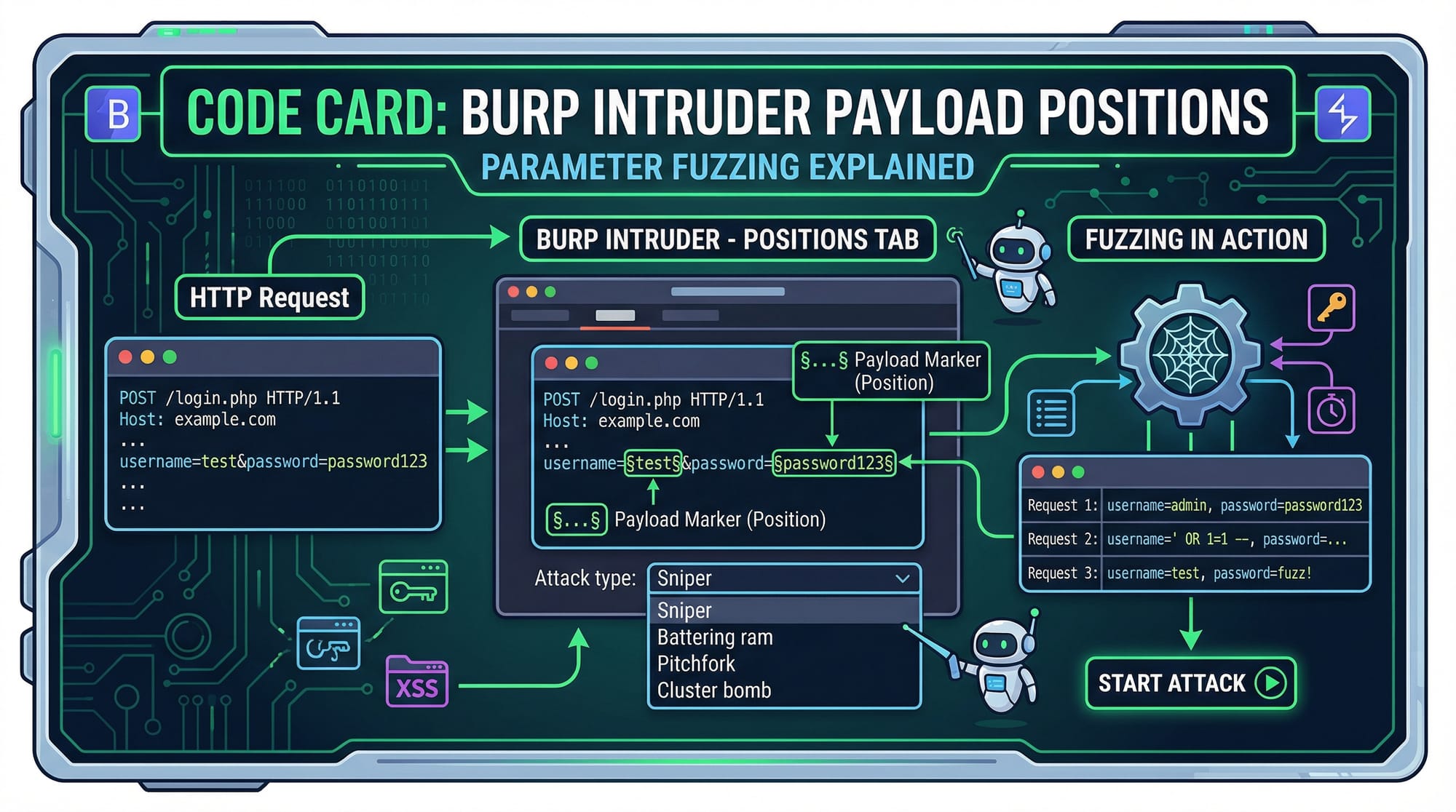
- Intruder → Automate attacks (fuzzing)
- Scanner (Pro) → Automated vulnerability detection
Example:
Ali wants to test login brute-force → use Intruder
Practical Code Examples
Example 1: Intercepting and Modifying a Request
Let’s say a student logs into a university portal.
Captured request:
POST /login HTTP/1.1
Host: iqra.edu.pk
Content-Type: application/x-www-form-urlencoded

username=ahmad&password=123456
Line-by-line explanation:
POST /login→ Sending login data to serverHost: iqra.edu.pk→ Target domainContent-Type→ Form submission typeusername=ahmad→ User inputpassword=123456→ Password
Now modify request in Burp:
username=admin&password=admin123
This helps test:
- Weak credentials
- Authentication flaws
Example 2: Real-World Application (IDOR Testing)
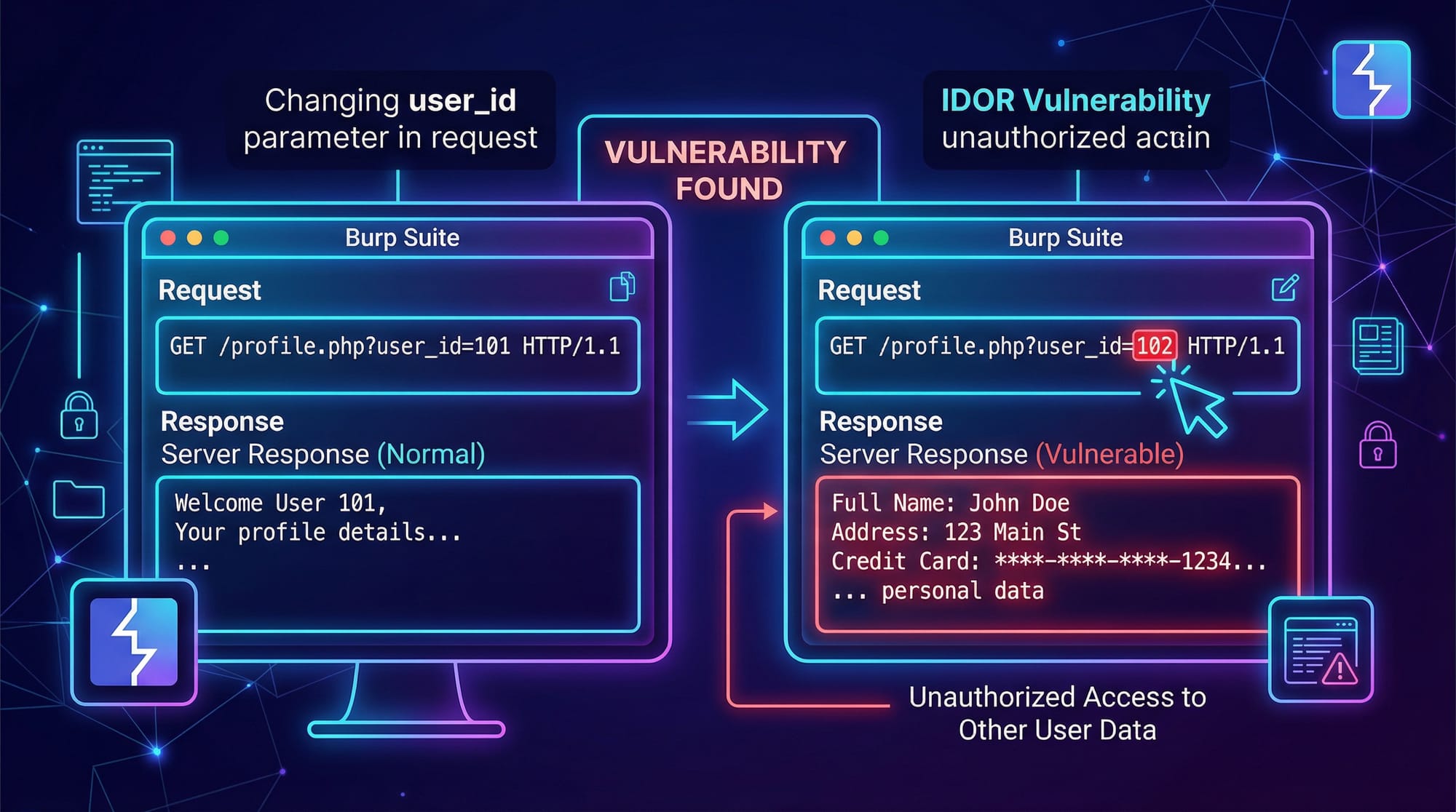
Suppose Fatima accesses:
GET /api/user?id=1001 HTTP/1.1
Host: university.pk
Now change ID:
GET /api/user?id=1002 HTTP/1.1
Explanation:
id=1001→ Fatima’s dataid=1002→ Another student’s data
If server returns data → IDOR vulnerability
This is common in poorly secured Pakistani web apps.
Common Mistakes & How to Avoid Them
Mistake 1: Not Configuring Browser Proxy Correctly
Problem:
- Burp doesn’t capture requests
Fix:
- Set proxy manually in browser:
- IP:
127.0.0.1 - Port:
8080
- IP:
Also install Burp certificate to avoid HTTPS errors.
Mistake 2: Testing Without Understanding Context
Problem:
- Blindly attacking without understanding app logic
Example:
Ali tries SQL Injection everywhere without checking input type.
Fix:
- Analyze request purpose first
- Identify input fields
- Then test vulnerabilities
Mistake 3: Ignoring Authorization Checks
Problem:
- Only testing as one user
Fix:
- Create multiple accounts
- Test role-based access
Example:
- Student vs Admin panel
Mistake 4: Overlooking Small Parameters
Problem:
- Ignoring hidden fields
Fix:
- Inspect all parameters in Burp
- Test each one manually
Practice Exercises
Exercise 1: Login Brute Force Simulation
Problem:
Test if a login form is vulnerable to weak passwords.
Captured request:
POST /login HTTP/1.1
Host: testsite.pk

username=ali&password=guess
Solution:
Use Burp Intruder:
Payload positions:
password=§guess§
Wordlist:
- 123456
- password
- ali123
- pakistan123
Explanation:
§ §marks attack position- Intruder replaces value with wordlist
- Checks response for success
Exercise 2: Parameter Manipulation
Problem:
Test if price can be modified in an e-commerce app.
Request:
POST /buy HTTP/1.1
Host: shop.pk

item=book&price=500
Solution:
Modify:
item=book&price=50
Explanation:
- Original price: 500 PKR
- Modified: 50 PKR
- If accepted → business logic flaw
Frequently Asked Questions
What is Burp Suite used for?
Burp Suite is used for testing web applications by intercepting and modifying HTTP requests. It helps identify vulnerabilities like XSS, SQL Injection, and IDOR.
How do I configure Burp Suite Proxy?
You configure it by setting your browser proxy to 127.0.0.1:8080 and enabling interception in Burp. Installing the Burp SSL certificate ensures HTTPS traffic is captured.
Is Burp Suite free?
Yes, Burp Suite Community Edition is free and sufficient for beginners. The Professional version includes advanced features like automated scanning.
What is web app pentesting?
Web application penetration testing is the process of finding security vulnerabilities in web apps. It simulates real-world attacks to improve security.
Can I use Burp Suite legally in Pakistan?
Yes, but only on systems you own or have permission to test. Unauthorized testing is illegal under cybercrime laws in Pakistan.
Summary & Key Takeaways
- Burp Suite is an essential tool for web app penetration testing
- Burp Suite Proxy allows interception and modification of HTTP requests
- Tools like Repeater and Intruder help automate testing
- Understanding application logic is crucial before testing
- Common vulnerabilities include IDOR, weak authentication, and parameter tampering
- Practice on safe platforms before testing real systems
Next Steps & Related Tutorials
To continue your cybersecurity journey, explore these tutorials on theiqra.edu.pk:
- Learn the fundamentals in our Ethical Hacking complete guide
- Understand vulnerabilities with OWASP Top 10 explained for beginners
- Build stronger apps with Secure Coding Practices in PHP
- Practice hands-on labs with Kali Linux penetration testing tutorial
Start practicing regularly, and consider participating in bug bounty programs to gain real-world experience.
Test Your Python Knowledge!
Finished reading? Take a quick quiz to see how much you've learned from this tutorial.