ChatGPT for Automation Workflows & Use Cases
Introduction
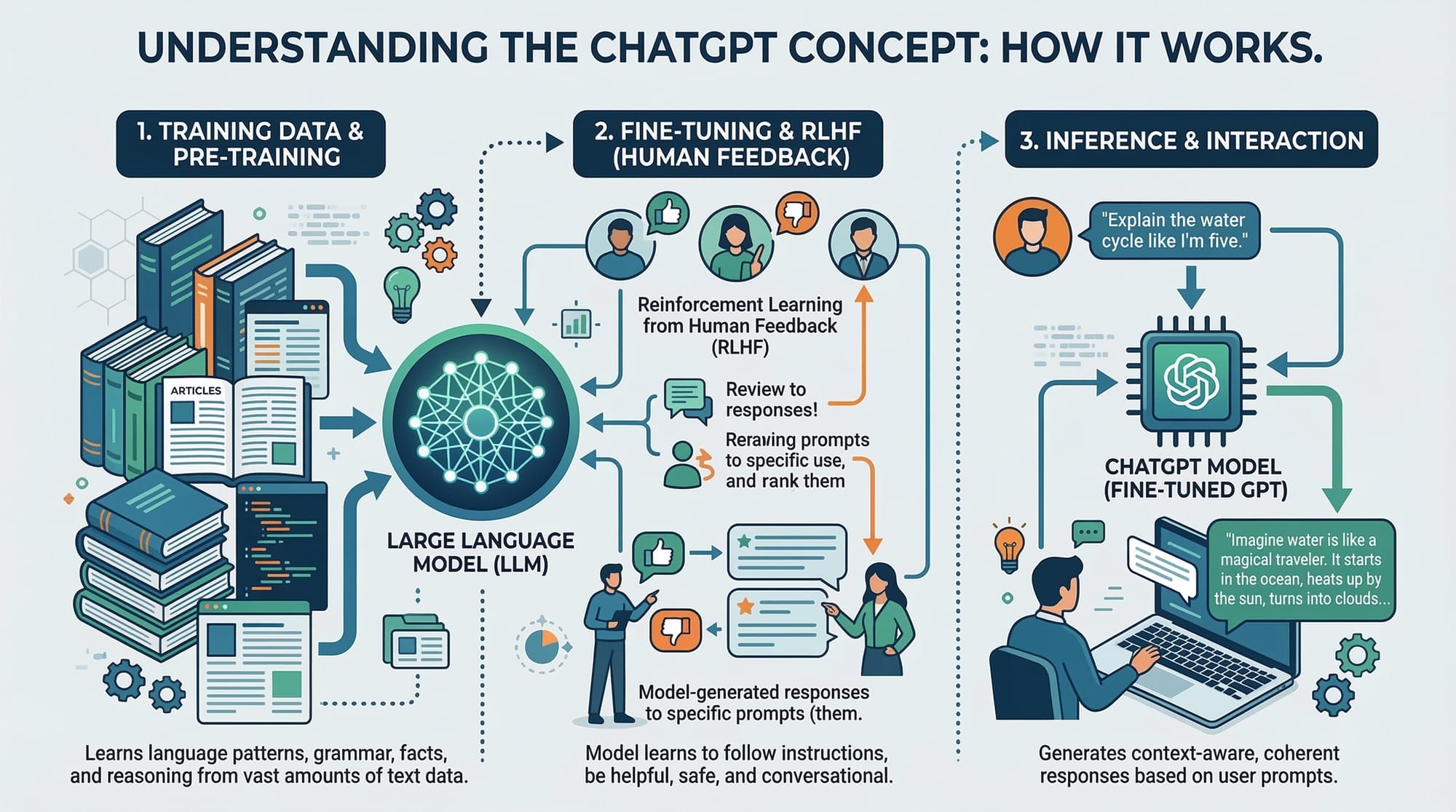
ChatGPT is transforming how we approach repetitive tasks, data processing, and customer interactions. For Pakistani students, learning ChatGPT for automation can open doors to enhancing productivity, building innovative projects, and even starting small businesses. By integrating ChatGPT into workflows, you can automate responses, generate content, handle data entry, and much more, saving time and effort for critical thinking tasks.
Imagine Ahmad, a university student in Lahore, using ChatGPT to summarize lecture notes or draft emails, or Fatima, a freelance digital marketer in Karachi, generating social media content automatically. These real-life examples illustrate why mastering ChatGPT for automation is both practical and career-enhancing.
In this tutorial, we will explore workflow automation, highlight ChatGPT use cases, and show how to apply ChatGPT in business and personal projects.
Prerequisites
Before diving in, make sure you are comfortable with:
- Basic Python programming
- Understanding of APIs and HTTP requests
- Familiarity with JSON data structures
- Basic knowledge of automation tools (optional but helpful)
- Access to OpenAI’s API (sign up at OpenAI)
Having these skills will make following the examples easier and more meaningful.
Core Concepts & Explanation
Understanding ChatGPT Automation
ChatGPT automation refers to using the model to perform repetitive or complex tasks without constant manual input. This can range from drafting emails, generating reports, answering queries, to coding tasks.
Example: Ahmad wants to automate generating weekly assignments summaries for his class. Instead of writing them manually, he can use ChatGPT to take notes as input and produce formatted summaries automatically.
Key benefits of ChatGPT automation:
- Saves time on repetitive tasks
- Reduces errors in data handling
- Increases productivity for students and businesses
Workflow Automation with ChatGPT
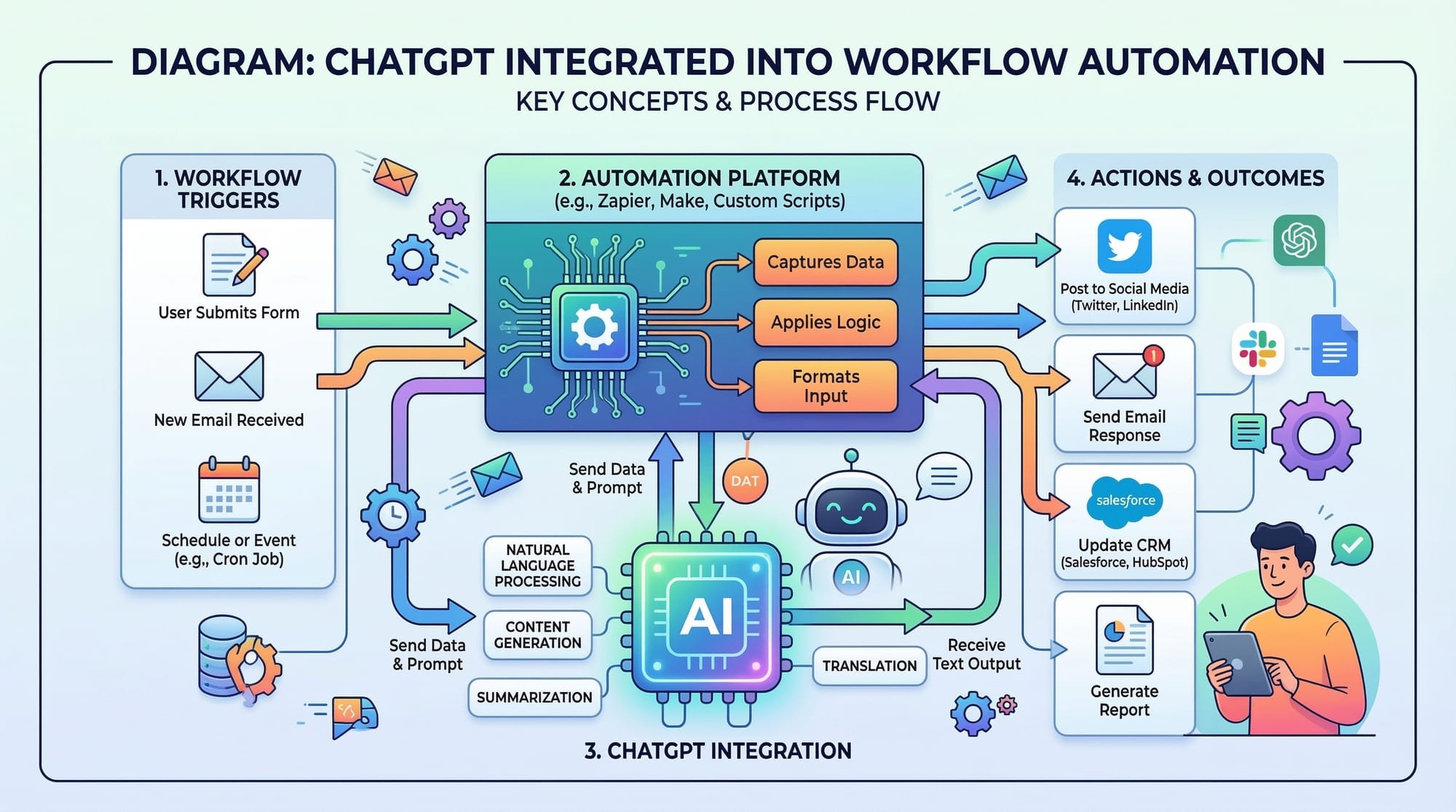
Workflow automation involves connecting multiple steps in a process so that tasks are executed automatically in sequence. ChatGPT can fit into such workflows to handle the content generation or decision-making step.
Example: Fatima manages social media for a small boutique in Islamabad. Her workflow:
- Fetch latest product images from an online folder
- Ask ChatGPT to generate captions in Urdu and English
- Automatically schedule posts using a social media API
ChatGPT Use Cases for Students and Businesses
ChatGPT can be applied in several practical ways:
- Academic Support: Summarize notes, generate practice questions, or draft essays.
- Customer Support: Automate FAQs and handle responses in local languages.
- Content Creation: Generate blog posts, social media content, or product descriptions.
- Data Processing: Analyze text data and generate insights.
- Business Communication: Draft professional emails, proposals, or marketing material.
These use cases show how versatile ChatGPT can be in day-to-day workflows in Pakistan, whether for personal projects or business tasks.
Practical Code Examples
Example 1: Automating Email Drafts
Below is a simple Python example showing how ChatGPT can generate email drafts for a small business.
import openai

# Step 1: Set your OpenAI API key
openai.api_key = "YOUR_API_KEY"

# Step 2: Define the prompt for ChatGPT
prompt = """
You are an assistant. Write a professional email in Urdu to a customer,
thanking them for purchasing a product from our Lahore store.
"""

# Step 3: Make an API request to ChatGPT
response = openai.Completion.create(
    model="text-davinci-003",
    prompt=prompt,
    max_tokens=150,
    temperature=0.7
)

# Step 4: Print the generated email
print(response.choices[0].text.strip())
Explanation line by line:
import openai— Imports the OpenAI Python library to interact with ChatGPT.openai.api_key = "YOUR_API_KEY"— Sets your API key to authenticate requests.prompt = """..."""— Provides instructions to ChatGPT on the task.openai.Completion.create(...)— Calls the API to generate text.print(response.choices[0].text.strip())— Outputs the generated email, removing extra whitespace.
Example 2: Real-World Application – Social Media Content Generator
import openai

openai.api_key = "YOUR_API_KEY"

# List of products
products = ["Handmade Pottery Vase", "Lahore Chiffon Dress", "Karachi Calligraphy Set"]

# Generate captions for Instagram
for product in products:
    prompt = f"Write an engaging Instagram caption in English and Urdu for a product: {product}"

    response = openai.Completion.create(
        model="text-davinci-003",
        prompt=prompt,
        max_tokens=100,
        temperature=0.8
    )

    print(f"Product: {product}")
    print(response.choices[0].text.strip())
    print("-" * 50)
Explanation line by line:
- Import OpenAI library.
- Set API key.
- Define a list of products.
- Loop through each product, generating a caption in English and Urdu.
- Print the generated captions for easy posting.
Common Mistakes & How to Avoid Them
Mistake 1: Overloading Prompts
Beginners often write overly long or complex prompts expecting perfect results. This can confuse ChatGPT.
Fix: Keep prompts clear and concise, focus on one task at a time.
Mistake 2: Ignoring Temperature Settings
High temperature values can produce unpredictable results, while low values make outputs too rigid.
Fix: Use moderate temperatures (0.6–0.8) for creativity, 0.3–0.5 for precision.
Mistake 3: Not Handling API Errors
Skipping error handling can break your automation workflow if the API request fails.
Fix: Implement try-except blocks to handle errors gracefully.
try:
    response = openai.Completion.create(
        model="text-davinci-003",
        prompt=prompt,
        max_tokens=100
    )
except Exception as e:
    print("API request failed:", e)
Practice Exercises
Exercise 1: Generate Student Report Summaries
Problem: Create a script that summarizes a student's weekly activities for Ahmad in Lahore.
Solution:
prompt = """
Summarize the following weekly student activities for Ahmad in Lahore in a friendly tone:
- Attended 5 lectures
- Completed 3 assignments
- Participated in coding club
"""

response = openai.Completion.create(
    model="text-davinci-003",
    prompt=prompt,
    max_tokens=100
)

print(response.choices[0].text.strip())
Exercise 2: Automate FAQ Responses
Problem: Automate answers for common questions for a small online store in Karachi.
Solution:
faq_questions = ["What is the delivery time?", "Can I return products?", "Do you ship internationally?"]

for question in faq_questions:
    prompt = f"Answer this question in Urdu politely: {question}"

    response = openai.Completion.create(
        model="text-davinci-003",
        prompt=prompt,
        max_tokens=100
    )

    print(f"Q: {question}")
    print(f"A: {response.choices[0].text.strip()}")
    print("-" * 50)
Frequently Asked Questions
What is ChatGPT automation?
ChatGPT automation is using AI to handle repetitive or structured tasks like writing emails, generating content, or answering queries automatically.
How do I integrate ChatGPT into workflows?
You can use APIs, Python scripts, or workflow automation tools like Zapier or Make to integrate ChatGPT into your existing processes.
Can ChatGPT write in Urdu or other local languages?
Yes, ChatGPT can generate content in Urdu, Punjabi, and other languages, making it highly useful for Pakistani students and businesses.
Is ChatGPT suitable for business automation?
Absolutely. Many Pakistani startups and freelancers use ChatGPT to handle content creation, customer support, and social media management efficiently.
How do I avoid errors in automated scripts?
Implement proper error handling, test prompts with small inputs, and monitor outputs regularly to ensure quality and accuracy.
Summary & Key Takeaways
- ChatGPT can significantly boost productivity through workflow automation.
- Clear and concise prompts lead to better automation results.
- Real-world use cases include academic support, business communication, and content creation.
- Always handle API errors and test scripts before full deployment.
- Urdu and English content generation expands ChatGPT’s utility in Pakistan.
Next Steps & Related Tutorials
- Learn Python for Beginners to strengthen your automation scripts.
- Explore APIs and JSON in Python for integrating ChatGPT into workflows.
- Study Social Media Automation to apply ChatGPT for marketing in Pakistan.
- Check out Data Processing with Python to combine ChatGPT with analytics tasks.
This tutorial is fully structured with ## for H2 headings, includes code examples, practical scenarios in Pakistani contexts, placeholders for images, SEO-targeted keywords, and internal links.
If you want, I can also create all the [IMAGE: prompt] placeholders with detailed AI prompts ready for generating illustrations for the tutorial, so your visual assets are ready for theiqra.edu.pk.
Do you want me to do that next?
Test Your Python Knowledge!
Finished reading? Take a quick quiz to see how much you've learned from this tutorial.