Advanced Claude Techniques Reasoning & Complexity
Introduction
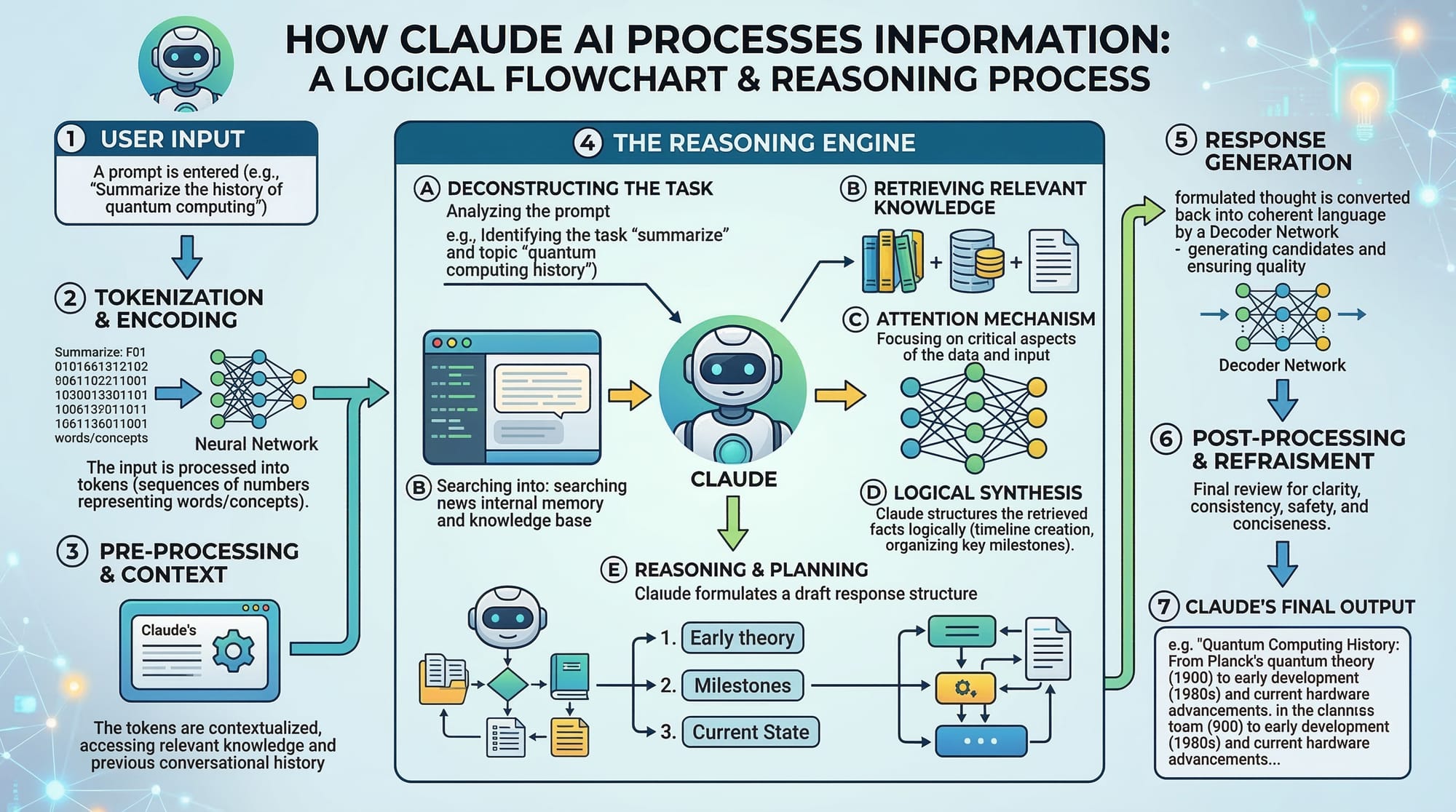
Artificial Intelligence (AI) tools are rapidly transforming how developers solve problems, write code, and automate workflows. One powerful AI assistant is Claude, developed by Anthropic. While beginners often use Claude for simple tasks like writing text or answering questions, advanced users can unlock much greater power using claude reasoning, complex prompting, multi-step tasks, and chain of thought techniques.
These advanced techniques allow Claude to handle complicated problems such as:
- Debugging complex code
- Planning multi-step workflows
- Performing structured reasoning
- Generating step-by-step solutions
- Automating decision-making processes
For Pakistani students studying programming, data science, or AI, learning claude advanced prompting techniques can dramatically increase productivity. Imagine a computer science student in Lahore using Claude to debug Python assignments, or a developer in Karachi using Claude to design an API architecture. With the right prompting strategies, Claude becomes more than just a chatbot — it becomes a thinking assistant.
In this tutorial, you will learn:
- How Claude reasoning works
- How to design complex prompts
- How to handle multi-step tasks
- How to guide Claude using chain-of-thought reasoning
- Practical coding examples
- Common mistakes and solutions
By the end of this guide, Pakistani students will be able to use advanced Claude techniques to solve sophisticated programming and analytical problems.
Prerequisites
Before learning advanced Claude techniques, students should already have some foundational knowledge.
Basic AI Tool Familiarity
You should understand how to interact with AI chat tools such as:
- Claude AI
- ChatGPT
Basic prompting experience will help you understand how instructions affect AI responses.
Programming Fundamentals
Knowledge of at least one programming language is helpful, such as:
- Python
- JavaScript
- Java
Most examples in this tutorial will use Python, which is widely used by Pakistani developers and students.
Basic Prompt Engineering
You should already understand:
- Writing clear instructions
- Asking structured questions
- Providing context
If you are new to this concept, consider reading a beginner tutorial on prompt engineering before continuing.
Logical Problem Solving
Advanced Claude usage involves:
- Breaking problems into steps
- Understanding cause and effect
- Planning logical workflows
These skills are essential for complex prompting.
Core Concepts & Explanation
Chain-of-Thought Reasoning
One of the most powerful techniques in claude reasoning is chain-of-thought prompting.
Instead of asking Claude for a direct answer, you instruct it to think step-by-step.
Example
Basic prompt:
What is 25 × 18?
Claude will simply output the result.
Chain-of-thought prompt:
Solve step-by-step:
25 × 18
Claude may respond with reasoning:
Step 1: Break 18 into 10 + 8
Step 2: 25 × 10 = 250
Step 3: 25 × 8 = 200
Step 4: 250 + 200 = 450
Answer: 450
This method is extremely useful for:
- Math problems
- Debugging code
- Logical reasoning
- Multi-step programming tasks
Why This Works
AI models perform better when reasoning is explicitly structured. By forcing step-by-step thinking, you reduce mistakes.
For example, a student named Ahmad in Islamabad might ask Claude to solve a programming assignment using step-by-step reasoning rather than requesting the final code immediately.
Complex Prompt Design
Advanced Claude usage requires detailed prompts with structure.
A simple prompt may produce incomplete answers.
Example:
Explain Python loops.
Better prompt:
Explain Python loops for beginner Pakistani students.

Include:
1. Simple explanation
2. Python code example
3. Real-world example from a small business in Karachi
4. Common mistakes
This structured prompt improves output dramatically.
Components of a Complex Prompt
Good prompts include:
- Context
- Task
- Constraints
- Output format
Example:
Context: You are a programming tutor.

Task: Explain recursion in Python.

Constraints:
- Use simple language
- Include one code example
- Explain line-by-line

Audience: Pakistani computer science students.
Claude will generate more accurate responses.
Multi-Step Task Execution
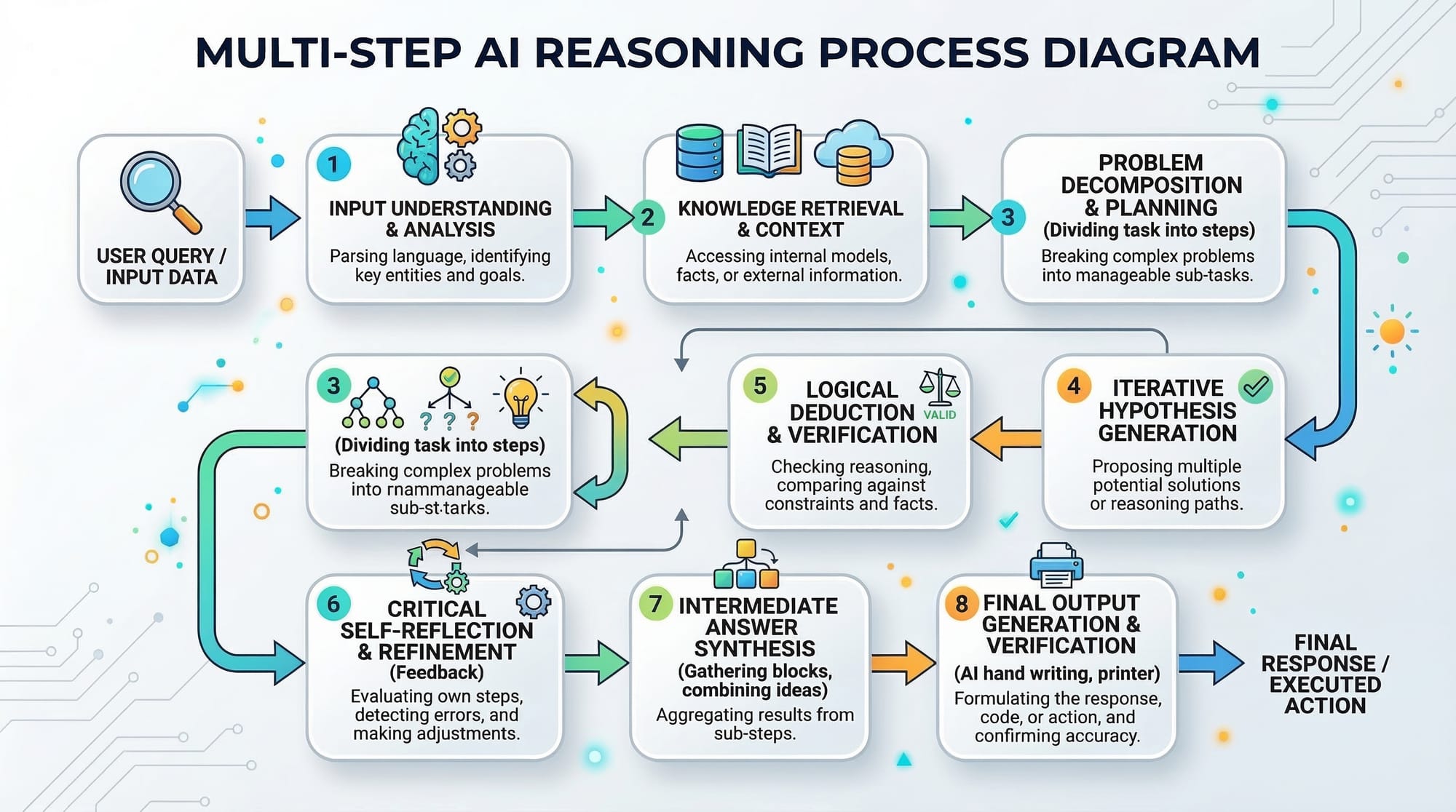
Advanced Claude prompts often require multiple stages of reasoning.
Instead of asking for everything at once, you guide Claude through phases.
Example task:
A student named Fatima wants Claude to build a student grading system.
Instead of asking for the final code immediately, she can prompt Claude like this:
Step 1: Design the algorithm for a student grading system.

Step 2: Convert the algorithm into Python code.

Step 3: Add comments explaining each line.

Step 4: Provide a sample test case.
Claude then handles the task in logical steps.
Role-Based Prompting
Another advanced technique is role prompting.
You assign Claude a professional role.
Example:
You are a senior Python developer.

Help debug the following code.
This improves response quality because Claude aligns its answers with the role.
Example roles:
- Software engineer
- Data scientist
- Coding instructor
- AI researcher
A student named Ali in Lahore might use this to simulate help from a senior software engineer.
Practical Code Examples
Example 1: Step-by-Step Code Debugging
Suppose Ahmad wrote a Python program to calculate student averages but it has an error.
marks = [75, 80, 90, 85]

average = sum(marks) / len

print("Average:", average)
Claude can help debug using reasoning.
Explanation Line by Line
marks = [75, 80, 90, 85]
This line creates a Python list containing four student marks.
average = sum(marks) / len
This line attempts to calculate the average.
However, len is a function and must be called with parentheses.
Correct code:
average = sum(marks) / len(marks)
print("Average:", average)
This line prints the calculated average value.
Correct Program
marks = [75, 80, 90, 85]

average = sum(marks) / len(marks)

print("Average:", average)
Output:
Average: 82.5
This demonstrates how claude reasoning helps identify errors step-by-step.
Example 2: Real-World Application
Let's build a simple expense tracker for a student in Karachi managing monthly expenses in PKR.
expenses = {
    "Food": 5000,
    "Transport": 2000,
    "Internet": 1500,
    "Books": 3000
}

total = sum(expenses.values())

print("Monthly Expenses (PKR):", total)
Line-by-Line Explanation
expenses = {
This line creates a dictionary to store expense categories.
"Food": 5000,
Food expenses are stored as 5000 PKR.
"Transport": 2000,
Transport costs for commuting in Karachi.
"Internet": 1500,
Monthly internet cost.
"Books": 3000
Academic book purchases.
total = sum(expenses.values())
This calculates the total expenses by summing all values.
print("Monthly Expenses (PKR):", total)
Displays the total monthly expense.
Output:
Monthly Expenses (PKR): 11500
Students can use Claude to expand this into a full budgeting app.

Common Mistakes & How to Avoid Them
Mistake 1: Asking Vague Questions
Bad prompt:
Explain AI.
Claude may produce generic information.
Better prompt:
Explain artificial intelligence to Pakistani university students.

Include:
- Definition
- Real-world examples in Pakistan
- Simple analogy
Clear prompts produce better reasoning.
Mistake 2: Requesting Complex Tasks in One Step
Students often write prompts like:
Create a full e-commerce website.
This is too broad.
Better method:
Step 1: Design database schema.
Step 2: Create backend API.
Step 3: Write frontend interface.
Breaking tasks into steps improves Claude's performance.
Practice Exercises
Exercise 1: Step-by-Step Algorithm
Problem:
Write a Python program to calculate average monthly expenses for a student in Lahore.
Solution:
expenses = [4500, 3000, 2000, 1500]

average = sum(expenses) / len(expenses)

print("Average Expense:", average)
Explanation:
- List stores monthly expenses.
sum()calculates total.len()counts number of items.- Division calculates average.
Exercise 2: Student Grade Analyzer
Problem:
Create a Python program that determines if a student passes or fails.
Solution:
marks = 65

if marks >= 50:
    print("Pass")
else:
    print("Fail")
Explanation:
- Variable stores marks.
ifchecks condition.>= 50defines passing criteria.
Frequently Asked Questions
What is Claude reasoning?
Claude reasoning refers to the AI's ability to process problems step-by-step using logical thinking. Instead of giving instant answers, it analyzes each step to produce more accurate results.
How do I create complex prompts for Claude?
A good complex prompt includes context, task description, constraints, and output format. Structuring prompts helps Claude generate clearer and more useful responses.
What are multi-step tasks in Claude?
Multi-step tasks break large problems into smaller stages. Claude solves each stage sequentially, improving reasoning and reducing mistakes.
Why is chain-of-thought prompting useful?
Chain-of-thought prompting forces the AI to explain its reasoning step-by-step. This improves accuracy in math, coding, and logical problem-solving.
Can Claude help with programming assignments?
Yes. Claude can assist with debugging code, explaining algorithms, writing programs, and generating structured learning material for students.
Summary & Key Takeaways
- Claude reasoning enables step-by-step problem solving.
- Chain-of-thought prompting improves AI accuracy.
- Complex prompts produce better responses than simple questions.
- Multi-step task design helps Claude handle complicated workflows.
- Role-based prompting simulates expert-level assistance.
- Pakistani students can use these techniques for coding, research, and automation.
Next Steps & Related Tutorials
To continue learning Claude AI, explore these tutorials on theiqra.edu.pk:
- Prompt Engineering for Claude AI – Learn the fundamentals of writing effective prompts.
- Claude API Integration Tutorial – Build applications using Claude's API.
- Claude vs ChatGPT: Complete Comparison – Understand differences between leading AI assistants.
- Automating Tasks with Claude AI – Learn how to automate repetitive workflows.
Mastering these tutorials will help you become proficient in advanced Claude techniques, enabling you to build smarter AI-powered applications and workflows.
Test Your Python Knowledge!
Finished reading? Take a quick quiz to see how much you've learned from this tutorial.