Claude API Building AI Applications with Claude
Introduction
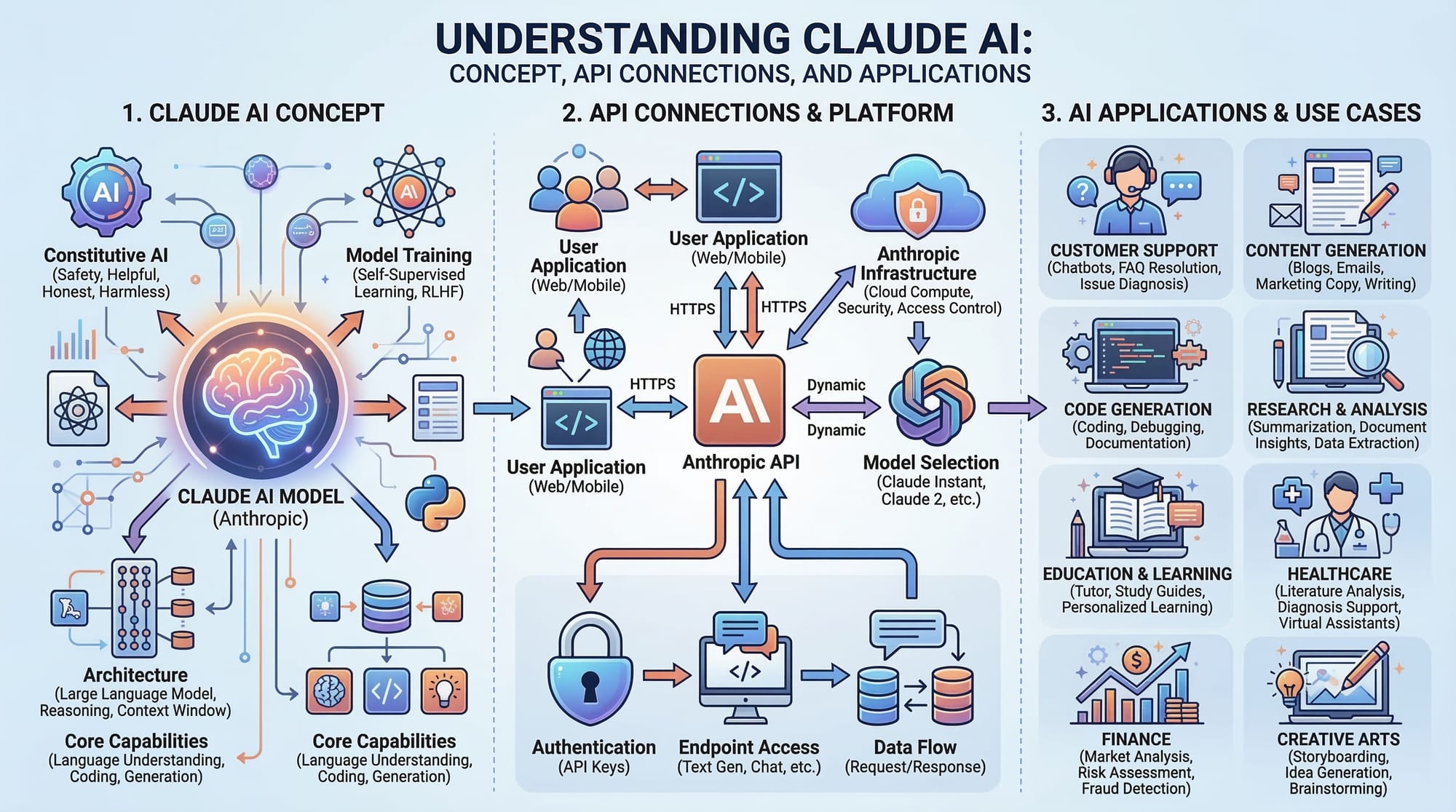
Artificial Intelligence (AI) is transforming how software is built across the world, including Pakistan. One of the most powerful tools available to developers today is the Claude API, provided by Anthropic. The Claude API allows developers to integrate advanced AI capabilities into their applications, such as natural language understanding, content generation, chatbots, coding assistants, and much more.
For Pakistani students learning programming, understanding the Anthropic API and Claude integration can open doors to building modern AI-powered applications. Companies in cities like Karachi, Lahore, and Islamabad are increasingly looking for developers who understand how to work with AI APIs.
By learning building with Claude, students can create projects such as:
- AI chatbots for customer service
- Automated essay writers
- AI-powered tutoring systems
- Coding assistants
- Content summarization tools
These types of AI applications are becoming common in startups and tech companies.
In this tutorial, you will learn:
- What the Claude API is and how it works
- How to set up the Anthropic API
- Core concepts of Claude integration
- Practical coding examples
- Common mistakes developers make
- Exercises to strengthen your understanding
By the end of this guide, you will be able to build your own AI applications using Claude.
Prerequisites
Before starting this tutorial, you should have basic knowledge of the following topics.
Basic Programming Knowledge
You should understand at least one programming language such as:
- Python
- JavaScript (Node.js)
Python is commonly used for AI development, so we will use Python examples in this tutorial.
Understanding of APIs
You should know basic API concepts:
- What an API is
- Sending requests
- Receiving responses in JSON
If you have previously worked with APIs like OpenAI or REST APIs, this will be easier.
Basic Command Line Usage
You should know how to:
- Install packages using
pip - Run Python scripts
- Set environment variables
An Anthropic API Key
To use the Claude API, you need to create an account at the Anthropic developer platform and generate an API key.
This key allows your application to communicate with Claude securely.
Core Concepts & Explanation
Before writing code, it is important to understand how the Claude API works.
Claude API Architecture
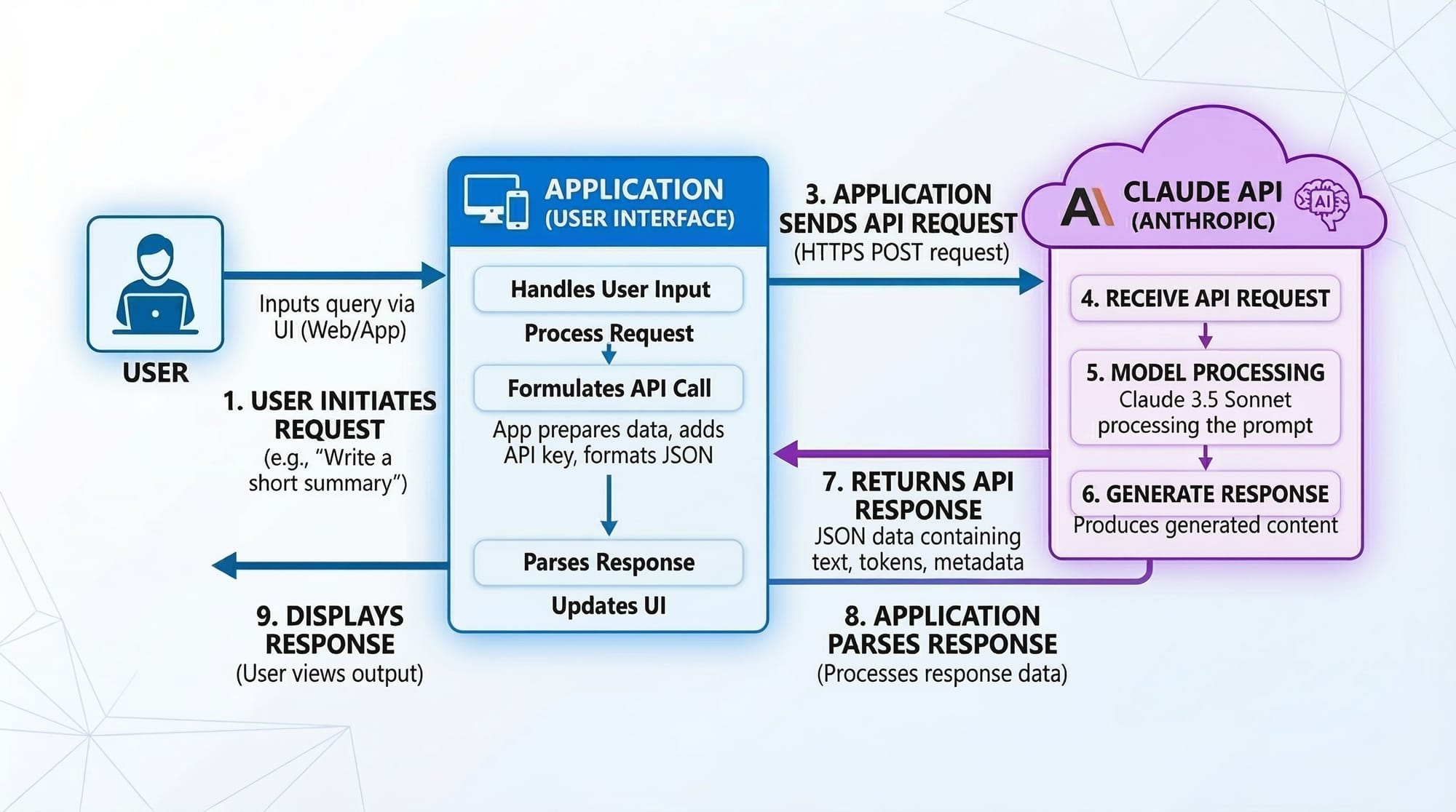
The Claude API works using a request-response model.
Your application sends a prompt to Claude, and Claude returns a response generated by its AI model.
The basic workflow looks like this:
- User enters a request
- Your app sends the request to Claude API
- Claude processes the prompt
- Claude sends back a response
- Your app displays the output
For example, imagine Ahmad, a student in Lahore, building a study assistant.
He enters:
"Explain Python loops in simple words."
Claude processes the request and generates a clear explanation.
Prompts and Responses
The prompt is the input you send to Claude.
The response is the output returned by Claude.
Example prompt:
Explain what a Python function is.
Claude may respond with:
A Python function is a reusable block of code that performs a specific task.
Good prompts lead to better AI results.
For example:
Poor prompt:
Explain coding
Better prompt:
Explain Python functions with a simple example for beginner students.
Prompt quality significantly affects Claude's output.
Claude Models
Anthropic offers multiple Claude models with different capabilities.
Examples include:
- Claude Opus – most powerful reasoning
- Claude Sonnet – balanced performance
- Claude Haiku – fast and lightweight
For student projects and web apps, Sonnet or Haiku are usually enough.
Practical Code Examples
Now we will build simple AI applications using the Claude API.
Example 1: Simple Claude API Request
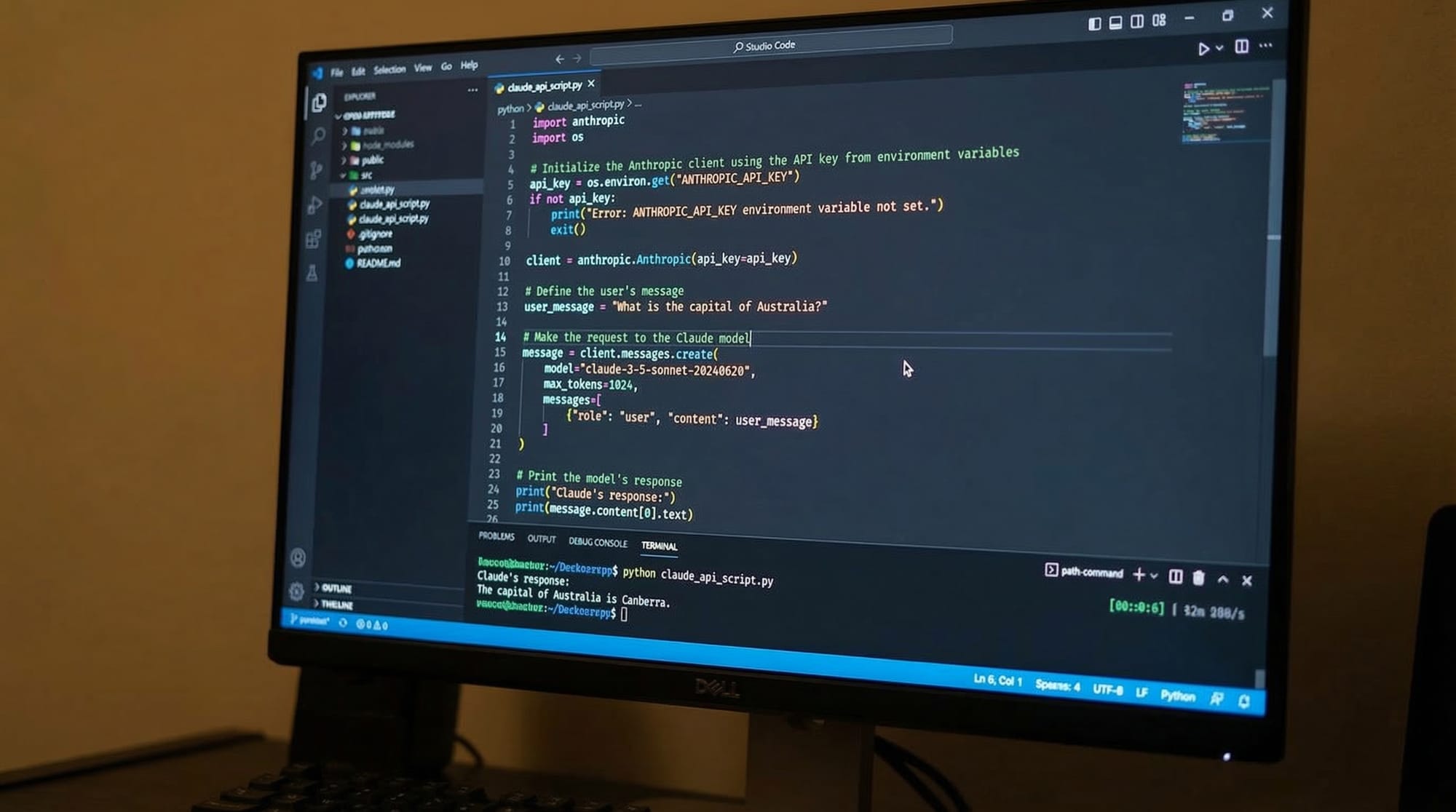
This example shows how to send a prompt to Claude using Python.
Step 1: Install the Anthropic Library
pip install anthropic
Explanation:
pipis Python's package manageranthropicis the official Python SDK for the Claude API
Step 2: Python Code Example
import anthropic

client = anthropic.Anthropic(
    api_key="YOUR_API_KEY"
)

response = client.messages.create(
    model="claude-3-sonnet-20240229",
    max_tokens=200,
    messages=[
        {"role": "user", "content": "Explain what Python lists are."}
    ]
)

print(response.content)
Line-by-Line Explanation
import anthropic
Imports the Anthropic library so Python can interact with the Claude API.
client = anthropic.Anthropic(api_key="YOUR_API_KEY")
Creates a client object used to send requests to Claude.
Replace "YOUR_API_KEY" with your real API key.
response = client.messages.create(...)
This line sends a request to the Claude API.
model="claude-3-sonnet-20240229"
Specifies which Claude model will generate the response.
max_tokens=200
Limits the length of the generated output.
messages=[{"role": "user", "content": "..."}]
Defines the prompt that Claude should answer.
print(response.content)
Displays Claude's response in the terminal.
Example 2: Real-World Application – AI Study Assistant
Now let's build a simple AI tutor that helps Pakistani students.
Imagine Fatima, a student in Islamabad, using a program to ask programming questions.
Python Program
import anthropic

client = anthropic.Anthropic(
    api_key="YOUR_API_KEY"
)

question = input("Ask your programming question: ")

response = client.messages.create(
    model="claude-3-sonnet-20240229",
    max_tokens=300,
    messages=[
        {"role": "user", "content": question}
    ]
)

print("\nAI Tutor Answer:")
print(response.content)
Line-by-Line Explanation
question = input("Ask your programming question: ")
Allows the user to type a question.
Example:
What is a Python dictionary?
messages=[{"role": "user", "content": question}]
Sends the user's question to Claude.
print("\nAI Tutor Answer:")
Prints a label before the response.
print(response.content)
Displays Claude's generated answer.
With only a few lines of code, we created a basic AI tutoring application.
Common Mistakes & How to Avoid Them
Mistake 1: Exposing Your API Key
Many beginners accidentally upload their API keys to GitHub.
Example of a bad practice:
api_key="sk-live-123456"
If someone sees this key, they can use your API and spend your credits.
Correct Approach
Use environment variables.
Example:
import os
import anthropic

client = anthropic.Anthropic(
    api_key=os.getenv("ANTHROPIC_API_KEY")
)
This keeps your key secure.
Mistake 2: Poor Prompt Design
Another common issue is writing vague prompts.
Bad prompt:
Tell me about programming
Better prompt:
Explain Python loops with an example for beginner students in Pakistan.
Clear prompts produce better AI responses.
Practice Exercises
Exercise 1: Build an AI Math Helper
Problem
Create a program that sends a math question to Claude and returns the explanation.
Example input:
Explain how to solve 5x + 10 = 20
Solution
import anthropic

client = anthropic.Anthropic(
    api_key="YOUR_API_KEY"
)

question = input("Enter math question: ")

response = client.messages.create(
    model="claude-3-sonnet-20240229",
    max_tokens=200,
    messages=[
        {"role": "user", "content": question}
    ]
)

print(response.content)
This program allows students to learn math interactively.
Exercise 2: AI Content Generator
Problem
Create a program that generates a short blog post about technology in Pakistan.
Solution
import anthropic

client = anthropic.Anthropic(
    api_key="YOUR_API_KEY"
)

prompt = "Write a short article about the growth of tech startups in Karachi."

response = client.messages.create(
    model="claude-3-sonnet-20240229",
    max_tokens=250,
    messages=[
        {"role": "user", "content": prompt}
    ]
)

print(response.content)
This type of program can power AI blogging tools.
Frequently Asked Questions
What is the Claude API?
The Claude API is a service provided by Anthropic that allows developers to integrate Claude AI models into applications. It enables features like chatbots, content generation, and automated reasoning through simple API calls.
How do I get an Anthropic API key?
You can obtain an API key by creating a developer account on the Anthropic platform. After registering, generate an API key in your dashboard and use it in your code to authenticate requests.
Can I build chatbots with Claude?
Yes. Claude is especially good at conversational AI. Developers can create chatbots for customer support, tutoring, or virtual assistants using the Claude API.
Is the Claude API free for students?
Anthropic sometimes offers free credits for new users, but large-scale usage typically requires payment. Many developers start with small projects before scaling.
Which programming languages support Claude integration?
Claude can be used with many programming languages including Python, JavaScript, Java, and others through HTTP requests. Python and Node.js are the most commonly used.
Summary & Key Takeaways
- The Claude API allows developers to build powerful AI applications.
- Claude works using a prompt and response API architecture.
- Python makes it easy to integrate Claude using the Anthropic SDK.
- Good prompt engineering significantly improves AI output.
- Always protect your API keys using environment variables.
- Claude can power applications like AI tutors, chatbots, and content generators.
Next Steps & Related Tutorials
If you enjoyed learning about building with Claude, here are some related tutorials you should explore on theiqra.edu.pk:
- Learn Prompt Engineering for ChatGPT to improve AI prompts and responses
- Study ChatGPT API Integration to understand how different AI APIs work
- Explore Machine Learning Model Deployment to learn how to launch AI apps in production
- Read the Computer Vision with Python guide to expand your AI development skills
These tutorials will help you become a well-rounded AI developer capable of building real-world applications.
Test Your Python Knowledge!
Finished reading? Take a quick quiz to see how much you've learned from this tutorial.