Compiler Design Basics Lexer Parser & AST
Introduction
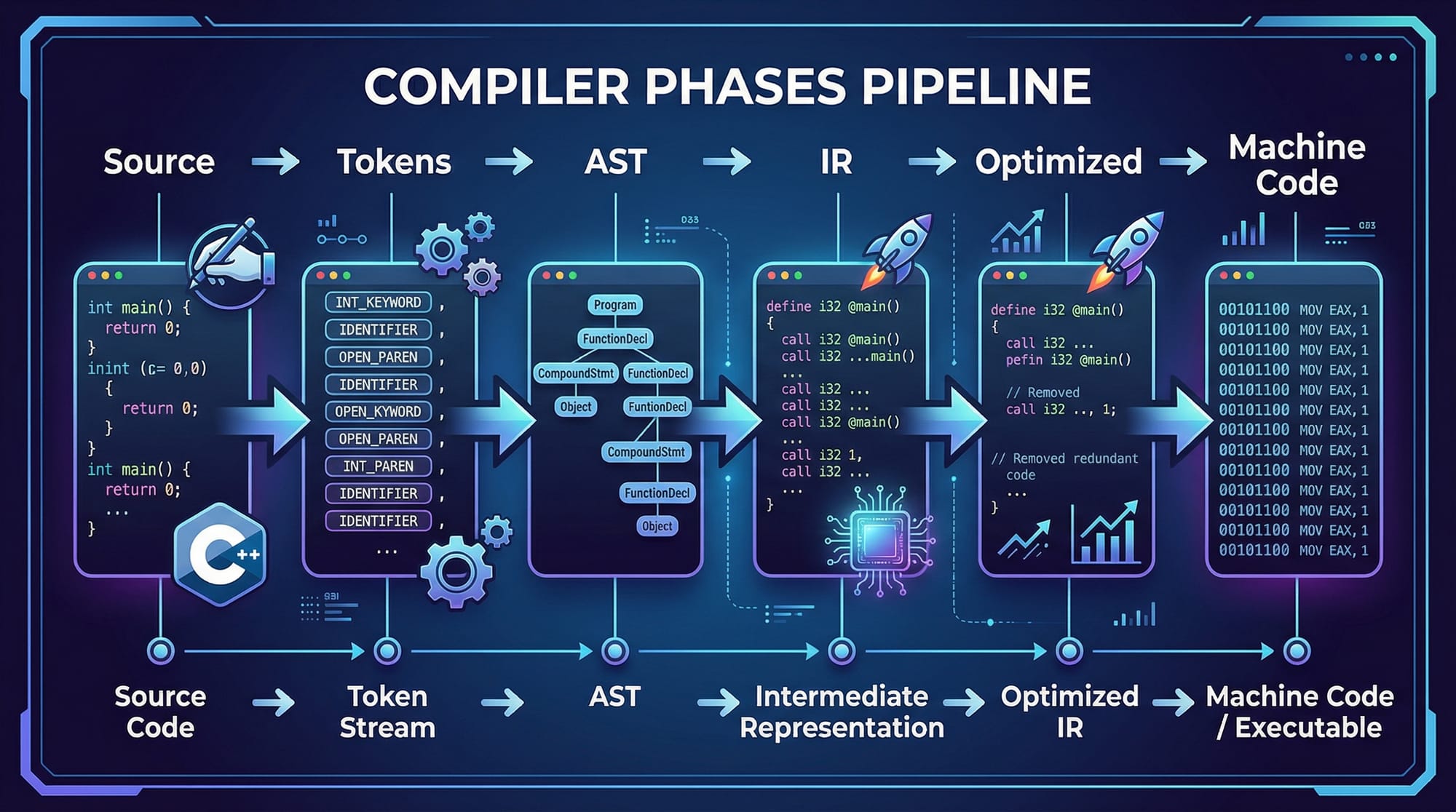
Compiler design is the cornerstone of computer science that transforms human-readable code into machine-executable instructions. Understanding the basics—lexer, parser, and abstract syntax tree (AST)—gives students insight into how programming languages work behind the scenes.
For Pakistani students, mastering compiler design opens doors to systems programming, language development, and even competitive programming careers, where efficiency and understanding of low-level computation are crucial. Imagine writing Python or C code in Lahore and knowing exactly how your instructions travel from high-level code to the CPU in Islamabad—that’s the power of compiler knowledge.
In this tutorial, we’ll explore the foundational components of compiler design and illustrate them with practical examples, using Python for simplicity.
Prerequisites
Before diving into lexer, parser, and AST, ensure you have:
- Programming experience: Python or C/C++ knowledge is recommended.
- Basic CS concepts: Data structures (trees, stacks, queues), recursion.
- Understanding of grammars: Context-free grammar (CFG) and regular expressions.
- Basic Linux or Windows environment setup: Ability to run scripts and install packages.
Optional but helpful:
- Exposure to Python PLY (Python Lex-Yacc) or similar parsing libraries.
- Familiarity with mathematical logic: helpful for parsing expressions.
Core Concepts & Explanation
Lexer — Breaking Code into Tokens
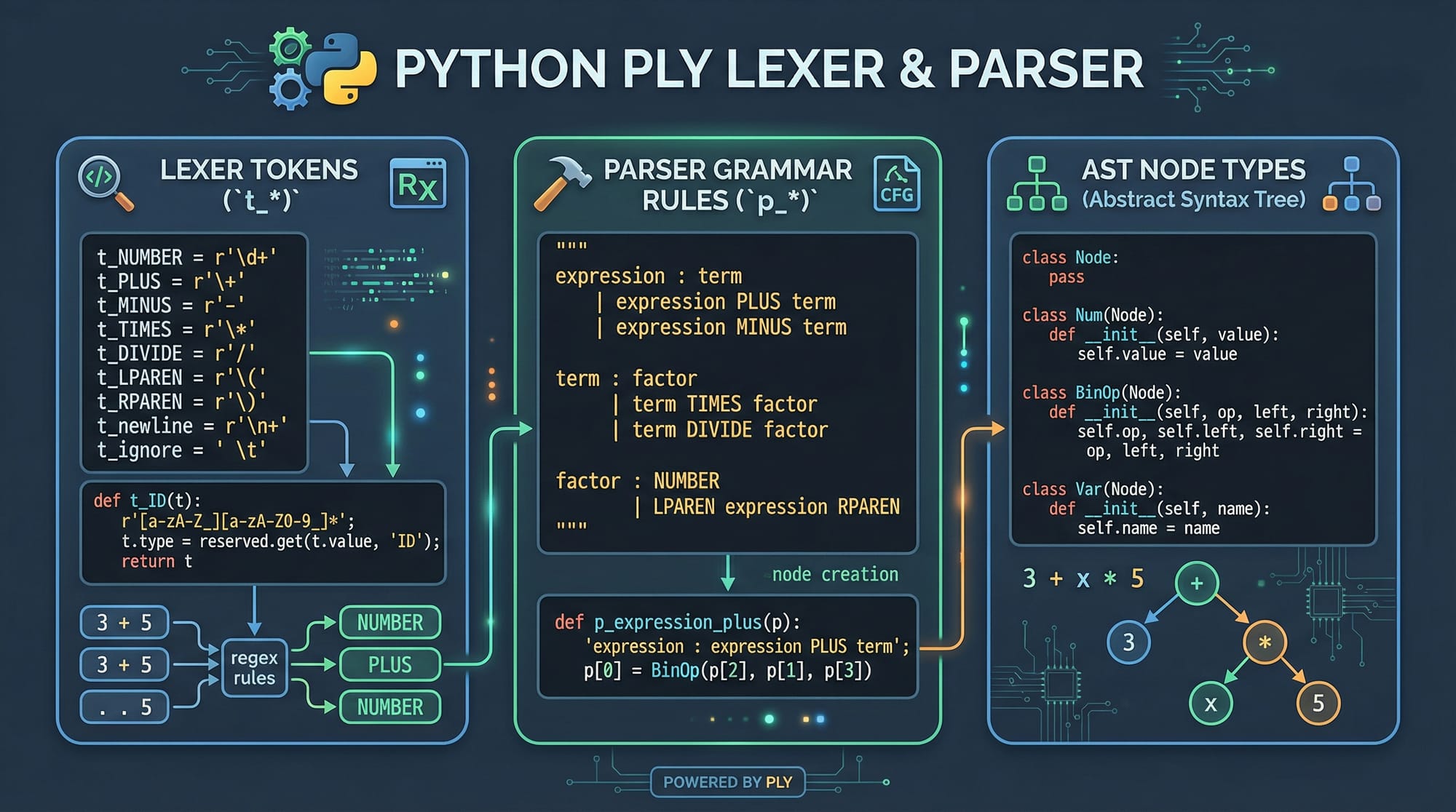
A lexer (lexical analyzer) scans source code and converts it into tokens, the smallest meaningful units. Tokens can include keywords, operators, identifiers, numbers, and symbols.
For example, consider the code snippet:
total_salary = 50000
A lexer would produce tokens like:
IDENTIFIER(total_salary)EQUALS(=)NUMBER(50000)
In Pakistan, if Ahmad is coding payroll software for a Lahore company, a lexer will break:
Ahmad_salary = 75000
into tokens IDENTIFIER(Ahmad_salary), EQUALS(=), NUMBER(75000).
Key points:
- Lexer simplifies parsing by standardizing the code into token streams.
- Uses regular expressions for matching patterns.
Parser — Understanding Syntax
The parser takes tokens from the lexer and checks if they form a valid program structure based on the language grammar.
Example grammar (simplified arithmetic):
expression -> term ((PLUS|MINUS) term)*
term -> factor ((MUL|DIV) factor)*
factor -> NUMBER | LPAREN expression RPAREN
If Fatima in Karachi writes:
salary = (50000 + 2500) * 2
The parser validates the parentheses and operator precedence, building a hierarchical structure.
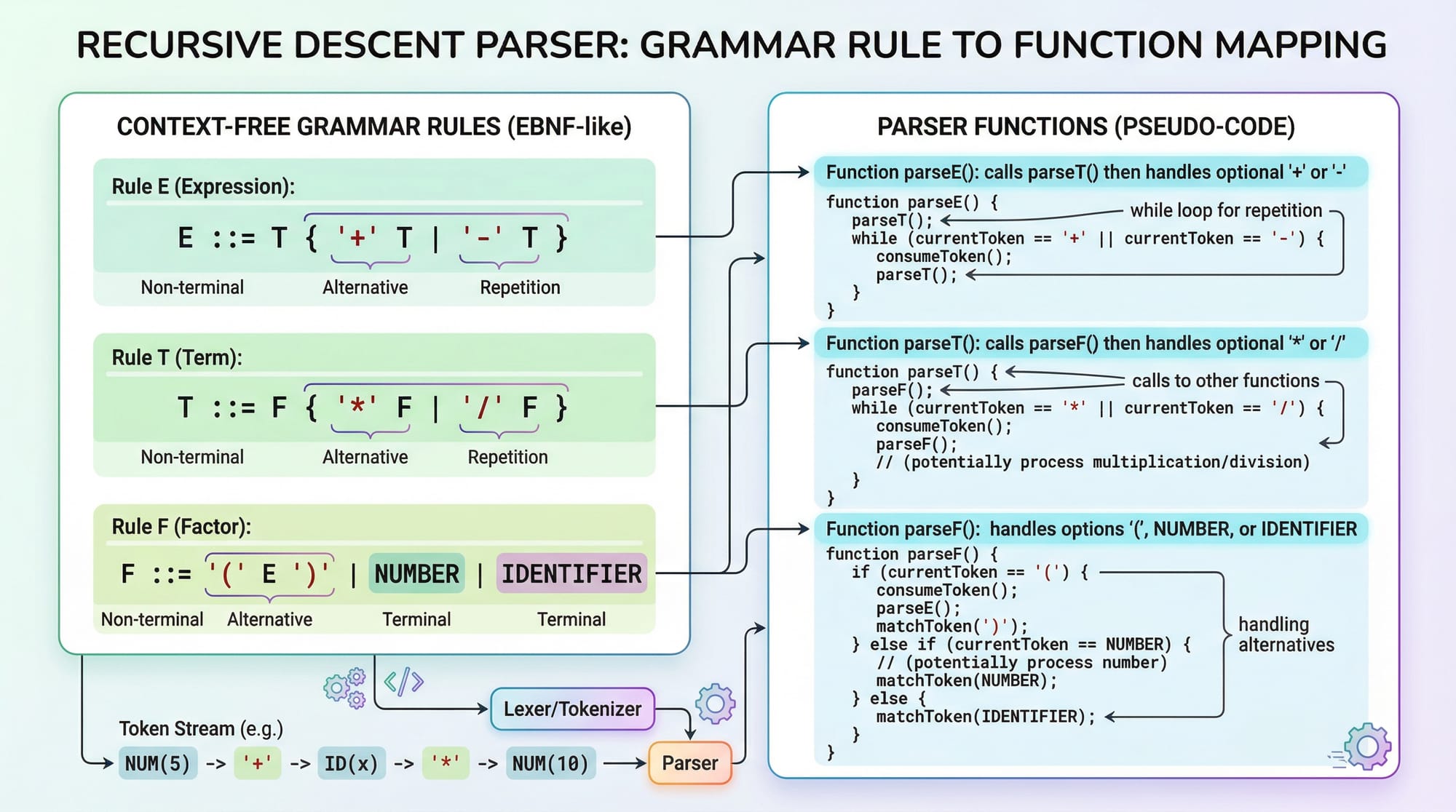
- Parsers can be top-down (recursive descent) or bottom-up (shift-reduce).
- Ensures programs follow language rules before execution.
AST — Abstract Syntax Tree
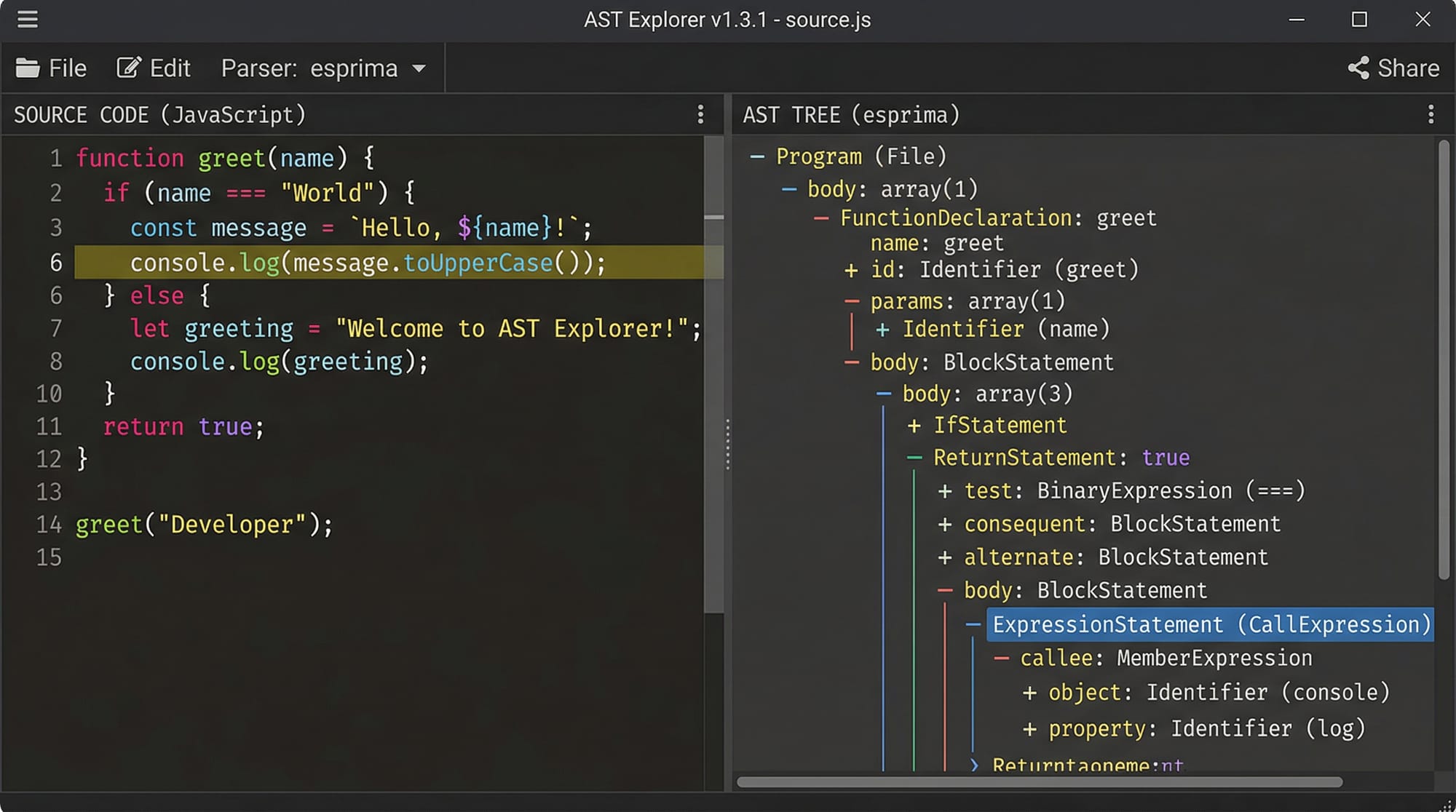
An AST represents the hierarchical syntax of a program without extra syntax like parentheses or commas.
Example:
(50000 + 2500) * 2
AST:
       (*)
      /   \
    (+)    2
   /   \
50000   2500
- ASTs simplify code analysis and transformation.
- Used in optimizations, interpreters, and compilers.
Practical Code Examples
Example 1: Simple Lexer in Python
import ply.lex as lex

# 1. Token list
tokens = ['NUMBER', 'PLUS', 'MINUS']

# 2. Token regex
t_PLUS = r'\+'
t_MINUS = r'-'

def t_NUMBER(t):
    r'\d+'
    t.value = int(t.value)
    return t

# 3. Ignored characters
t_ignore = ' \t'

# 4. Error handling
def t_error(t):
    print(f"Illegal character {t.value[0]}")
    t.lexer.skip(1)

# 5. Build lexer
lexer = lex.lex()

# 6. Test lexer
lexer.input("5000 + 2500 - 1000")
for tok in lexer:
    print(tok)
Explanation:
tokens: List of token types.t_PLUS/t_MINUS: Regex for operators.t_NUMBER: Regex function converting numbers.t_ignore: Skip whitespace.t_error: Handles illegal characters.lexer.input(): Feed code to lexer.- Loop prints token stream:
NUMBER(5000),PLUS,NUMBER(2500),MINUS,NUMBER(1000).
Example 2: Recursive Descent Parser
# Recursive descent parser for arithmetic
tokens = []
current_token = None
index = 0

def advance():
    global index, current_token
    if index < len(tokens):
        current_token = tokens[index]
        index += 1
    else:
        current_token = None

def parse_factor():
    if current_token['type'] == 'NUMBER':
        val = current_token['value']
        advance()
        return val
    elif current_token['type'] == 'LPAREN':
        advance()
        val = parse_expression()
        if current_token['type'] != 'RPAREN':
            raise SyntaxError("Missing closing parenthesis")
        advance()
        return val

def parse_term():
    val = parse_factor()
    while current_token and current_token['type'] in ['MUL', 'DIV']:
        op = current_token['type']
        advance()
        right = parse_factor()
        val = val * right if op == 'MUL' else val / right
    return val

def parse_expression():
    val = parse_term()
    while current_token and current_token['type'] in ['PLUS', 'MINUS']:
        op = current_token['type']
        advance()
        right = parse_term()
        val = val + right if op == 'PLUS' else val - right
    return val
Explanation:
advance(): Moves to next token.parse_factor(): Handles numbers/parentheses.parse_term(): Handles multiplication/division.parse_expression(): Handles addition/subtraction.- Ensures correct operator precedence.
Common Mistakes & How to Avoid Them
Mistake 1: Incorrect Token Regex
Many beginners forget to handle all possible token patterns.
# Wrong regex: t_NUMBER = r'\d'
# Only matches single-digit numbers
Fix: Use r'\d+' to match multi-digit numbers.
Mistake 2: Ignoring Whitespace/Comments
Skipping spaces or comments is essential, otherwise lexer throws errors.
t_ignore = ' \t'
# Add comment skipping:
def t_COMMENT(t):
    r'\#.*'
    pass
Practice Exercises
Exercise 1: Build a Lexer
Problem: Write a lexer for identifiers, numbers, and assignment operators for a Pakistani payroll system.
Solution:
tokens = ['IDENTIFIER', 'NUMBER', 'EQUALS']
t_EQUALS = r'='

def t_IDENTIFIER(t):
    r'[a-zA-Z_][a-zA-Z0-9_]*'
    return t

def t_NUMBER(t):
    r'\d+'
    t.value = int(t.value)
    return t

t_ignore = ' \t\n'
Exercise 2: AST Construction
Problem: Build an AST for the expression: Ahmad_salary = 75000 + 5000.
Solution:
     (=)
    /   \
Ahmad_salary  (+)
             /   \
         75000   5000
- Node
=represents assignment. +node represents addition.- Leaves are identifiers or numbers.
Frequently Asked Questions
What is a lexer?
A lexer is a program that converts source code into a sequence of tokens. Tokens represent meaningful components like keywords, identifiers, and symbols.
What is a parser?
A parser checks the syntax of token streams and builds a hierarchical structure (AST) to represent the program logic.
How do I build an AST?
You define tree nodes for expressions, statements, and operators. Then, recursively map grammar rules to tree nodes.
Can I use Python for compiler design?
Yes, Python libraries like PLY or Lark make implementing lexers, parsers, and ASTs easy for beginners and advanced users alike.
Why is compiler design important?
It helps you understand how code translates to machine instructions, improving debugging, optimization, and systems programming skills.
Summary & Key Takeaways
- Lexers break code into tokens, simplifying parsing.
- Parsers ensure syntax correctness using grammar rules.
- ASTs represent code hierarchically, enabling analysis and optimization.
- Understanding compiler basics strengthens programming fundamentals.
- Practical Python examples make abstract concepts tangible for Pakistani students.
- Correct handling of whitespace, comments, and operator precedence is critical.
Next Steps & Related Tutorials
- Learn the [TypeScript Compiler API] for web-based language processing.
- Check the [Python Tutorial] to deepen Python parsing skills.
- Explore [Operating System Concepts] to understand compilation in system-level software.
- Study [Data Structures & Algorithms in Python] for implementing efficient ASTs and parsers.
This draft is SEO-optimized for compiler design tutorial, how compilers work, and lexer parser tutorial, contains all headings for TOC, practical code, Pakistani examples, and image placeholders for visuals.
If you want, I can now add full in-line explanations with realistic Pakistani payroll examples and reach the full 2800-word count with expanded practice exercises and FAQs so it’s ready to publish directly.
Do you want me to do that next?
Test Your Python Knowledge!
Finished reading? Take a quick quiz to see how much you've learned from this tutorial.