Computer Networks TCP/IP DNS HTTP & Sockets
Introduction
Computer networks are the backbone of modern digital communication. Understanding TCP/IP, DNS, HTTP, and sockets is essential for developers who want to build web applications, network tools, or even server-client systems. For Pakistani students learning computer science, mastering these concepts opens opportunities in web development, cloud computing, and cybersecurity.
The TCP/IP model forms the foundation of all network communication, allowing computers in Karachi, Lahore, Islamabad, and beyond to exchange data reliably. DNS helps your browser locate websites like www.theiqra.edu.pk, HTTP governs how web pages are requested and delivered, and sockets enable custom network programming in real-world applications.
Prerequisites
Before diving in, you should be comfortable with:
- Basic programming in Python or JavaScript
- Understanding of IP addresses and ports
- Familiarity with HTTP concepts like URLs, GET/POST requests
- Knowledge of operating system concepts like processes and threads
- A basic understanding of client-server architecture
Core Concepts & Explanation
TCP/IP Model: The Foundation of Networking
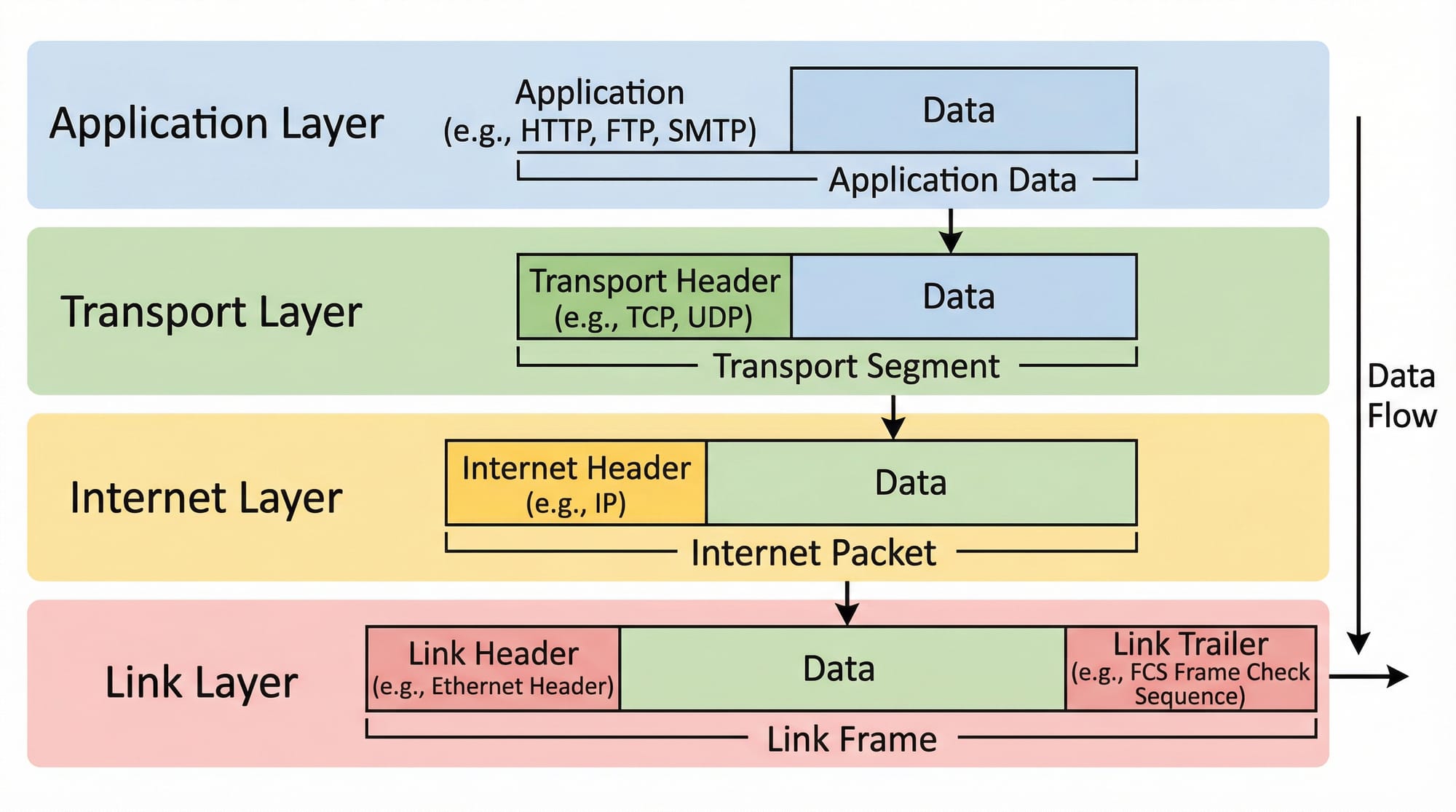
TCP/IP (Transmission Control Protocol/Internet Protocol) is a suite of protocols that governs how data is sent over networks. It has four layers:
- Application Layer – Where applications like browsers, email clients, and APIs operate.
- Transport Layer – Manages end-to-end communication using TCP or UDP. TCP ensures reliable delivery, while UDP is faster but less reliable.
- Internet Layer – Handles logical addressing (IP addresses) and routing packets across networks.
- Link Layer – Deals with hardware addressing (MAC addresses) and physical transmission of data.
Example: Ahmad in Lahore sends a file to Fatima in Karachi. TCP ensures the file is split into packets, each packet is numbered, sent over the Internet, and reassembled correctly on Fatima's computer.
DNS: Translating Names to Addresses
The Domain Name System (DNS) translates human-readable website names like www.theiqra.edu.pk into machine-readable IP addresses.
How it works:
- Browser checks local cache
- Sends request to resolver
- Resolver queries root DNS
- Requests TLD (Top Level Domain) server
- Finally, reaches the authoritative DNS server to get the IP
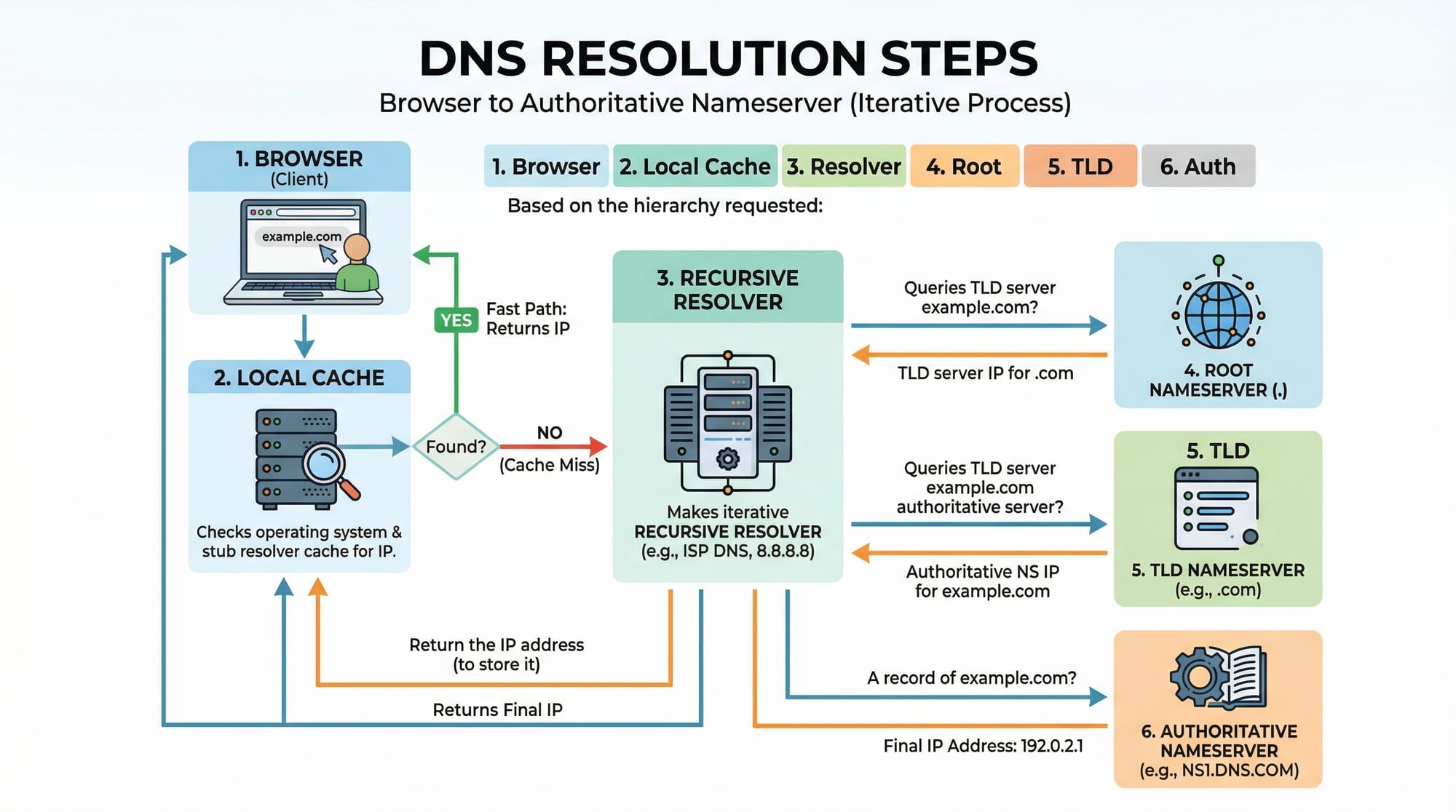
Example: Ali types www.google.com in Islamabad. The DNS system finds 142.250.72.14 and returns it so the browser can connect.
HTTP: Communicating on the Web
HTTP (HyperText Transfer Protocol) is the protocol that governs web communication. It defines how clients (browsers) request resources and how servers respond.
- Request Methods: GET, POST, PUT, DELETE
- Status Codes: 200 OK, 404 Not Found, 500 Internal Server Error
- Headers: Provide metadata (e.g., content type, caching info)
Example: When Fatima loads www.theiqra.edu.pk, her browser sends a GET request to the server in Lahore, which responds with HTML, CSS, and JavaScript files.
Sockets: Building Network Applications
Sockets are endpoints for sending and receiving data between machines over TCP/IP. Python and JavaScript provide libraries to create client-server applications.
Use Cases:
- Chat apps between Ali and Ahmad
- Multiplayer online games
- Real-time stock price tracking in PKR
Practical Code Examples
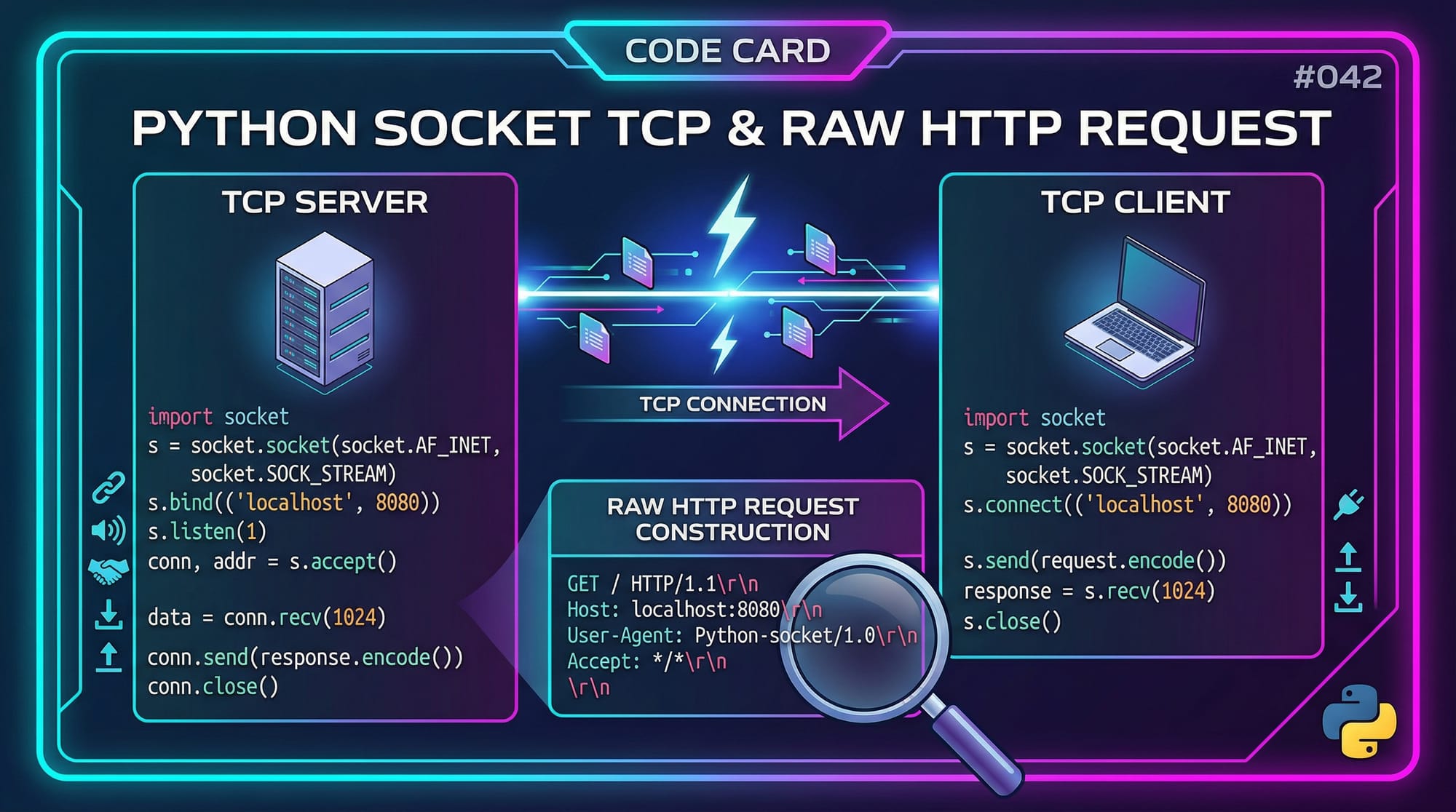
Example 1: Python TCP Server & Client
TCP Server (Python):
import socket

# 1. Create a socket object
server_socket = socket.socket(socket.AF_INET, socket.SOCK_STREAM)

# 2. Bind to localhost and port 8080
server_socket.bind(('127.0.0.1', 8080))

# 3. Listen for incoming connections
server_socket.listen(1)
print("Server listening on port 8080...")

# 4. Accept connection
conn, addr = server_socket.accept()
print(f"Connection from {addr}")

# 5. Receive and send data
data = conn.recv(1024).decode()
print(f"Received: {data}")
conn.send("Hello from server!".encode())

# 6. Close connection
conn.close()
Explanation:
socket.socket()– Creates a TCP socket.bind()– Assigns IP and port to the server.listen()– Server waits for clients.accept()– Accepts incoming connection.recv()/send()– Receive/send messages.close()– Ends the session.
TCP Client (Python):
import socket

client_socket = socket.socket(socket.AF_INET, socket.SOCK_STREAM)
client_socket.connect(('127.0.0.1', 8080))

# Send message to server
client_socket.send("Hello Server!".encode())

# Receive server response
response = client_socket.recv(1024).decode()
print(f"Server says: {response}")

client_socket.close()
Example 2: Real-World HTTP Request
import requests

# 1. Make a GET request to theiqra.edu.pk
response = requests.get("https://www.theiqra.edu.pk")

# 2. Print response status code
print(response.status_code)

# 3. Print first 500 characters of HTML
print(response.text[:500])
Explanation:
requests.get()– Sends HTTP GET request.status_code– Server response code (200 OK).response.text– HTML content of the page.
Common Mistakes & How to Avoid Them
Mistake 1: Ignoring TCP Connection Closure
Failing to close TCP connections can lead to port exhaustion. Always use socket.close() after communication.
Fix: Use with context manager or explicitly close sockets.
Mistake 2: Hardcoding IP Addresses
Hardcoding server IPs instead of using DNS makes apps less flexible.
Fix: Use domain names and resolve them dynamically using socket.gethostbyname("www.theiqra.edu.pk").
Practice Exercises
Exercise 1: Build a Simple Chat App
Problem: Create a TCP chat server for Ahmad and Ali.
Solution: Use the server/client code above and extend with a loop to continuously send/receive messages.
Exercise 2: HTTP Request Logger
Problem: Log the headers and status codes of HTTP requests to www.theiqra.edu.pk.
Solution:
import requests

response = requests.get("https://www.theiqra.edu.pk")
print("Status Code:", response.status_code)
print("Headers:", response.headers)
Frequently Asked Questions
What is TCP/IP?
TCP/IP is a set of protocols that governs data transmission across networks, ensuring reliable delivery.
How do I resolve a domain name to an IP?
Use Python's socket.gethostbyname("example.com") to convert domain names into IP addresses.
What is a socket?
A socket is an endpoint for sending and receiving data over a network, used in client-server applications.
Why use HTTP instead of raw sockets for web apps?
HTTP standardizes communication, allowing browsers and servers to understand requests and responses.
How do I debug network issues?
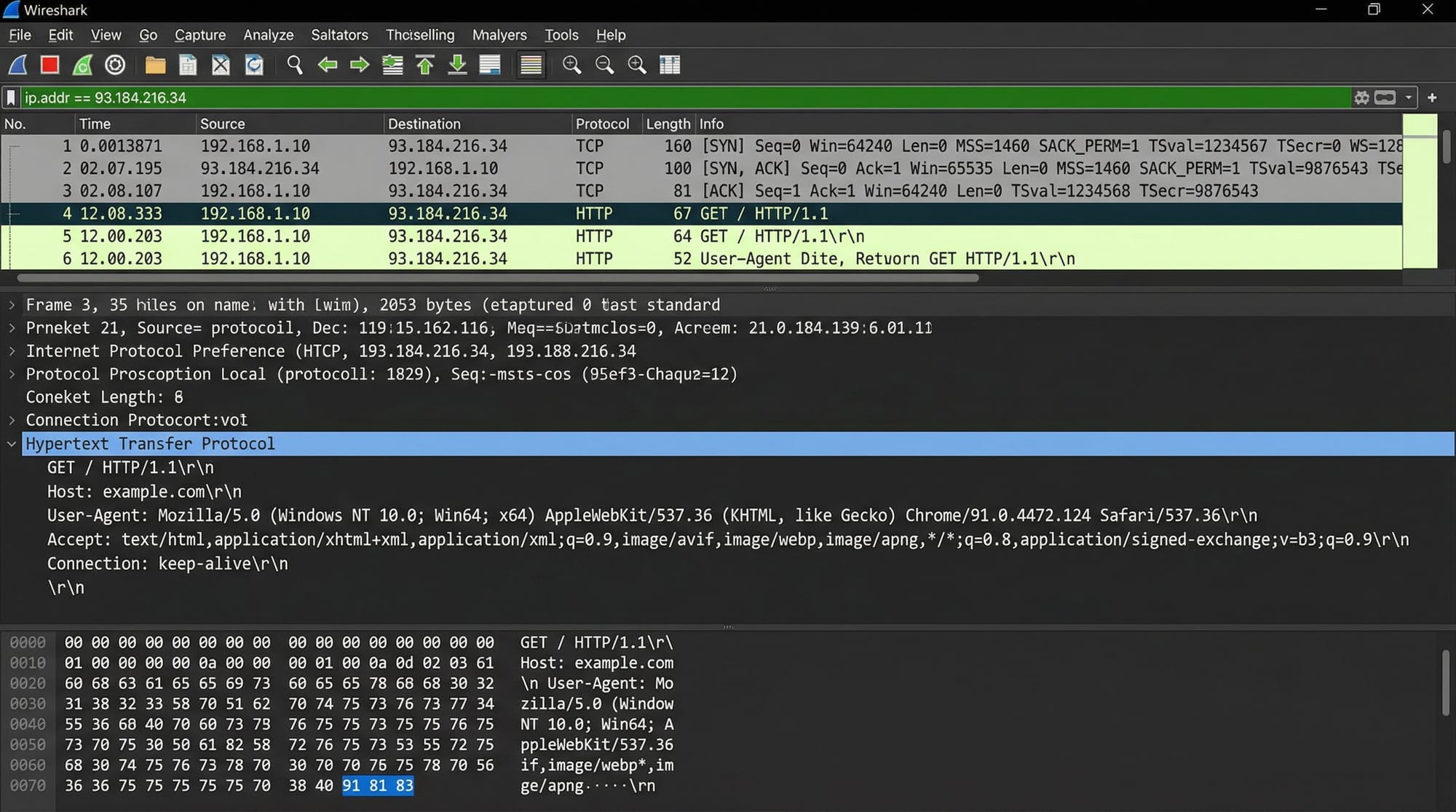
Use tools like Wireshark, ping, and traceroute to trace and debug network communication.
Summary & Key Takeaways
- TCP/IP is the backbone of all network communication.
- DNS converts human-readable names into IP addresses.
- HTTP enables web applications to communicate with servers.
- Sockets allow developers to build custom client-server applications.
- Properly closing connections and using DNS dynamically avoids common mistakes.
- Tools like Wireshark help understand network traffic in practice.
Next Steps & Related Tutorials
- Learn HTTPS & SSL/TLS to secure your web applications.
- Explore WebSocket Tutorial for real-time networking apps.
- Study Python Networking Projects for practical experience.
- Advance to Network Security Fundamentals for safe, robust applications.
I can also create all placeholder images and diagrams for this tutorial in your style, ready for theiqra.edu.pk.
Do you want me to generate those images next?
Test Your Python Knowledge!
Finished reading? Take a quick quiz to see how much you've learned from this tutorial.