Consul Tutorial Service Discovery & Configuration
Introduction
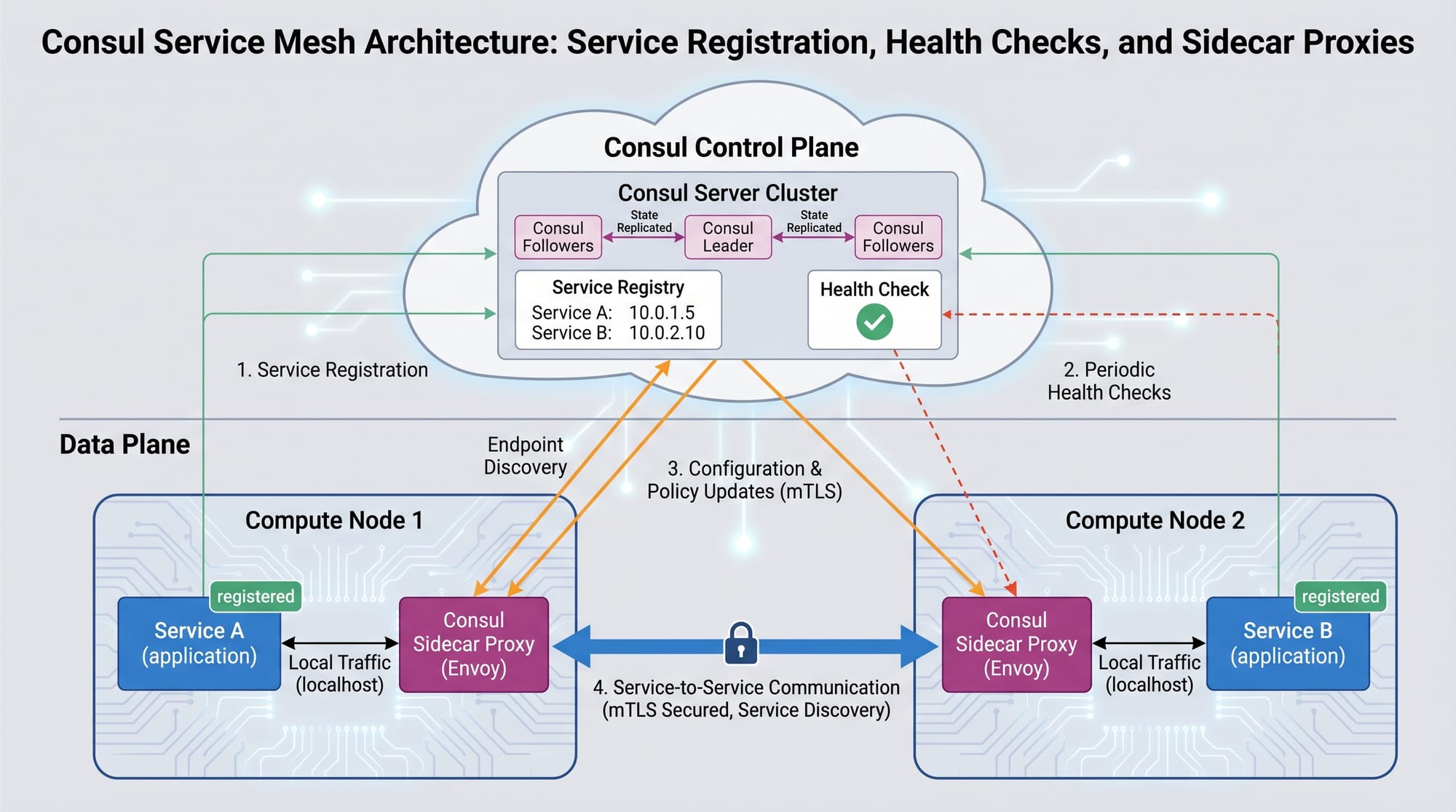
The Consul tutorial: service discovery & configuration is an important topic in modern DevOps and cloud-native systems. It is based on HashiCorp Consul, a powerful tool used for service discovery, configuration management, and service networking in distributed systems.
In simple terms, Consul helps microservices “find each other” automatically without hardcoding IP addresses. For example, in a cloud application running in Karachi-based startup infrastructure, one service (like a payment service) can automatically locate another service (like an authentication service) using Consul.
For Pakistani students learning DevOps, especially those interested in Kubernetes, cloud computing, or backend systems, Consul is a must-learn technology. Companies in Lahore, Islamabad, and remote freelance markets increasingly demand skills in service mesh tools like Consul.
By the end of this tutorial, you will understand:
- How service discovery works in Consul
- How configuration management is handled
- How Consul integrates with Kubernetes
- Real-world DevOps use cases
Prerequisites
Before starting this hashicorp consul tutorial, you should have basic knowledge of:
- Linux command line basics
- Docker fundamentals
- Basic understanding of microservices
- Introduction to Kubernetes concepts
- Basic networking (IP, ports, DNS)
Optional but helpful:
- Basic Go or Python programming
- Familiarity with DevOps tools like Jenkins or Terraform
Core Concepts & Explanation
Service Discovery in Consul
Service discovery means automatically finding services in a distributed system.
Instead of manually configuring:
payment-service = 192.168.1.10
auth-service = 192.168.1.11
Consul allows services to register themselves dynamically.
Example:
- Ahmad runs a backend service in Lahore cloud server
- Fatima runs authentication service in Islamabad
- Consul automatically connects them using service names instead of IPs
Key idea:
Services register themselves → Consul stores registry → Other services query it
Health Checks and Service Monitoring
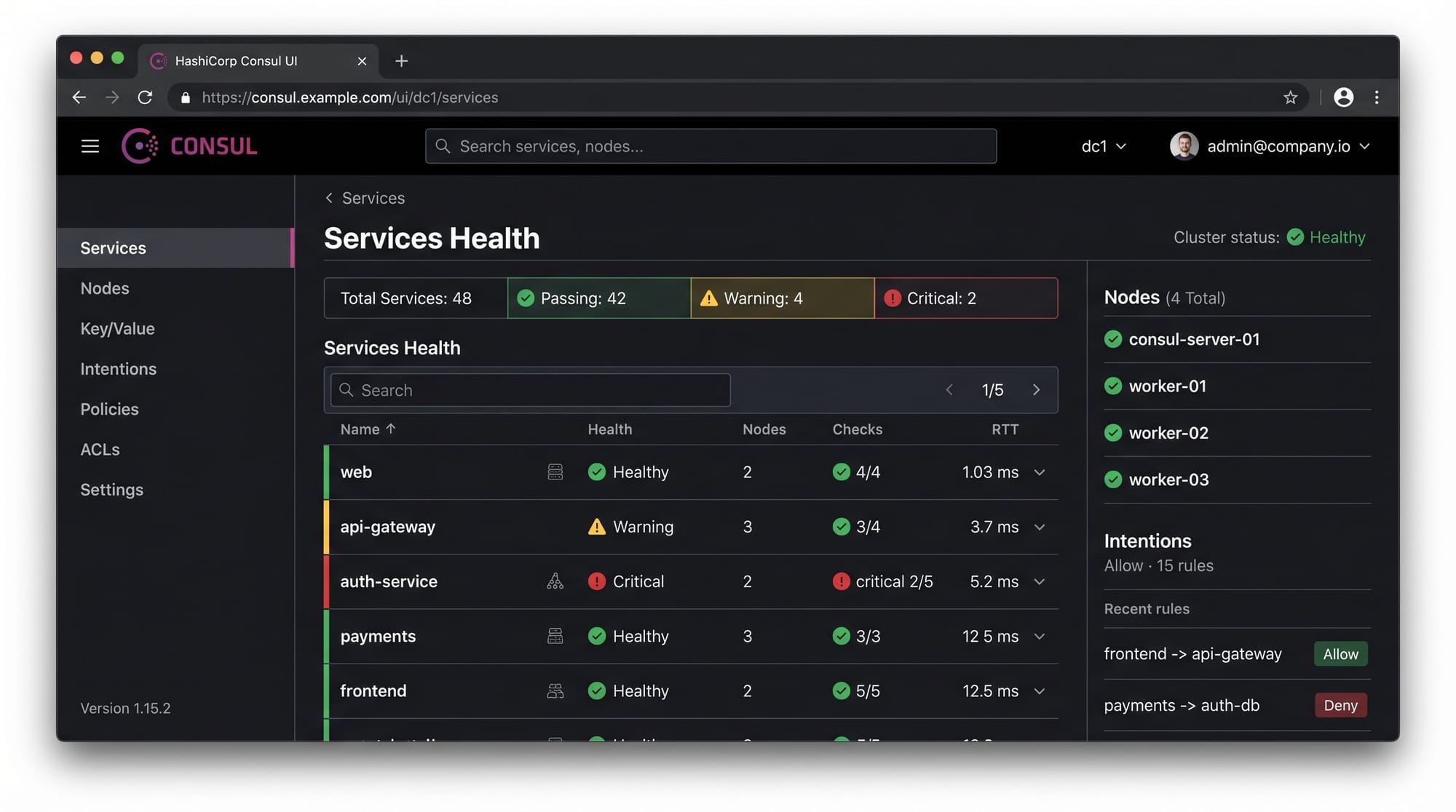
Consul continuously checks whether services are healthy or not.
Types of health checks:
- HTTP checks (API endpoint monitoring)
- TCP checks (port availability)
- Script-based checks
Example:
If a Karachi-based payment API stops responding, Consul marks it as “critical” and removes it from routing automatically.
This ensures:
- High availability
- No broken requests
- Automatic failover
Key-Value (KV) Configuration Store
Consul also works as a distributed configuration store.
Developers store app settings like:
- Database URLs
- Feature flags
- API keys (non-sensitive in some cases)
Example:
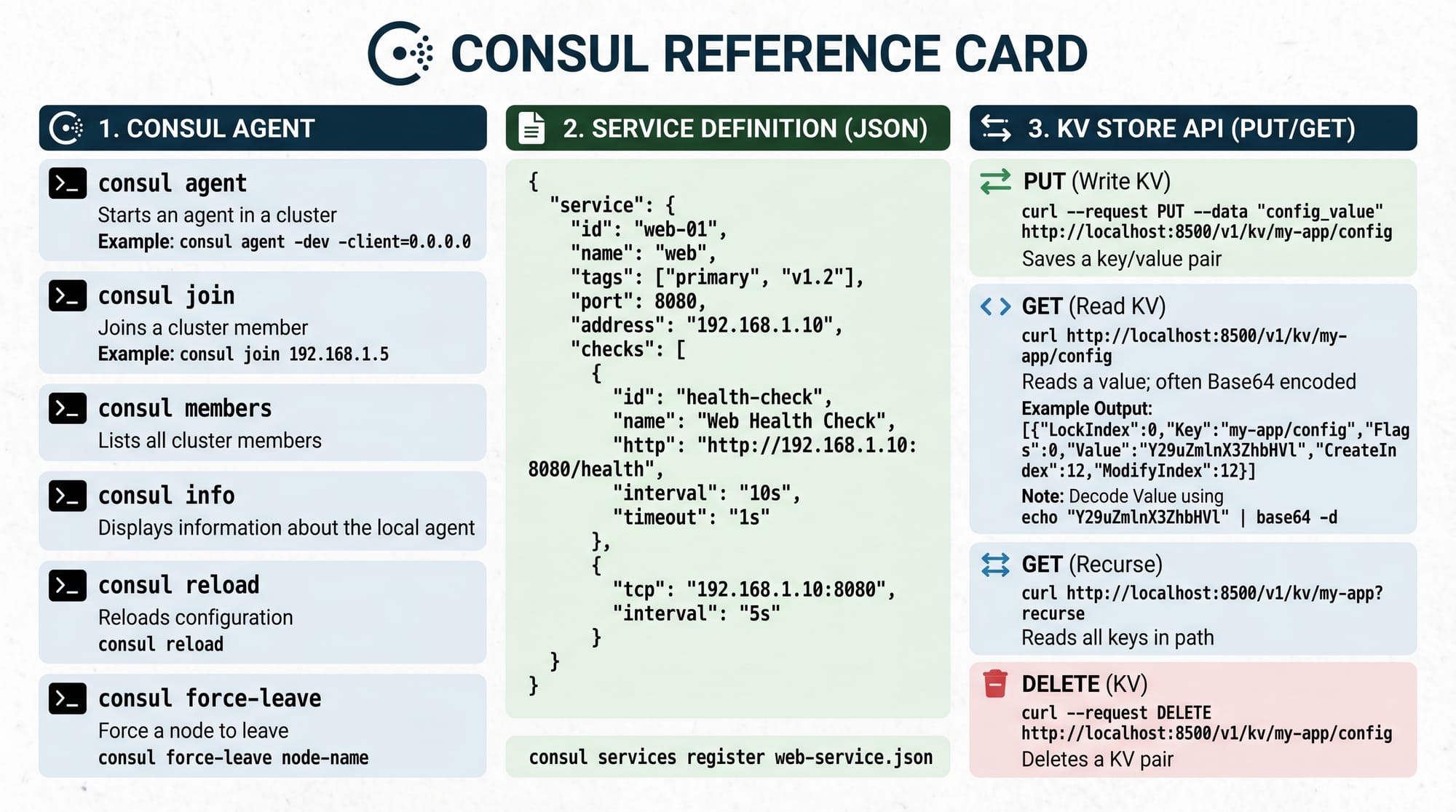
/config/payment/db_host = mysql.prod.local/config/auth/token_expiry = 3600
Practical Code Examples
Example 1: Registering a Service in Consul
# Start Consul agent in development mode
consul agent -dev
Line-by-line explanation:
consul agent→ Starts Consul service node-dev→ Runs in development mode (single node, testing only)
Now register a service:
{
  "service": {
    "name": "payment-service",
    "port": 8080
  }
}
Explanation:
"service"→ Defines service registration block"name"→ Service identifier used in discovery"port"→ Port where service is running (e.g., 8080)
Register via CLI:
consul services register payment.json
Explanation:
- Registers service into Consul catalog
- Makes it discoverable by other services
Example 2: Real-World Application in Microservices
Imagine a Pakistani e-commerce platform in Karachi:
Services:
- user-service
- order-service
- payment-service
Using Consul, services discover each other dynamically:
curl http://localhost:8500/v1/catalog/service/payment-service
Explanation:
curl→ API request tool/v1/catalog/service/→ Consul API endpointpayment-service→ Service name being queried
Response returns all available instances of payment service.
Example KV usage:
consul kv put config/app_mode "production"
Explanation:
kv put→ Stores configuration key-value pairconfig/app_mode→ Key name"production"→ Value stored
Common Mistakes & How to Avoid Them
Mistake 1: Not Configuring Health Checks Properly
Many beginners only register services but forget health checks.
Problem:
- Service is down but still receives traffic
Fix:
Add health check:
{
  "check": {
    "http": "http://localhost:8080/health",
    "interval": "10s"
  }
}
Explanation:
"http"→ Health endpoint"interval"→ How often Consul checks service health
Mistake 2: Using Consul Without Secure Networking
Beginners often run Consul without encryption in production.
Problem:
- Sensitive service data exposed
Fix:
- Enable ACLs (Access Control Lists)
- Use TLS encryption
- Restrict network access
Example:
consul acl bootstrap
Explanation:
- Enables security tokens for Consul access control
Practice Exercises
Exercise 1: Register a Simple Web Service
Problem:
Register a service called student-api running on port 5000.
Solution:
{
  "service": {
    "name": "student-api",
    "port": 5000
  }
}
Then run:
consul services register student.json
Exercise 2: Store and Retrieve Configuration
Problem:
Store database name iqra_db in Consul KV store.
Solution:
consul kv put config/db_name "iqra_db"
Retrieve it:
consul kv get config/db_name
Frequently Asked Questions
What is HashiCorp Consul used for?
HashiCorp Consul is used for service discovery, configuration management, and monitoring in distributed systems. It helps microservices find each other without manual configuration.
How does Consul work in Kubernetes?
Consul integrates with Kubernetes by registering pods as services. It enables service mesh capabilities like secure communication and traffic routing.
Is Consul better than DNS-based service discovery?
Yes, because Consul provides health checks, dynamic updates, and metadata-based routing, while DNS only resolves static IP addresses.
Can I use Consul for small projects?
Yes, but it is most useful in medium to large microservice architectures. Beginners can still learn it using Docker or local development mode.
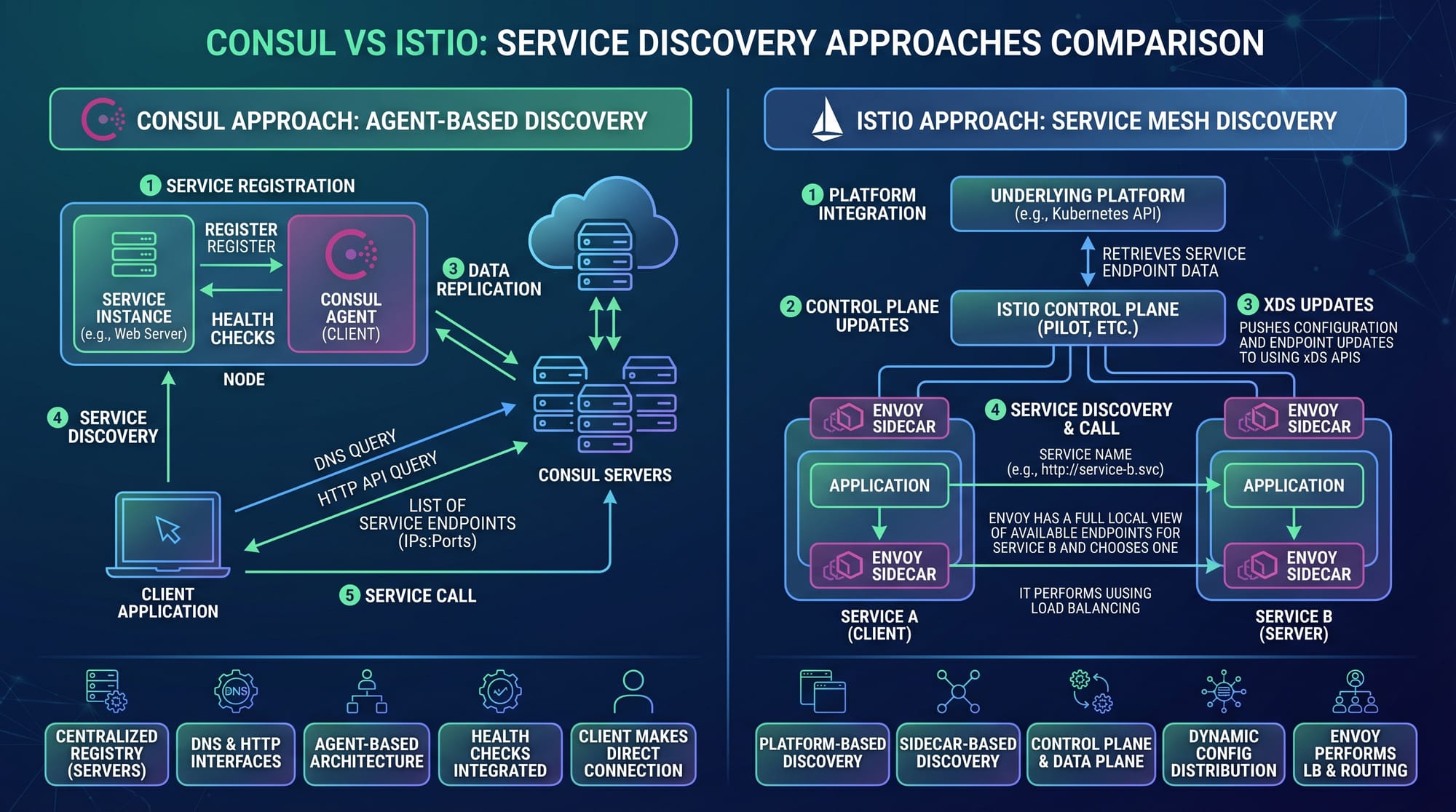
What is the difference between Consul and service mesh tools like Istio?
Consul includes service discovery + configuration + service mesh features, while tools like Istio mainly focus on service mesh networking inside Kubernetes.
Summary & Key Takeaways
- Consul is a powerful service discovery and configuration tool by HashiCorp
- It automatically connects microservices without hardcoded IPs
- Health checks ensure reliability and fault tolerance
- KV store helps manage distributed configuration
- Works well with Kubernetes and modern DevOps systems
- Widely used in real-world cloud-native architectures
Next Steps & Related Tutorials
To continue learning DevOps and service mesh systems, explore:
- Learn Kubernetes fundamentals in our tutorial: Kubernetes Tutorial for Beginners
- Understand service networking with Istio Service Mesh Guide
- Master infrastructure automation with Terraform Basics for Beginners
- Explore CI/CD pipelines using Jenkins Pipeline Tutorial
These tutorials will help you build strong DevOps skills for jobs in Pakistan’s growing tech industry and global freelancing platforms.
Test Your Python Knowledge!
Finished reading? Take a quick quiz to see how much you've learned from this tutorial.