Content Security Policy (CSP) XSS Prevention Guide
Introduction
Content Security Policy (CSP) is a powerful security feature that helps protect websites from cross-site scripting (XSS) and other code injection attacks. In this Content Security Policy (CSP): XSS Prevention Guide, you’ll learn how to use the csp header effectively to control which resources your website can load.
For Pakistani students building websites in cities like Lahore, Karachi, or Islamabad, understanding CSP is essential. Whether you're working on a university project at theiqra.edu.pk or developing a freelance site for a client earning in PKR, securing your web applications is a must.
XSS attacks occur when attackers inject malicious scripts into your website. CSP helps prevent this by allowing only trusted sources for scripts, styles, images, and more.
Prerequisites
Before starting this tutorial, you should have:
- Basic knowledge of HTML, CSS, and JavaScript
- Understanding of HTTP headers
- Familiarity with web browsers (Chrome, Firefox)
- Basic concept of web security and XSS
- Experience with a backend server (Node.js, PHP, or similar)
Core Concepts & Explanation
Understanding Content Security Policy (CSP)
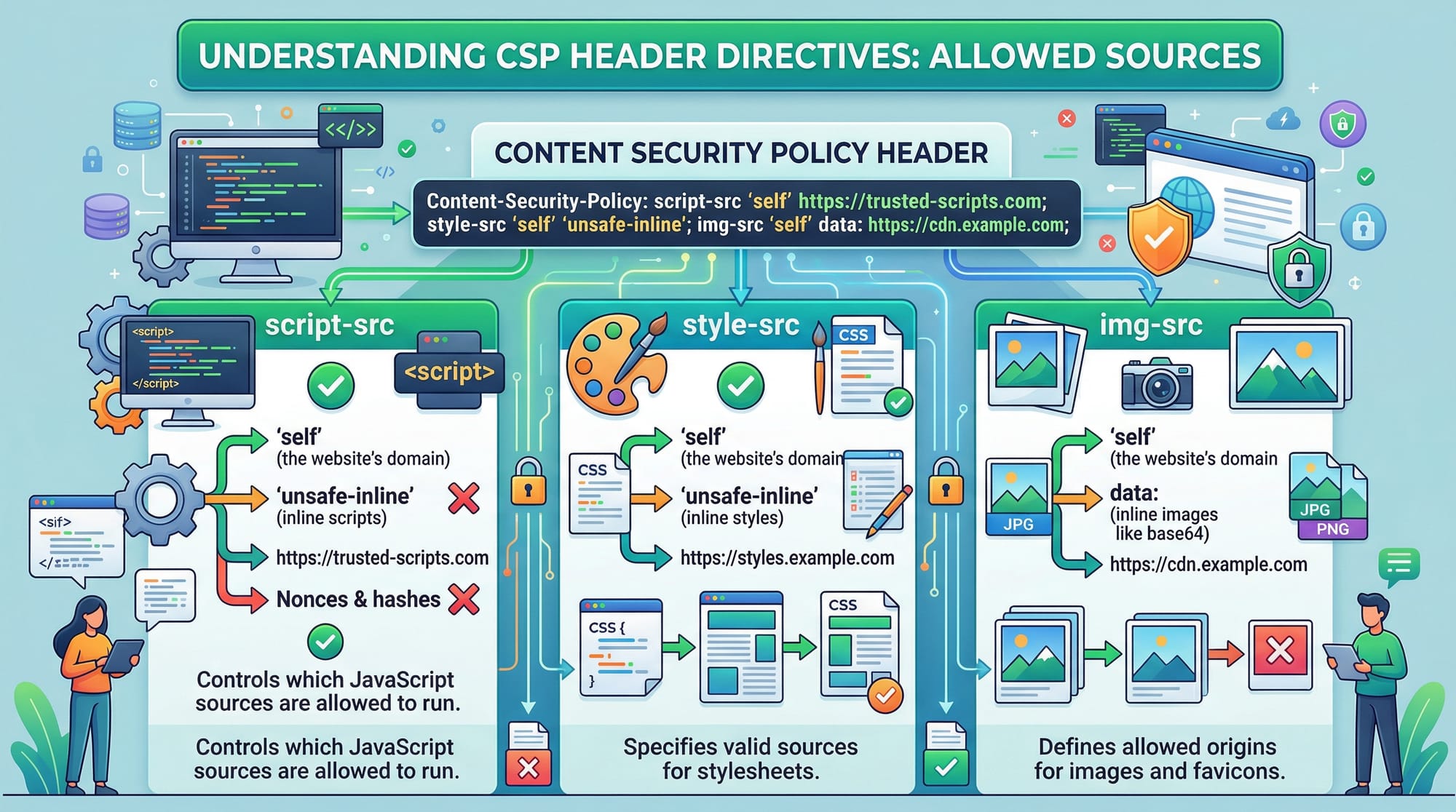
CSP is a browser security mechanism implemented via HTTP headers. It defines which resources (scripts, styles, images, etc.) are allowed to load on your webpage.
For example:
Content-Security-Policy: default-src 'self';
Explanation:
Content-Security-Policy: The header namedefault-src: Defines the default policy for all resource types'self': Only allows resources from the same origin
👉 This means your site will block scripts or resources from external domains unless explicitly allowed.
Preventing XSS Using CSP Directives
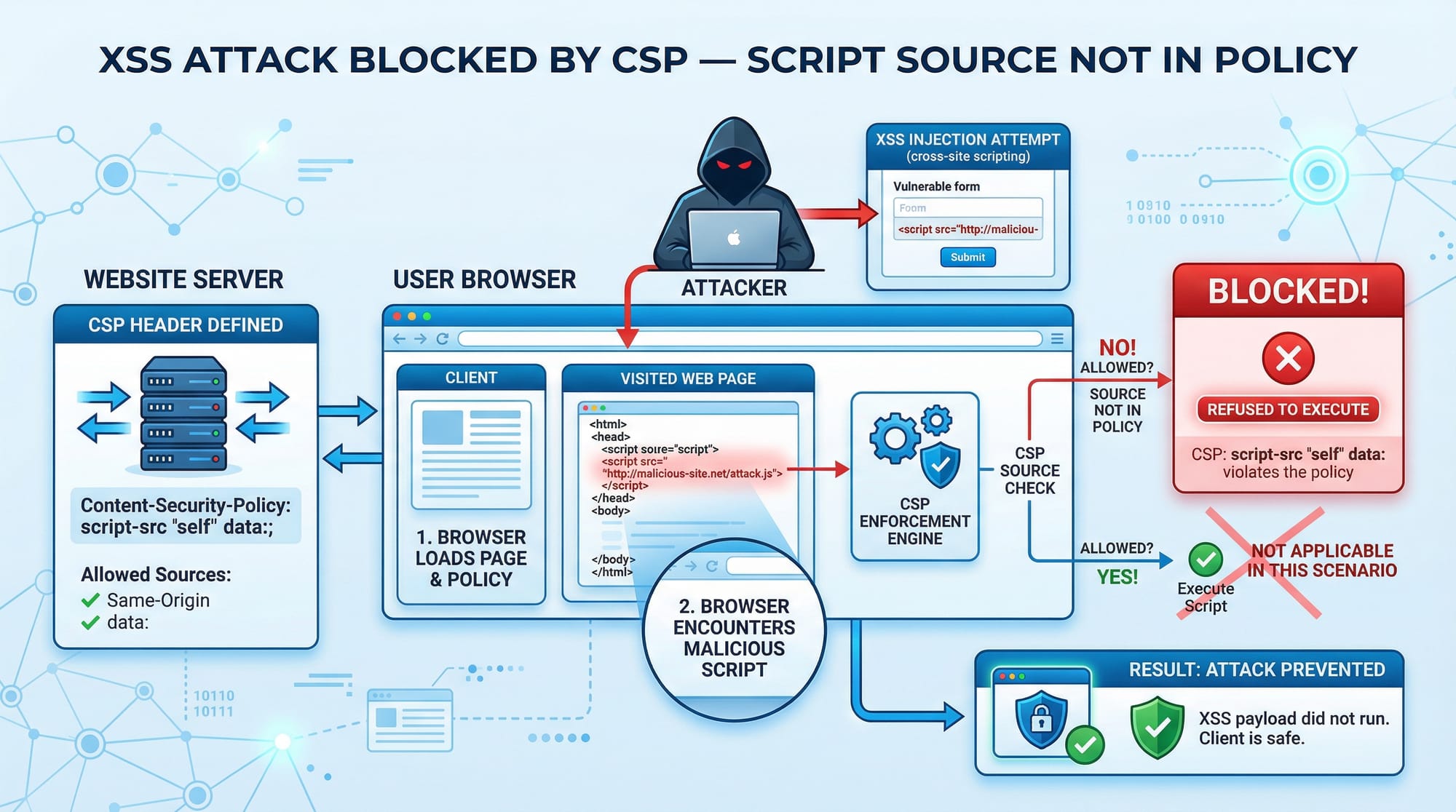
CSP helps prevent XSS by restricting script execution.
Example:
Content-Security-Policy: script-src 'self' https://trusted.cdn.com;
Explanation:
script-src: Controls allowed JavaScript sources'self': Allows scripts from your own domainhttps://trusted.cdn.com: Allows scripts from a trusted CDN
If an attacker injects:
<script>alert('Hacked by Ali')</script>
It will be blocked because inline scripts are not allowed.
Using Nonce for Inline Scripts
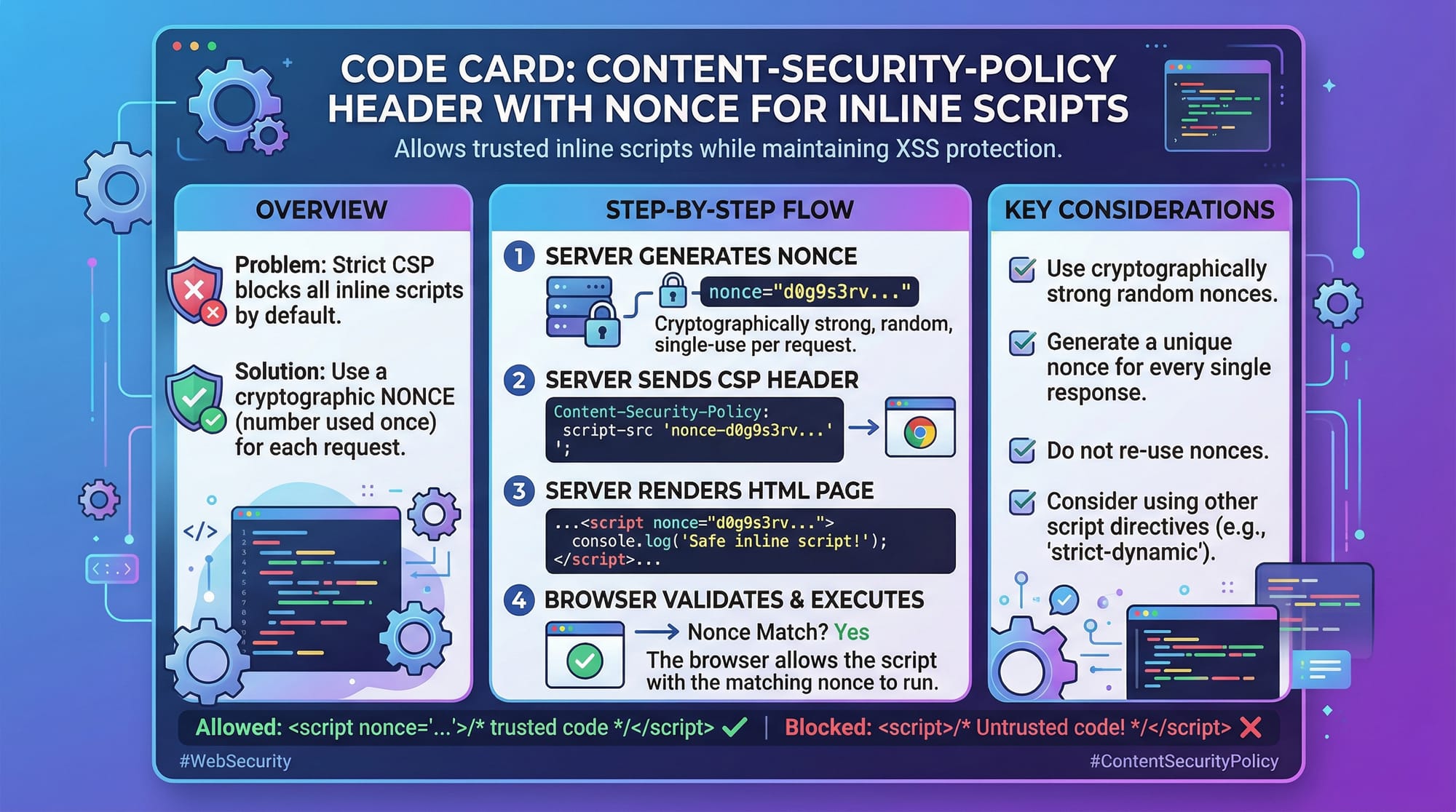
Sometimes you need inline scripts. CSP allows this using a nonce (number used once).
Content-Security-Policy: script-src 'self' 'nonce-abc123';
HTML:
<script nonce="abc123">
  console.log("Secure inline script");
</script>
Explanation:
'nonce-abc123': A unique token generated per request- Only scripts with this nonce will execute
- Prevents unauthorized inline scripts
Practical Code Examples
Example 1: Basic CSP Header Implementation
// Node.js Express example
app.use((req, res, next) => {
  res.setHeader(
    "Content-Security-Policy",
    "default-src 'self'; script-src 'self'; style-src 'self'; img-src 'self';"
  );
  next();
});
Line-by-line explanation:
app.use(...): Middleware applied to all requestsres.setHeader(...): Sets the CSP headerdefault-src 'self': Default rule for all resourcesscript-src 'self': Only allow scripts from same originstyle-src 'self': Restrict CSS sourcesimg-src 'self': Restrict images
👉 This is a strict policy ideal for small projects or student portfolios.
Example 2: Real-World Application
Imagine Fatima is building an e-commerce site in Karachi.
Content-Security-Policy:
default-src 'self';
script-src 'self' https://cdn.jsdelivr.net;
style-src 'self' https://fonts.googleapis.com;
font-src https://fonts.gstatic.com;
img-src 'self' data:;
connect-src 'self' https://api.paymentgateway.pk;
Line-by-line explanation:
default-src 'self': Base restrictionscript-src: Allows scripts from jsDelivr CDNstyle-src: Allows Google Fonts CSSfont-src: Allows font filesimg-src: Allows local images + base64 imagesconnect-src: Allows API calls to payment gateway
👉 This setup balances security with real-world needs.
Common Mistakes & How to Avoid Them
Mistake 1: Using 'unsafe-inline'
Many beginners use:
script-src 'self' 'unsafe-inline';
❌ Problem:
- Allows inline scripts → defeats CSP protection
✅ Fix:
Use nonce or hashes:
script-src 'self' 'nonce-random123';
Mistake 2: Overly Permissive Policies
Example:
default-src *;
❌ Problem:
- Allows everything → no security
✅ Fix:
default-src 'self';
👉 Always whitelist only trusted sources.
Bonus Tip: Use Report-Only Mode
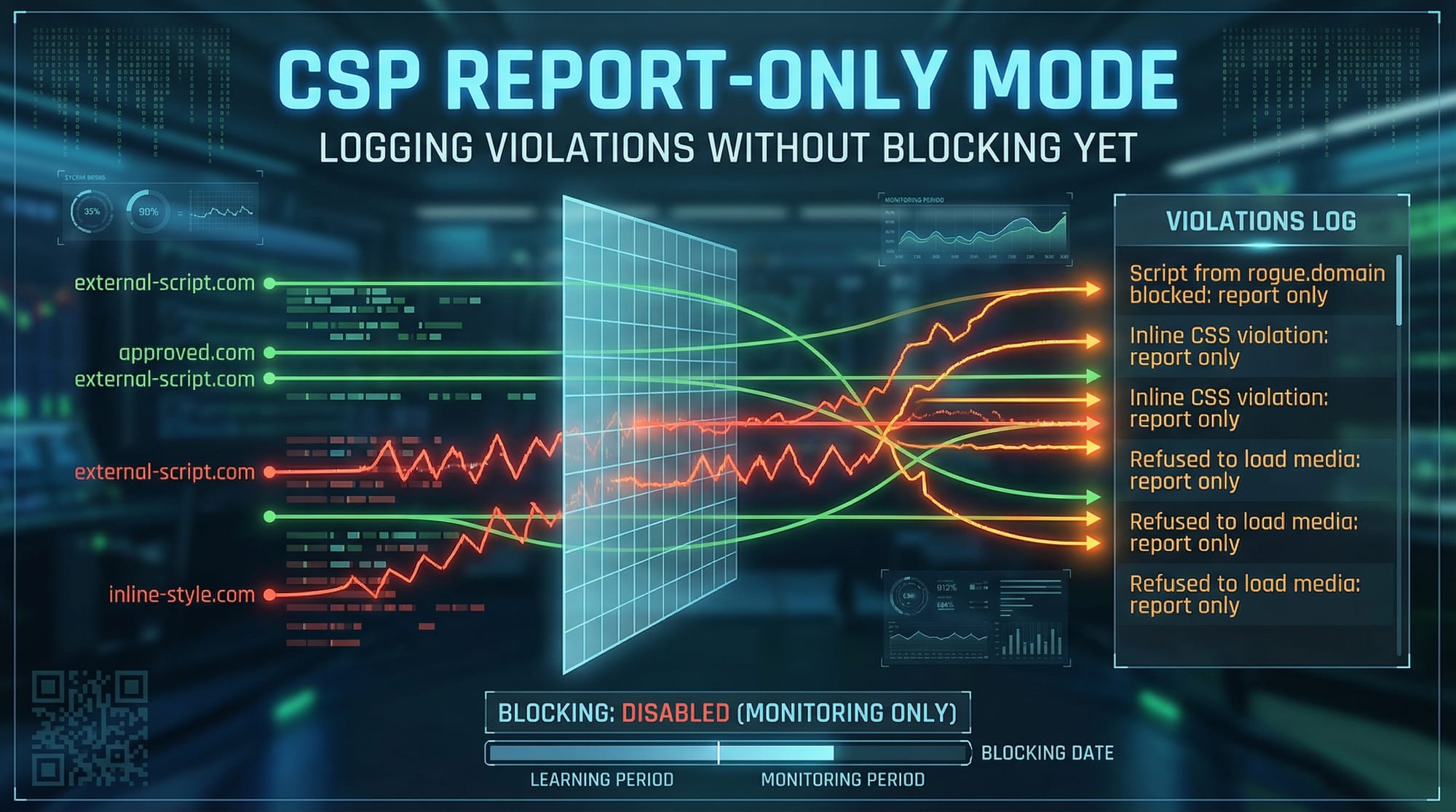
Test your policy before enforcing:
Content-Security-Policy-Report-Only: default-src 'self';
Explanation:
- Logs violations
- Does not block content
- Helps debugging
Practice Exercises
Exercise 1: Restrict Script Sources
Problem:
Allow scripts only from your domain and https://cdn.example.com.
Solution:
Content-Security-Policy: script-src 'self' https://cdn.example.com;
Explanation:
- Blocks all other script sources
- Prevents malicious injections
Exercise 2: Enable Secure Inline Script
Problem:
Allow one inline script securely.
Solution:
Content-Security-Policy: script-src 'self' 'nonce-secure123';
HTML:
<script nonce="secure123">
  alert("Hello Ahmad!");
</script>
Explanation:
- Only scripts with matching nonce execute
- Prevents unauthorized scripts
Frequently Asked Questions
What is Content Security Policy (CSP)?
CSP is a browser security feature that restricts which resources can load on a webpage. It helps prevent XSS and other injection attacks by enforcing strict rules.
How do I enable CSP in my website?
You can enable CSP by adding the Content-Security-Policy HTTP header in your server configuration (Node.js, Apache, or Nginx).
Does CSP completely stop XSS attacks?
CSP significantly reduces XSS risks but is not a complete solution. You should also validate inputs and sanitize user data.
What is a nonce in CSP?
A nonce is a unique token generated per request that allows specific inline scripts to run securely.
Can I use CSP with third-party libraries?
Yes, you can allow trusted CDNs by specifying them in directives like script-src or style-src.
Summary & Key Takeaways
- CSP is a critical tool for XSS prevention
- Use strict policies like
'self'whenever possible - Avoid
'unsafe-inline'and overly permissive rules - Use nonce or hashes for secure inline scripts
- Test policies using Report-Only mode
- Combine CSP with other security practices
Next Steps & Related Tutorials
To deepen your web security knowledge, explore these tutorials on theiqra.edu.pk:
- Learn about OWASP Top 10 vulnerabilities to understand common risks
- Read our guide on Web Security fundamentals for beginners
- Explore HTTPS and SSL/TLS implementation tutorial to secure communication
- Check out API Security and Rate Limiting guide for backend protection
By mastering CSP and related topics, you’ll be well-prepared to build secure, professional web applications in Pakistan and beyond 🚀
Test Your Python Knowledge!
Finished reading? Take a quick quiz to see how much you've learned from this tutorial.