Cryptography for Developers Hashing Encryption & PKI
Introduction
Cryptography is the backbone of modern cybersecurity. From securing your WhatsApp messages to protecting online banking transactions in Pakistan, cryptography ensures that sensitive data remains private and tamper-proof.
In this cryptography tutorial, we’ll explore three essential pillars every developer must understand:
- Hashing (for data integrity and password security)
- Encryption (for protecting data confidentiality)
- Public Key Infrastructure (PKI) (for identity and trust on the internet)
For Pakistani students and developers—whether you're building apps in Lahore, freelancing from Karachi, or studying in Islamabad—understanding cryptography is a must-have skill. It helps you build secure applications, pass job interviews, and contribute to real-world systems like e-commerce, banking, and government platforms.
Prerequisites
Before starting this tutorial, you should have:
- Basic programming knowledge (preferably Python or JavaScript)
- Understanding of variables, functions, and APIs
- Basic networking concepts (HTTP, HTTPS)
- Familiarity with command line tools
- Interest in cybersecurity or backend development
Core Concepts & Explanation
Hashing: Securing Data Integrity
Hashing converts input data into a fixed-length string using a hash function.
Example:
Input: "Ahmad123"
Output: "ef92b778bafe771e89245b89ecbc08a44a4e166c06659911881f383d4473e94f"
Key properties:
- One-way: Cannot reverse the hash
- Deterministic: Same input → same output
- Fast computation
Use cases:
- Password storage (e.g., storing hashed passwords instead of plain text)
- Data integrity verification
Example in Pakistan:
If Fatima signs up on an e-commerce website in Karachi, her password should be hashed before storing in the database.
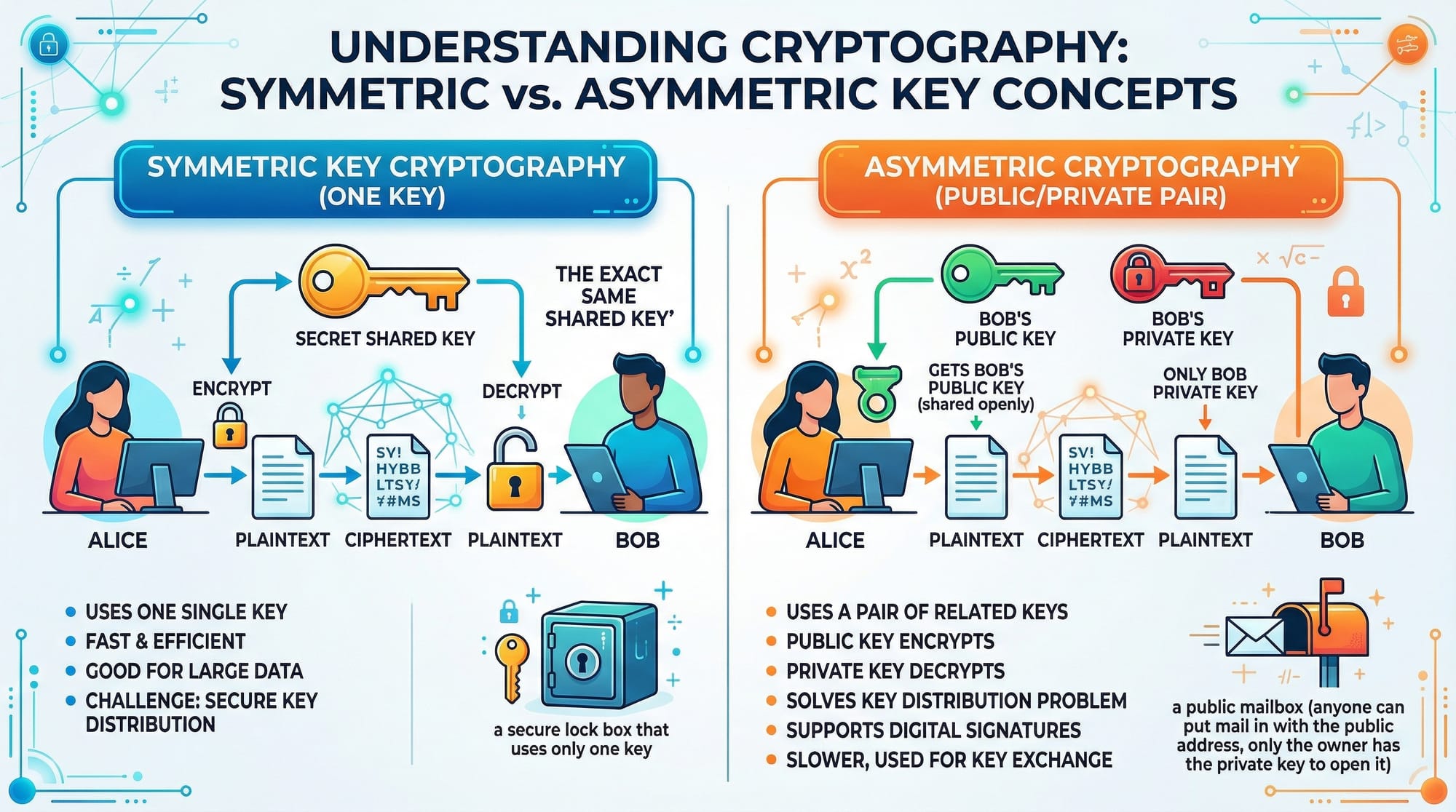
Symmetric vs Asymmetric Encryption
Encryption protects data by converting it into unreadable format.
Symmetric Encryption
- Uses one key for both encryption and decryption
- Fast and efficient
Example:
Ali encrypts a file using AES and sends it to Ahmad using the same secret key.
Asymmetric Encryption
- Uses two keys: Public and Private
- Public key encrypts, private key decrypts
Example:
A bank in Islamabad uses RSA:
- Public key → shared with users
- Private key → kept secret
This is the basis of the rsa tutorial concept.
Public Key Infrastructure (PKI)
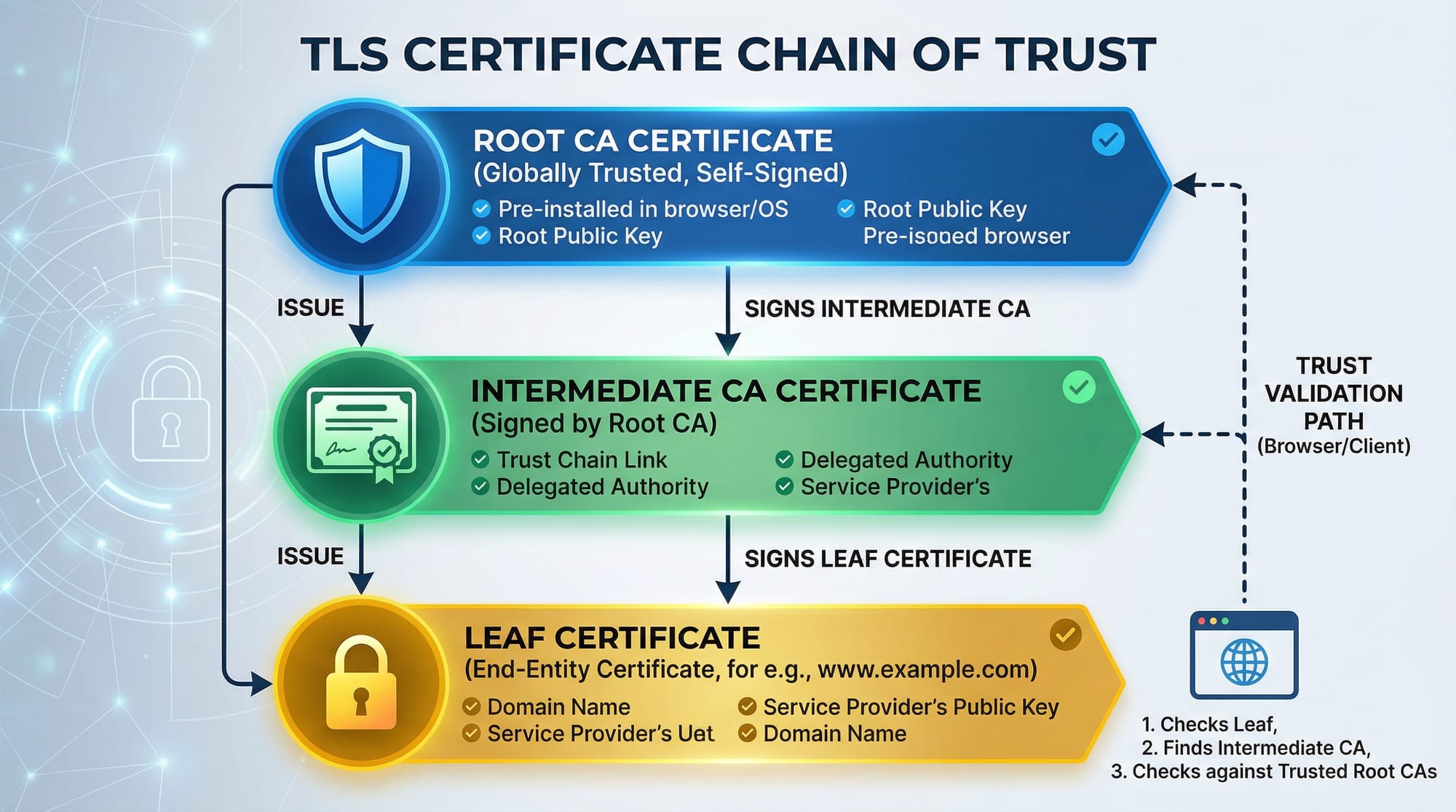
PKI is a system that manages digital certificates and encryption keys.
It includes:
- Certificate Authorities (CA)
- Digital certificates
- Public/private key pairs
Example:
When you visit a website using HTTPS, PKI ensures:
- The website is authentic
- Your data is encrypted
In Pakistan, banks and government websites rely heavily on PKI for secure communication.
Practical Code Examples
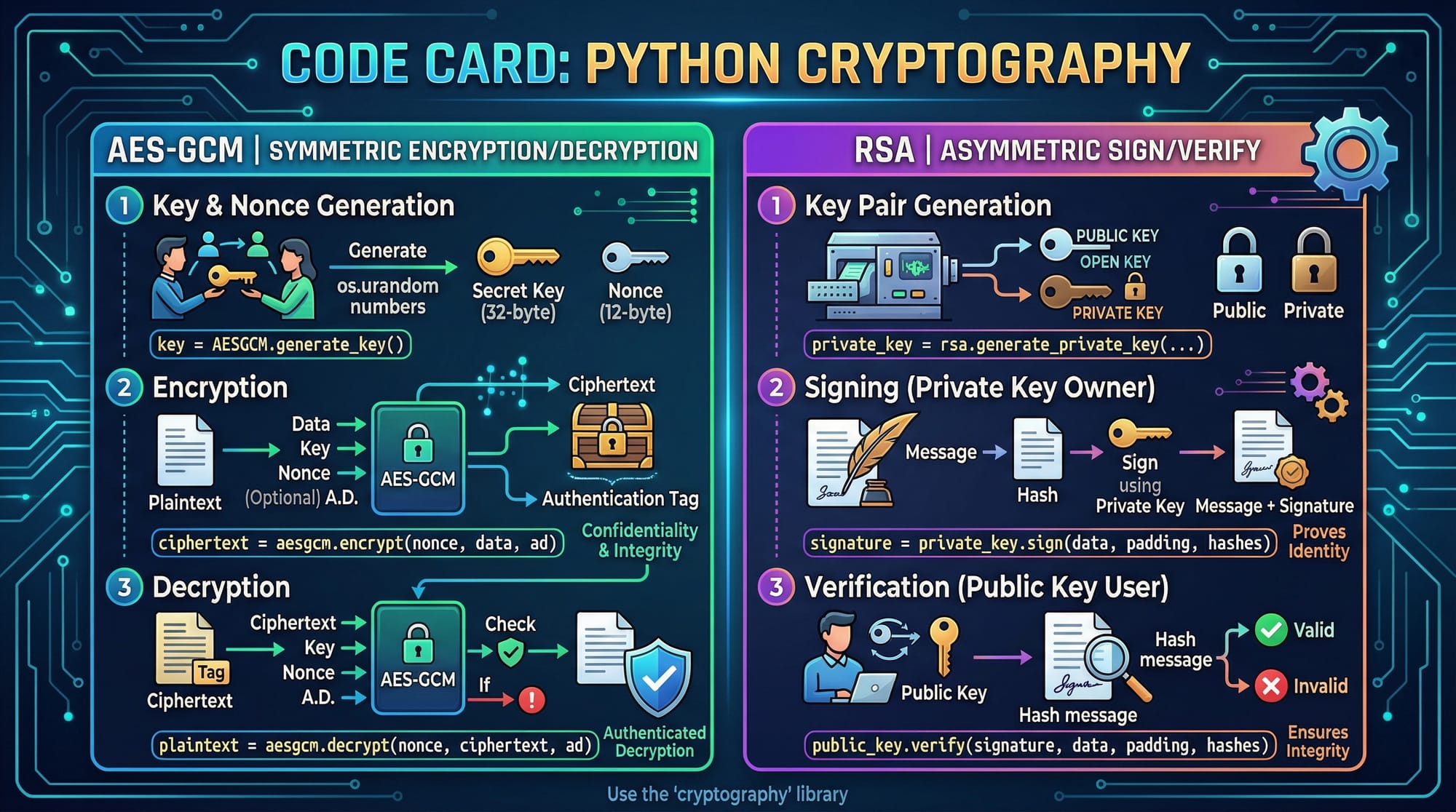
Example 1: AES Encryption in Python
from cryptography.hazmat.primitives.ciphers.aead import AESGCM
import os

# Step 1: Generate a random key
key = AESGCM.generate_key(bit_length=128)

# Step 2: Create AESGCM object
aesgcm = AESGCM(key)

# Step 3: Generate a random nonce
nonce = os.urandom(12)

# Step 4: Encrypt data
data = b"Hello Ahmad from Lahore"
encrypted = aesgcm.encrypt(nonce, data, None)

# Step 5: Decrypt data
decrypted = aesgcm.decrypt(nonce, encrypted, None)

print(decrypted)
Line-by-line explanation:
AESGCM.generate_key()→ Generates a secure random keyAESGCM(key)→ Initializes encryption objectos.urandom(12)→ Creates a nonce (random value)encrypt()→ Encrypts plaintextdecrypt()→ Converts ciphertext back to original data
Example 2: RSA Digital Signature (Real-World Use Case)
from cryptography.hazmat.primitives.asymmetric import rsa, padding
from cryptography.hazmat.primitives import hashes

# Step 1: Generate private key
private_key = rsa.generate_private_key(
    public_exponent=65537,
    key_size=2048
)

# Step 2: Get public key
public_key = private_key.public_key()

# Step 3: Message to sign
message = b"Payment of 5000 PKR by Ali"

# Step 4: Sign message
signature = private_key.sign(
    message,
    padding.PSS(
        mgf=padding.MGF1(hashes.SHA256()),
        salt_length=padding.PSS.MAX_LENGTH
    ),
    hashes.SHA256()
)

# Step 5: Verify signature
public_key.verify(
    signature,
    message,
    padding.PSS(
        mgf=padding.MGF1(hashes.SHA256()),
        salt_length=padding.PSS.MAX_LENGTH
    ),
    hashes.SHA256()
)

print("Signature verified!")
Explanation:
generate_private_key()→ Creates secure RSA keyspublic_key()→ Extracts public keysign()→ Signs data using private keyverify()→ Confirms authenticity using public key
Real-world example:
Used in online banking systems in Pakistan to verify transactions securely.
Common Mistakes & How to Avoid Them
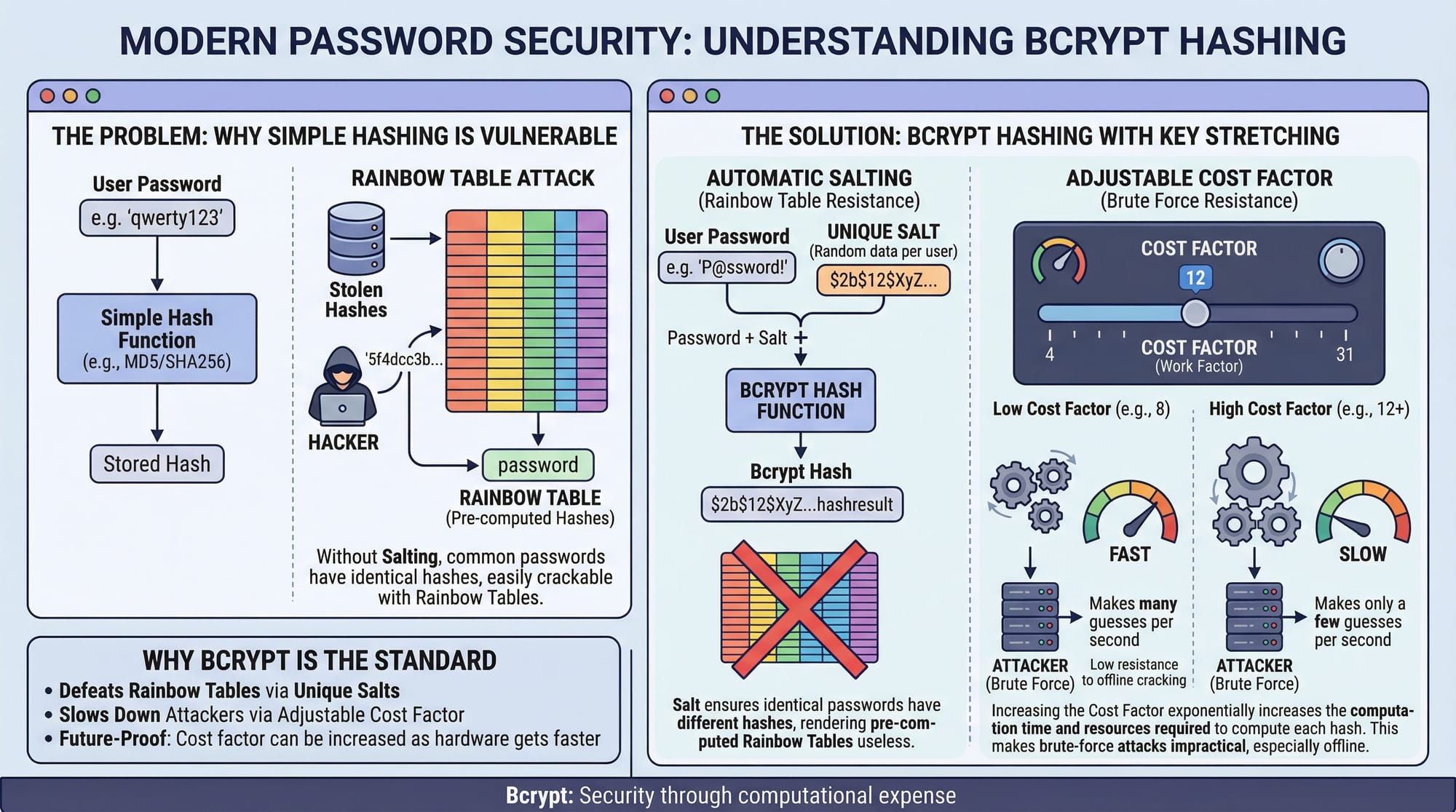
Mistake 1: Storing Plain Passwords
❌ Wrong:
password = "Ali123"
✅ Correct:
import bcrypt

hashed = bcrypt.hashpw(b"Ali123", bcrypt.gensalt())
Explanation:
- Always hash passwords using strong algorithms like bcrypt
- Prevents hackers from reading passwords
Mistake 2: Using Weak Encryption Modes
❌ Using ECB mode (insecure)
✅ Use secure modes like AES-GCM
Why?
- ECB leaks patterns
- GCM provides authentication + encryption
Practice Exercises
Exercise 1: Hash a Password
Problem:
Hash a password "Fatima2024" using SHA-256.
Solution:
import hashlib

password = "Fatima2024"
hashed = hashlib.sha256(password.encode()).hexdigest()

print(hashed)
Explanation:
encode()converts string to bytessha256()generates hashhexdigest()converts to readable format
Exercise 2: Encrypt Message with AES
Problem:
Encrypt "Hello Karachi" using AES.
Solution:
from cryptography.fernet import Fernet

key = Fernet.generate_key()
cipher = Fernet(key)

encrypted = cipher.encrypt(b"Hello Karachi")
decrypted = cipher.decrypt(encrypted)

print(decrypted)
Explanation:
generate_key()creates secret keyencrypt()secures messagedecrypt()retrieves original data
Frequently Asked Questions
What is cryptography in simple terms?
Cryptography is the practice of securing data using mathematical techniques. It ensures confidentiality, integrity, and authenticity of information.
How do I choose between symmetric and asymmetric encryption?
Use symmetric encryption for speed (e.g., encrypting files) and asymmetric encryption for secure key exchange or authentication.
What is RSA used for?
RSA is used for secure data transmission, digital signatures, and key exchange in HTTPS connections.
How do I store passwords securely?
Always use hashing algorithms like bcrypt or Argon2. Never store passwords in plain text.
What is PKI and why is it important?
PKI manages digital certificates and encryption keys. It ensures secure communication over the internet, especially in HTTPS.
Summary & Key Takeaways
- Cryptography is essential for modern application security
- Hashing protects passwords and ensures data integrity
- Symmetric encryption is fast; asymmetric encryption is secure for key exchange
- PKI enables trust and secure communication (HTTPS)
- Avoid common mistakes like weak encryption and plain-text passwords
- Learn and practice cryptography to build secure systems in Pakistan
Next Steps & Related Tutorials
To continue your journey, explore these tutorials on theiqra.edu.pk:
- Learn the fundamentals in Cybersecurity Basics for Beginners
- Understand secure web communication in HTTPS & SSL/TLS Explained
- Dive deeper into attacks with OWASP Top 10 Vulnerabilities
- Practice real tools in Burp Suite for Web Security Testing
These resources will help you become a skilled cybersecurity developer ready for real-world challenges in Pakistan and beyond.
Test Your Python Knowledge!
Finished reading? Take a quick quiz to see how much you've learned from this tutorial.