CSS Custom Properties Variables Dynamic Theming Guide
Introduction
CSS Custom Properties—commonly known as CSS variables—are a powerful feature in modern CSS that allow you to store reusable values (like colors, spacing, fonts) and use them across your stylesheets. In this CSS Custom Properties (Variables): Dynamic Theming Guide, you’ll learn how to create flexible, maintainable, and dynamic designs using variables.
For Pakistani students learning web development—whether you're Ahmad building a portfolio in Lahore or Fatima designing a startup website in Karachi—CSS variables help you write cleaner code and easily implement features like dark mode, theme switching, and consistent design systems.
Unlike traditional CSS values, custom properties are dynamic. You can change them using JavaScript or based on user preferences, making them ideal for dynamic theming CSS.
Prerequisites
Before starting this CSS variables tutorial, you should have:
- Basic understanding of HTML structure
- Knowledge of CSS selectors and properties
- Familiarity with concepts like classes, IDs, and pseudo-classes
- Basic JavaScript (optional, for dynamic updates)
Core Concepts & Explanation
Understanding CSS Custom Properties (Variables)
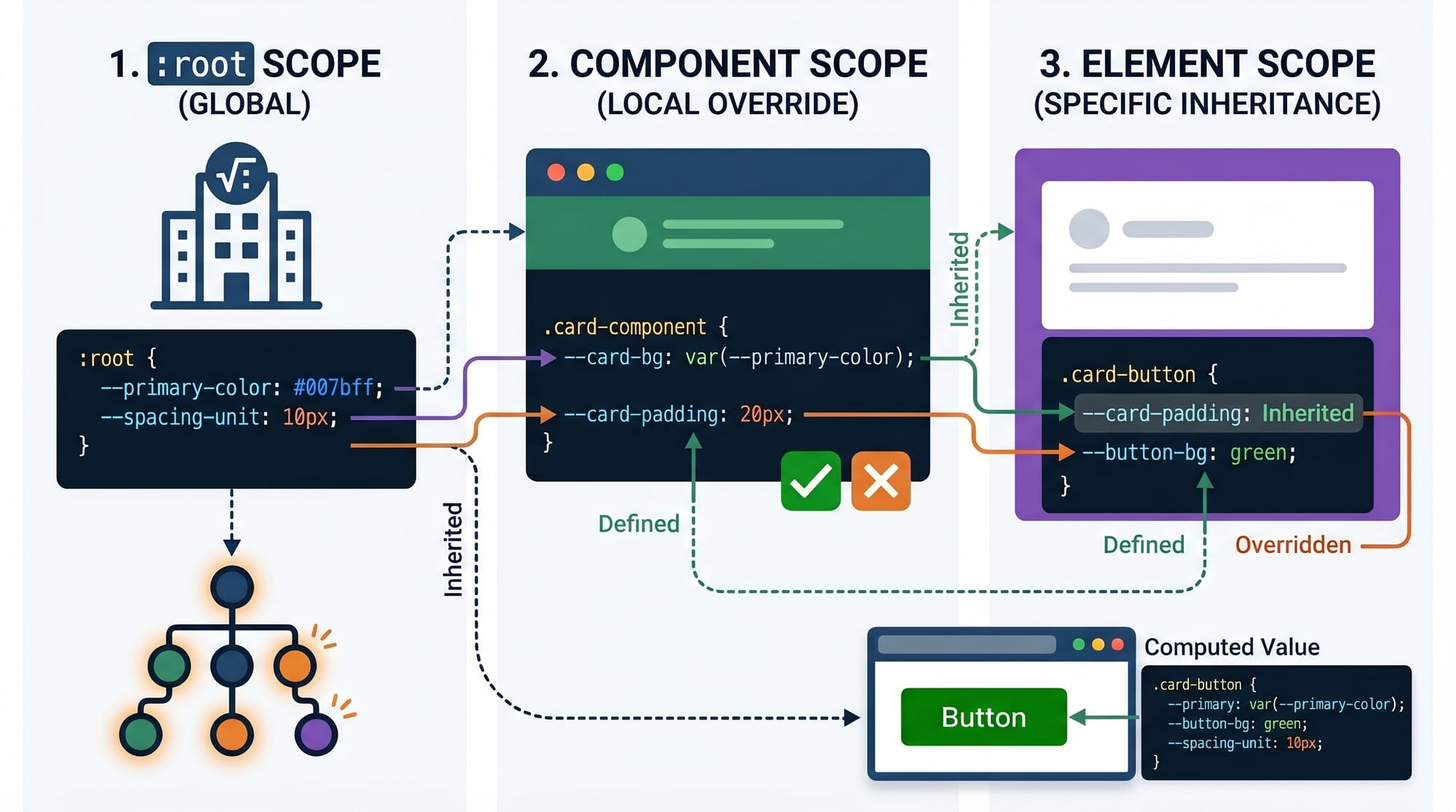
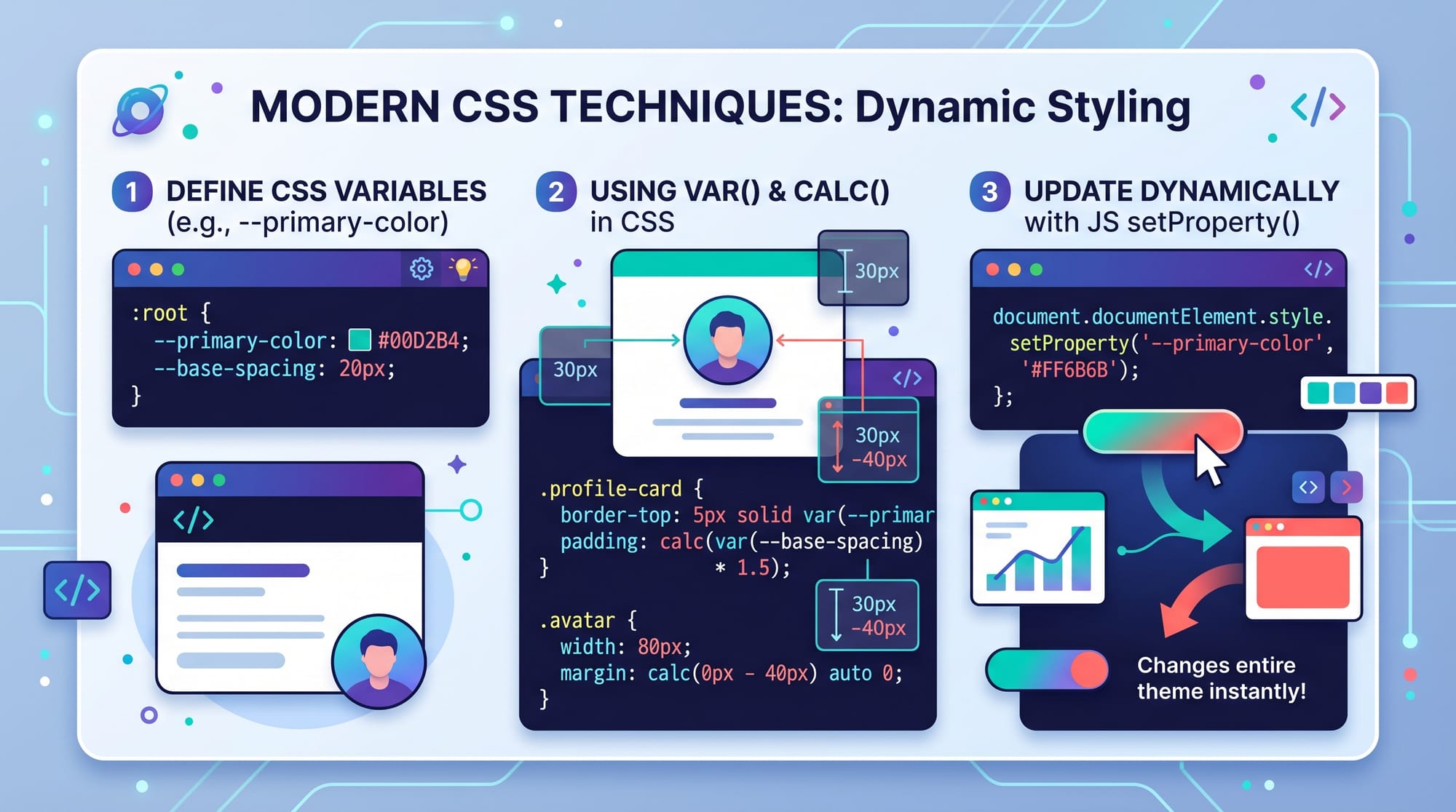
CSS custom properties are declared using -- and accessed using the var() function.
Example:
:root {
  --primary-color: #007bff;
}
button {
  background-color: var(--primary-color);
}
Explanation:
:root→ Refers to the global scope (like the<html>element)--primary-color→ A custom property (variable)var(--primary-color)→ Retrieves the value
This allows you to define a color once and reuse it everywhere.
Variable Scope and Inheritance
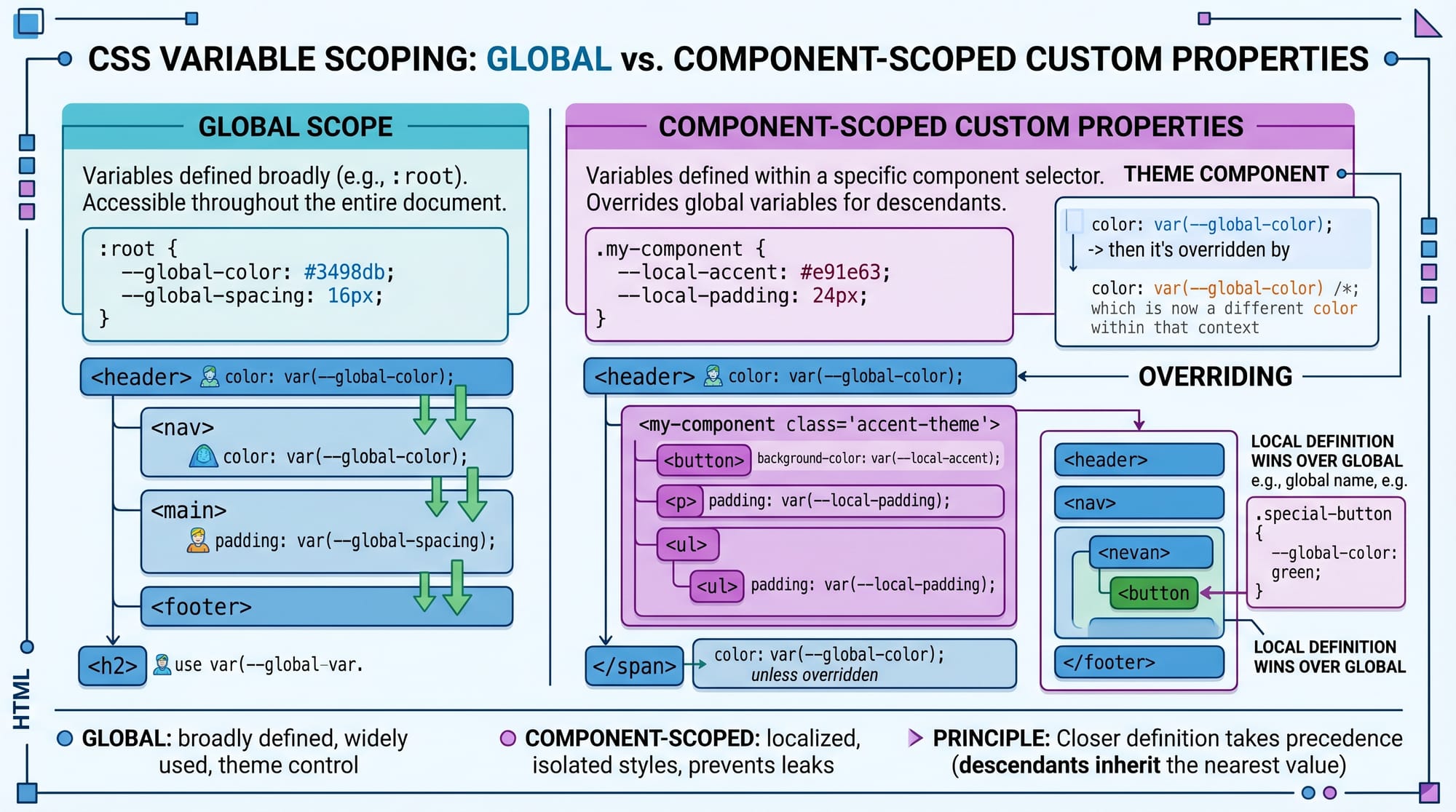
CSS variables follow the cascade and can be scoped locally.
Example:
:root {
  --text-color: black;
}

.card {
  --text-color: blue;
}

p {
  color: var(--text-color);
}
Explanation:
- Global variable is
black - Inside
.card, it becomesblue <p>inside.card→ blue<p>outside.card→ black
This makes components highly customizable.
Using calc() with Variables
You can perform calculations using variables.
:root {
  --base-size: 10px;
}

.box {
  width: calc(var(--base-size) * 5);
}
Explanation:
--base-size= 10pxcalc()multiplies it → 50px- Makes layouts flexible and responsive
Updating Variables with JavaScript
You can dynamically change variables using JavaScript.
document.documentElement.style.setProperty('--primary-color', 'green');
Explanation:
document.documentElement→ targets:rootsetProperty()→ updates variable value- Instantly updates UI without reloading page
Practical Code Examples
Example 1: Theme Colors System
:root {
  --primary-color: #0066cc;
  --secondary-color: #f4f4f4;
  --text-color: #333;
}

body {
  background-color: var(--secondary-color);
  color: var(--text-color);
}

button {
  background-color: var(--primary-color);
  color: white;
}
Line-by-line Explanation:
:root→ defines global variables--primary-color→ main brand color--secondary-color→ background colorbody→ uses variables for stylingbutton→ consistent styling using variable
👉 If Ahmad changes --primary-color, all buttons update instantly.
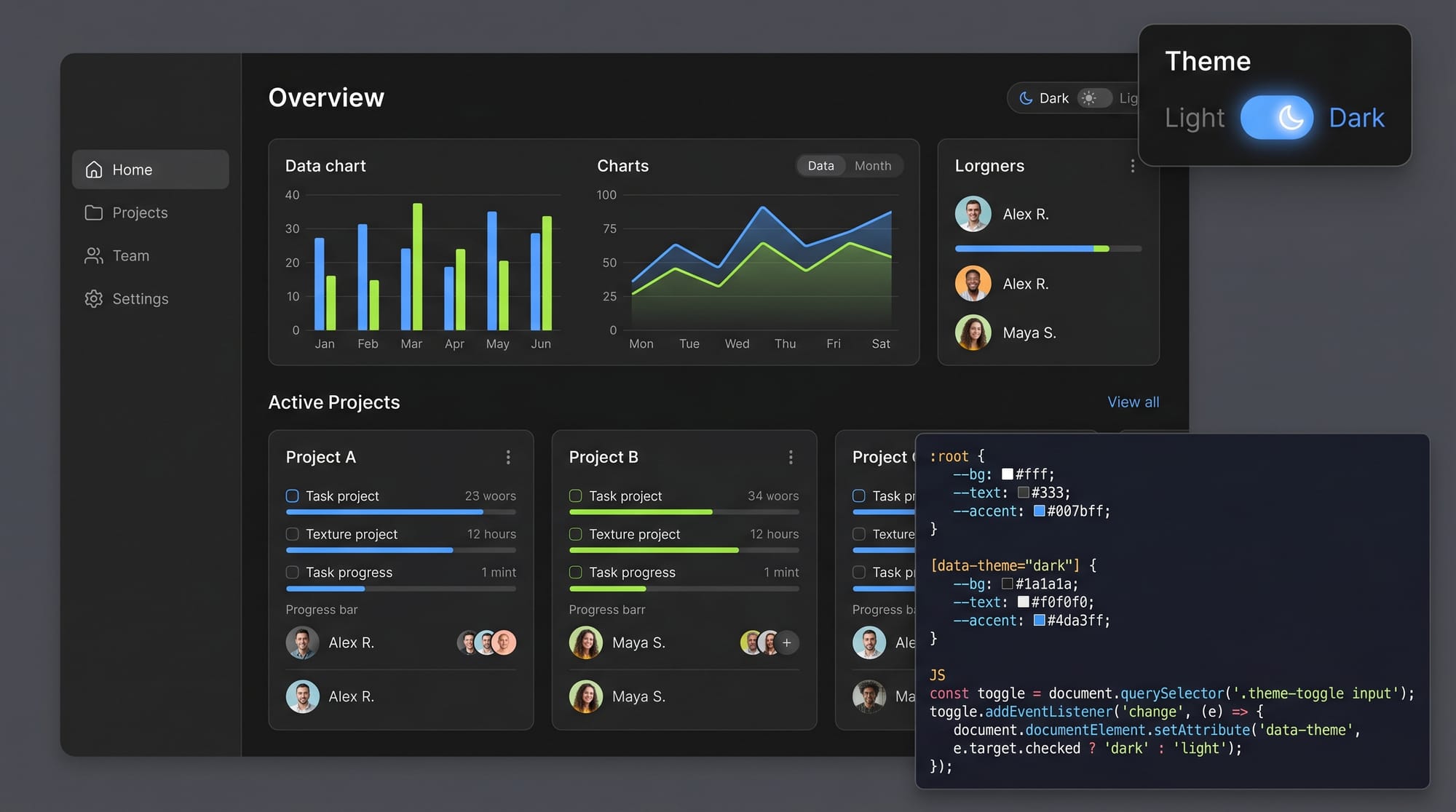
Example 2: Real-World Application (Dark Mode Toggle)
:root {
  --bg-color: white;
  --text-color: black;
}

.dark-mode {
  --bg-color: black;
  --text-color: white;
}

body {
  background-color: var(--bg-color);
  color: var(--text-color);
}
function toggleDarkMode() {
  document.body.classList.toggle('dark-mode');
}
Line-by-line Explanation:
:root→ default light theme.dark-mode→ overrides variablesbody→ uses variables for colorstoggleDarkMode()→ switches class- UI updates instantly using variable swap
👉 Fatima can build a professional dark mode feature in seconds.
Common Mistakes & How to Avoid Them
Mistake 1: Not Defining Fallback Values
Using variables without fallback can break UI.
color: var(--main-color);
Fix:
color: var(--main-color, black);
Explanation:
- If variable is missing → fallback
blackis used - Prevents unexpected styling issues
Mistake 2: Incorrect Scope Usage
Declaring variables inside limited scope unintentionally.
.card {
  --main-color: red;
}
Problem:
- Variable only works inside
.card
Fix:
:root {
  --main-color: red;
}
Explanation:
- Use
:rootfor global variables - Use component scope only when needed
Practice Exercises
Exercise 1: Create a Color Theme
Problem:
Create variables for primary, secondary, and text colors, and apply them to a webpage.
Solution:
:root {
  --primary: green;
  --secondary: lightgray;
  --text: black;
}

body {
  background: var(--secondary);
  color: var(--text);
}

h1 {
  color: var(--primary);
}
Explanation:
- Variables defined globally
- Applied to body and headings
- Easy to update theme
Exercise 2: Responsive Spacing System
Problem:
Use variables to control spacing and scale it.
Solution:
:root {
  --spacing: 10px;
}

.container {
  padding: calc(var(--spacing) * 2);
}

.box {
  margin: var(--spacing);
}
Explanation:
- Base spacing = 10px
- Padding = 20px using calc()
- Margin uses same variable
- Keeps design consistent
Frequently Asked Questions
What is a CSS custom property?
A CSS custom property is a variable defined using -- that stores reusable values like colors or sizes. It helps make CSS more maintainable and dynamic.
How do I use CSS variables in my project?
Define them in :root and access them using var(). You can use them anywhere in your CSS styles.
Can CSS variables be changed dynamically?
Yes, you can update them using JavaScript with setProperty(), making them perfect for dynamic theming.
Are CSS variables better than SCSS variables?
CSS variables work in real-time and can change dynamically, while SCSS variables are compiled and static. Both have their use cases.
Do CSS variables work in all browsers?
Most modern browsers support CSS variables. However, older browsers like Internet Explorer do not support them.
Summary & Key Takeaways
- CSS custom properties allow reusable and dynamic styling
- Variables are defined using
--and accessed withvar() - They support inheritance and scoping
- You can use them with
calc()for responsive design - JavaScript can dynamically update variables
- Perfect for building themes like dark mode
Next Steps & Related Tutorials
To continue your journey, explore these tutorials on theiqra.edu.pk:
- Learn the fundamentals in CSS Basics to strengthen your foundation
- Build utility-first designs with Tailwind CSS
- Explore responsive layouts in a Flexbox & Grid tutorial
- Dive deeper into animations with a CSS Animations guide
Mastering css custom properties will make your code cleaner, smarter, and more professional—an essential skill for every Pakistani frontend developer aiming for success in 2026 and beyond 🚀
Test Your Python Knowledge!
Finished reading? Take a quick quiz to see how much you've learned from this tutorial.