CSS Nesting has() & Modern Selectors Guide 2026
Introduction
CSS has evolved rapidly, and in 2026 one of the biggest improvements for frontend developers is the combination of css nesting, the css has selector, and other modern CSS selectors 2026 features. These tools make styling faster, cleaner, and closer to how developers naturally think about UI components.
Traditionally, CSS required long, repetitive selectors. For example, styling a card and its children meant writing multiple separate rules. But now, with modern CSS, we can nest styles inside each other and even select parent elements based on child conditions using :has().
For Pakistani students learning web development in cities like Lahore, Karachi, and Islamabad, mastering these modern selectors is extremely important. Companies are increasingly expecting developers to write scalable, component-based CSS for React, Next.js, and modern UI frameworks.
Prerequisites
Before learning css nesting, :has() & modern selectors guide 2026, you should understand:
- Basic HTML structure (div, section, header, button)
- Basic CSS selectors (class, id, element selectors)
- CSS properties (color, margin, padding, display)
- Basic understanding of hover and pseudo-classes like
:hover,:focus
If you are comfortable building a simple webpage like a student profile card or blog layout, you are ready to continue.
Core Concepts & Explanation
CSS Nesting (Modern Native Nesting in CSS)
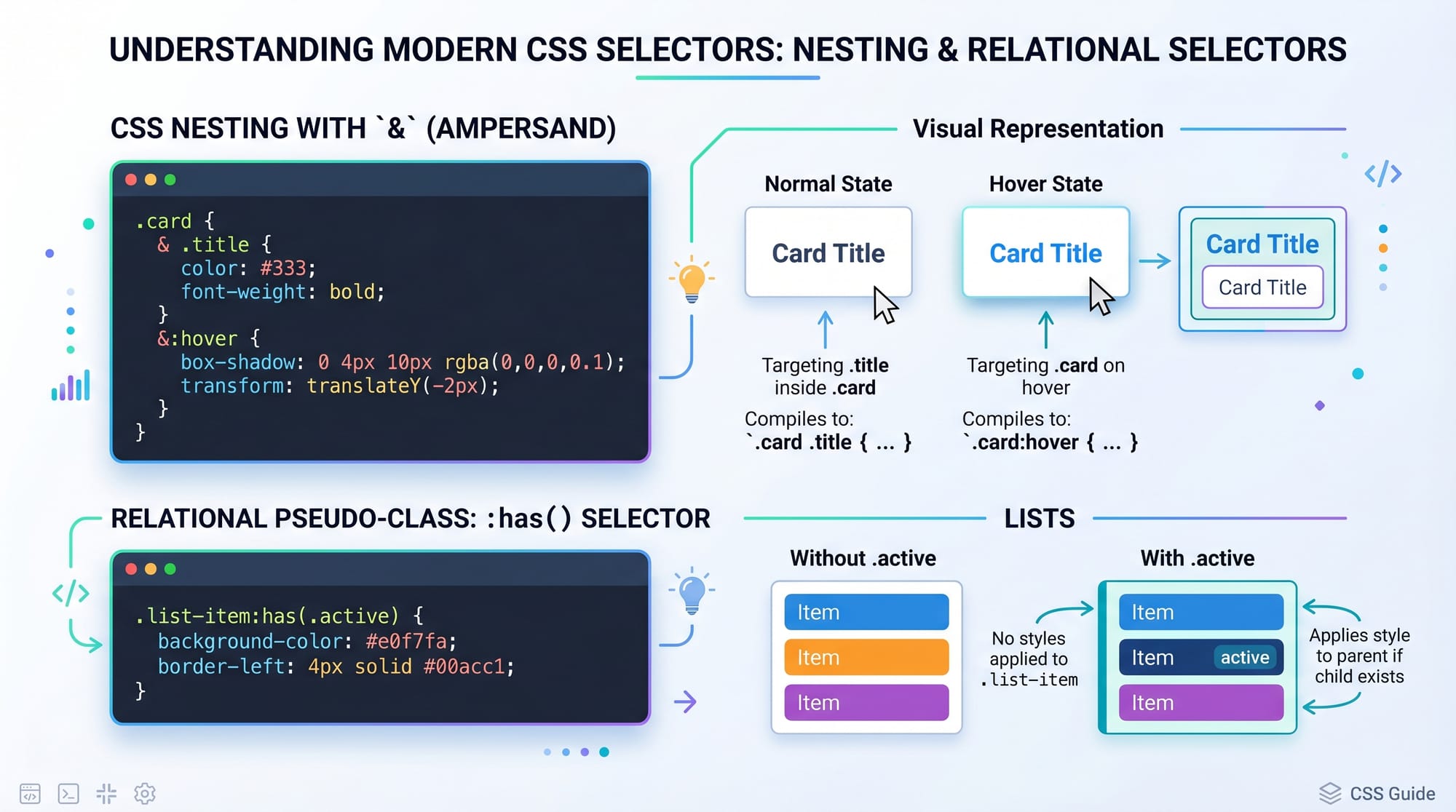
CSS Nesting allows you to write selectors inside other selectors, similar to Sass, but now it is built directly into CSS.
Example:
.card {
  background: white;
  padding: 20px;

  .title {
    font-size: 20px;
    color: #333;
  }

  &:hover {
    transform: scale(1.05);
  }
}
Explanation:
.card→ Main container styling.title→ Nested inside.card, styles only titles inside card&:hover→ Refers to.card:hover- Makes CSS shorter and easier to read
This is extremely useful when building dashboards, e-commerce cards, or student portals.
The CSS :has() Selector (Parent Selector Revolution)
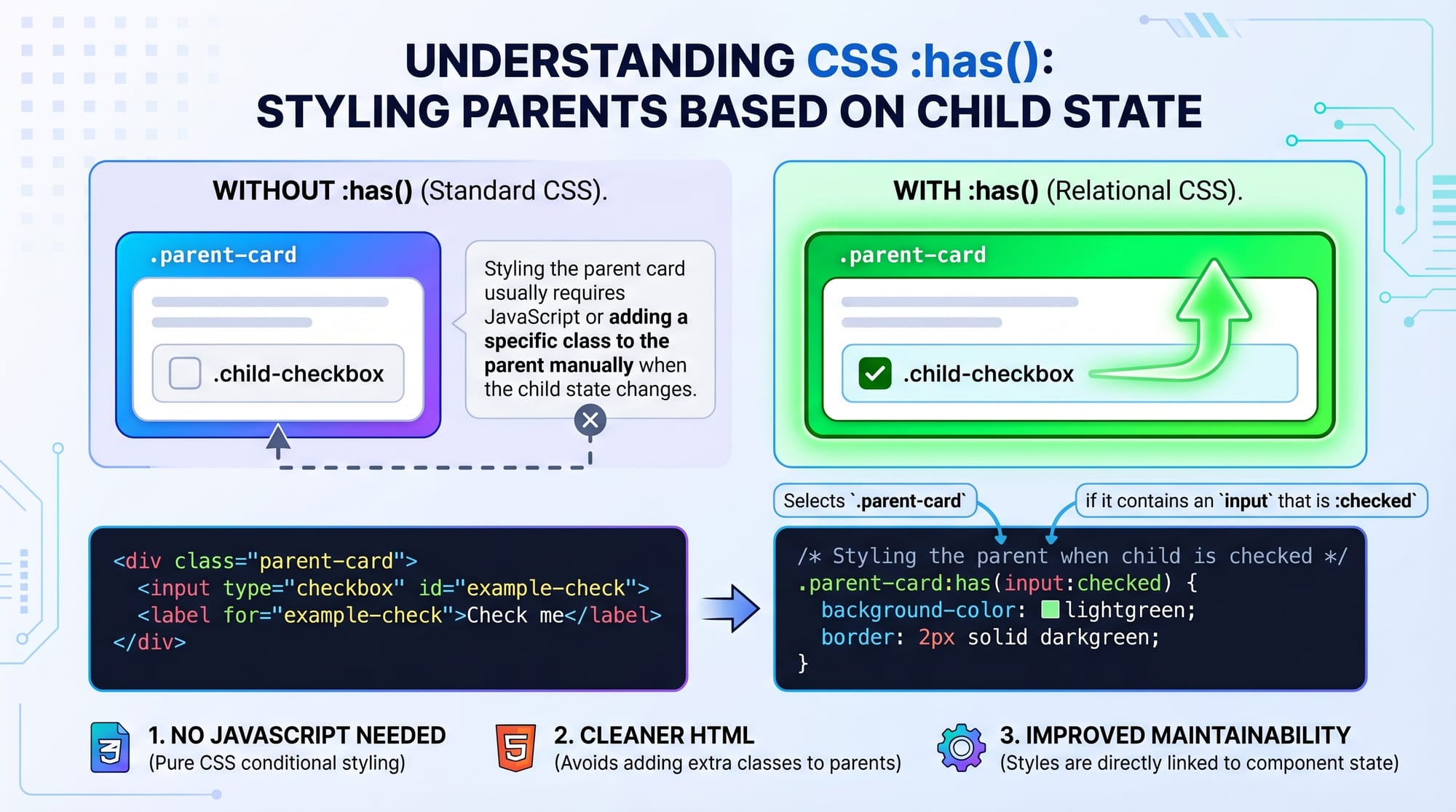
The css has selector is one of the most powerful modern CSS features. It allows selecting a parent based on its children.
Example:
.card:has(.active) {
  border: 2px solid green;
}
Explanation:
.card→ Parent element:has(.active)→ Applies style if a child has class.active- Border appears only when condition is true
This was not possible in traditional CSS without JavaScript.
Modern CSS Selectors 2026 Improvements
Modern CSS also includes advanced selectors:
:is()→ simplifies multiple selectors:where()→ zero specificity selector:not()→ excludes elements:has()→ parent selector capability
Example:
button:is(.primary, .secondary) {
  padding: 10px 15px;
}
Explanation:
- Styles both
.primaryand.secondarybuttons - Reduces repetition
Practical Code Examples
Example 1: Student Card with CSS Nesting
.student-card {
  background: #fff;
  border-radius: 10px;
  padding: 15px;

  .name {
    font-weight: bold;
    color: #222;
  }

  .grade {
    color: green;
  }

  &:hover {
    box-shadow: 0 4px 10px rgba(0,0,0,0.1);
  }
}
Explanation:
.student-card→ main container for student info.name→ student name styling.grade→ marks or grade color&:hover→ adds shadow effect on hover
This is useful for university portals in Pakistan showing student results.
Example 2: Real-World Application (Notification System)
.notification {
  padding: 10px;
  background: #f5f5f5;

  &:has(.unread) {
    border-left: 4px solid red;
  }

  .message {
    font-size: 14px;
  }
}
Explanation:
.notification→ main box:has(.unread)→ highlights notifications with unread messages.message→ text inside notification
Common Mistakes & How to Avoid Them
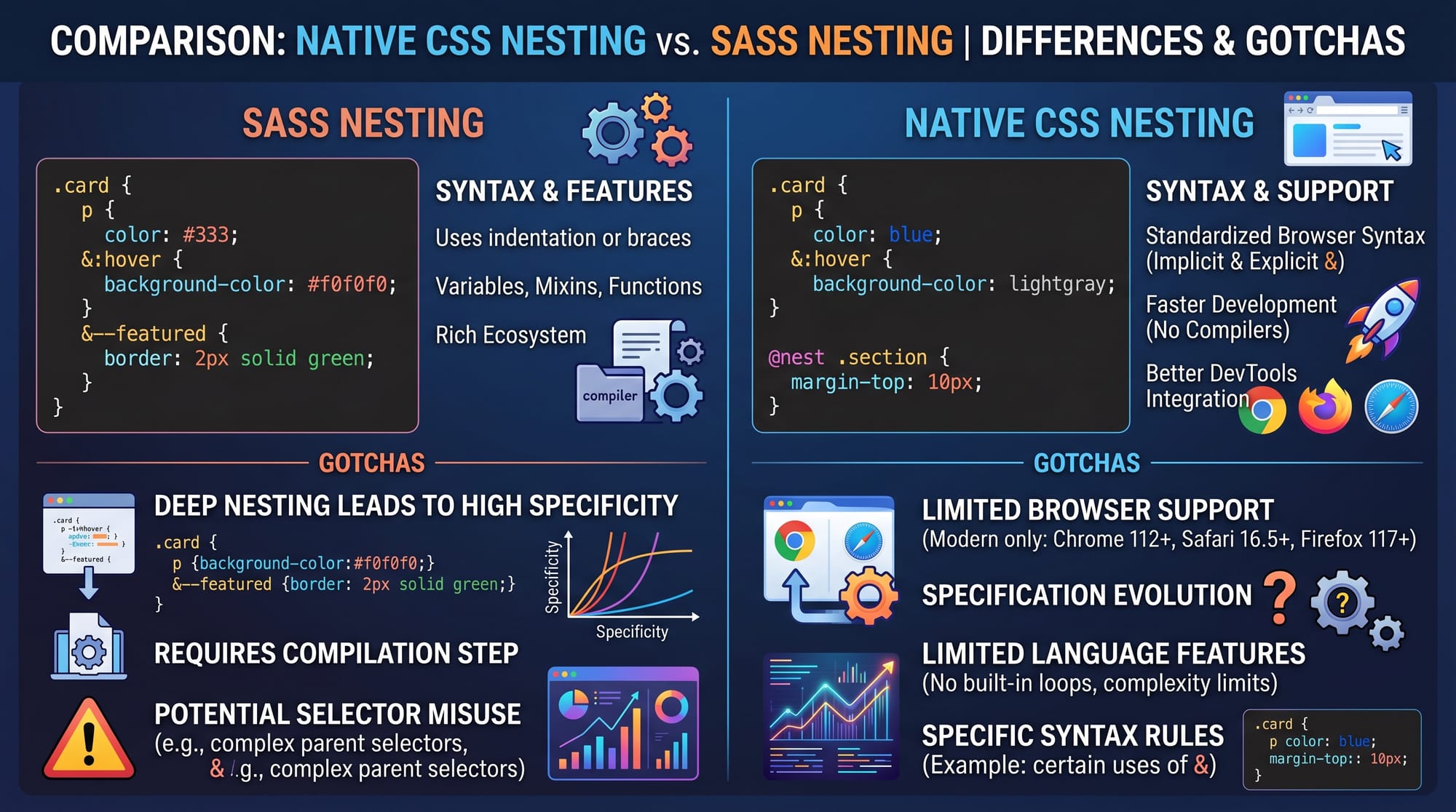
Mistake 1: Confusing Sass Nesting with Native CSS Nesting
Many students think CSS nesting works exactly like Sass.
❌ Wrong:
.card {
  .title {
    color: red;
  }
}
(This may not work in older browsers)
✔ Correct approach:
Use modern supported syntax or compile via tools.
.card {
  & .title {
    color: red;
  }
}
Explanation:
&ensures proper selector reference- Safer for browser compatibility
Mistake 2: Overusing :has() Selector
Some students overuse :has() for simple tasks.
❌ Wrong:
div:has(p) {
  color: blue;
}
✔ Better:
Use direct styling when possible:
div p {
  color: blue;
}
Explanation:
:has()is powerful but heavier- Use only when parent-based logic is needed
Practice Exercises
Exercise 1: Build a Product Card
Problem:
Create a product card for a Lahore-based online store with:
- Product name
- Price in PKR
- Hover effect
Solution:
.product-card {
  padding: 15px;
  border: 1px solid #ddd;

  .title {
    font-size: 18px;
  }

  .price {
    color: green;
  }

  &:hover {
    transform: scale(1.03);
  }
}
Exercise 2: Highlight Active Menu Item
Problem:
Highlight navigation menu if one item is active.
Solution:
.nav:has(.active) {
  background: #eee;
}
Frequently Asked Questions
What is css nesting in modern CSS?
CSS nesting allows you to write selectors inside other selectors, making CSS cleaner and more structured like components.
What is css has selector used for?
The :has() selector is used to style a parent element based on its child elements' state or class.
Is css nesting supported in all browsers?
Modern browsers support it, but older browsers may require preprocessing tools or fallbacks.
Why should Pakistani students learn modern CSS selectors?
Because modern companies in Pakistan and abroad use component-based frameworks that rely heavily on clean, scalable CSS.
What is the difference between Sass nesting and CSS nesting?
Sass requires compilation, while native CSS nesting works directly in the browser with modern support.
Summary & Key Takeaways
- CSS nesting reduces repetition and improves readability
:has()allows parent selection based on child state- Modern CSS selectors simplify complex UI styling
- Native CSS nesting is replacing older preprocessor reliance
- Best for building modern UI systems and component libraries
- Overusing advanced selectors can reduce performance
Next Steps & Related Tutorials
To continue your learning journey, explore these tutorials on theiqra.edu.pk:
- Learn foundational styling in our CSS Basics Tutorial
- Improve your workflow with Sass/SCSS Tutorial for Beginners
- Build layouts with CSS Grid & Flexbox Masterclass
- Explore animations in Modern CSS Animations Guide
If you want, I can also convert this into:
- SEO blog format (with meta description + schema markup)
- Quiz for students
- Or React-based interactive lesson for theiqra.edu.pk
Test Your Python Knowledge!
Finished reading? Take a quick quiz to see how much you've learned from this tutorial.