Cypress Component Testing Unit Test React Vue Components
Introduction
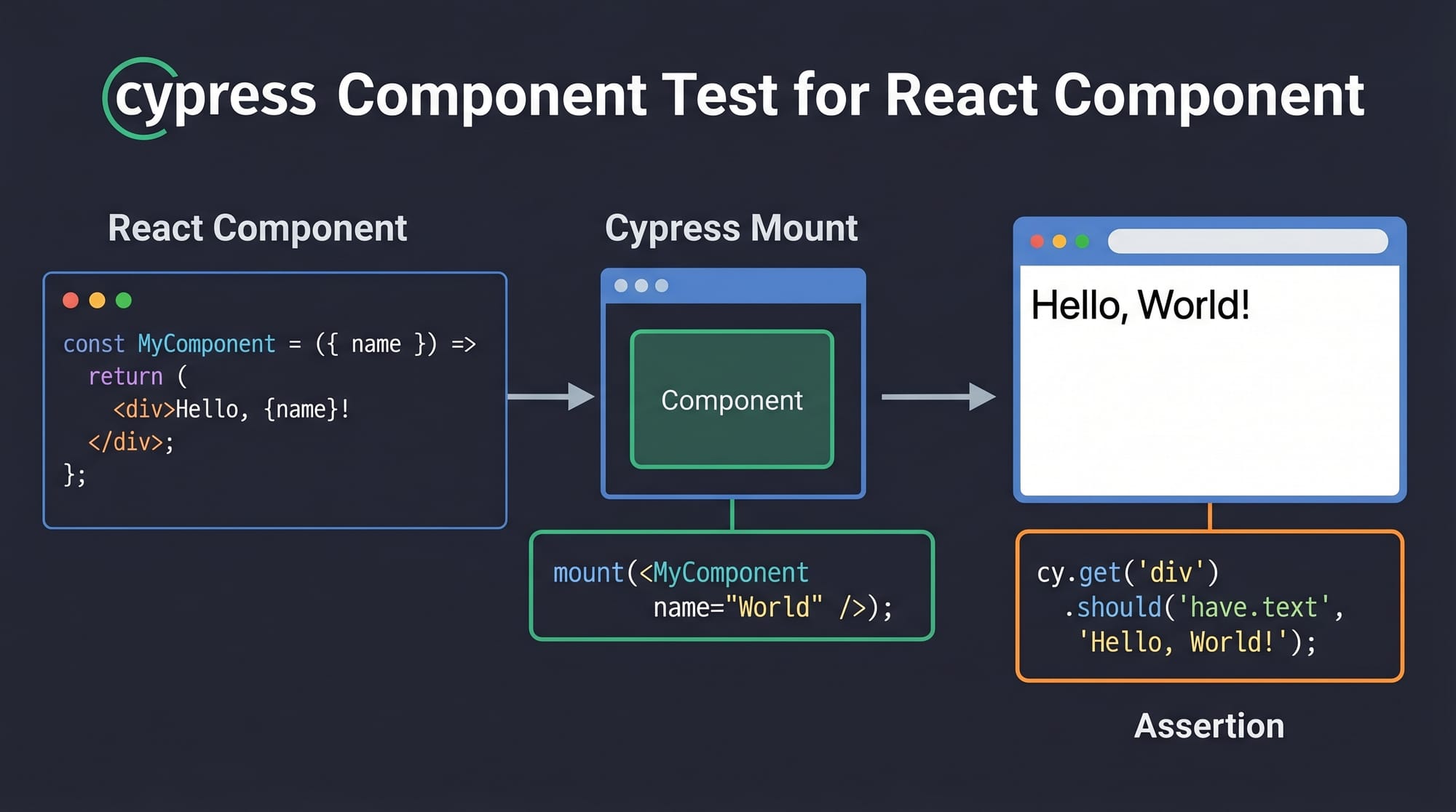
Cypress Component Testing is a modern approach to testing individual UI components in isolation using Cypress, a popular JavaScript testing framework. Unlike traditional end-to-end (E2E) testing, where you test the entire application flow, cypress component testing allows you to focus on smaller pieces like buttons, forms, and UI elements in frameworks such as React and Vue.
For Pakistani students—especially those studying web development in cities like Lahore, Karachi, and Islamabad—this skill is highly valuable. Many software houses and startups expect developers not only to write code but also to test it properly. Learning cypress react testing and cypress vue testing can significantly improve your job prospects and help you write more reliable applications.
Whether you're building an e-commerce app charging prices in PKR or a student portal for universities like Iqra University, component testing ensures each part of your UI works correctly.
Prerequisites
Before starting this tutorial, you should have:
- Basic knowledge of JavaScript (ES6+)
- Understanding of React or Vue fundamentals
- Familiarity with HTML and CSS
- Node.js installed on your system
- Basic knowledge of testing concepts (helpful but not mandatory)
- Experience with npm or yarn package managers
Core Concepts & Explanation
Understanding Component Testing vs E2E Testing
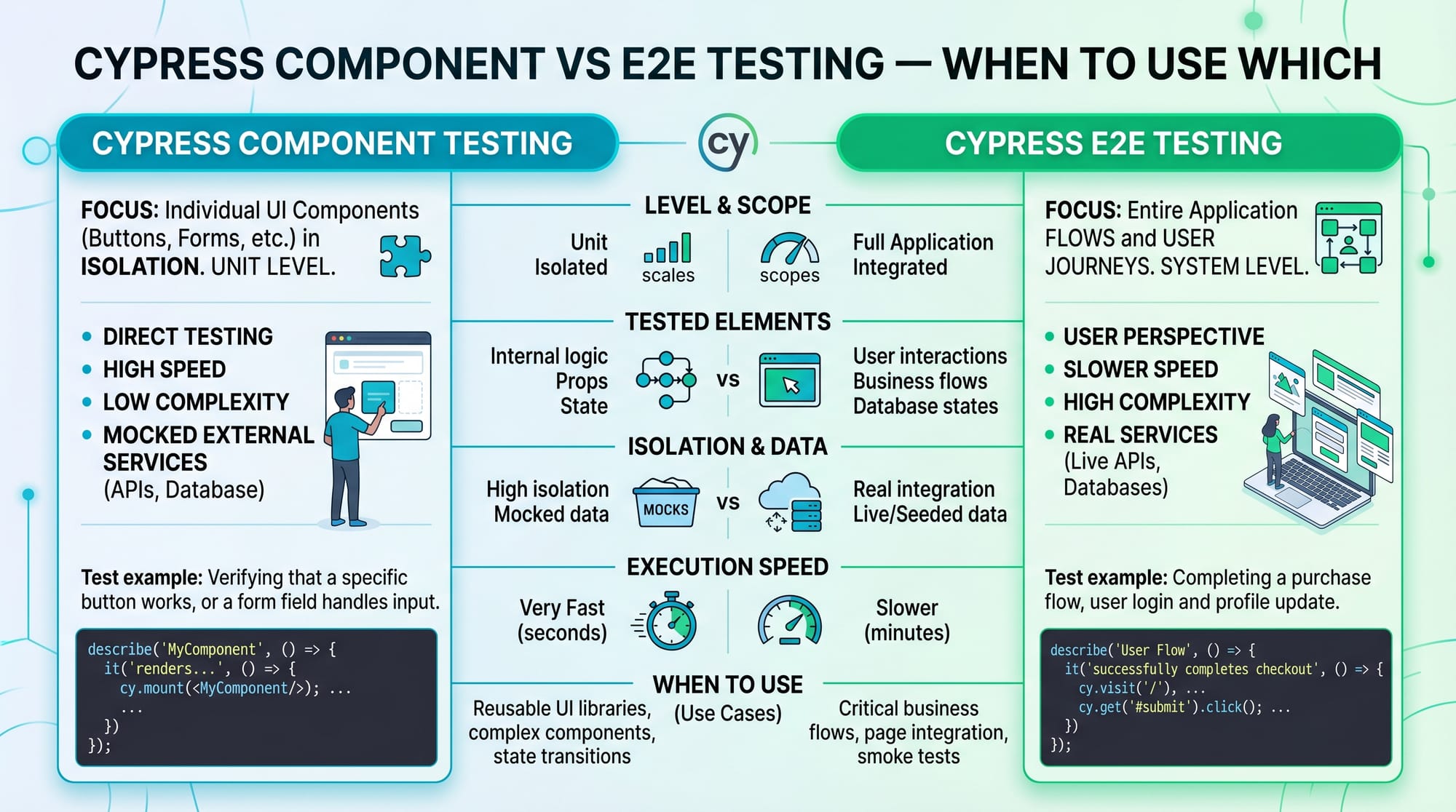
Component testing focuses on testing individual UI components in isolation, while E2E testing validates the entire application workflow.
Example:
- Component test → Check if a "Buy Now" button renders correctly
- E2E test → Check if a user can complete a purchase flow
// Component test example
cy.mount(<Button />)
cy.get('button').should('contain', 'Buy Now')
Explanation:
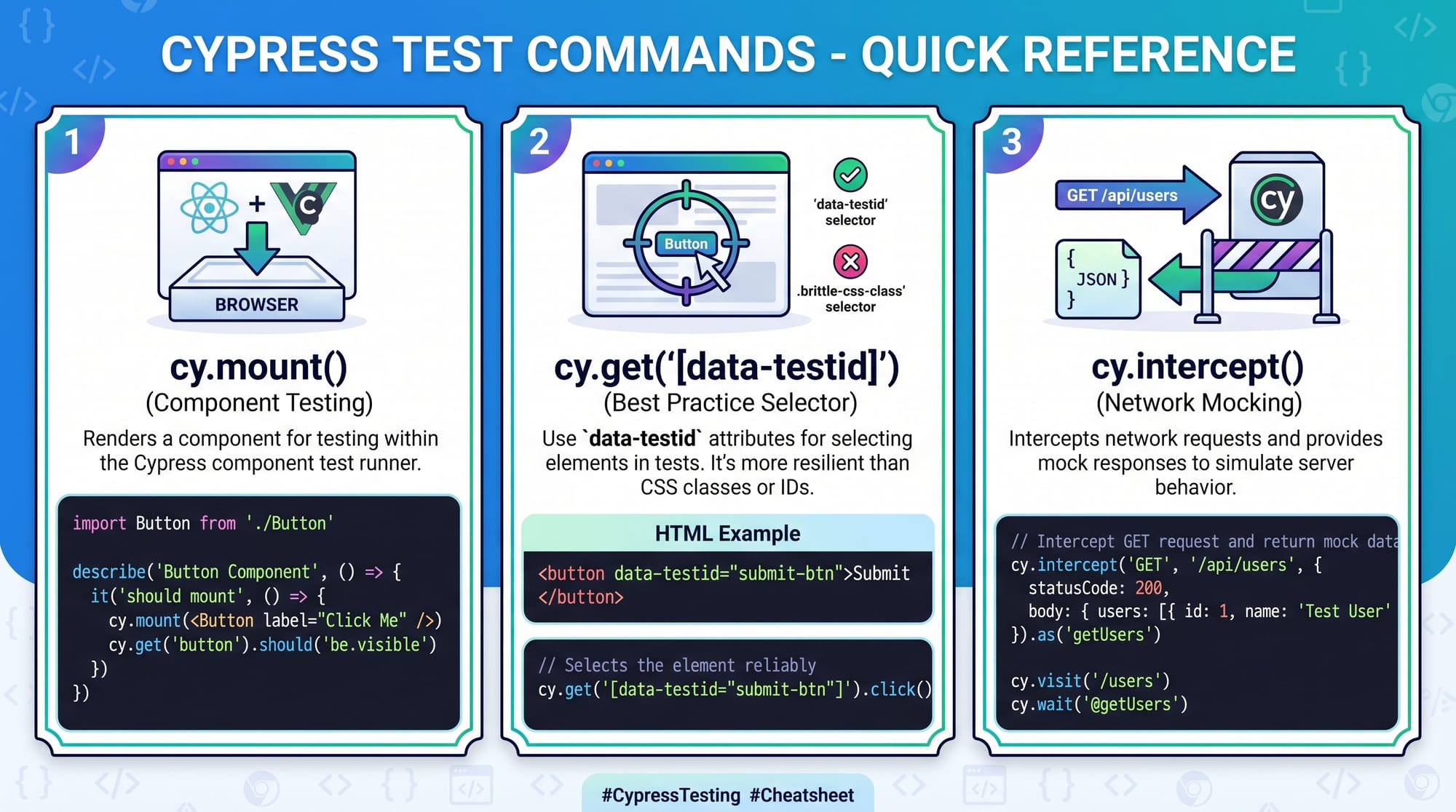
cy.mount(<Button />)→ Mounts the component in isolationcy.get('button')→ Selects the button element.should('contain', 'Buy Now')→ Verifies text content
This is the core of cypress component testing—fast, isolated, and reliable.
Mounting Components in Cypress
To test components, you need to "mount" them into Cypress's test runner.
import { mount } from 'cypress/react'
import Button from './Button'

describe('Button Component', () => {
  it('renders correctly', () => {
    mount(<Button label="Click Me" />)
    cy.contains('Click Me').should('exist')
  })
})
Explanation:
import { mount }→ Import Cypress mounting utilitymount(<Button />)→ Renders component inside Cypresscy.contains()→ Finds element by text.should('exist')→ Assertion to verify presence
This approach is widely used in cypress react testing.
Using Selectors and Assertions
Selectors help you find elements, while assertions verify behavior.
cy.get('[data-testid="submit-btn"]').click()
cy.get('.success-message').should('be.visible')
Explanation:
cy.get()→ Selects DOM elements[data-testid="submit-btn"]→ Best practice selector.click()→ Simulates user action.should('be.visible')→ Checks visibility
Mocking API Calls with cy.intercept
Instead of calling real APIs, you can mock responses.
cy.intercept('GET', '/api/products', {
  statusCode: 200,
  body: [{ id: 1, name: 'Laptop', price: 50000 }]
})
Explanation:
cy.intercept()→ Intercepts network requests'GET', '/api/products'→ Target requeststatusCode→ Mock response statusbody→ Fake data
This is extremely useful for Pakistani students working on local apps where APIs may not be ready.
Practical Code Examples
Example 1: Testing a React Button Component
// Button.jsx
function Button({ label }) {
  return <button>{label}</button>
}

export default Button
// Button.cy.js
import { mount } from 'cypress/react'
import Button from './Button'

describe('Button Component Test', () => {
  it('displays correct label', () => {
    mount(<Button label="Pay PKR 1000" />)
    cy.get('button').should('contain', 'Pay PKR 1000')
  })
})
Line-by-line explanation:
function Button({ label })→ Defines a reusable React component<button>{label}</button>→ Renders label inside buttonimport { mount }→ Import mounting utilitydescribe()→ Groups testsit()→ Defines a test casemount(<Button ... />)→ Renders componentcy.get('button')→ Select button element.should('contain', 'Pay PKR 1000')→ Verify text
Example 2: Real-World Application (Vue Form)
<!-- LoginForm.vue -->
<template>
  <form @submit.prevent="submit">
    <input v-model="username" data-testid="username" />
    <button type="submit">Login</button>
  </form>
</template>

<script>
export default {
  data() {
    return { username: '' }
  },
  methods: {
    submit() {
      alert(this.username)
    }
  }
}
</script>
// LoginForm.cy.js
import { mount } from 'cypress/vue'
import LoginForm from './LoginForm.vue'

describe('Login Form Test', () => {
  it('accepts input and submits', () => {
    mount(LoginForm)

    cy.get('[data-testid="username"]').type('Ahmad')
    cy.get('button').click()
  })
})
Explanation:
<input v-model="username">→ Two-way bindingdata-testid→ Testing selectormount(LoginForm)→ Mount Vue component.type('Ahmad')→ Simulate typing.click()→ Submit form
This demonstrates cypress vue testing in a real-world login scenario.
Common Mistakes & How to Avoid Them
Mistake 1: Using Poor Selectors
❌ Bad:
cy.get('div:nth-child(2)')
✅ Good:
cy.get('[data-testid="submit-btn"]')
Fix Explanation:
- Avoid fragile selectors like
nth-child - Use stable attributes like
data-testid
Mistake 2: Not Mocking API Calls
❌ Bad:
cy.visit('/products') // depends on real API
✅ Good:
cy.intercept('GET', '/api/products', { body: [] })
Fix Explanation:
- Real APIs may fail or be slow
- Mocking ensures consistent tests
Practice Exercises
Exercise 1: Test a Counter Component
Problem:
Create a test for a counter button that increments value.
Solution:
mount(<Counter />)
cy.get('button').click()
cy.get('span').should('contain', '1')
Explanation:
- Click triggers increment
- Assertion checks updated value
Exercise 2: Validate Form Input
Problem:
Test a form where user enters city name (e.g., Lahore).
Solution:
cy.get('input').type('Lahore')
cy.get('button').click()
cy.contains('Lahore').should('exist')
Explanation:
- Input simulates user typing
- Assertion confirms result
Frequently Asked Questions
What is Cypress Component Testing?
It is a testing method where individual UI components are tested in isolation using Cypress. It helps developers quickly verify functionality without running the full application.
How do I use Cypress with React?
You can use cypress/react to mount React components and test them using Cypress commands like cy.mount() and cy.get().
How do I test Vue components in Cypress?
Use cypress/vue to mount Vue components and interact with them similarly to React tests using Cypress commands.
Is Cypress better than Jest for component testing?
Cypress provides a real browser environment and better debugging tools, while Jest is faster for unit tests. Many developers use both together.
Can I use Cypress for API testing?
Yes, Cypress supports API testing using commands like cy.request() and cy.intercept() for mocking.
Summary & Key Takeaways
- Cypress Component Testing allows testing UI components in isolation
- It supports both React and Vue frameworks
cy.mount()is used to render components- Use
data-testidfor reliable selectors - Mock APIs using
cy.intercept()for stable tests - Ideal for Pakistani students aiming for modern web development roles
Next Steps & Related Tutorials
To continue your learning journey, explore these tutorials on theiqra.edu.pk:
- Learn the basics in our Cypress Tutorial for Beginners
- Understand UI testing deeper with React Testing Library Guide
- Build scalable apps with Advanced React Components Tutorial
- Explore frontend frameworks in our Vue.js Complete Guide
These resources will help you master both testing and development for real-world applications in Pakistan’s growing tech industry.
Test Your Python Knowledge!
Finished reading? Take a quick quiz to see how much you've learned from this tutorial.