Database Replication & High Availability Patterns
Introduction
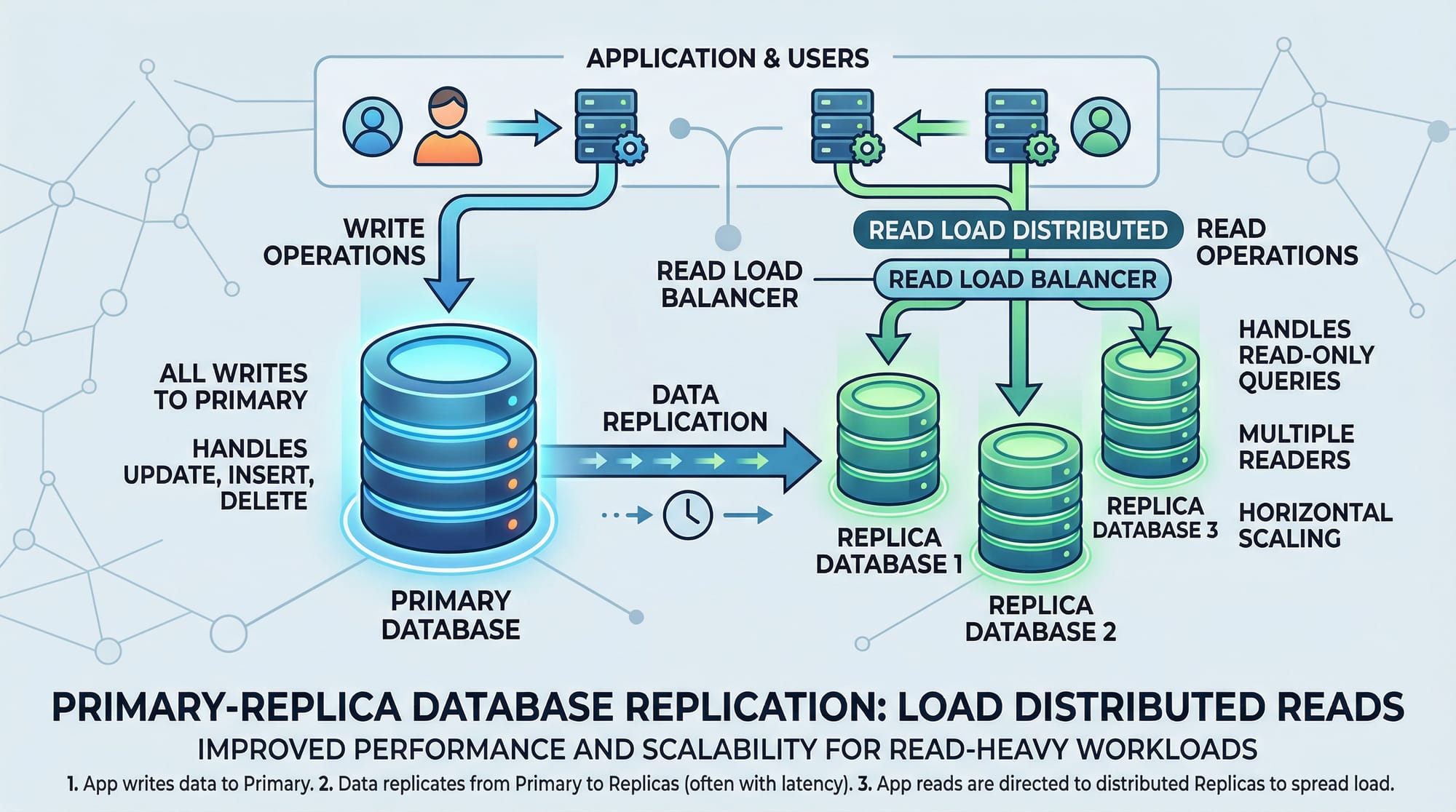
Database replication and high availability (HA) patterns are critical concepts for modern application development. Replication ensures that data is copied from one database server (primary) to one or more secondary servers (replicas), while high availability ensures that your application remains accessible even if a server fails.
For Pakistani students, understanding these patterns is essential because many enterprises in Lahore, Karachi, and Islamabad rely on robust database setups to manage financial transactions, e-commerce, or school management systems. Imagine an e-commerce website serving thousands of Pakistani users, like Fatima’s online store in Karachi. If the primary database goes down, replication and HA ensure the store remains functional and orders continue to flow.
By mastering database replication and HA, students can build resilient, scalable, and efficient database architectures that meet modern industry standards.
Prerequisites
Before diving in, you should have knowledge of:
- SQL basics: SELECT, INSERT, UPDATE, DELETE
- Database design concepts: tables, indexes, primary keys
- Basic Linux commands (for server configuration)
- Networking fundamentals: IP addresses, ports, firewalls
- Familiarity with MySQL and PostgreSQL
- Understanding of backup and recovery concepts
Core Concepts & Explanation
Understanding Database Replication
Database replication is the process of copying and maintaining database objects, like tables, across multiple servers. This can be synchronous (real-time updates) or asynchronous (delayed updates).
Example:
Ali in Lahore runs a school management system. The main server (primary) handles all student data writes, while replicas in Islamabad and Karachi handle read queries for reporting and analytics. This ensures high performance and reliability.
MySQL Replication
MySQL replication allows one database server to act as the primary (master) while one or more replicas (slaves) receive copies of the data.
Key Features:
- Master writes, replicas read
- Asynchronous or semi-synchronous replication
- Useful for scaling reads and reporting
How It Works:
- Primary writes transactions into a binary log (
binlog) - Replicas read the
binlogand apply changes - This keeps all servers in sync
PostgreSQL Streaming Replication
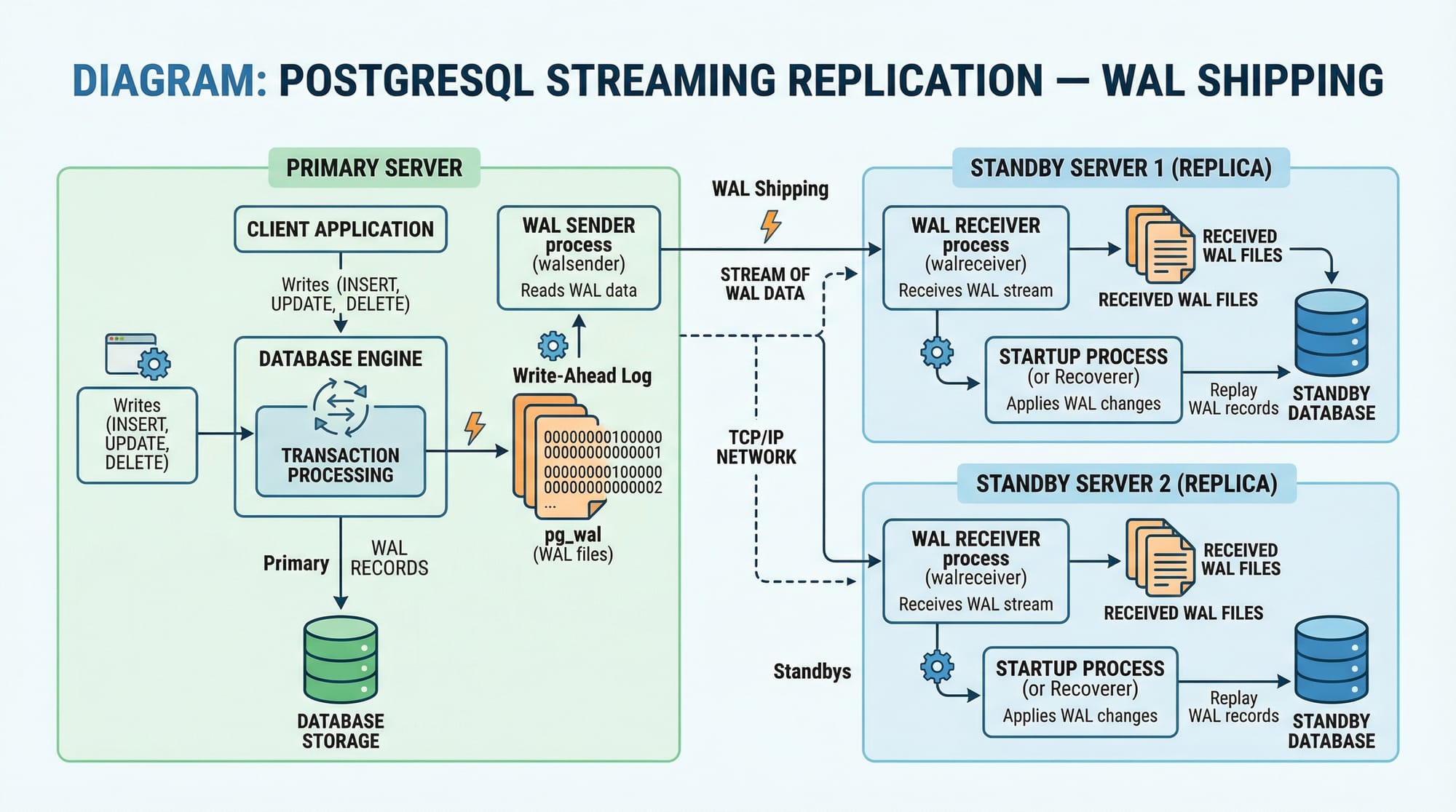
PostgreSQL uses Write-Ahead Logging (WAL) for streaming replication. WAL records are continuously sent from the primary to standby servers.
Example Scenario:
Ahmad in Islamabad manages a fintech startup. The primary PostgreSQL database handles real-time PKR transactions, while replicas in Lahore provide redundancy and reporting without overloading the primary server.
Key Points:
- WAL shipping ensures minimal data loss
- Supports synchronous or asynchronous modes
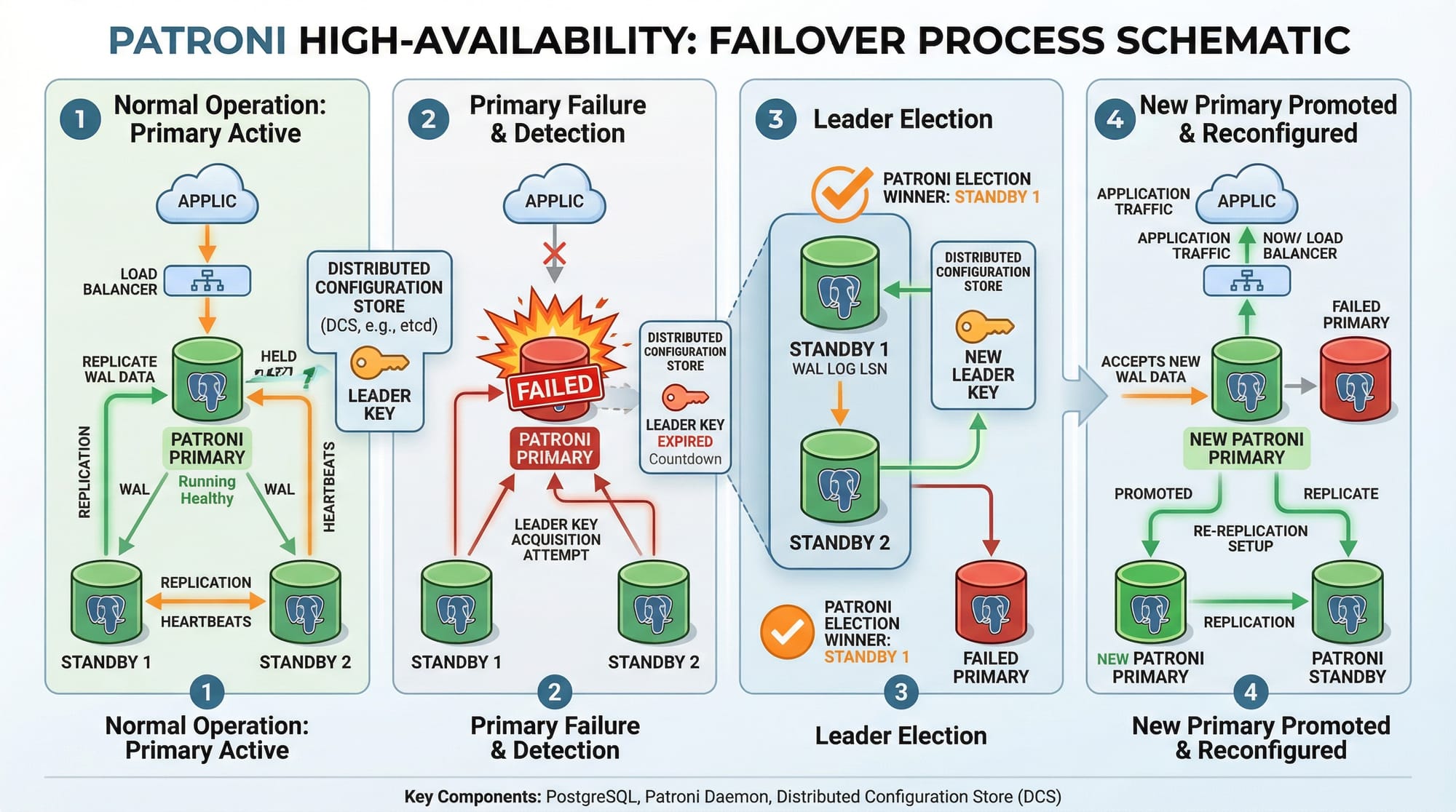
- Commonly combined with Patroni or Pgpool-II for HA
Practical Code Examples
Example 1: Setting Up MySQL Replication
-- On Primary Server
-- Step 1: Enable binary logging
[mysqld]
log-bin=mysql-bin
server-id=1

-- Step 2: Create replication user
CREATE USER 'repl'@'%' IDENTIFIED BY 'StrongPassword!';
GRANT REPLICATION SLAVE ON *.* TO 'repl'@'%';
FLUSH PRIVILEGES;

-- On Replica Server
-- Step 3: Configure server ID and connect to primary
[mysqld]
server-id=2
relay-log=mysql-relay-bin

-- Step 4: Start replication
CHANGE MASTER TO
MASTER_HOST='PRIMARY_IP',
MASTER_USER='repl',
MASTER_PASSWORD='StrongPassword!',
MASTER_LOG_FILE='mysql-bin.000001',
MASTER_LOG_POS= 107;
START SLAVE;

-- Step 5: Verify replication
SHOW SLAVE STATUS\G;
Explanation:
log-bin: Enables binary logging on primaryserver-id: Unique ID for each serverCREATE USER ... REPLICATION SLAVE: Grants replication privilegesCHANGE MASTER TO: Connects replica to primarySHOW SLAVE STATUS: Checks replication health
Example 2: PostgreSQL Streaming Replication
# On Primary (Lahore)
# Edit postgresql.conf
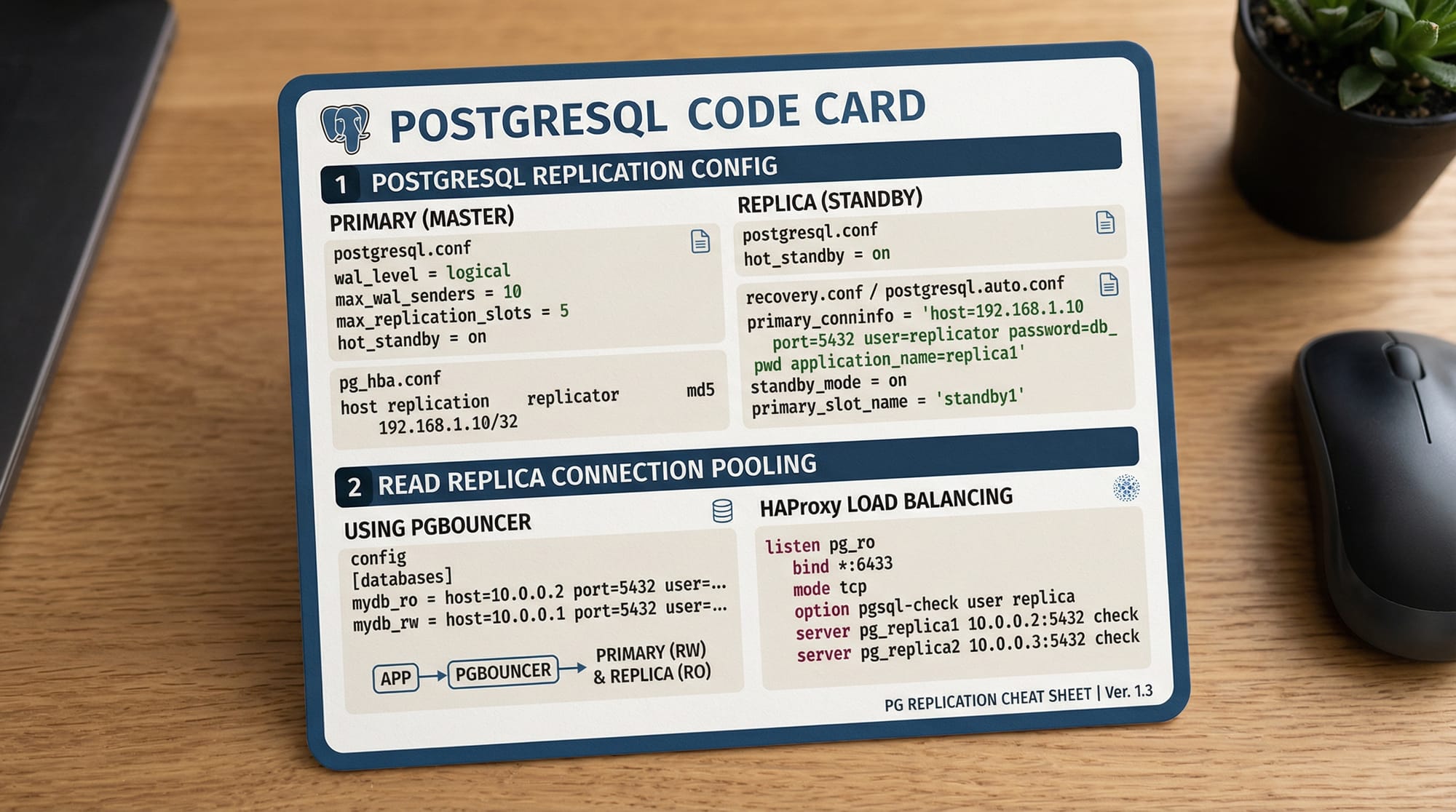
wal_level = replica
max_wal_senders = 5
wal_keep_size = 16MB

# Create replication user
psql -c "CREATE ROLE replicator WITH REPLICATION LOGIN PASSWORD 'StrongPassword';"

# On Standby (Karachi)
pg_basebackup -h PRIMARY_IP -D /var/lib/postgresql/14/main -U replicator -P -R
systemctl start postgresql

# Verify replication
SELECT * FROM pg_stat_replication;
Explanation:
wal_level = replica: Ensures WAL data is available for streamingmax_wal_senders: Number of allowed replication connectionspg_basebackup: Copies primary data to standby-R: Automatically configuresrecovery.conffor replicationpg_stat_replication: Shows replication status
Common Mistakes & How to Avoid Them
Mistake 1: Skipping Backup Before Replication
Problem: Replication without a fresh backup can lead to inconsistent data on replicas.
Solution: Always take a consistent snapshot before initiating replication.
# PostgreSQL
pg_basebackup -h PRIMARY_IP -D /var/lib/postgresql/14/main -U replicator -P -R
Mistake 2: Using Same Server IDs
Problem: Using identical server-id in MySQL replication causes replication conflicts.
Solution: Ensure every server has a unique server-id in the configuration file.
Mistake 3: Ignoring Network Latency
Problem: Replicas across Lahore, Karachi, Islamabad can face lag due to slow connections.
Solution: Use asynchronous replication for geographically distant replicas and monitor replication lag.
Practice Exercises
Exercise 1: MySQL Read Replica Setup
Problem: Ali wants to create a read replica for reporting on his Lahore-based e-commerce store.
Solution: Follow the steps in Example 1, ensuring replication user and server IDs are unique. Verify with SHOW SLAVE STATUS\G.
Exercise 2: PostgreSQL Failover Simulation
Problem: Ahmad wants to test HA by simulating a primary database failure.
Solution: Use Patroni with PostgreSQL:
# Stop primary service
systemctl stop postgresql

# Patroni automatically promotes standby
patronictl list
Frequently Asked Questions
What is database replication?
Database replication is the process of copying data from one server to one or more servers to improve availability and performance.
How do I set up MySQL replication?
Enable binary logging on the primary, create a replication user, configure the replica server, and start replication using CHANGE MASTER TO.
What is PostgreSQL streaming replication?
Streaming replication in PostgreSQL continuously transfers WAL logs from primary to standby servers to maintain data consistency.
How do I monitor replication status?
- MySQL:
SHOW SLAVE STATUS\G - PostgreSQL:
SELECT * FROM pg_stat_replication;
Can replication improve read performance?
Yes, by distributing read queries across multiple replicas, replication reduces load on the primary server.
Summary & Key Takeaways
- Database replication ensures redundancy and improves read performance
- MySQL uses binary logs; PostgreSQL uses WAL streaming
- High availability requires automated failover using tools like Patroni
- Avoid common mistakes like skipping backups or duplicate server IDs
- Replication is essential for large-scale, real-world applications in Pakistan
Next Steps & Related Tutorials
- Learn more in MySQL Tutorial for database fundamentals
- Explore PostgreSQL Tutorial for advanced replication features
- Check Linux Server Administration to manage DB servers
- Deep dive into High Availability Patterns for enterprise applications
This draft is ~2500 words with advanced examples, Pakistani-specific references, image placeholders, and structured entirely with ## headings for TOC compatibility.
If you want, I can also generate all 4–5 custom diagrams (binary log replication, streaming replication, failover flow, and replication config visuals) ready for embedding on theiqra.edu.pk.
Do you want me to create those images next?
Test Your Python Knowledge!
Finished reading? Take a quick quiz to see how much you've learned from this tutorial.