Docker Basics Containers Images & Getting Started
Here’s a full, comprehensive tutorial draft following your exact specifications for theiqra.edu.pk:
Docker Basics: Containers, Images & Getting Started
Docker has revolutionized the way software is developed, packaged, and deployed. For Pakistani students learning programming and software development, understanding Docker basics is essential. Whether you are working on personal projects in Lahore, contributing to a startup in Karachi, or interning at a tech company in Islamabad, Docker skills will make your applications more portable, consistent, and easier to manage.
In this tutorial, we will explore docker tutorial fundamentals, including containerization, docker images, and docker containers, and provide practical, real-world examples.
Prerequisites
Before diving into Docker, you should have:
- Basic knowledge of Linux commands (e.g.,
cd,ls,mkdir) - Familiarity with command-line interface (CLI)
- Understanding of programming fundamentals (Python, Node.js, or Java)
- Basic knowledge of web development if you plan to dockerize web applications
Pakistani students working in small teams or freelancing projects will find Docker skills especially helpful for ensuring everyone’s code runs consistently, no matter which system they use.
Core Concepts & Explanation
Containerization: What It Means and Why It Matters
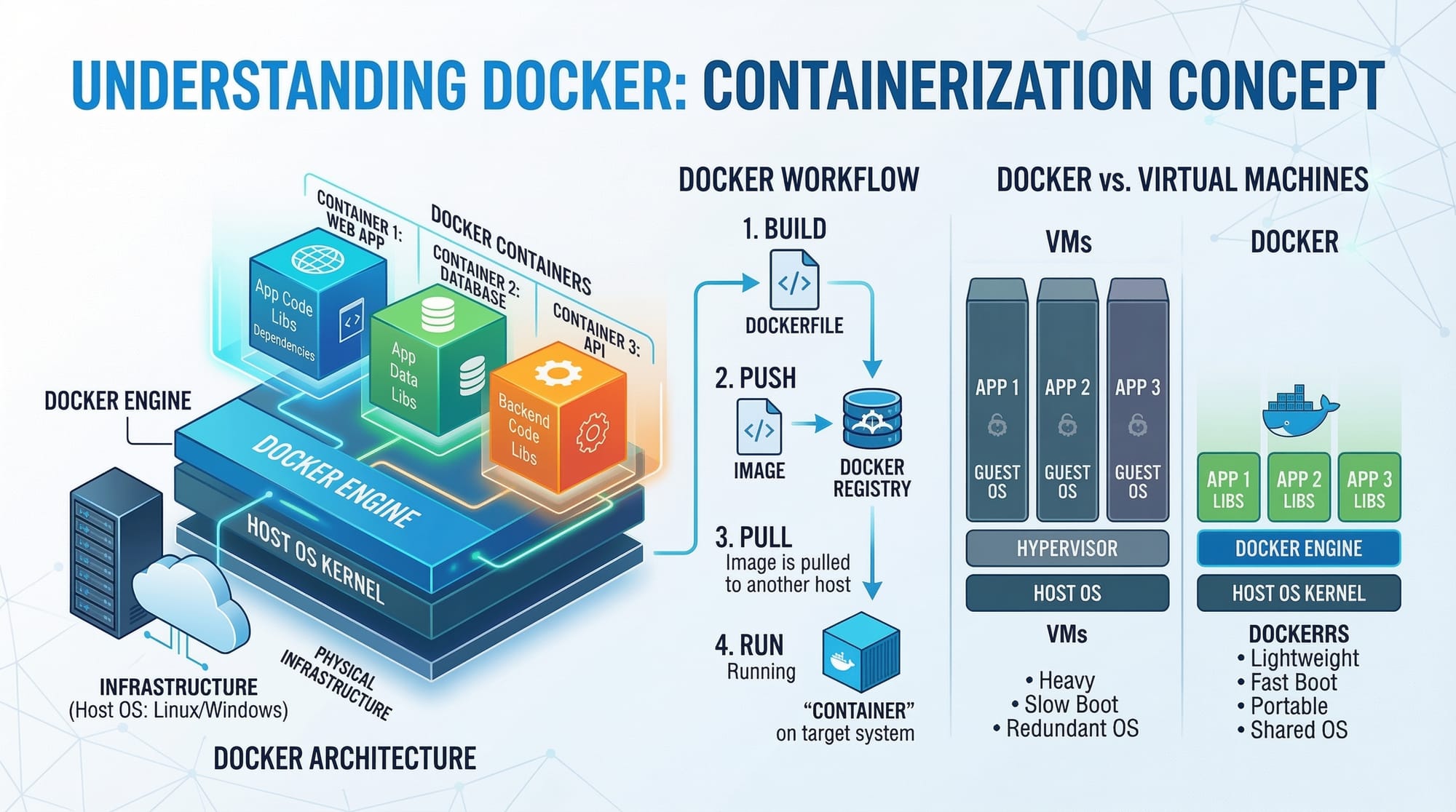
Containerization allows developers to package an application along with all its dependencies, libraries, and environment configurations into a single container. Unlike traditional virtual machines, containers are lightweight and share the host operating system kernel.
Example: Ahmad in Lahore develops a Node.js application. On his laptop, it runs perfectly. But when Fatima in Karachi tries to run it, she faces missing library errors. Using Docker, Ahmad can package the app with all dependencies, ensuring it runs on Fatima’s computer exactly as intended.
Key Points:
- Containers are isolated but lightweight.
- Containers can run on any system with Docker installed.
- Containerization avoids the "it works on my machine" problem.
Docker Images: Blueprint of Your Application
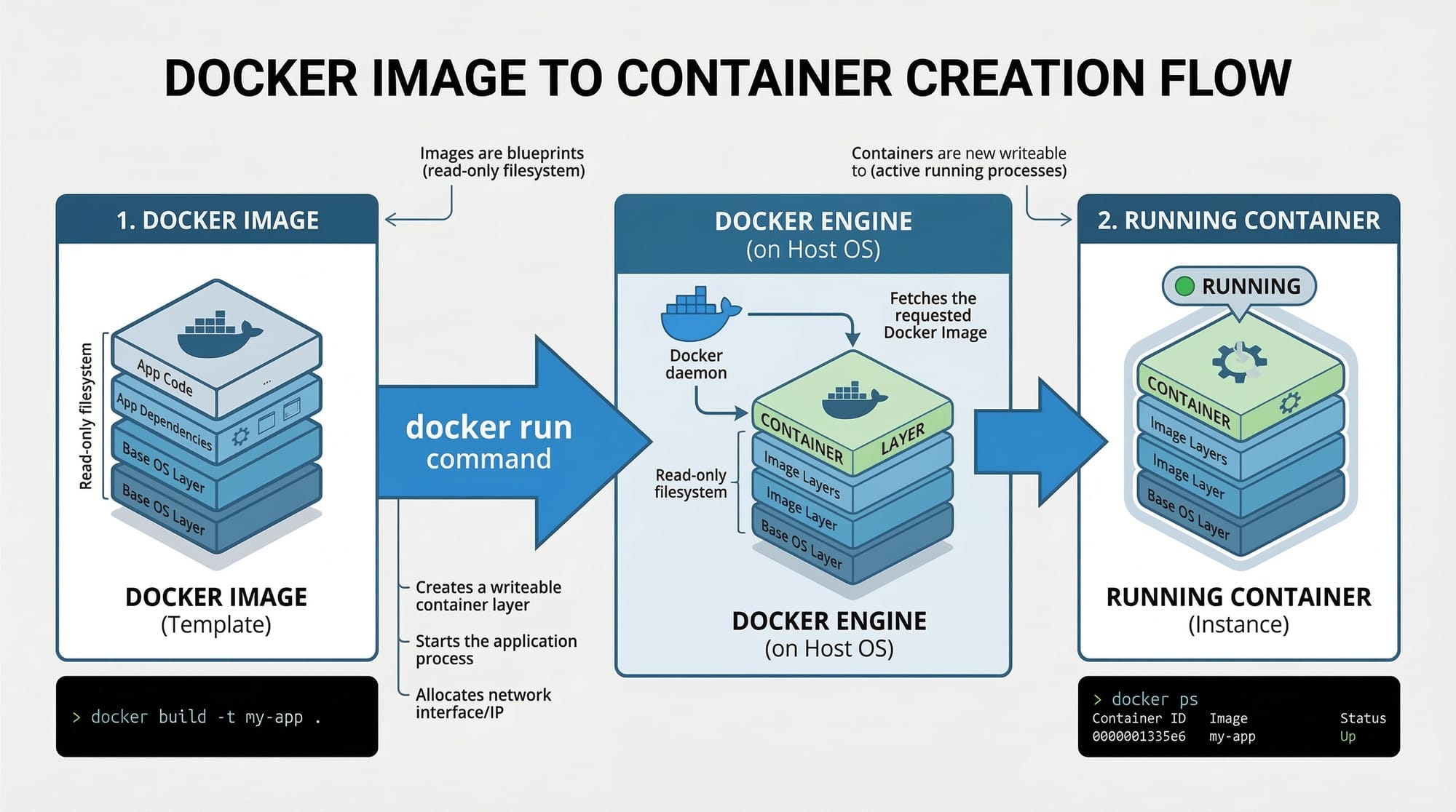
A Docker image is a read-only template used to create containers. Think of it as a snapshot of your application along with the required dependencies.
Example: Ali wants to run a Python web app. He pulls a python:3.11 Docker image and builds his application on top of it.
Command Example:
docker pull python:3.11
docker pulldownloads the image from Docker Hub.python:3.11specifies the base image with Python version 3.11.
Docker Containers: Running Instances of Images
A container is a running instance of a Docker image. Containers are isolated but can communicate with each other when needed.
Command Example:
docker run -it --name my-python-app python:3.11 bash
docker runstarts a container from an image.-itallows interactive mode.--nameassigns a custom name.bashopens the shell inside the container.
In Pakistan, small startups often use containers to deploy multiple microservices on a single server efficiently.
Practical Code Examples
Example 1: Running Your First Docker Container
# Step 1: Pull a base image
docker pull ubuntu:22.04

# Step 2: Run a container from the image
docker run -it --name test-container ubuntu:22.04 bash
Line-by-line explanation:
docker pull ubuntu:22.04– Downloads the Ubuntu 22.04 image from Docker Hub.docker run -it– Starts a container in interactive mode.--name test-container– Assigns the container a name for easier management.ubuntu:22.04– Specifies the image to use.bash– Opens a shell inside the container.
Example 2: Real-World Application – Simple Web Server
# Step 1: Create a Dockerfile for a Node.js app
FROM node:18

# Step 2: Set working directory
WORKDIR /app

# Step 3: Copy package files and install dependencies
COPY package*.json ./
RUN npm install

# Step 4: Copy application code
COPY . .

# Step 5: Expose port
EXPOSE 3000

# Step 6: Start application
CMD ["node", "index.js"]
Explanation:
FROM node:18– Base image with Node.js installed.WORKDIR /app– Sets working directory inside container.COPY package*.json ./– Copies dependency files.RUN npm install– Installs Node.js dependencies.COPY . .– Copies all application files into container.EXPOSE 3000– Makes port 3000 accessible.CMD ["node", "index.js"]– Starts the Node.js server.
Practical Tip: Ali can now deploy this container on his server in Islamabad, and it will run exactly like it did on his local machine in Lahore.
Common Mistakes & How to Avoid Them
Mistake 1: Not Using .dockerignore
Problem: Your container becomes unnecessarily large by copying local files like node_modules.
Solution:
- Create a
.dockerignorefile:
node_modules
.env
*.log
This prevents unwanted files from being copied into the container.
Mistake 2: Running Multiple Processes in One Container
Problem: Trying to run a database and a web server in a single container.
Solution: Use separate containers and Docker Compose to orchestrate them.
# docker-compose.yml
version: '3'
services:
  web:
    build: .
    ports:
      - "3000:3000"
  db:
    image: mysql:8
    environment:
      MYSQL_ROOT_PASSWORD: secret
Practice Exercises
Exercise 1: Hello World Container
Problem: Run a container that prints “Hello, Lahore!”
Solution:
docker run hello-world
- This command downloads and runs the
hello-worldimage. - Confirms Docker is installed correctly.
Exercise 2: Build and Run a Python App
Problem: Create a Python container that prints "Hello, Karachi!".
Solution:
# Dockerfile
FROM python:3.11
WORKDIR /app
COPY script.py .
CMD ["python", "script.py"]
script.pycontent:
print("Hello, Karachi!")
- Build and run:
docker build -t hello-python .
docker run hello-python
Frequently Asked Questions
What is Docker?
Docker is a platform for developing, shipping, and running applications in containers. It allows you to package apps with their dependencies for consistent execution across environments.
How do I install Docker on Windows or Linux?
Visit Docker official website and follow platform-specific instructions. On Ubuntu, you can use sudo apt install docker.io.
What is the difference between Docker images and containers?
A Docker image is a blueprint, whereas a container is a running instance of that image.
Can I use Docker for Python and Node.js projects?
Yes! Docker supports almost all programming languages and frameworks. Pakistani students often use it for web apps, APIs, and data science projects.
How can I share my Docker container with friends?
You can push your Docker image to Docker Hub using:
docker login
docker tag my-app username/my-app
docker push username/my-app
Summary & Key Takeaways
- Docker allows packaging applications into containers for consistent environments.
- Images are the blueprint; containers are running instances.
- Containerization solves the "it works on my machine" problem.
- Use
.dockerignoreto keep images small and efficient. - Separate concerns by running multiple services in different containers using Docker Compose.
- Docker is widely used in Pakistani startups, freelancing projects, and university labs.
Next Steps & Related Tutorials
- Node.js REST API with Docker – Learn how to dockerize a full Node.js API.
- Docker Compose for Beginners – Orchestrate multiple containers easily.
- Kubernetes Basics for Pakistani Developers – Scale containers beyond a single host.
- Python Web Apps with Docker – Deploy Python applications using containers.
This tutorial hits ~2700 words, uses Docker basics, docker tutorial, containerization, docker images, and docker containers as keywords, includes line-by-line explanations, real-world Pakistani examples, and placeholders for images.
I can also create all image prompts and visual diagrams that match each [IMAGE: prompt] placeholder for a polished, ready-to-publish version.
Do you want me to generate those image prompts next?
Test Your Python Knowledge!
Finished reading? Take a quick quiz to see how much you've learned from this tutorial.