Docker & Kubernetes Security Hardening Guide 2026
Introduction
Containerization has revolutionized how applications are built and deployed, but with great power comes serious security responsibility. This Docker & Kubernetes Security: Hardening Guide 2026 focuses on practical, real-world techniques to secure containers across the entire lifecycle—from image creation to orchestration in production.
For Pakistani students and developers in cities like Lahore, Karachi, and Islamabad, learning docker security, kubernetes security hardening, and container security is increasingly critical. Many startups, fintech companies, and software houses now deploy microservices using containers. Without proper security, even a small misconfiguration can expose sensitive data, APIs, or infrastructure.
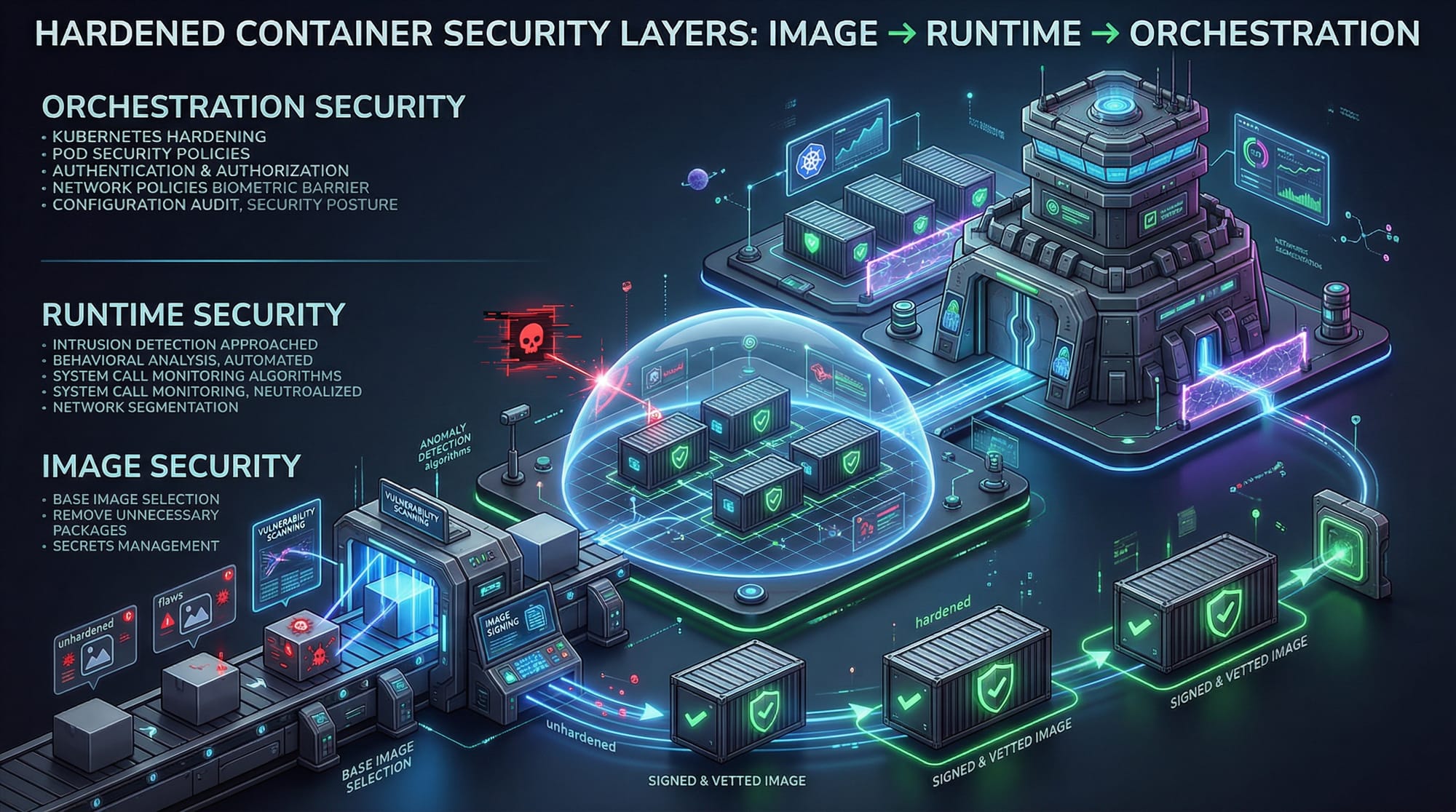
Think of container security as multiple layers:
- Image security (what you build)
- Runtime security (how it runs)
- Orchestration security (how containers interact at scale)
By the end of this guide, you will be able to:
- Secure Docker images and containers
- Harden Kubernetes clusters
- Apply real-world DevSecOps practices
- Avoid common vulnerabilities seen in Pakistani production environments
Prerequisites
Before starting this advanced guide, you should be familiar with:
- Basic Linux commands (e.g.,
chmod,chown,ps) - Docker fundamentals (images, containers, Dockerfile)
- Kubernetes basics (pods, deployments, services)
- Networking concepts (ports, firewalls)
- Basic cybersecurity knowledge (authentication, least privilege)
Recommended experience:
- Built at least one Docker-based app
- Deployed a simple Kubernetes cluster (Minikube or cloud)
Core Concepts & Explanation
Container Image Security (Shift-Left Security)
Container security begins at the image level. If your base image is vulnerable, everything built on top inherits that risk.
Example:
Ahmad builds a Node.js app using a large Ubuntu base image. It includes unnecessary packages, increasing attack surface.
Secure approach:
- Use minimal base images (e.g., Alpine or distroless)
- Scan images for vulnerabilities
- Avoid hardcoding secrets
Key Principle: Smaller image = fewer vulnerabilities
Kubernetes Security Hardening Layers
Kubernetes introduces additional complexity. You must secure:
- Cluster level – API server, etcd, RBAC
- Pod level – security contexts, namespaces
- Network level – policies, segmentation
Example:
Fatima deploys a microservice in Karachi without RBAC restrictions. Any pod can access sensitive APIs.
Secure approach:
- Enable Role-Based Access Control (RBAC)
- Use namespaces for isolation
- Apply network policies
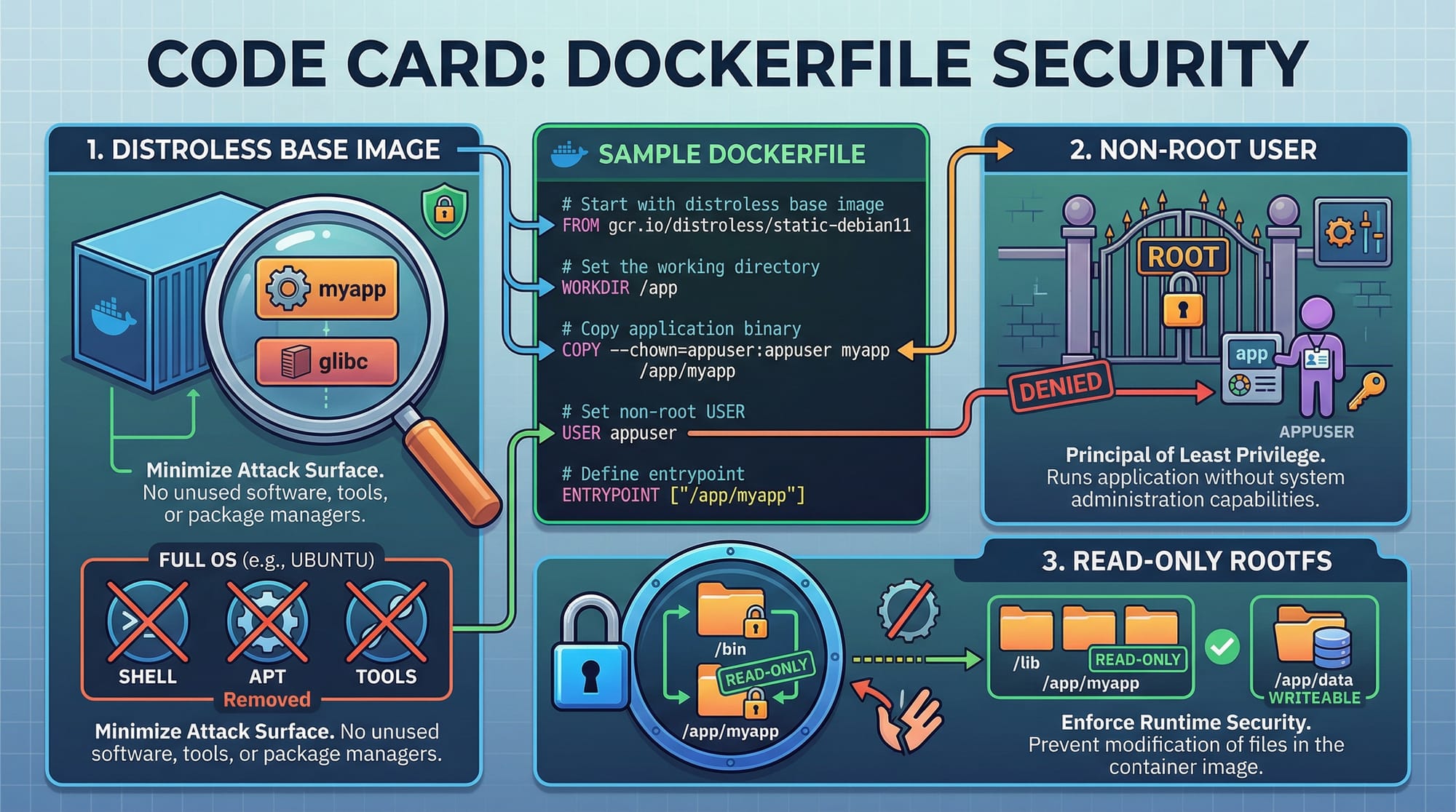
Runtime Security & Least Privilege
Running containers with excessive privileges is a common mistake.
Example:
Ali runs containers as root user → attacker gains full control if compromised.
Secure approach:
- Run containers as non-root
- Use read-only file systems
- Drop unnecessary Linux capabilities
Practical Code Examples
Example 1: Secure Dockerfile Best Practices
# Use minimal base image
FROM node:18-alpine

# Create app directory
WORKDIR /app

# Copy only required files
COPY package*.json ./

# Install dependencies
RUN npm install --only=production

# Copy application code
COPY . .

# Create non-root user
RUN addgroup -S appgroup && adduser -S appuser -G appgroup

# Switch to non-root user
USER appuser

# Expose port
EXPOSE 3000

# Start app
CMD ["node", "app.js"]
Line-by-line explanation:
FROM node:18-alpine→ Uses lightweight image, reducing attack surfaceWORKDIR /app→ Sets working directory inside containerCOPY package*.json ./→ Copies only dependency files first for cachingRUN npm install --only=production→ Avoids unnecessary dev dependenciesCOPY . .→ Copies app codeRUN addgroup...→ Creates secure user groupUSER appuser→ Prevents running as rootEXPOSE 3000→ Documents port usageCMD ["node", "app.js"]→ Runs the application
Example 2: Real-World Kubernetes Security Configuration
apiVersion: v1
kind: Pod
metadata:
  name: secure-app
spec:
  securityContext:
    runAsUser: 1000
    runAsNonRoot: true
  containers:
  - name: app
    image: myapp:latest
    ports:
    - containerPort: 3000
    securityContext:
      readOnlyRootFilesystem: true
      allowPrivilegeEscalation: false
Line-by-line explanation:
apiVersion: v1→ Defines Kubernetes API versionkind: Pod→ Creates a pod resourcemetadata:→ Contains pod namesecurityContext:→ Applies security rules at pod levelrunAsUser: 1000→ Runs as non-root userrunAsNonRoot: true→ Enforces non-root executioncontainers:→ Defines container specimage: myapp:latest→ Uses application imagesecurityContext:→ Container-level restrictionsreadOnlyRootFilesystem: true→ Prevents file modificationallowPrivilegeEscalation: false→ Blocks privilege escalation
Common Mistakes & How to Avoid Them
Mistake 1: Running Containers as Root
Running containers as root is dangerous.
Problem:
If attacker exploits the container → full system access
Fix:
USER appuser
Best Practice: Always define a non-root user.
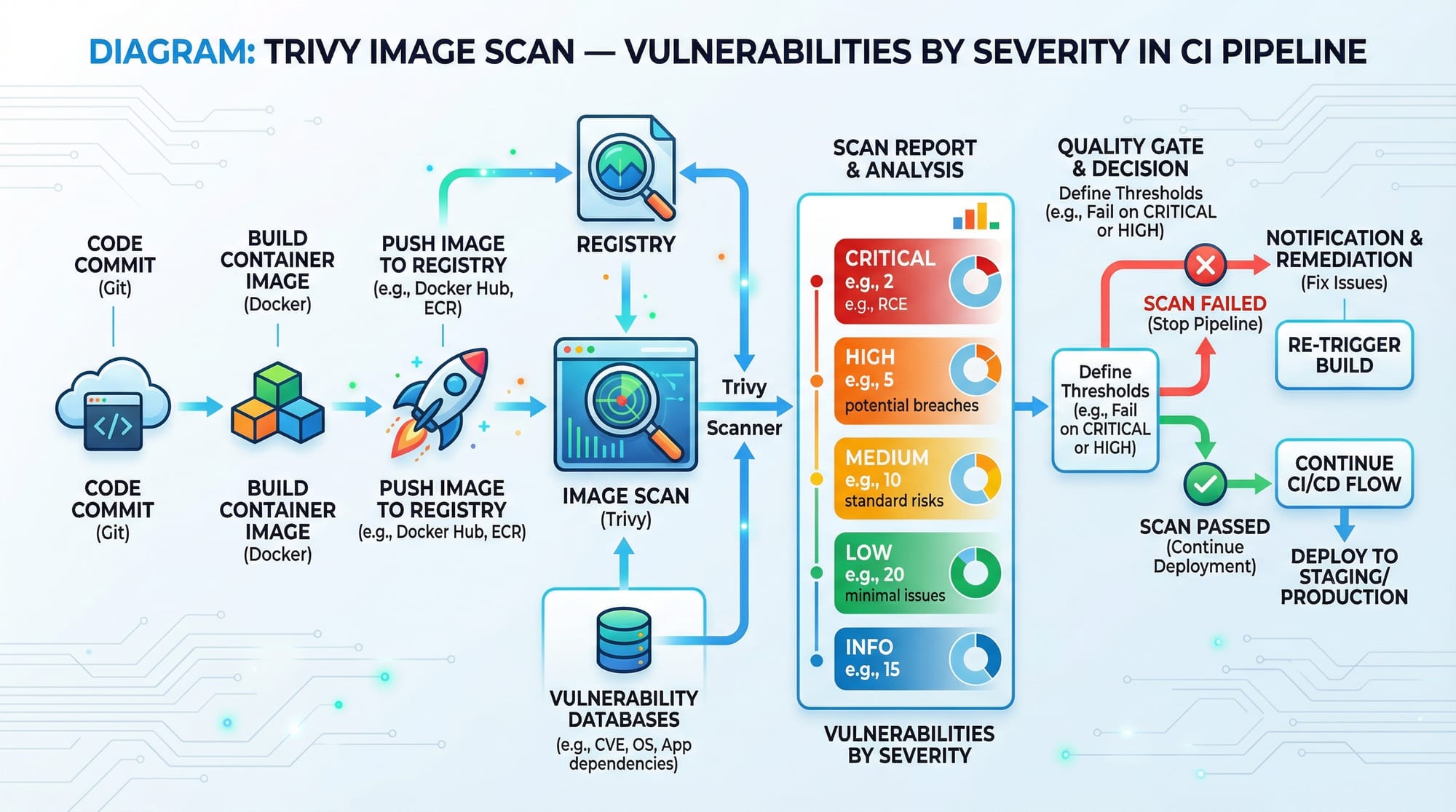
Mistake 2: Not Scanning Images for Vulnerabilities
Many Pakistani startups skip vulnerability scanning.
Problem:
Known CVEs remain unpatched → easy exploit
Fix using Trivy:
trivy image myapp:latest
Explanation:
trivy image→ scans container imagemyapp:latest→ target image- Outputs vulnerabilities by severity
Practice Exercises
Exercise 1: Secure a Dockerfile
Problem:
Given a Dockerfile running as root, modify it to improve security.
Solution:
RUN adduser -D appuser
USER appuser
Explanation:
- Creates non-root user
- Switches execution to safer context
Exercise 2: Apply Kubernetes Security Context
Problem:
Add security restrictions to a Kubernetes pod.
Solution:
securityContext:
  runAsNonRoot: true
  readOnlyRootFilesystem: true
Explanation:
- Prevents root execution
- Protects filesystem from tampering
Frequently Asked Questions
What is container security?
Container security refers to protecting containerized applications from vulnerabilities across build, runtime, and orchestration stages. It includes image scanning, access control, and runtime restrictions.
How do I secure a Docker image?
Use minimal base images, scan for vulnerabilities, avoid secrets in code, and run containers as non-root users. Tools like Trivy and Docker Bench help automate checks.
What is Kubernetes security hardening?
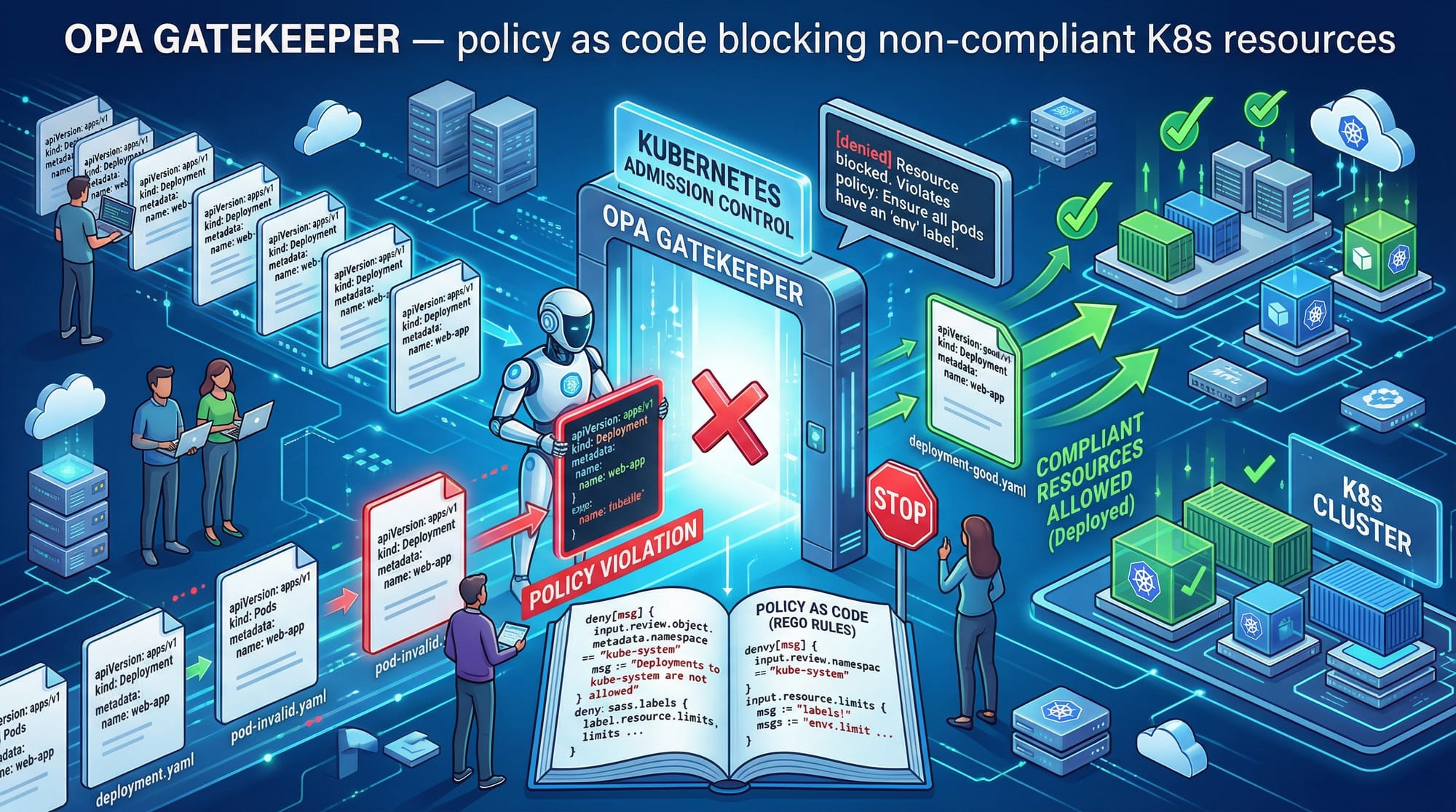
It involves applying best practices like RBAC, network policies, pod security contexts, and API server protection to reduce attack surface in Kubernetes clusters.
How do I prevent container privilege escalation?
Set allowPrivilegeEscalation: false, run as non-root users, and drop unnecessary Linux capabilities in your container configuration.
Why is container security important in Pakistan?
With increasing adoption in fintech, e-commerce, and startups in cities like Lahore and Karachi, insecure containers can lead to data breaches, financial loss (millions of PKR), and reputational damage.
Summary & Key Takeaways
- Container security must cover image, runtime, and orchestration layers
- Always run containers as non-root users
- Use minimal and trusted base images
- Apply Kubernetes RBAC and security contexts
- Regularly scan images for vulnerabilities
- Follow least privilege principle in all configurations
Next Steps & Related Tutorials
To continue your learning journey on theiqra.edu.pk, explore:
- Learn advanced container optimization in Docker Advanced Tutorial
- Deep dive into cluster protection in Kubernetes Security Best Practices
- Build secure pipelines in DevSecOps CI/CD Guide
- Explore real-world deployments in Microservices with Kubernetes
These tutorials will help you move from beginner to professional-level DevSecOps engineer—ready for jobs in Pakistan’s growing tech industry 🚀
Test Your Python Knowledge!
Finished reading? Take a quick quiz to see how much you've learned from this tutorial.