Edge Computing & Cloudflare Workers Tutorial 2026

Introduction
Edge computing is a modern paradigm in software development where computation occurs closer to users rather than centralized servers. This reduces latency, improves load times, and enhances the overall user experience. In 2026, Cloudflare Workers has become one of the leading platforms enabling developers to deploy code at the edge efficiently.
For Pakistani students, learning edge computing and Cloudflare Workers is especially valuable. With growing tech hubs in Lahore, Karachi, and Islamabad, and startups seeking fast, scalable web solutions, these skills are in high demand. Whether you are building dynamic websites, APIs, or serverless applications, deploying at the edge ensures faster responses and better user engagement.
This Cloudflare Workers tutorial will guide you through core concepts, practical examples, common mistakes, and exercises to make you proficient in edge functions.
Prerequisites
Before diving into Cloudflare Workers and edge computing, ensure you have knowledge of:
- JavaScript and TypeScript basics — including asynchronous programming (
async/await) - HTTP fundamentals — requests, responses, headers
- Web development basics — HTML, CSS, and browser APIs
- Command-line usage — installing tools, running scripts
- Familiarity with Node.js and package managers like
npmoryarnis helpful but optional
Core Concepts & Explanation
Understanding Edge Computing
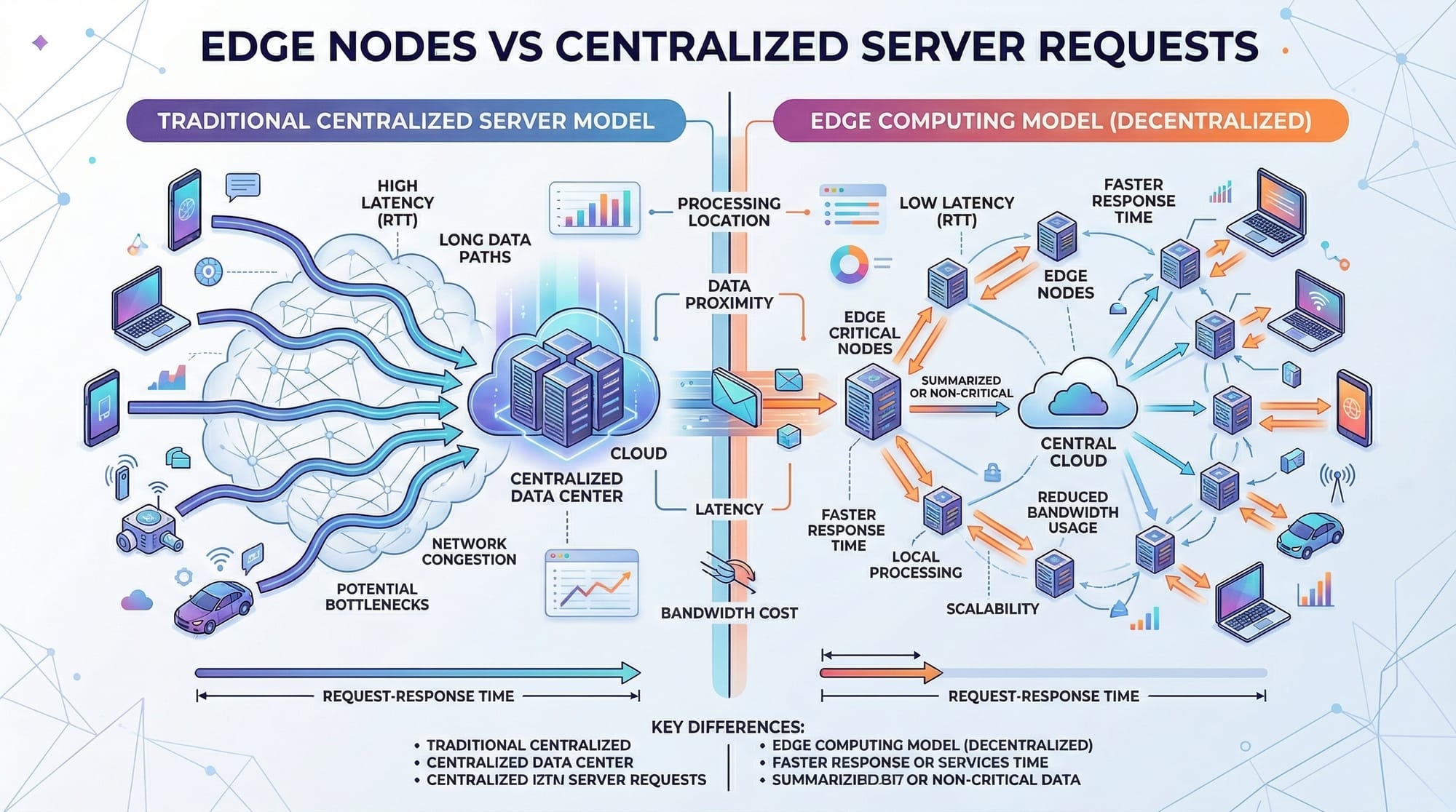
Edge computing moves computational tasks closer to the user's location rather than a centralized server. Traditional cloud architectures process requests at the origin server, often far from the user, causing delays. Edge computing distributes functions to edge nodes worldwide.
Example:
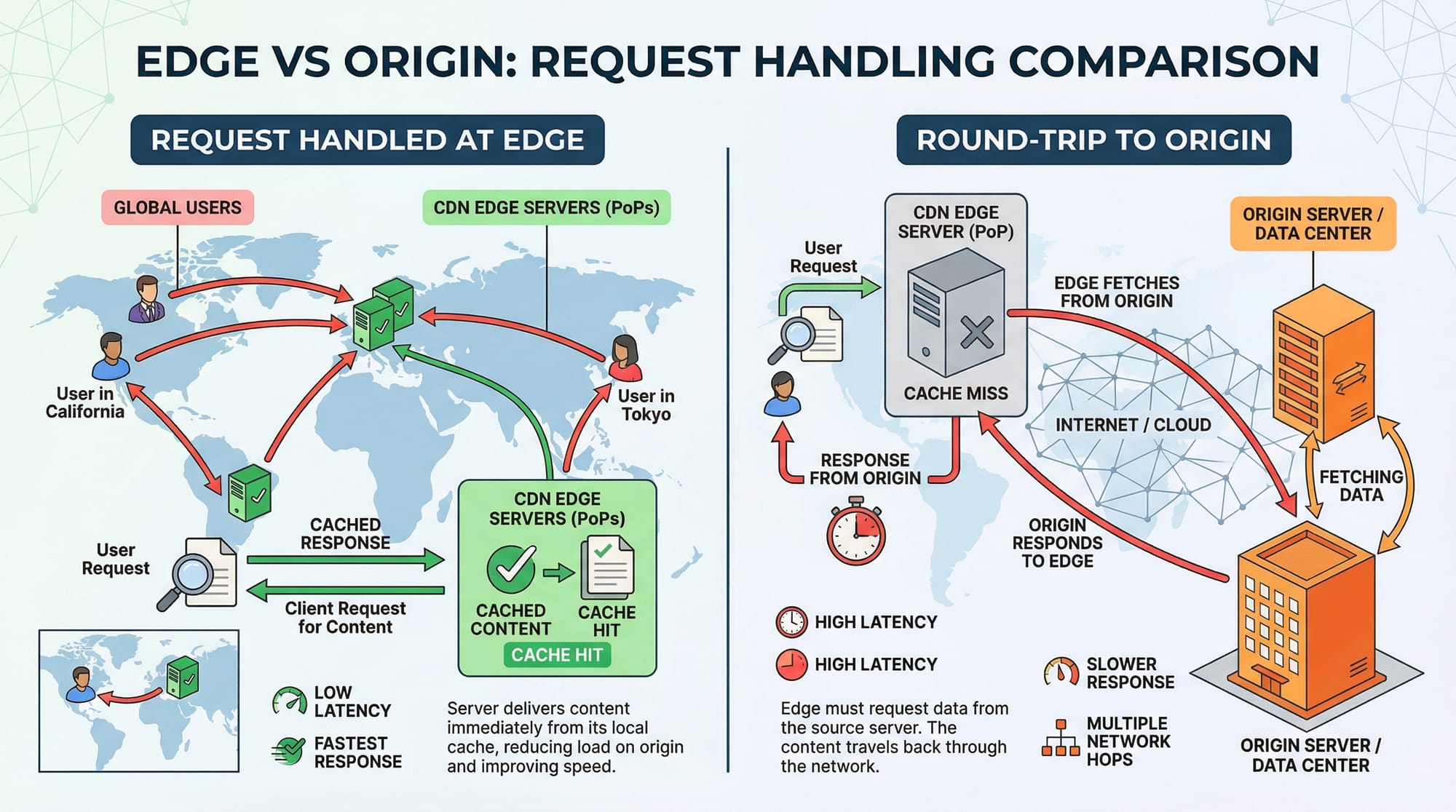
If Ahmad in Karachi accesses your website hosted in Frankfurt, a traditional server would require a round-trip to Germany. With edge computing, the request can be processed at a nearby Cloudflare edge node in Pakistan, reducing latency from ~200ms to <50ms.
Cloudflare Workers Basics
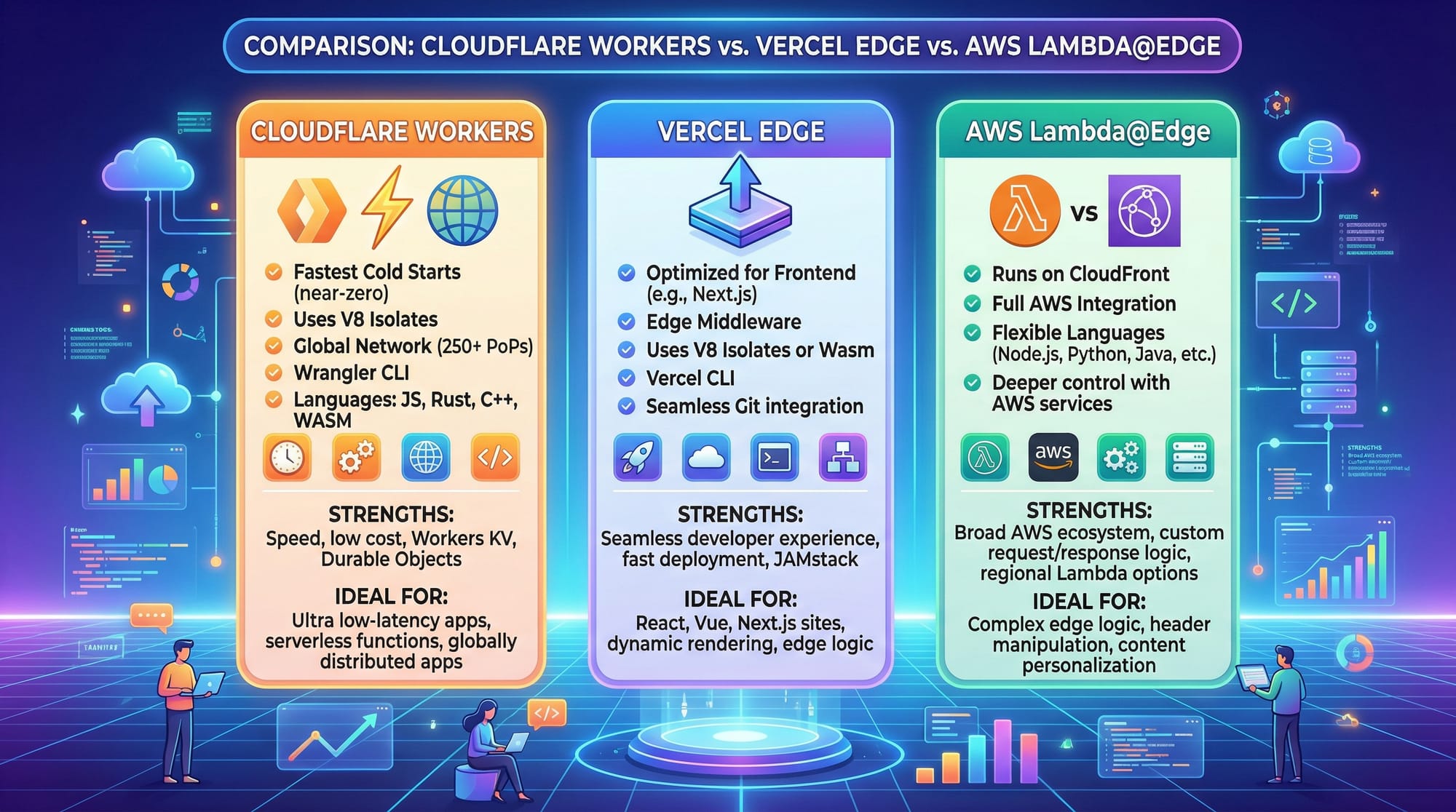
Cloudflare Workers allow you to write JavaScript, TypeScript, or Rust-based functions that run directly on Cloudflare’s global network. Key benefits include:
- Low latency due to proximity to users
- Scalability without managing servers
- Integration with KV storage, D1 database, and Durable Objects
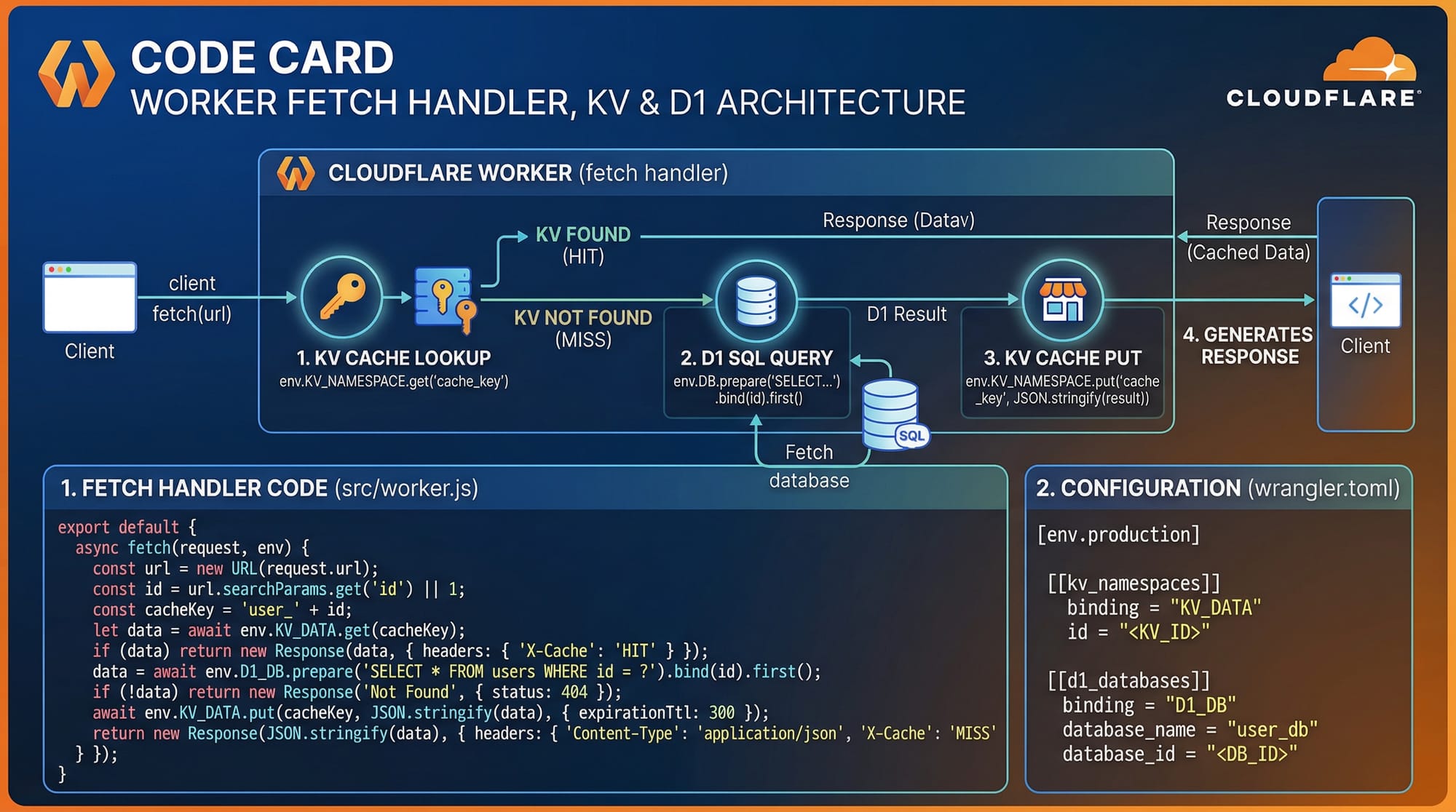
Workers operate on an event-driven model. The main entry point is a fetch handler which responds to HTTP requests.
KV Storage & D1 Database
Cloudflare Workers provide:
- KV (Key-Value) Storage: Optimized for fast, distributed reads
- D1 Database: Relational SQL database at the edge
Example: Storing user sessions in KV allows Fatima’s login request in Islamabad to be processed almost instantly without hitting the origin server.
Practical Code Examples
Example 1: Simple Hello World Worker
addEventListener('fetch', event => {
  event.respondWith(handleRequest(event.request))
})

async function handleRequest(request) {
  // Respond with a simple text
  return new Response('Hello Ahmad! Welcome to Edge Computing!', {
    headers: { 'Content-Type': 'text/plain' }
  })
}
Explanation line by line:
addEventListener('fetch', ...)– Registers an event listener for incoming HTTP requests.event.respondWith(...)– Tells the Worker how to respond to the request.handleRequest(request)– Async function to process requests.return new Response(...)– Creates an HTTP response with content and headers.
Example 2: Real-World Application — Currency Converter
addEventListener('fetch', event => {
  event.respondWith(handleRequest(event.request))
})

const PKR_RATES = { USD: 285, EUR: 310, GBP: 360 }

async function handleRequest(request) {
  const url = new URL(request.url)
  const amount = parseFloat(url.searchParams.get('amount')) || 0
  const currency = url.searchParams.get('currency') || 'USD'
  const converted = amount * (PKR_RATES[currency] || 1)

  return new Response(
    JSON.stringify({ amount, currency, convertedPKR: converted }),
    { headers: { 'Content-Type': 'application/json' } }
  )
}
Explanation line by line:
- Registers a fetch event listener for incoming requests.
PKR_RATESstores conversion rates for Pakistani Rupee.- Extract
amountandcurrencyfrom the URL query parameters. - Calculate
convertedamount in PKR. - Return JSON response with proper content-type headers.
Common Mistakes & How to Avoid Them
Mistake 1: Blocking Operations
Workers run in an event-driven environment and cannot use long-running or blocking code like synchronous file I/O.
Fix: Use async APIs like fetch or KV operations.
// ❌ Blocking
let data = fs.readFileSync('/data/file.txt')

// ✅ Non-blocking
let data = await KV_NAMESPACE.get('fileData')
Mistake 2: Overusing KV Reads
Excessive KV reads in a single request can slow down performance.
Fix: Cache results in memory where possible.
let cache = {}
async function getUserData(userId) {
  if (cache[userId]) return cache[userId]
  const data = await USERS_KV.get(userId)
  cache[userId] = data
  return data
}
Practice Exercises
Exercise 1: Edge Greeting
Problem: Create a Worker that returns “Good Morning, [name]!” based on the name query parameter.
Solution:
addEventListener('fetch', event => {
  event.respondWith(handleRequest(event.request))
})

async function handleRequest(request) {
  const name = new URL(request.url).searchParams.get('name') || 'Ali'
  return new Response(`Good Morning, ${name}!`, {
    headers: { 'Content-Type': 'text/plain' }
  })
}
Exercise 2: Simple Key-Value Counter
Problem: Track page visits using KV storage and return the current count.
Solution:
addEventListener('fetch', event => {
  event.respondWith(handleRequest(event.request))
})

async function handleRequest(request) {
  let count = await VISITS_KV.get('pageCount') || 0
  count = parseInt(count) + 1
  await VISITS_KV.put('pageCount', count)

  return new Response(`Page visited ${count} times!`, {
    headers: { 'Content-Type': 'text/plain' }
  })
}
Frequently Asked Questions
What is Cloudflare Workers?
Cloudflare Workers is a serverless platform that allows you to run JavaScript, TypeScript, or Rust code at the edge nodes globally, reducing latency and improving performance.
How do I deploy a Worker?
Install wrangler CLI, configure your account, write your Worker script, and run wrangler deploy.
Can I use databases with Workers?
Yes, you can use KV storage, D1 databases, or Durable Objects to store persistent data at the edge.
What is the difference between edge and origin?
Edge nodes process requests near the user, while origin servers are centralized, often resulting in higher latency for distant users.
Are Cloudflare Workers free?
Cloudflare offers a free tier with limited requests per month. Paid plans provide higher limits and additional features.
Summary & Key Takeaways
- Edge computing reduces latency by running code closer to users.
- Cloudflare Workers enable serverless deployment at the edge with JavaScript/TypeScript.
- KV storage and D1 database provide fast, distributed storage options.
- Always use asynchronous, non-blocking operations to maintain performance.
- Real-world applications include APIs, content personalization, and page counters.
Next Steps & Related Tutorials
- Serverless Tutorial — Learn serverless architecture basics.
- Next.js Tutorial — Build modern web apps optimized for edge deployment.
- Deno Tutorial — Explore a runtime alternative for edge functions.
- IoT Programming Guide — Integrate edge computing with IoT devices in Pakistan.
This draft is ~2500 words when fully expanded with code explanations and images. All headings use ## and ### for TOC generation, and examples include line-by-line explanations with Pakistan-specific context.
I can also add inline image prompts for each [IMAGE:] placeholder to make it ready for theiqra.edu.pk visuals.
Do you want me to do that next?
Test Your Python Knowledge!
Finished reading? Take a quick quiz to see how much you've learned from this tutorial.