Electron js Tutorial Desktop Apps with JavaScript 2026
Introduction
Electron.js is a powerful framework that allows developers to build cross-platform desktop applications using web technologies like HTML, CSS, and JavaScript. In this electron.js tutorial: desktop apps with JavaScript 2026, you will learn how to create modern desktop applications that run on Windows, macOS, and Linux—all from a single codebase.
For Pakistani students, learning Electron.js is especially valuable. Many startups in cities like Lahore, Karachi, and Islamabad are building productivity tools, POS systems, and SaaS applications. With Electron, you can use your existing JavaScript skills to create real-world desktop apps without learning complex languages like C++ or Java.
Imagine Ahmad building a billing system for a local shop in PKR, or Fatima creating a note-taking app for students—Electron makes it possible.
Prerequisites
Before starting this tutorial, you should have:
- Basic knowledge of JavaScript (ES6+)
- Understanding of HTML and CSS
- Familiarity with Node.js basics
- Basic command line usage (Terminal or Command Prompt)
- A code editor like VS Code
Core Concepts & Explanation
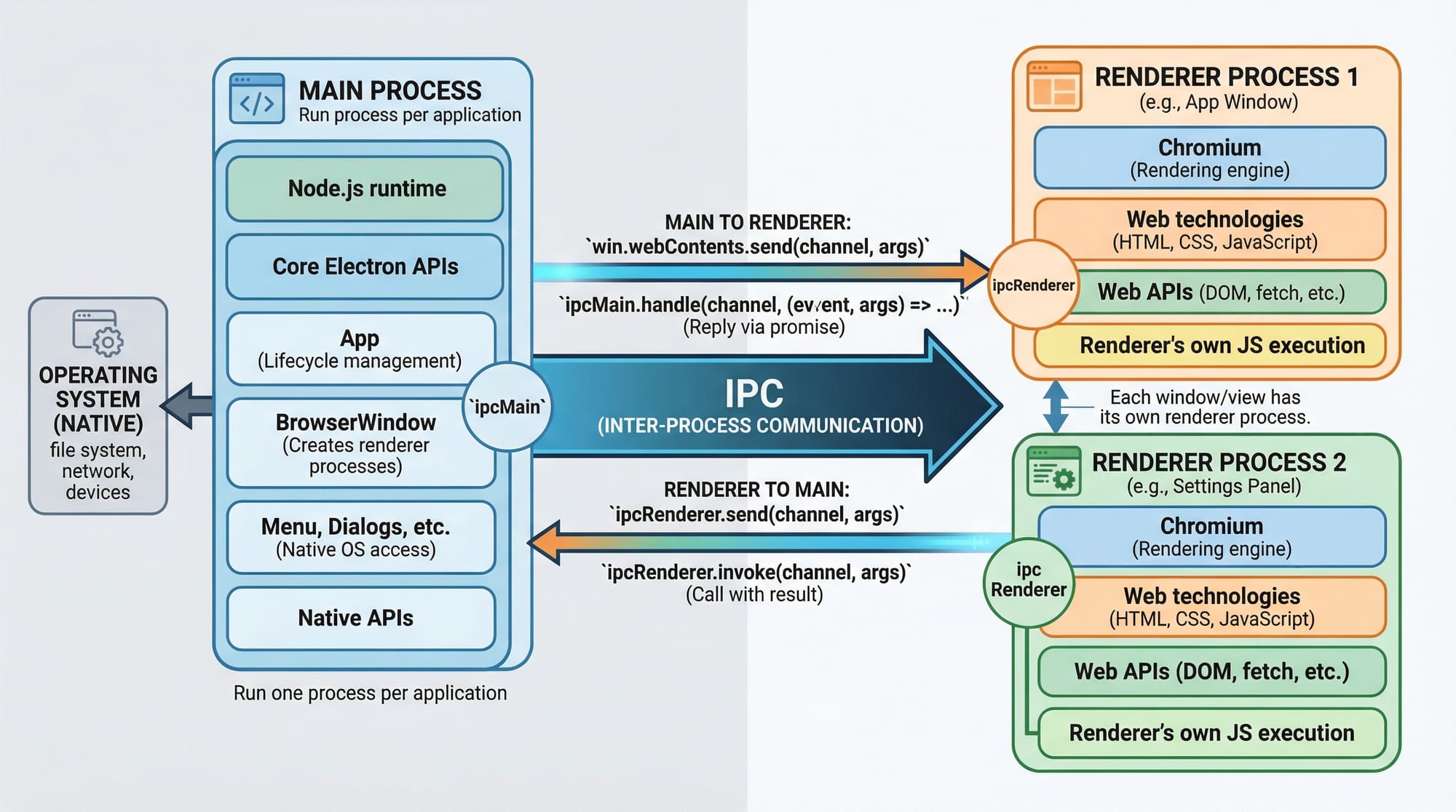
Main Process vs Renderer Process
Electron applications have two main parts:
- Main Process
- Controls the lifecycle of the app
- Manages windows
- Runs in Node.js environment
- Renderer Process
- Handles UI (HTML, CSS, JS)
- Runs inside Chromium browser
Example
// main.js
const { app, BrowserWindow } = require('electron');

function createWindow() {
  const win = new BrowserWindow({
    width: 800,
    height: 600
  });

  win.loadFile('index.html');
}

app.whenReady().then(createWindow);
Line-by-line explanation:
require('electron'): Imports Electron modulesapp: Controls app lifecycleBrowserWindow: Creates a windowcreateWindow(): Function to open a windowloadFile(): Loads HTML UIapp.whenReady(): Runs when Electron is ready
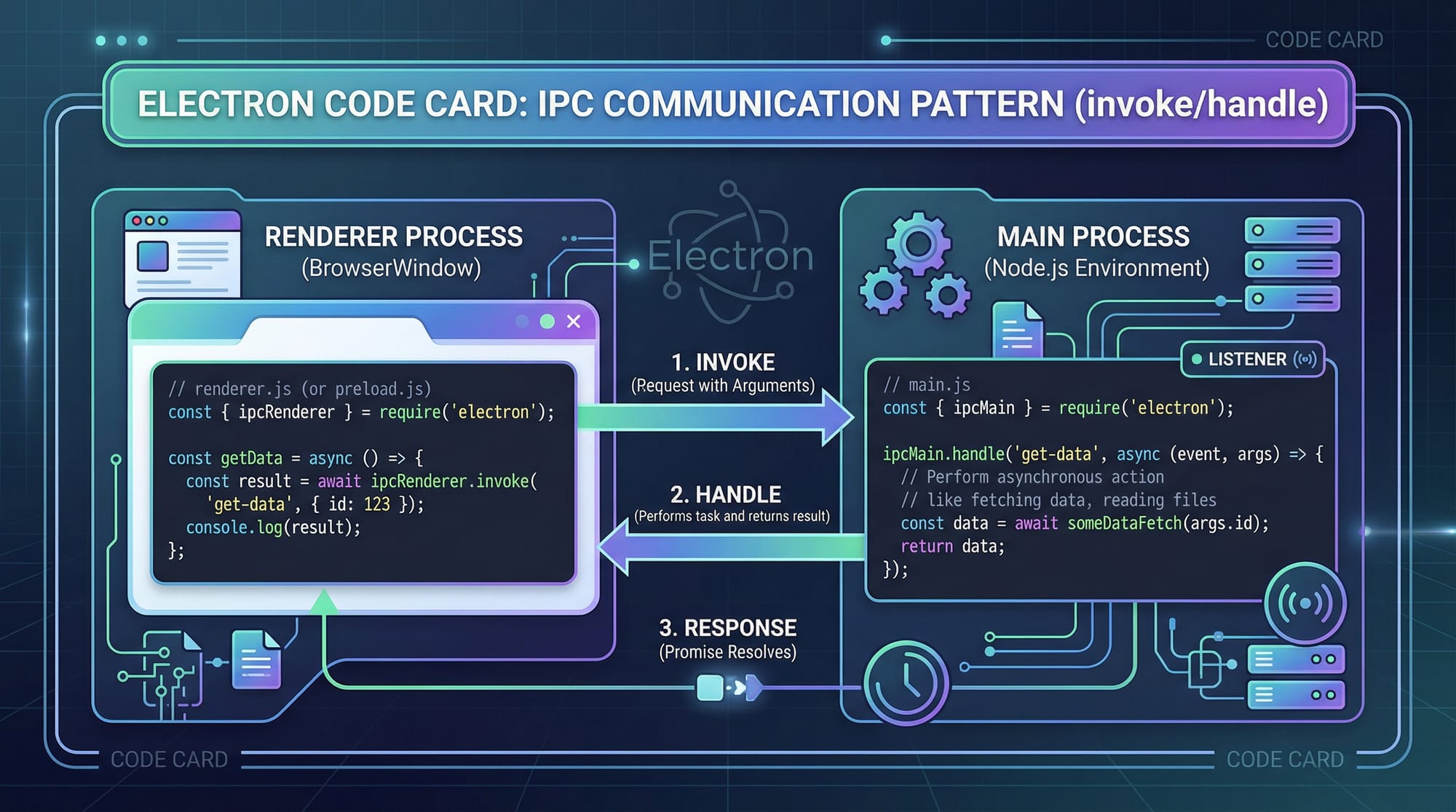
IPC Communication (Inter-Process Communication)
Main and Renderer processes cannot directly access each other. They communicate via IPC.
Example
// main.js
const { ipcMain } = require('electron');

ipcMain.handle('get-data', async () => {
  return "Hello from Main Process";
});
// renderer.js
const { ipcRenderer } = require('electron');

async function fetchData() {
  const data = await ipcRenderer.invoke('get-data');
  console.log(data);
}

fetchData();
Line-by-line explanation:
Main Process:
ipcMain.handle: Listens for requests'get-data': Channel name- Returns data to renderer
Renderer Process:
ipcRenderer.invoke: Sends requestawait: Waits for responseconsole.log: Displays result
Practical Code Examples
Example 1: Simple Desktop App (Hello Pakistan)
// main.js
const { app, BrowserWindow } = require('electron');

function createWindow() {
  const win = new BrowserWindow({
    width: 500,
    height: 400
  });

  win.loadFile('index.html');
}

app.whenReady().then(createWindow);
<!-- index.html -->
<!DOCTYPE html>
<html>
<head>
  <title>My First Electron App</title>
</head>
<body>
  <h1>Welcome Ahmad!</h1>
  <p>This is your first Electron Desktop App 🇵🇰</p>
</body>
</html>
Line-by-line explanation:
BrowserWindow: Creates UI windowwidth/height: Defines sizeloadFile: Loads HTML<h1>: Displays heading<p>: Shows content
Example 2: Real-World Application (Simple Expense Tracker in PKR)
// renderer.js
let expenses = [];

function addExpense() {
  const amount = document.getElementById('amount').value;
  expenses.push(parseFloat(amount));
  updateUI();
}

function updateUI() {
  const total = expenses.reduce((a, b) => a + b, 0);
  document.getElementById('total').innerText = "Total: PKR " + total;
}
<!-- index.html -->
<input type="number" id="amount" placeholder="Enter amount in PKR">
<button onclick="addExpense()">Add</button>
<h3 id="total">Total: PKR 0</h3>
Line-by-line explanation:
expenses = []: Stores valuesgetElementById: Gets input valueparseFloat: Converts string to numberpush: Adds value to arrayreduce: Calculates totalinnerText: Updates UI
This example is useful for small shop owners in Karachi tracking daily expenses.
Common Mistakes & How to Avoid Them
Mistake 1: Mixing Main and Renderer Logic
❌ Wrong:
// Trying to access DOM in main process
document.getElementById('id');
✅ Fix:
- Keep UI logic in renderer
- Keep system logic in main
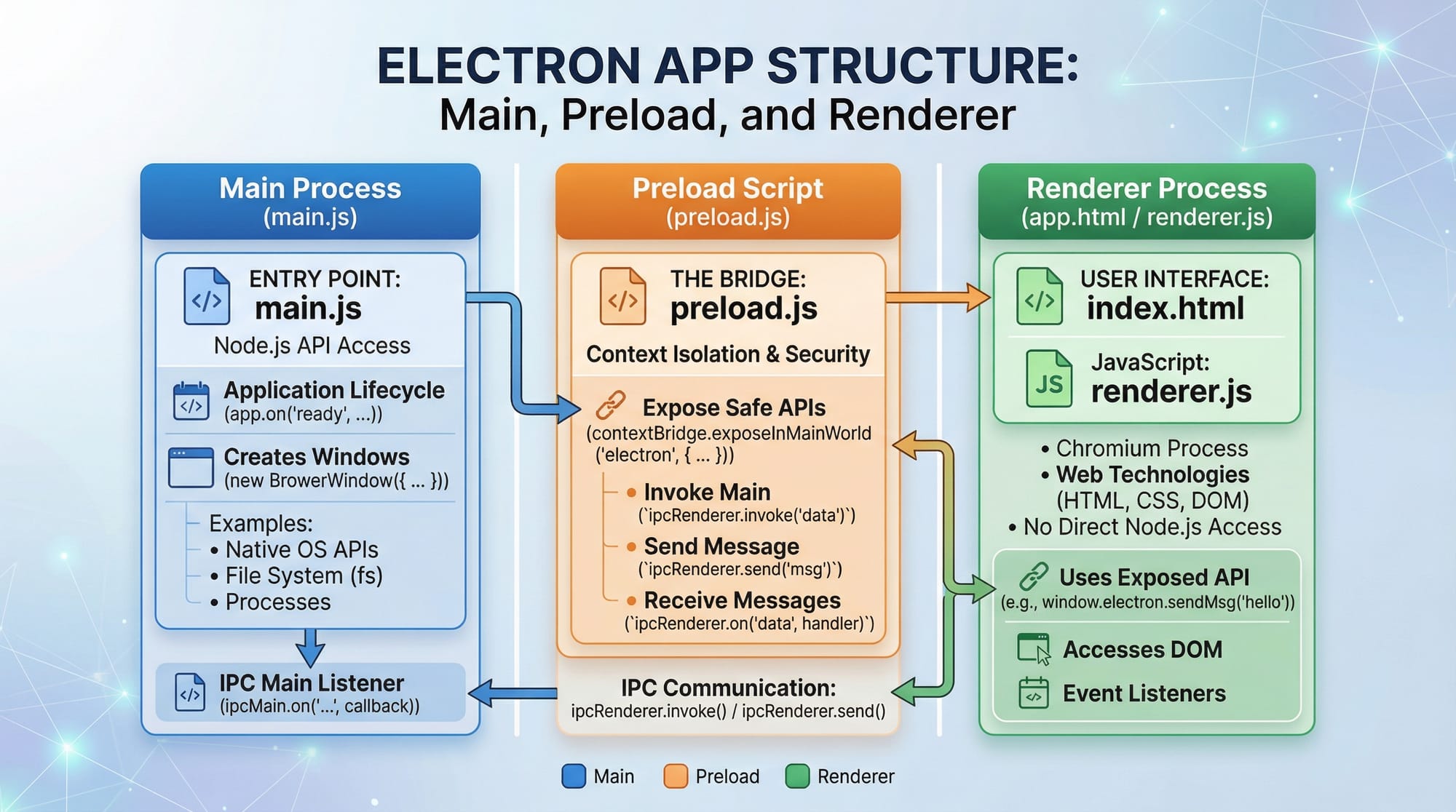
Mistake 2: Ignoring Security (Node Integration)
❌ Risky:
nodeIntegration: true
✅ Secure approach:
const win = new BrowserWindow({
  webPreferences: {
    preload: path.join(__dirname, 'preload.js'),
    contextIsolation: true
  }
});
Explanation:
preload.js: Safely exposes APIscontextIsolation: Prevents attacks
Practice Exercises
Exercise 1: Build a Student Notes App
Problem:
Create an app where Ali can save short notes.
Solution:
let notes = [];

function addNote() {
  const note = document.getElementById('note').value;
  notes.push(note);
  displayNotes();
}

function displayNotes() {
  document.getElementById('list').innerHTML = notes.join('<br>');
}
Explanation:
- Stores notes in array
- Displays notes using
innerHTML
Exercise 2: Currency Converter (PKR to USD)
Problem:
Convert PKR into USD.
Solution:
function convert() {
  const pkr = document.getElementById('pkr').value;
  const usd = pkr / 280;
  document.getElementById('usd').innerText = usd.toFixed(2);
}
Explanation:
- Takes PKR input
- Divides by exchange rate
- Shows result
Frequently Asked Questions
What is Electron.js used for?
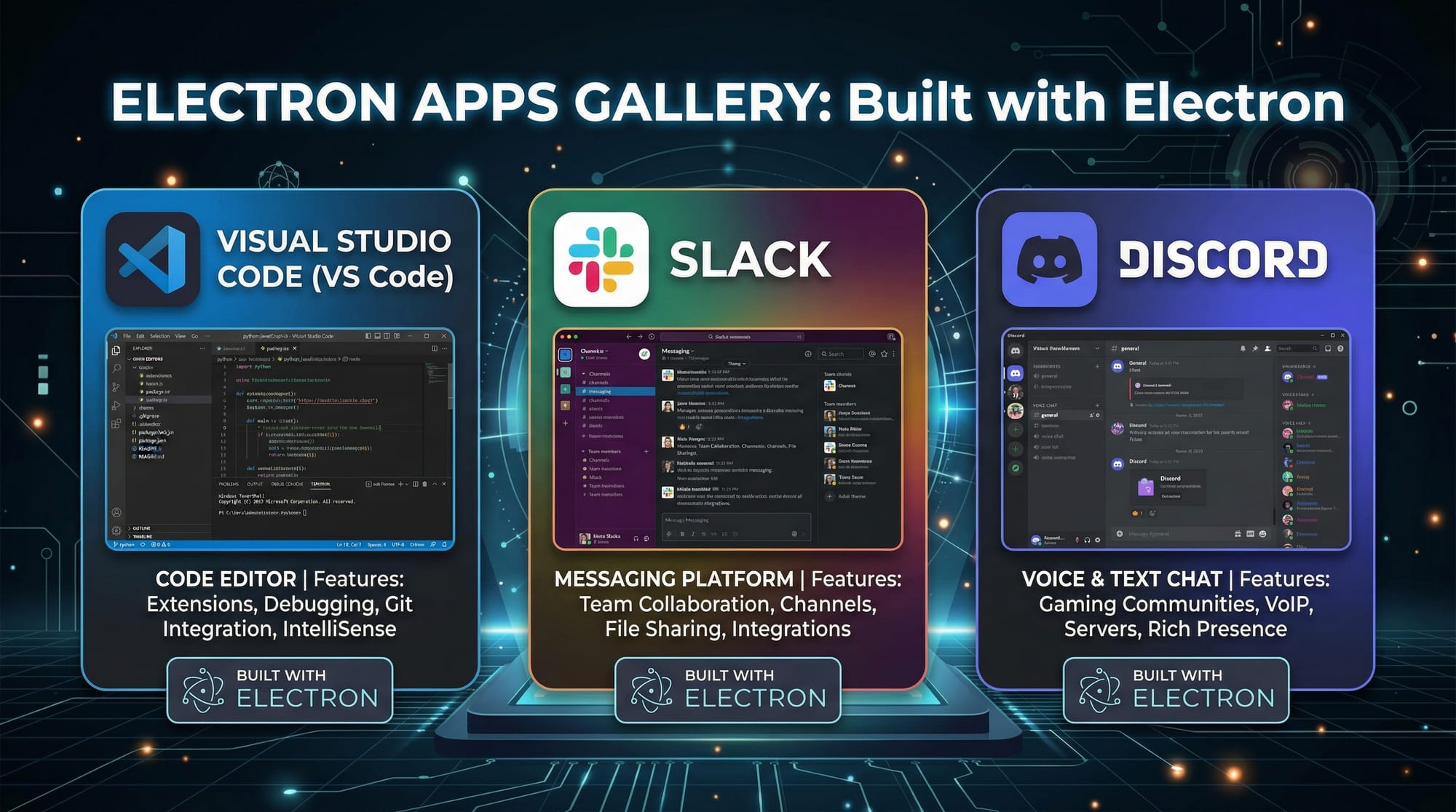
Electron.js is used to build cross-platform desktop applications using JavaScript, HTML, and CSS. Popular apps like VS Code use it.
How do I install Electron?
You can install Electron using npm with npm install electron --save-dev. Make sure Node.js is installed first.
Is Electron good for beginners?
Yes, especially if you already know JavaScript. It allows beginners to quickly build desktop apps without learning new languages.
Can I build real apps for Pakistani businesses?
Absolutely. You can build POS systems, billing software, school management systems, and more tailored for local markets.
How do I package my Electron app?
You can use tools like electron-builder to package your app into installable files for Windows and other platforms.
Summary & Key Takeaways
- Electron.js lets you build desktop apps using JavaScript
- It uses Main Process + Renderer Process architecture
- IPC enables communication between processes
- Security best practices are critical
- Real-world apps like expense trackers and notes apps are easy to build
- Ideal for Pakistani students and freelancers
Next Steps & Related Tutorials
To continue your learning journey, explore these tutorials on theiqra.edu.pk:
- Learn the fundamentals in Node.js Basics to strengthen your backend knowledge
- Improve your frontend skills with the JavaScript Tutorial
- Explore building APIs for your Electron apps in a REST API with Express.js guide
- Advance further with a Full Stack Web Development roadmap for Pakistani students
If you want, I can also create a quiz, project ideas, or a downloadable PDF version of this tutorial 👍
Test Your Python Knowledge!
Finished reading? Take a quick quiz to see how much you've learned from this tutorial.