Flagger Tutorial Progressive Delivery & Canary Deployments
Introduction
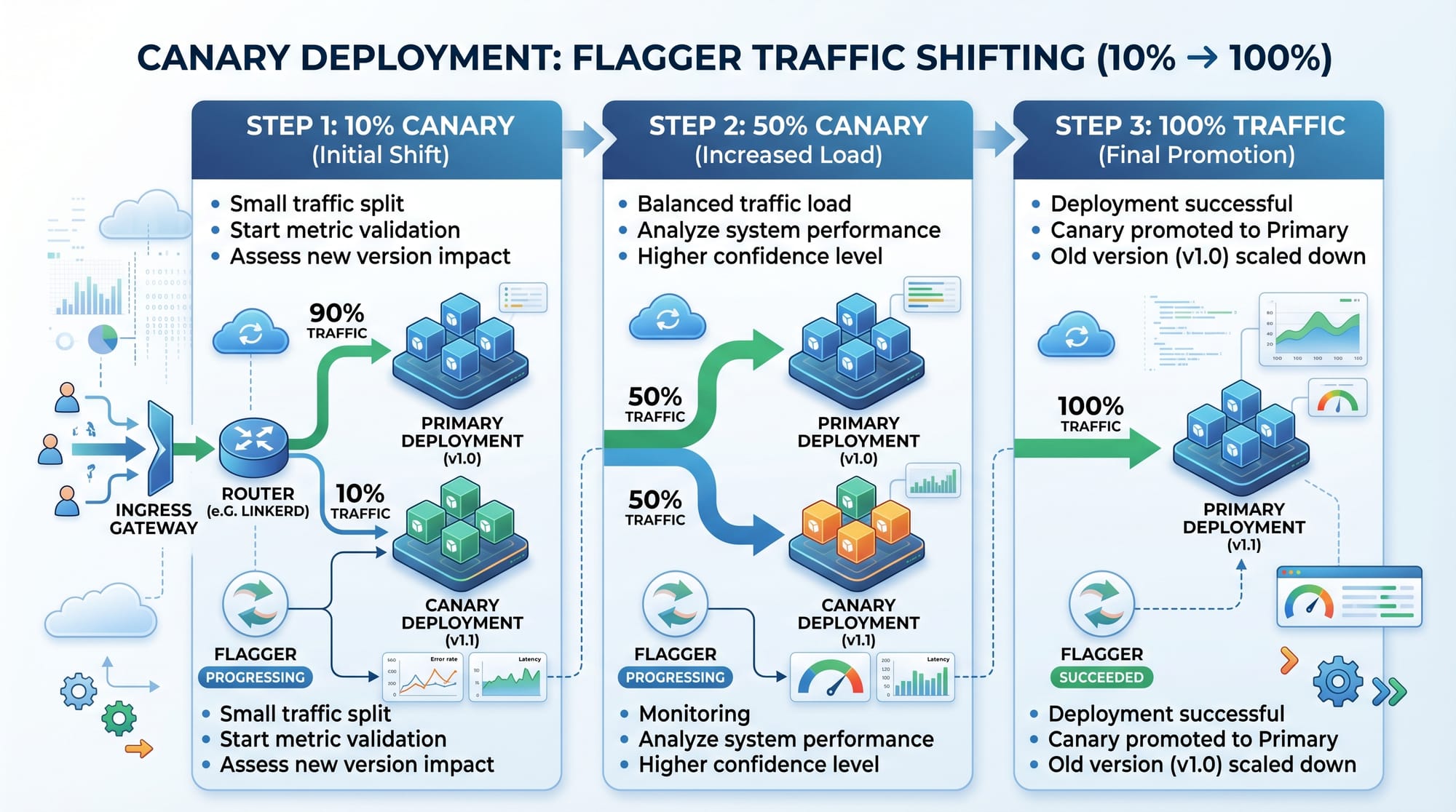
Flagger Tutorial: Progressive Delivery & Canary Deployments is an advanced Kubernetes-based DevOps concept that helps teams release software safely and gradually. Instead of pushing a new version of an application to all users at once, Flagger enables progressive delivery, where traffic is slowly shifted from an old version to a new version while continuously monitoring performance and errors.
For Pakistani students learning DevOps in cities like Lahore, Karachi, and Islamabad, mastering tools like Flagger is extremely valuable. Many local startups and IT companies (including e-commerce platforms, fintech apps, and SaaS providers) are moving toward Kubernetes-based infrastructure. Understanding canary deployment in Kubernetes gives students a competitive edge in the job market and helps them build real-world, production-grade systems.
For example, imagine a Karachi-based online store “ShopEase PK” launching a new checkout system. Instead of risking a full release that could break payments, Flagger allows them to release it to only 10% of users first, then gradually increase traffic if everything is stable.
This tutorial will guide you through Flagger from basics to advanced real-world implementation.
Prerequisites
Before starting this Flagger tutorial, you should have a solid understanding of the following:
- Basic knowledge of Kubernetes (Pods, Deployments, Services)
- Familiarity with Helm package manager
- Understanding of CI/CD pipelines
- Basic knowledge of service mesh (Istio, Linkerd, or NGINX)
- Linux command line basics
- kubectl installed and configured
- A running Kubernetes cluster (Minikube, Kind, or cloud-based like GKE, EKS, AKS)
Optional but helpful:
- Prometheus monitoring system
- Grafana dashboard experience
- Basic YAML configuration knowledge
Core Concepts & Explanation
What is Flagger and Progressive Delivery?
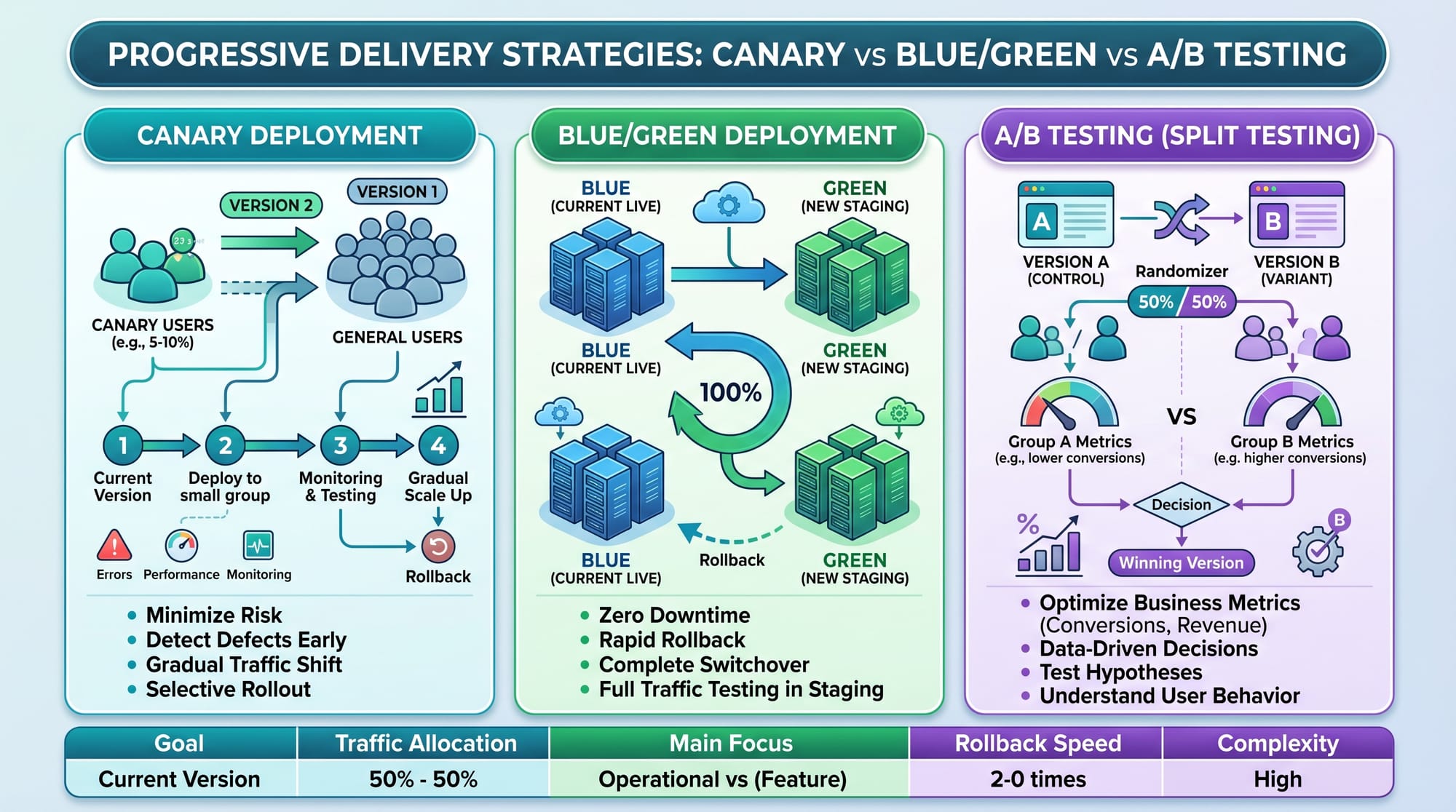
Flagger is a Kubernetes operator that automates progressive delivery strategies such as canary deployments and blue/green deployments. It integrates with service meshes like Istio or Linkerd and monitoring tools like Prometheus to safely release new application versions.
Progressive delivery means:
- Releasing software gradually
- Monitoring real-time metrics
- Automatically rolling back if issues are detected
Instead of manual deployment decisions, Flagger uses metrics like:
- HTTP error rate
- Request latency
- CPU usage
- Custom application metrics
For example, if Ali from Islamabad deploys version 2 of his banking API and error rates increase, Flagger automatically rolls back to version 1 without human intervention.
Canary Deployment in Kubernetes
A canary deployment is a release strategy where a new version of an application is introduced to a small subset of users before full rollout.
Steps:
- Deploy version 2 alongside version 1
- Route 10% of traffic to version 2
- Monitor metrics
- Increase traffic gradually (25%, 50%, 100%)
- Roll back if issues occur
This reduces risk and improves reliability.
Example in Pakistan context:
A Lahore-based food delivery app “FoodNow” can safely test a new recommendation engine without affecting all users.
Practical Code Examples
Example 1: Install Flagger + Canary Setup
First, install Flagger using Helm:
# Add Flagger Helm repository
helm repo add flagger https://flagger.app

# Update repositories
helm repo update

# Install Flagger with Prometheus integration
helm install flagger flagger/flagger \
  --namespace istio-system \
  --set meshProvider=istio \
  --set metricsServer=http://prometheus:9090
Line-by-line explanation:
helm repo add flagger https://flagger.app→ Adds Flagger chart repositoryhelm repo update→ Refreshes local Helm repositorieshelm install flagger→ Installs Flagger in Kubernetes cluster--namespace istio-system→ Deploys Flagger inside Istio namespace--set meshProvider=istio→ Configures Flagger to use Istio service mesh--set metricsServer=http://prometheus:9090→ Connects Flagger to Prometheus monitoring
Next, create a canary deployment:
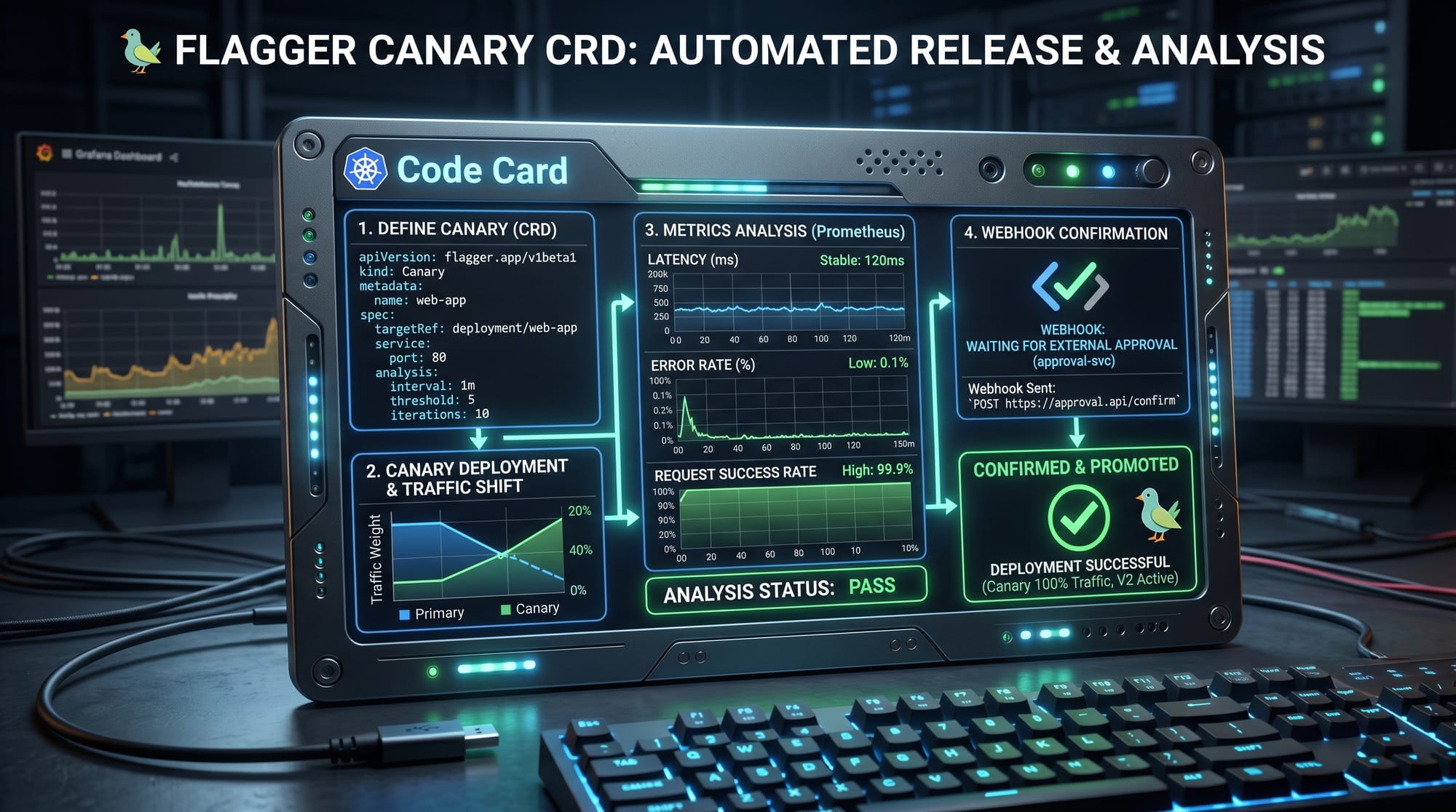
apiVersion: flagger.app/v1beta1
kind: Canary
metadata:
  name: payment-service
  namespace: default
spec:
  targetRef:
    apiVersion: apps/v1
    kind: Deployment
    name: payment-service
  service:
    port: 80
  analysis:
    interval: 1m
    threshold: 5
    maxWeight: 50
    stepWeight: 10
Line-by-line explanation:
apiVersion→ Defines Flagger API versionkind: Canary→ Declares canary deployment strategymetadata.name→ Name of canary resourcetargetRef→ Points to Kubernetes deploymentservice.port→ Exposes service on port 80interval: 1m→ Checks metrics every 1 minutethreshold: 5→ Max failed checks before rollbackmaxWeight: 50→ Maximum 50% traffic to canarystepWeight: 10→ Increment traffic by 10% each step
Example 2: Real-World Application (Karachi E-Commerce System)
Imagine a Karachi-based startup “DarazLite” upgrading its product recommendation engine.
apiVersion: apps/v1
kind: Deployment
metadata:
  name: recommendation-v2
spec:
  replicas: 2
  selector:
    matchLabels:
      app: recommendation
      version: v2
  template:
    metadata:
      labels:
        app: recommendation
        version: v2
    spec:
      containers:
      - name: app
        image: myrepo/recommendation:v2
        ports:
        - containerPort: 8080
Line-by-line explanation:
replicas: 2→ Runs two instances for reliabilityversion: v2→ Marks this as new versionimage→ Docker image for new releasecontainerPort: 8080→ Application port inside container
Flagger will automatically:
- Route 10% of Karachi users to v2
- Monitor latency and errors
- Increase traffic if stable
- Roll back if checkout failures increase
Common Mistakes & How to Avoid Them
Mistake 1: Not Configuring Proper Metrics
Many beginners forget to set up Prometheus metrics correctly. Without metrics, Flagger cannot make intelligent decisions.
Fix:
- Ensure Prometheus is installed
- Configure service monitoring
- Define error rate thresholds
Mistake 2: Setting High Traffic Too Quickly
Increasing traffic too fast (e.g., 50% immediately) can cause production failures.
Fix:
- Use gradual increments (5%, 10%, 25%)
- Monitor each step carefully
- Allow enough analysis interval
Practice Exercises
Exercise 1: Deploy Your First Canary
Problem:
Deploy a sample Node.js application using Flagger and route 10% traffic to version 2.
Solution:
- Create Kubernetes deployment v1 and v2
- Install Flagger
- Define Canary CRD
- Observe traffic shifting using Istio
Exercise 2: Simulate Failure Scenario
Problem:
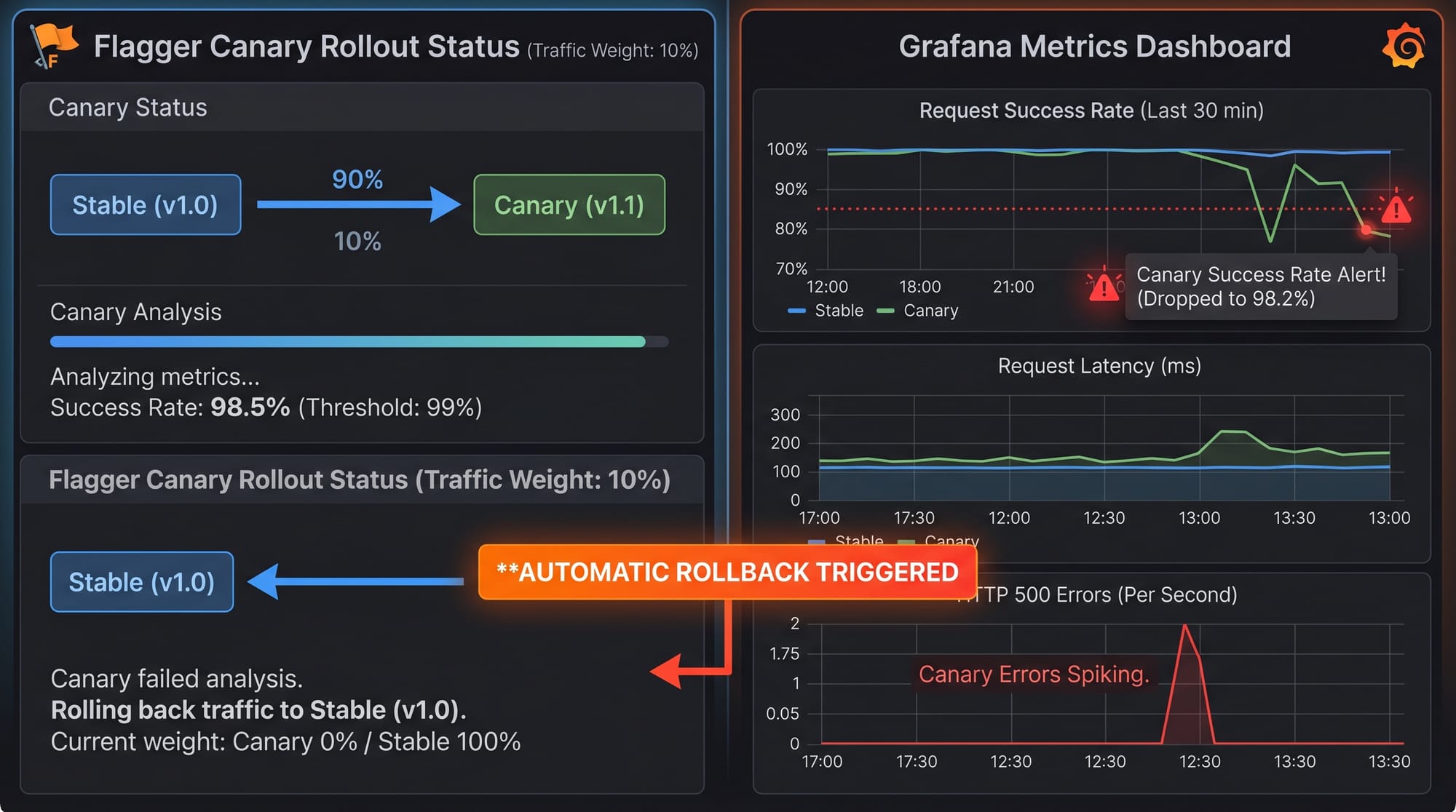
Introduce high error rate in v2 and observe rollback.
Solution:
- Modify v2 to return HTTP 500 errors
- Watch Prometheus metrics spike
- Flagger automatically rolls back to stable version
Frequently Asked Questions
What is Flagger in Kubernetes?
Flagger is a progressive delivery operator that automates canary deployments and ensures safe application releases using metrics-based analysis.
How does canary deployment work in Kubernetes?
It gradually shifts traffic from an old version to a new version while monitoring system health and automatically rolling back if issues occur.
Why is progressive delivery important?
It reduces deployment risk, improves system stability, and ensures that only tested changes reach all users.
Do I need Istio for Flagger?
No, but Istio or another service mesh is recommended because it helps control traffic routing for canary deployments.
Can Flagger work in production environments?
Yes, Flagger is widely used in production systems for automated rollouts and is trusted in enterprise Kubernetes environments.
Summary & Key Takeaways
- Flagger automates progressive delivery in Kubernetes environments
- Canary deployments reduce risk by gradual traffic shifting
- Prometheus and service mesh are essential for monitoring and routing
- Automatic rollback improves system reliability
- Pakistani developers can use these skills in modern DevOps roles
- Real-world applications include fintech, e-commerce, and SaaS platforms
Next Steps & Related Tutorials
To deepen your DevOps knowledge, explore these related tutorials on theiqra.edu.pk:
- Learn advanced deployment automation with the ArgoCD Tutorial
- Master traffic management using the Istio Service Mesh Guide
- Improve CI/CD pipelines with Tekton Cloud-Native CI/CD
- Strengthen Kubernetes foundations with Kubernetes Production Best Practices
By continuing your journey, you’ll be able to build production-grade systems used in modern cloud-native companies across Pakistan and beyond.
Test Your Python Knowledge!
Finished reading? Take a quick quiz to see how much you've learned from this tutorial.