Flutter State Management Riverpod & BLoC Pattern
Introduction
Flutter apps today are more powerful than ever, but as your app grows, managing data and UI updates becomes challenging. This is where flutter state management 2026 approaches like flutter riverpod and flutter bloc come into play.
State management is simply how your app handles and updates data. For example, when Ahmad logs into an app in Lahore or Fatima adds items to a shopping cart in Karachi, the app must update the UI instantly and correctly. Without proper state management, apps become buggy, slow, and hard to maintain.
In this tutorial, we will explore Flutter State Management: Riverpod & BLoC Pattern—two of the most popular and industry-relevant approaches used by professional developers.
Why Pakistani students should learn this:
- Many freelancing and job opportunities in Pakistan require Flutter expertise
- Companies prefer scalable and maintainable code
- Riverpod and BLoC are widely used in real-world apps
Prerequisites
Before starting, you should have:
- Basic understanding of Flutter widgets (StatelessWidget, StatefulWidget)
- Knowledge of Dart programming
- Familiarity with async programming (Future, Stream)
- Basic Flutter project setup experience
If you’re new, consider first learning Flutter basics before diving into advanced state management.
Core Concepts & Explanation
Understanding State in Flutter
State is the data that changes over time. For example:
- User login status
- Cart items in a shopping app
- API data from a server
Flutter rebuilds UI when state changes. But managing this manually becomes difficult as apps grow.
Two modern solutions:
- Riverpod → Simple, flexible, testable
- BLoC → Structured, event-driven architecture
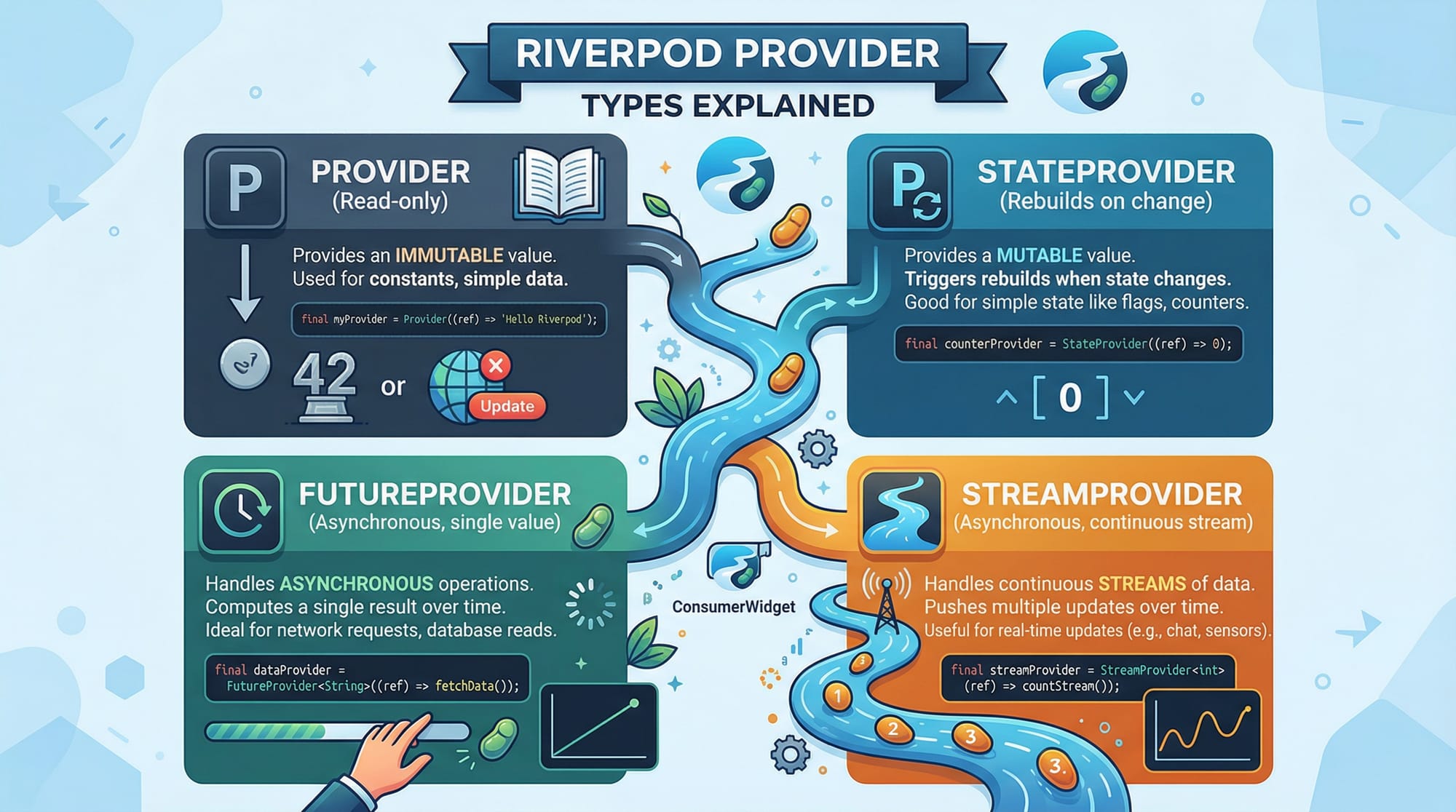
Riverpod: Modern and Developer-Friendly
Riverpod is an improved version of Provider. It removes common issues like context dependency and improves testability.
Key concepts:
- Providers → Store and expose state
- ref.watch → Listen to changes
- ref.read → Access state without listening
Example:
final counterProvider = StateProvider<int>((ref) => 0);
Explanation:
final counterProvider→ Defines a providerStateProvider<int>→ Holds an integer state(ref) => 0→ Initial value is 0
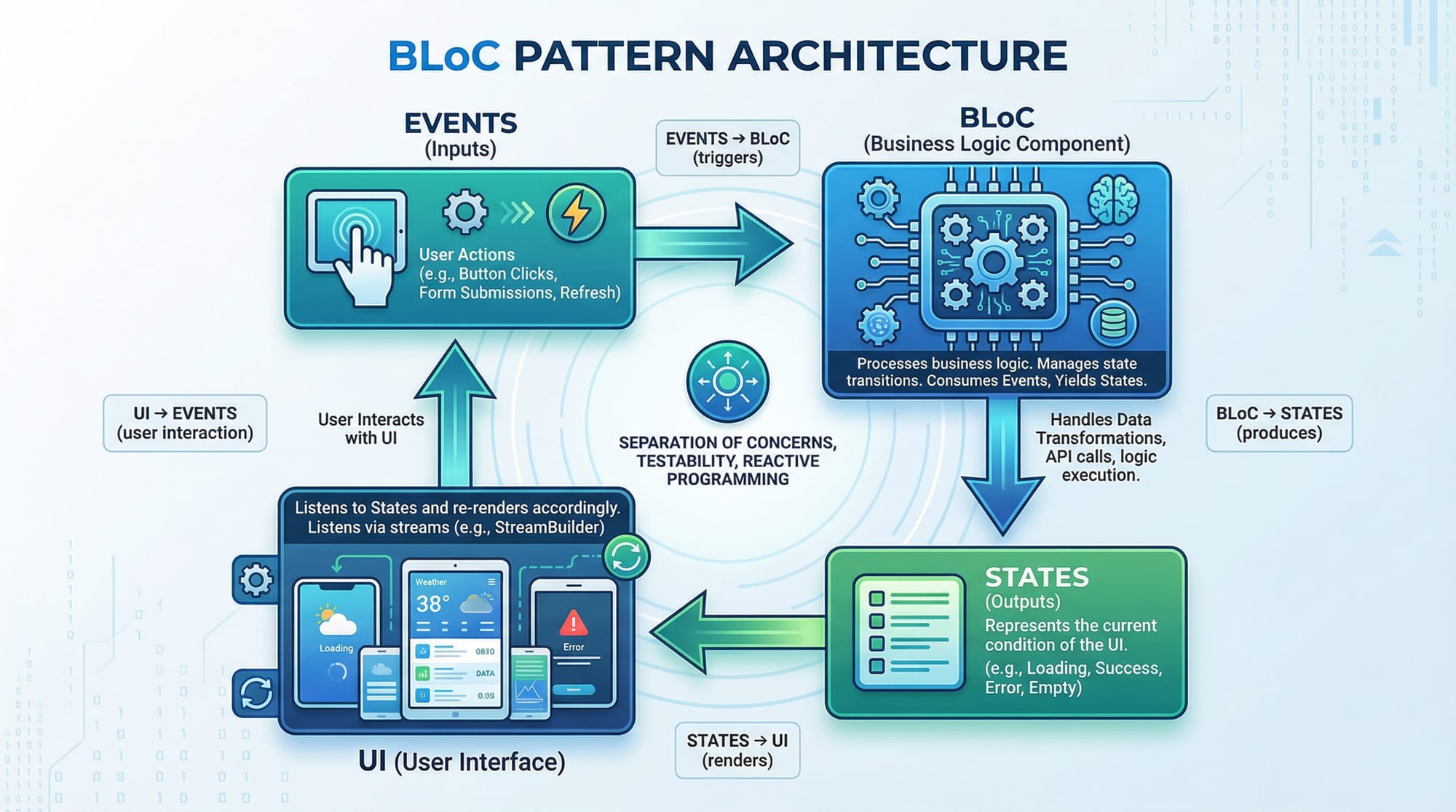
BLoC Pattern: Structured Architecture
BLoC stands for Business Logic Component.
It separates:
- UI
- Business Logic
- Data
Flow:
Event → BLoC → State → UI
Example:
- User clicks button → Event triggered
- BLoC processes logic
- New state emitted
- UI updates
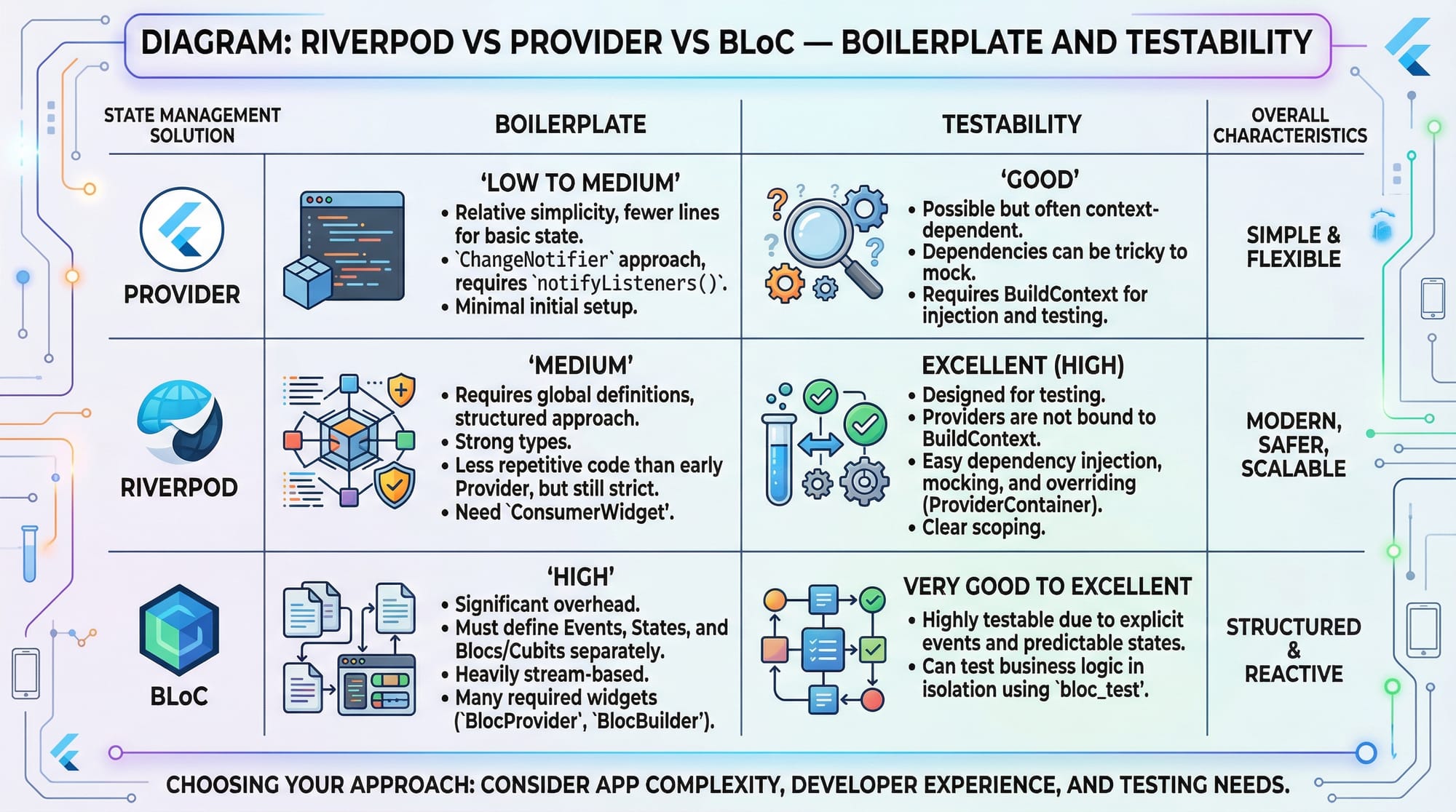
Riverpod vs BLoC
| Feature | Riverpod | BLoC |
|---|---|---|
| Learning Curve | Easy | Medium |
| Boilerplate | Low | High |
| Scalability | High | Very High |
| Testing | Easy | Excellent |
Practical Code Examples
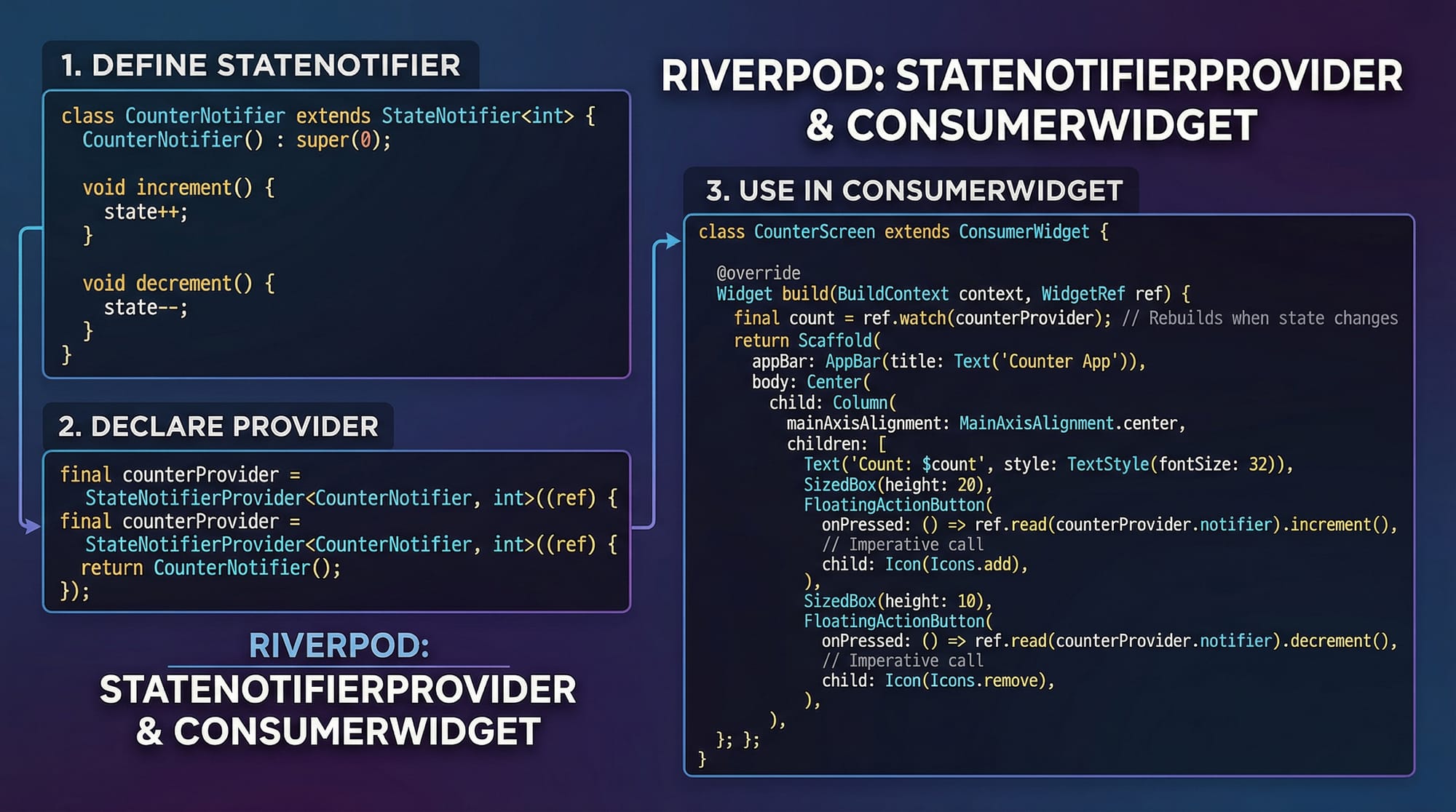
Example 1: Counter App using Riverpod
import 'package:flutter/material.dart';
import 'package:flutter_riverpod/flutter_riverpod.dart';

final counterProvider = StateProvider<int>((ref) => 0);

void main() {
  runApp(ProviderScope(child: MyApp()));
}

class MyApp extends StatelessWidget {
  @override
  Widget build(BuildContext context) {
    return MaterialApp(home: CounterScreen());
  }
}

class CounterScreen extends ConsumerWidget {
  @override
  Widget build(BuildContext context, WidgetRef ref) {
    final count = ref.watch(counterProvider);

    return Scaffold(
      appBar: AppBar(title: Text("Counter App - Islamabad")),
      body: Center(child: Text('$count')),
      floatingActionButton: FloatingActionButton(
        onPressed: () {
          ref.read(counterProvider.notifier).state++;
        },
        child: Icon(Icons.add),
      ),
    );
  }
}
Line-by-line explanation:
import→ Imports Flutter and Riverpod librariescounterProvider→ Stores counter stateProviderScope→ Required wrapper for RiverpodConsumerWidget→ Allows listening to providersref.watch→ Rebuilds UI when state changesref.read→ Updates state without rebuildingstate++→ Increments counter
Example 2: Real-World Application (Shopping Cart in PKR)
final cartProvider = StateNotifierProvider<CartNotifier, List<int>>((ref) {
  return CartNotifier();
});

class CartNotifier extends StateNotifier<List<int>> {
  CartNotifier() : super([]);

  void addItem(int price) {
    state = [...state, price];
  }

  int get totalPrice => state.fold(0, (sum, item) => sum + item);
}
Explanation:
StateNotifierProvider→ Advanced provider for logicCartNotifier→ Handles business logicstate = [...state, price]→ Adds item immutablyfold()→ Calculates total price in PKR
Usage in UI:
final cart = ref.watch(cartProvider);
final total = ref.watch(cartProvider.notifier).totalPrice;
Explanation:
cart→ List of item pricestotal→ Total cart value
Example scenario:
Ali in Karachi adds items worth PKR 500, PKR 1000 → total = PKR 1500
Common Mistakes & How to Avoid Them
Mistake 1: Using ref.read Instead of ref.watch
Problem:
UI does not update.
Wrong:
final count = ref.read(counterProvider);
Fix:
final count = ref.watch(counterProvider);
Explanation:
read→ No rebuildwatch→ Rebuilds UI when state changes
Mistake 2: Overusing BLoC for Simple Apps
Problem:
Too much boilerplate for small apps.
Fix:
- Use Riverpod for small/medium apps
- Use BLoC for large enterprise apps
Tip:
Start simple → scale later
Practice Exercises
Exercise 1: Simple Counter Reset
Problem:
Create a counter app with reset button.
Solution:
void resetCounter(WidgetRef ref) {
  ref.read(counterProvider.notifier).state = 0;
}
Explanation:
- Access notifier
- Set state to 0
- UI updates automatically
Exercise 2: Cart Discount Feature
Problem:
Apply 10% discount on total price.
Solution:
double get discountedPrice {
  return totalPrice * 0.9;
}
Explanation:
- Multiply by 0.9 → 10% discount
- Useful for Pakistani e-commerce apps
Frequently Asked Questions
What is Flutter state management?
Flutter state management is the process of handling and updating UI data efficiently. It ensures apps respond correctly to user actions like clicks, API responses, and navigation.
How do I choose between Riverpod and BLoC?
Use Riverpod for simplicity and faster development. Choose BLoC when working on large-scale apps requiring strict architecture and separation of concerns.
Is Riverpod better than Provider?
Yes, Riverpod improves upon Provider by removing context dependency, improving safety, and making testing easier.
Can I use Riverpod and BLoC together?
Yes, many advanced apps combine both. Riverpod can manage dependencies while BLoC handles complex business logic.
Why is BLoC popular in jobs?
BLoC enforces clean architecture and scalability, which companies prefer for maintainable codebases.
Summary & Key Takeaways
- Riverpod is simple, modern, and beginner-friendly
- BLoC is powerful and structured for large apps
- State management is essential for scalable Flutter apps
- Use
ref.watchfor UI updates andref.readfor actions - Choose tools based on app complexity
- Practice with real-world examples like shopping carts and login systems
Next Steps & Related Tutorials
To continue learning, explore these tutorials on theiqra.edu.pk:
- Learn Flutter from scratch in our Flutter Tutorial for Beginners
- Dive deeper into UI building with Flutter Widgets Guide
- Explore web apps with React State Management
- Advance your backend skills with Firebase for Flutter Apps
By mastering flutter riverpod and flutter bloc, you are building skills that are highly in demand in Pakistan’s growing tech industry. Keep practicing, build real apps, and stay consistent 🚀
Test Your Python Knowledge!
Finished reading? Take a quick quiz to see how much you've learned from this tutorial.