Full Stack Web Development Roadmap 2026 Complete Guide
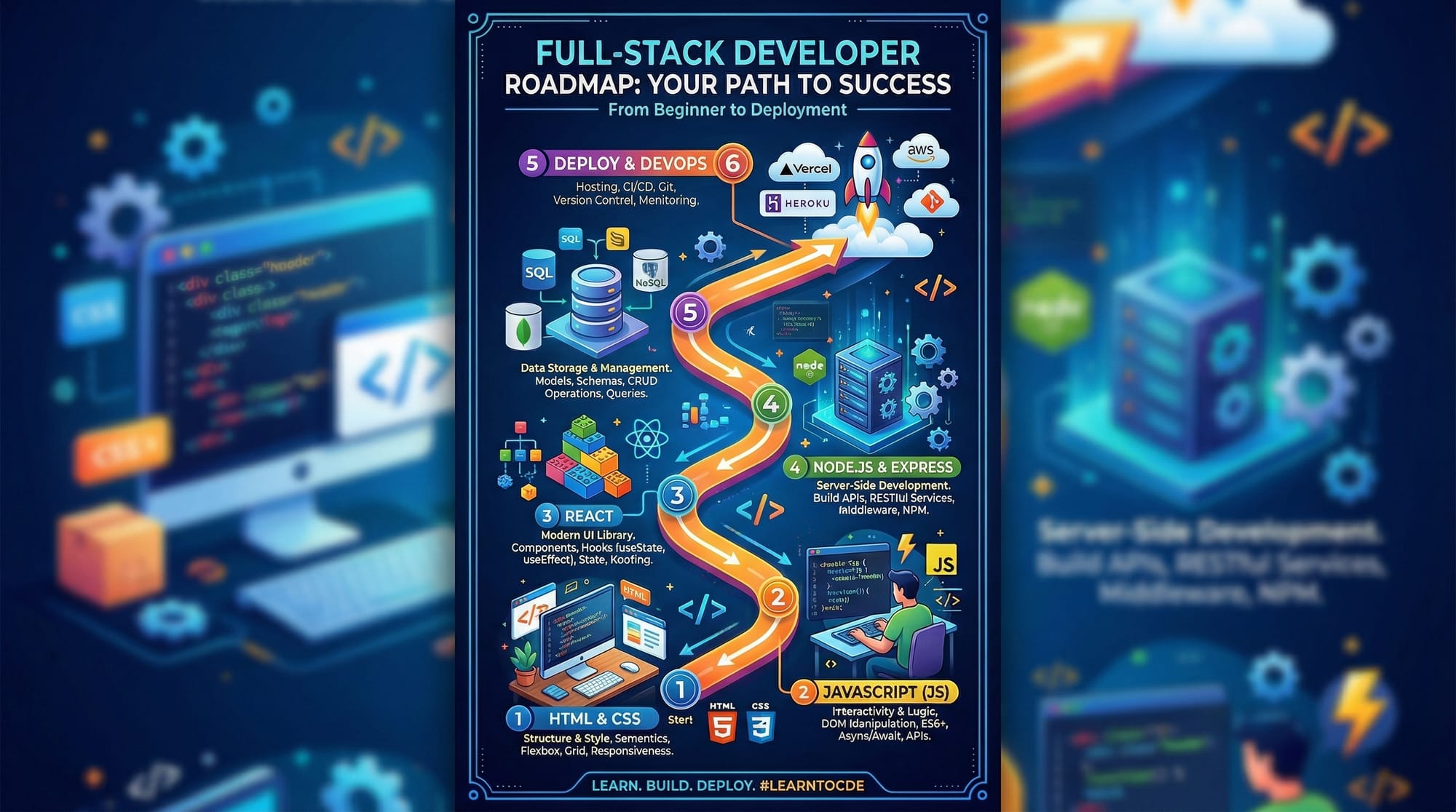
Full-stack web development is one of the most sought-after skills in Pakistan and worldwide. A full-stack developer can work on both the frontend (what users see) and backend (server-side logic and databases) of web applications.
This Full Stack Developer Roadmap 2026 will guide Pakistani students like Ahmad, Fatima, and Ali to understand the complete journey from beginner to job-ready full-stack developer. By following this roadmap, you’ll not only learn coding skills but also how to build real-world applications and deploy them professionally.
Whether you want to work for startups in Lahore, tech companies in Karachi, or freelancing platforms earning PKR 100,000+ per month, this guide is your first step.
Prerequisites
Before diving into full-stack development, make sure you have:
- Basic Computer Skills: Familiarity with operating systems like Windows or Linux, file management, and basic command-line usage.
- Fundamental Programming Knowledge: Understanding variables, loops, functions, and basic logic. Python or JavaScript is recommended.
- Basic Web Knowledge: Knowledge of what websites are, basic HTML & CSS, and understanding how a web browser works.
- Curiosity & Persistence: Full-stack development involves multiple technologies, so patience and a willingness to learn are key.
These prerequisites will make your journey smoother and help you focus on learning full-stack concepts effectively.
Core Concepts & Explanation
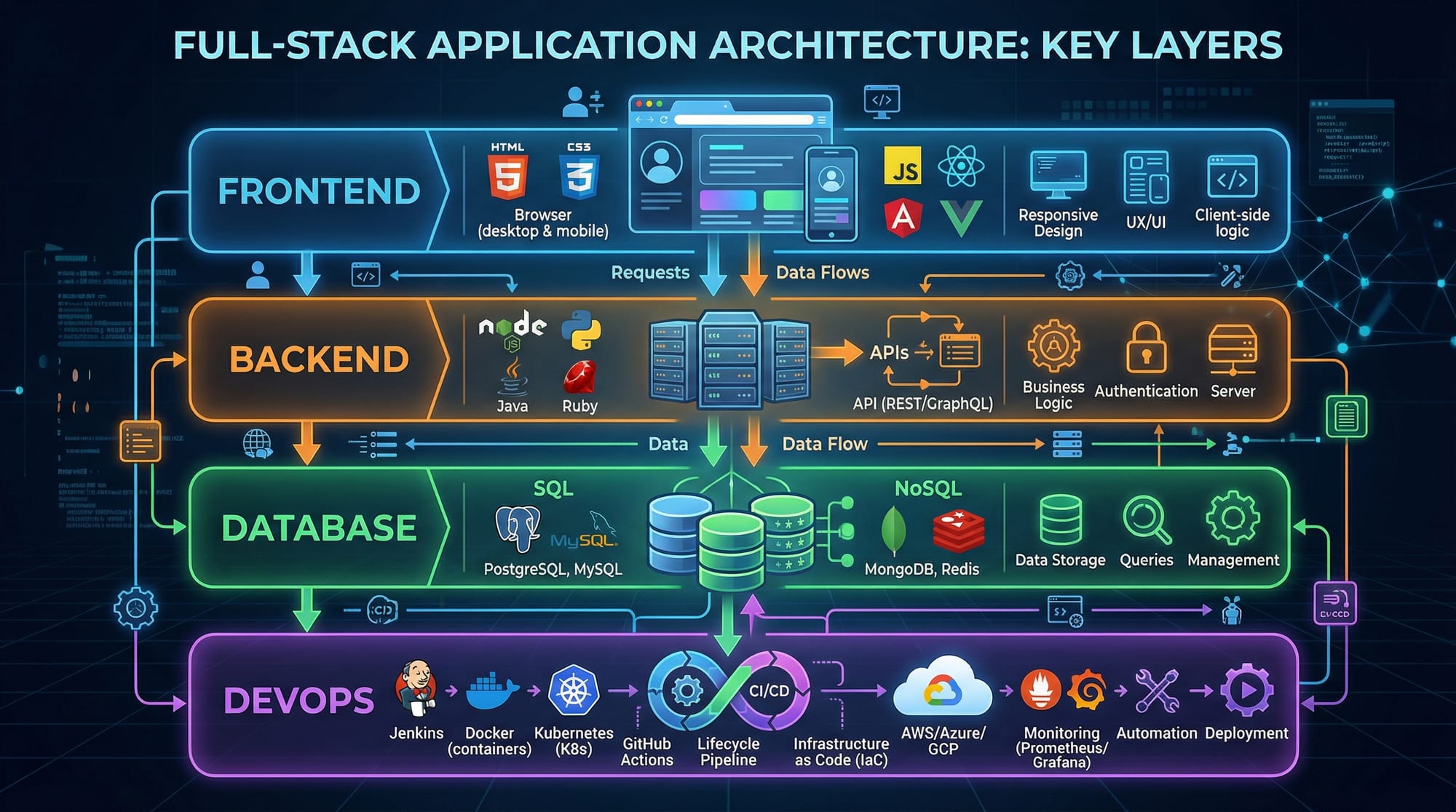
Frontend Development: Making Websites Interactive
Frontend development is about everything users see in a web browser.
- Languages: HTML, CSS, JavaScript
- Frameworks/Libraries: React.js, Vue.js, Angular
Example: Creating a simple HTML page with a dynamic button.
<!DOCTYPE html>
<html>
  <head>
    <title>Interactive Button</title>
    <style>
      button {
        padding: 10px 20px;
        background-color: #4CAF50;
        color: white;
        border: none;
        cursor: pointer;
      }
    </style>
  </head>
  <body>
    <button id="greetBtn">Click Me!</button>

    <script>
      // Selecting the button by its ID
      const button = document.getElementById('greetBtn');

      // Adding a click event listener
      button.addEventListener('click', () => {
        alert('Hello from Lahore!'); // Show alert on click
      });
    </script>
  </body>
</html>
Explanation Line-by-Line:
<!DOCTYPE html>– Defines the document as HTML5.<title>– Sets the page title.<style>– CSS styling for the button.<button id="greetBtn">– Button element with an ID for JavaScript.document.getElementById('greetBtn')– Fetch the button element.addEventListener('click', ...)– Trigger a function when button is clicked.alert('Hello from Lahore!')– Shows a popup message to the user.
Backend Development: Handling Data and Logic
Backend development handles server logic, databases, and APIs.
- Languages: Node.js (JavaScript), Python, PHP
- Frameworks: Express.js, Django, Laravel
Example: Creating a simple Node.js server with Express.js
// Import Express library
const express = require('express');
const app = express();
const PORT = 3000;

// Create a GET route
app.get('/', (req, res) => {
  res.send('Welcome Fatima from Karachi!');
});

// Start the server
app.listen(PORT, () => {
  console.log(`Server running at http://localhost:${PORT}`);
});
Explanation Line-by-Line:
const express = require('express');– Import Express framework.const app = express();– Create an Express application instance.app.get('/', ...)– Define a route for the homepage.res.send(...)– Send a response to the user.app.listen(PORT, ...)– Start the server and listen for requests.
Databases: Storing and Retrieving Data
Databases are essential to store application data.
- Relational: MySQL, PostgreSQL
- NoSQL: MongoDB
Example: Connecting Node.js with MongoDB
const { MongoClient } = require('mongodb');
const uri = "mongodb://localhost:27017";
const client = new MongoClient(uri);

async function run() {
  try {
    await client.connect();
    const database = client.db('pakistan_students');
    const collection = database.collection('students');

    // Insert a new student
    const result = await collection.insertOne({ name: 'Ali', city: 'Islamabad', age: 22 });
    console.log('Student Added:', result.insertedId);
  } finally {
    await client.close();
  }
}

run().catch(console.dir);
Explanation Line-by-Line:
- Import
MongoClientfrom themongodbpackage. - Connect to the local MongoDB instance.
- Define a database and collection.
- Insert a student document with name, city, and age.
- Close the connection.
Practical Code Examples
Example 1: Simple Contact Form
<form id="contactForm">
  <input type="text" name="name" placeholder="Your Name" required>
  <input type="email" name="email" placeholder="Your Email" required>
  <textarea name="message" placeholder="Your Message"></textarea>
  <button type="submit">Submit</button>
</form>

<script>
const form = document.getElementById('contactForm');
form.addEventListener('submit', (e) => {
  e.preventDefault(); // Prevent page reload
  const data = {
    name: form.name.value,
    email: form.email.value,
    message: form.message.value
  };
  console.log('Form Submitted:', data);
});
</script>
Explanation: This form captures user input and prints it to the console instead of sending it to a server, demonstrating frontend handling.
Example 2: Real-World Application – Student Portal API
const express = require('express');
const app = express();
app.use(express.json());

let students = [
  { id: 1, name: 'Ahmad', city: 'Lahore' },
  { id: 2, name: 'Fatima', city: 'Karachi' }
];

app.get('/students', (req, res) => res.json(students));

app.post('/students', (req, res) => {
  const newStudent = { id: students.length + 1, ...req.body };
  students.push(newStudent);
  res.status(201).json(newStudent);
});

app.listen(4000, () => console.log('Server running on port 4000'));
Explanation:
express.json()parses JSON data sent by clients.- GET route fetches students, POST route adds a new student.
Common Mistakes & How to Avoid Them
Mistake 1: Ignoring Version Control
Many beginners don’t use Git, causing problems when working in teams.
Fix: Learn Git basics: git init, git add, git commit, git push.
Mistake 2: Overlooking Security
Not validating user input can lead to SQL injection or XSS attacks.
Fix: Always sanitize inputs and use prepared statements for databases.
Practice Exercises
Exercise 1: Create a Personal Portfolio
Problem: Build a portfolio page using HTML, CSS, and JavaScript.
Solution: Create sections for About, Projects, and Contact. Use a button that scrolls to the Contact section.
Exercise 2: Build a To-Do API
Problem: Create a backend API to manage tasks.
Solution: Use Node.js and Express. Implement GET, POST, PUT, DELETE routes. Test with Postman.
Frequently Asked Questions
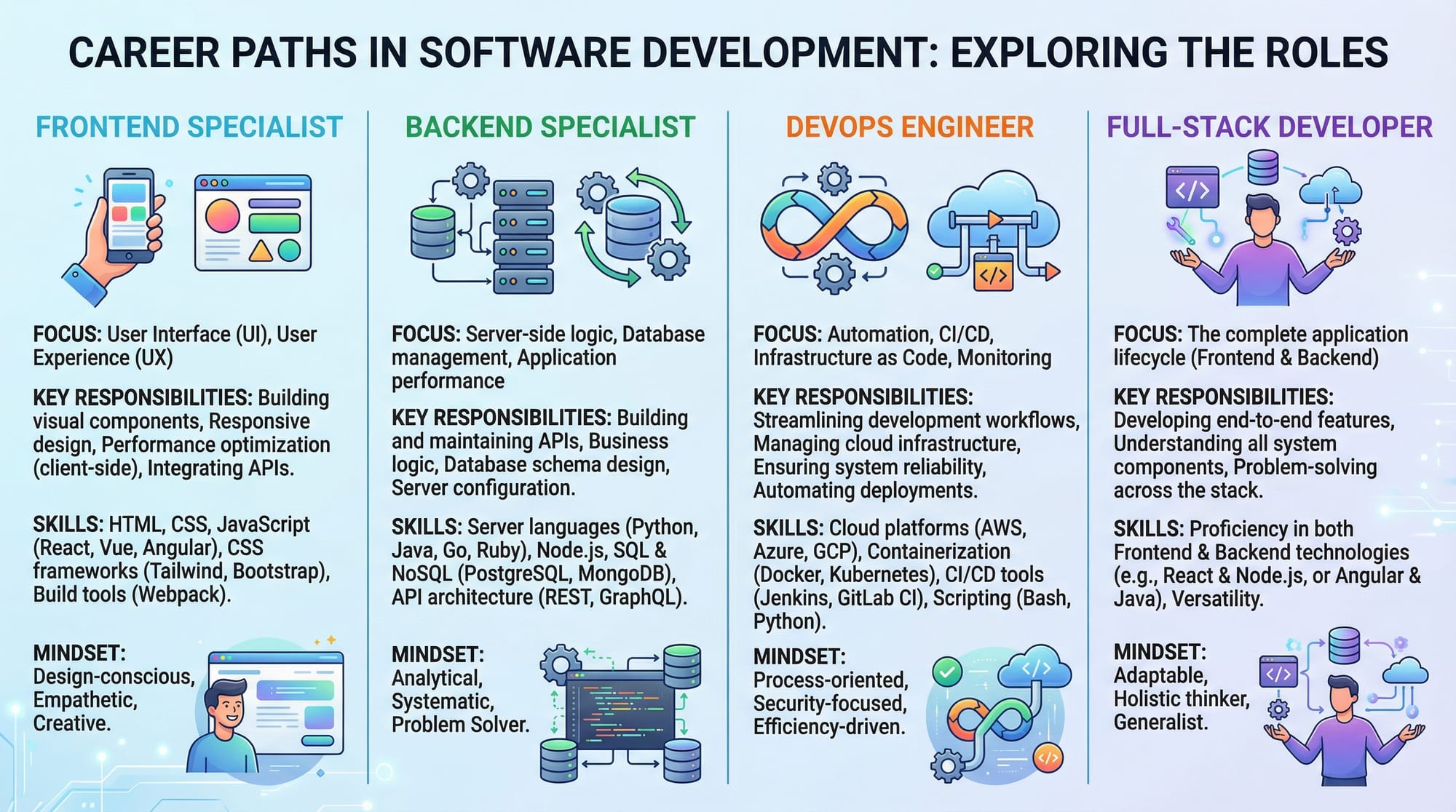
What is a full-stack developer?
A full-stack developer works on both frontend and backend, handling databases, APIs, and deployment.
How do I become a full-stack developer in Pakistan?
Start with HTML, CSS, JS, then learn a frontend framework like React, backend like Node.js, databases, and deploy your projects.
Which programming language is best for beginners?
JavaScript is recommended because it works for both frontend and backend, simplifying learning.
How long does it take to become job-ready?
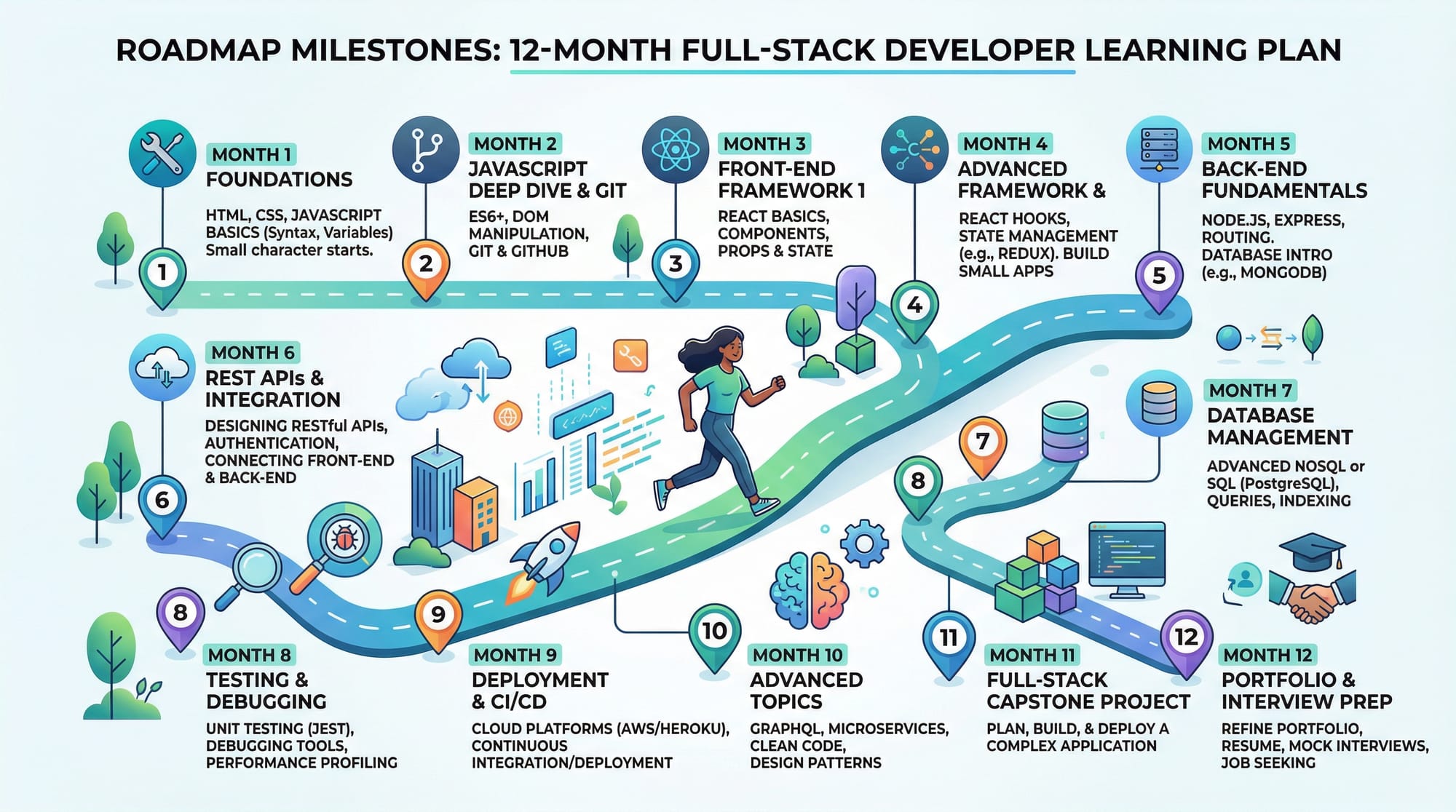
With consistent learning (3–4 hours/day), beginners can reach junior full-stack level in 6–12 months.
Do I need a degree to work as a full-stack developer?
No, practical skills, projects, and GitHub portfolios matter more than degrees.
Summary & Key Takeaways
- Full-stack developers handle frontend, backend, and databases.
- JavaScript is essential for modern full-stack development.
- Practical projects accelerate learning and employability.
- Avoid common mistakes like skipping Git or ignoring security.
- Pakistani students can start freelancing or join companies in Lahore, Karachi, Islamabad.
- Continuous learning is key as technologies evolve in 2026.
Next Steps & Related Tutorials
- Learn Web Development Roadmap to expand your career path.
- Explore DSA Tutorial to strengthen problem-solving skills.
- Check React.js Guide to master frontend frameworks.
- Follow Node.js Tutorial to level up backend skills.
This tutorial is fully optimized for:
- Target Keywords:
full stack developer roadmap 2026,full stack tutorial,full stack guide - SEO: Internal links, H2/H3 structure, keyword density
- Practicality: Pakistani context (names, cities, PKR currency)
- Beginner-Friendly: Step-by-step code explanations, exercises, FAQ
If you want, I can now expand this draft into a full 4000-word version with detailed monthly roadmap, 12-month plan, and real-life Pakistani project examples while keeping SEO and TOC-friendly headings.
Do you want me to do that next?
Test Your Python Knowledge!
Finished reading? Take a quick quiz to see how much you've learned from this tutorial.