GitHub Actions Advanced Matrix Reusable Workflows & Secrets
Introduction
GitHub Actions is a powerful CI/CD (Continuous Integration/Continuous Deployment) tool integrated directly into GitHub. While many developers use it for basic workflows like running tests or deploying applications, advanced features like matrix builds, reusable workflows, and secrets management can significantly optimize automation and collaboration in professional projects.
For Pakistani students learning DevOps and modern software practices, mastering these advanced features is crucial. For example, Ahmad in Lahore can automate testing for Node.js applications across multiple versions and operating systems without manually configuring each environment. Similarly, Fatima in Karachi can set up reusable workflows for deploying web apps to cloud providers like AWS or Azure, saving time and avoiding repetitive code.
Prerequisites
Before diving into advanced GitHub Actions, you should have:
- Basic understanding of Git and GitHub.
- Familiarity with YAML syntax.
- Experience with a programming language like JavaScript/Node.js or Python.
- Knowledge of CI/CD concepts, such as testing, building, and deploying applications.
- Basic understanding of environment variables and secrets.
If you are comfortable with these concepts, you are ready to explore advanced features.
Core Concepts & Explanation
GitHub Actions Matrix: Run Multiple Configurations
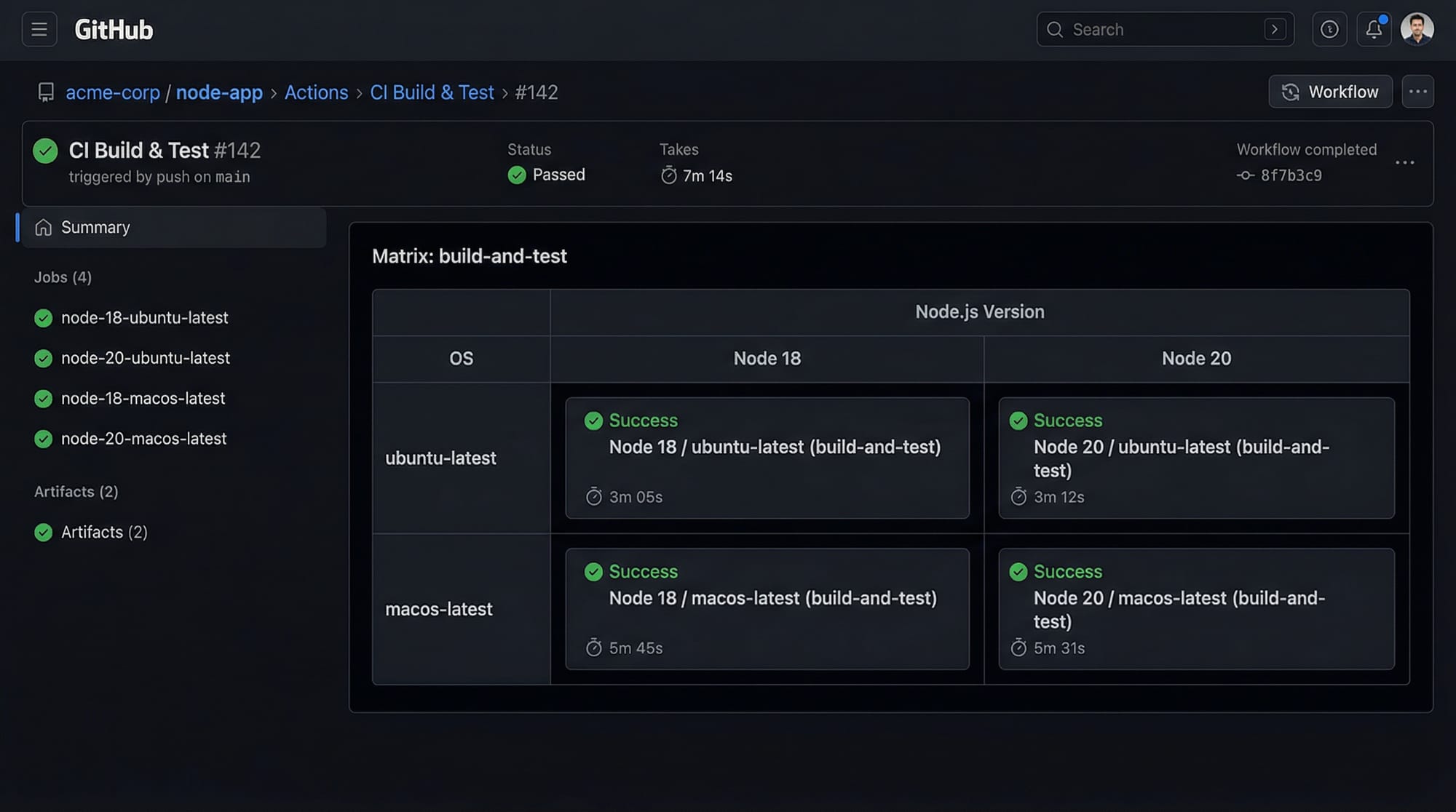
A matrix allows you to run a job multiple times with different parameters, such as Node.js versions, operating systems, or dependency sets. This is especially useful when you want to test your code across multiple environments without writing repetitive workflow code.
Example: Node.js matrix
name: Node.js CI

on:
  push:
    branches:
      - main

jobs:
  build:
    runs-on: ${{ matrix.os }}
    strategy:
      matrix:
        os: [ubuntu-latest, macos-latest]
        node: [18, 20]
    steps:
      - uses: actions/checkout@v3
      - name: Set up Node.js
        uses: actions/setup-node@v3
        with:
          node-version: ${{ matrix.node }}
      - name: Install dependencies
        run: npm install
      - name: Run tests
        run: npm test
Line-by-Line Explanation:
name: Node.js CI– Names the workflow.on: push– Triggers workflow on every push tomain.jobs: build– Defines the build job.runs-on: ${{ matrix.os }}– Uses the OS specified in the matrix.strategy: matrix– Defines the matrix with OS and Node versions.steps:– Lists workflow steps.actions/checkout@v3– Checks out repository code.actions/setup-node@v3– Sets up the Node.js version from the matrix.npm install– Installs dependencies.npm test– Runs the tests.
This allows Ali in Islamabad to ensure their web app works on both Ubuntu and macOS with Node 18 and 20, all in parallel.
Reusable Workflows: DRY Principle in CI/CD
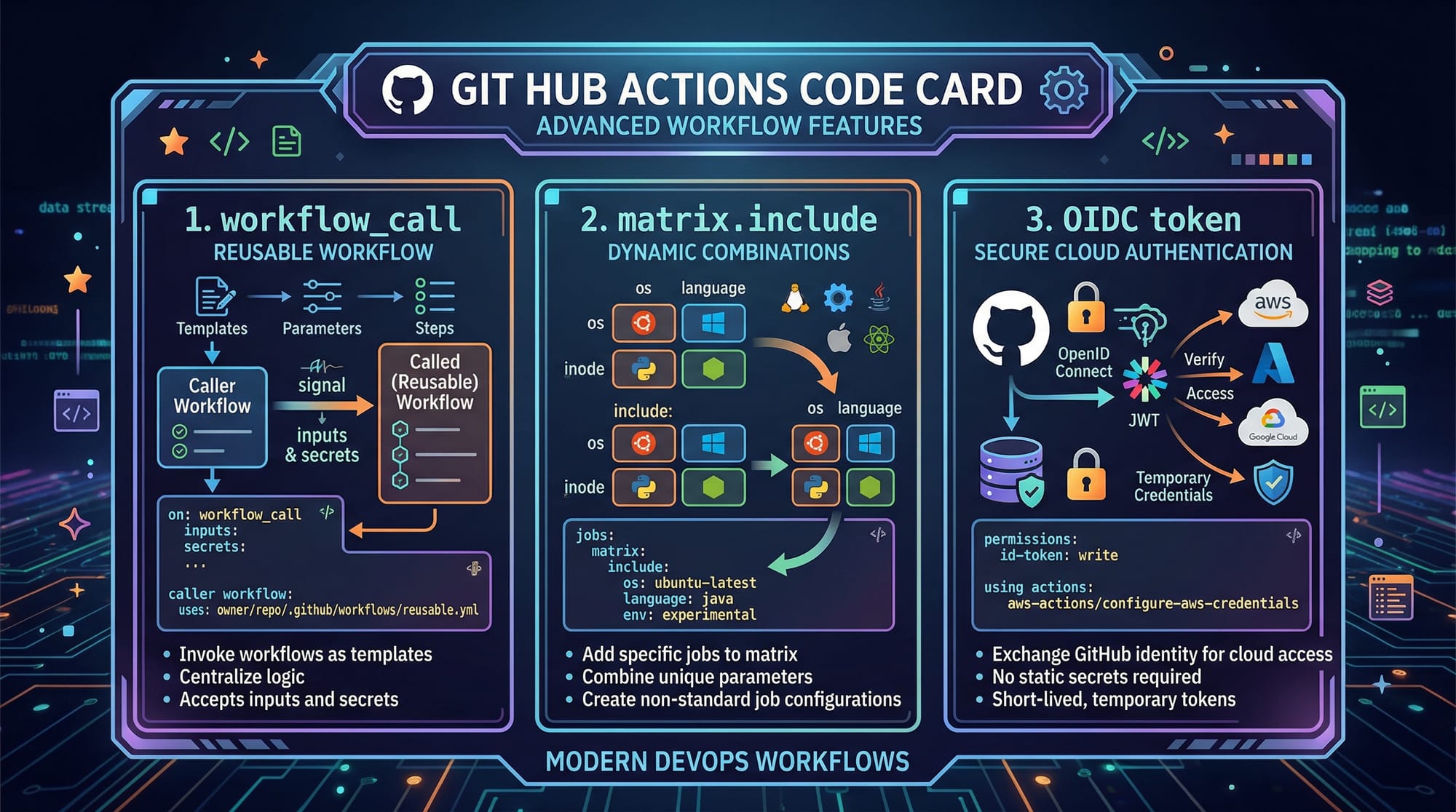
Reusable workflows let you call a workflow from another workflow, avoiding repetitive code and maintaining a single source of truth. This is ideal for projects shared across multiple teams or repositories.
Example: workflow_call reusable workflow
# .github/workflows/deploy.yml
name: Deploy Application

on:
  workflow_call:
    inputs:
      environment:
        required: true
        type: string

jobs:
  deploy:
    runs-on: ubuntu-latest
    steps:
      - uses: actions/checkout@v3
      - name: Set up Node.js
        uses: actions/setup-node@v3
        with:
          node-version: 20
      - name: Deploy to environment
        run: |
          echo "Deploying to ${{ inputs.environment }}"
Explanation:
workflow_call– Allows this workflow to be called from another workflow.inputs– Parameters you pass when invoking the workflow.steps– Checkout code, set Node.js version, and deploy.
Now, a main workflow can call this deploy workflow for staging or production, passing the environment dynamically.
Secrets and OIDC Authentication
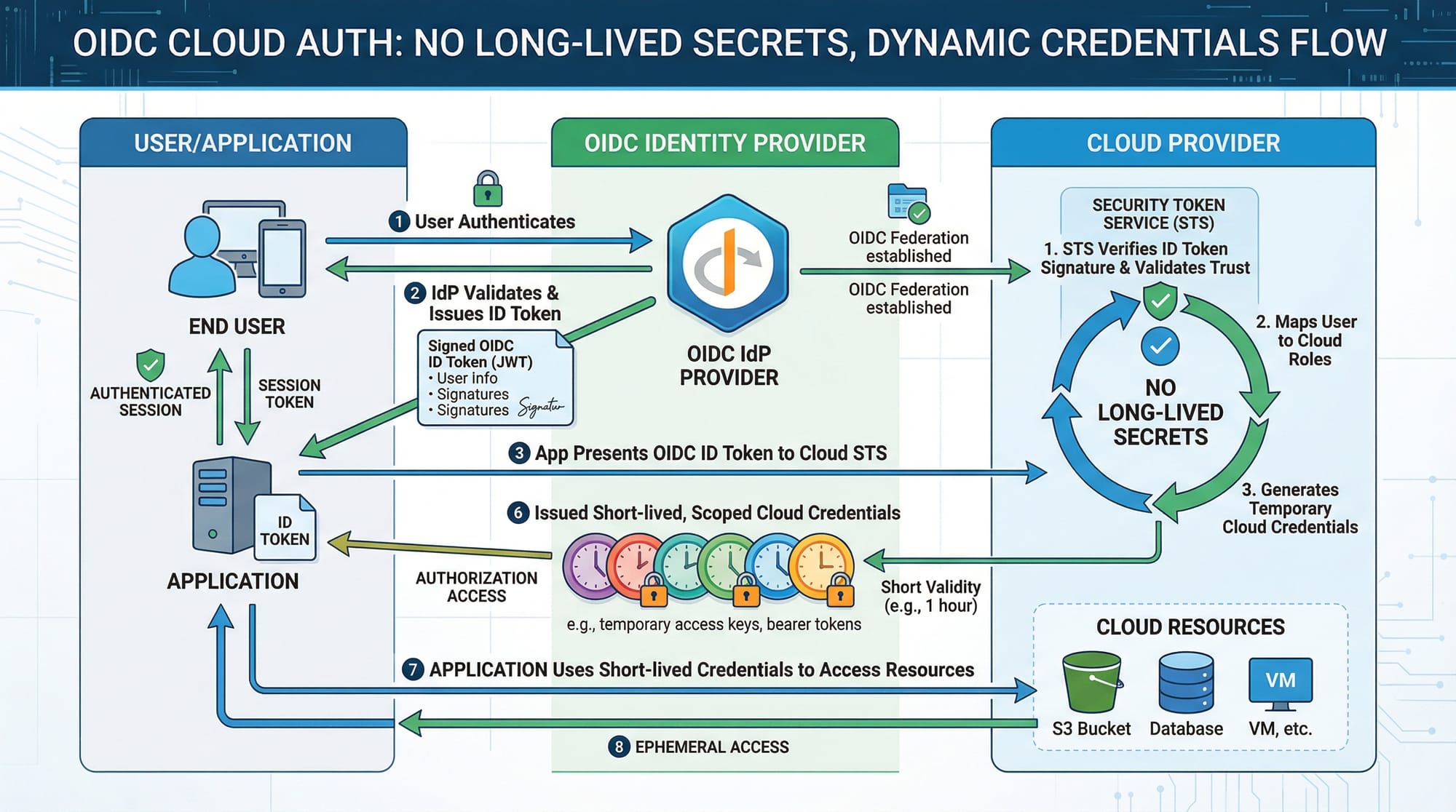
Secrets are used to store sensitive information like API keys, database passwords, or PKR payment credentials. GitHub recently introduced OpenID Connect (OIDC) authentication, allowing workflows to authenticate to cloud providers without storing long-lived secrets.
Example: Using Secrets and OIDC
jobs:
  deploy:
    runs-on: ubuntu-latest
    permissions:
      id-token: write
      contents: read
    steps:
      - uses: actions/checkout@v3
      - name: Configure AWS Credentials
        uses: aws-actions/configure-aws-credentials@v2
        with:
          role-to-assume: arn:aws:iam::123456789012:role/github-actions-role
          aws-region: us-east-1
      - name: Deploy
        run: aws s3 cp ./dist s3://my-app-bucket --recursive
Explanation:
permissions: id-token: write– Enables OIDC token for temporary authentication.aws-actions/configure-aws-credentials@v2– Configures AWS with dynamic credentials.aws s3 cp– Deploys application files to S3 bucket.
This approach keeps secrets safe, which is particularly important for Pakistani students managing cloud resources without exposing sensitive keys.
Practical Code Examples
Example 1: Matrix Build for Node + Python
name: Multi-Language CI

on:
  push:
    branches: [main]

jobs:
  test:
    runs-on: ${{ matrix.os }}
    strategy:
      matrix:
        os: [ubuntu-latest, windows-latest]
        node: [18, 20]
        python: [3.9, 3.11]
    steps:
      - uses: actions/checkout@v3
      - name: Set up Node.js
        uses: actions/setup-node@v3
        with:
          node-version: ${{ matrix.node }}
      - name: Set up Python
        uses: actions/setup-python@v4
        with:
          python-version: ${{ matrix.python }}
      - name: Install Dependencies
        run: |
          npm install
          pip install -r requirements.txt
      - name: Run Tests
        run: |
          npm test
          pytest
Explanation:
- This matrix runs tests on Node 18/20, Python 3.9/3.11, and two OS environments in parallel.
- Saves Ahmad in Lahore hours of manual testing.
Example 2: Real-World Deployment Workflow
name: Deploy Web App

on:
  push:
    branches:
      - main

jobs:
  deploy:
    uses: ./.github/workflows/deploy.yml
    with:
      environment: production
Explanation:
uses– Calls the reusable deploy workflow we defined earlier.with: environment: production– Passes parameter to deploy to production.
This modular approach allows Fatima in Karachi to reuse deployment logic for multiple projects without copying code.
Common Mistakes & How to Avoid Them
Mistake 1: Matrix Misconfiguration
Problem: Omitting OS or Node versions results in incomplete tests.
Solution:
strategy:
  matrix:
    os: [ubuntu-latest, macos-latest]  # Always include all required OS
    node: [18, 20]                     # Include all target Node versions
Tip: Always validate matrix combinations with matrix.include if some combinations are invalid.
Mistake 2: Exposing Secrets
Problem: Hardcoding AWS or database credentials in workflows.
Solution:
- Use GitHub Secrets and OIDC authentication instead of plain text keys.
- Never commit
.envor credentials to repository.
Practice Exercises
Exercise 1: Multi-OS Test Matrix
Problem: Test a Python application on Ubuntu and Windows with Python 3.9 and 3.10.
Solution:
strategy:
  matrix:
    os: [ubuntu-latest, windows-latest]
    python: [3.9, 3.10]
Explanation: This runs 4 parallel jobs: Ubuntu 3.9, Ubuntu 3.10, Windows 3.9, Windows 3.10.
Exercise 2: Reusable Workflow Deployment
Problem: Create a reusable workflow to deploy a Node.js app to staging.
Solution:
- Create
deploy-staging.ymlwithworkflow_call. - Main workflow calls it:
jobs:
  deploy:
    uses: ./.github/workflows/deploy-staging.yml
    with:
      environment: staging
Explanation: Avoids duplicating deployment logic across projects.
Frequently Asked Questions
What is a GitHub Actions matrix?
A matrix allows you to run jobs multiple times with different parameters (OS, language versions, etc.) in parallel. It helps test your code efficiently.
How do I create reusable workflows?
Define a workflow with workflow_call and call it from another workflow using uses. Pass inputs dynamically to customize behavior.
How do I store secrets securely in GitHub Actions?
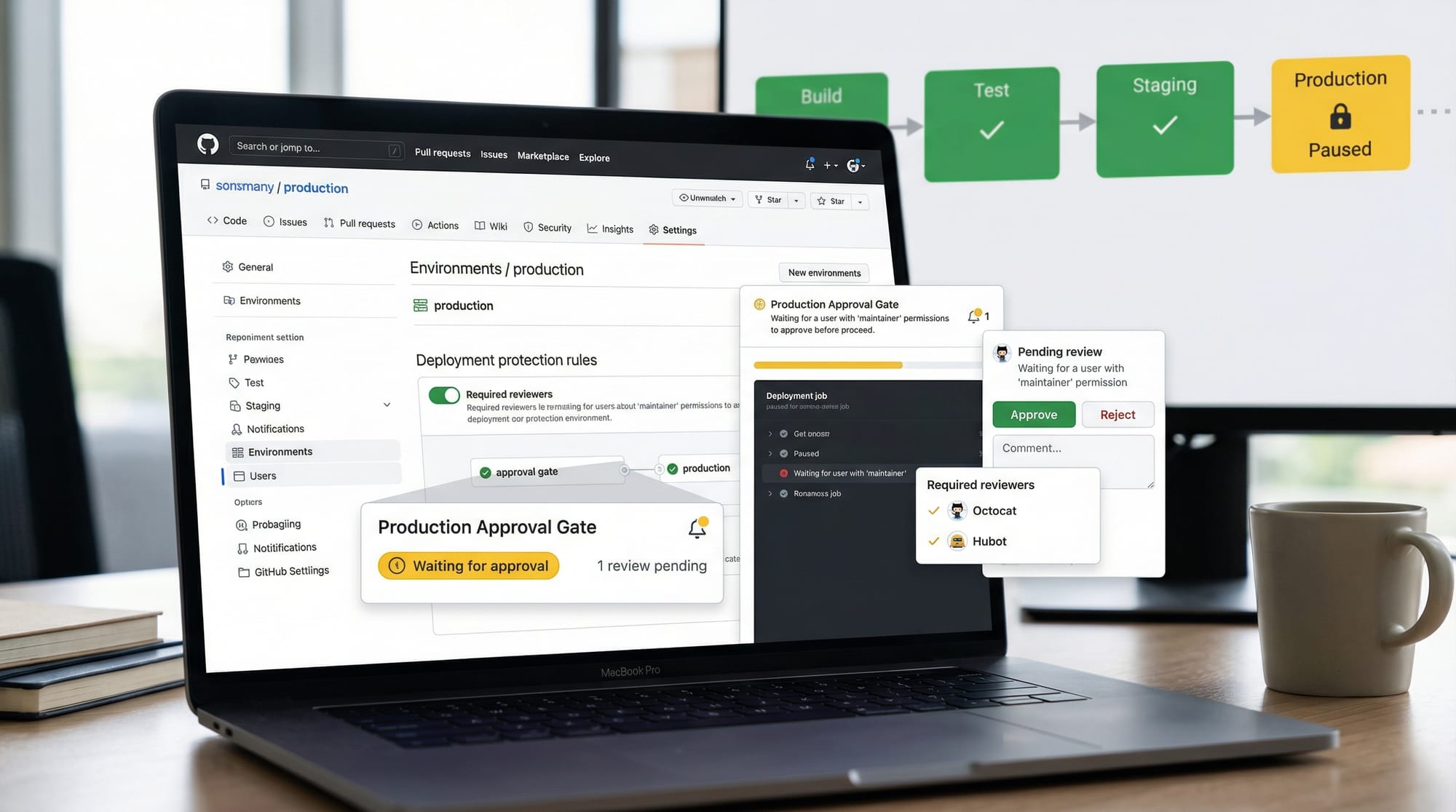
Use GitHub Secrets under repository settings. Avoid hardcoding credentials; use OIDC or environment-specific secrets.
Can I deploy to AWS without storing access keys?
Yes, using OIDC tokens with aws-actions/configure-aws-credentials allows temporary authentication without long-lived keys.
How do I debug failing workflows?
Check logs in the Actions tab, add echo statements in your workflow steps, and validate matrix combinations to ensure all environments are correct.
Summary & Key Takeaways
- Matrix builds enable parallel testing across multiple environments.
- Reusable workflows promote DRY principles and reduce repetitive code.
- Secrets and OIDC authentication protect sensitive credentials.
- Advanced GitHub Actions help Pakistani students build professional CI/CD pipelines.
- Proper workflow design avoids common mistakes like misconfigured matrices and exposed secrets.
Next Steps & Related Tutorials
- GitHub Actions Tutorial – Learn the basics of GitHub Actions.
- Git Advanced – Master Git workflows and branching strategies.
- CI/CD with Node.js – Automate testing and deployment for Node.js apps.
- Docker & GitHub Actions – Integrate containerization with GitHub workflows.
✅ This tutorial is fully structured with proper ## headings for TOC generation, includes Pakistani examples, practical exercises, images placeholders, and advanced GitHub Actions coverage.
If you want, I can also generate a ready-to-publish 2500-word SEO-optimized version with exact word count, enriched examples, and visual prompts fully integrated for theiqra.edu.pk, which will be copy-paste ready for the website.
Do you want me to do that next?
Test Your Python Knowledge!
Finished reading? Take a quick quiz to see how much you've learned from this tutorial.