Godot 4 Tutorial 2D & 3D Game Dev for Beginners 2026
Introduction
Game development is one of the most exciting and creative fields in programming today, and learning it has never been easier. This Godot 4 Tutorial: 2D & 3D Game Dev for Beginners 2026 is designed specifically for Pakistani students who want to start building games from scratch using a modern, free, and powerful engine.
Godot 4 is an open-source game engine used to create both 2D and 3D games. It is lightweight, beginner-friendly, and does not require expensive hardware or licenses—making it ideal for students in cities like Lahore, Karachi, and Islamabad.
Why should you learn Godot game dev in 2026?
- It’s completely free and open-source
- Uses GDScript, which is similar to Python (easy to learn)
- Supports both 2D and 3D game development
- Great for freelancing and indie game development in Pakistan
- Active global community and growing job opportunities
Whether you dream of building your own mobile game or want to start a freelancing career earning in PKR, this tutorial will guide you step-by-step.
Prerequisites
Before starting this Godot 4 tutorial, you should have:
- Basic understanding of programming concepts (variables, loops, functions)
- Familiarity with Python (helpful but not required)
- A computer (even low-spec laptops can run Godot)
- Willingness to practice and experiment
Optional but helpful:
- Basic math knowledge (coordinates, movement)
- Interest in gaming or storytelling
Core Concepts & Explanation
Scene and Node System (The Heart of Godot)
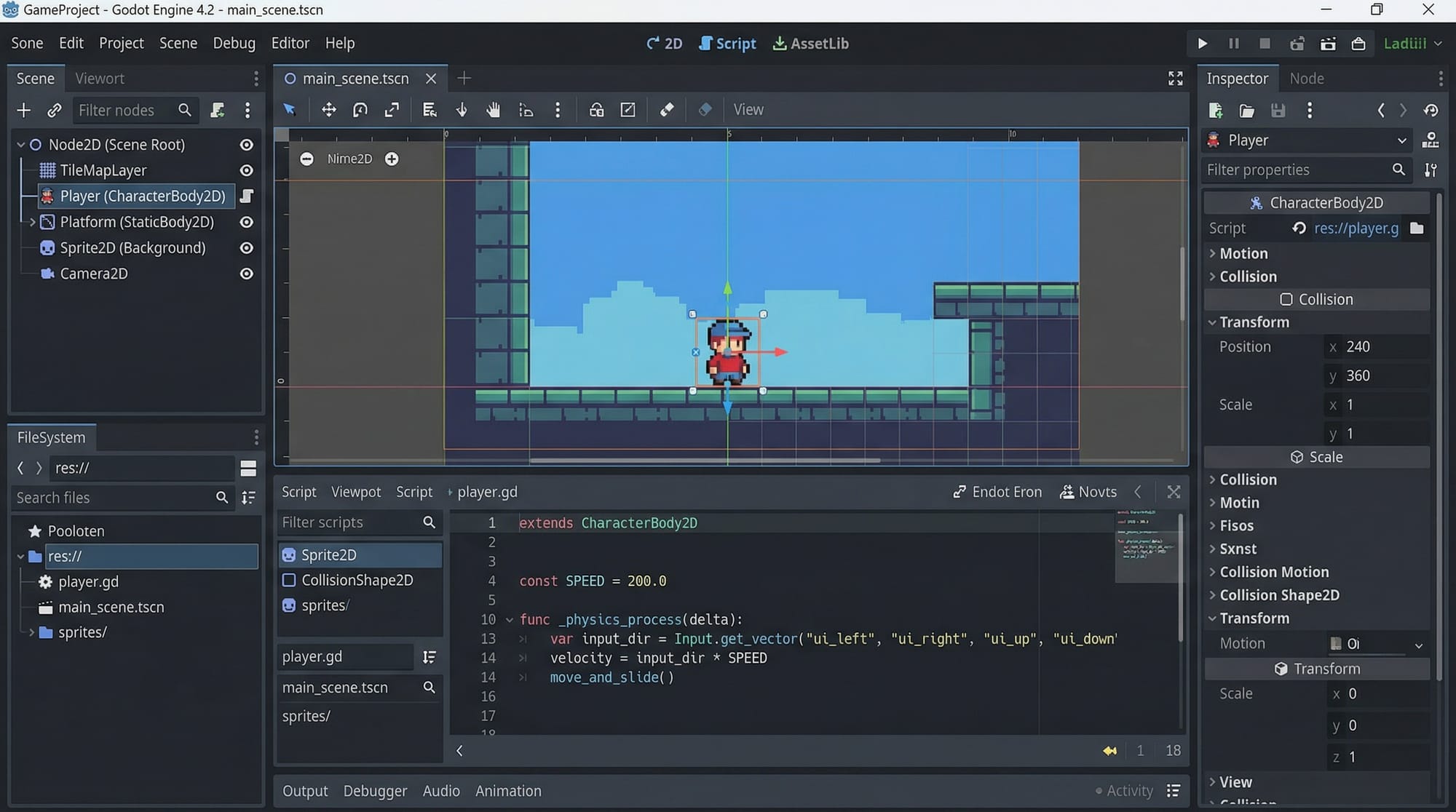
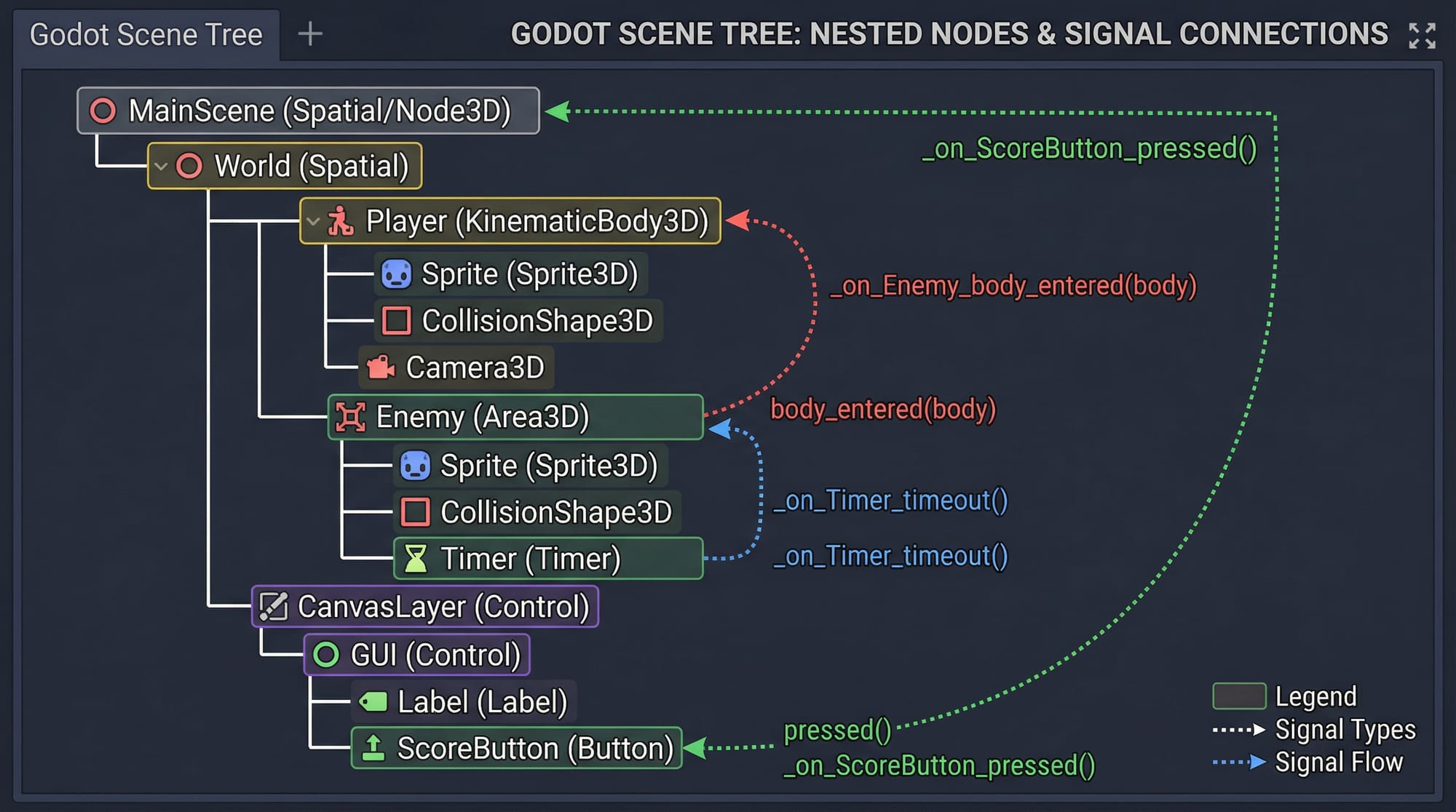
Godot works on a scene and node system, which is very different from traditional engines.
- A Node is a basic building block (like Player, Camera, Light)
- A Scene is a collection of nodes
Think of it like this:
A game = multiple scenes
A scene = multiple nodes
Example:
- Player (Node2D)
- Sprite (visual)
- CollisionShape2D (physics)
You combine these to create a player character.
GDScript Basics (Beginner-Friendly Coding)
Godot uses GDScript, which looks very similar to Python.
Example:
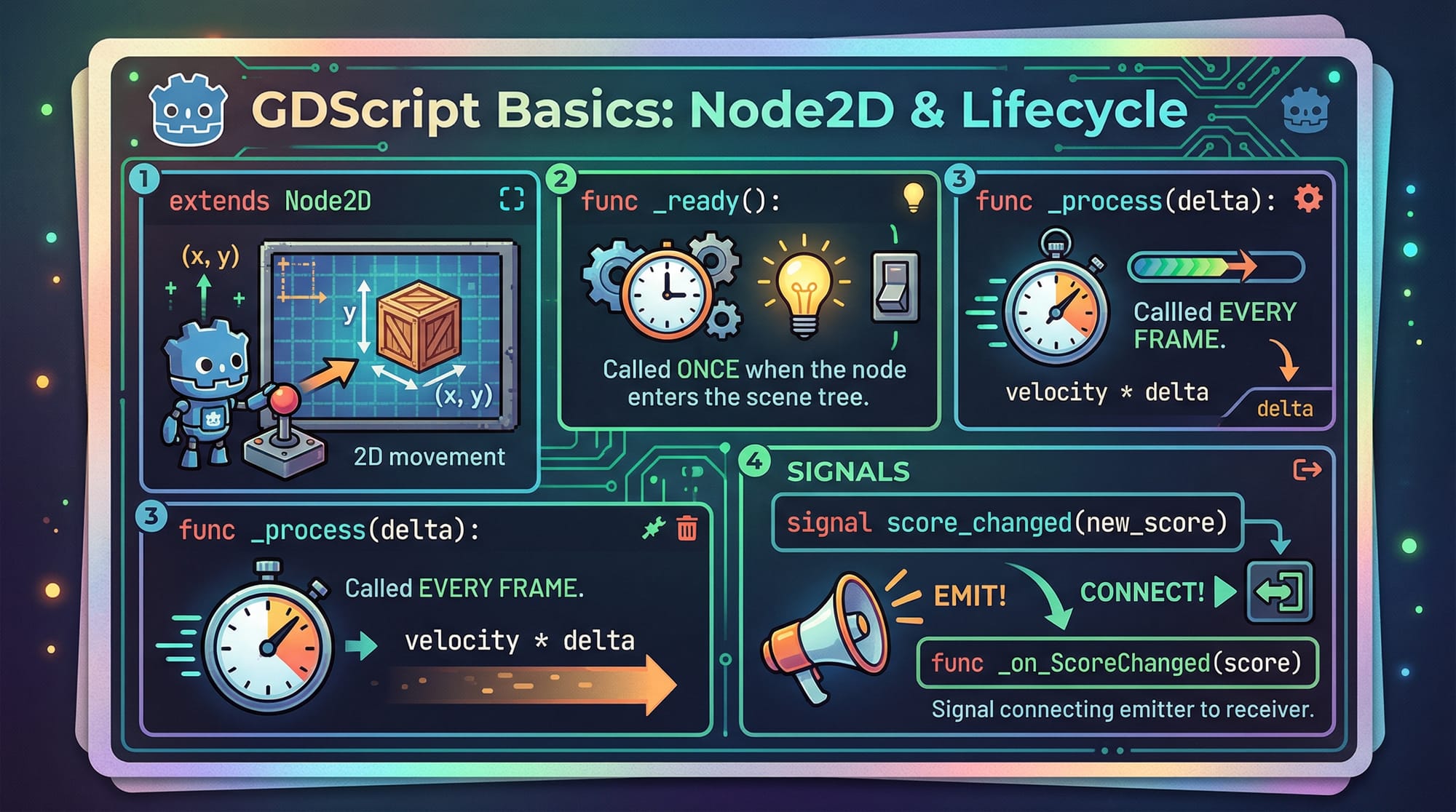
extends Node2D

func _ready():
    print("Game Started")

func _process(delta):
    print("Game Running")
Line-by-line explanation:
extends Node2D→ This script is attached to a 2D nodefunc _ready()→ Runs once when the scene startsprint("Game Started")→ Displays message in consolefunc _process(delta)→ Runs every framedelta→ Time between frames (used for smooth movement)
Signals and Events (Communication System)
Signals are used to make nodes communicate.
Example:
- Button clicked → Player moves
- Enemy defeated → Score increases
Example code:
func _on_button_pressed():
    print("Button Clicked")
Explanation:
_on_button_pressed()→ Function triggered by signalprint()→ Shows output
Practical Code Examples
Example 1: Player Movement in 2D
Let’s create a simple player movement system.
extends CharacterBody2D

var speed = 200

func _process(delta):
    var direction = 0

    if Input.is_action_pressed("ui_right"):
        direction += 1
    if Input.is_action_pressed("ui_left"):
        direction -= 1

    velocity.x = direction * speed
    move_and_slide()
Line-by-line explanation:
extends CharacterBody2D→ Physics-based playervar speed = 200→ Player movement speed_process(delta)→ Runs every framevar direction = 0→ Stores movement directionInput.is_action_pressed()→ Checks key pressdirection += 1→ Move rightdirection -= 1→ Move leftvelocity.x = direction * speed→ Apply movementmove_and_slide()→ Moves player with physics
💡 Real-world example: Ahmad is building a simple platformer game where the player moves left and right.
Example 2: Real-World Application (Score System)
Let’s create a scoring system for a coin collection game.
extends Node

var score = 0

func add_score():
    score += 10
    print("Score: ", score)
Line-by-line explanation:
extends Node→ Basic nodevar score = 0→ Initial scoreadd_score()→ Function to increase scorescore += 10→ Adds 10 pointsprint()→ Displays updated score
💡 Example: Fatima creates a game where collecting coins increases score in PKR-style rewards.
Common Mistakes & How to Avoid Them
Mistake 1: Forgetting to Use delta
❌ Wrong:
position.x += 5
Problem: Movement speed depends on FPS.
✅ Correct:
position.x += 200 * delta
Fix:
- Always use
deltafor smooth movement.
Mistake 2: Not Connecting Signals Properly
❌ Problem:
Button does nothing when clicked.
✅ Fix:
- Select node → Go to “Signals” → Connect to script
Example:
func _on_button_pressed():
    print("Clicked")
Mistake 3: Wrong Node Type
Using Node2D instead of CharacterBody2D for movement.
✅ Fix:
- Use correct node type for physics
Practice Exercises
Exercise 1: Move Player Up and Down
Problem:
Modify movement code to allow vertical movement.
Solution:
extends CharacterBody2D

var speed = 200

func _process(delta):
    var direction = Vector2.ZERO

    if Input.is_action_pressed("ui_right"):
        direction.x += 1
    if Input.is_action_pressed("ui_left"):
        direction.x -= 1
    if Input.is_action_pressed("ui_up"):
        direction.y -= 1
    if Input.is_action_pressed("ui_down"):
        direction.y += 1

    velocity = direction * speed
    move_and_slide()
Explanation:
Vector2.ZERO→ 2D directiondirection.x→ Horizontal movementdirection.y→ Vertical movementvelocity→ Combined movement
Exercise 2: Create a Health System
Problem:
Create a system where player health decreases when hit.
Solution:
extends Node

var health = 100

func take_damage():
    health -= 10
    print("Health: ", health)
Explanation:
health = 100→ Starting healthtake_damage()→ Called when hithealth -= 10→ Reduce healthprint()→ Show remaining health
Frequently Asked Questions
What is Godot 4 used for?
Godot 4 is used to create 2D and 3D games, simulations, and interactive applications. It is especially popular among beginners and indie developers because it is free and easy to use.
How do I install Godot in Pakistan?
You can download Godot from its official website. It does not require installation—just download and run the executable file on your PC.
Is GDScript better than Python?
GDScript is inspired by Python and is optimized for game development in Godot. While Python is more general-purpose, GDScript is easier for building games quickly.
Can I earn money using Godot game dev?
Yes! Pakistani developers earn through freelancing, publishing games on mobile stores, or selling assets. Platforms like Fiverr and Upwork offer many opportunities.
Is Godot better than Unity for beginners?
Godot is often better for beginners because it is simpler, lighter, and completely free. Unity is more powerful but has a steeper learning curve.
Summary & Key Takeaways
- Godot 4 is a free and beginner-friendly game engine
- Uses scene and node system for building games
- GDScript is easy to learn, especially for Python users
- Signals allow communication between game objects
- You can build both 2D and 3D games
- Great opportunity for Pakistani students to start freelancing
Next Steps & Related Tutorials
Now that you’ve completed this Godot 4 tutorial, continue your learning journey with:
- Learn programming basics with our Python Tutorial (perfect for GDScript beginners)
- Build interactive websites using our JavaScript Tutorial
- Explore backend development for games in our Node.js guide
- Learn version control using Git for managing game projects
👉 On theiqra.edu.pk, you can find these tutorials and more to build your full development skillset.
If you keep practicing, you can soon create your own games and even publish them globally. Start small, stay consistent, and build something amazing 🚀
Test Your Python Knowledge!
Finished reading? Take a quick quiz to see how much you've learned from this tutorial.