Google Cloud Run Serverless Containers Tutorial
Introduction
Google Cloud Run: Serverless Containers Tutorial is a hands-on guide to one of the most powerful services in modern cloud computing—Google Cloud Run, a fully managed platform that lets you run containerized applications without managing servers.
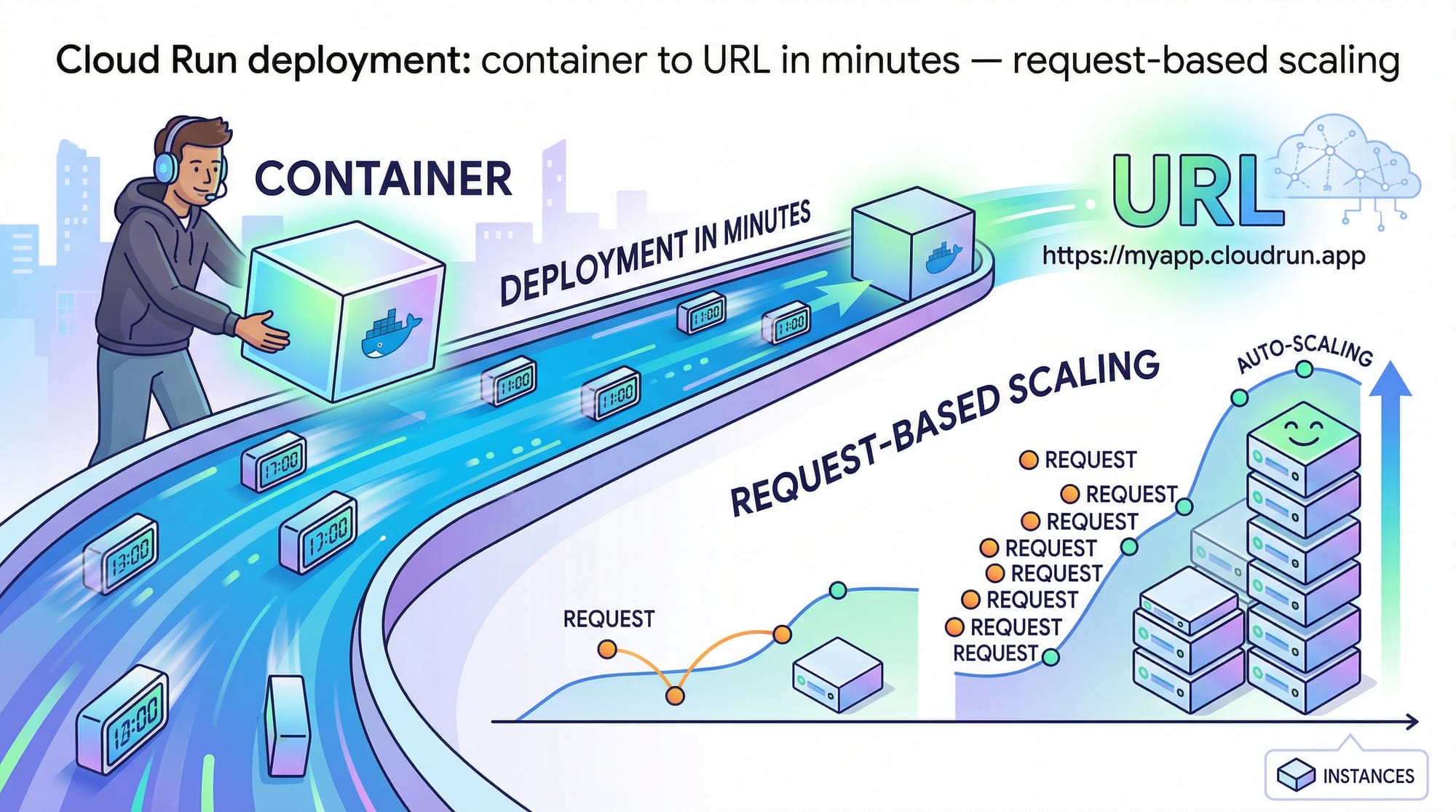
In simple terms, Cloud Run allows you to deploy your app (inside a Docker container) and instantly get a public URL—no need to worry about servers, scaling, or infrastructure.
For Pakistani students and developers in cities like Lahore, Karachi, and Islamabad, learning Cloud Run is especially valuable because:
- It reduces infrastructure costs (pay only when your app runs — ideal for PKR budgets 💸)
- It simplifies deployment for startups and freelancing projects
- It’s widely used in modern DevOps and cloud-native development
Whether you're building an API for a university project or launching a SaaS product, Cloud Run helps you go live quickly.
Prerequisites
Before starting this tutorial, you should have:
- Basic understanding of Docker containers
- Familiarity with command line (CLI)
- A Google Cloud account (free tier available)
- Basic programming knowledge (Node.js, Python, or similar)
- Understanding of HTTP APIs (GET/POST requests)
Optional but helpful:
- Experience with Linux commands
- Basic cloud knowledge
Core Concepts & Explanation
What Are Serverless Containers in GCP?
Serverless containers combine two powerful ideas:
- Containers → Package your app with dependencies
- Serverless → No server management
With Cloud Run, you upload a container image, and Google handles:
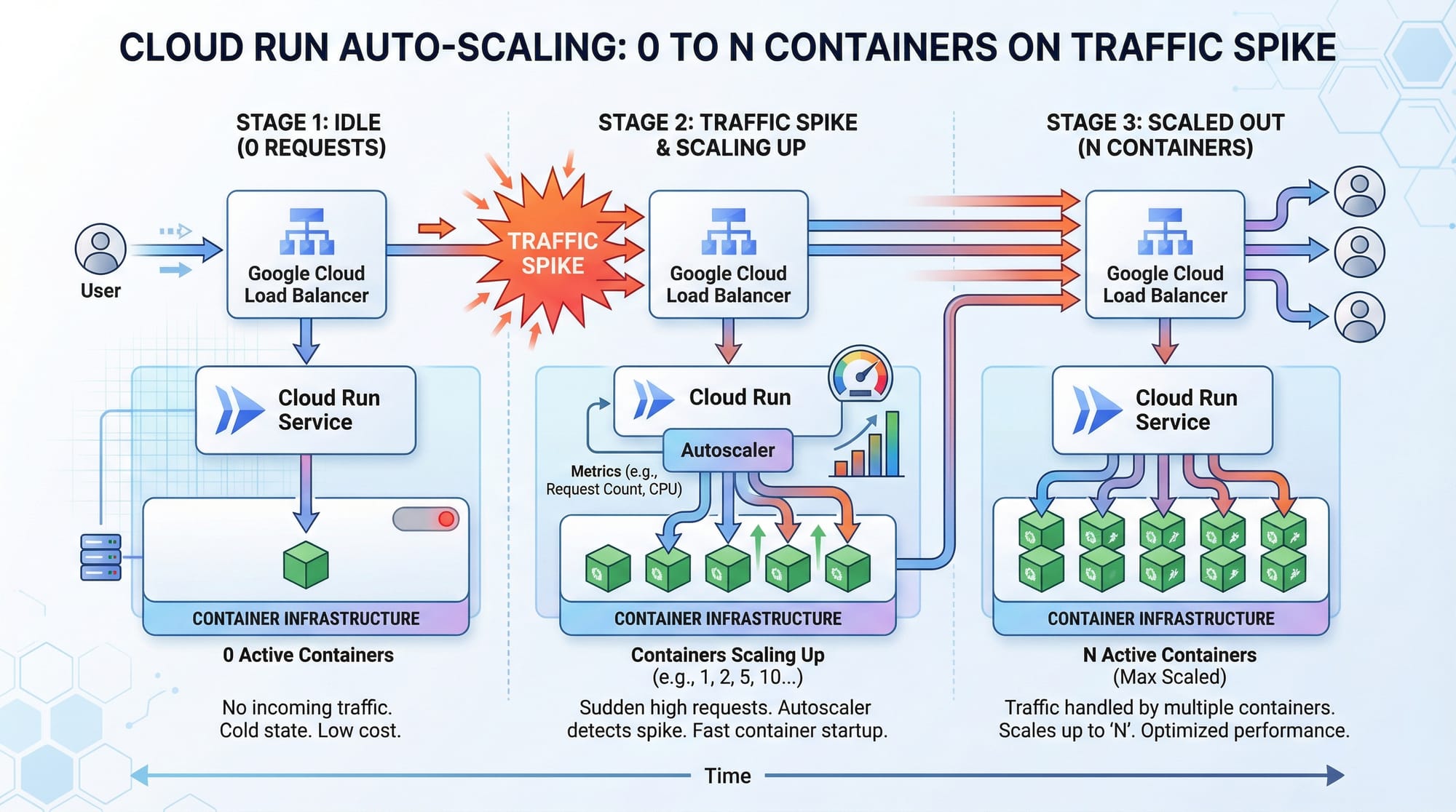
- Scaling (0 to thousands of instances)
- Load balancing
- Security patches
- Infrastructure
Example:
Ali builds a Node.js API in Islamabad. Instead of renting a server, he:
- Packages the app into a Docker container
- Deploys it to Cloud Run
- Gets a live URL instantly
If no users access it → cost = 0 PKR
If traffic spikes → Cloud Run auto-scales
Request-Based Scaling & Stateless Design
Cloud Run works on request-based scaling, meaning:
- No requests → 0 instances
- More requests → more containers
This requires your app to be stateless, meaning:
- No data stored in memory permanently
- Use external databases (Firestore, MySQL, etc.)
Example:
Fatima builds an e-commerce API in Lahore:
- Product data → stored in database
- App → just processes requests
This allows Cloud Run to scale easily.
Practical Code Examples
Example 1: Deploy a Simple Node.js App
Step 1: Create App
// app.js
const express = require('express');
const app = express();

app.get('/', (req, res) => {
  res.send('Hello from Cloud Run!');
});

const PORT = process.env.PORT || 8080;
app.listen(PORT, () => {
  console.log(`Server running on port ${PORT}`);
});
Explanation (Line-by-Line)
const express = require('express');
→ Imports Express frameworkconst app = express();
→ Creates an Express applicationapp.get('/', (req, res) => {...});
→ Defines a route for homepageres.send('Hello from Cloud Run!');
→ Sends response to userprocess.env.PORT
→ Cloud Run dynamically assigns portapp.listen(PORT)
→ Starts server
Step 2: Create Dockerfile
# Use Node.js image
FROM node:18

# Set working directory
WORKDIR /app

# Copy files
COPY package*.json ./
RUN npm install

COPY . .

# Start app
CMD ["node", "app.js"]
Explanation
FROM node:18→ Base imageWORKDIR /app→ Working directoryCOPY package*.json ./→ Copy dependenciesRUN npm install→ Install packagesCOPY . .→ Copy all filesCMD ["node", "app.js"]→ Run app
Step 3: Deploy to Cloud Run
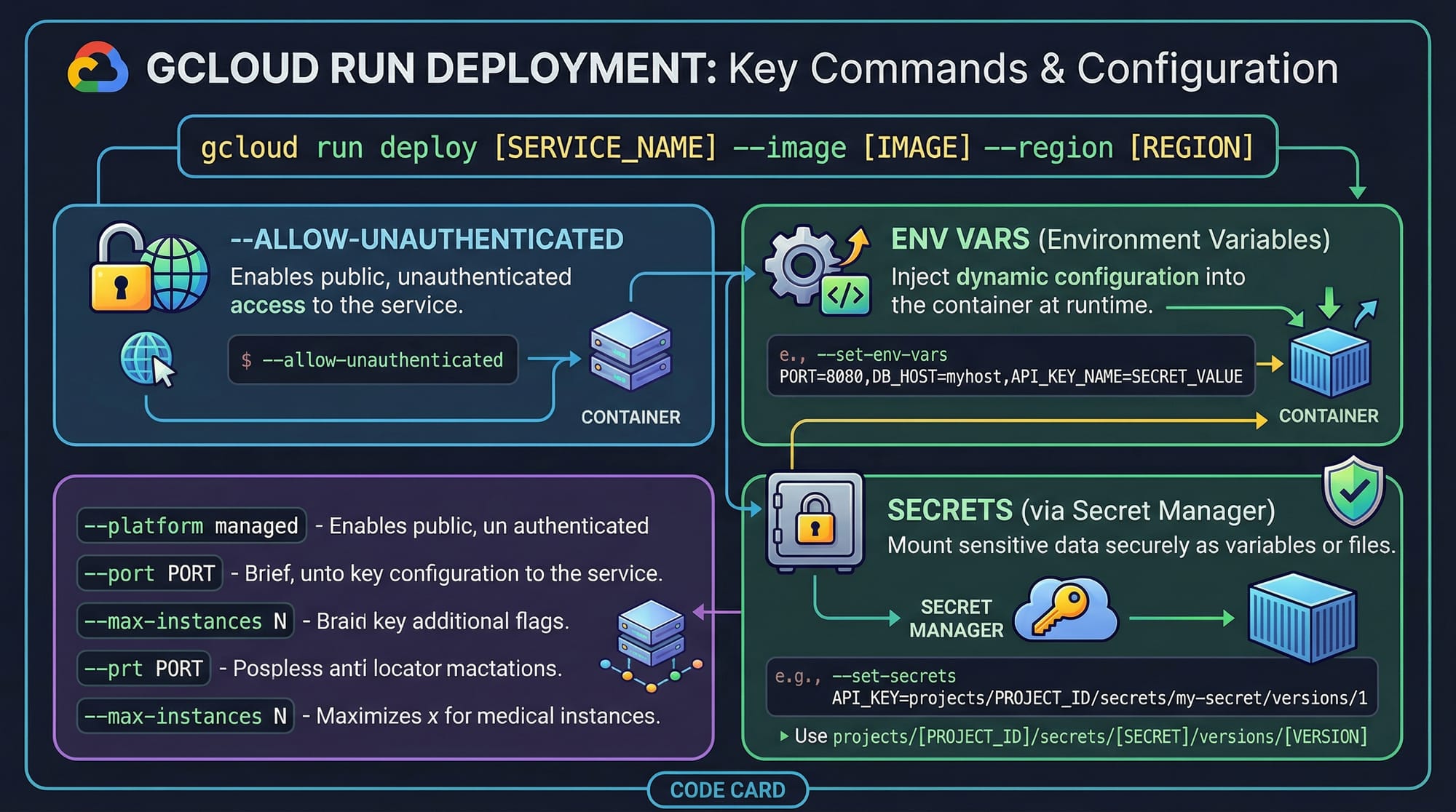
gcloud run deploy my-app \
  --source . \
  --region asia-south1 \
  --allow-unauthenticated
Explanation
gcloud run deploy→ Deploy commandmy-app→ Service name--source .→ Build from current directory--region asia-south1→ Nearby region (India for low latency in Pakistan)--allow-unauthenticated→ Public access
Example 2: Real-World Application (Student Result API)
Imagine Ahmad builds a Student Result API for a university.
const express = require('express');
const app = express();

const results = {
  "Ali": { marks: 850, grade: "A" },
  "Fatima": { marks: 920, grade: "A+" }
};

app.get('/result/:name', (req, res) => {
  const name = req.params.name;

  if (results[name]) {
    res.json(results[name]);
  } else {
    res.status(404).send('Student not found');
  }
});

const PORT = process.env.PORT || 8080;
app.listen(PORT);
Explanation
results→ Mock database/result/:name→ Dynamic routereq.params.name→ Get URL parameterres.json()→ Send JSON responseres.status(404)→ Handle errors
Use Case in Pakistan:
- University portals
- Freelance APIs
- Small SaaS products
Common Mistakes & How to Avoid Them
Mistake 1: Not Using the Correct Port
Cloud Run expects your app to listen on PORT environment variable.
❌ Wrong:
app.listen(3000);
✅ Correct:
const PORT = process.env.PORT || 8080;
app.listen(PORT);
Why?
Cloud Run assigns ports dynamically.
Mistake 2: Keeping State in Memory
❌ Wrong:
let counter = 0;
counter++;
Problem:
- Each container has separate memory
- Data gets lost when instance stops
✅ Fix:
- Use database (Firestore, MySQL)
Mistake 3: Not Allowing Public Access
❌ Deployment without:
--allow-unauthenticated
Result:
- App is deployed but inaccessible
✅ Fix:
Add the flag or configure IAM permissions.
Mistake 4: Large Container Size
- Slow deployment
- Higher costs
✅ Fix:
- Use lightweight images (
node:18-alpine)
Practice Exercises
Exercise 1: Build a Greeting API
Problem:
Create an API that returns:Hello Ahmad from Lahore
Solution:
const express = require('express');
const app = express();

app.get('/greet/:name/:city', (req, res) => {
  const { name, city } = req.params;
  res.send(`Hello ${name} from ${city}`);
});

const PORT = process.env.PORT || 8080;
app.listen(PORT);
Explanation:
- Uses route parameters
- Sends dynamic response
Exercise 2: Currency Converter (PKR Example)
Problem:
Create an API that converts USD to PKR (static rate).
Solution:
const express = require('express');
const app = express();

app.get('/convert/:usd', (req, res) => {
  const usd = parseFloat(req.params.usd);
  const rate = 280; // Example rate
  const pkr = usd * rate;

  res.json({ usd, pkr });
});

const PORT = process.env.PORT || 8080;
app.listen(PORT);
Explanation:
- Converts user input
- Returns JSON response
Frequently Asked Questions
What is Google Cloud Run?
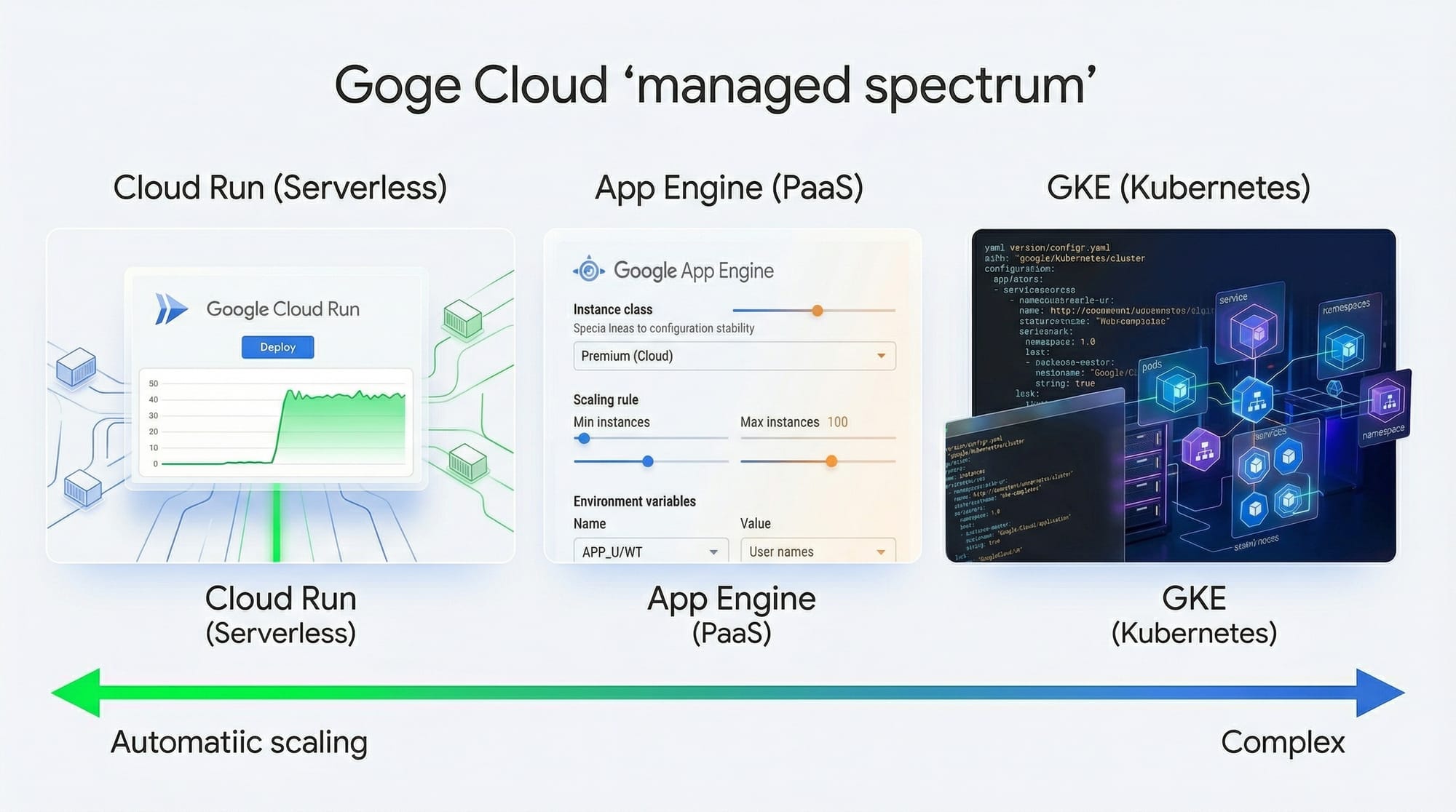
Google Cloud Run is a fully managed service that allows you to run containerized applications without managing servers. It automatically scales based on incoming requests.
How do I deploy an app to Cloud Run?
You can deploy using the gcloud run deploy command. It builds your container, deploys it, and gives you a public URL in minutes.
Is Cloud Run free for students?
Yes, Cloud Run has a generous free tier. Many student projects in Pakistan can run within free limits if traffic is low.
What languages are supported in Cloud Run?
Cloud Run supports any language (Node.js, Python, Java, Go) as long as it runs inside a container.
How does Cloud Run scaling work?
Cloud Run automatically scales from zero to multiple instances based on incoming traffic, ensuring efficient cost usage.
Summary & Key Takeaways
- Cloud Run allows you to deploy serverless containers easily
- You don’t need to manage servers or infrastructure
- It scales automatically from 0 to N instances
- You only pay for actual usage (ideal for PKR budgets)
- Works with any programming language using Docker
- Perfect for APIs, microservices, and student projects
Next Steps & Related Tutorials
To deepen your understanding, explore these tutorials on theiqra.edu.pk:
- Learn the basics in Google Cloud Basics to understand cloud concepts
- Master containerization with Docker Basics before deploying
- Explore Kubernetes Fundamentals for advanced orchestration
- Dive into CI/CD with GitHub Actions for automated deployment
These will help you move from beginner to professional cloud developer 🚀
Test Your Python Knowledge!
Finished reading? Take a quick quiz to see how much you've learned from this tutorial.