GraphQL vs REST API Differences & When to Use Each
Introduction
In modern web development, one of the most common debates is GraphQL vs REST API—which one to use, when, and why. Both are powerful ways to build APIs, but they solve problems differently.
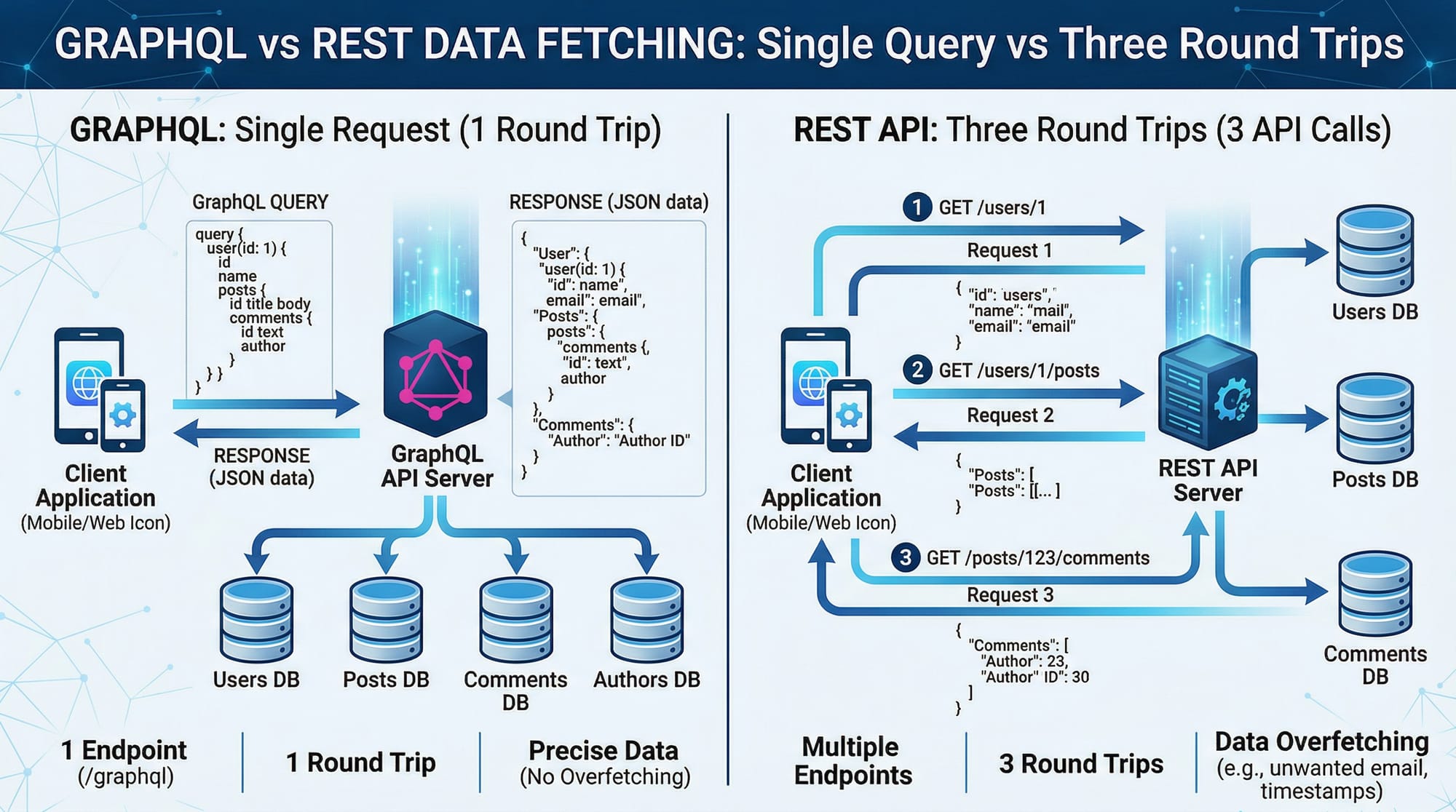
A REST API (Representational State Transfer) has been the standard for many years. It uses multiple endpoints to fetch or send data. On the other hand, GraphQL is a newer approach that allows clients to request exactly the data they need in a single query.
For Pakistani students learning web development—whether in Lahore, Karachi, or Islamabad—understanding graphql vs rest api: differences & when to use each is essential. Companies in Pakistan’s growing tech industry are increasingly using GraphQL in startups, fintech apps, and e-commerce platforms.
If you’re building apps for users like Ahmad ordering food or Fatima checking bank balances in PKR, choosing the right API style can directly affect performance and user experience.
Prerequisites
Before starting this tutorial, you should have:
- Basic understanding of HTTP methods (GET, POST, PUT, DELETE)
- Knowledge of JavaScript (ES6+)
- Familiarity with APIs and JSON
- Basic Node.js experience (helpful but not required)
- Understanding of client-server architecture
Core Concepts & Explanation
REST API: Multiple Endpoints & Fixed Data
In REST, data is accessed through different URLs (endpoints). Each endpoint returns a fixed structure.
Example:
GET /users/1
GET /users/1/orders
GET /orders/101
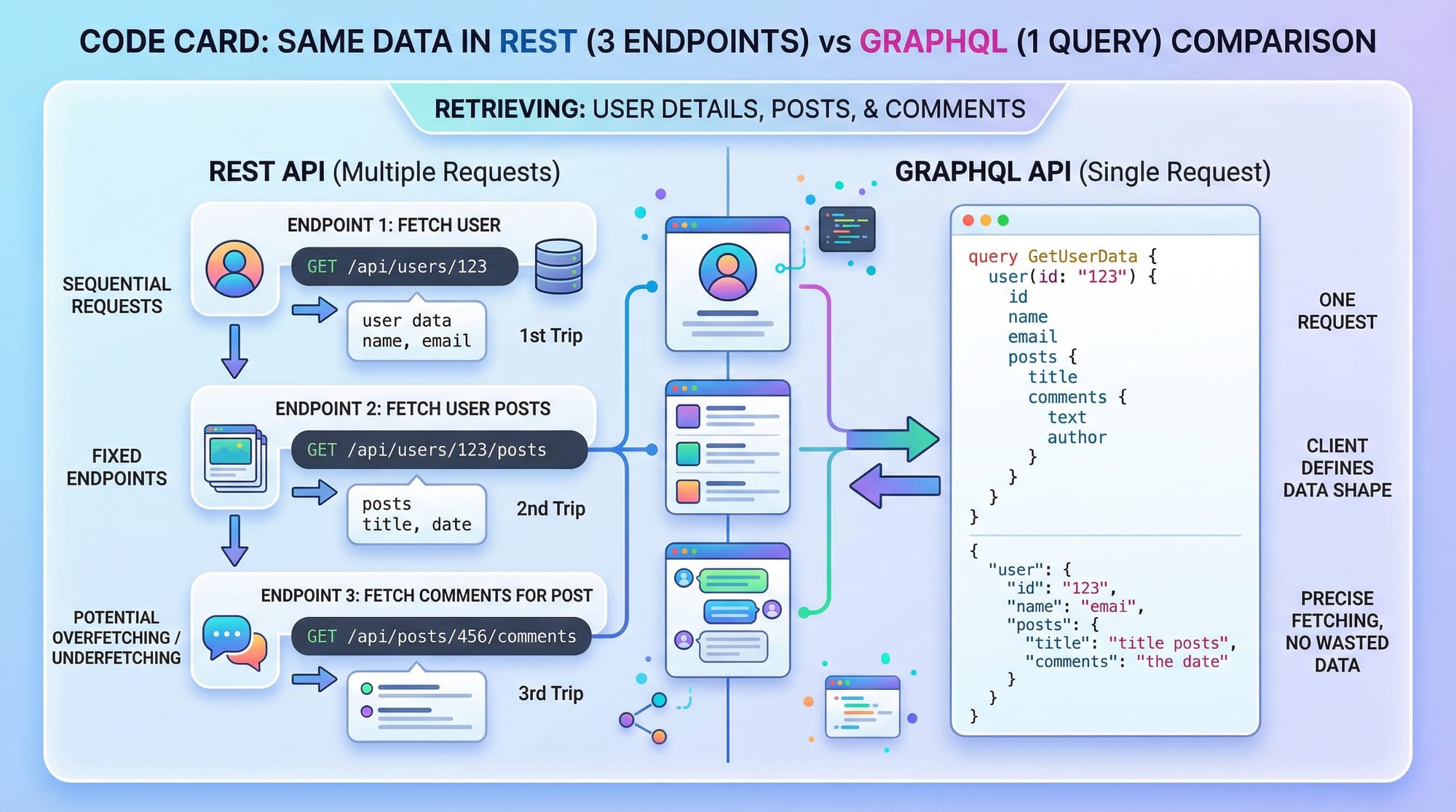
If Ali wants user details + orders + product info, he may need multiple requests.
Key Points:
- Each endpoint returns predefined data
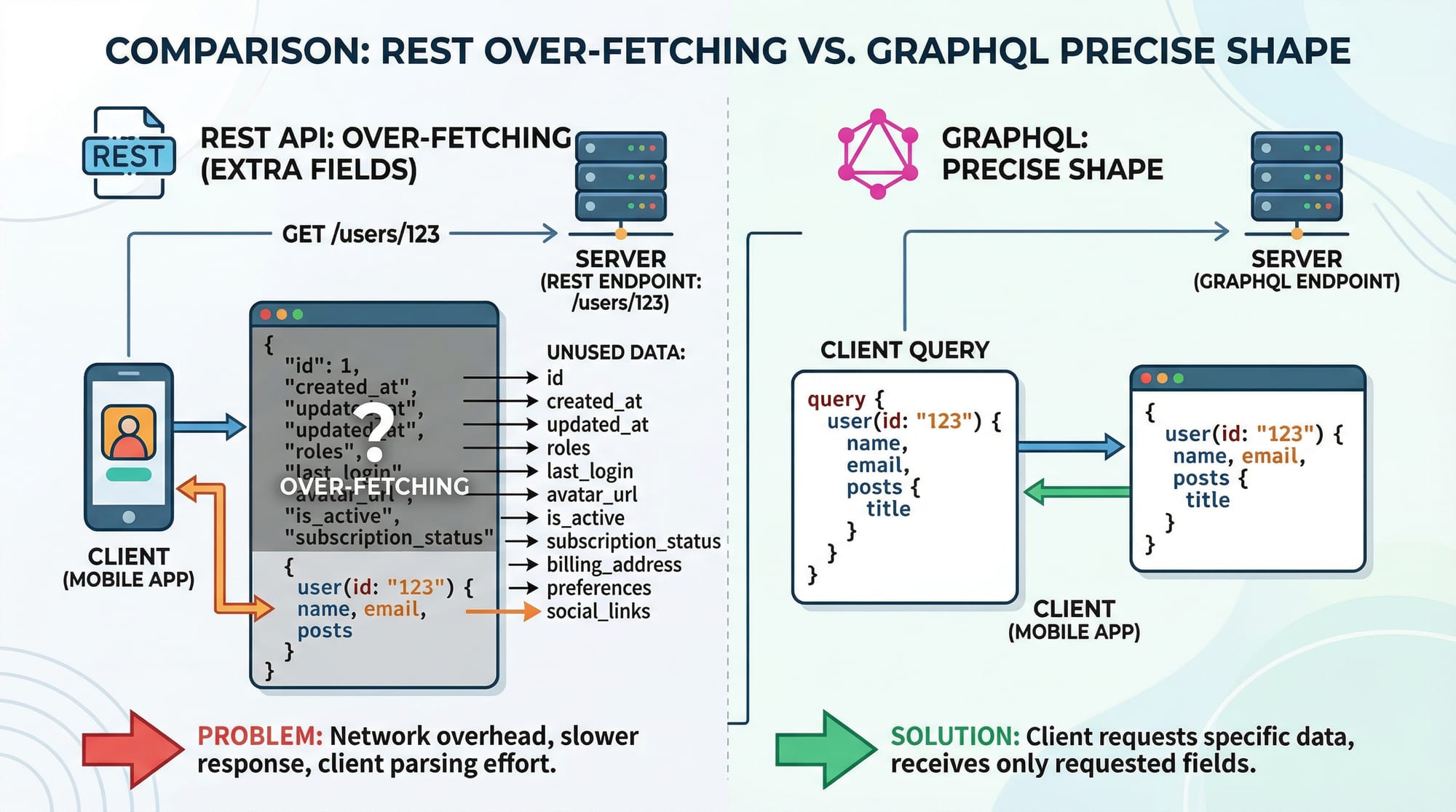
- Can lead to over-fetching or under-fetching
- Requires multiple round trips
GraphQL: Single Endpoint & Flexible Queries
GraphQL uses a single endpoint (usually /graphql) and allows the client to specify exactly what data is needed.
Example Query:
query {
  user(id: 1) {
    name
    orders {
      id
      total
    }
  }
}
Here, Fatima gets exactly what she needs in one request.
Key Points:
- Single endpoint
- Client controls data shape
- Reduces unnecessary data transfer
Practical Code Examples
Example 1: Fetching User Data (REST vs GraphQL)
REST API Example
// Fetch user data
fetch("https://api.example.com/users/1")
  .then(response => response.json())
  .then(data => console.log(data));
Explanation:
fetch(...)→ sends HTTP request"https://api.example.com/users/1"→ endpoint for user.then(response => response.json())→ converts response to JSON.then(data => console.log(data))→ prints user data
⚠️ Problem: You may receive unnecessary fields like address, phone, etc.
GraphQL Example
fetch("https://api.example.com/graphql", {
  method: "POST",
  headers: {
    "Content-Type": "application/json"
  },
  body: JSON.stringify({
    query: `
      query {
        user(id: 1) {
          name
          email
        }
      }
    `
  })
})
.then(res => res.json())
.then(data => console.log(data));
Explanation:
method: "POST"→ GraphQL requests are usually POSTheaders→ defines JSON formatbody→ contains GraphQL queryquery { user(id: 1) { name email } }→ only fetch required fields.then(...)→ processes response
✅ Advantage: Only required data is returned.
Example 2: Real-World Application (E-commerce in Pakistan)
Imagine Ahmad is building an online store in Lahore.
REST Approach
// Step 1: Get products
fetch("/products")

// Step 2: Get product reviews
fetch("/products/1/reviews")

// Step 3: Get seller info
fetch("/sellers/5")
Explanation:
- Multiple API calls increase load time
- Mobile users in Pakistan (slow internet) may face delays
GraphQL Approach
query {
  product(id: 1) {
    name
    price
    reviews {
      comment
    }
    seller {
      name
      rating
    }
  }
}
Explanation:
- Single query fetches all data
product(id: 1)→ main object- Nested fields → reviews and seller info
- Efficient for mobile apps
Common Mistakes & How to Avoid Them
Mistake 1: Overusing GraphQL for Simple APIs
Many beginners think GraphQL is always better.
❌ Wrong Approach:
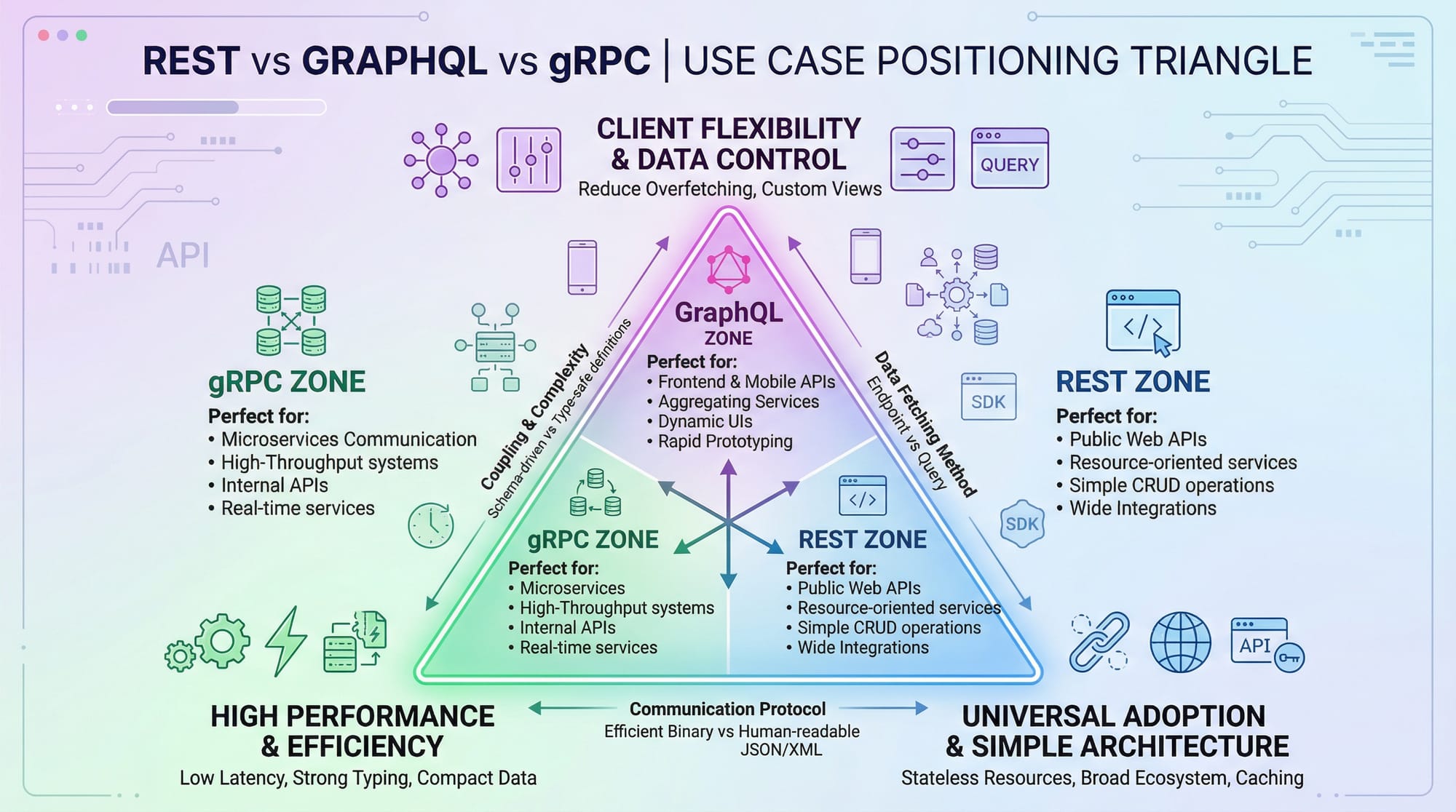
- Using GraphQL for a simple CRUD API (e.g., student records)
✅ Fix:
- Use REST when:
- API is simple
- Data structure is fixed
- No complex relationships
Mistake 2: Ignoring Performance Optimization
GraphQL can cause performance issues if not handled properly.
❌ Example:
query {
  users {
    posts {
      comments {
        text
      }
    }
  }
}
This can fetch huge nested data.
✅ Fix:
- Limit query depth
- Use pagination
query {
  users(limit: 10) {
    name
  }
}
Explanation:
limit: 10→ restricts data- Avoids heavy queries
Practice Exercises
Exercise 1: Convert REST to GraphQL
Problem:
Convert this REST API:
GET /students/1
GET /students/1/courses
Solution:
query {
  student(id: 1) {
    name
    courses {
      title
    }
  }
}
Explanation:
- Combines multiple endpoints into one query
- Fetches only required fields
Exercise 2: Optimize GraphQL Query
Problem:
Reduce unnecessary data:
query {
  users {
    name
    age
    address
    posts {
      title
      content
    }
  }
}
Solution:
query {
  users {
    name
    posts {
      title
    }
  }
}
Explanation:
- Removed unused fields
- Improves performance
Frequently Asked Questions
What is the main difference between GraphQL vs REST API?
REST uses multiple endpoints with fixed data, while GraphQL uses a single endpoint and allows clients to request specific data. GraphQL reduces over-fetching and improves efficiency.
How do I decide when to use GraphQL?
Use GraphQL when your app requires flexible data fetching, multiple related resources, or mobile optimization. REST is better for simple APIs with fixed responses.
Is GraphQL faster than REST?
GraphQL can be faster because it reduces the number of requests. However, poorly designed queries can make it slower than REST.
Can I use GraphQL with existing REST APIs?
Yes, you can use GraphQL as a layer on top of REST APIs. Many companies gradually migrate from REST to GraphQL this way.
Is GraphQL hard to learn for beginners in Pakistan?
It may feel complex at first, but with practice, it becomes easier. If you already understand APIs and JSON, you can learn GraphQL quickly.
Summary & Key Takeaways
- REST uses multiple endpoints, GraphQL uses one endpoint
- GraphQL allows precise data fetching
- REST is simpler and easier for beginners
- GraphQL is ideal for complex apps and mobile performance
- Avoid overusing GraphQL for simple projects
- Choose based on project requirements, not trends
Next Steps & Related Tutorials
To continue your learning journey on theiqra.edu.pk, explore:
- Learn the basics in our GraphQL Tutorial for Beginners
- Understand API fundamentals in REST API Design Guide
- Build real projects with Node.js API Development Tutorial
- Improve frontend integration with JavaScript Fetch API Tutorial
Related: GraphQL Tutorial, REST API Design
Test Your Python Knowledge!
Finished reading? Take a quick quiz to see how much you've learned from this tutorial.