Hash Tables & Hash Maps How They Work with Examples
Introduction
Hash tables and hash maps are among the most powerful data structures in computer science. If you’ve ever used a Python dictionary or stored data in key–value form, you’ve already worked with them—maybe without realizing it.
In simple terms, a hash table stores data in pairs: a key and a value. A hash map is just a practical implementation of a hash table. These structures allow you to store and retrieve data extremely fast—usually in constant time, O(1).
For Pakistani students learning Data Structures and Algorithms (DSA), understanding hashing is crucial. Whether you're building a student management system in Lahore, tracking expenses in PKR, or designing a backend system in Islamabad, hash tables are everywhere.
This tutorial will give you a complete understanding of hash table tutorial, hash map Python, and hashing explained, with practical examples and real-world use cases.
Prerequisites
Before diving into hash tables, make sure you are comfortable with:
- Basic programming concepts (variables, loops, functions)
- Arrays and lists
- Time complexity (Big-O notation)
- Basic understanding of memory
If you’re not confident yet, review topics like arrays and linked lists first.
Core Concepts & Explanation
What is Hashing? (The Core Idea)
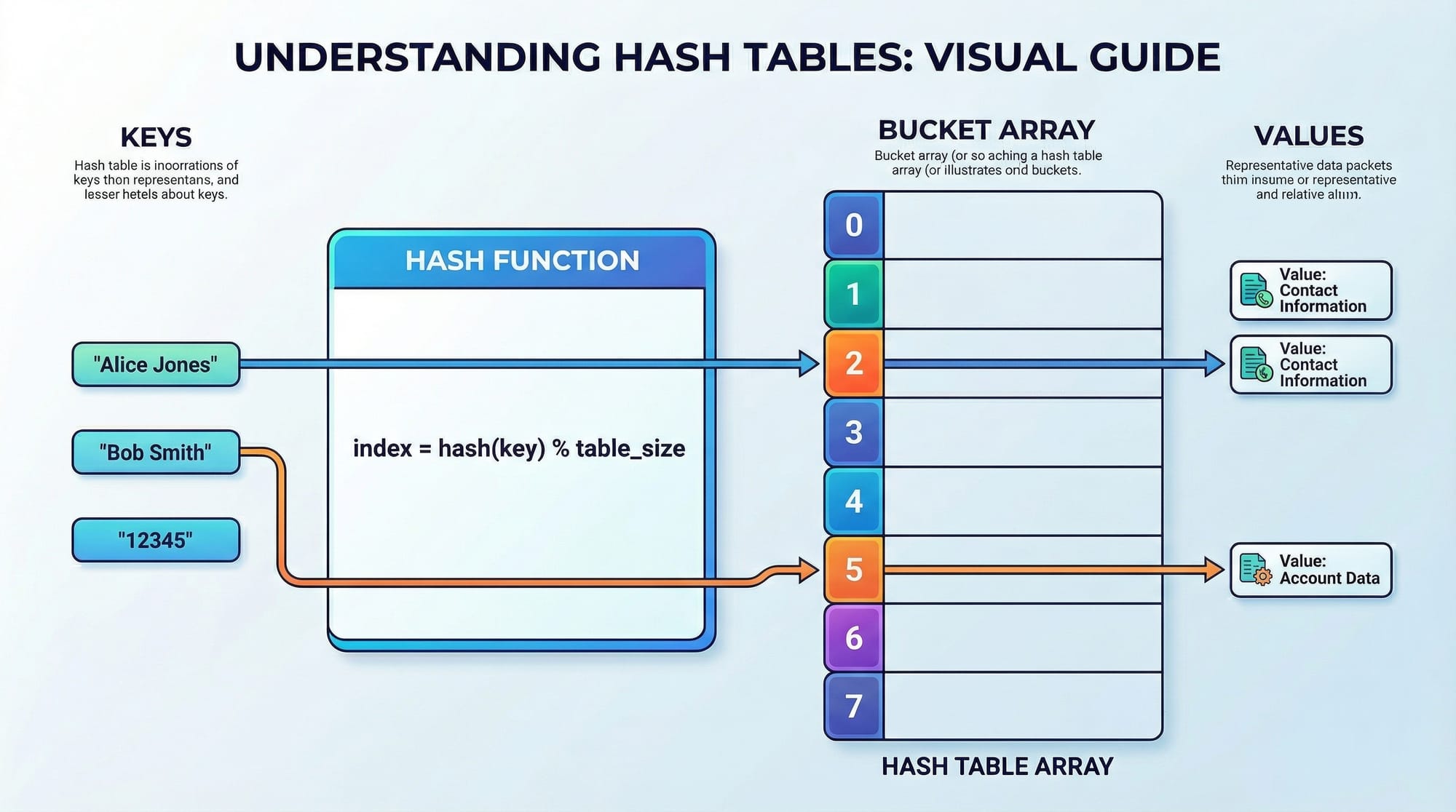
Hashing is the process of converting a key into an index using a hash function.
Think of it like assigning roll numbers to students:
- Ahmad → Roll #23
- Fatima → Roll #45
Instead of searching the entire list, you directly jump to the location.
Example:
Key: "Ali"
Hash Function → Index: 5
Store value at index 5
This is what makes hash tables fast.
How Hash Tables Work Internally
A hash table consists of:
- Array (Buckets)
- Hash Function
- Key-Value Storage
Let’s break it down:
- You give a key (e.g., "Ahmad")
- Hash function converts it into an index
- Value is stored at that index
Example:
Key: "Ahmad" → Hash → 2
Value: 5000 PKR stored at index 2
Collision Handling Techniques
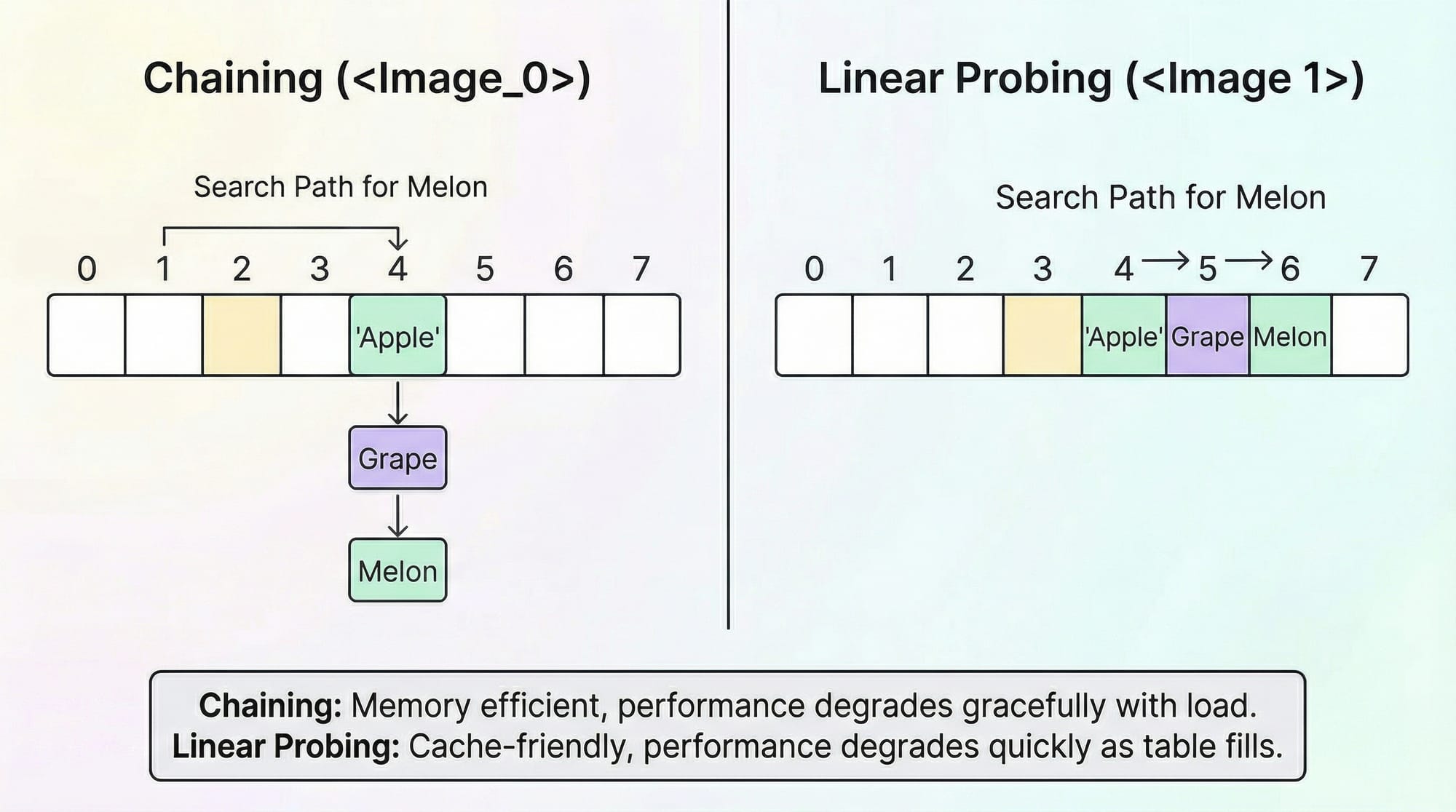
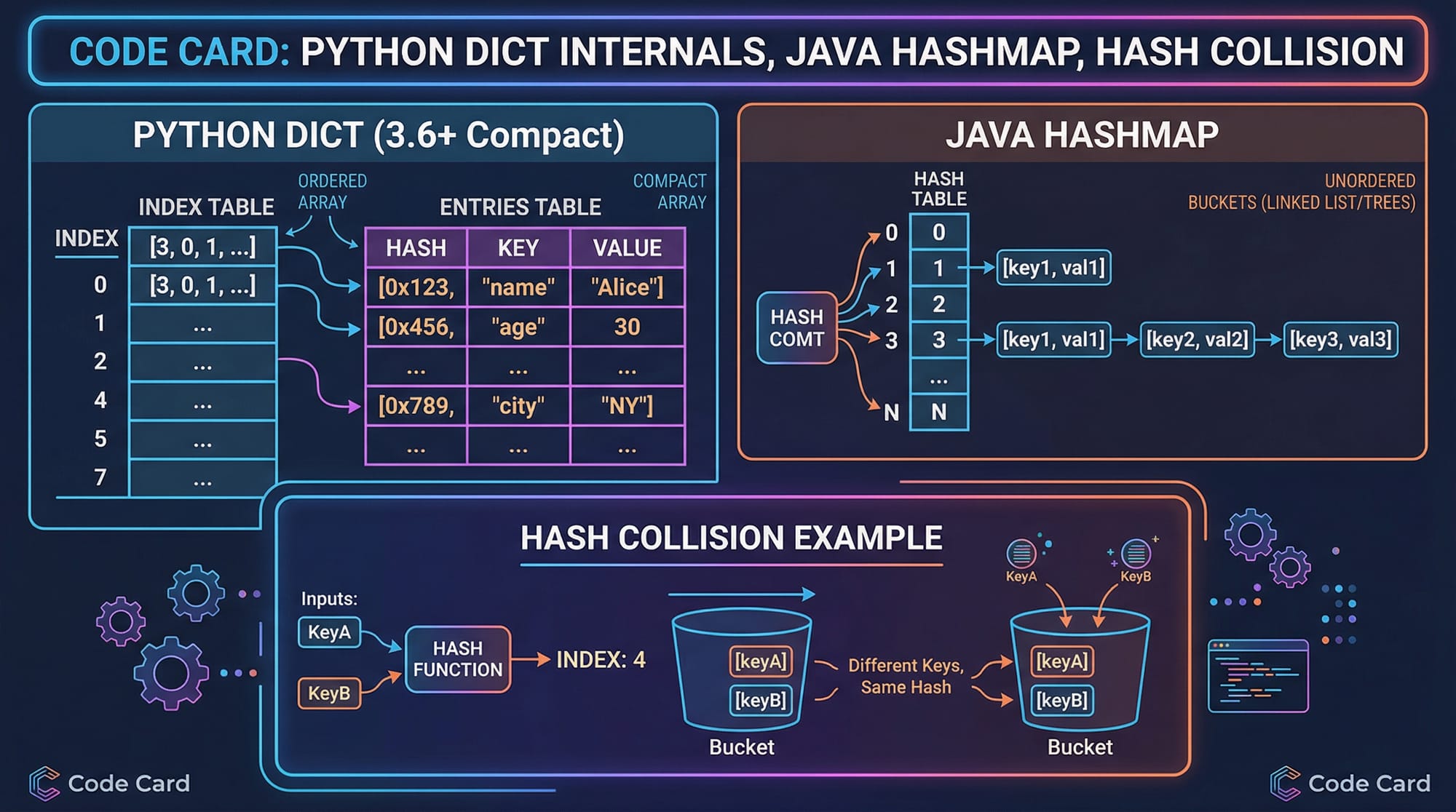
Sometimes, two keys map to the same index. This is called a collision.
1. Chaining
Each bucket stores a list of values.
Index 2 → [("Ahmad", 5000), ("Ali", 7000)]
2. Open Addressing (Linear Probing)
If a spot is taken, move to the next one.
Index 2 occupied → try index 3 → store there
Practical Code Examples
Example 1: Basic Hash Map in Python
# Creating a hash map using Python dictionary
student_fees = {}

# Adding data
student_fees["Ahmad"] = 5000
student_fees["Fatima"] = 7000
student_fees["Ali"] = 6000

# Accessing data
print(student_fees["Ahmad"])

# Updating data
student_fees["Ali"] = 6500

# Deleting data
del student_fees["Fatima"]
Line-by-Line Explanation
student_fees = {}
- Creates an empty hash map (dictionary).
student_fees["Ahmad"] = 5000
- Adds key "Ahmad" with value 5000.
print(student_fees["Ahmad"])
- Retrieves Ahmad’s fee.
student_fees["Ali"] = 6500
- Updates existing value.
del student_fees["Fatima"]
- Removes entry from hash map.
Example 2: Real-World Application (Student Attendance System)
# Attendance system using hash map
attendance = {}

# Mark attendance
attendance["Ahmad"] = True
attendance["Fatima"] = False
attendance["Ali"] = True

# Check attendance
for student, status in attendance.items():
    if status:
        print(student + " is present")
    else:
        print(student + " is absent")
Line-by-Line Explanation
attendance = {}
- Creates empty dictionary.
attendance["Ahmad"] = True
- Marks Ahmad as present.
for student, status in attendance.items():
- Loops through all entries.
if status:
- Checks if student is present.
print(student + " is present")
- Displays result.
Common Mistakes & How to Avoid Them
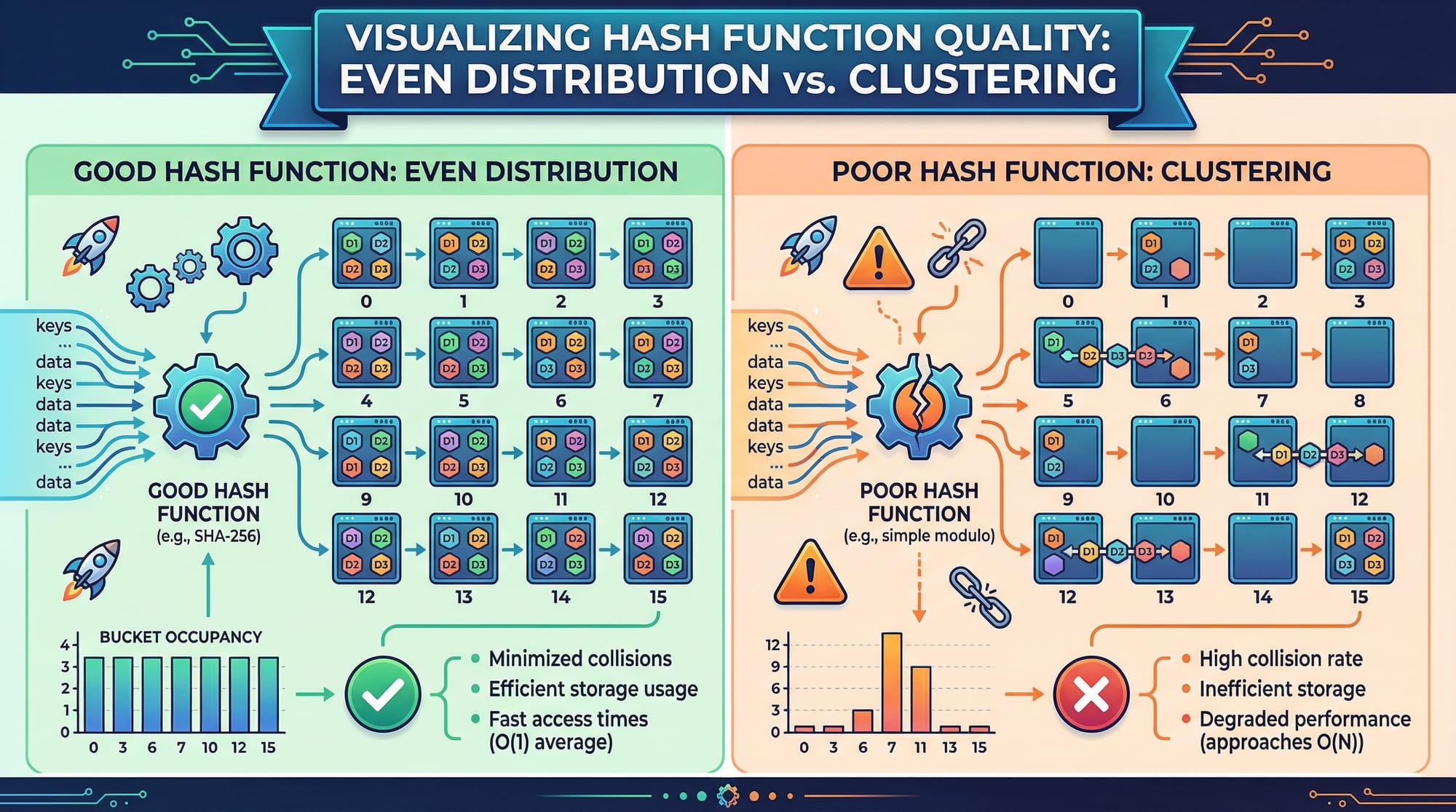
Mistake 1: Poor Hash Function
A bad hash function creates too many collisions.
Problem:
def bad_hash(key):
    return 1  # Every key goes to same index
Fix:
Use built-in hashing or better logic:
hash(key)
Tip: Good hash functions distribute values evenly.
Mistake 2: Assuming Order is Preserved
Students often think hash maps maintain order (older versions don’t guarantee this).
Problem:
data = {"Ali": 1, "Ahmad": 2}
Expecting order → Wrong assumption.
Fix:
Use ordered structures if needed:
from collections import OrderedDict
Practice Exercises
Exercise 1: Count Student Votes
Problem:
Count how many times each student name appears in a list.
names = ["Ali", "Ahmad", "Ali", "Fatima", "Ahmad", "Ali"]
Solution:
counts = {}

for name in names:
    if name in counts:
        counts[name] += 1
    else:
        counts[name] = 1

print(counts)
Explanation:
- Checks if name exists
- If yes → increment
- If no → initialize
Exercise 2: Find Duplicate Numbers
Problem:
Find duplicates in a list.
numbers = [1, 2, 3, 2, 4, 1]
Solution:
seen = {}
duplicates = []

for num in numbers:
    if num in seen:
        duplicates.append(num)
    else:
        seen[num] = True

print(duplicates)
Explanation:
- Track seen elements
- If repeated → add to duplicates
Frequently Asked Questions
What is a hash table?
A hash table is a data structure that stores key-value pairs and uses a hash function to quickly locate data. It provides near constant-time access, making it highly efficient.
How do I use a hash map in Python?
In Python, hash maps are implemented using dictionaries (dict). You can add, access, and delete elements using keys, making data retrieval fast and simple.
Why are hash tables fast?
Hash tables use a hash function to directly compute the index of a value, avoiding the need to search through the entire dataset.
What is a collision in hashing?
A collision occurs when two keys map to the same index. It is handled using techniques like chaining or open addressing.
When should I use a hash table?
Use hash tables when you need fast lookup, insertion, and deletion—such as caching, counting, or indexing data.
Summary & Key Takeaways
- Hash tables store data as key-value pairs
- Hash functions convert keys into array indices
- Average time complexity is O(1)
- Collisions are handled using chaining or probing
- Python dictionaries are built using hash tables
- Essential for real-world applications like databases and caching
Next Steps & Related Tutorials
To strengthen your understanding, explore these related topics on theiqra.edu.pk:
- Learn how data is stored sequentially in Arrays & Linked Lists
- Master key-value storage with Python Dictionaries
- Understand hierarchical data using Binary Trees
- Practice problem-solving with Stacks and Queues
By combining these concepts, you’ll build a strong foundation in Data Structures and Algorithms—essential for coding interviews and real-world software development in Pakistan and beyond.
Test Your Python Knowledge!
Finished reading? Take a quick quiz to see how much you've learned from this tutorial.