HashiCorp Vault Tutorial Secrets Management Guide
Introduction
HashiCorp Vault Tutorial: Secrets Management Guide is an intermediate-level learning resource designed to help students understand how modern applications securely store, access, and manage sensitive information such as API keys, database passwords, encryption keys, and tokens.
In traditional software development, secrets are often stored in .env files or hardcoded into applications. This becomes dangerous in production environments, especially in DevOps workflows and cloud-native systems. Vault solves this problem by centralizing secrets management and providing controlled, secure access to sensitive data.
For Pakistani students learning DevOps, especially in cities like Lahore, Karachi, and Islamabad, mastering vault secrets management is a highly valuable skill. Companies increasingly use tools like HashiCorp Vault in combination with Kubernetes and CI/CD pipelines.
For example, imagine Fatima from Lahore working on an e-commerce project. Instead of storing database credentials in code, she uses Vault to securely fetch credentials at runtime. Even if her code is exposed, the secrets remain safe.
Prerequisites
Before starting this hashicorp vault tutorial, students should be familiar with:
- Basic Linux commands (cd, ls, systemctl)
- Understanding of APIs and HTTP requests
- Basic Docker knowledge
- Intro to Kubernetes concepts (pods, deployments)
- Familiarity with YAML configuration files
- Basic DevOps pipeline understanding
If you are new, it is recommended to first study:
- Docker Basics Tutorial on theiqra.edu.pk
- Kubernetes Fundamentals Guide on theiqra.edu.pk
Core Concepts & Explanation
What is HashiCorp Vault?
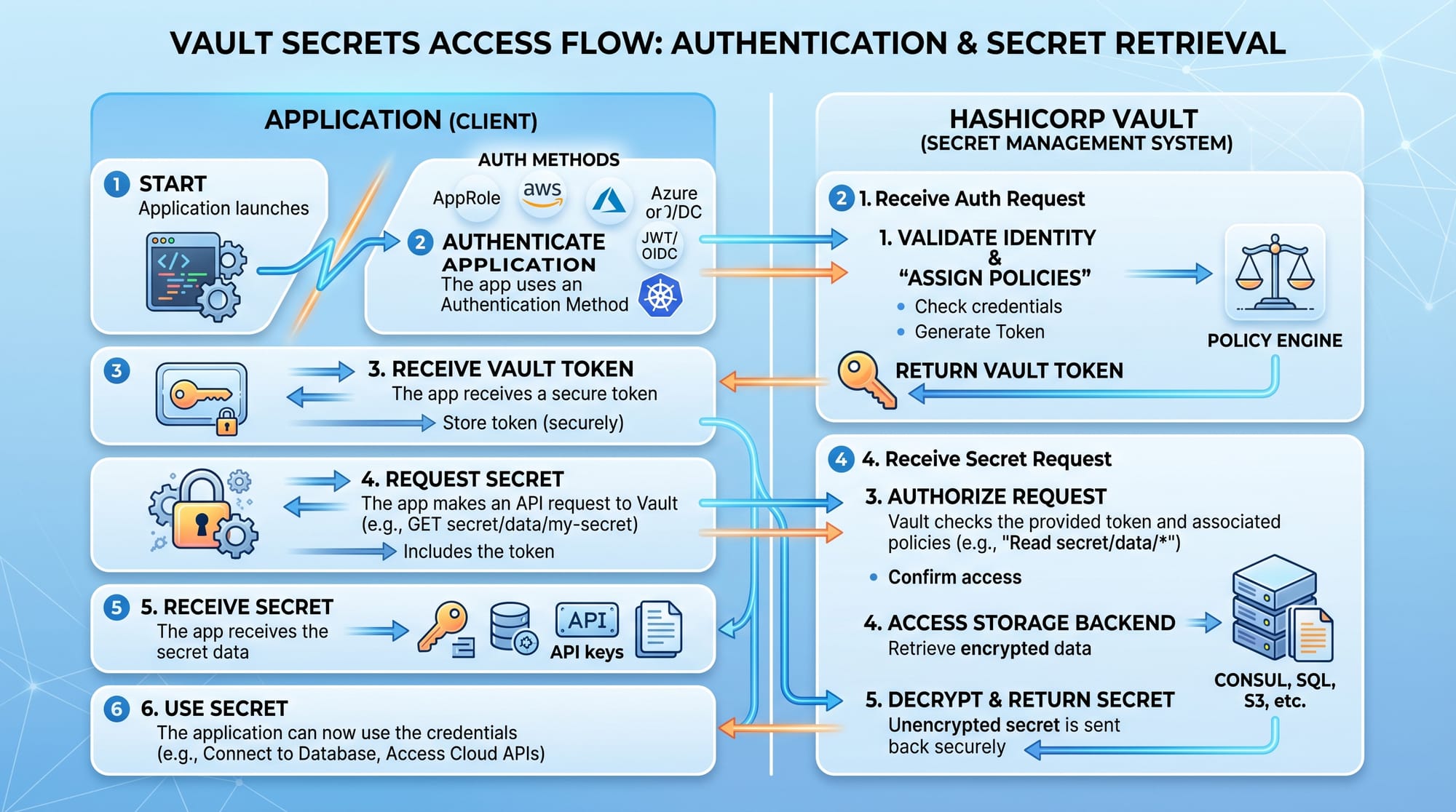
HashiCorp Vault is a tool used for securely storing and accessing secrets. It provides:
- Secure secret storage
- Dynamic secrets generation
- Encryption as a service
- Identity-based access control
Instead of storing secrets in code, applications request them from Vault at runtime.
Example:
- App → requests DB password
- Vault → verifies identity
- Vault → returns temporary credential
Vault Secrets Engines
Secrets engines are components in Vault responsible for managing different types of secrets.
Common engines include:
- KV (Key-Value) Engine: Stores static secrets like API keys
- Database Engine: Generates dynamic DB credentials
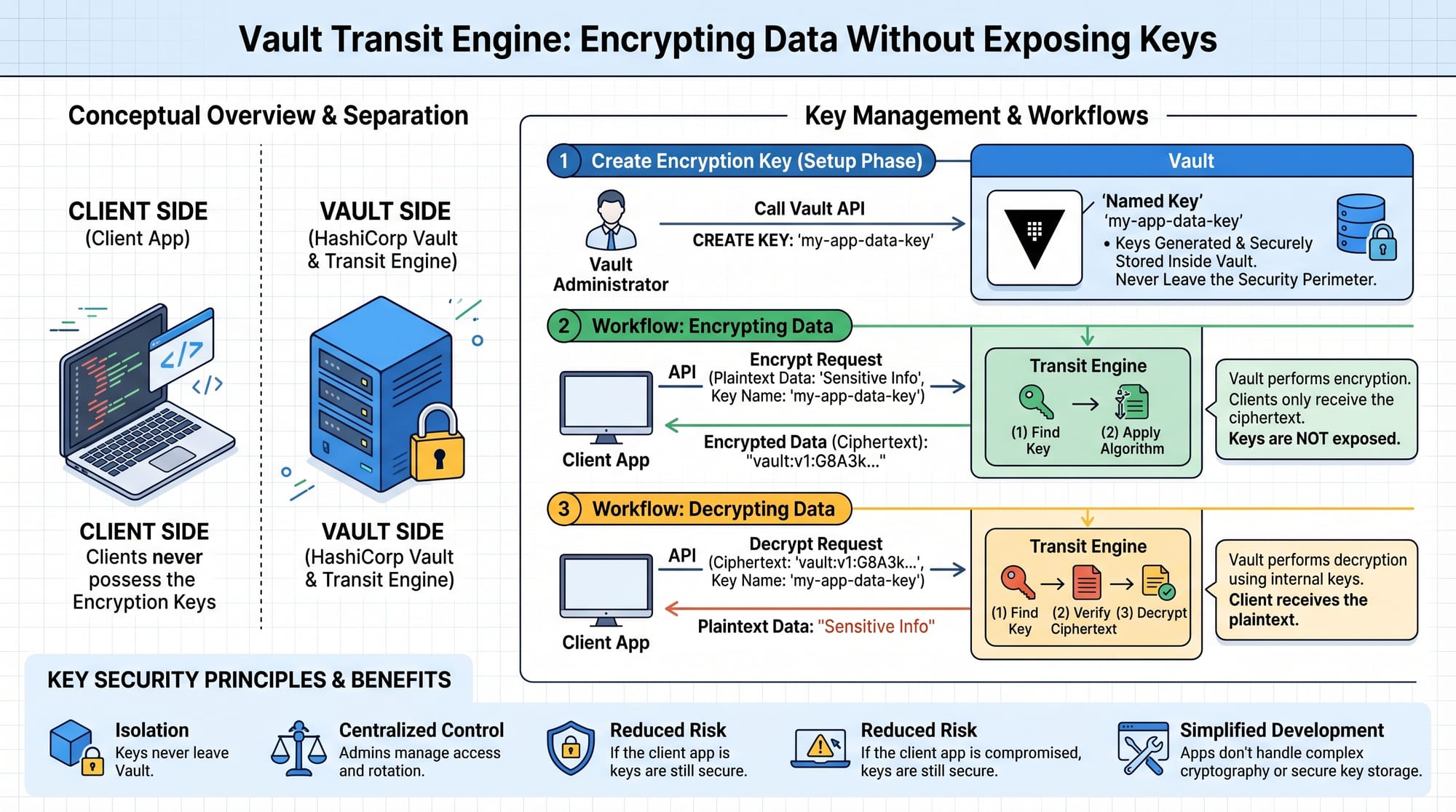
- Transit Engine: Encrypts/decrypts data without exposing keys
Example in Pakistan context:
Ali from Islamabad builds a fintech app. He uses KV engine for API keys and database engine for temporary MySQL credentials.
Vault Authentication Methods
Vault supports multiple authentication methods:
- Token-based authentication
- AppRole authentication
- Kubernetes authentication
- LDAP integration
In modern DevOps setups, vault kubernetes authentication is the most widely used method.
Practical Code Examples
Example 1: Storing and Retrieving Secrets (KV Engine)
# Enable KV secrets engine
vault secrets enable kv

# Store a secret
vault kv put secret/app db_password="mypassword123"
Line-by-line Explanation:
vault secrets enable kv
→ Activates the Key-Value secrets enginevault kv put secret/app
→ Creates a secret path calledappdb_password="mypassword123"
→ Stores database password securely inside Vault
Now retrieve it:
vault kv get secret/app
Explanation:
vault kv get
→ Reads stored secretsecret/app
→ Path where secret is stored
Example 2: Real-World Application (Database Dynamic Credentials)
# Enable database secrets engine
vault secrets enable database

# Configure database connection
vault write database/config/mydb \
    plugin_name=mysql-database-plugin \
    connection_url="{{username}}:{{password}}@tcp(localhost:3306)/" \
    allowed_roles="readonly"
Line-by-line Explanation:
vault secrets enable database
→ Enables dynamic database credential generationplugin_name=mysql-database-plugin
→ Specifies MySQL pluginconnection_url
→ Defines how Vault connects to databaseallowed_roles="readonly"
→ Restricts access permissions
Common Mistakes & How to Avoid Them
Mistake 1: Storing Root Tokens in Code
Many beginners accidentally store Vault root tokens inside application code or GitHub repositories.
Problem:
- Exposes full system control
- Security breach risk
Solution:
Use AppRole or Kubernetes authentication instead:
vault auth enable approle
This generates temporary credentials instead of static root tokens.
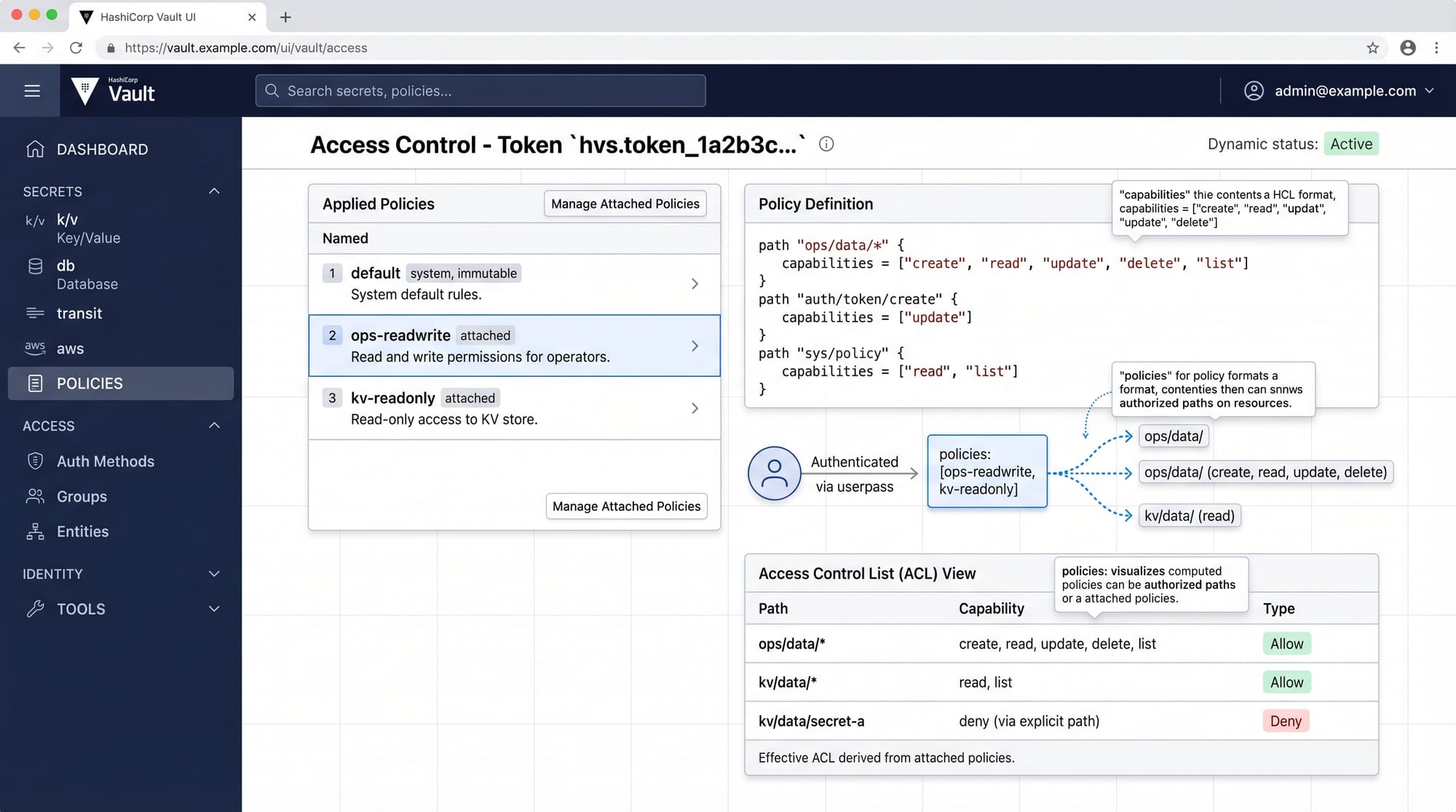
Mistake 2: Not Setting Proper Policies
Without policies, users may access all secrets.
Problem:
- Over-permissioned access
- Security vulnerabilities
Solution:
path "secret/data/app" {
  capabilities = ["read"]
}
Explanation:
path "secret/data/app"
→ Defines which secret path is allowedcapabilities = ["read"]
→ Only allows reading, not writing or deleting
Practice Exercises
Exercise 1: Store and Retrieve API Key
Problem:
Store a secret called api_key for a payment system.
Solution:
vault kv put secret/payment api_key="pk_live_123456"
vault kv get secret/payment
Exercise 2: Create a Policy for Read-Only Access
Problem:
Create a Vault policy that allows only reading secrets from secret/data/finance.
Solution:
path "secret/data/finance" {
  capabilities = ["read"]
}
Frequently Asked Questions
What is HashiCorp Vault used for?
HashiCorp Vault is used for securely storing and managing secrets like API keys, passwords, and certificates. It ensures applications access sensitive data safely without exposing it in code.
How does Vault improve security in DevOps?
Vault reduces risk by centralizing secrets management, generating dynamic credentials, and enforcing strict access control policies across applications and teams.
What is vault secrets management?
Vault secrets management refers to the process of securely storing, accessing, rotating, and controlling sensitive information using HashiCorp Vault.
How does vault kubernetes integration work?
Vault integrates with Kubernetes using service accounts. Pods authenticate with Vault and receive temporary secrets based on defined policies.
Can beginners learn HashiCorp Vault easily?
Yes. Beginners with basic Linux and DevOps knowledge can learn Vault step by step. Practicing commands and real-world examples makes it easier to understand.
Summary & Key Takeaways
- Vault is a secure secrets management system used in modern DevOps
- It replaces hardcoded credentials with dynamic secret access
- Supports multiple authentication methods including Kubernetes
- Policies control access and improve security
- Secrets engines handle different types of sensitive data
- Widely used in production-grade cloud applications
Next Steps & Related Tutorials
Now that you understand hashicorp vault tutorial: secrets management guide, you should continue building your DevOps foundation:
- Learn Kubernetes security in our tutorial on Kubernetes Security Best Practices
- Explore container workflows in Docker Security Fundamentals
- Understand CI/CD pipelines in DevOps Automation Guide
- Learn infrastructure protection in Cloud Security Basics
These tutorials on theiqra.edu.pk will help you become a job-ready DevOps engineer in Pakistan’s growing tech industry.
Test Your Python Knowledge!
Finished reading? Take a quick quiz to see how much you've learned from this tutorial.