HTML Accessibility (A11y) ARIA & Screen Readers
Introduction
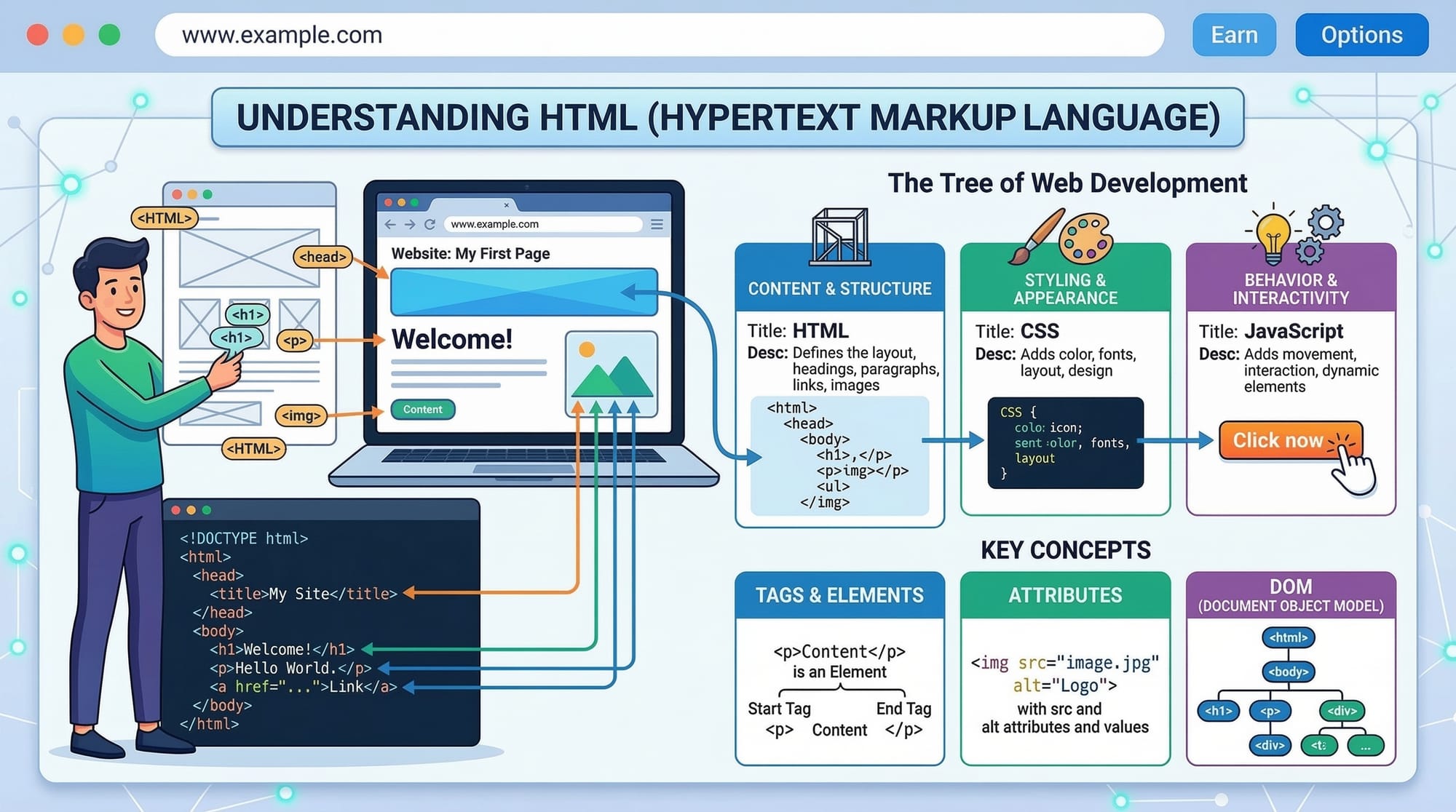
Web development is not just about making websites look attractive — it is also about ensuring that everyone can use them, including people with disabilities. This is where HTML Accessibility (A11y) comes in.
The term A11y (pronounced “ally”) is a shorthand for accessibility — the “11” represents the eleven letters between A and Y in the word accessibility. In web development, html accessibility means designing and coding websites so that people with visual, hearing, motor, or cognitive impairments can use them effectively.
Many users rely on assistive technologies such as screen readers, keyboard navigation, or voice commands. If a website is not accessible, these users may struggle to read content, navigate pages, or complete tasks.
For example:
- A visually impaired student in Lahore might rely on a screen reader to access an online course.
- A user with limited mobility may use only a keyboard instead of a mouse.
- Someone with low vision may depend on proper structure and contrast to read content.
To make websites accessible, developers use:
- semantic HTML
- ARIA labels
- keyboard-friendly navigation
- WCAG compliance guidelines
Learning accessibility is extremely important for Pakistani students studying web development because:
- Many organizations require WCAG compliance
- Accessible sites reach more users
- It improves SEO and usability
- It builds professional-quality websites
In this tutorial, you will learn:
- What HTML accessibility means
- How semantic HTML improves accessibility
- How ARIA attributes help assistive technologies
- How screen readers interpret web pages
- Practical coding techniques to build accessible websites.
Prerequisites
Before learning HTML Accessibility (A11y), you should already understand the basics of HTML.
Recommended knowledge includes:
- Basic HTML structure
- Common HTML tags (
<div>,<p>,<a>,<img>) - Basic forms
- Basic CSS styling
If you are new to these topics, consider reviewing:
- HTML Basics tutorial
- HTML Forms guide
- Semantic HTML tutorial
These concepts will help you understand how accessibility works in real-world development.
Core Concepts & Explanation
Semantic HTML and Accessibility
One of the most important foundations of html accessibility is semantic HTML.
Semantic HTML means using tags that clearly describe their purpose. For example:
| Tag | Meaning |
|---|---|
<header> | Website header |
<nav> | Navigation menu |
<main> | Main content |
<article> | Independent content |
<footer> | Footer section |
Example:
<header>
  <h1>Iqra Coding Tutorials</h1>
</header>

<nav>
  <a href="#">Home</a>
  <a href="#">Courses</a>
</nav>

<main>
  <article>
    <h2>Learn HTML Accessibility</h2>
    <p>This tutorial explains accessibility basics.</p>
  </article>
</main>

<footer>
  <p>Copyright 2025</p>
</footer>
Line-by-line explanation
<header>
Defines the header section of the webpage.
<h1>
Main heading for the page. Screen readers prioritize headings.
<nav>
Indicates navigation links for the website.
<a href="#">
Clickable links for navigation.
<main>
Contains the main content of the page.
<article>
Represents standalone content such as tutorials or blog posts.
<footer>
Defines the bottom section containing copyright or contact info.
Why semantic HTML matters:
- Screen readers understand the page structure
- Improves SEO ranking
- Helps keyboard navigation
- Makes code easier to maintain
ARIA Labels and Assistive Technologies
Sometimes HTML elements need extra accessibility information. This is where ARIA (Accessible Rich Internet Applications) attributes help.
ARIA labels provide additional descriptions for screen readers.
Example:
<button aria-label="Open navigation menu">
  ☰
</button>
Line-by-line explanation
<button>
Creates a clickable button.
aria-label="Open navigation menu"
Provides a descriptive label for screen readers.
☰
This symbol represents a menu icon visually.
Without the ARIA label, a screen reader might simply say “button”. With the label, it announces:
"Open navigation menu button"
This greatly improves usability.
Common ARIA attributes:
| Attribute | Purpose |
|---|---|
aria-label | Adds description |
aria-hidden | Hides elements from screen readers |
aria-expanded | Indicates dropdown state |
aria-live | Announces dynamic content updates |
Understanding Screen Readers
Screen readers are software programs that read webpage content aloud.
Examples include:
- NVDA
- JAWS
- VoiceOver
Screen readers read HTML structure in this order:
- Page title
- Headings
- Navigation
- Content
- Links and buttons
Example of accessible content:
<h1>HTML Accessibility Tutorial</h1>
<h2>Introduction</h2>
<p>This guide explains accessibility.</p>
Explanation:
<h1>
The main page heading. Screen readers announce this first.
<h2>
Subheading that organizes content.
<p>
Paragraph content that is read normally.
Proper heading structure allows users to jump between sections easily.
WCAG Compliance Basics
The Web Content Accessibility Guidelines (WCAG) define standards for accessible websites.
There are four main principles:
- Perceivable
- Operable
- Understandable
- Robust
Example guideline:
All images must include alt text.
<img src="student-learning-html.jpg" alt="Pakistani student learning HTML on laptop">
Explanation:
src
Specifies the image file.
alt
Describes the image for screen readers.
If the image fails to load or the user cannot see it, the alt text is read instead.
Practical Code Examples
Example 1: Accessible Navigation Menu
<nav>
  <ul>
    <li><a href="index.html">Home</a></li>
    <li><a href="courses.html">Courses</a></li>
    <li><a href="contact.html">Contact</a></li>
  </ul>
</nav>
Line-by-line explanation
<nav>
Defines the navigation area.
<ul>
Creates an unordered list.
<li>
Each navigation item.
<a>
Clickable link to other pages.
Using lists improves accessibility because screen readers understand the menu structure.
Example 2: Real-World Application (Accessible Form)
Imagine Fatima from Karachi registering for a programming course.
<form>
  <label for="name">Full Name</label>
  <input id="name" type="text">

  <label for="email">Email Address</label>
  <input id="email" type="email">

  <button type="submit">Register</button>
</form>
Line-by-line explanation
<form>
Creates the form container.
<label for="name">
Associates the label with the input field.
<input id="name">
Text input field for the user's name.
<label for="email">
Label for the email field.
<input type="email">
Ensures correct email format.
<button type="submit">
Submits the form.
Why labels matter:
Screen readers read:
"Full Name, edit text"
Without labels, users would not know what to enter.
Common Mistakes & How to Avoid Them
Mistake 1: Missing Alt Text for Images
Incorrect code:
<img src="laptop.jpg">
Problem:
Screen readers cannot describe the image.
Correct version:
<img src="laptop.jpg" alt="Student practicing HTML coding">
Now the image is accessible.
Mistake 2: Using Div Instead of Semantic Tags
Incorrect:
<div class="header">
<div class="menu">
<div class="content">
Problem:
Screen readers cannot understand page structure.
Correct:
<header></header>
<nav></nav>
<main></main>
Semantic tags provide clear meaning.
Practice Exercises
Exercise 1: Add Alt Text
Problem
Fix the following code so it becomes accessible.
<img src="student.jpg">
Solution
<img src="student.jpg" alt="Ali learning HTML programming">
Explanation:
The alt attribute describes the image for screen readers.
Exercise 2: Accessible Button
Problem
Improve this button for accessibility.
<button>🔍</button>
Solution
<button aria-label="Search website">
  🔍
</button>
Explanation:
The aria-label describes the purpose of the button.
Frequently Asked Questions
What is HTML accessibility?
HTML accessibility means designing websites so that people with disabilities can access and use them easily. It includes using semantic HTML, ARIA attributes, and proper structure.
How do I make my website accessible?
Use semantic HTML, add alt text for images, provide labels for forms, ensure keyboard navigation, and follow WCAG guidelines.
What are ARIA labels?
ARIA labels are special attributes that provide additional information to screen readers so users can understand elements like buttons or icons.
Why are screen readers important?
Screen readers allow visually impaired users to hear webpage content instead of seeing it. Accessible HTML ensures the content is understandable.
What is WCAG compliance?
WCAG compliance means following Web Content Accessibility Guidelines, which define international standards for accessible web design.
Summary & Key Takeaways
- HTML Accessibility (A11y) ensures websites can be used by everyone.
- Semantic HTML improves structure and screen reader understanding.
- ARIA labels provide additional descriptions for assistive technologies.
- Screen readers rely on headings, labels, and alt text.
- WCAG guidelines help developers build accessible websites.
- Accessibility improves usability, SEO, and professional quality.
Next Steps & Related Tutorials
To continue improving your HTML skills, explore these tutorials on theiqra.edu.pk:
- Learn Semantic HTML Elements for Modern Websites
- Master HTML Forms and Input Validation
- Understand Embedding Media in HTML (Audio & Video)
- Improve your site with HTML SEO Best Practices
These tutorials will help you build professional, accessible, and SEO-friendly websites used by developers worldwide.
Test Your Python Knowledge!
Finished reading? Take a quick quiz to see how much you've learned from this tutorial.