HTML Semantic Elements Complete Guide for SEO & Accessibility
Introduction
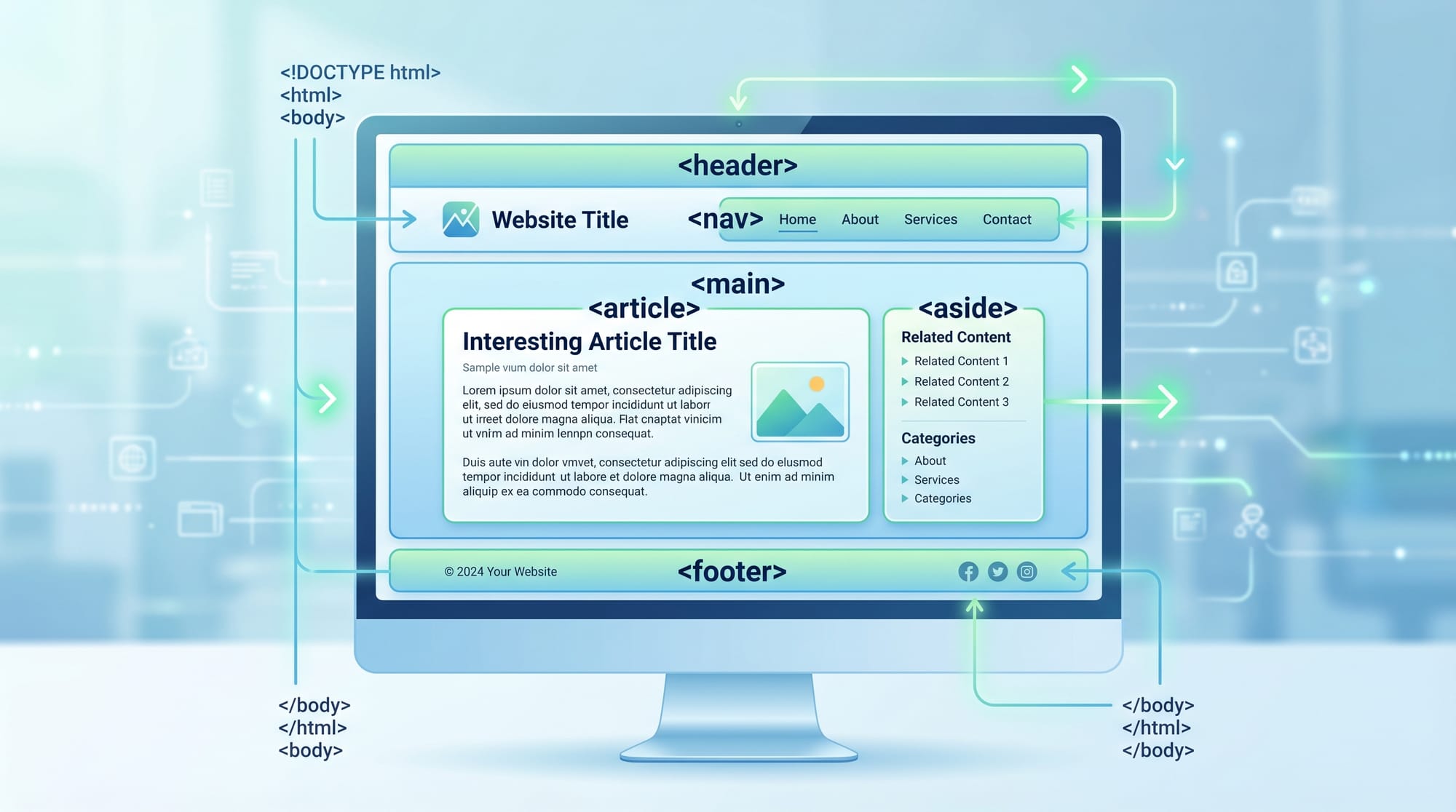
HTML semantic elements are special HTML tags that clearly describe their meaning to both browsers and developers. In simple words, semantic HTML elements tell the browser what content is, not just how it looks.
This topic—HTML Semantic Elements: Complete Guide for SEO & Accessibility—is extremely important for Pakistani students who want to become professional web developers. Whether you are learning in Lahore, Karachi, or Islamabad, understanding semantic HTML will help you build websites that are:
- Easier for Google to rank (better SEO)
- Easier for screen readers to understand (better accessibility)
- More professional and structured
- Easier to maintain and debug
For example, instead of using only <div> everywhere, semantic HTML uses meaningful tags like <header>, <article>, <section>, and <footer>.
Prerequisites
Before learning html semantic elements, you should already know:
- Basic HTML structure (
<!DOCTYPE html>,<html>,<head>,<body>) - Common HTML tags like
<div>,<p>,<a>,<img> - Basic understanding of websites and web pages
- Optional: Basic CSS knowledge (helpful but not required)
If you are completely new, first check:
- HTML Basics tutorial on theiqra.edu.pk
- Introduction to Web Development
Core Concepts & Explanation
What Are Semantic HTML Elements?
Semantic HTML elements are tags that clearly describe their meaning.
Examples include:
<header>→ top section of a page<nav>→ navigation menu<main>→ main content<article>→ independent content (like blog post)<section>→ grouped content<footer>→ bottom section
Instead of writing:
<div class="header"></div>
We use:
<header></header>
This is better because:
- Search engines understand structure
- Screen readers read content correctly
- Code becomes cleaner
Why Semantic HTML Matters for SEO & Accessibility
Semantic HTML is important for two major reasons:
1. SEO (Search Engine Optimization)
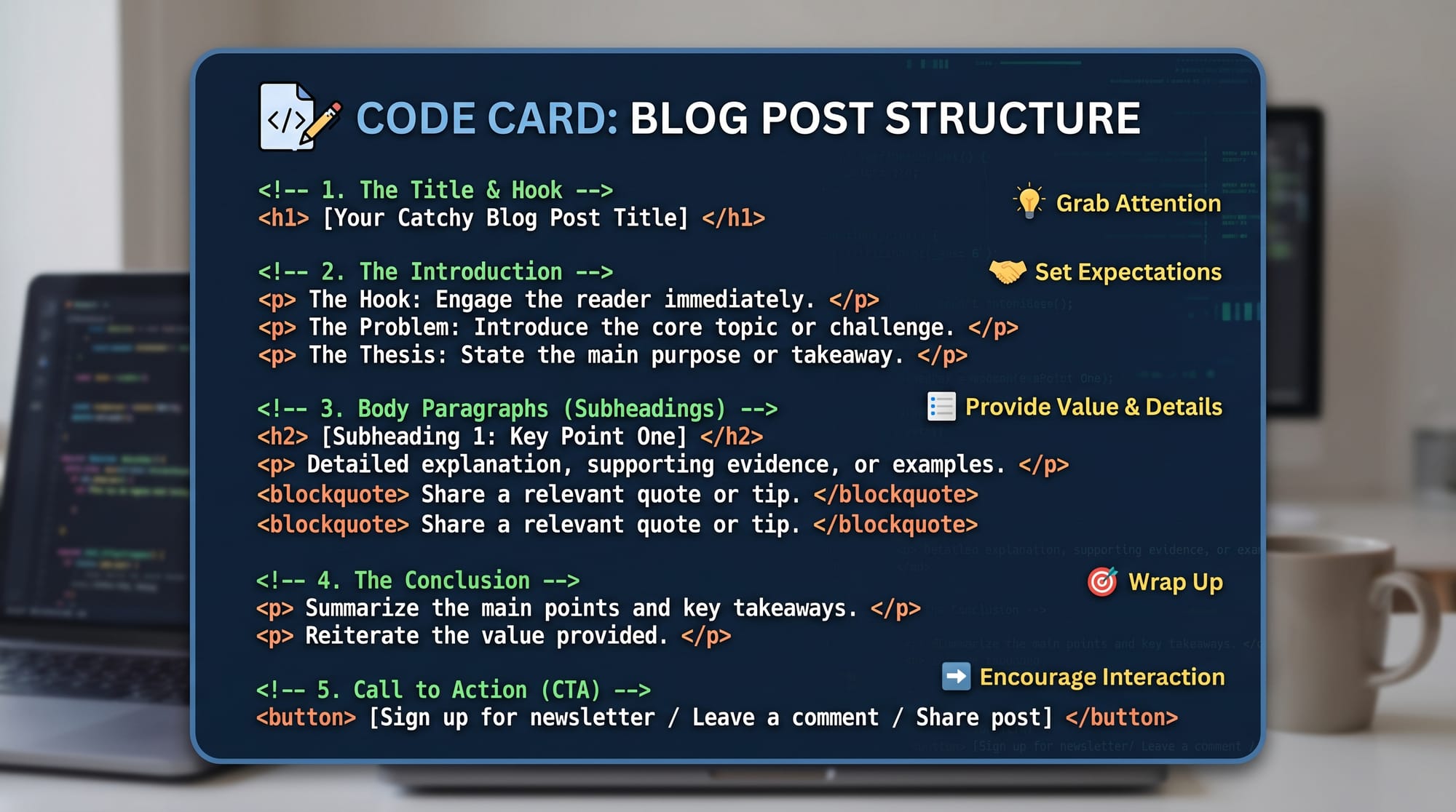
Search engines like Google use HTML structure to understand your page.
Example:
<h1>tells Google the main topic<article>tells Google this is a blog post<nav>tells Google this is navigation
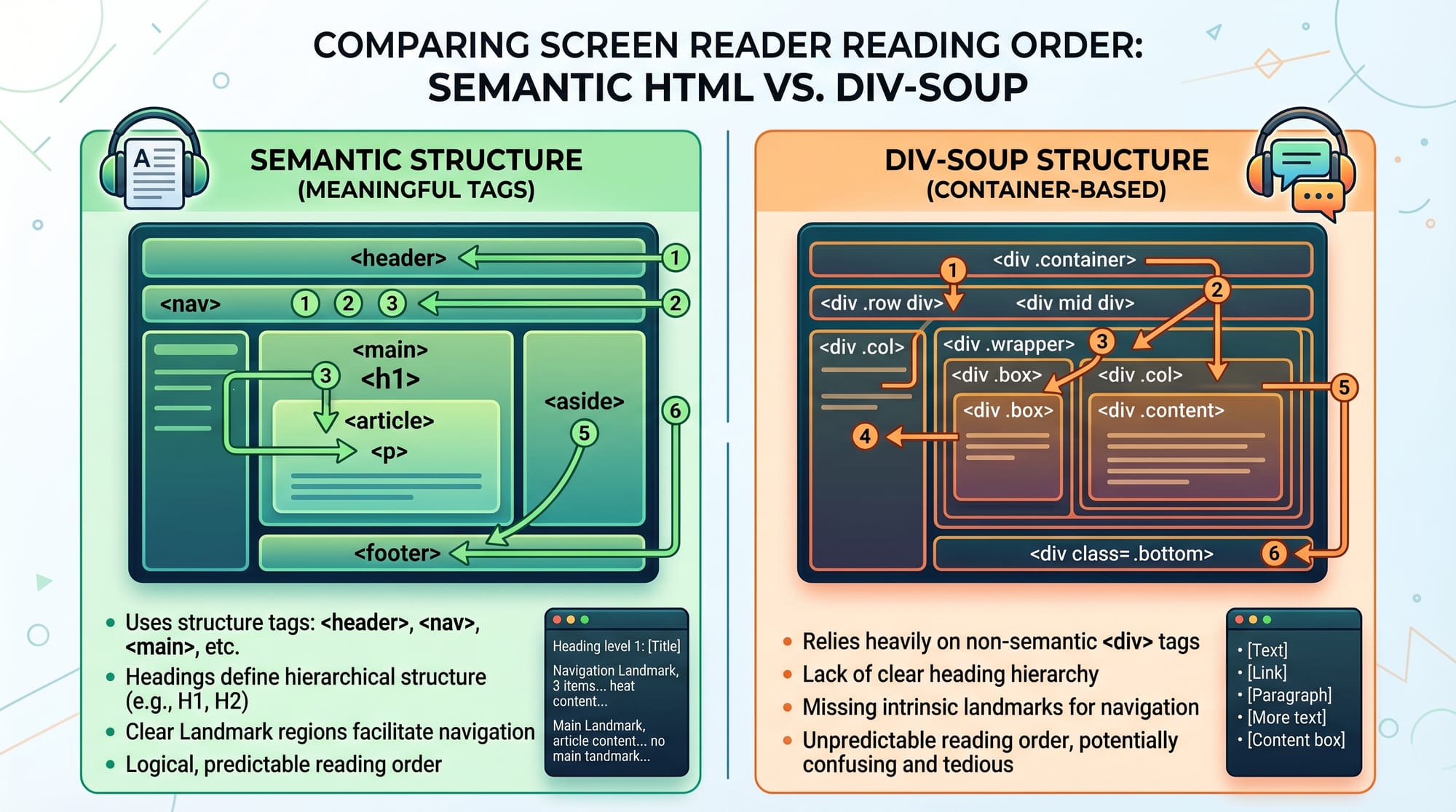
A properly structured page can rank higher than a messy “div-soup” page.
2. Accessibility
Screen readers used by visually impaired users depend on semantic HTML.
For example:
<nav>allows users to skip navigation easily<main>helps users jump to main content<button>is recognized as clickable
Practical Code Examples
Example 1: Basic Semantic Web Page Structure
<!DOCTYPE html>
<html>
<head>
  <title>Ali's Blog</title>
</head>

<body>

<header>
  <h1>Welcome to Ali's Blog</h1>
</header>

<nav>
  <a href="#">Home</a>
  <a href="#">About</a>
</nav>

<main>
  <article>
    <h2>My First Blog Post</h2>
    <p>This is a simple post about learning HTML in Pakistan.</p>
  </article>
</main>

<footer>
  <p>© 2026 Ali from Lahore</p>
</footer>

</body>
</html>
Line-by-line Explanation:
<!DOCTYPE html>→ Declares HTML5 document<html>→ Root element of page<head>→ Contains metadata like title<title>→ Shows text in browser tab<body>→ Visible content starts here<header>→ Top section with heading<h1>→ Main heading of page<nav>→ Navigation links section<a>→ Hyperlinks to pages<main>→ Main content area<article>→ Independent blog post<p>→ Paragraph text<footer>→ Bottom section of page
Example 2: Real-World Application (News Website Layout)
<header>
  <h1>Pakistan Daily News</h1>
</header>

<nav>
  <a href="#">Home</a>
  <a href="#">Sports</a>
  <a href="#">Technology</a>
</nav>

<main>
  <article>
    <header>
      <h2>New IT Park Opens in Islamabad</h2>
      <time datetime="2026-04-11">April 11, 2026</time>
    </header>

    <figure>
      <img src="islamabad-it-park.jpg" alt="IT Park Islamabad">
      <figcaption>New tech hub in Islamabad</figcaption>
    </figure>

    <p>The government has launched a new IT park to support startups in Pakistan...</p>
  </article>

  <aside>
    <h3>Related News</h3>
    <p>More tech updates coming soon...</p>
  </aside>
</main>

<footer>
  <p>© 2026 Pakistan Daily News</p>
</footer>
Line-by-line Explanation:
<header>→ Website title section<nav>→ Menu links for navigation<main>→ Primary content area<article>→ Single news article- Nested
<header>→ Title + date of article <time>→ Machine-readable date<figure>→ Image container<img>→ Displays image<figcaption>→ Image description<p>→ Article text<aside>→ Side content (related news)<footer>→ Copyright section
Common Mistakes & How to Avoid Them
Mistake 1: Using Too Many <div> Tags (Div Soup)
Many beginners in Pakistan overuse <div> for everything:
❌ Wrong Example:
<div class="header"></div>
<div class="nav"></div>
<div class="content"></div>
✔ Correct Solution:
<header></header>
<nav></nav>
<main></main>
Why fix this?
- Better SEO
- Cleaner structure
- Easier maintenance
Mistake 2: Wrong Use of Semantic Tags
Sometimes students use semantic tags incorrectly.
❌ Wrong:
<nav>
  <p>Welcome to my website</p>
</nav>
✔ Correct:
<nav>
  <a href="#">Home</a>
  <a href="#">Contact</a>
</nav>
Explanation:
<nav>should contain navigation links, not general text- Semantic meaning must match content
Practice Exercises
Exercise 1: Build a Simple Profile Page
Problem:
Create a page for “Fatima from Karachi” using semantic HTML with header, main content, and footer.
Solution:
<header>
  <h1>Fatima's Profile</h1>
</header>

<main>
  <p>I am a web development student from Karachi, Pakistan.</p>
</main>

<footer>
  <p>Contact: [email protected]</p>
</footer>
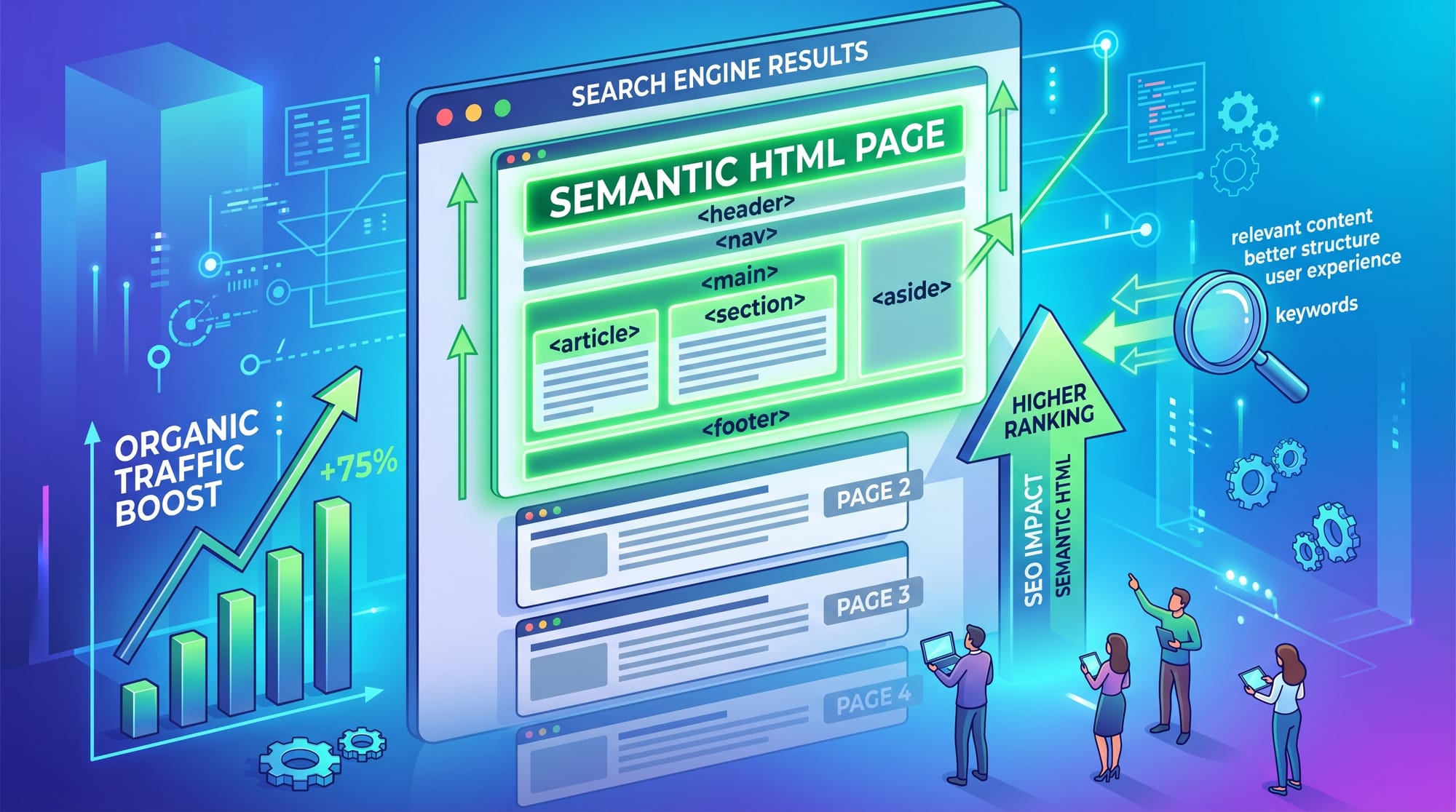
Exercise 2: Create a Blog Post Structure
Problem:
Build a blog layout with article title, date, and content.
Solution:
<article>
  <header>
    <h2>Learning HTML in Islamabad</h2>
    <time datetime="2026-04-11">11 April 2026</time>
  </header>

  <p>This blog explains how Pakistani students can learn HTML easily.</p>
</article>
Frequently Asked Questions
What are HTML semantic elements?
HTML semantic elements are tags that clearly describe their meaning, such as <header>, <article>, and <footer>. They help browsers and developers understand the structure of a web page. They also improve SEO and accessibility.
Why is semantic HTML important for SEO?
Semantic HTML helps search engines understand your content better. Tags like <article> and <nav> give meaning to content, which can improve ranking in Google search results.
What is the difference between semantic and non-semantic HTML?
Semantic HTML uses meaningful tags like <header> and <footer>, while non-semantic HTML uses generic tags like <div> and <span> that do not describe content meaning.
Can I build full websites using only semantic HTML?
Yes, but semantic HTML is usually combined with CSS and JavaScript. HTML provides structure, CSS handles design, and JavaScript adds interactivity.
How does semantic HTML help accessibility?
Semantic HTML helps screen readers understand page structure. For example, <nav> allows users to jump to navigation, and <main> helps them skip directly to main content.
Summary & Key Takeaways
- Semantic HTML gives meaning to web page structure
- It improves SEO by helping search engines understand content
- It improves accessibility for screen readers
- It replaces unnecessary
<div>usage with meaningful tags - Key tags include
<header>,<nav>,<main>,<article>,<section>,<footer> - Proper structure leads to professional, maintainable websites
Next Steps & Related Tutorials
Now that you understand html semantic elements, continue learning to become a professional web developer.
Recommended tutorials on theiqra.edu.pk:
- Learn HTML Basics to strengthen your foundation
- Explore Web Accessibility for inclusive design skills
- Study CSS Layout Techniques for styling semantic structures
- Learn SEO Fundamentals for Developers
These topics will help you build real-world, production-ready websites used in Pakistan and globally.
Test Your Python Knowledge!
Finished reading? Take a quick quiz to see how much you've learned from this tutorial.