HTML Tags & Attributes Complete Reference 2026
Introduction
HTML (HyperText Markup Language) is the foundation of every website you visit on the internet. From the bustling online stores in Karachi to educational portals in Lahore, every webpage is built using HTML tags and attributes. For Pakistani students aspiring to become web developers, understanding HTML is the crucial first step in your programming journey. Whether you dream of building websites for local businesses in Islamabad, creating e-commerce platforms for Pakistani entrepreneurs, or working as a freelance developer for international clients, mastering HTML tags and attributes will open countless doors of opportunity in the rapidly growing tech industry of Pakistan.
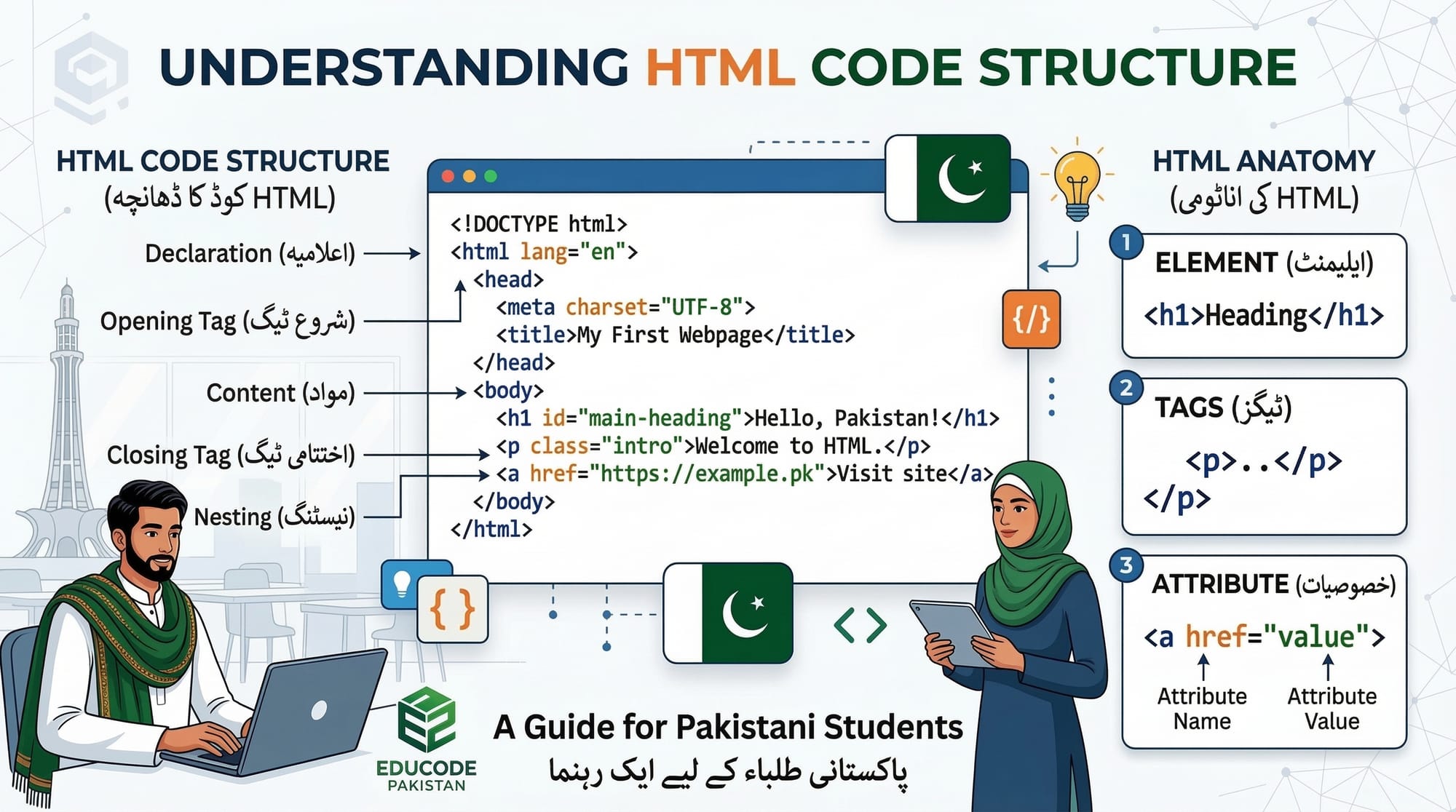
HTML tags are the building blocks of web pages, telling browsers how to display content. Think of tags as instructions wrapped in angle brackets that define elements like headings, paragraphs, images, and links. Attributes, on the other hand, provide additional information about these elements—such as specifying the source of an image or the destination of a link. Together, HTML tags and attributes form the skeleton of every website, making them essential knowledge for anyone entering the field of web development in Pakistan and beyond.
Prerequisites
Before diving into HTML tags and attributes, you should have the following basic knowledge and tools ready. The good news is that HTML is beginner-friendly, and you don't need any prior programming experience to get started. Students from Lahore, Karachi, Islamabad, or any city in Pakistan can begin learning HTML with just a computer and an internet connection.
• Basic computer literacy: Ability to create, save, and organize files on your computer
• A text editor: We recommend Visual Studio Code (free) or Notepad++ for writing HTML code
• A web browser: Google Chrome, Mozilla Firefox, or Microsoft Edge to view your HTML pages
• Understanding of file paths: Knowing how to navigate folders on your computer
• Enthusiasm to learn: The most important prerequisite for any programming journey!
Core Concepts & Explanation
Understanding HTML Tags
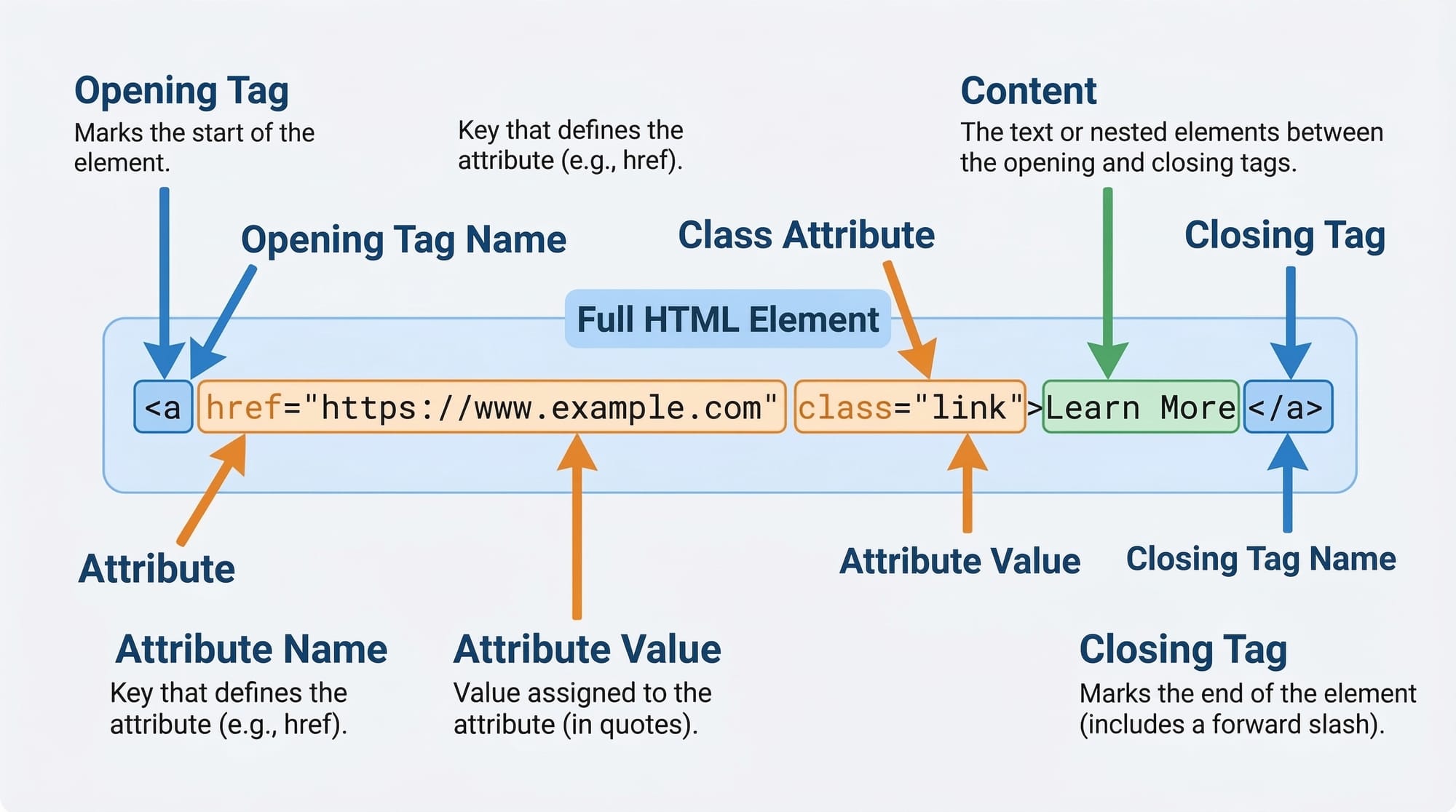
HTML tags are the fundamental building blocks of every webpage. They are keywords enclosed in angle brackets (< >) that tell the browser how to display content. Tags usually come in pairs: an opening tag and a closing tag, with the content placed between them. The closing tag includes a forward slash (/) before the tag name. For example, <p> is an opening paragraph tag, and </p> is its closing counterpart. When Ahmad from Lahore writes his first HTML page, he'll use tags to structure his content into headings, paragraphs, lists, and more.
Tags can also be nested inside each other, creating a hierarchical structure. This nesting is similar to how Pakistani families have multiple generations living together—the parent element contains child elements, and proper nesting ensures that the HTML document is well-structured and valid. Understanding how tags work together is essential for creating semantic HTML that is both human-readable and machine-friendly, which helps with search engine optimization (SEO) for websites targeting Pakistani audiences.
Understanding HTML Attributes
HTML attributes provide additional information about elements and are always specified in the opening tag. They come in name-value pairs, written as name="value". Attributes help customize elements, making them more functional and interactive. For instance, when Fatima wants to add an image of Lahore's Badshahi Mosque to her webpage, she uses the <img> tag with the src attribute to specify the image location and the alt attribute to provide alternative text for accessibility. Without attributes, tags would be limited in their functionality, unable to link to other pages, display images, or receive user input.
Common attributes include id (unique identifier), class (for styling groups of elements), style (inline CSS), href (for links), src (for images and media), and many more. Attributes are what make HTML elements truly powerful and versatile. For Pakistani students learning web development, mastering attributes is crucial because they enable you to create interactive, accessible, and well-organized websites that can compete on the global stage.
Common HTML Tags Reference
Let's explore the most commonly used HTML tags that every Pakistani web developer should know. These tags form the foundation of any webpage and are essential for structuring content effectively. From headings that organize your content to lists that display information clearly, these tags are your essential toolkit for web development.
|
Tag |
Purpose |
Example |
|
<html> |
Root element that
contains all HTML content |
<html>...</html> |
|
<head> |
Contains metadata,
title, and links to resources |
<head><title>Page</title></head> |
|
<body> |
Contains all visible
page content |
<body>Content here</body> |
|
<h1>-<h6> |
Headings from most (h1)
to least (h6) important |
<h1>Main Title</h1> |
|
<p> |
Defines a paragraph of
text |
<p>This is a paragraph.</p> |
|
<a> |
Creates hyperlinks to
other pages or resources |
<a href="url">Link</a> |
|
<img> |
Embeds images
(self-closing tag) |
<img src="photo.jpg"
alt="Description"> |
|
<ul>/<ol> |
Creates unordered
(bullets) or ordered (numbers) lists |
<ul><li>Item</li></ul> |
|
<div> |
Generic container for
grouping elements |
<div class="container">...</div> |
|
<span> |
Inline container for
styling text portions |
<span class="highlight">text</span> |
Table 1: Common HTML Tags Reference
Practical Code Examples
Example 1: Creating a Basic Webpage Structure
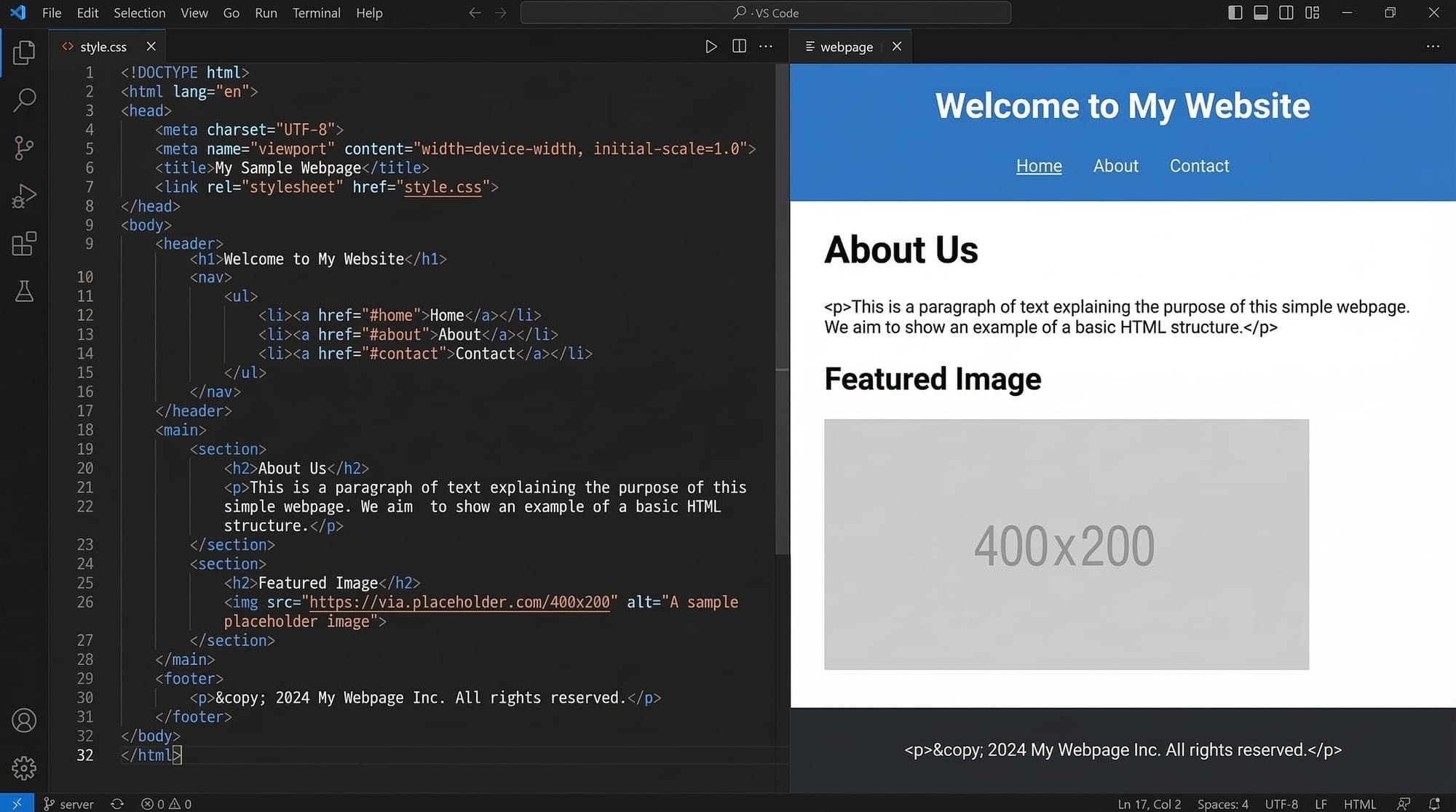
Let's create a simple webpage about a fictional Pakistani restaurant in Karachi. This example demonstrates the fundamental HTML structure that every webpage must have, along with essential tags for organizing content.
<!DOCTYPE html>
<html lang="en">
<head>
<meta charset="UTF-8">
<title>Karachi Biryani House</title>
</head>
<body>
<h1>Welcome to Karachi Biryani House</h1>
<p>The best biryani in Pakistan since 1985!</p>
</body>
</html>
Line-by-line explanation:
Line 1: <!DOCTYPE html> - Declares this document as HTML5, the latest standard.
Line 2: <html lang="en"> - The root element with language attribute for SEO.
Lines 3-6: <head> section contains metadata like character encoding and page title.
Line 5: <title> sets the browser tab text and search engine listing.
Lines 7-10: <body> contains visible content with heading and paragraph.
Line 9: <h1> is the main heading, displayed largest by browsers.
Example 2: Real-World Application - Product Page
Now let's build a more practical example—a product page for a Pakistani clothing store. This demonstrates how tags and attributes work together to create an engaging user experience. Ali, a developer from Islamabad, might create something like this for a local boutique's website.
<article class="product">
<img src="kurta.jpg" alt="Blue Embroidered Kurta" width="300">
<h2>Blue Embroidered Kurta</h2>
<p class="price">PKR 4,500</p>
<p>Handcrafted in Lahore with premium cotton fabric.</p>
<a href="/buy/kurta-001" class="btn">Buy Now</a>
</article>
Line-by-line explanation:
Line 1: <article class="product"> - Semantic tag with class for styling.
Line 2: <img> displays product image with src, alt, and width attributes.
Line 3: <h2> Product name as secondary heading for hierarchy.
Line 4: <p class="price"> Price in Pakistani Rupees with class for styling.
Line 5: <p> Product description for customers.
Line 6: <a href="..."> Creates clickable link for purchasing with href attribute.
Common Mistakes & How to Avoid Them
Mistake 1: Forgetting to Close Tags
One of the most common mistakes beginners make is forgetting to close HTML tags. This can cause unexpected display issues and make your webpage look broken. For example, if you open a <div> tag but forget to close it with </div>, all the content after it may inherit the wrong styling or layout. Some tags like <img>, <br>, and <input> are self-closing and don't need a closing tag, but most tags require proper closure.
Incorrect code:
<p>This paragraph is missing its closing tag
Correct code:
<p>This paragraph has a proper closing tag.</p>
Mistake 2: Improper Attribute Syntax
Another frequent error is incorrect attribute syntax. Attributes must have a name, followed by an equals sign, and a value in quotation marks. Many beginners forget the quotation marks or use the wrong type. Remember that in HTML, you can use either single quotes (') or double quotes ("), but you must be consistent within each attribute. Additionally, attribute values should not contain spaces unless the space is part of the actual value.
Incorrect code:
<a href=https://theiqra.edu.pk>Visit theiqra</a>
Correct code:
<a href="https://theiqra.edu.pk">Visit theiqra</a>
Mistake 3: Incorrect Tag Nesting
Proper nesting of HTML tags is crucial for valid HTML documents. When tags overlap incorrectly, browsers may still display the content, but it can cause unpredictable behavior and accessibility issues. Think of nesting like opening and closing boxes—you must close the innermost box before closing the outer one. This principle ensures your HTML is well-formed and compatible with all browsers, important for Pakistani websites serving diverse audiences across the country.
Incorrect code:
<p><strong>Bold text</p></strong>
Correct code:
<p><strong>Bold text</strong></p>
Practice Exercises
Exercise 1: Create a Personal Profile Page
Create an HTML page about yourself or a fictional character. Include a heading with your name, a paragraph introducing yourself, and a list of your hobbies or skills. Use at least three different types of HTML tags and one image with proper attributes.
Solution:
<!DOCTYPE html>
<html>
<body>
<h1>Fatima Ahmed</h1>
<img src="fatima.jpg" alt="Fatima's photo" width="200">
<p>I am a student from Lahore learning web development.</p>
<h3>My Hobbies:</h3>
<ul>
<li>Coding</li>
<li>Reading</li>
<li>Cricket</li>
</ul>
</body>
</html>
Exercise 2: Build a Contact Card
Create a contact card for a fictional Pakistani business. Include the business name, address, phone number, and a link to their website. Use appropriate tags and attributes to structure the information semantically.
Solution:
<article class="contact-card">
<h2>Islamabad Tech Solutions</h2>
<address>
<p>Blue Area, Islamabad, Pakistan</p>
<p>Phone: <a href="tel:+9251123456789">+92 51 1234 56789</a></p>
<p>Email: <a href="mailto:[email protected]">[email protected]</a></p>
</address>
<a href="https://islamabadtech.pk" target="_blank">Visit Website</a>
</article>
Frequently Asked Questions
What is the difference between HTML tags and HTML elements?
HTML tags are the markers themselves—the angle brackets and keywords like <p> and </p>. An HTML element is the complete package including the opening tag, content, and closing tag. For example, in <p>Hello</p>, the tags are <p> and </p>, while the element is the entire construct including the text "Hello".
How do I know which HTML tags to use for my content?
Choose HTML tags based on the meaning (semantics) of your content, not just how you want it to look. Use <h1>-<h6> for headings, <p> for paragraphs, <ul> or <ol> for lists, <nav> for navigation menus, <article> for self-contained content, and <section> for thematic groupings. This approach, called semantic HTML, improves accessibility and SEO for your Pakistani website visitors.
Are HTML tags case-sensitive?
No, HTML tags are not case-sensitive. Both <P> and <p> will work the same way. However, the standard convention and best practice is to use lowercase letters for all HTML tags and attributes. This makes your code more readable and consistent with industry standards, which is important when working in professional development teams in Pakistan or internationally.
What are global attributes in HTML?
Global attributes are attributes that can be used on any HTML element. The most common global attributes include: id (unique identifier), class (for CSS styling and grouping), style (inline CSS), title (tooltip text), data-* (custom data storage), and hidden (hides the element). Understanding global attributes helps you write more flexible and maintainable HTML code for your web projects.
How can I practice HTML without setting up a local environment?
Pakistani students can use online code editors like CodePen, JSFiddle, or Replit to practice HTML directly in their browser without installing any software. Simply visit these websites, write your HTML in the editor, and see instant results. This is perfect for beginners who want to start learning immediately. Once comfortable, you can transition to a local development environment with VS Code for more advanced projects.
Summary & Key Takeaways
Congratulations on completing this comprehensive guide to HTML tags and attributes! You have taken an important step in your web development journey. Here are the key points to remember as you continue learning and building websites:
• HTML tags are the building blocks of webpages, written in angle brackets and usually come in opening/closing pairs that wrap around content to define its structure and meaning.
• Attributes provide additional information about elements and are always written in name="value" pairs within the opening tag, enabling customization and interactivity.
• Semantic HTML uses meaningful tags that describe content purpose, improving accessibility, SEO, and code maintainability for websites serving Pakistani and global audiences.
• Common mistakes include forgetting to close tags, improper attribute syntax, and incorrect tag nesting—always validate your HTML to catch these errors early.
• Practice is essential: use online editors like CodePen to experiment freely, then transition to local development environments as your skills grow.
• Every expert developer started as a beginner—your journey from learning HTML in Pakistan to building world-class websites begins with mastering these fundamental concepts.
Next Steps & Related Tutorials
Now that you understand HTML tags and attributes, you're ready to expand your web development skills further. Here are some recommended tutorials on theiqra.edu.pk to continue your learning journey:
• CSS Fundamentals for Beginners - Learn how to style your HTML elements with colors, fonts, and layouts to create visually stunning websites that showcase Pakistani creativity.
• HTML Forms and Input Elements - Master creating contact forms, registration pages, and user input fields to build interactive websites for Pakistani businesses and organizations.
• Introduction to JavaScript - Add interactivity and dynamic behavior to your webpages, from simple animations to complex web applications serving users across Pakistan.
• Responsive Web Design Basics - Create websites that look great on all devices, from desktop computers to smartphones, ensuring your Pakistani audience can access your content anywhere.
Remember, every professional web developer started exactly where you are now. Keep practicing, keep building, and don't hesitate to explore the many resources available on theiqra.edu.pk. The tech industry in Pakistan is growing rapidly, and your HTML skills are the foundation of an exciting career in web development!
Test Your Python Knowledge!
Finished reading? Take a quick quiz to see how much you've learned from this tutorial.