HTTP/2 & HTTP/3 Modern Web Protocols Explained
Introduction
The internet has evolved rapidly over the last decade, and so have the protocols that power it. If you’ve ever wondered why modern websites load faster than before—even on slower connections—then understanding HTTP/2 and HTTP/3 is essential.
This tutorial, “HTTP/2 & HTTP/3: Modern Web Protocols Explained”, will guide Pakistani students through the evolution from HTTP/1.1 to HTTP/2 and HTTP/3 (QUIC), explaining how these technologies improve performance, security, and user experience.
Whether you're Ahmad building a portfolio in Lahore, Fatima deploying an e-commerce site in Karachi, or Ali working on APIs in Islamabad, mastering these protocols will make you a better web developer.
We will also touch on an important foundation: HTTP vs HTTPS, since modern protocols rely heavily on secure connections.
Prerequisites
Before starting this http2 tutorial and introduction to http3 quic, you should be familiar with:
- Basic understanding of how the web works (client-server model)
- HTML, CSS, and JavaScript basics
- What HTTP requests and responses are
- Basic networking concepts (TCP/IP, DNS)
- Familiarity with command line tools (optional but helpful)
Core Concepts & Explanation
HTTP/1.1 Limitations and Why We Needed HTTP/2
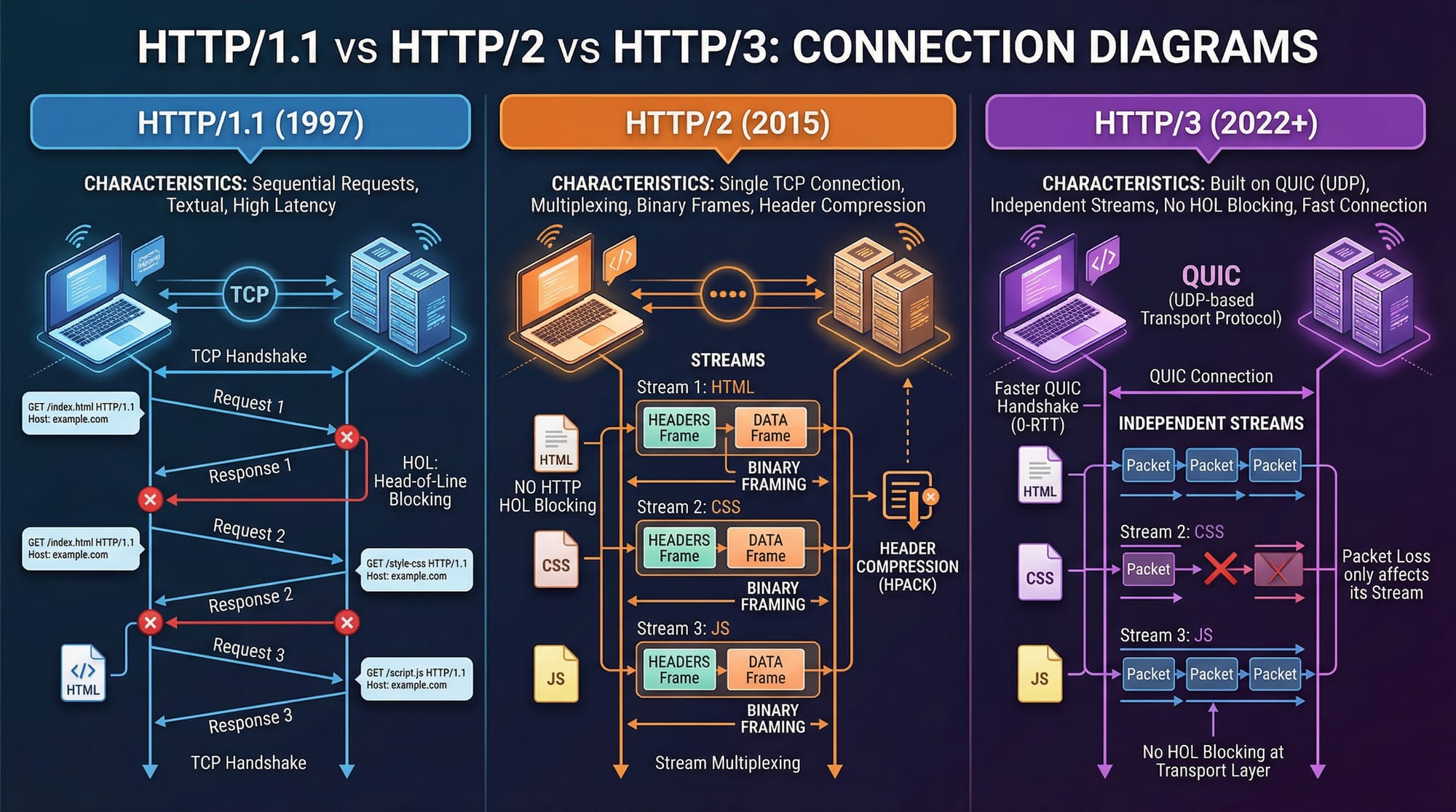
Before HTTP/2, most websites used HTTP/1.1, which had several limitations:
- One request per connection (mostly) → caused delays
- Head-of-line blocking → slow loading when one request blocks others
- Multiple TCP connections required → inefficient and resource-heavy
Example:
Fatima opens an online clothing store in Karachi. Her homepage loads 50 images. In HTTP/1.1, the browser must open multiple connections to download them, slowing performance.
HTTP/2: Multiplexing, Binary Protocol, and Header Compression
HTTP/2 solves many HTTP/1.1 issues:
Key Features:
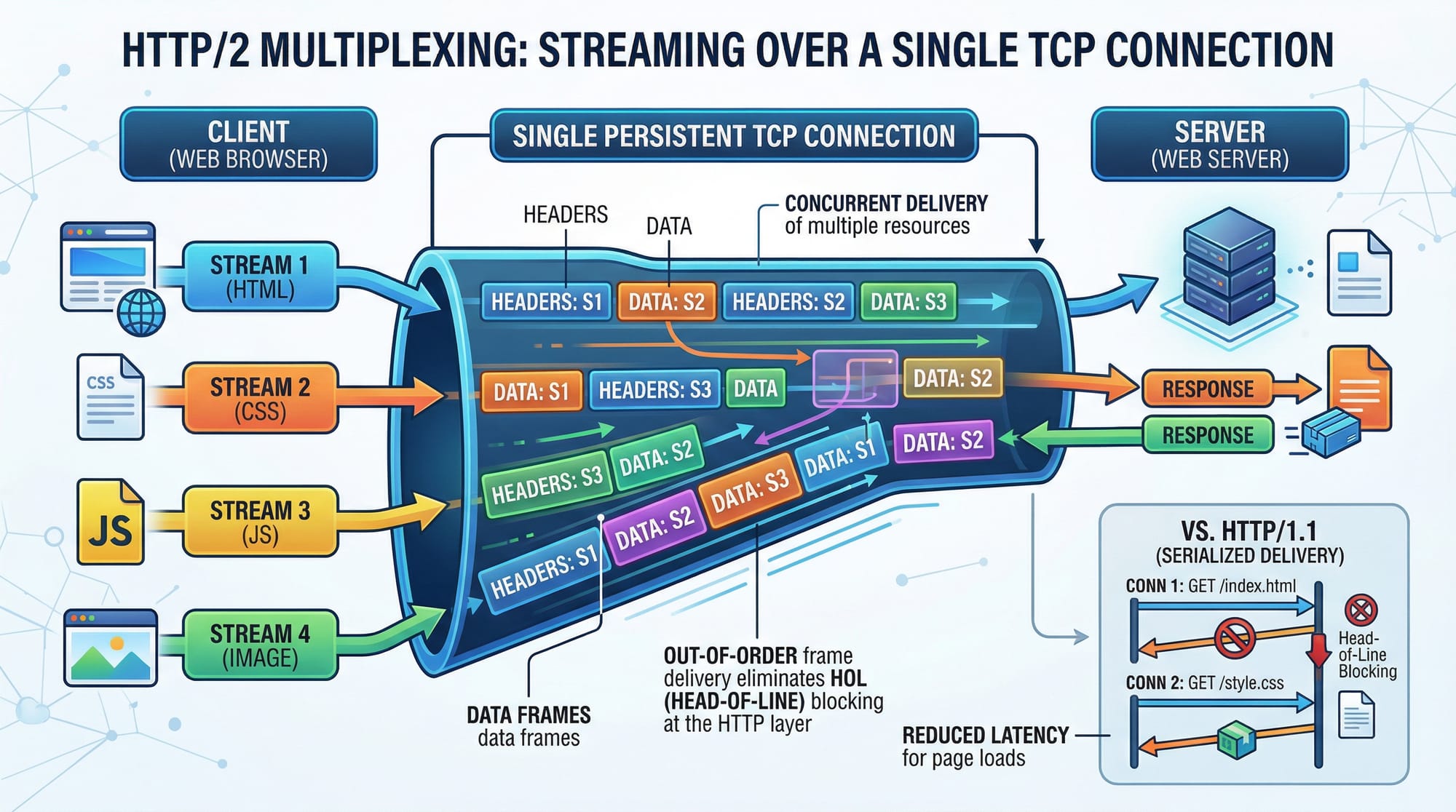
- Multiplexing → multiple requests over a single connection
- Binary protocol → faster parsing compared to text
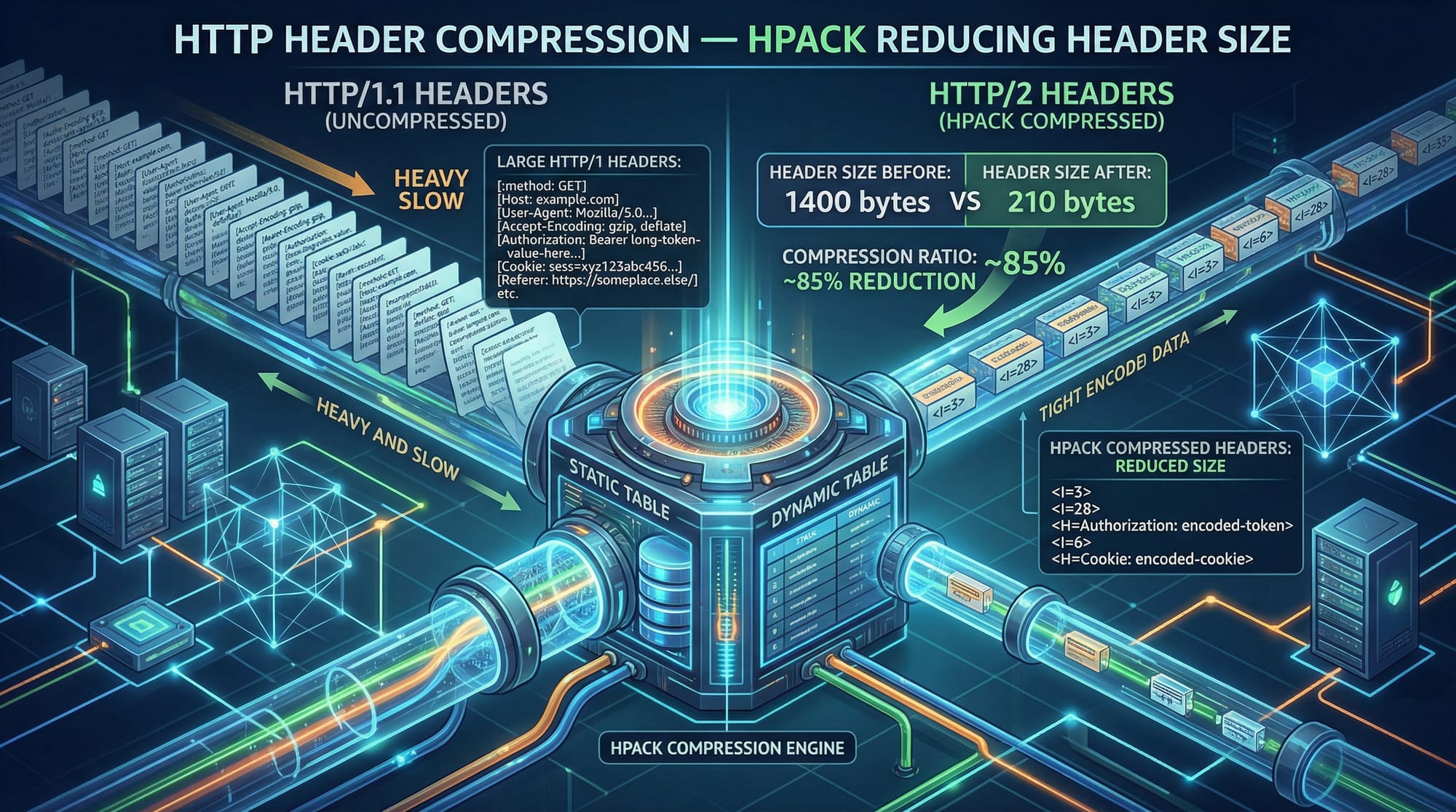
- Header compression (HPACK) → reduces data size
- Server push → server sends resources before request
Example:
Ali’s blog loads CSS, JS, and images simultaneously over one connection—faster and more efficient.
HTTP/3 and QUIC: The Future of Web Transport
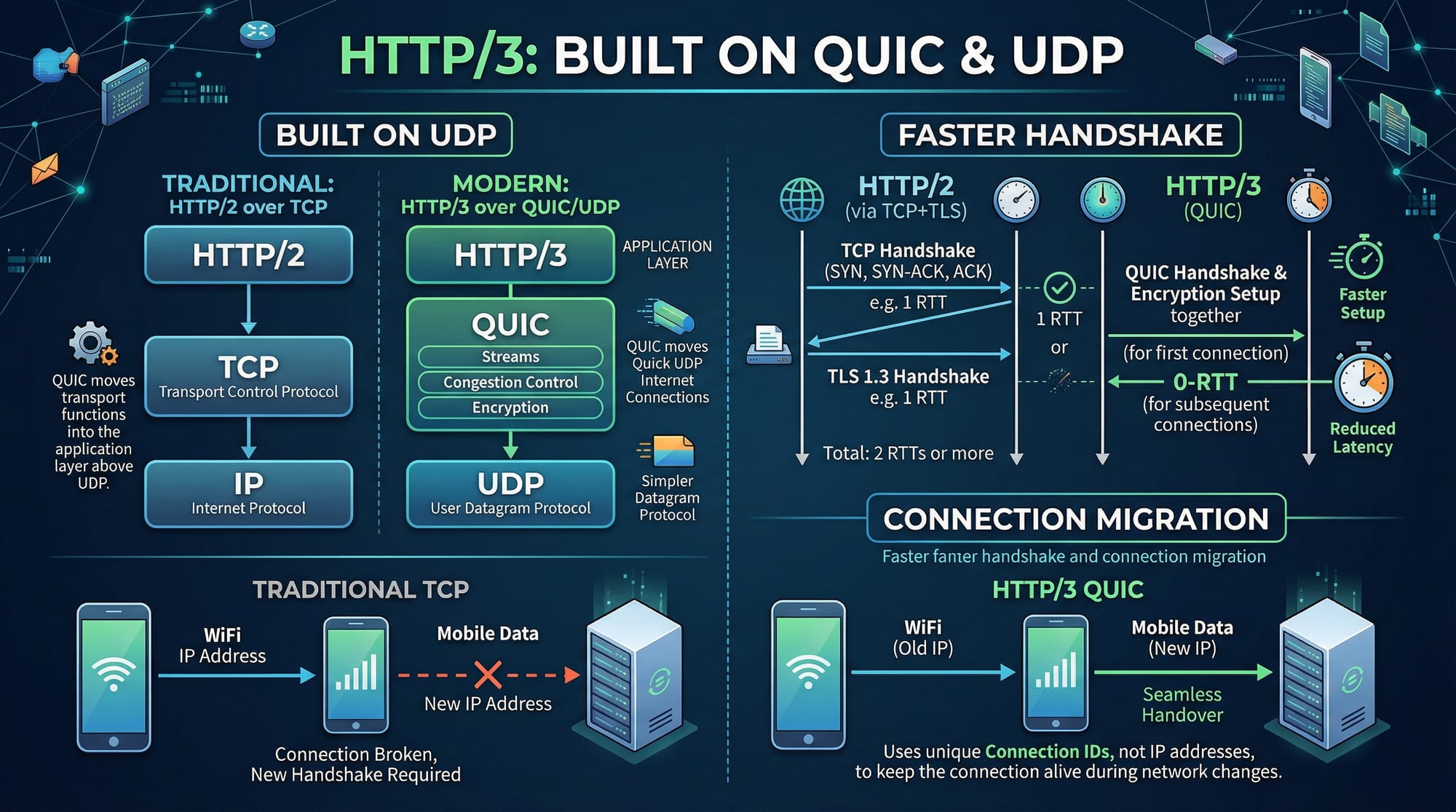
HTTP/3 is built on QUIC, which uses UDP instead of TCP.
Why QUIC?
- Faster connection establishment
- Built-in encryption (like HTTPS)
- No head-of-line blocking at transport level
- Connection migration (works better on mobile networks)
Example:
Ahmad is browsing a website on mobile while switching from WiFi to 4G in Islamabad. HTTP/3 keeps the connection alive without restarting—thanks to QUIC.
HTTP vs HTTPS: Why Security Matters
- HTTP → unencrypted, vulnerable to attacks
- HTTPS → encrypted using TLS
Modern protocols (HTTP/2 & HTTP/3) require HTTPS in most browsers.
Example:
If an e-commerce store in Lahore uses HTTP, user data (like card details in PKR transactions) can be intercepted. HTTPS prevents this.
Practical Code Examples
Example 1: Checking HTTP/2 Support Using curl
curl -I --http2 https://example.com
Explanation:
curl→ command-line tool to make HTTP requests-I→ fetch only headers (not full content)--http2→ force HTTP/2 requesthttps://example.com→ target website
If HTTP/2 is supported, you’ll see:
HTTP/2 200
Example 2: Enabling HTTP/2 in Nginx (Real-World Application)
server {
    listen 443 ssl http2;
    server_name example.com;

    ssl_certificate /etc/ssl/certs/example.crt;
    ssl_certificate_key /etc/ssl/private/example.key;

    root /var/www/html;
    index index.html;
}
Line-by-line Explanation:
server {→ starts server configuration blocklisten 443 ssl http2;→ enables HTTPS (port 443) with HTTP/2server_name example.com;→ domain namessl_certificate→ path to SSL certificatessl_certificate_key→ private key fileroot→ website files directoryindex→ default file
Real-world use case:
A Pakistani startup hosting its site on a VPS in Karachi enables HTTP/2 for faster loading and better SEO.
Example 3: HTTP/3 (QUIC) in Nginx
server {
    listen 443 quic reuseport;
    listen 443 ssl;

    ssl_certificate /etc/ssl/certs/example.crt;
    ssl_certificate_key /etc/ssl/private/example.key;

    add_header Alt-Svc 'h3=":443"';
}
Explanation:
listen 443 quic→ enables HTTP/3 via QUICreuseport→ improves performancessl_certificate→ required for encryptionadd_header Alt-Svc→ tells browser HTTP/3 is available
Common Mistakes & How to Avoid Them
Mistake 1: Using HTTP Instead of HTTPS
Problem:
Developers try to use HTTP/2 without HTTPS.
Why it fails:
Browsers only support HTTP/2 over HTTPS.
Fix:
- Install SSL certificate (Let’s Encrypt is free)
- Redirect HTTP → HTTPS
server {
    listen 80;
    return 301 https://$host$request_uri;
}
Mistake 2: Not Optimizing Assets Despite HTTP/2
Problem:
Developers assume HTTP/2 removes need for optimization.
Reality:
HTTP/2 improves performance—but large images still slow down sites.
Fix:
- Compress images
- Use lazy loading
- Minify CSS/JS
Practice Exercises
Exercise 1: Check Protocol Version
Problem:
Use curl to check whether a website supports HTTP/2.
Solution:
curl -I --http2 https://google.com
Explanation:
- Sends request headers
- Forces HTTP/2
- Displays protocol version
Exercise 2: Enable HTTPS Redirection
Problem:
Redirect all HTTP traffic to HTTPS in Nginx.
Solution:
server {
    listen 80;
    server_name yoursite.com;

    return 301 https://yoursite.com$request_uri;
}
Explanation:
listen 80→ HTTP portserver_name→ domainreturn 301→ permanent redirect$request_uri→ preserves path
Frequently Asked Questions
What is HTTP/2?
HTTP/2 is an improved version of HTTP that allows multiple requests over a single connection using multiplexing, making websites faster and more efficient.
What is HTTP/3 (QUIC)?
HTTP/3 uses QUIC (based on UDP) instead of TCP, providing faster connections, reduced latency, and better performance on unstable networks.
What is the difference between HTTP and HTTPS?
HTTP is unencrypted, while HTTPS uses encryption (TLS) to secure data between client and server, protecting user information.
How do I enable HTTP/2 on my website?
You need an HTTPS-enabled server (like Nginx or Apache) and configure it to support HTTP/2 using SSL certificates.
Is HTTP/3 widely supported?
HTTP/3 is supported by modern browsers like Chrome and Firefox, but server-side support is still growing and may require additional setup.
Summary & Key Takeaways
- HTTP/2 improves speed with multiplexing and header compression
- HTTP/3 uses QUIC over UDP for faster and more reliable connections
- HTTPS is mandatory for modern protocols
- HTTP/3 reduces latency and supports connection migration
- Optimization (images, scripts) is still important even with HTTP/2
- Learning these protocols gives Pakistani developers a competitive edge
Next Steps & Related Tutorials
To deepen your understanding, explore these related tutorials on theiqra.edu.pk:
- Learn how to optimize websites with our Web Performance Optimization Guide
- Understand secure communication in our HTTPS Tutorial for Beginners
- Improve backend performance with our API Design Best Practices guide
- Master deployment with our Nginx Configuration Tutorial
By mastering http2 tutorial concepts, understanding http3 quic, and knowing the difference between http vs https, you are well on your way to becoming a modern web developer ready for real-world challenges in Pakistan and beyond 🚀
Test Your Python Knowledge!
Finished reading? Take a quick quiz to see how much you've learned from this tutorial.