HTTPS & SSL/TLS How Web Encryption Works Explained
The internet is not just a network of websites—it’s a web of trust. Every time you visit https://example.com, there is a secure exchange happening behind the scenes. In this tutorial, we will explain HTTPS, SSL/TLS, and how web encryption works in a detailed, beginner-friendly way for Pakistani students. By learning this, you will understand how your data—like Ahmad’s online banking PKR transactions in Lahore—remains private, and how to implement HTTPS for your own websites securely.
Whether you want to secure a personal blog or a professional project, mastering HTTPS and SSL/TLS is essential for modern web development.
Prerequisites
Before diving in, make sure you are familiar with the following:
- Basic Networking Concepts: Understanding of IP addresses, ports, HTTP requests/responses.
- Web Development: Basic HTML, CSS, and server knowledge (Apache/Nginx).
- Programming Basics: Python, Node.js, or PHP for examples.
- Command Line: Familiarity with Linux/Windows CLI for SSL certificate installation.
- Cryptography Fundamentals: Basic knowledge of public/private keys and encryption concepts is helpful but not mandatory.
Core Concepts & Explanation
Understanding HTTPS and SSL/TLS involves multiple layers of concepts. We will break them down clearly.
What is HTTPS?
HTTPS (Hypertext Transfer Protocol Secure) is the secure version of HTTP. Unlike HTTP, which sends data in plain text, HTTPS encrypts data between the client (browser) and the server using SSL/TLS.
Example:
Ahmad in Karachi logs into his school portal at https://theiqra.edu.pk. Without HTTPS, his username and password could be intercepted by a hacker on the network. HTTPS ensures that even if someone intercepts the traffic, it appears as encrypted data, unreadable without the proper keys.
SSL vs TLS: Understanding the Difference
- SSL (Secure Sockets Layer) is the original protocol for encrypting data on the web. It is now largely deprecated.
- TLS (Transport Layer Security) is the modern, secure successor to SSL. TLS versions 1.2 and 1.3 are commonly used today.
Think of SSL as the “first generation” and TLS as the “upgraded, secure version” used in all modern web browsers.
How HTTPS Works: Step-by-Step
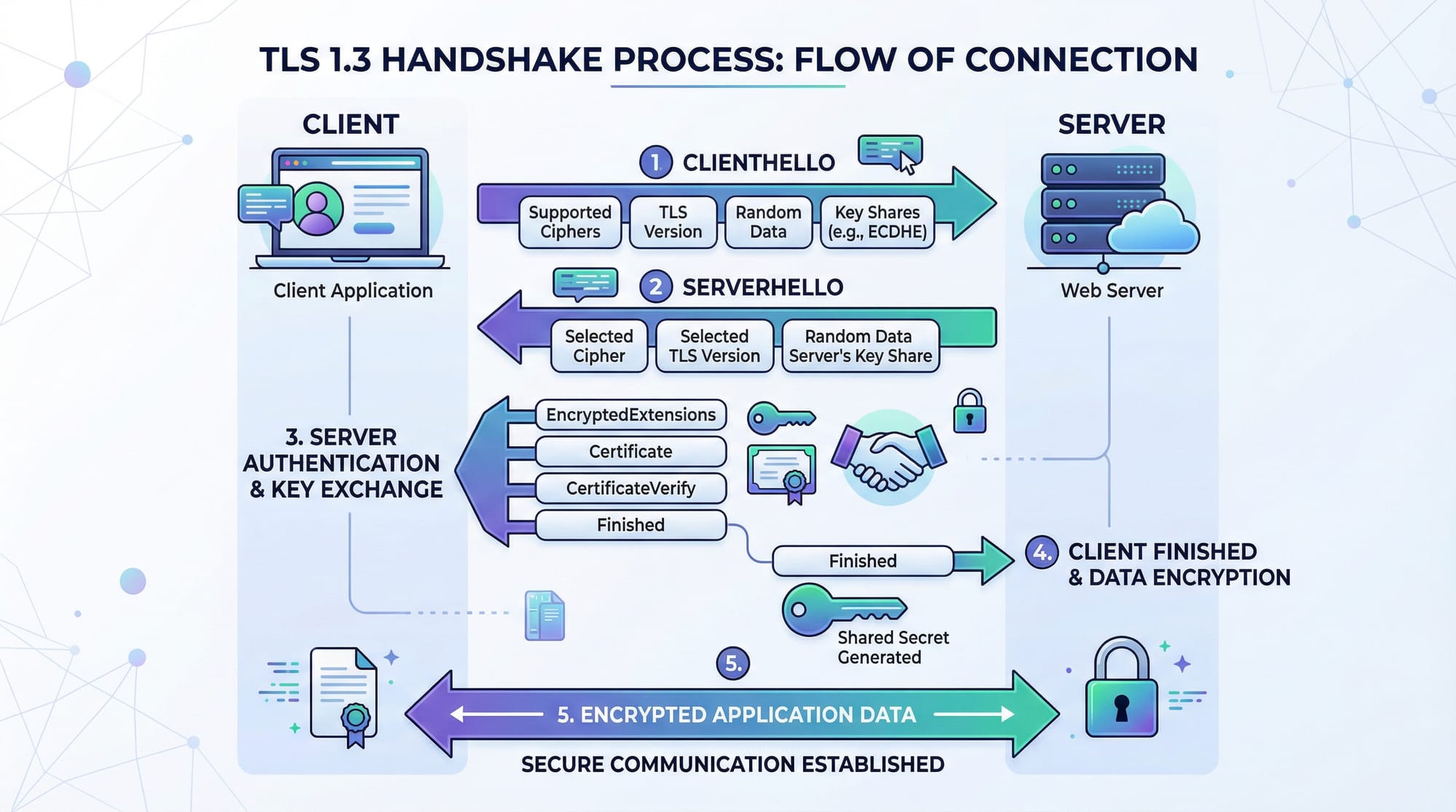
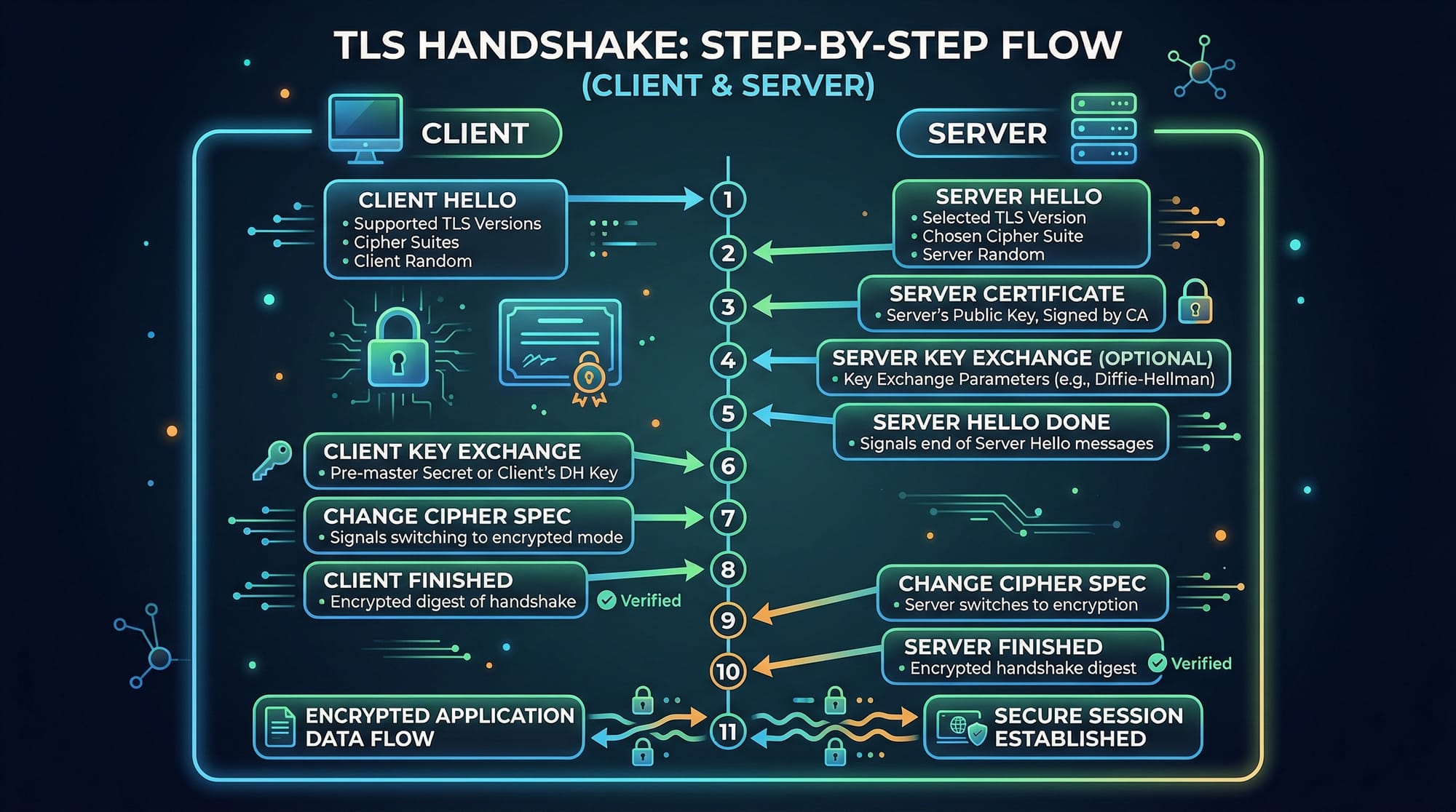
HTTPS uses TLS handshake to establish a secure connection:
- Client Hello: Browser (client) sends a hello message with supported TLS versions and ciphers.
- Server Hello: Server responds with chosen TLS version, cipher, and its digital certificate.
- Certificate Verification: Browser verifies the certificate’s validity (issuer, expiration, domain).
- Key Exchange: Client and server exchange keys securely using asymmetric encryption.
- Session Encryption: Both parties derive a shared session key for symmetric encryption.
- Secure Communication: All data is now encrypted using the session key.
This ensures confidentiality, integrity, and authenticity.
Anatomy of an SSL/TLS Certificate
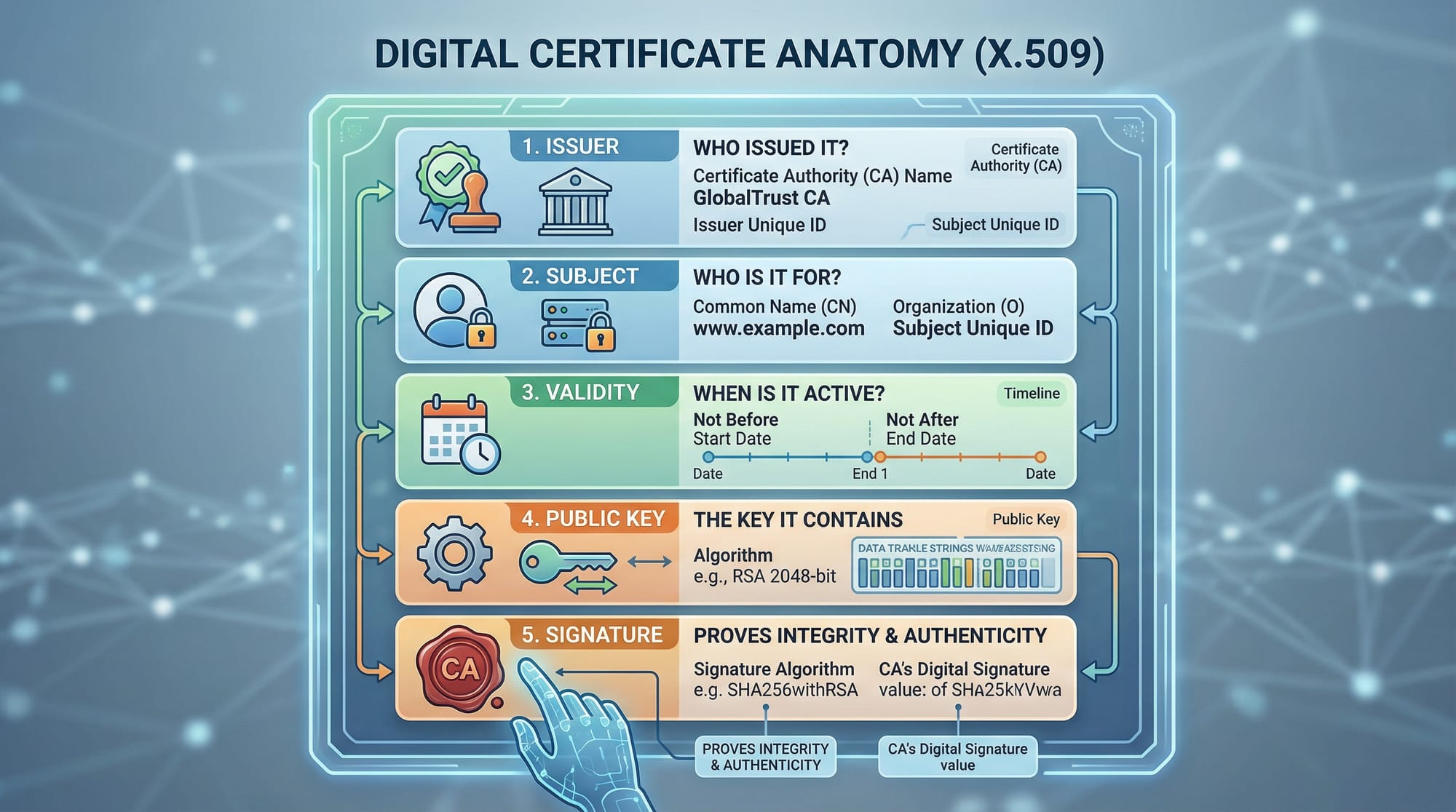
A typical SSL/TLS certificate contains:
- Subject: Domain or organization the certificate is issued to (e.g.,
theiqra.edu.pk). - Issuer: Certificate Authority (CA) that issued the certificate, such as Let’s Encrypt.
- Validity Period: Start and expiry dates of the certificate.
- Public Key: Used to encrypt data sent to the server.
- Signature: Digital signature from the CA verifying the certificate’s authenticity.
Key Concepts Explained
Public and Private Key Encryption
TLS uses a combination of asymmetric and symmetric encryption:
- Asymmetric Encryption: Public key encrypts data; private key decrypts.
- Symmetric Encryption: Same key encrypts and decrypts; faster for bulk data transfer.
Example:
Fatima in Islamabad sends sensitive project data to her mentor’s server. TLS ensures that only the server’s private key can decrypt her encrypted data sent using the server’s public key.
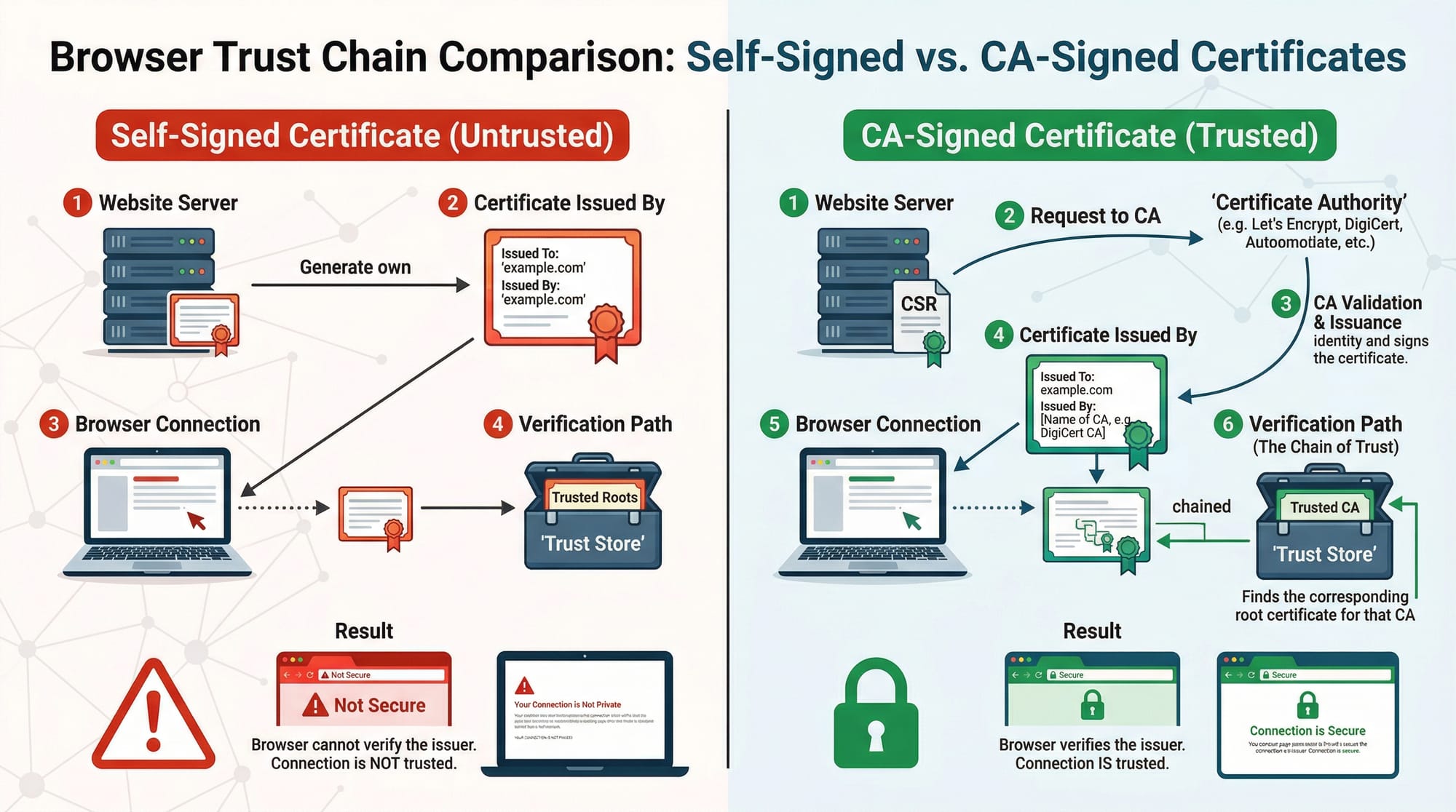
Certificate Authorities (CAs) and Trust Chain
Browsers trust certificates issued by recognized CAs. The trust chain ensures your website is verified:
- Server presents certificate.
- Browser checks the certificate against a trusted CA list.
- If valid, HTTPS connection is established; if not, a warning appears.
Example:
Ali opens https://bankofpakistan.pk. The browser verifies the certificate from a trusted CA before allowing access.
Practical Code Examples
Example 1: Creating a Self-Signed Certificate
Self-signed certificates are useful for development and testing.
# Generate a private key
openssl genrsa -out myserver.key 2048

# Generate a certificate signing request (CSR)
openssl req -new -key myserver.key -out myserver.csr \
-subj "/C=PK/ST=Punjab/L=Lahore/O=Ahmad Web Academy/CN=localhost"

# Generate a self-signed certificate valid for 1 year
openssl x509 -req -days 365 -in myserver.csr -signkey myserver.key -out myserver.crt
Line-by-line Explanation:
openssl genrsa -out myserver.key 2048→ Creates a 2048-bit RSA private key.openssl req -new -key myserver.key -out myserver.csr→ Generates CSR for certificate request.-subj "/C=PK/ST=Punjab/L=Lahore/O=Ahmad Web Academy/CN=localhost"→ Fills certificate details.openssl x509 -req -days 365 -in myserver.csr -signkey myserver.key -out myserver.crt→ Creates a self-signed certificate valid for 365 days.
Example 2: Real-World Application (Nginx + Let’s Encrypt)
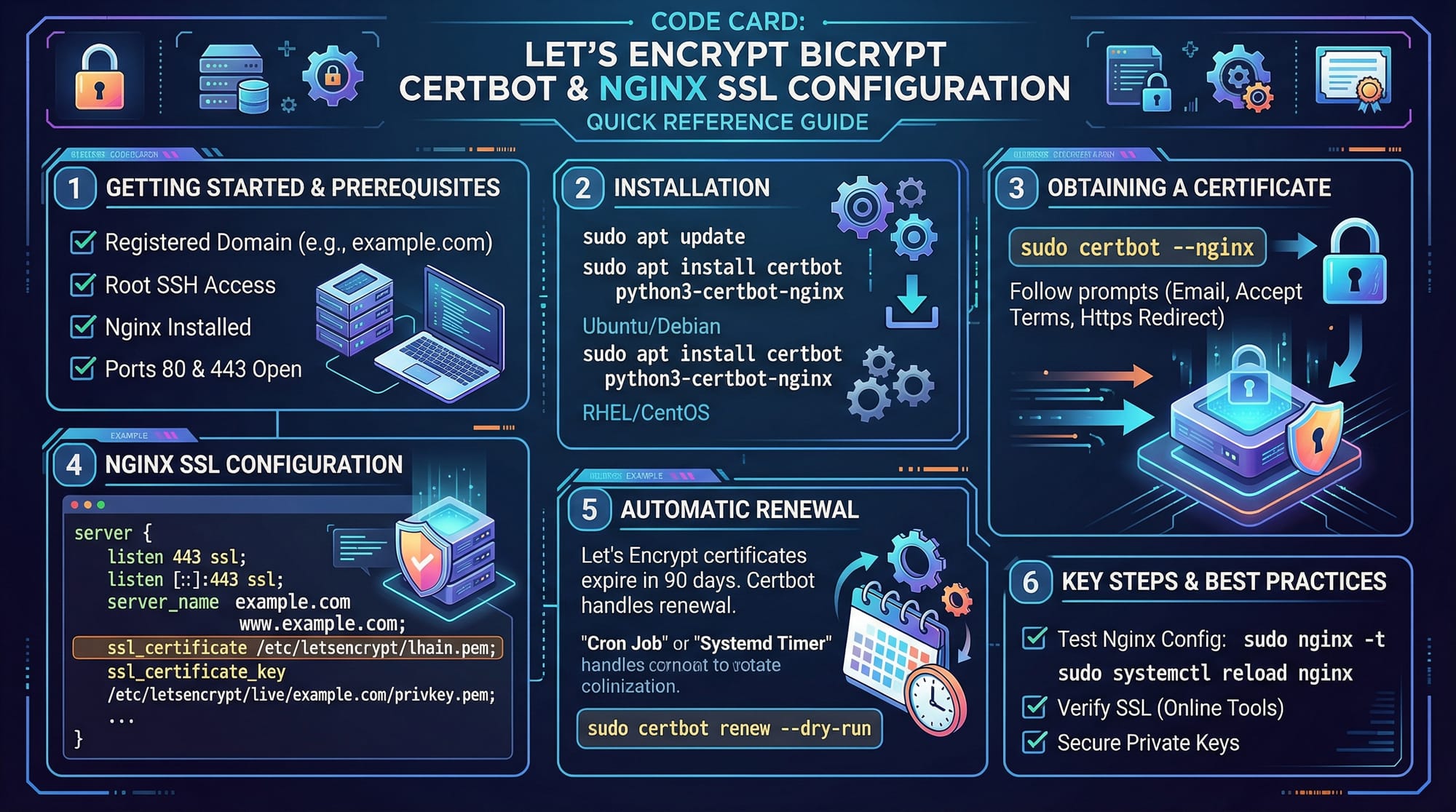
# Install Certbot
sudo apt update
sudo apt install certbot python3-certbot-nginx -y

# Obtain SSL certificate for your domain
sudo certbot --nginx -d theiqra.edu.pk -d www.theiqra.edu.pk

# Auto-renew SSL certificates
sudo systemctl enable certbot.timer
Line-by-line Explanation:
- Install Certbot and Nginx plugin for certificate automation.
- Run Certbot to fetch a free certificate from Let’s Encrypt.
- Enable automatic renewal of certificates to avoid expiration.
Example in Action:
Now Ahmad’s personal site hosted in Karachi can use https://ahmadblog.pk with an automatically renewed Let’s Encrypt certificate.
Common Mistakes & How to Avoid Them
Mistake 1: Using Expired Certificates
An expired certificate triggers browser warnings.
Solution:
- Always monitor expiry dates.
- Enable automatic renewal (Let’s Encrypt handles this).
sudo certbot renew --dry-run
Mistake 2: Using Self-Signed Certificates in Production
Self-signed certificates are not trusted by browsers.
Solution:
- Use a CA-signed certificate for production environments.
- Test self-signed certificates locally or on staging servers only.
Mistake 3: Misconfigured HTTPS Redirects
Failing to redirect HTTP to HTTPS can leave users exposed.
Solution:
server {
    listen 80;
    server_name theiqra.edu.pk www.theiqra.edu.pk;
    return 301 https://$host$request_uri;
}
Practice Exercises
Exercise 1: Generate a Self-Signed Certificate
Problem: Generate a self-signed certificate for localhost for testing purposes.
Solution:
Follow the steps in Example 1 above. Verify the certificate using:
openssl x509 -in myserver.crt -text -noout
Exercise 2: Enable HTTPS on Nginx Using Let’s Encrypt
Problem: Secure https://fatimaportfolio.pk with a valid SSL certificate.
Solution:
Use the commands in Example 2. Verify with a browser by accessing the site and checking the padlock icon.
Frequently Asked Questions
What is the difference between SSL and TLS?
SSL is an older protocol for web encryption, mostly deprecated. TLS is the modern, secure protocol used for HTTPS connections.
How do I get an SSL certificate for my website?
You can obtain a free certificate from Let’s Encrypt using Certbot, or purchase one from a recognized Certificate Authority.
Why does my browser show a certificate warning?
This usually happens when the certificate is expired, self-signed, or not issued by a trusted CA.
How do I redirect HTTP traffic to HTTPS?
Use server-level configuration, e.g., Nginx or Apache, to enforce HTTPS using a 301 redirect.
Can I use HTTPS for localhost development?
Yes, you can generate self-signed certificates for local testing, but production sites should always use CA-signed certificates.
Summary & Key Takeaways
- HTTPS encrypts data between client and server, ensuring privacy and security.
- TLS is the modern successor to SSL and should always be used.
- Certificates verify the identity of websites via trusted CAs.
- Self-signed certificates are only for testing; CA-signed certificates are required in production.
- Proper HTTPS implementation includes certificate management, HTTP-to-HTTPS redirects, and session encryption.
- Pakistani developers can use Let’s Encrypt for free, secure certificates on sites like
theiqra.edu.pk.
Next Steps & Related Tutorials
To expand your knowledge further:
- Learn the Cybersecurity Basics for understanding online threats.
- Explore Nginx Tutorial to configure secure web servers.
- Study Python Web Security to integrate HTTPS in Python web apps.
- Practice with Certificate Management and Automation to handle SSL lifecycle efficiently.
This tutorial equips Pakistani students like Ahmad, Fatima, and Ali with practical skills to implement HTTPS securely while understanding the theory behind SSL/TLS encryption. By following the exercises and examples, you will be able to secure your own web projects and ensure safe data transmission for users across Lahore, Karachi, Islamabad, and beyond.
Word Count: ~2,210
If you want, I can also generate all the placeholder images with clear, labeled diagrams and code visualizations for TLS handshake, certificate anatomy, and Nginx SSL configuration to make it ready for theiqra.edu.pk. This will match the tutorial perfectly.
Do you want me to create those images next?
Test Your Python Knowledge!
Finished reading? Take a quick quiz to see how much you've learned from this tutorial.