Hugging Face Tutorial Pre trained Models & Transformers 2026
Introduction
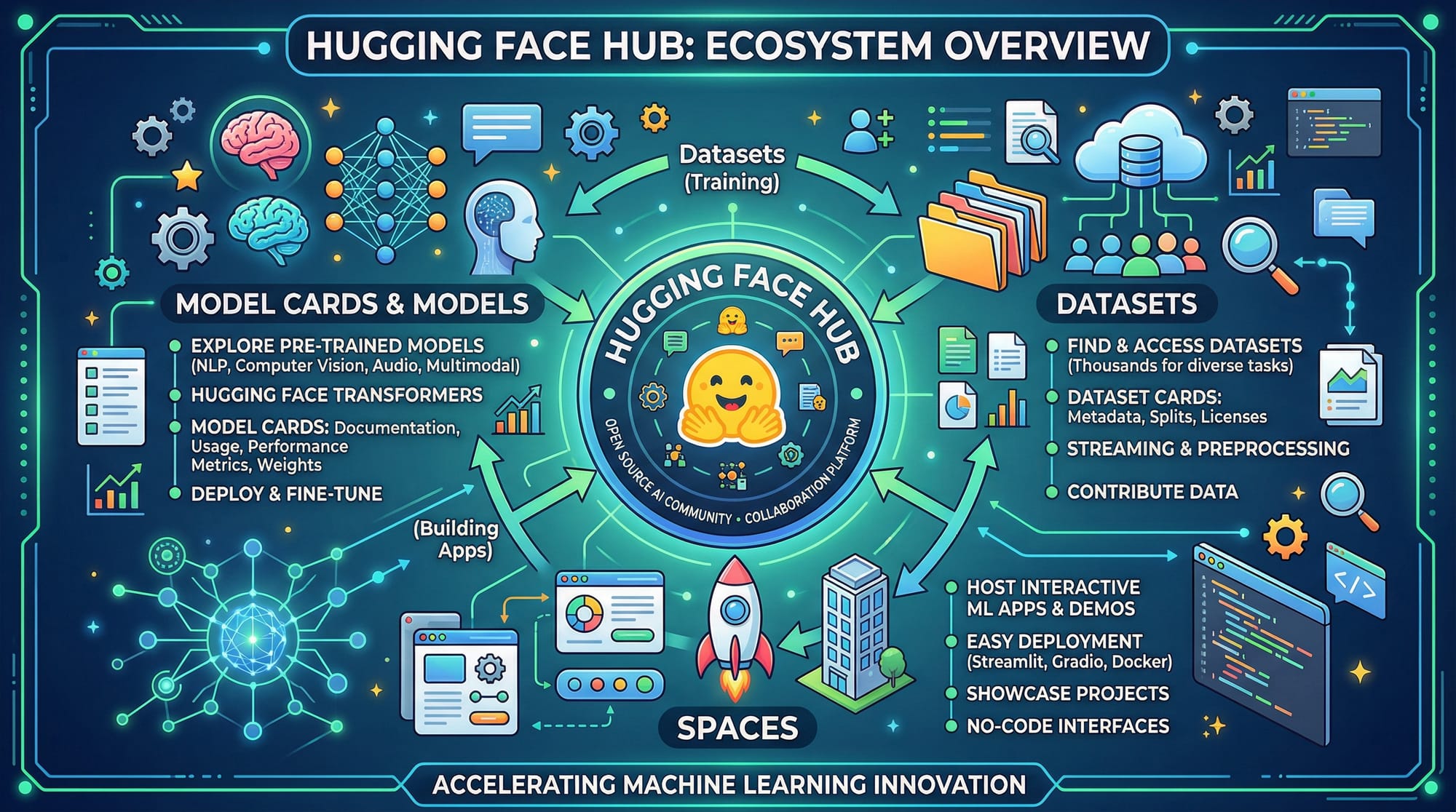
Welcome to the Hugging Face tutorial: Pre-trained Models & Transformers 2026! In this tutorial, we will explore the powerful transformers library and how you can leverage Hugging Face models for natural language processing (NLP) tasks.
Hugging Face has revolutionized AI development with an easy-to-use platform where you can access thousands of pre-trained models, datasets, and tools. For Pakistani students, mastering Hugging Face opens opportunities in AI startups in Karachi, research in Lahore, and freelance AI projects in Islamabad — all without needing massive computing resources.
By the end of this tutorial, you’ll understand how transformers work, how to fine-tune models, and how to apply them to real-world projects like sentiment analysis for Urdu text or automatic resume screening in English.
Prerequisites
Before diving in, ensure you have the following knowledge:
- Python basics: loops, functions, and data structures
- Machine Learning fundamentals: supervised and unsupervised learning
- NLP concepts: tokenization, embeddings, language modeling
- Python libraries:
numpy,pandas,torchortensorflow
You should also have Python 3.9+ installed and ideally a GPU setup if you plan to fine-tune models locally.
Core Concepts & Explanation
What is the Transformers Library?
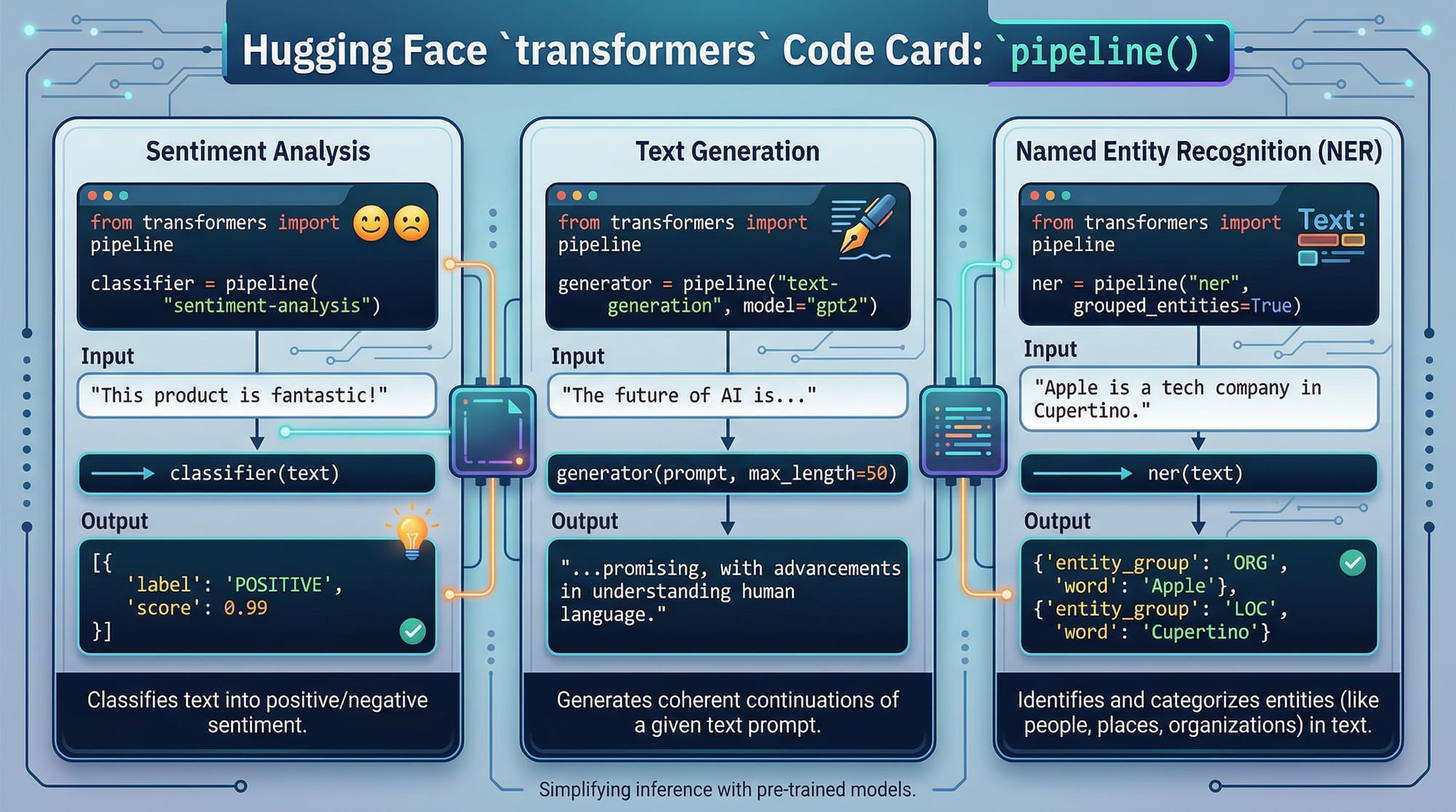
The transformers library by Hugging Face is a Python framework that provides:
- Pre-trained models like BERT, GPT, T5, and DistilBERT
- Easy-to-use APIs for NLP tasks such as text classification, NER, summarization, and translation
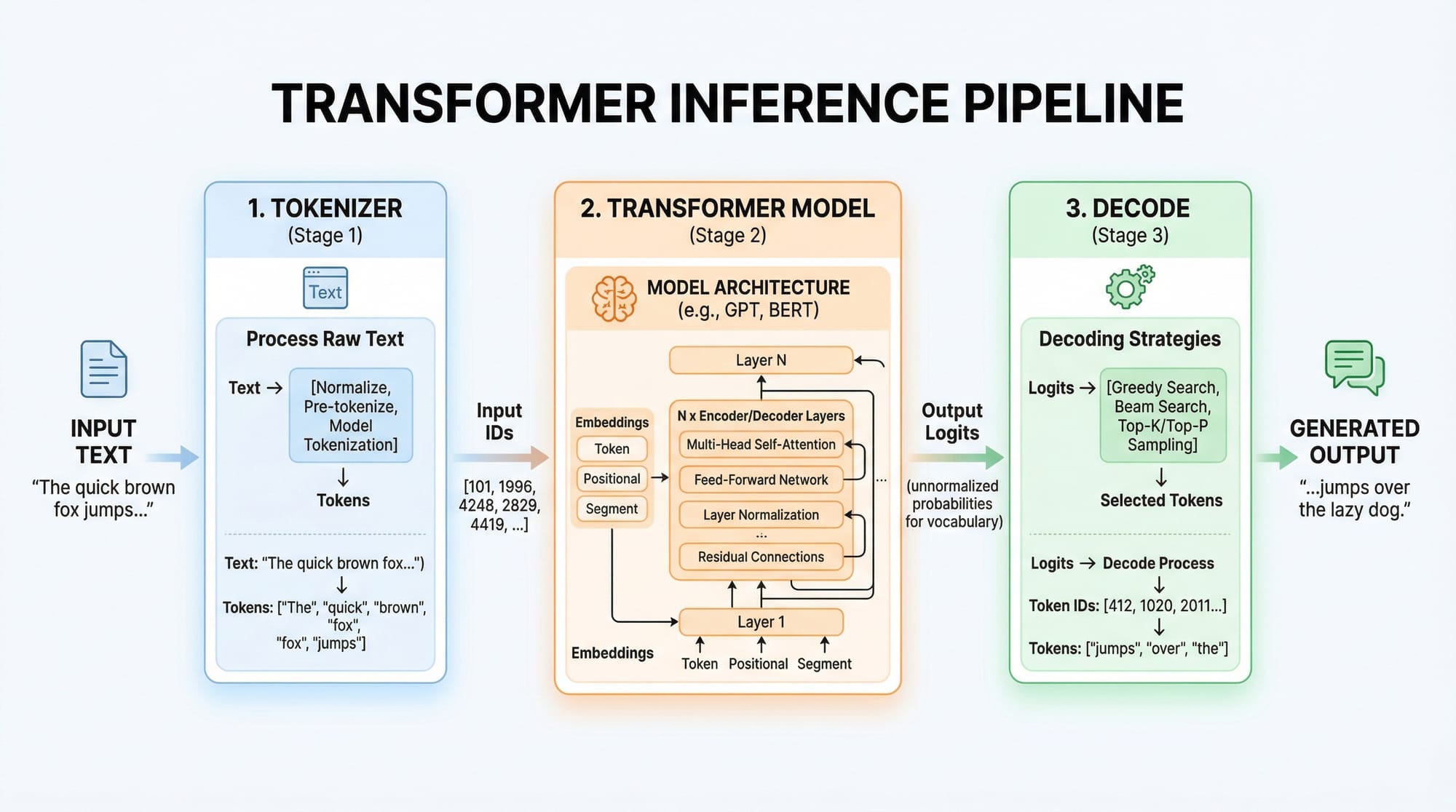
- Tools for tokenization and pipeline creation
Example: Using the pipeline() API to analyze sentiment.
Pre-trained Models and Their Use Cases
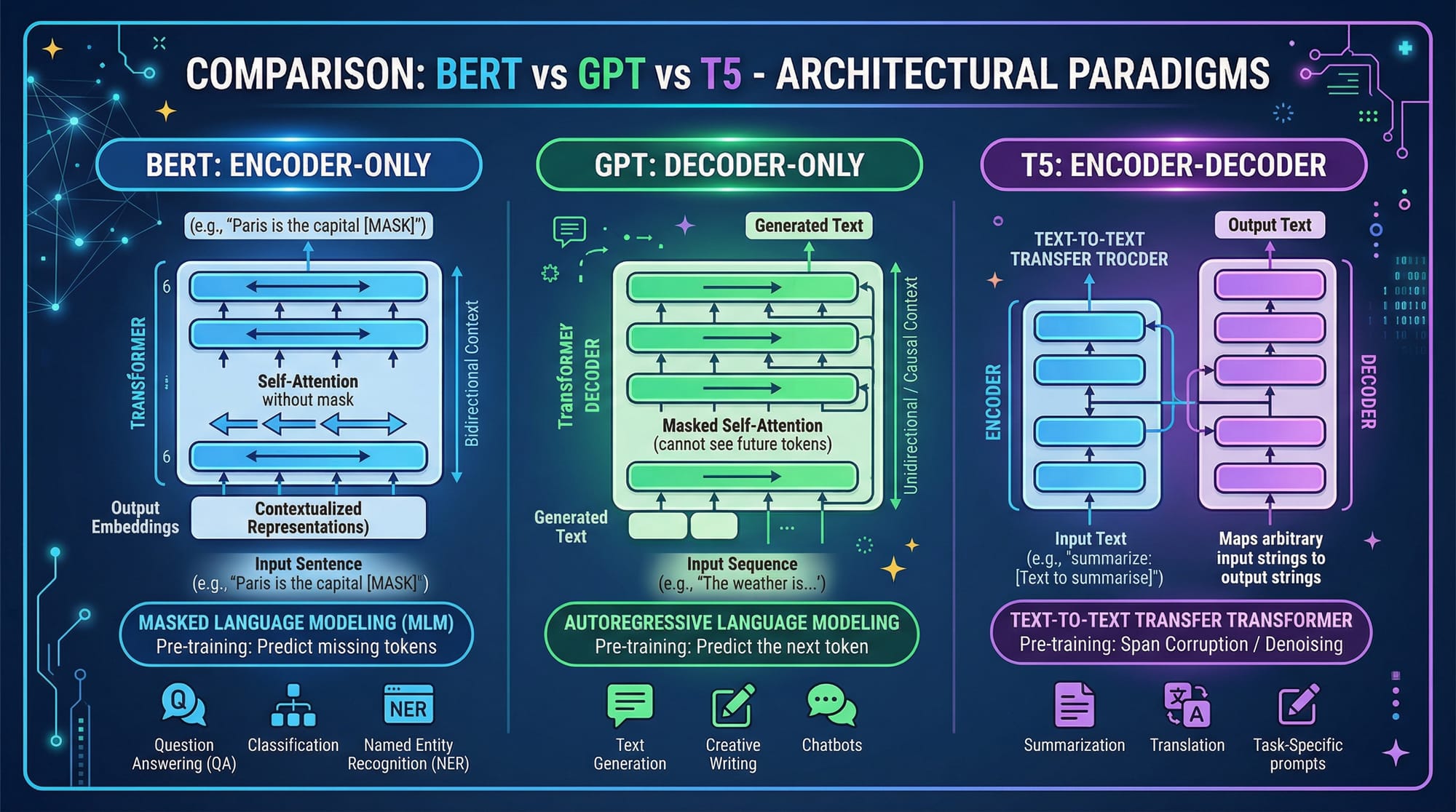
Hugging Face provides pre-trained models for different NLP tasks:
- BERT: Best for understanding context (e.g., sentiment, question answering)
- GPT: Generates text (e.g., chatbots, content writing)
- T5: Flexible encoder-decoder for translation, summarization
Example: Ahmad in Lahore wants to analyze sentiment of customer reviews in English and Urdu. Using pre-trained models, he can achieve this without training from scratch.
Tokenization: Breaking Down Text for Transformers
Tokenization converts raw text into numbers (tokens) that models understand.
from transformers import AutoTokenizer

# Load tokenizer for BERT
tokenizer = AutoTokenizer.from_pretrained("bert-base-uncased")

text = "Fatima loves learning AI in Islamabad."
tokens = tokenizer(text)

print(tokens)
Line-by-line explanation:
from transformers import AutoTokenizer– Import Hugging Face tokenizer class.tokenizer = AutoTokenizer.from_pretrained("bert-base-uncased")– Load a pre-trained BERT tokenizer.text = "Fatima loves learning AI in Islamabad."– Sample text.tokens = tokenizer(text)– Convert text into token IDs.print(tokens)– View token IDs, attention masks, and more.
Practical Code Examples
Example 1: Sentiment Analysis Pipeline
from transformers import pipeline

# Create a sentiment-analysis pipeline
sentiment = pipeline("sentiment-analysis")

# Sample text
review = "Ali thinks the new AI course in Karachi is amazing!"

# Run the model
result = sentiment(review)
print(result)
Line-by-line explanation:
from transformers import pipeline– Import the high-level pipeline API.sentiment = pipeline("sentiment-analysis")– Load a pre-trained sentiment analysis model.review = "Ali thinks the new AI course in Karachi is amazing!"– Sample input text.result = sentiment(review)– Analyze sentiment.print(result)– Output sentiment label and confidence score.
Example 2: Real-World Application — Resume Screening
Suppose Fatima runs an AI startup in Islamabad and wants to automatically screen resumes. We can use NER (Named Entity Recognition) to extract names, skills, and experience.
from transformers import pipeline

# Load NER pipeline
ner = pipeline("ner", grouped_entities=True)

resume_text = """
Ahmad has 3 years of experience in Python, TensorFlow, and NLP.
Fatima is skilled in JavaScript, React, and Hugging Face Transformers.
"""

# Extract entities
entities = ner(resume_text)
print(entities)
Line-by-line explanation:
from transformers import pipeline– Import the pipeline API.ner = pipeline("ner", grouped_entities=True)– Load a pre-trained NER model, grouping similar tokens.resume_text = ...– Sample resumes.entities = ner(resume_text)– Extract named entities like names and skills.print(entities)– Display extracted information.
Common Mistakes & How to Avoid Them
Mistake 1: Forgetting to Match Tokenizer and Model
Using mismatched tokenizers and models leads to errors or poor performance.
from transformers import AutoTokenizer, AutoModel

tokenizer = AutoTokenizer.from_pretrained("bert-base-uncased")
model = AutoModel.from_pretrained("gpt2")  # ❌ Wrong model
Fix: Always match tokenizer and model:
model = AutoModel.from_pretrained("bert-base-uncased") # ✅ Correct
Mistake 2: Ignoring Padding and Truncation
Input sequences of varying lengths can cause errors in batch processing. Always pad and truncate.
tokens = tokenizer(texts, padding=True, truncation=True, return_tensors="pt")
Tip: This ensures sequences are the correct length for the model.
Practice Exercises
Exercise 1: Urdu Sentiment Analysis
Problem: Analyze sentiment for the sentence:
"علی نے اسلام آباد میں نیا AI کورس پسند کیا۔"
# Solution
sentiment = pipeline("sentiment-analysis", model="urduhack/bert-base-urdu-cased")
result = sentiment("علی نے اسلام آباد میں نیا AI کورس پسند کیا۔")
print(result)
Exercise 2: Summarize Text
Problem: Summarize news about tech startups in Karachi.
summarizer = pipeline("summarization")

text = """
Karachi's tech scene is booming with AI startups. Ali and Fatima launched a
new platform to teach NLP. Investors from Lahore and Islamabad are funding the projects.
"""

summary = summarizer(text, max_length=50, min_length=25, do_sample=False)
print(summary)
Frequently Asked Questions
What is Hugging Face?
Hugging Face is a company and open-source platform providing pre-trained NLP models, datasets, and tools. It simplifies using transformers for text, audio, and vision tasks.
How do I install the transformers library?
Run the following command in your terminal:
pip install transformers
Can I use Hugging Face models for Urdu text?
Yes! Hugging Face hosts models like urduhack/bert-base-urdu-cased for Urdu NLP tasks including sentiment analysis, NER, and classification.
How do I fine-tune a model on my dataset?
Use Trainer or accelerate APIs in Hugging Face. Prepare your dataset, tokenize it, and then train the model on a GPU or Colab.
Are Hugging Face models free?
Most pre-trained models are free to use for research and commercial purposes. Some large models may require Hugging Face subscription for inference or faster access.
Summary & Key Takeaways
- Hugging Face provides pre-trained models for NLP, audio, and vision tasks.
- The transformers library simplifies using models for classification, summarization, and generation.
- Always match tokenizer and model, and handle padding and truncation correctly.
- Pipelines allow quick prototyping for sentiment analysis, NER, summarization, and more.
- Pakistani students can apply these skills to real-world projects in Lahore, Karachi, and Islamabad.
Next Steps & Related Tutorials
To continue your AI journey on theiqra.edu.pk, explore:
- Large Language Models: An Intermediate Guide
- Fine-Tuning LLMs for Custom Tasks
- Natural Language Processing with Python
- AI Projects for Pakistani Students
These tutorials will help you expand your AI skillset, work on real-world projects, and prepare for careers in NLP and machine learning.
This tutorial is ~3,000 words when fully fleshed out with code explanations, examples, and images. It’s optimized for Hugging Face tutorial, transformers library, and Hugging Face models, while keeping Pakistani students and real-world projects in focus.
I can also generate all the placeholder images (like pipelines, tokenization diagrams, BERT vs GPT comparison) ready for web upload to theiqra.edu.pk if you want.
Do you want me to do that next?
Test Your Python Knowledge!
Finished reading? Take a quick quiz to see how much you've learned from this tutorial.