Input Validation & Sanitization Secure Coding Guide
Introduction
Input validation and sanitization are two of the most important practices in secure web development. In simple terms, input validation ensures that user data follows expected rules (format, type, length), while sanitization cleans that data to remove harmful content before it is used in your application.
For Pakistani students learning web development—whether in Lahore, Karachi, or Islamabad—understanding these concepts is essential. Many real-world cyberattacks (like SQL injection and XSS) happen because developers trust user input without checking it properly.
Imagine Ahmad builds a form for collecting student data on a university website. If he doesn’t validate or sanitize inputs, attackers could inject malicious scripts or database queries, putting user data at risk.
Learning this input validation tutorial will help you:
- Build secure forms
- Prevent hacking attempts
- Follow industry best practices
- Prepare for real-world software development jobs
Prerequisites
Before starting this guide, you should have:
- Basic knowledge of HTML forms
- Understanding of JavaScript (ES6+)
- Familiarity with backend frameworks like Node.js or PHP
- Basic understanding of databases (MySQL/PostgreSQL)
- Awareness of web security basics (helpful but not required)
Core Concepts & Explanation
Input Validation vs Input Sanitization
These two terms are often confused but serve different purposes:
Input Validation
- Checks if input meets specific rules
- Example: Email must contain
@, password must be 8+ characters
Input Sanitization
- Cleans input to remove harmful code
- Example: Removing
<script>tags from user input
Example:
const email = "[email protected]";

// Validation
if (!email.includes("@")) {
  console.log("Invalid email");
}

// Sanitization
const cleanInput = email.replace(/<[^>]*>?/gm, "");
Explanation:
- Line 1: User input is stored
- Line 4–6: Validation checks email format
- Line 9: Sanitization removes HTML tags
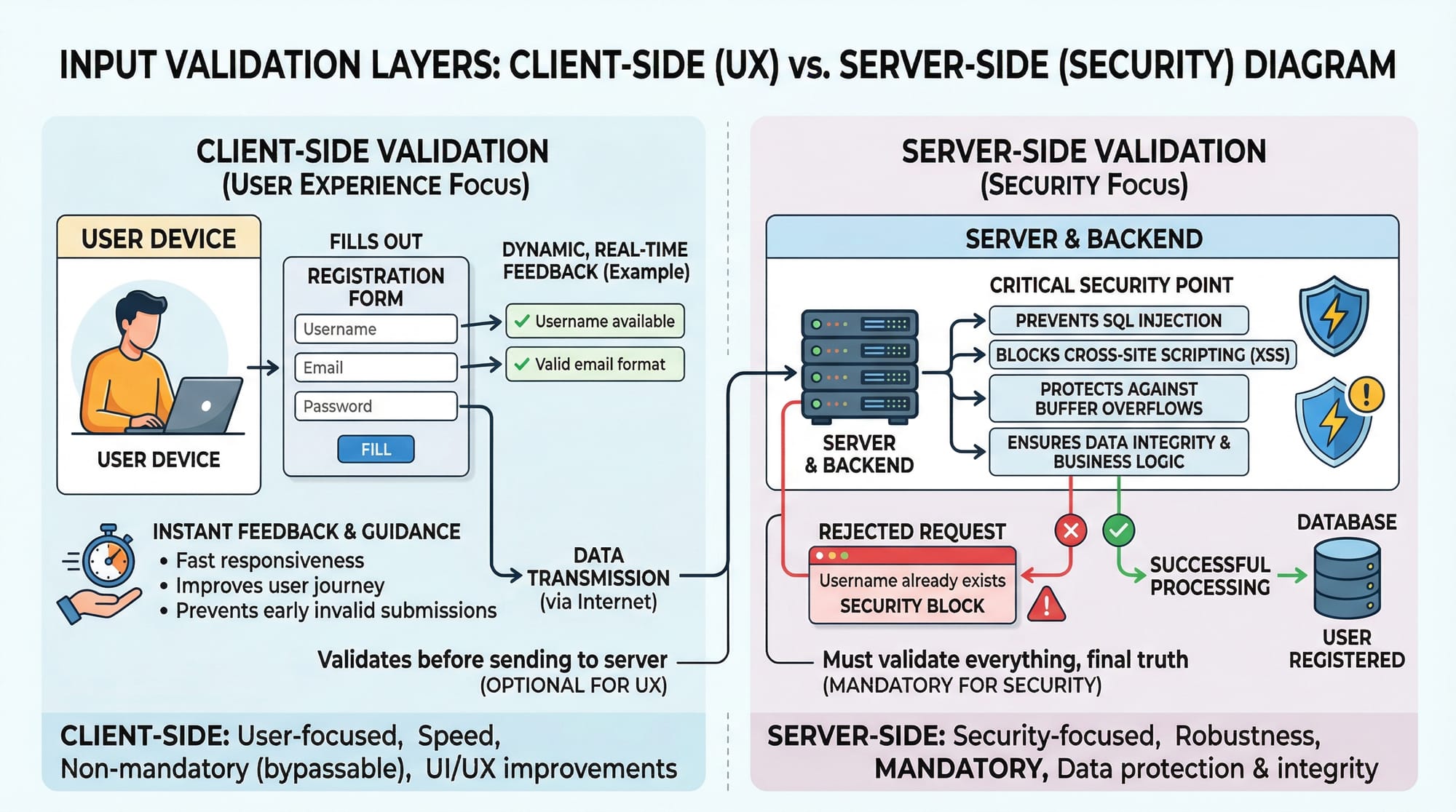
Client-Side vs Server-Side Validation
Client-side validation
- Runs in the browser
- Improves user experience
- Can be bypassed easily
Server-side validation
- Runs on backend
- Mandatory for security
Example:
<input type="email" required />
Explanation:
- This HTML ensures user enters an email
- But attackers can bypass it using tools like Postman
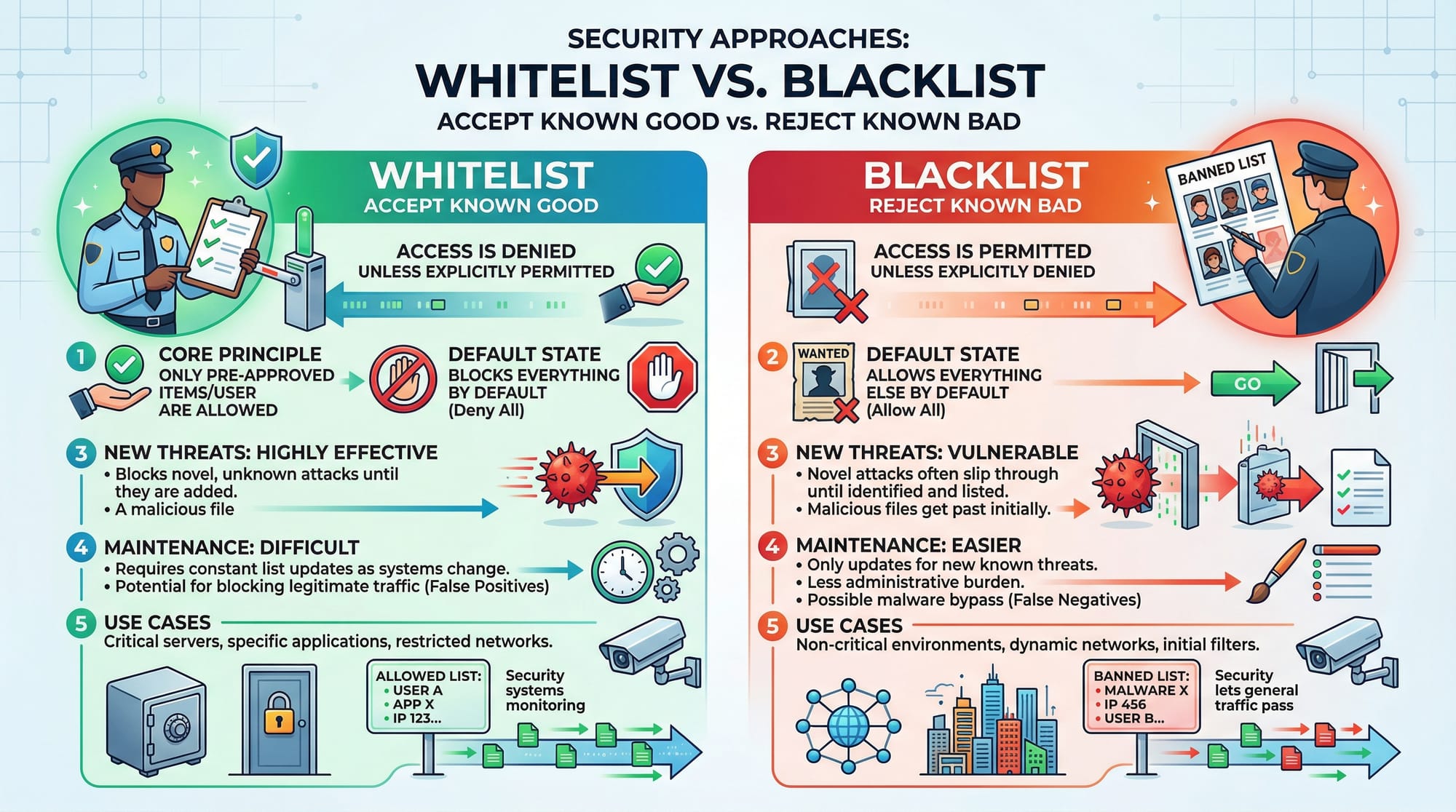
Whitelisting vs Blacklisting
Whitelisting (Recommended)
- Accept only known safe inputs
- Example: Only allow letters and numbers
Blacklisting
- Block known bad inputs
- Less secure because new threats can bypass it
Validation Libraries (Joi, Zod, express-validator)
Modern apps use libraries to simplify validation.
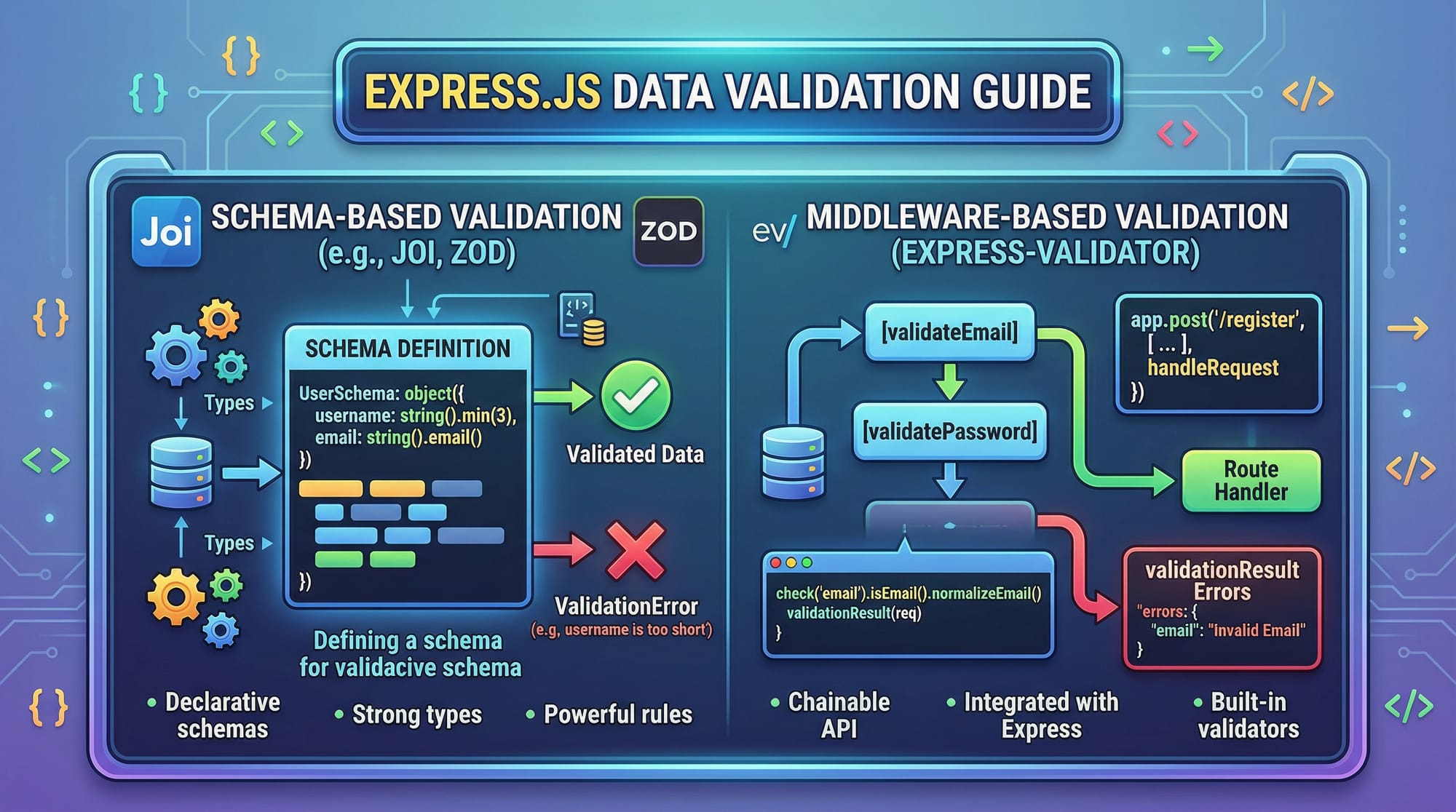
Example with Joi:
const Joi = require("joi");

const schema = Joi.object({
  name: Joi.string().min(3).required(),
  age: Joi.number().min(18).required()
});
Explanation:
- Line 1: Import Joi library
- Line 3–6: Define rules for input fields
namemust be at least 3 charactersagemust be a number ≥ 18
Practical Code Examples
Example 1: Secure User Registration Form
const express = require("express");
const app = express();

app.use(express.json());

app.post("/register", (req, res) => {
  const { name, email, password } = req.body;

  // Validation
  if (!name || name.length < 3) {
    return res.status(400).send("Invalid name");
  }

  if (!email.includes("@")) {
    return res.status(400).send("Invalid email");
  }

  if (password.length < 8) {
    return res.status(400).send("Weak password");
  }

  // Sanitization
  const cleanName = name.replace(/<[^>]*>?/gm, "");

  res.send("User registered successfully");
});
Line-by-line Explanation:
- Line 1–2: Import and initialize Express
- Line 4: Enable JSON parsing
- Line 6: Create POST route for registration
- Line 7: Extract user input
- Line 10–12: Validate name length
- Line 14–16: Validate email format
- Line 18–20: Ensure strong password
- Line 23: Sanitize name input
- Line 25: Send success response
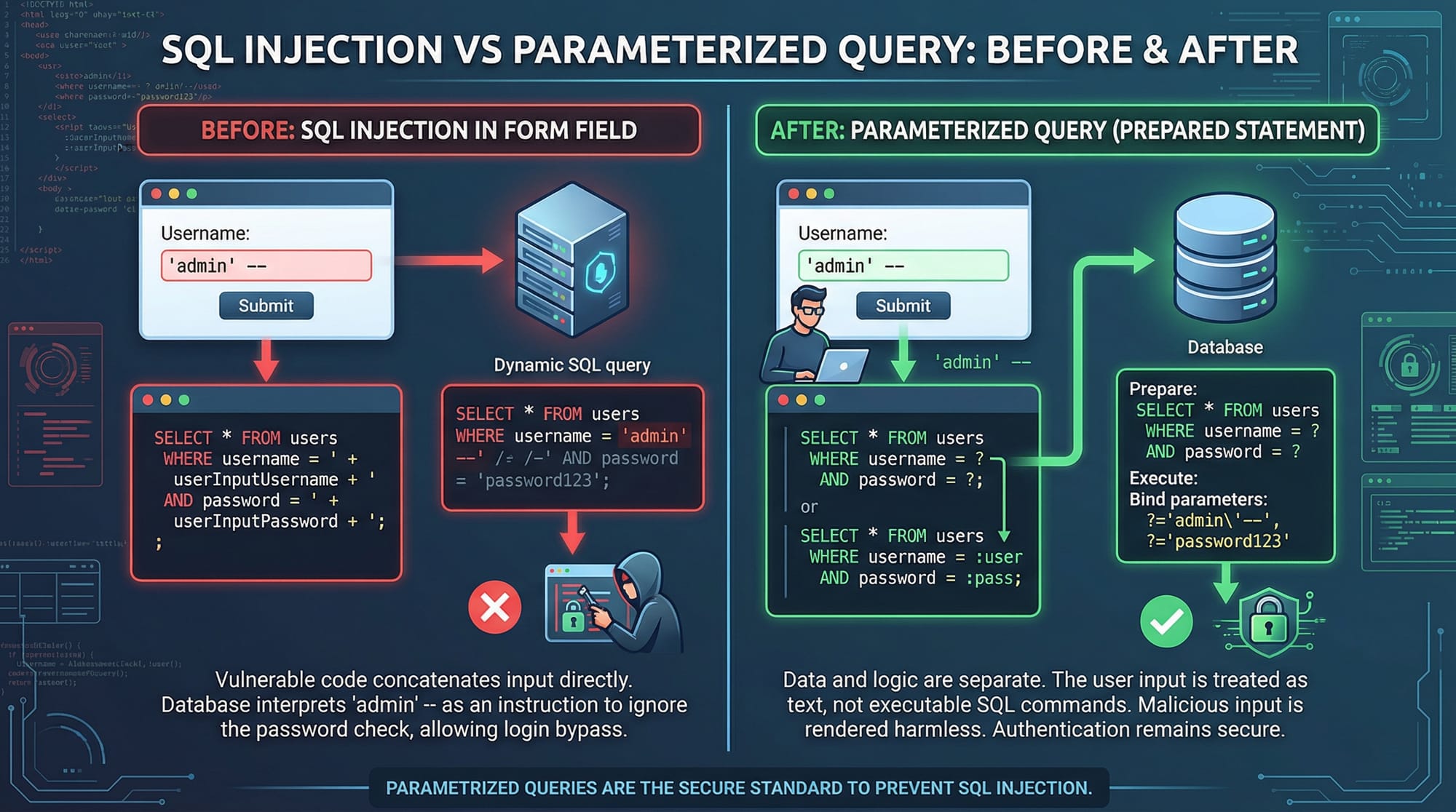
Example 2: Real-World Application (Prevent SQL Injection)
const mysql = require("mysql2");

const connection = mysql.createConnection({
  host: "localhost",
  user: "root",
  password: "",
  database: "students"
});

app.post("/login", (req, res) => {
  const { email, password } = req.body;

  // Parameterized query
  const query = "SELECT * FROM users WHERE email = ? AND password = ?";

  connection.execute(query, [email, password], (err, results) => {
    if (err) throw err;

    if (results.length > 0) {
      res.send("Login successful");
    } else {
      res.send("Invalid credentials");
    }
  });
});
Line-by-line Explanation:
- Line 1: Import MySQL library
- Line 3–8: Configure database connection
- Line 10: Login route
- Line 11: Extract input
- Line 14: Use placeholders (
?) instead of direct input - Line 16: Pass values safely to query
- Line 17–18: Handle errors
- Line 20–24: Check login result
Common Mistakes & How to Avoid Them
Mistake 1: Trusting Client-Side Validation
Many beginners rely only on frontend validation.
Wrong Approach:
if (email.includes("@")) {
  // Accept input
}
Fix:
Always validate on server too.
if (!email || !email.includes("@")) {
  return res.status(400).send("Invalid email");
}
Mistake 2: Using Blacklist Instead of Whitelist
Wrong Approach:
if (input.includes("<script>")) {
  // block
}
Fix (Whitelist):
const validInput = /^[a-zA-Z0-9]+$/;

if (!validInput.test(input)) {
  return res.send("Invalid input");
}
Explanation:
- Regex ensures only safe characters
- Prevents unknown attacks
Practice Exercises
Exercise 1: Validate Student Form
Problem:
Create validation for a form with:
- Name (min 3 characters)
- Age (≥18)
Solution:
if (!name || name.length < 3) {
  console.log("Invalid name");
}

if (!age || age < 18) {
  console.log("Invalid age");
}
Explanation:
- Ensures valid name length
- Prevents underage entries
Exercise 2: Sanitize Comment Input
Problem:
Remove HTML tags from user comments.
Solution:
const comment = "<script>alert('hack')</script>";
const clean = comment.replace(/<[^>]*>?/gm, "");

console.log(clean);
Explanation:
- Regex removes all HTML tags
- Prevents XSS attacks
Frequently Asked Questions
What is input validation?
Input validation is the process of checking user input to ensure it meets required rules such as format, type, and length. It helps prevent invalid or harmful data from entering your system.
How do I sanitize user input?
You can sanitize input by removing or escaping dangerous characters using methods like regex or libraries. This ensures that scripts or malicious code cannot execute.
Why is server-side validation important?
Server-side validation is crucial because client-side validation can be bypassed. It ensures that all incoming data is checked before processing or storing.
What is SQL injection?
SQL injection is an attack where malicious SQL queries are inserted into input fields. It can allow attackers to access or manipulate database data.
Which is better: whitelist or blacklist?
Whitelist is better because it only allows known safe inputs, while blacklist may miss new or unknown attack patterns.
Summary & Key Takeaways
- Always validate and sanitize user input
- Never trust client-side validation alone
- Use parameterized queries to prevent SQL injection
- Prefer whitelist validation over blacklist
- Use libraries like Joi or Zod for scalable validation
- Secure forms are essential for real-world applications
Next Steps & Related Tutorials
To deepen your knowledge, explore these related tutorials on theiqra.edu.pk:
- Learn about OWASP Top 10 vulnerabilities to understand common security risks
- Explore PHP MySQL secure login systems for backend security
- Study Cross-Site Scripting (XSS) prevention techniques for frontend protection
- Practice secure API development with Node.js for modern applications
By mastering these concepts, you’ll be well on your way to becoming a skilled and security-conscious developer in Pakistan’s growing tech industry 🚀
Test Your Python Knowledge!
Finished reading? Take a quick quiz to see how much you've learned from this tutorial.