Java Collections ArrayList HashMap & LinkedList
Introduction
The Java Collections Framework is one of the most important parts of modern Java programming. It provides ready-made data structures that help developers efficiently store, manage, and manipulate groups of objects. Among the most commonly used collections are ArrayList, HashMap, and LinkedList.
These data structures solve common programming problems such as storing lists of students, mapping roll numbers to names, or managing queues of tasks in an application.
For Pakistani students learning Java, understanding these collections is essential because:
- They are heavily used in real-world software development
- They appear frequently in job interviews
- They help you write cleaner and more efficient code
For example, if you are building a university management system for a college in Lahore, you might use:
- ArrayList to store a list of students
- HashMap to map student IDs to student details
- LinkedList to manage processing queues (like assignment submissions)
In this tutorial, you will learn how the Java Collections Framework works and how to use ArrayList, HashMap, and LinkedList with practical examples relevant to Pakistani students.
Prerequisites
Before starting this tutorial, you should already understand the following Java basics:
- Basic syntax of Java
- Variables and data types
- Conditional statements (
if,switch) - Loops (
for,while) - Methods and classes
- Basic understanding of arrays
If you are not comfortable with these topics yet, it is recommended to review beginner tutorials on Java fundamentals before continuing.
Core Concepts & Explanation
Understanding the Java Collections Framework
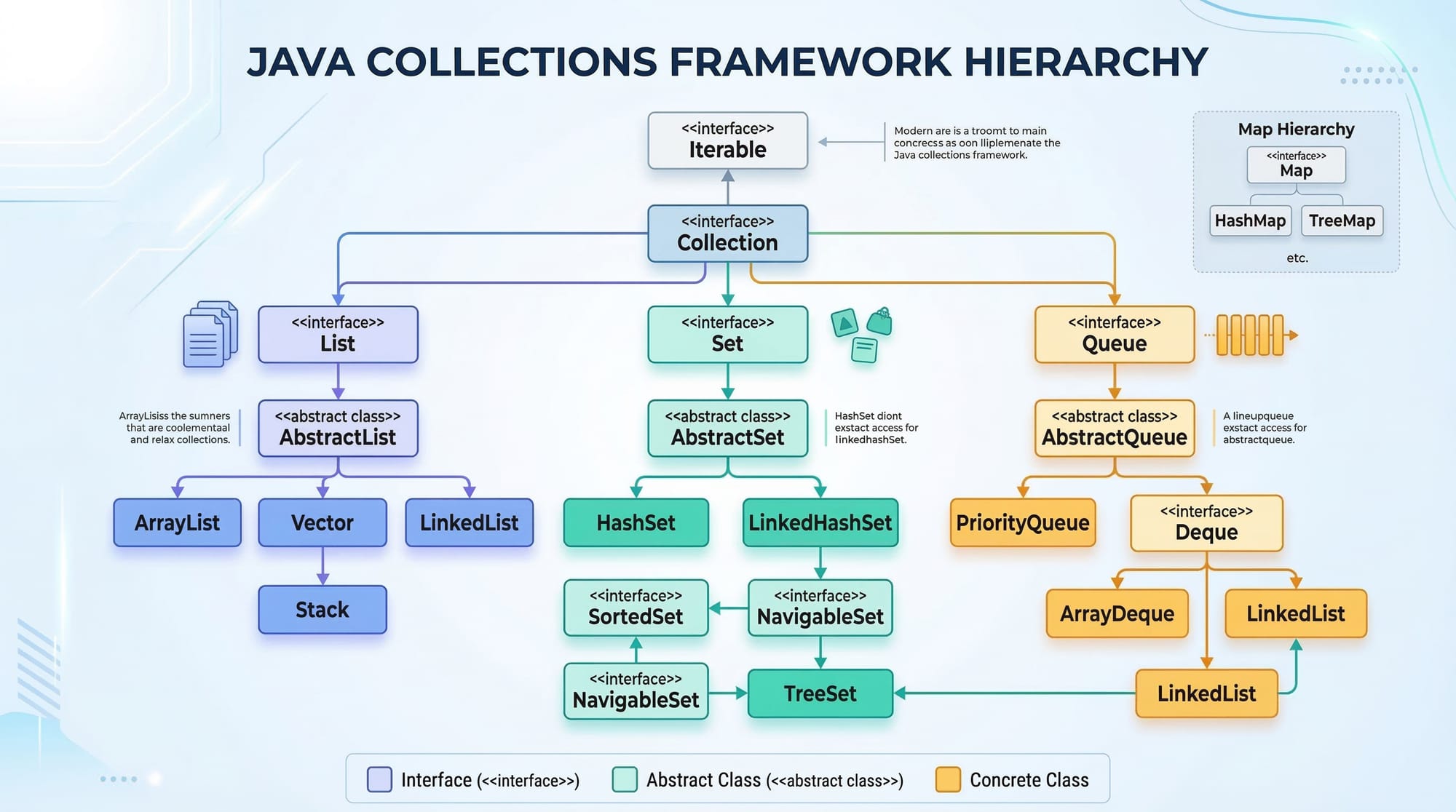
The Java Collections Framework (JCF) is a set of interfaces and classes that provide reusable data structures.
The main advantages of using collections include:
- Reduces coding effort
- Improves program performance
- Provides standardized data structures
Some core interfaces include:
- List – ordered collection
- Set – unique elements
- Queue – ordered processing
- Map – key-value pairs
Classes like ArrayList, LinkedList, and HashMap implement these interfaces.
Example import statement:
import java.util.*;
Explanation:
import– tells Java to use external libraries.java.util– package that contains collection classes.*– imports all classes from the package.
Java ArrayList – Dynamic Arrays
An ArrayList is a resizable array implementation of the List interface.
Unlike normal arrays, ArrayList can grow or shrink dynamically.
Key characteristics:
- Maintains insertion order
- Allows duplicate elements
- Provides fast random access
Example:
import java.util.ArrayList;

public class StudentList {
    public static void main(String[] args) {

        ArrayList<String> students = new ArrayList<>();

        students.add("Ahmad");
        students.add("Fatima");
        students.add("Ali");

        System.out.println(students);
    }
}
Line-by-line explanation:
import java.util.ArrayList;
Imports the ArrayList class.ArrayList<String> students = new ArrayList<>();
Creates an ArrayList that stores String values.students.add("Ahmad");
Adds Ahmad to the list.students.add("Fatima");
Adds another element.students.add("Ali");
Adds a third element.System.out.println(students);
Prints the entire list.
Output:
[Ahmad, Fatima, Ali]
Java LinkedList – Doubly Linked Structure
A LinkedList stores elements as nodes connected with pointers.
Each node contains:
- Data
- Reference to next node
- Reference to previous node
Advantages:
- Faster insertions and deletions
- Efficient for queue-like operations
Example:
import java.util.LinkedList;

public class TaskQueue {
    public static void main(String[] args) {

        LinkedList<String> tasks = new LinkedList<>();

        tasks.add("Submit Assignment");
        tasks.add("Attend Java Class");
        tasks.add("Practice Coding");

        System.out.println(tasks);
    }
}
Line-by-line explanation:
LinkedList<String> tasks
Creates a LinkedList for storing tasks.tasks.add()
Adds elements to the list.System.out.println(tasks)
Prints the queue of tasks.
Java HashMap – Key-Value Data Structure
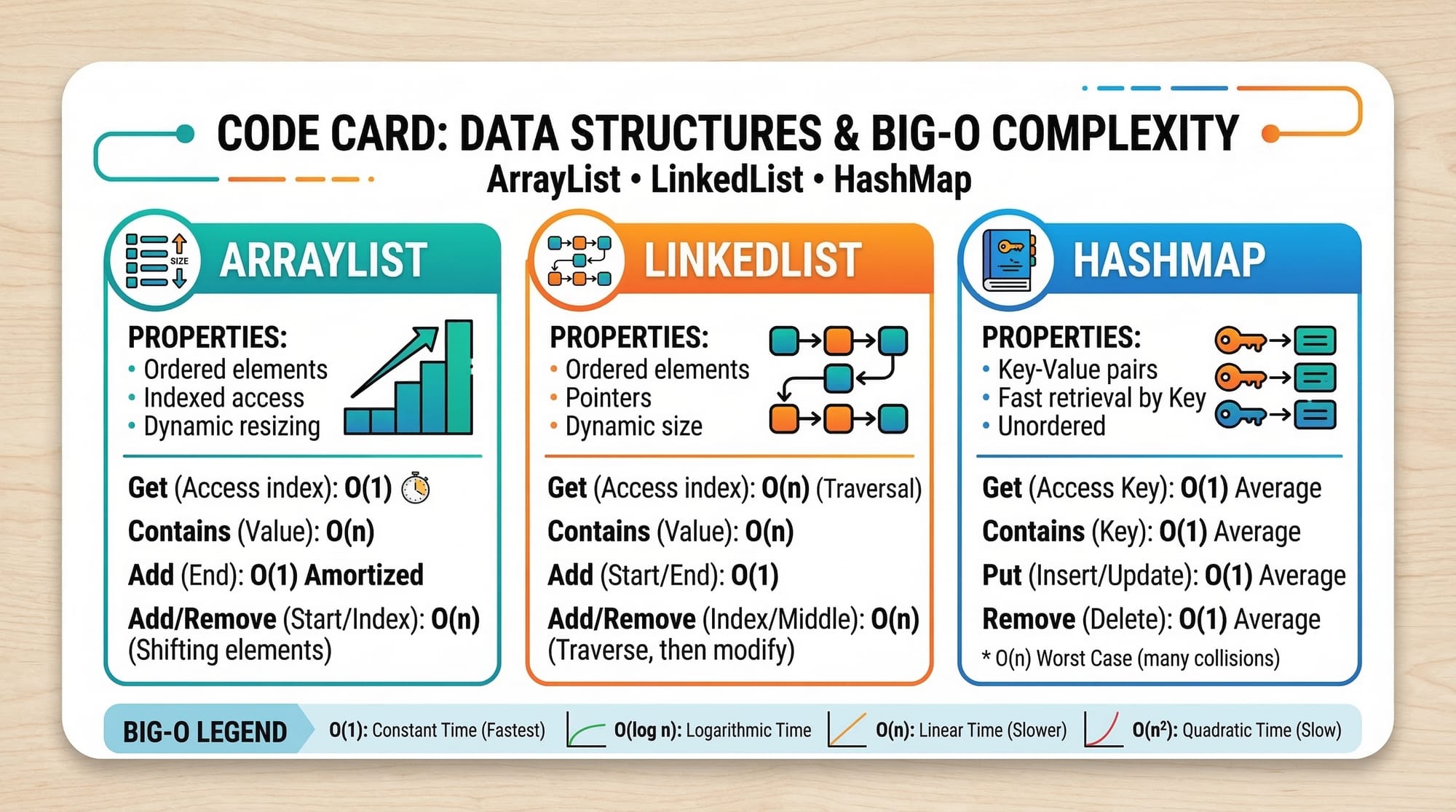
A HashMap stores data in key-value pairs.
Example:
- Key → Student ID
- Value → Student Name
Features:
- Very fast lookup
- Keys must be unique
- Does not maintain insertion order
Example:
import java.util.HashMap;

public class StudentMap {
    public static void main(String[] args) {

        HashMap<Integer, String> students = new HashMap<>();

        students.put(101, "Ahmad");
        students.put(102, "Fatima");
        students.put(103, "Ali");

        System.out.println(students);
    }
}
Explanation:
HashMap<Integer, String>
Key is Integer (ID), value is String (name).students.put(101, "Ahmad");
Adds key-value pair.System.out.println(students);
Prints all entries.
Practical Code Examples
Example 1: Managing Student Names with ArrayList
Suppose a college in Islamabad wants to store a list of students enrolled in a Java course.
import java.util.ArrayList;

public class CourseStudents {

    public static void main(String[] args) {

        ArrayList<String> students = new ArrayList<>();

        students.add("Ahmad");
        students.add("Fatima");
        students.add("Ali");

        System.out.println("Total Students: " + students.size());

        System.out.println("First Student: " + students.get(0));

        students.remove("Ali");

        System.out.println("Updated List: " + students);
    }
}
Explanation:
ArrayList<String> students
Creates a list of student names.add()
Adds students to the list.size()
Returns the number of elements.get(0)
Accesses the first student.remove("Ali")
Deletes Ali from the list.println()
Displays results.
Output example:
Total Students: 3
First Student: Ahmad
Updated List: [Ahmad, Fatima]
Example 2: Real-World Application – Student Fee Record with HashMap
Imagine a small academy in Karachi tracking student fees in PKR.
import java.util.HashMap;

public class FeeSystem {

    public static void main(String[] args) {

        HashMap<String, Integer> fees = new HashMap<>();

        fees.put("Ahmad", 15000);
        fees.put("Fatima", 18000);
        fees.put("Ali", 12000);

        System.out.println("Ahmad Fee: PKR " + fees.get("Ahmad"));

        fees.put("Ali", 14000);

        System.out.println("Updated Fee Record: " + fees);
    }
}
Line-by-line explanation:
HashMap<String, Integer> fees
Stores student name and fee amount.put()
Adds a record.get("Ahmad")
Retrieves Ahmad's fee.fees.put("Ali", 14000)
Updates Ali’s fee.println()
Displays the data.
Common Mistakes & How to Avoid Them
Mistake 1: Using Array Instead of ArrayList
Beginners often use arrays when dynamic lists are required.
Incorrect:
String[] students = new String[3];
Problem:
- Fixed size
- Cannot expand dynamically
Correct approach:
ArrayList<String> students = new ArrayList<>();
Now the list can grow automatically.
Mistake 2: Using Wrong Key Type in HashMap
Example mistake:
HashMap map = new HashMap();
Problem:
- No type safety
- Possible runtime errors
Correct version:
HashMap<Integer, String> students = new HashMap<>();
Benefits:
- Compile-time type checking
- Safer code
Practice Exercises
Exercise 1: Store City Names
Problem:
Create an ArrayList that stores three Pakistani cities: Lahore, Karachi, Islamabad. Print them using a loop.
Solution:
import java.util.ArrayList;

public class Cities {
    public static void main(String[] args) {

        ArrayList<String> cities = new ArrayList<>();

        cities.add("Lahore");
        cities.add("Karachi");
        cities.add("Islamabad");

        for(String city : cities){
            System.out.println(city);
        }
    }
}
Explanation:
ArrayList<String> citiescreates the list.add()inserts cities.for(String city : cities)loops through the list.println()displays each city.
Exercise 2: Student Marks with HashMap
Problem:
Create a HashMap that stores student names and their marks.
Solution:
import java.util.HashMap;

public class Marks {
    public static void main(String[] args) {

        HashMap<String, Integer> marks = new HashMap<>();

        marks.put("Ahmad", 85);
        marks.put("Fatima", 92);
        marks.put("Ali", 78);

        System.out.println(marks);
    }
}
Explanation:
HashMap<String, Integer>stores name and marks.put()adds records.println()prints all entries.
Frequently Asked Questions
What is the Java Collections Framework?
The Java Collections Framework is a set of interfaces and classes used to store and manipulate groups of objects efficiently. It includes structures such as ArrayList, HashMap, LinkedList, HashSet, and more.
What is the difference between ArrayList and LinkedList?
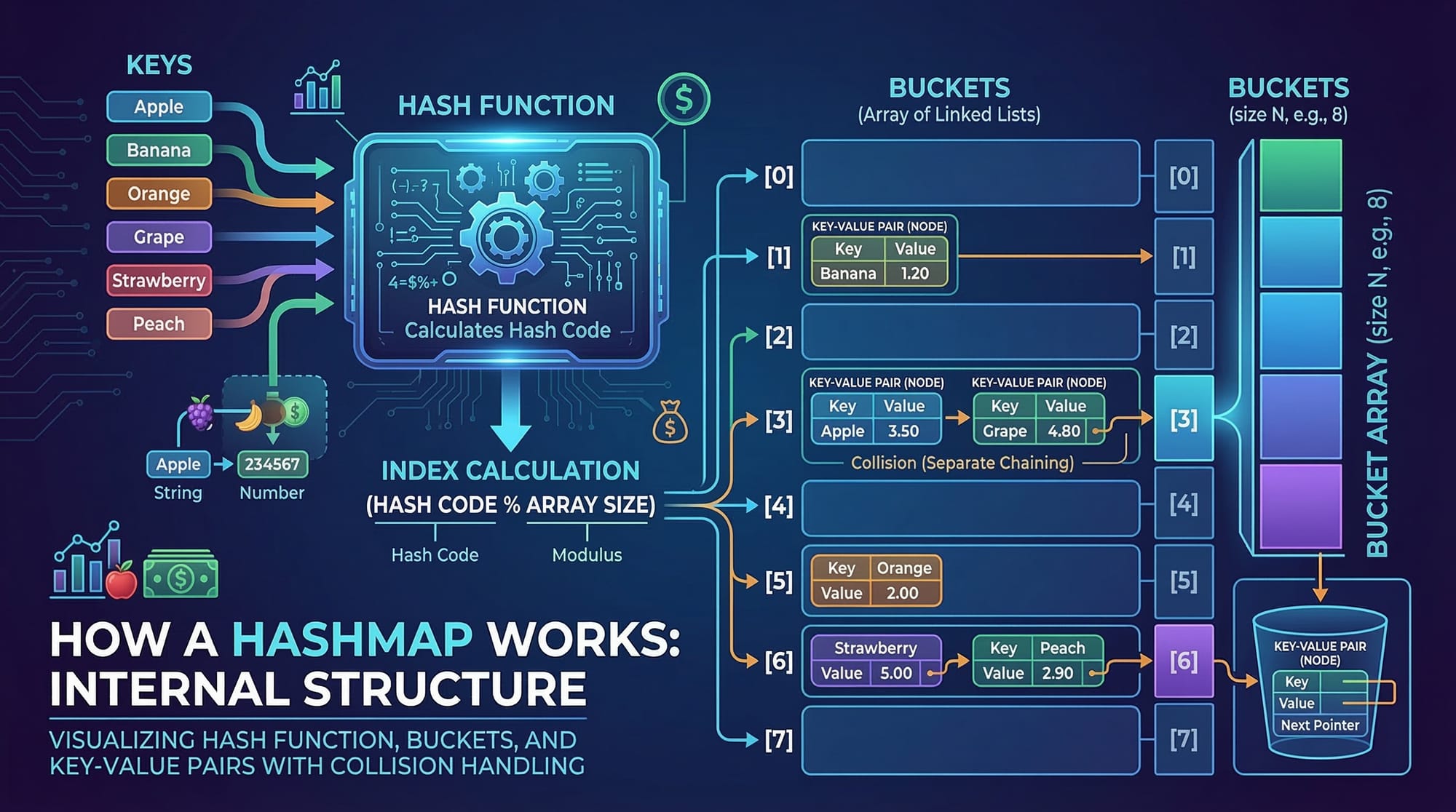
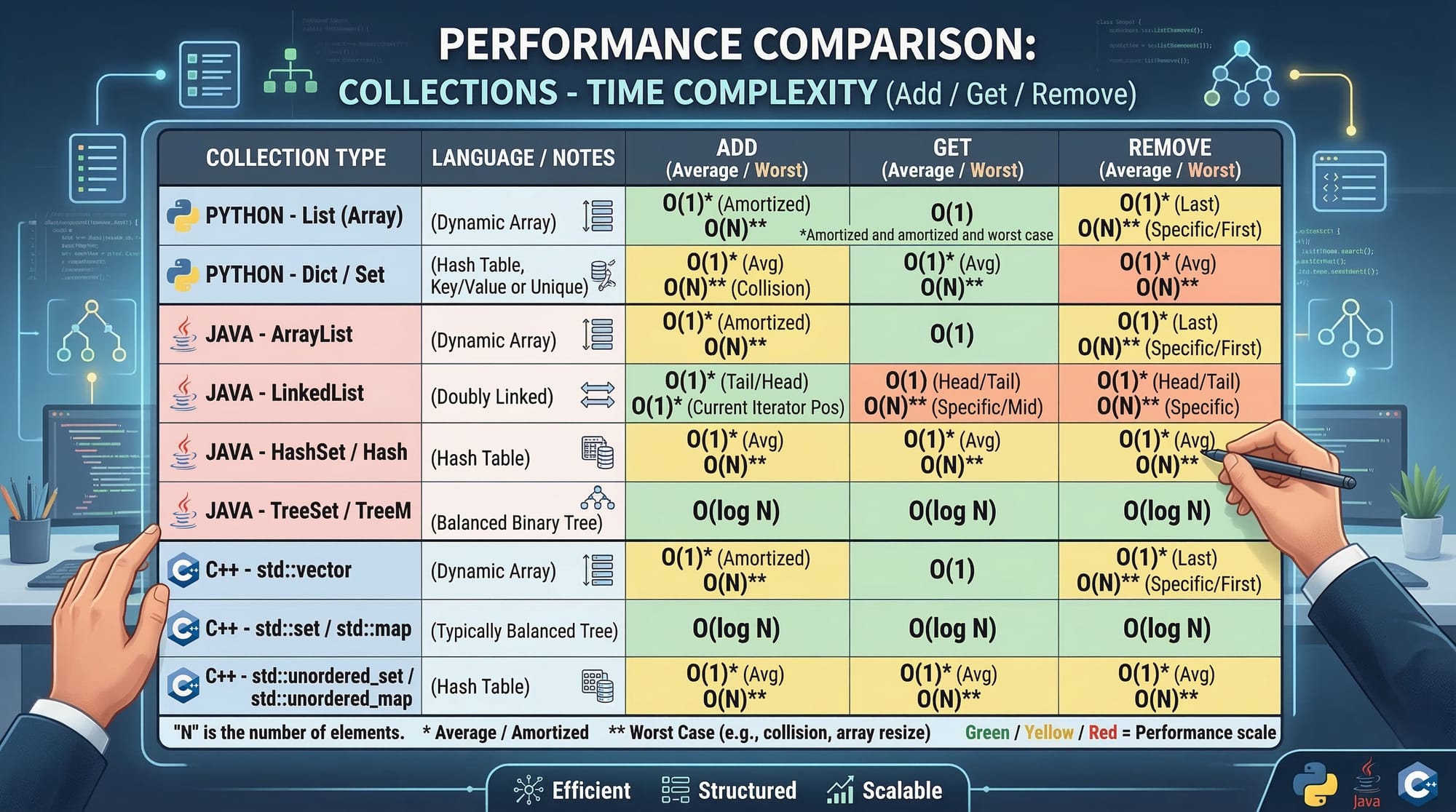
ArrayList uses a dynamic array internally, making it faster for accessing elements. LinkedList uses a doubly linked structure, making it faster for inserting and deleting elements.
When should I use HashMap?
HashMap is best when you need fast lookup using keys, such as mapping student IDs to names or storing configuration settings.
Can HashMap store duplicate keys?
No. HashMap does not allow duplicate keys. If a duplicate key is inserted, the new value replaces the previous one.
Is ArrayList faster than LinkedList?
ArrayList is generally faster for reading and accessing elements, while LinkedList is faster for frequent insertions and deletions.
Summary & Key Takeaways
- The Java Collections Framework provides powerful data structures.
- ArrayList is best for dynamic lists and quick access.
- LinkedList is useful for frequent insertions and deletions.
- HashMap stores data in key-value pairs with fast lookup.
- Collections help build scalable and maintainable applications.
- Understanding collections is essential for Java interviews and real-world development.
Next Steps & Related Tutorials
To deepen your understanding of Java programming, explore these related tutorials on theiqra.edu.pk:
- Learn object-oriented concepts in Java OOP tutorial
- Understand data structures using Java arrays and lists guide
- Explore backend programming concepts with REST API development tutorial
- If you're learning multiple languages, check the Python Lists tutorial to compare Python and Java data structures.
These tutorials will help you build a strong programming foundation and move toward becoming a professional software developer. 🚀
Test Your Python Knowledge!
Finished reading? Take a quick quiz to see how much you've learned from this tutorial.