Java Control Flow If Else Switch & Loops
Introduction
Java programs do not simply execute every line of code from top to bottom. Instead, they often need to make decisions and repeat tasks depending on conditions. This behavior is called control flow.
In Java control flow, developers decide which code should run, when it should run, and how many times it should run. The most common control flow structures in Java are:
- java if else statements (decision making)
- switch statements (multiple decision options)
- java for loop (repeating code a fixed number of times)
- java while loop (repeating code while a condition is true)
These structures allow you to build interactive programs, games, calculators, and real-world applications.
For example, imagine building a program for a small shop in Lahore:
- If a customer spends more than PKR 5000, give a discount.
- If a student’s marks are above 90, print “Excellent”.
- Repeat a task 10 times to process multiple orders.
Without control flow, programs would be extremely limited.
For Pakistani students learning programming, understanding control flow is essential because it forms the foundation of real software development.
By the end of this tutorial, you will understand:
- How to use java if else
- How to implement switch statements
- How to use java for loop
- How to use java while loop
You will also learn practical examples that mirror real-world scenarios in Pakistan, making it easier to understand and apply these concepts.
Prerequisites
Before starting this tutorial, you should already know:
- Basic Java syntax
- How to write and run a Java program
- What variables and data types are
- How to use basic operators like
+,-,>,<,==
If you are new to these topics, read:
- Java Variables and Data Types
- Java Operators Tutorial
These topics will help you understand the examples in this guide.
Core Concepts & Explanation
Understanding Java If-Else Statements
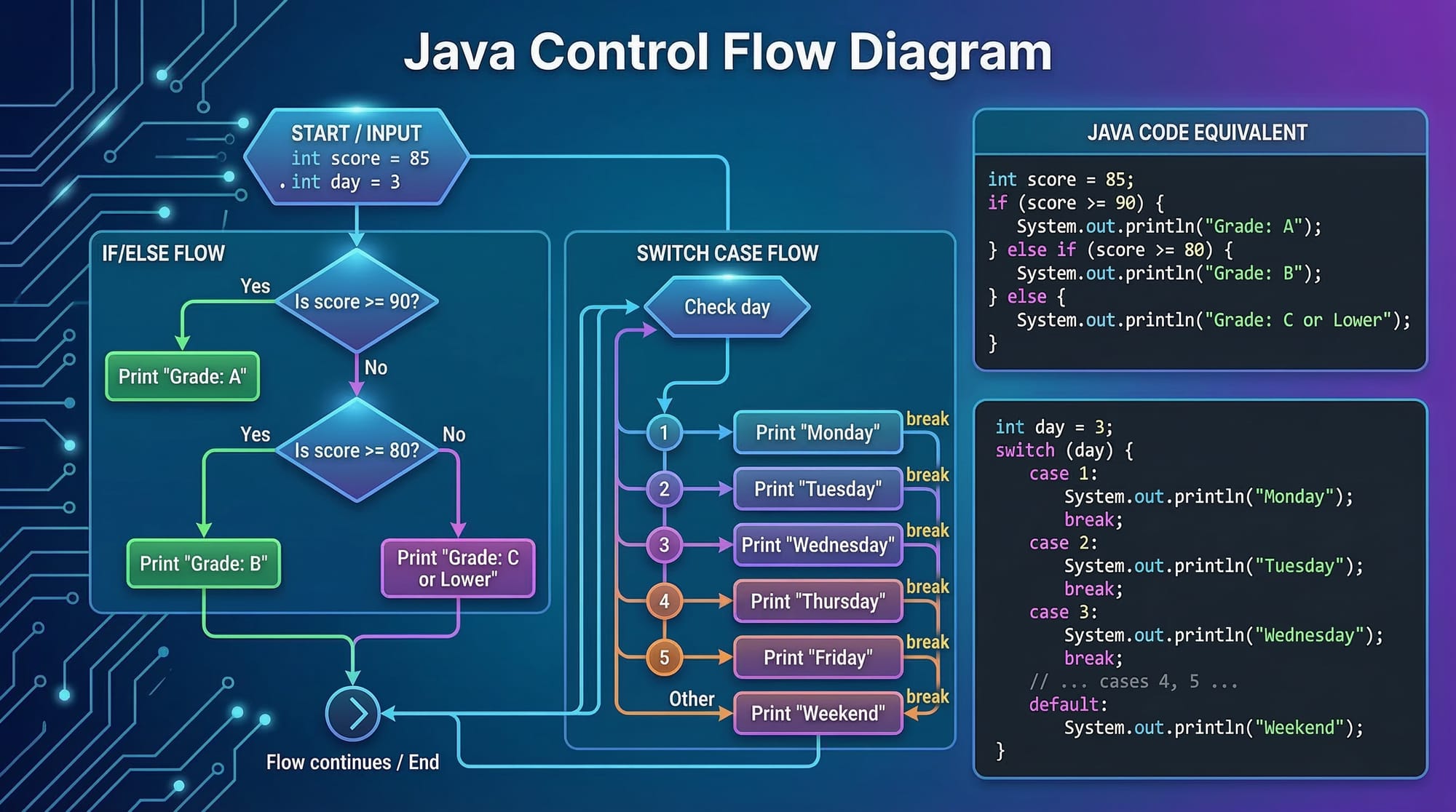
The java if else statement allows a program to make decisions based on conditions.
It checks a condition and executes code depending on whether the condition is true or false.
Basic syntax:
if (condition) {
    // code runs if condition is true
} else {
    // code runs if condition is false
}
Example:
int marks = 85;

if (marks >= 50) {
    System.out.println("You passed the exam");
} else {
    System.out.println("You failed the exam");
}
Explanation:
Line 1
int marks = 85;
We create a variable called marks storing the student's score.
Line 3
if (marks >= 50)
The program checks if marks are greater than or equal to 50.
Line 4
System.out.println("You passed the exam");
If the condition is true, Java prints You passed the exam.
Line 6
else
If the condition is false, the program executes the code in the else block.
Line 7
System.out.println("You failed the exam");
This prints You failed the exam.
You can also chain conditions using else if.
Example:
int marks = 92;

if (marks >= 90) {
    System.out.println("Grade: A");
} else if (marks >= 75) {
    System.out.println("Grade: B");
} else {
    System.out.println("Grade: C");
}
This program assigns grades based on marks.
Java Switch Statements for Multiple Choices
When there are many conditions, using multiple if else statements becomes messy. The switch statement offers a cleaner solution.
Example:
int day = 3;

switch (day) {
    case 1:
        System.out.println("Monday");
        break;
    case 2:
        System.out.println("Tuesday");
        break;
    case 3:
        System.out.println("Wednesday");
        break;
    default:
        System.out.println("Invalid day");
}
Explanation:
Line 1
int day = 3;
The variable day stores a number.
Line 3
switch(day)
The program evaluates the value of day.
Line 5
case 1:
If the value is 1, the program prints Monday.
Line 7
break;
Stops execution of the switch block.
Line 9
case 3:
Since the value is 3, Java prints Wednesday.
Line 13
default
Runs if none of the cases match.
Switch statements are useful in menu systems, calculators, and command-based programs.
Java Loops: For Loop and While Loop
Loops allow a program to repeat tasks automatically.
Two commonly used loops are:
- java for loop
- java while loop
Java For Loop
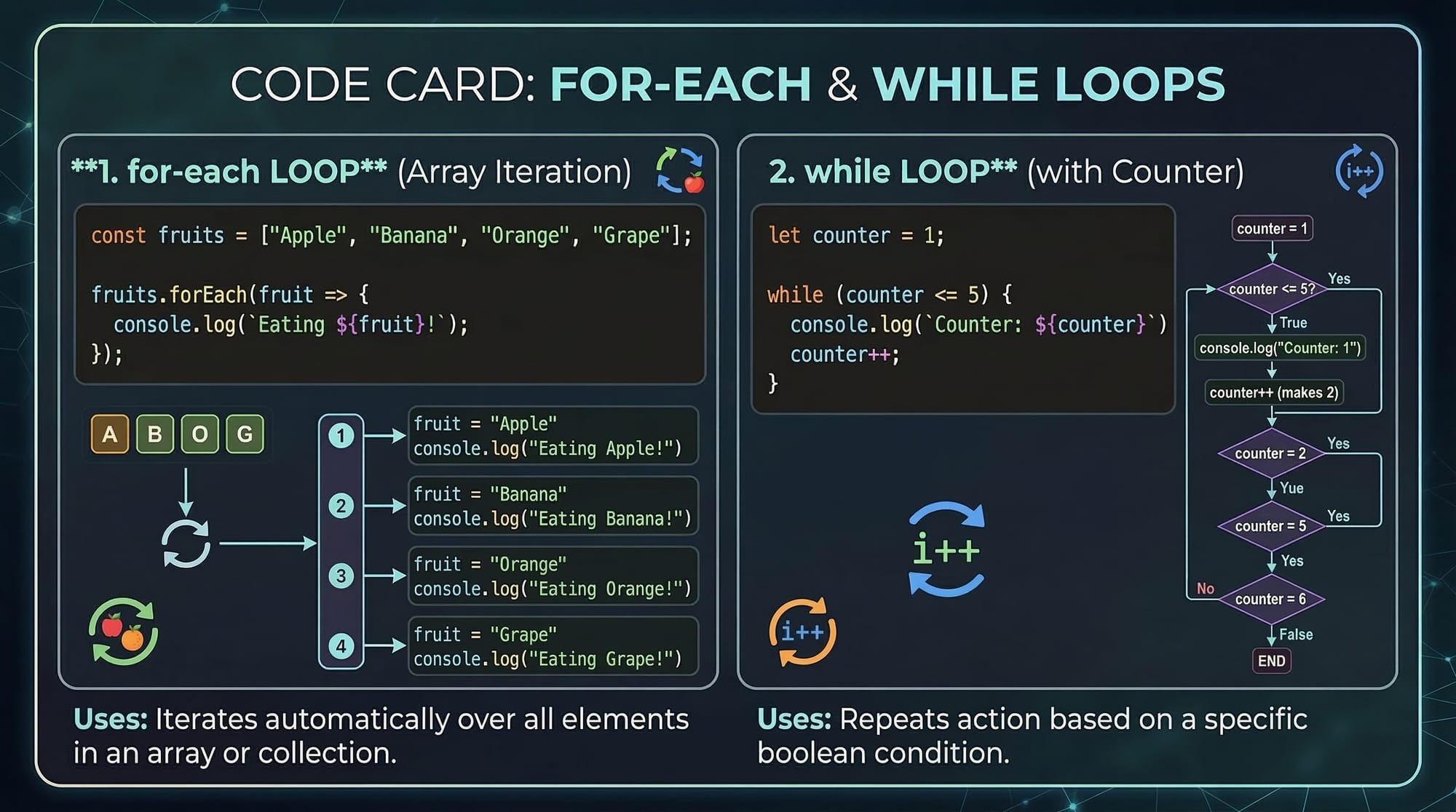
The java for loop is used when you know how many times a task should repeat.
Example:
for (int i = 1; i <= 5; i++) {
    System.out.println("Welcome to Java programming");
}
Explanation:
Line 1
int i = 1
Initialize the loop counter.
i <= 5
The loop runs while i is less than or equal to 5.
i++
Increase the counter by 1 after each iteration.
Line 2
System.out.println(...)
This message prints five times.
Java While Loop
The java while loop repeats code as long as a condition remains true.
Example:
int count = 1;

while (count <= 5) {
    System.out.println("Processing order " + count);
    count++;
}
Explanation:
Line 1
int count = 1
The loop counter starts at 1.
Line 3
while (count <= 5)
The loop continues while count is less than or equal to 5.
Line 4
The program prints the current order number.
Line 5
count++
The counter increases, eventually stopping the loop.
Practical Code Examples
Example 1: Student Grade Calculator
Suppose Ahmad is building a program to calculate grades for students in Islamabad.
public class GradeChecker {
    public static void main(String[] args) {

        int marks = 78;

        if (marks >= 90) {
            System.out.println("Grade A");
        } else if (marks >= 75) {
            System.out.println("Grade B");
        } else if (marks >= 60) {
            System.out.println("Grade C");
        } else {
            System.out.println("Fail");
        }
    }
}
Explanation:
Line 1
We create a Java class called GradeChecker.
Line 2
The main method is the entry point of the program.
Line 4
int marks = 78;
We store the student's marks.
Line 6
if (marks >= 90)
Check if marks qualify for Grade A.
Line 8
else if (marks >= 75)
Check if marks qualify for Grade B.
Line 10
else if (marks >= 60)
Check if marks qualify for Grade C.
Line 12
else
If none of the conditions match, the student fails.
Example 2: Real-World Application — ATM Menu System
Imagine Fatima building a simple ATM system in Karachi.
public class ATMMenu {
    public static void main(String[] args) {

        int option = 2;

        switch(option) {
            case 1:
                System.out.println("Check Balance");
                break;
            case 2:
                System.out.println("Withdraw Cash");
                break;
            case 3:
                System.out.println("Deposit Money");
                break;
            default:
                System.out.println("Invalid option");
        }
    }
}
Explanation:
Line 1
Create a class called ATMMenu.
Line 4
int option = 2;
User selects option 2.
Line 6
switch(option)
The program checks the selected option.
Line 8
case 1
Shows Check Balance.
Line 11
case 2
Shows Withdraw Cash.
Line 14
case 3
Shows Deposit Money.
Line 17
default
Handles invalid choices.
Common Mistakes & How to Avoid Them
Mistake 1: Forgetting Break in Switch
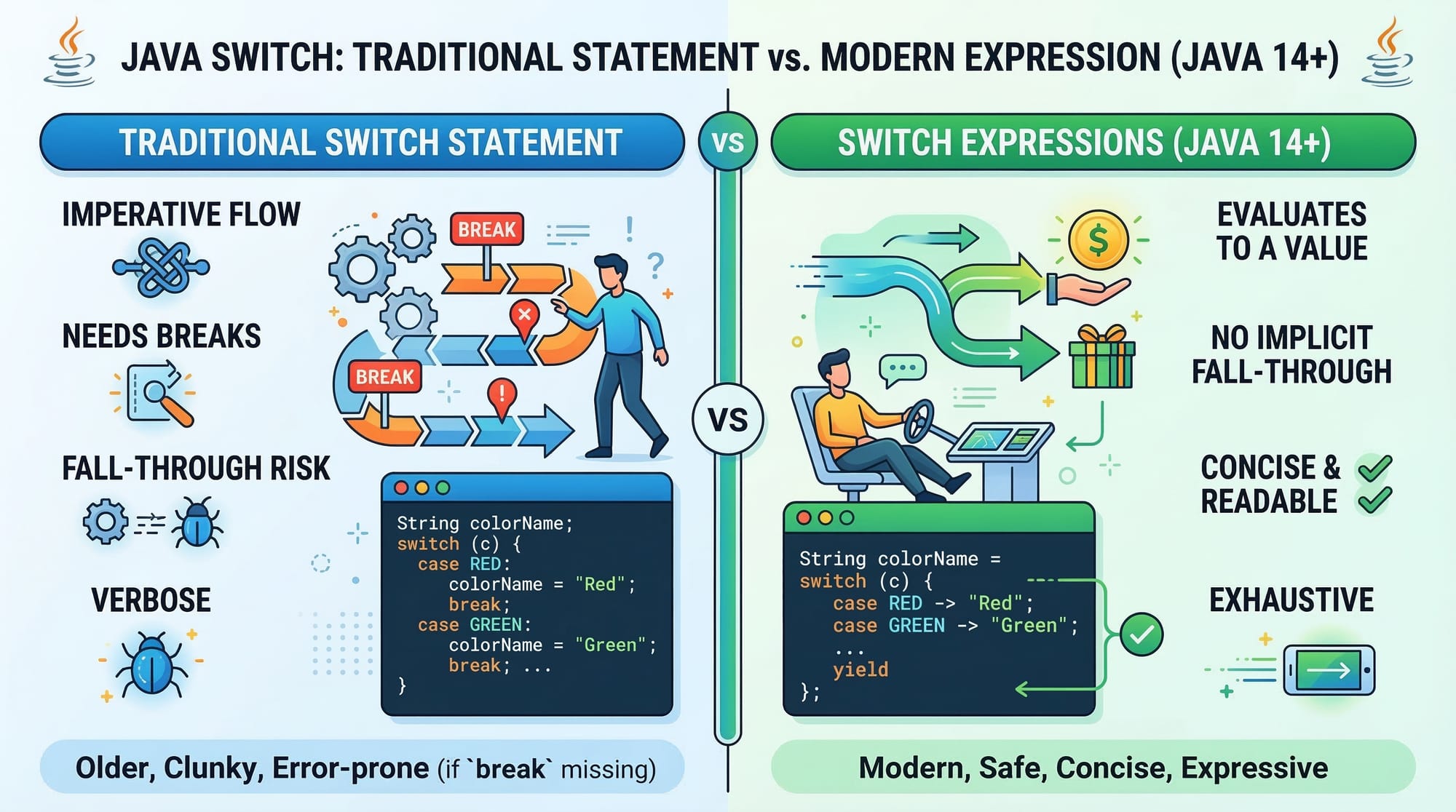
Many beginners forget to add break statements.
Example mistake:
int day = 1;

switch(day) {
    case 1:
        System.out.println("Monday");
    case 2:
        System.out.println("Tuesday");
}
Output:
Monday
Tuesday
Why?
Without break, Java continues executing the next case.
Correct version:
case 1:
    System.out.println("Monday");
    break;
Mistake 2: Infinite While Loop
Beginners often forget to update the loop variable.
Incorrect code:
int i = 1;

while(i <= 5) {
    System.out.println(i);
}
Problem:
i never increases, so the loop runs forever.
Correct code:
int i = 1;

while(i <= 5) {
    System.out.println(i);
    i++;
}
Now the loop stops at 5.
Practice Exercises
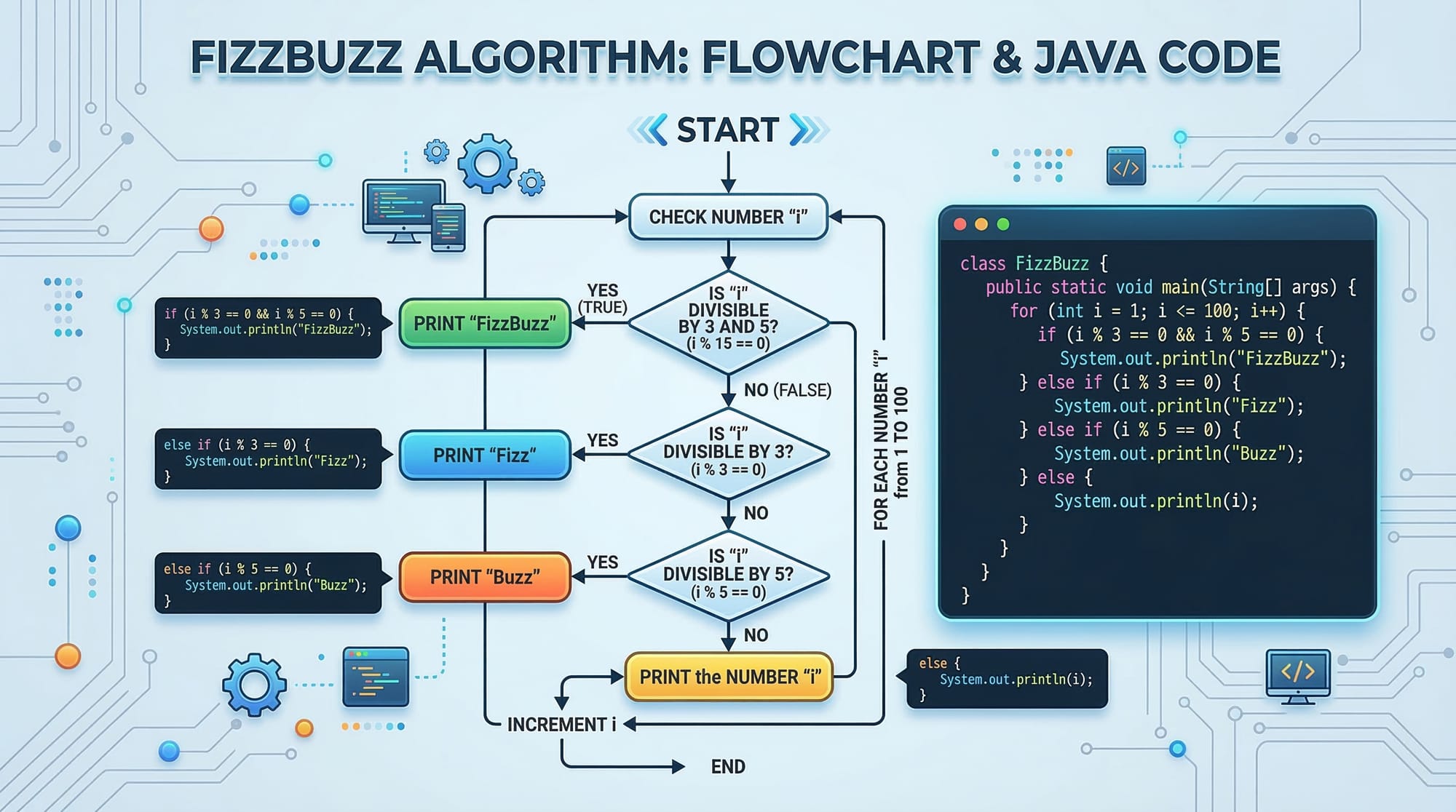
Exercise 1: Even or Odd Number
Problem
Write a Java program that checks whether a number is even or odd.
Solution
int number = 10;

if(number % 2 == 0) {
    System.out.println("Even number");
} else {
    System.out.println("Odd number");
}
Explanation
Line 1
Store the number.
Line 3
number % 2
Find the remainder after dividing by 2.
Line 5
If remainder equals 0, the number is even.
Line 7
Otherwise it is odd.
Exercise 2: Print Numbers Using a For Loop
Problem
Print numbers from 1 to 10 using a java for loop.
Solution
for(int i = 1; i <= 10; i++) {
    System.out.println(i);
}
Explanation
Line 1
int i = 1
Start counting at 1.
i <= 10
Run until 10.
i++
Increase by 1 each time.
Line 2
Print the number.
Frequently Asked Questions
What is Java control flow?
Java control flow determines the order in which statements execute in a program. It allows programs to make decisions and repeat actions using structures like if-else, switch, for loops, and while loops.
How do I use java if else?
You use java if else to run different code based on conditions. If the condition evaluates to true, the if block executes; otherwise, the else block runs.
What is the difference between java for loop and java while loop?
A java for loop is typically used when the number of iterations is known beforehand. A java while loop is used when the loop should run until a condition becomes false.
When should I use a switch statement?
Switch statements are best when checking multiple possible values of a variable, such as menu options or command inputs.
Are loops important for learning Java?
Yes. Loops are essential because they allow programs to process large amounts of data efficiently without writing repetitive code.
Summary & Key Takeaways
- Java control flow determines how and when code executes.
- java if else statements allow programs to make decisions.
- Switch statements simplify multiple conditional checks.
- java for loop is ideal when the number of iterations is known.
- java while loop runs until a condition becomes false.
- Control flow structures are essential for building real-world applications.
Next Steps & Related Tutorials
To continue learning Java programming on theiqra.edu.pk, explore these tutorials:
- Learn how variables work in Java Variables and Data Types
- Understand calculations using Java Operators Tutorial
- Explore decision-making in Python Control Flow
- Build real applications using Java Functions and Methods
These tutorials will help you move from beginner to intermediate Java developer step by step.
Test Your Python Knowledge!
Finished reading? Take a quick quiz to see how much you've learned from this tutorial.