Java OOP Classes Objects Inheritance & Polymorphism
Introduction
Object-Oriented Programming (OOP) is one of the most important concepts in modern programming. In Java, OOP helps developers build programs using reusable components called classes and objects.
Understanding java oop, java classes, java inheritance, and java polymorphism allows programmers to create scalable and maintainable software. Instead of writing long procedural code, OOP organizes code into logical structures that mirror real-world entities.
For example:
- A Student can be represented as a class.
- Each student record becomes an object.
- Specialized students like GraduateStudent can inherit from Student.
For Pakistani students learning programming, OOP is essential because:
- Most enterprise applications use OOP.
- Popular frameworks like Spring and Android rely on OOP principles.
- It prepares students for real-world software development jobs in Pakistan and globally.
For instance, if a developer in Lahore builds a university management system, OOP helps model entities like Students, Teachers, Courses, and Fees (PKR).
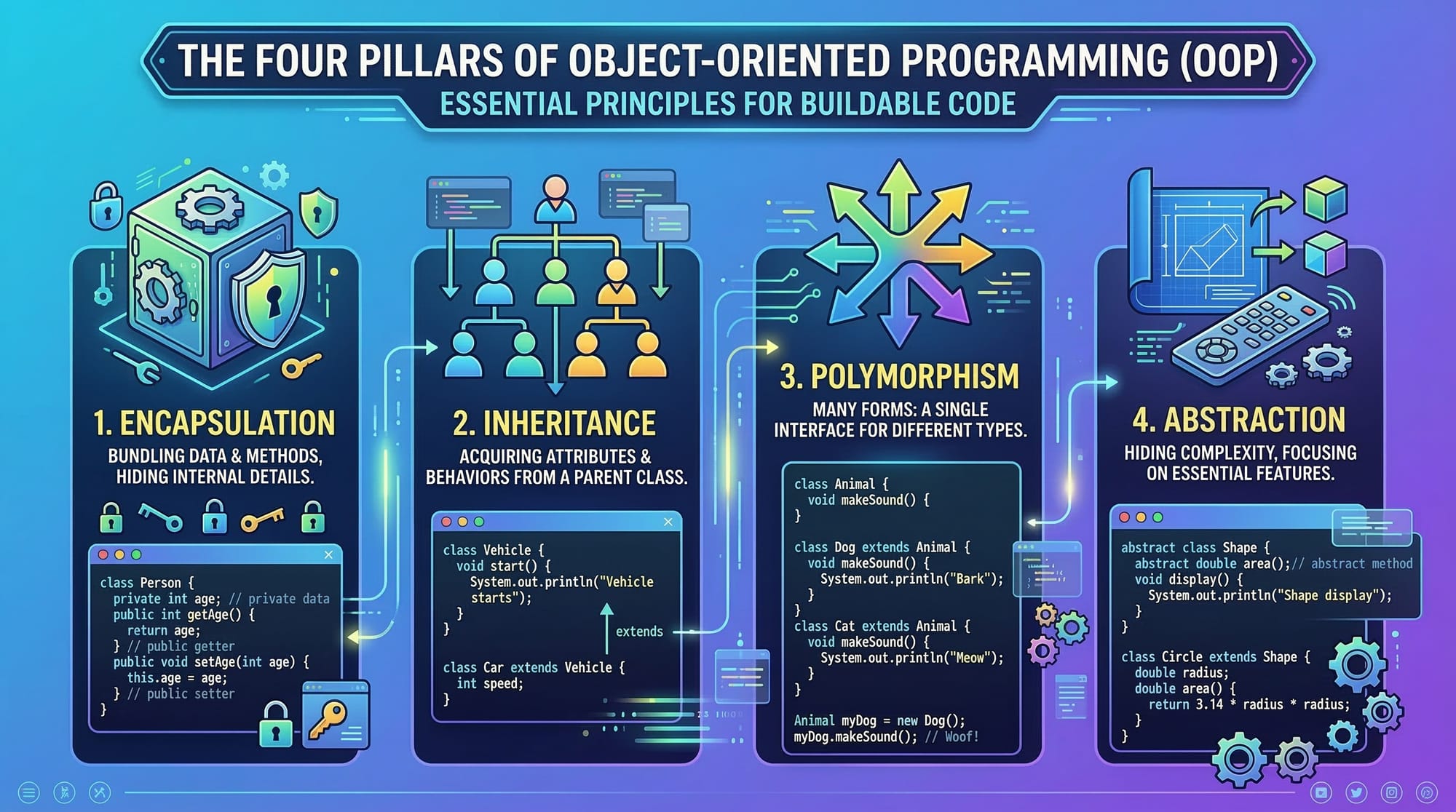
Java OOP is built around four pillars:
- Encapsulation
- Inheritance
- Polymorphism
- Abstraction
These principles make code easier to maintain, reuse, and extend.
Prerequisites
Before learning Java OOP, students should understand the following topics:
- Basic Java syntax
- Java variables and data types
- Java operators
- Conditional statements (
if,switch) - Loops (
for,while) - Basic Java methods
If you are new to Java, you should first read the Java tutorial for beginners before starting OOP concepts.
Core Concepts & Explanation
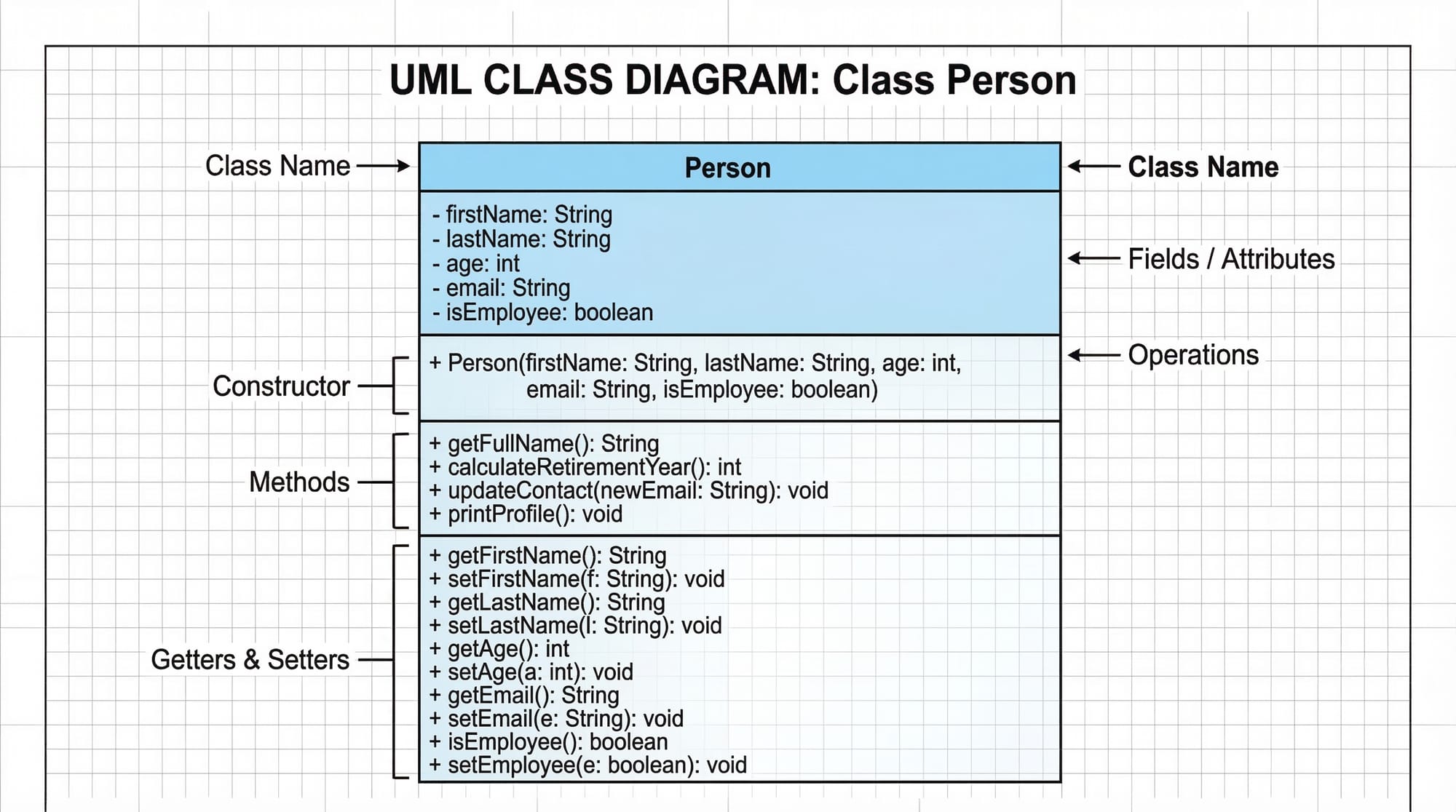
Understanding Java Classes
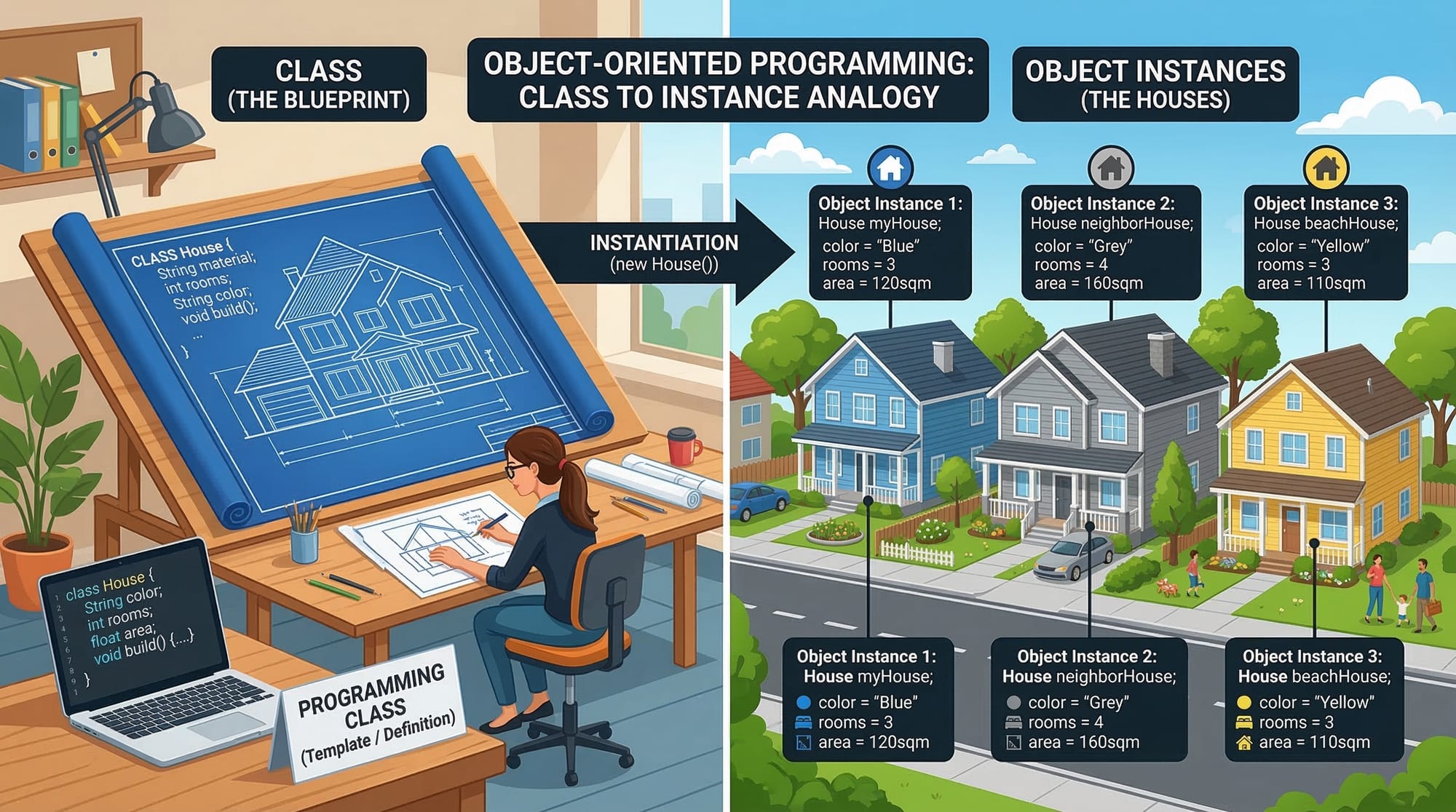
A class in Java is a blueprint used to create objects.
Think of a class like the blueprint of a house. The blueprint defines the structure, but the actual houses built from it are objects.
Example:
class Student {
    String name;
    int age;

    void displayInfo() {
        System.out.println("Name: " + name);
        System.out.println("Age: " + age);
    }
}
Explanation:
class Student
Defines a class named Student.String name;
Declares a variable to store the student's name.int age;
Stores the student's age.void displayInfo()
Defines a method that prints student information.
Classes help organize related data and methods together.
Understanding Java Objects
An object is an instance of a class.
If Student is the blueprint, then Ahmad, Fatima, and Ali are individual objects created from that blueprint.
Example:
public class Main {
    public static void main(String[] args) {

        Student s1 = new Student();
        s1.name = "Ahmad";
        s1.age = 20;

        s1.displayInfo();
    }
}
Explanation:
Student s1 = new Student();
Creates a new object of the Student class.s1.name = "Ahmad";
Assigns a value to the name field.s1.age = 20;
Assigns the student's age.s1.displayInfo();
Calls the method to display information.
Objects allow us to represent real-world entities in code.
Understanding Java Inheritance
Inheritance allows one class to acquire the properties and behavior of another class.
This promotes code reuse.
Example:
class Person {
    String name;

    void displayName() {
        System.out.println("Name: " + name);
    }
}

class Student extends Person {
    int rollNumber;

    void displayRoll() {
        System.out.println("Roll Number: " + rollNumber);
    }
}
Explanation:
class Person
Base class containing common properties.class Student extends Person
The Student class inherits from Person.displayName()
Student can use this method even though it is defined in Person.
Inheritance helps avoid repeating code.
For example, in a Karachi school system, both Teachers and Students share properties like name and ID.
Understanding Java Polymorphism
Polymorphism means one method behaving in different ways.
Java supports two types:
- Compile-time polymorphism (Method Overloading)
- Runtime polymorphism (Method Overriding)
Example of method overriding:
class Animal {
    void sound() {
        System.out.println("Animal makes a sound");
    }
}

class Cat extends Animal {
    void sound() {
        System.out.println("Cat meows");
    }
}
Explanation:
class Animal
Base class.void sound()
Method representing animal sound.class Cat extends Animal
Cat inherits from Animal.void sound()in Cat
Overrides the parent method.
When called, the Cat version runs instead of the parent version.
Polymorphism allows flexible and extensible code.
Practical Code Examples
Example 1: Student Management System
Imagine a small student management system used in an Islamabad college.
class Student {

    String name;
    int marks;

    void displayResult() {
        if(marks >= 50) {
            System.out.println(name + " has passed.");
        } else {
            System.out.println(name + " has failed.");
        }
    }
}

public class Main {
    public static void main(String[] args) {

        Student s1 = new Student();
        s1.name = "Fatima";
        s1.marks = 72;

        s1.displayResult();
    }
}
Line-by-line explanation:
class Student
Defines the student class.String name;
Stores the student's name.int marks;
Stores exam marks.void displayResult()
Method to evaluate pass or fail.if(marks >= 50)
Condition to determine passing marks.Student s1 = new Student();
Creates a student object.s1.name = "Fatima";
Assigns the name.s1.marks = 72;
Assigns marks.s1.displayResult();
Calls the result method.
Example 2: Real-World Application — Bank Account
Consider a simple banking system used in Lahore.
class BankAccount {

    String accountHolder;
    double balance;

    void deposit(double amount) {
        balance += amount;
        System.out.println("Deposited: PKR " + amount);
    }

    void showBalance() {
        System.out.println("Current Balance: PKR " + balance);
    }
}

public class Main {
    public static void main(String[] args) {

        BankAccount account = new BankAccount();

        account.accountHolder = "Ali";
        account.balance = 5000;

        account.deposit(2000);
        account.showBalance();
    }
}
Explanation:
class BankAccount
Represents a bank account.String accountHolder
Stores the account holder name.double balance
Stores the balance.deposit(double amount)
Adds money to the account.balance += amount
Updates the balance.showBalance()
Displays the current balance.
This example demonstrates how Java classes and objects model real-life systems.
Common Mistakes & How to Avoid Them
Mistake 1: Not Using Constructors Properly
Beginners often forget to initialize object values.
Incorrect approach:
Student s1 = new Student();
Better approach using constructor:
class Student {

    String name;

    Student(String n) {
        name = n;
    }
}
Explanation:
Student(String n)
Constructor method.name = n
Initializes the object immediately.
Constructors make code cleaner and safer.
Mistake 2: Misunderstanding Inheritance
Some students create unnecessary inheritance chains.
Bad design:
Person → Student → CollegeStudent → EngineeringStudent → ComputerEngineeringStudent
Better design:
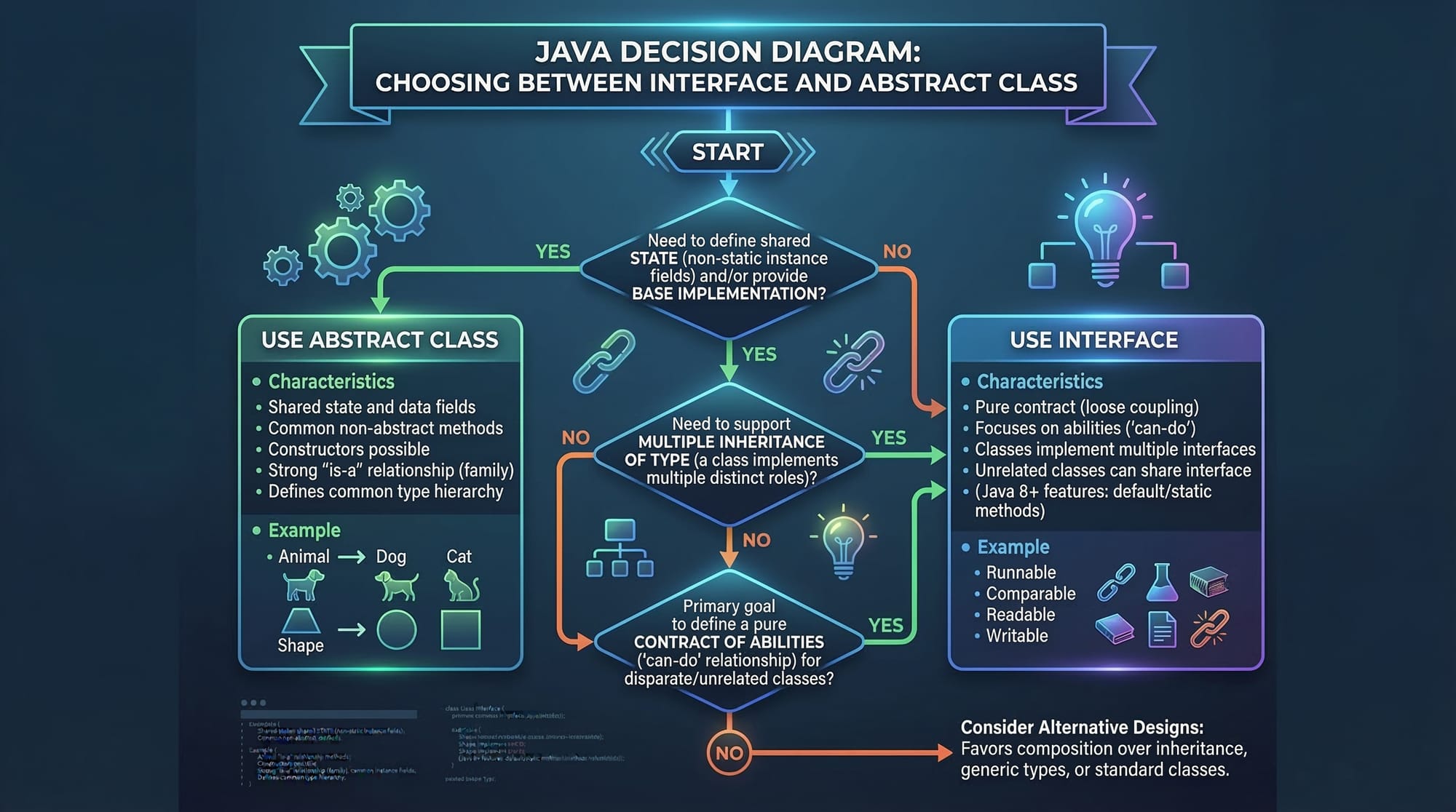
- Keep inheritance simple.
- Use interfaces or composition when needed.
This keeps programs easier to maintain.
Practice Exercises
Exercise 1: Create a Car Class
Problem
Create a class named Car with:
- brand
- price
- method
displayCar()
Solution
class Car {

    String brand;
    int price;

    void displayCar() {
        System.out.println("Brand: " + brand);
        System.out.println("Price: PKR " + price);
    }
}
Explanation:
class Car
Defines a car blueprint.brandandprice
Store car information.displayCar()
Prints details.
Exercise 2: Use Inheritance
Problem
Create:
- Parent class
Person - Child class
Teacher
Solution
class Person {
    String name;
}

class Teacher extends Person {

    String subject;

    void display() {
        System.out.println("Name: " + name);
        System.out.println("Subject: " + subject);
    }
}
Explanation:
Personstores common data.Teacherinheritsname.display()prints teacher details.
Frequently Asked Questions
What is Java OOP?
Java OOP is a programming paradigm that organizes software around objects and classes. It helps developers model real-world entities in code and build scalable applications using concepts like inheritance and polymorphism.
What is the difference between a class and an object?
A class is a blueprint or template, while an object is an instance created from that blueprint. For example, Student is a class, while Ahmad or Fatima are objects.
How does inheritance work in Java?
Inheritance allows a child class to reuse properties and methods from a parent class using the extends keyword. This reduces duplicate code and improves maintainability.
What is polymorphism in Java?
Polymorphism means one interface with multiple implementations. It allows methods to behave differently depending on the object calling them.
Why is OOP important for software development?
OOP improves code reuse, scalability, and maintainability. Large applications like banking systems, web platforms, and mobile apps rely heavily on object-oriented programming.
Summary & Key Takeaways
- Java OOP organizes programs using classes and objects.
- Classes act as blueprints, while objects represent real-world instances.
- Inheritance allows code reuse between parent and child classes.
- Polymorphism enables flexible and dynamic method behavior.
- OOP is essential for building large, maintainable applications.
- Understanding OOP prepares Pakistani students for professional Java development.
Next Steps & Related Tutorials
Now that you understand Java classes, inheritance, and polymorphism, continue learning with these tutorials on theiqra.edu.pk:
- Read the Java Tutorial for Beginners to strengthen your Java fundamentals.
- Explore Java Variables, Data Types & Operators to understand Java syntax deeply.
- Learn Java Control Flow (If, Switch, Loops) for program logic.
- Check Python OOP Basics to compare object-oriented concepts across languages.
These tutorials will help you build a strong programming foundation and prepare you for advanced topics like Java interfaces, collections, and frameworks.
Test Your Python Knowledge!
Finished reading? Take a quick quiz to see how much you've learned from this tutorial.