Java Tutorial for Beginners Complete Guide 2026
Introduction
Java remains one of the most powerful and widely used programming languages in the world. If you're searching for a java tutorial for beginners or planning to learn java 2026, this guide is designed specifically for you.
Java was originally created by James Gosling at Sun Microsystems in 1995 and is now maintained by Oracle Corporation. Over the decades, Java has become a core technology behind mobile apps, enterprise software, banking systems, and large-scale websites.
For Pakistani students in cities like Lahore, Karachi, and Islamabad, learning Java can open doors to careers in:
- Software Development
- Android App Development
- Enterprise Systems
- Cloud Computing
- Big Data Engineering
Java is known for its reliability, security, and portability, meaning a program written once can run almost anywhere thanks to the Java Virtual Machine (JVM).
In this Java Tutorial for Beginners — Complete Guide 2026, you will learn:
- What Java is and how it works
- How to install and write your first Java program
- Core programming concepts
- Real-world coding examples
- Common beginner mistakes
- Practice exercises to build your skills
Whether you are a student at a university or learning programming independently, this tutorial will help you start your Java journey confidently.
Prerequisites
Before starting this java tutorial for beginners, you don't need extensive programming knowledge. However, having a few basic skills will make learning easier.
Basic Computer Skills
You should know how to:
- Use a computer and manage files
- Install software on Windows or Linux
- Use a text editor or IDE
Basic Understanding of Programming Logic
Helpful concepts include:
- Variables
- Simple problem solving
- Basic mathematics
But don’t worry — everything will be explained step-by-step.
Required Tools
To learn Java 2026, you will need:
- Java Development Kit (JDK) from Oracle Corporation
- A code editor like Visual Studio Code or IntelliJ IDEA
- A computer running Windows, macOS, or Linux
Core Concepts & Explanation
Java Platform and JVM Architecture
Java works differently from many programming languages because it uses a virtual machine to run programs.
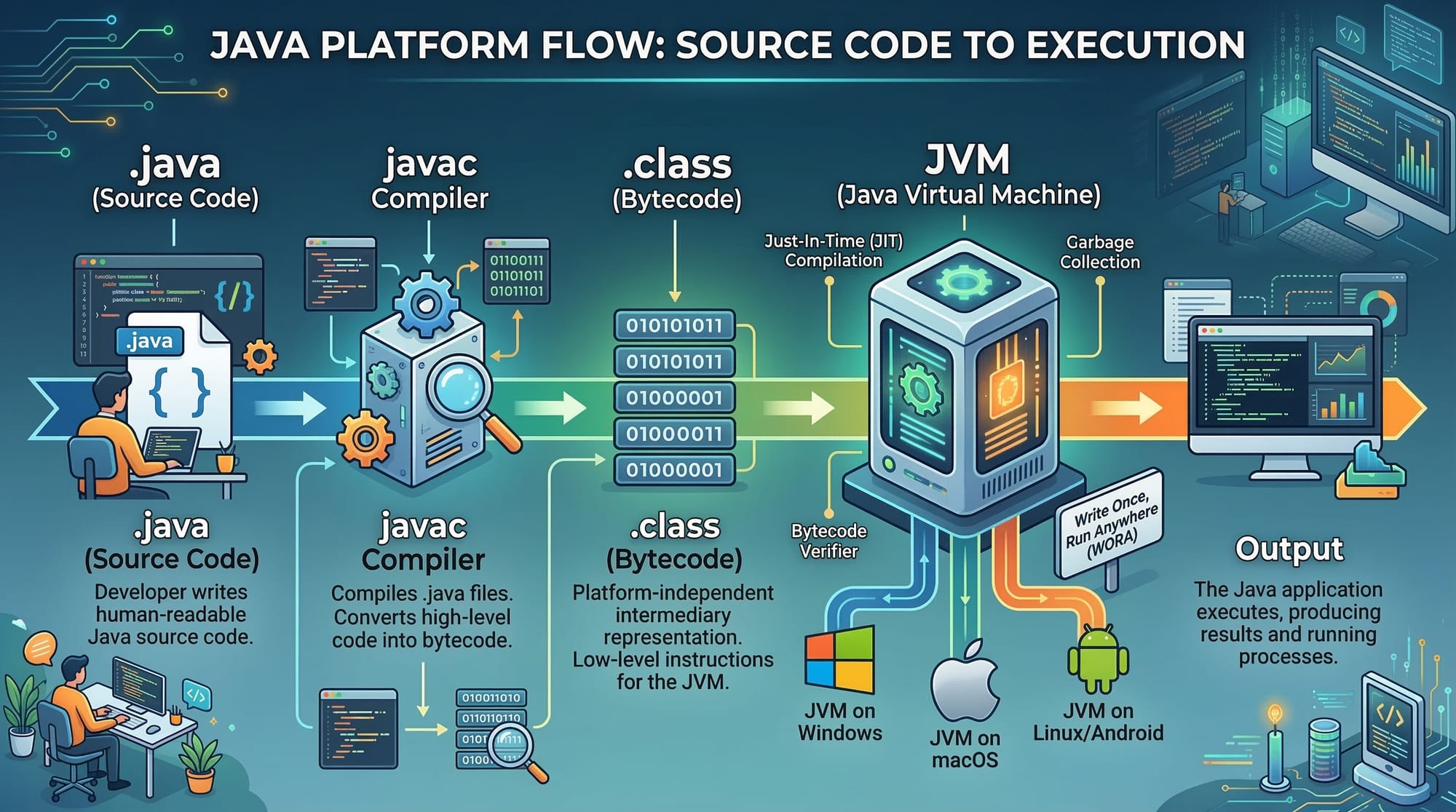
Here is the basic process:
- You write code in a
.javafile - The Java compiler converts it into bytecode
- The Java Virtual Machine (JVM) executes the bytecode
This architecture makes Java platform-independent.
For example:
- Write program on Windows
- Run it on Linux
- Run it on macOS
Without changing the code.
This concept is often summarized as:
Write Once, Run Anywhere
Variables and Data Types
Variables store information inside a program.
Example:
int age = 20;
double price = 1500.50;
String name = "Ahmad";
Explanation:
Line 1
int age = 20;
intmeans integer numberageis the variable name20is the stored value
Line 2
double price = 1500.50;
doublestores decimal numbers- Used for values like currency (PKR prices)
Line 3
String name = "Ahmad";
Stringstores text- Useful for names or messages
Common Java data types:
| Type | Example | Description |
|---|---|---|
| int | 10 | whole numbers |
| double | 19.5 | decimal numbers |
| char | 'A' | single character |
| boolean | true | true/false value |
| String | "Ali" | text |
Control Statements (Decision Making)
Control statements allow your program to make decisions.
The most common is if-else.
Example:
int marks = 75;

if (marks >= 50) {
    System.out.println("You passed the exam");
} else {
    System.out.println("You failed the exam");
}
Explanation:
Line 1
int marks = 75;
The student's marks are stored.
Line 2
if (marks >= 50)
Java checks if marks are greater than or equal to 50.
Line 3
System.out.println("You passed the exam");
If the condition is true, this message appears.
Line 4
else
If the condition is false.
Line 5
System.out.println("You failed the exam");
This message will display.
Programs often use these decisions in systems like university grading or admission systems.
Loops (Repeating Tasks)
Loops allow repeating code multiple times.
Example using for loop:
for(int i = 1; i <= 5; i++) {
    System.out.println("Welcome to Java Programming");
}
Explanation:
Line 1
for(int i = 1; i <= 5; i++)
istarts from 1- Loop continues until 5
i++increases value by 1
Line 2
System.out.println("Welcome to Java Programming");
This line runs 5 times.
Loops are useful for:
- Processing student records
- Calculating totals
- Displaying lists
Practical Code Examples
Example 1: Your First Java Program
Let’s write the famous Hello World program.
public class HelloWorld {

    public static void main(String[] args) {

        System.out.println("Hello Pakistan! Welcome to Java Programming");

    }

}
Explanation:
Line 1
public class HelloWorld
Defines a class named HelloWorld. In Java, every program must be inside a class.
Line 2
public static void main(String[] args)
This is the main method, where Java starts executing the program.
Line 3
System.out.println("Hello Pakistan! Welcome to Java Programming");
This prints a message to the screen.
Output:
Hello Pakistan! Welcome to Java Programming
Example 2: Real-World Application
Let’s create a simple student fee calculator for a college in Lahore.
public class FeeCalculator {

    public static void main(String[] args) {

        int tuitionFee = 45000;
        int hostelFee = 15000;
        int totalFee;

        totalFee = tuitionFee + hostelFee;

        System.out.println("Total Fee in PKR: " + totalFee);

    }

}
Explanation:
Line 1
public class FeeCalculator
Defines a class called FeeCalculator.
Line 2
int tuitionFee = 45000;
Tuition fee stored in Pakistani Rupees (PKR).
Line 3
int hostelFee = 15000;
Hostel fee stored.
Line 4
int totalFee;
Declares variable for total.
Line 5
totalFee = tuitionFee + hostelFee;
Adds both fees.
Line 6
System.out.println("Total Fee in PKR: " + totalFee);
Displays the total fee.
Output:
Total Fee in PKR: 60000
Common Mistakes & How to Avoid Them
Mistake 1: Missing Semicolon
Java requires semicolons at the end of statements.
Incorrect:
int age = 20
System.out.println(age)
Correct:
int age = 20;
System.out.println(age);
Why it matters:
The compiler cannot understand where a statement ends without a semicolon.
Mistake 2: Class Name and File Name Mismatch
In Java:
Class Name = File Name
Incorrect:
File name:
Program.java
Code:
public class HelloWorld
Correct:
File name:
HelloWorld.java
Code:
public class HelloWorld
Matching names prevents compilation errors.
Practice Exercises
Exercise 1: Student Marks Calculator
Problem:
Write a Java program that:
- Stores marks for 3 subjects
- Calculates total marks
- Displays the result.
Solution:
public class MarksCalculator {

    public static void main(String[] args) {

        int math = 80;
        int physics = 70;
        int chemistry = 75;

        int total = math + physics + chemistry;

        System.out.println("Total Marks: " + total);

    }

}
Explanation:
- Variables store marks
- Marks are added
- Result printed.
Exercise 2: Currency Conversion
Problem:
Create a Java program that converts PKR to USD.
Solution:
public class CurrencyConverter {

    public static void main(String[] args) {

        double pkr = 10000;
        double usdRate = 280.0;

        double usd = pkr / usdRate;

        System.out.println("USD Value: " + usd);

    }

}
Explanation:
- PKR amount stored
- Exchange rate stored
- Division converts currency.
Frequently Asked Questions
What is Java used for?
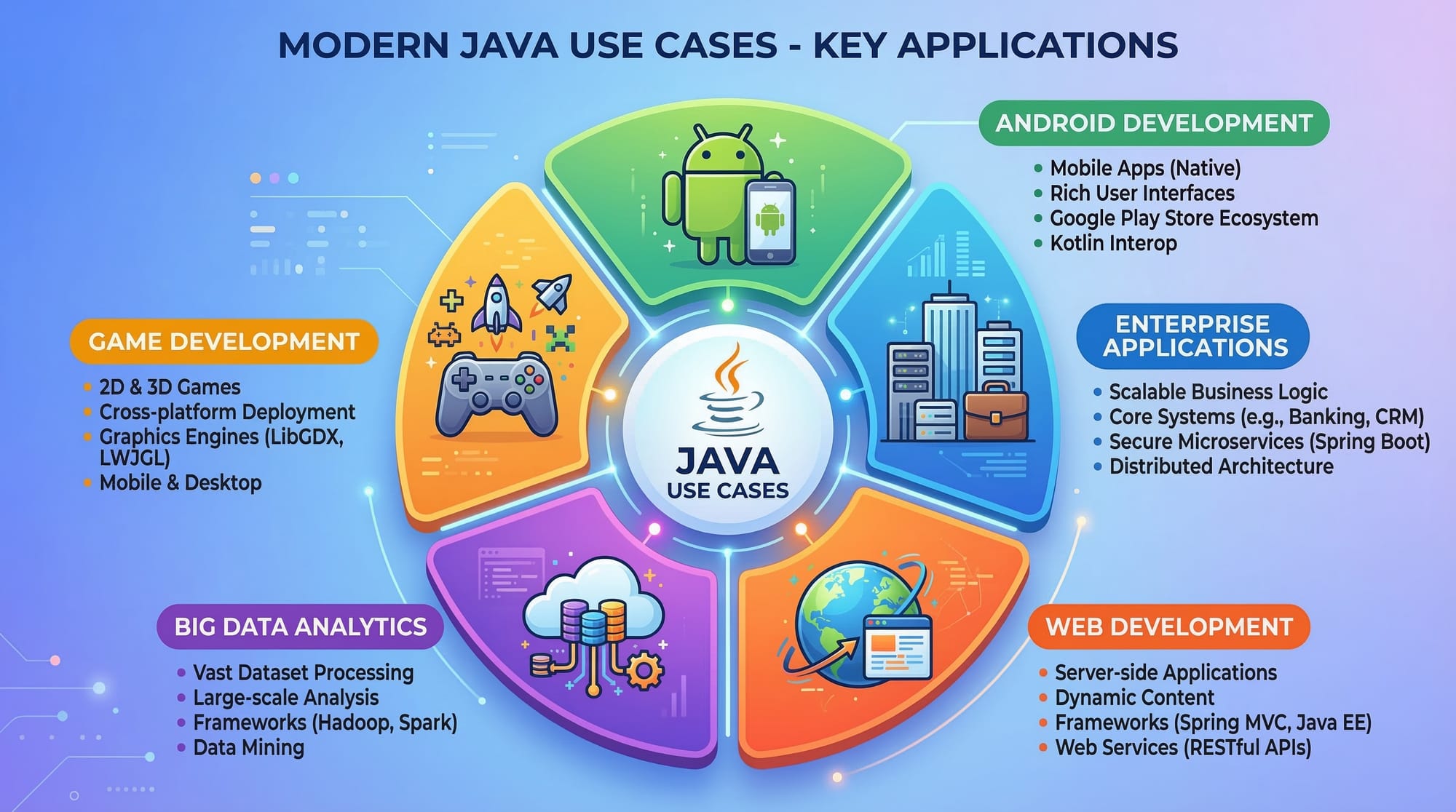
Java is used to build Android apps, enterprise software, banking systems, and large-scale web applications. Many global companies rely on Java because it is stable, secure, and scalable.
How do I install Java on my computer?
Download the Java Development Kit (JDK) from Oracle Corporation and install it. After installation, verify it using the command java -version in your terminal.
Is Java difficult for beginners?
Java has a slightly steeper learning curve than some languages, but it teaches strong programming fundamentals. Once you understand its structure, learning other languages becomes easier.
Can Java help me get a job in Pakistan?
Yes. Many companies in cities like Karachi and Lahore hire Java developers for enterprise systems, fintech platforms, and backend services.
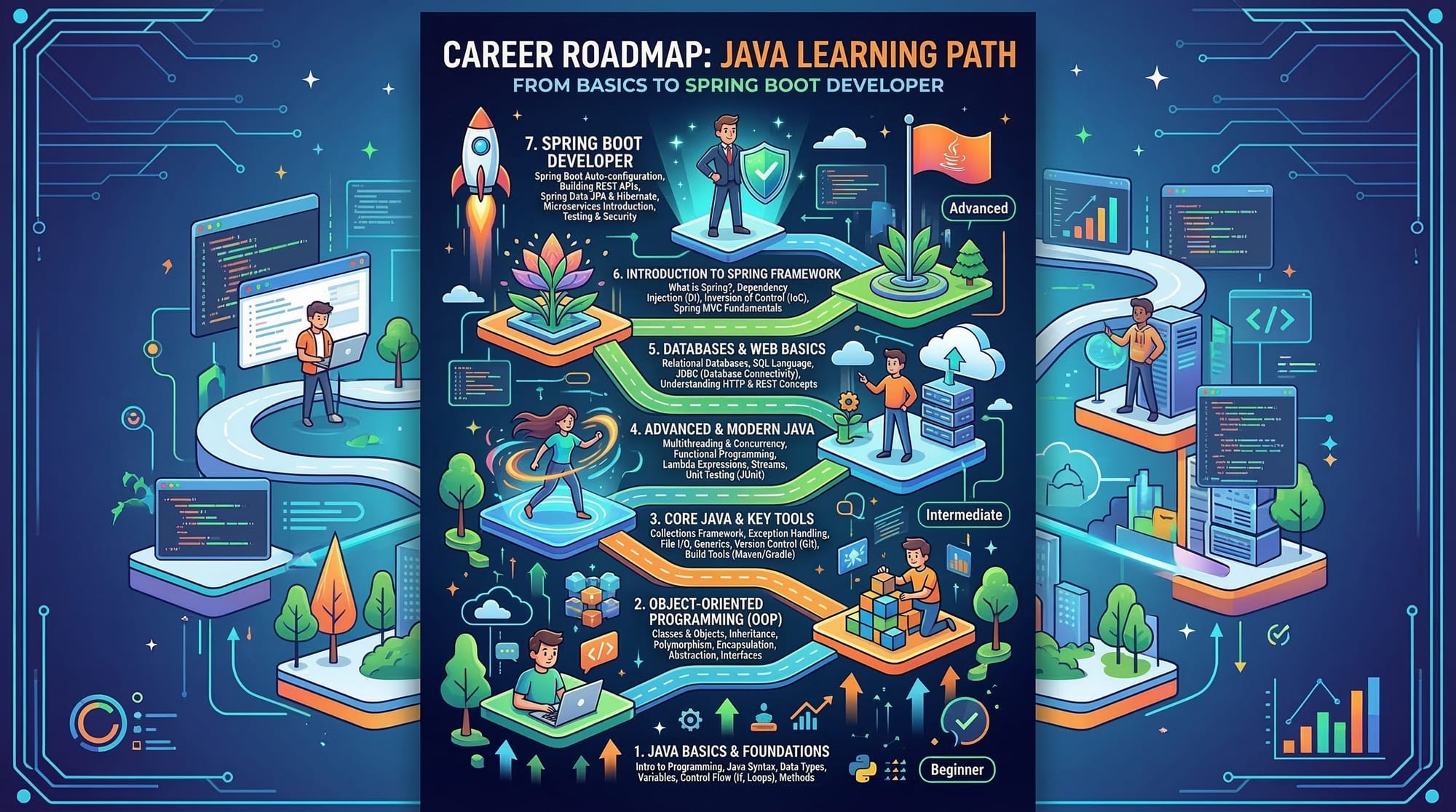
What should I learn after Java basics?
After learning Java fundamentals, you should explore:
- Object-Oriented Programming (OOP)
- Spring Boot
- Databases
- REST APIs
These skills are essential for modern backend development.
Summary & Key Takeaways
Key points from this java tutorial for beginners:
- Java is a powerful, platform-independent programming language.
- Programs run using the Java Virtual Machine (JVM).
- Beginners should learn variables, loops, and conditionals first.
- Java is widely used in Android, enterprise software, and banking systems.
- Pakistani students can build real-world projects like fee systems or student record applications.
- Learning Java builds a strong foundation for advanced programming.
Next Steps & Related Tutorials
Now that you’ve started your journey to learn Java 2026, continue expanding your skills with related tutorials on theiqra.edu.pk.
Recommended next tutorials:
- Python Tutorial for Beginners — a beginner-friendly guide to learning Python programming
- Web Development Roadmap 2026 — learn the full path to becoming a web developer
- REST API Design Tutorial — build backend services used by modern applications
- GitHub Collaboration Tutorial — learn how developers work together using Git and GitHub
Combining Java with web development, APIs, and cloud technologies can help you build a strong career as a software developer.
If you'd like, I can also help you with:
- SEO optimization for this article (rank for "java tutorial for beginners")
- Adding schema markup for Google FAQ rich results
- Creating a 10-question quiz JSON for this tutorial (for your website's quiz system).
Test Your Python Knowledge!
Finished reading? Take a quick quiz to see how much you've learned from this tutorial.