Java Variables Data Types & Operators Explained
Introduction
If you are starting your journey in Java programming, three concepts you will encounter immediately are java variables, java data types, and java operators. These are the basic building blocks of every Java program. Without understanding them, writing useful Java applications becomes very difficult.
A variable stores information, a data type defines what kind of information can be stored, and operators allow you to perform operations on that data. Together, these concepts allow developers to build everything from simple calculators to complex enterprise applications.
For Pakistani students learning programming, mastering these fundamentals is especially important. Many universities in Pakistan—including institutions in Lahore, Karachi, and Islamabad—teach Java as a core programming language because it is widely used in:
- Web development
- Android mobile applications
- Enterprise systems
- Banking and financial software
For example, a university project might require storing student names, calculating marks, or processing fees in PKR. Variables, data types, and operators make these tasks possible.
In this tutorial, we will clearly explain Java variables, Java data types, and Java operators with beginner-friendly examples designed for Pakistani students.
Prerequisites
Before starting this tutorial, you should have basic knowledge of:
- Installing the Java Development Kit (JDK)
- Writing and running a simple Java program
- Using an editor like VS Code or IntelliJ IDEA
- Understanding the basic structure of a Java program
If you are new to Java, you should first read Java Tutorial for Beginners on theiqra.edu.pk before continuing.
Core Concepts & Explanation
Understanding Java Variables
A variable is a named container that stores data in memory.
Think of a variable as a labeled box that stores information. The label is the variable name, and the contents are the stored value.
For example:
int age = 20;
Explanation:
int→ data type (integer)age→ variable name=→ assignment operator20→ stored value
Example using Pakistani student names:
String studentName = "Ahmad";
int marks = 85;
Explanation:
String studentNamestores the student's nameint marksstores exam marks- Each variable holds a different type of data
Rules for Java variable names:
- Must start with a letter,
$, or_ - Cannot start with a number
- Cannot use Java keywords like
int,class, orpublic
Valid examples:
int studentAge;
double accountBalance;
String cityName;
Invalid examples:
int 1age;     // Cannot start with number
int class;    // Reserved keyword
Using meaningful names like studentMarks instead of x makes programs easier to understand.
Understanding Java Data Types
A data type defines what type of data a variable can store.
Java is a strongly typed language, meaning every variable must declare its data type.
Java data types fall into two categories:
- Primitive Data Types
- Non-Primitive (Reference) Data Types
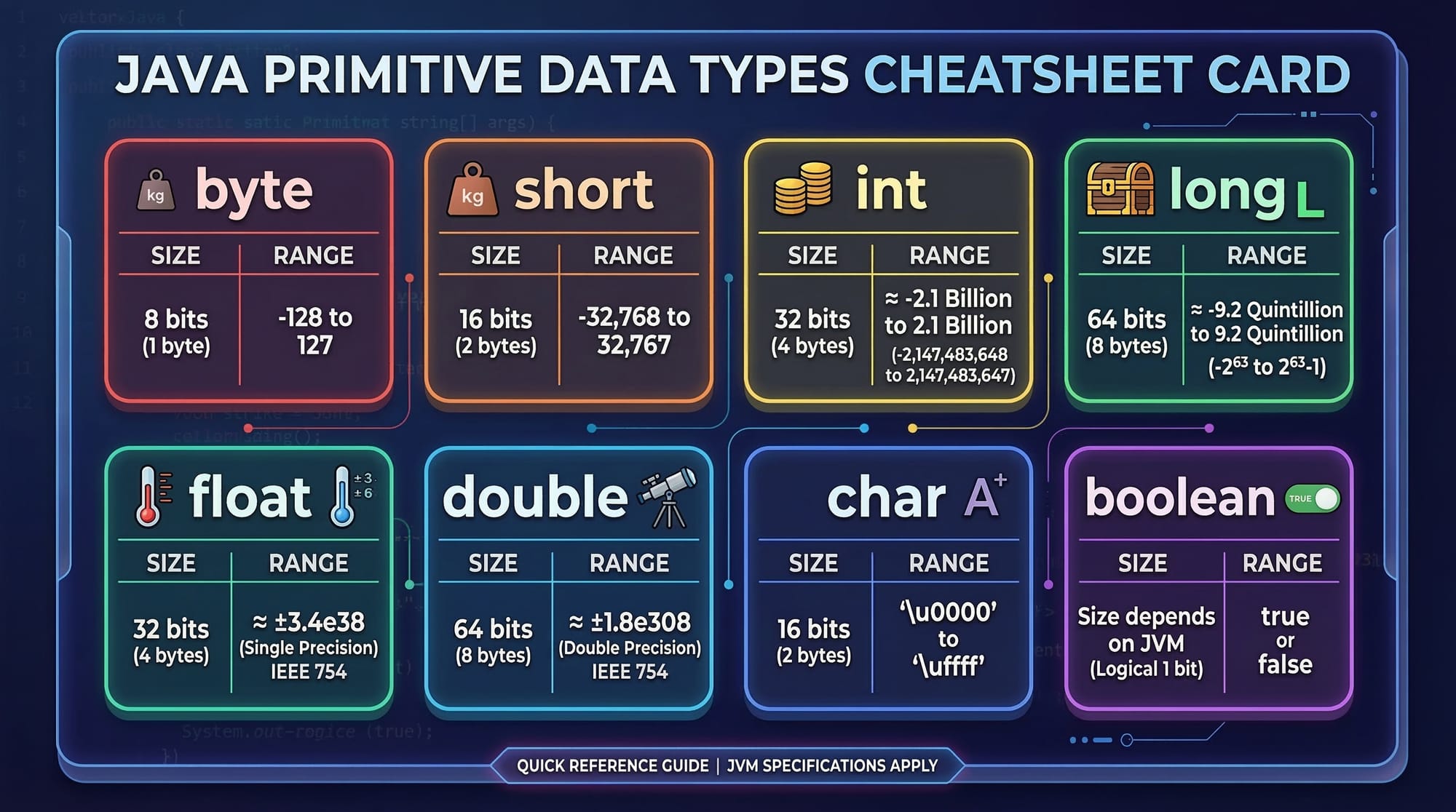
Primitive Data Types
Primitive types store simple values directly in memory.
| Data Type | Example | Description |
|---|---|---|
| byte | byte b = 10; | Small integers |
| short | short s = 200; | Slightly larger integers |
| int | int age = 21; | Most common integer type |
| long | long population = 240000000; | Very large numbers |
| float | float price = 99.5f; | Decimal numbers |
| double | double salary = 75000.50; | High precision decimals |
| char | char grade = 'A'; | Single characters |
| boolean | boolean passed = true; | True/false values |
Example:
int marks = 90;
double fee = 15000.50;
char grade = 'A';
boolean passed = true;
Explanation:
marksstores whole numbersfeestores decimal valuesgradestores a characterpassedstores a true/false condition
Non-Primitive Data Types
These store references to objects.
Common examples:
String- Arrays
- Classes
- Interfaces
Example:
String city = "Lahore";
Explanation:
Stringis a reference type- It stores text data
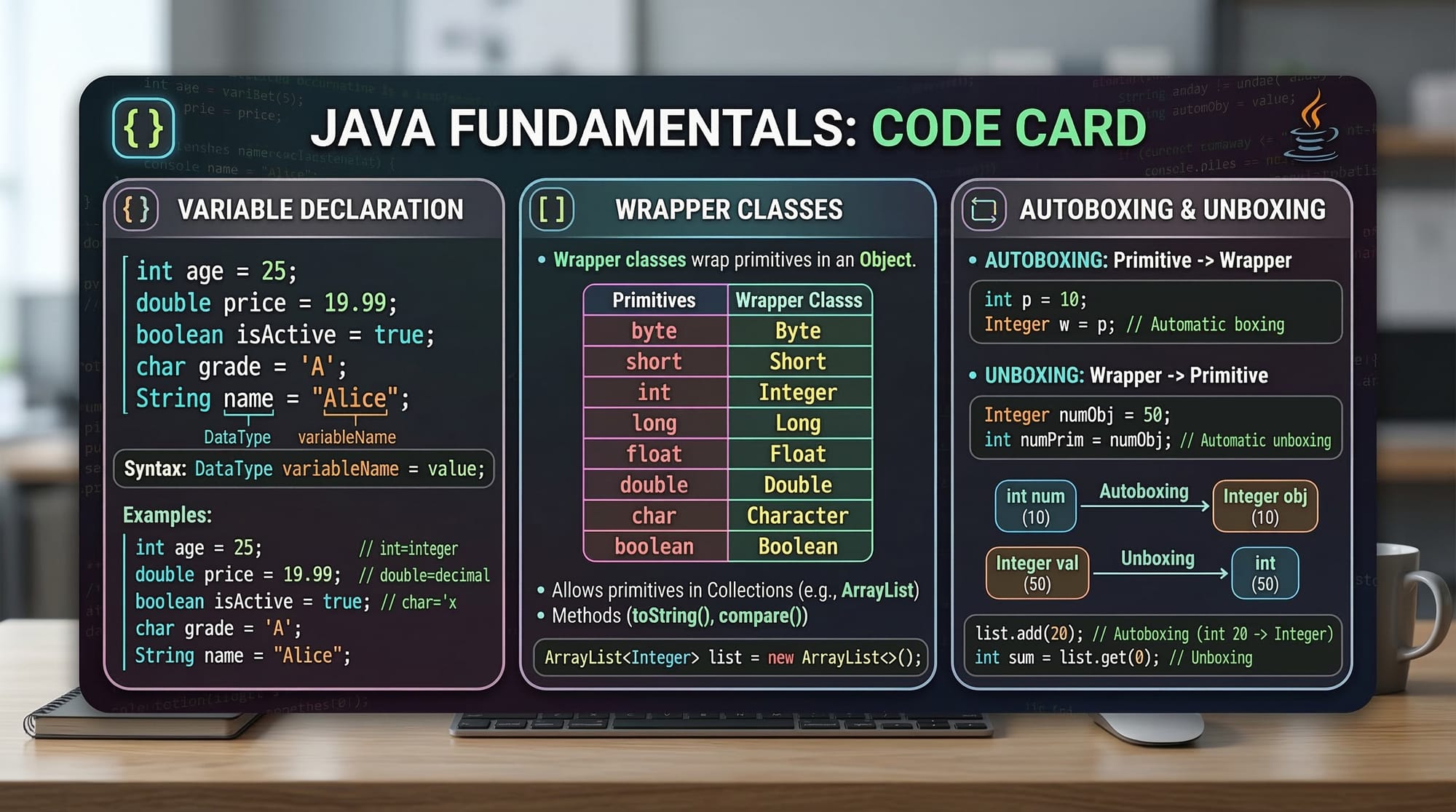
Java also provides wrapper classes like:
IntegerDoubleBoolean
These allow primitive values to be treated as objects.
Example:
Integer marks = 85;
This process is called autoboxing.
Understanding Java Operators
Operators perform operations on variables and values.
Example:
int total = 10 + 5;
Here + is an operator.
Java operators fall into several categories.
Arithmetic Operators
Used for mathematical calculations.
| Operator | Meaning |
|---|---|
| + | Addition |
| - | Subtraction |
| * | Multiplication |
| / | Division |
| % | Modulus |
Example:
int a = 10;
int b = 5;

int sum = a + b;
int difference = a - b;
Explanation:
+adds values-subtracts values
Comparison Operators
Used to compare values.
| Operator | Meaning |
|---|---|
| == | Equal to |
| != | Not equal |
| > | Greater than |
| < | Less than |
| >= | Greater or equal |
| <= | Less or equal |
Example:
int marks = 80;

boolean passed = marks >= 50;
Explanation:
- Checks if marks are greater than or equal to 50
- Result stored as
trueorfalse
Logical Operators
Used to combine conditions.
| Operator | Meaning |
|---|---|
| && | AND |
| ! | NOT |
Example:
int marks = 75;
int attendance = 80;

boolean eligible = marks > 50 && attendance > 75;
Explanation:
- Student must satisfy both conditions
- Result becomes
true
Practical Code Examples
Example 1: Student Marks Calculator
public class MarksCalculator {
    public static void main(String[] args) {

        int mathMarks = 85;
        int physicsMarks = 78;

        int total = mathMarks + physicsMarks;
        double average = total / 2.0;

        System.out.println("Total Marks: " + total);
        System.out.println("Average Marks: " + average);
    }
}
Line-by-line explanation:
public class MarksCalculator
Creates a class named MarksCalculator.
public static void main(String[] args)
Main method where the program starts.
int mathMarks = 85;
Stores Ahmad's math marks.
int physicsMarks = 78;
Stores physics marks.
int total = mathMarks + physicsMarks;
Adds both marks.
double average = total / 2.0;
Calculates average marks.
System.out.println(...)
Prints results on the screen.
Output:
Total Marks: 163
Average Marks: 81.5
Example 2: Real-World Application (Shop Billing System)
Imagine Ali runs a small shop in Karachi and wants to calculate a customer's bill.
public class ShopBill {
    public static void main(String[] args) {

        double itemPrice = 500.0;
        int quantity = 3;

        double totalPrice = itemPrice * quantity;

        System.out.println("Total Bill in PKR: " + totalPrice);
    }
}
Line-by-line explanation:
double itemPrice = 500.0;
Price of one product in PKR.
int quantity = 3;
Customer buys 3 items.
double totalPrice = itemPrice * quantity;
Multiplication operator calculates total bill.
System.out.println(...)
Displays final bill amount.
Output:
Total Bill in PKR: 1500.0
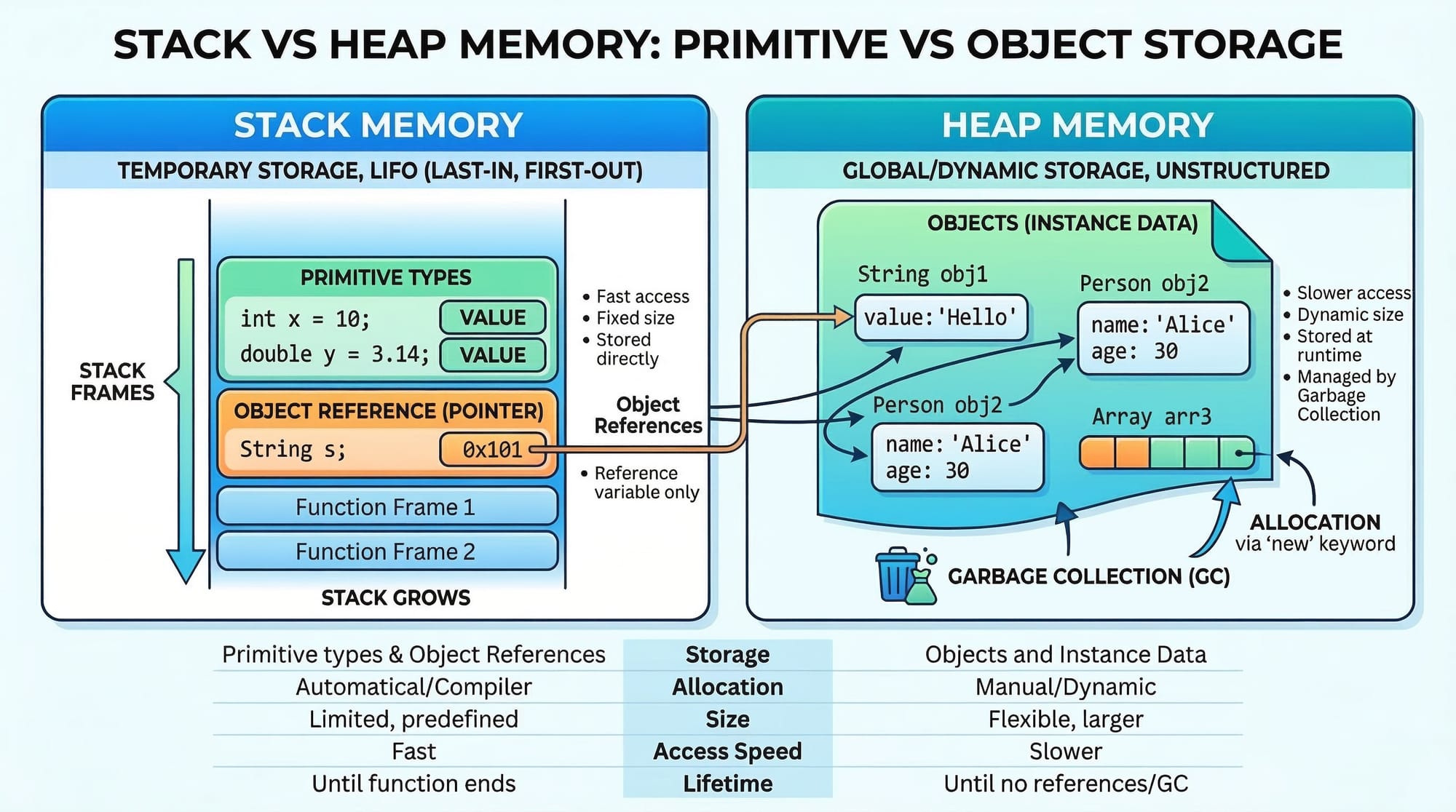
Primitive variables like int are stored in stack memory, while objects like String are stored in heap memory.
Common Mistakes & How to Avoid Them
Mistake 1: Using the Wrong Data Type
Incorrect:
int price = 99.99;
Problem:
int cannot store decimal numbers.
Correct version:
double price = 99.99;
Always choose a data type that matches the data you want to store.
Mistake 2: Confusing Assignment and Comparison
Incorrect:
if (marks = 50)
Problem:
= assigns a value instead of comparing.
Correct version:
if (marks == 50)
== checks equality.
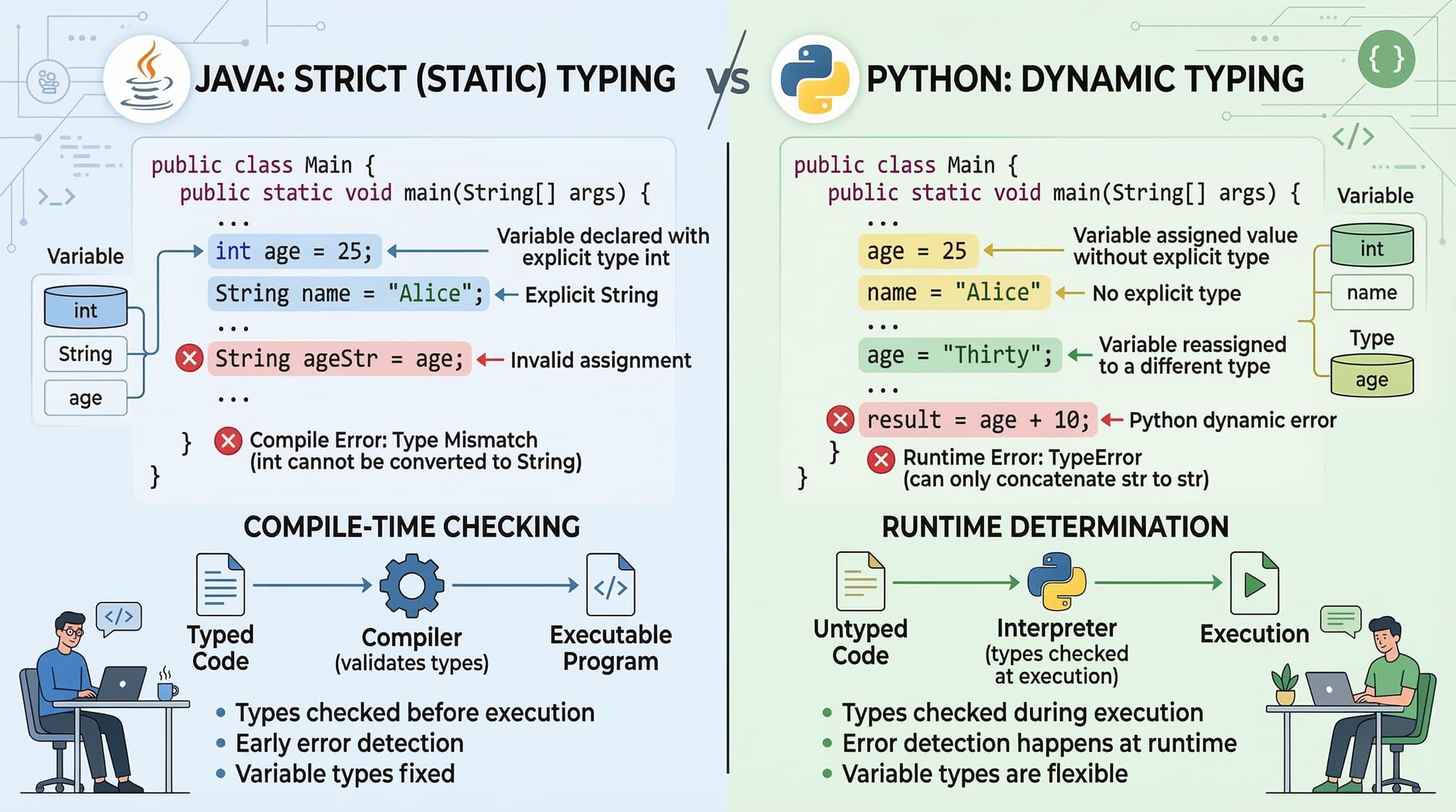
Java requires explicit types, while Python automatically detects types.
Practice Exercises
Exercise 1: Calculate Student Percentage
Problem:
Write a Java program that calculates the percentage of a student who scored:
- Math: 80
- Physics: 75
- Chemistry: 70
Solution:
public class PercentageCalculator {
    public static void main(String[] args) {

        int math = 80;
        int physics = 75;
        int chemistry = 70;

        int total = math + physics + chemistry;
        double percentage = total / 3.0;

        System.out.println("Percentage: " + percentage);
    }
}
Explanation:
- Stores marks in variables
- Adds them together
- Divides by number of subjects
Exercise 2: Simple Currency Converter
Problem:
Convert PKR to USD assuming:
1 USD = 280 PKR
Solution:
public class CurrencyConverter {
    public static void main(String[] args) {

        double pkr = 56000;
        double usd = pkr / 280;

        System.out.println("USD Amount: " + usd);
    }
}
Explanation:
pkrstores amount in Pakistani Rupees- Division operator converts currency
Frequently Asked Questions
What are Java variables?
Java variables are named memory locations used to store data. Each variable has a specific data type such as int, double, or String that determines the type of value it can hold.
What are Java data types?
Java data types define the kind of data a variable can store. Examples include primitive types like int, double, and boolean, and reference types like String and arrays.
What are Java operators?
Java operators are symbols used to perform operations on variables and values. Examples include arithmetic operators (+, -, *), comparison operators (==, >), and logical operators (&&, ||).
How do I choose the correct Java data type?
Choose a data type based on the kind of data you need. Use int for whole numbers, double for decimal values, char for characters, and boolean for true/false conditions.
Why is Java considered strongly typed?
Java is strongly typed because every variable must have a declared data type before it is used. This helps catch errors early and makes programs more reliable compared to dynamically typed languages.
Summary & Key Takeaways
- Java variables store data values used by a program.
- Java data types define the type of information a variable can hold.
- Java includes primitive types like
int,double, andboolean. - Operators allow programs to perform calculations and logical decisions.
- Java’s strong typing improves reliability and prevents many programming errors.
- Understanding these concepts is essential before learning advanced Java topics.
Next Steps & Related Tutorials
Now that you understand Java variables, data types, and operators, you are ready to explore more Java programming concepts.
Continue learning with these tutorials on theiqra.edu.pk:
- Java Tutorial for Beginners – A complete introduction to Java programming
- Java Control Flow Statements (if, switch, loops) – Learn how programs make decisions
- Java Methods Explained – How to organize reusable code
- JavaScript Variables – Compare variables in JavaScript and Java
Mastering these fundamentals will help you confidently build Java programs, whether you are developing university projects in Islamabad, creating Android apps, or preparing for a professional software development career.
Test Your Python Knowledge!
Finished reading? Take a quick quiz to see how much you've learned from this tutorial.