Asynchronous JavaScript: Callbacks, Promises & Fetch API
Introduction
Imagine you're at a dhaba in Lahore. You place your order for nihari, and the waiter doesn't freeze in place waiting for the kitchen — he goes and serves other customers. When your food is ready, he brings it to you. That's asynchronous programming in a nutshell.
JavaScript is single-threaded, meaning it can only do one thing at a time. But modern web applications need to fetch data from servers, read files, and respond to user clicks — all without freezing the browser. Asynchronous JavaScript solves this problem by letting your code continue running while waiting for slow operations to complete.
For Pakistani students building web apps — whether it's an e-commerce platform for Karachi businesses, a prayer time app for Islamabad, or a ride-sharing service like Careem — understanding async JavaScript is not optional. It's the foundation of every modern web application.
In this tutorial, you will learn:
- What callback functions are and why they were the original async solution
- How JavaScript Promises clean up messy async code
- How to use the Fetch API to pull real data from the internet
- Common mistakes and how to avoid them
- Hands-on exercises to build your skills
Prerequisites
Before diving in, make sure you're comfortable with the following:
- Basic JavaScript — variables, functions, arrays, and objects
- ES6 Syntax — arrow functions (
=>), template literals (```), andconst/let` - HTML basics — enough to run a script in a browser
- How the browser works — a rough idea that JavaScript runs in the browser
If you need a refresher on ES6 features, check out our ES6 JavaScript Complete Guide on theiqra.edu.pk before continuing.
Core Concepts & Explanation
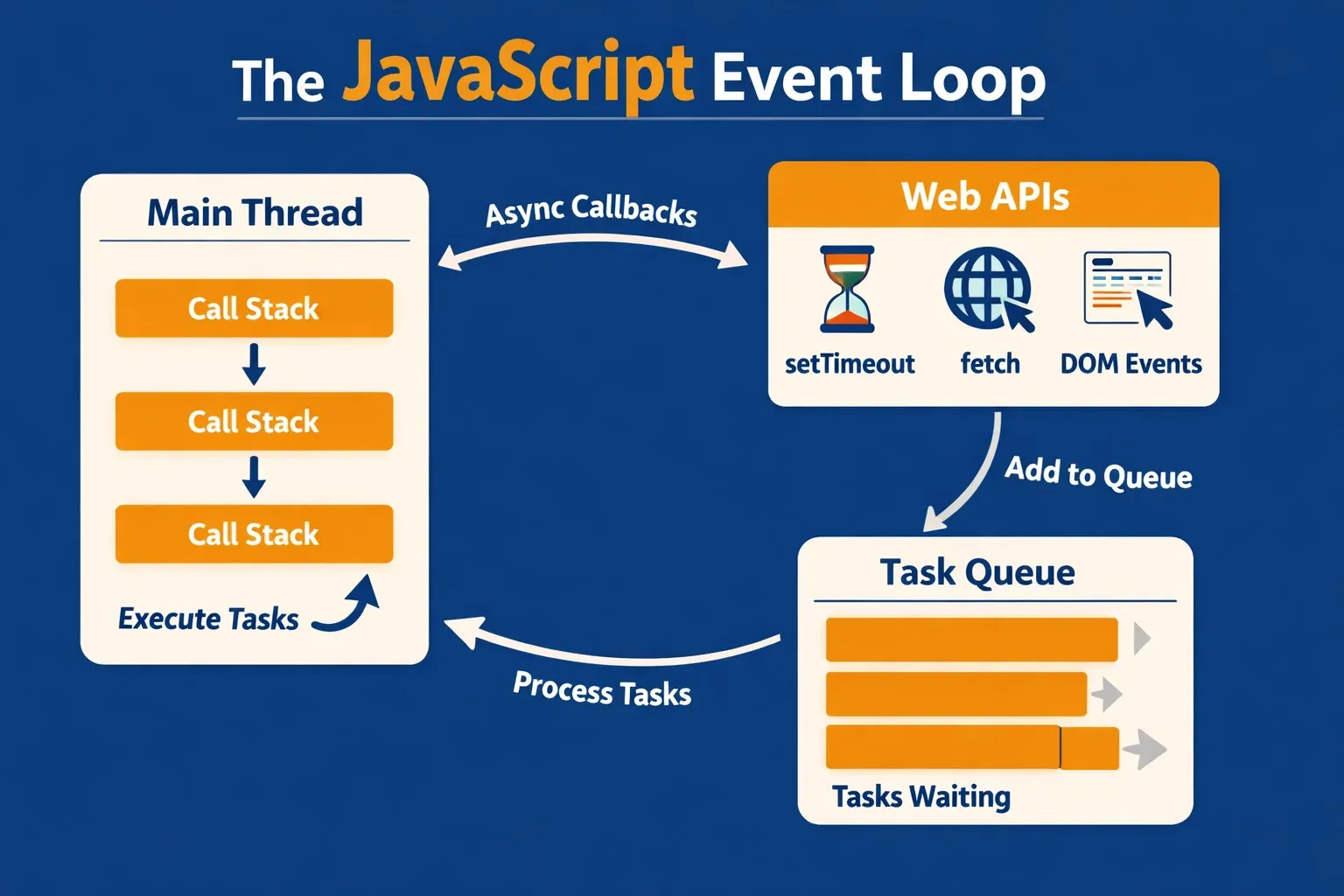
The JavaScript Event Loop
Before callbacks and promises make sense, you need to understand why async code exists in the first place.
JavaScript runs on a single thread — like a single loket (counter) at a government office. It can only process one task at a time. If a task takes too long (like fetching data from a server), everything behind it in the queue has to wait.
The Event Loop is JavaScript's solution. It works like this:
- Call Stack — JavaScript executes code line by line here
- Web APIs — Browser handles slow tasks (timers, network requests) in the background
- Task Queue — Completed async tasks wait here
- Event Loop — Constantly checks: "Is the Call Stack empty? If yes, move a task from the Queue."
console.log("1. Ahmad starts his order"); // Runs immediately

setTimeout(function() {
  console.log("3. Ahmad's food is ready!"); // Runs after 2 seconds
}, 2000);

console.log("2. Waiter serves other tables"); // Runs immediately
Output:
1. Ahmad starts his order
2. Waiter serves other tables
3. Ahmad's food is ready!
Notice that line 2 runs before line 3, even though setTimeout is written first in the queue. The browser handled the timer in the background while JavaScript continued. This is the heart of async behaviour.
Callback Functions
A callback function is simply a function you pass as an argument to another function, to be called later when a task is done.
Think of it like giving your phone number to the waiter — "Call me when the order is ready." The number (your callback) gets called at the right time.
// A simple callback example
function greetStudent(name, callback) {
  console.log("Assalam o Alaikum, " + name + "!");
  callback(); // Call the function we were given
}

function showWelcome() {
  console.log("Welcome to theiqra.edu.pk!");
}

greetStudent("Fatima", showWelcome);
// Output:
// Assalam o Alaikum, Fatima!
// Welcome to theiqra.edu.pk!
Line-by-line explanation:
- Line 2:
greetStudentaccepts a name and acallback(any function) - Line 4: It calls
callback()— whatever function was passed in - Line 7–9:
showWelcomeis a normal function - Line 11: We pass
showWelcome(without parentheses!) as the callback
Callbacks for Async Operations
Callbacks shine when dealing with async tasks like reading data:
// Simulating fetching a student's marks from a database
function fetchMarks(studentId, onSuccess, onError) {
  setTimeout(function() {
    // Simulate: student found in database
    if (studentId === "101") {
      onSuccess({ name: "Ali", marks: 87, subject: "Computer Science" });
    } else {
      onError("Student ID not found in records.");
    }
  }, 1500); // Simulates 1.5 second network delay
}

// Using the function
fetchMarks(
  "101",
  function(student) {
    console.log("Student found: " + student.name);
    console.log("Marks: " + student.marks + "/100");
  },
  function(error) {
    console.log("Error: " + error);
  }
);
Output after 1.5 seconds:
Student found: Ali
Marks: 87/100
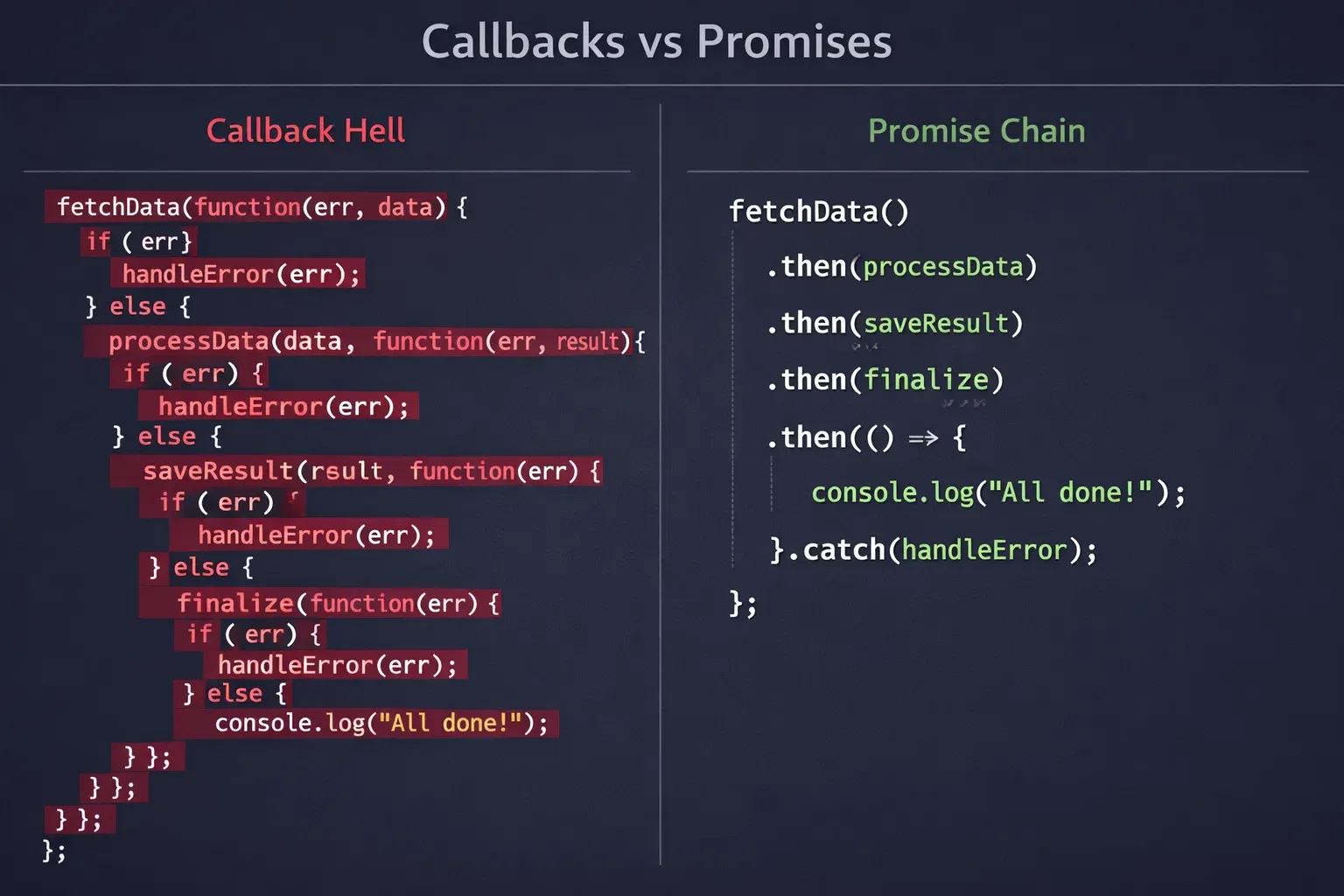
This works, but things get messy when you need to chain multiple async operations — a problem famously called Callback Hell.
Callback Hell (The Problem)
// Fetching student → then their course → then their instructor
// This gets deeply nested and hard to read!
fetchStudent("101", function(student) {
  fetchCourse(student.courseId, function(course) {
    fetchInstructor(course.instructorId, function(instructor) {
      fetchSchedule(instructor.id, function(schedule) {
        // We're now 4 levels deep — hard to debug!
        console.log(schedule);
      });
    });
  });
});
This "pyramid of doom" is hard to read, hard to debug, and easy to break. That's exactly why Promises were invented.
JavaScript Promises
A Promise is an object that represents the eventual result of an async operation. It's like a receipt from an online store — it promises that your item will arrive, and it will eventually be either delivered (fulfilled) or returned (rejected).
A Promise has three states:
- Pending — The operation is still in progress
- Fulfilled — The operation succeeded, result is available
- Rejected — The operation failed, error is available
Creating a Promise
// Creating a Promise that simulates checking payment status
function checkPayment(amount) {
  return new Promise(function(resolve, reject) {
    setTimeout(function() {
      if (amount > 0 && amount <= 50000) {
        resolve({
          status: "success",
          message: "Payment of PKR " + amount + " confirmed!",
          transactionId: "TXN" + Date.now()
        });
      } else {
        reject(new Error("Invalid payment amount. Must be between PKR 1 and 50,000."));
      }
    }, 1000);
  });
}
Line-by-line explanation:
- Line 2:
new Promise(...)creates a Promise object - Line 3: The executor function receives
resolveandreject— two functions provided by JavaScript - Line 5:
setTimeoutsimulates a delay (like a real API call) - Line 6–11: If conditions pass, we call
resolve(data)— Promise is fulfilled - Line 13: If something is wrong, we call
reject(error)— Promise is rejected
Consuming a Promise with .then() and .catch()
// Using the Promise we created above
checkPayment(2500)
  .then(function(result) {
    // This runs if the Promise was RESOLVED
    console.log("✅ " + result.message);
    console.log("Transaction ID: " + result.transactionId);
  })
  .catch(function(error) {
    // This runs if the Promise was REJECTED
    console.log("❌ Payment failed: " + error.message);
  })
  .finally(function() {
    // This runs ALWAYS, regardless of success or failure
    console.log("Payment process complete.");
  });
Output (after 1 second):
✅ Payment of PKR 2500 confirmed!
Transaction ID: TXN1711234567890
Payment process complete.
Chaining Promises — The Clean Solution
Now let's rewrite the earlier "callback hell" example using Promise chaining:
fetchStudent("101")
  .then(function(student) {
    return fetchCourse(student.courseId); // Return the next Promise
  })
  .then(function(course) {
    return fetchInstructor(course.instructorId);
  })
  .then(function(instructor) {
    return fetchSchedule(instructor.id);
  })
  .then(function(schedule) {
    console.log(schedule); // Clean, flat, readable!
  })
  .catch(function(error) {
    console.log("Something went wrong:", error.message);
  });
Much cleaner! Each .then() receives the resolved value of the previous Promise and returns a new one.
Async/Await — The Modern Syntax
async/await is syntactic sugar built on top of Promises. It lets you write async code that looks synchronous — much easier to read and reason about.
// Same logic as Promise chaining, but using async/await
async function getStudentSchedule(studentId) {
  try {
    const student = await fetchStudent(studentId);
    const course = await fetchCourse(student.courseId);
    const instructor = await fetchInstructor(course.instructorId);
    const schedule = await fetchSchedule(instructor.id);
    console.log(schedule);
  } catch (error) {
    console.log("Error:", error.message);
  }
}

getStudentSchedule("101");
Key rules:
- The
asynckeyword before a function makes it return a Promise automatically awaitcan only be used inside anasyncfunctionawaitpauses execution until the Promise resolves, then gives you the value- Wrap in
try/catchto handle errors (replaces.catch())
The Fetch API
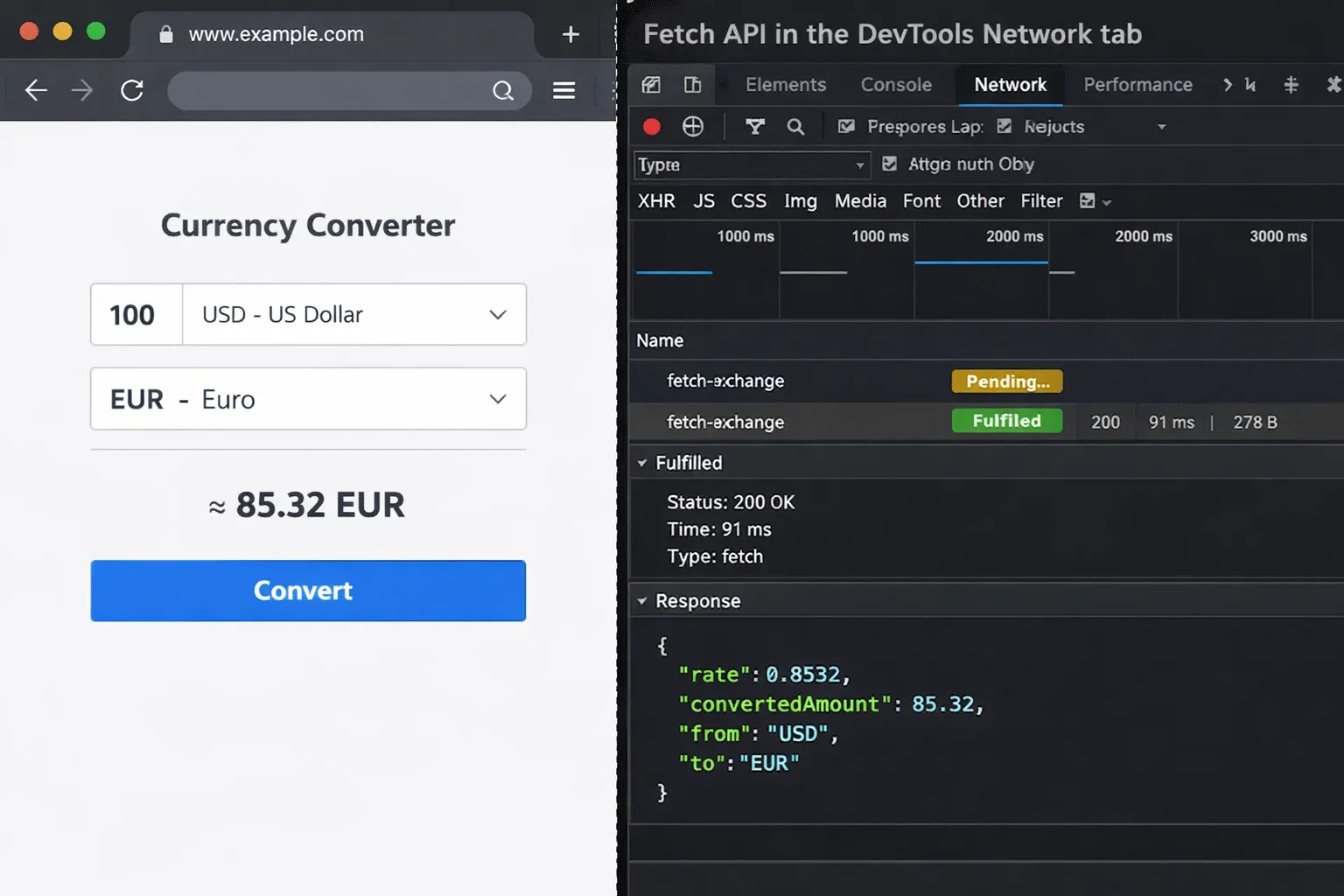
The Fetch API is the modern, built-in browser way to make HTTP requests — replacing the older XMLHttpRequest (AJAX). It returns a Promise, making it perfect for async/await.
// Basic Fetch syntax
fetch('https://api.example.com/data')
  .then(response => response.json()) // Step 1: Parse the response
  .then(data => console.log(data))   // Step 2: Use the data
  .catch(error => console.log(error));
Important: fetch() does NOT reject on HTTP errors (like 404 or 500). You must check response.ok manually:
fetch('https://api.example.com/students')
  .then(response => {
    if (!response.ok) {
      throw new Error("Server error: " + response.status);
    }
    return response.json();
  })
  .then(data => console.log(data))
  .catch(error => console.log("Failed:", error.message));
Practical Code Examples
Example 1: Fetching Prayer Times for Pakistani Cities
Here's a real-world application using the Fetch API to get prayer times — something genuinely useful for Pakistani users.
// Fetching prayer times for Karachi using a public API
async function getPrayerTimes(city, country) {
  const url = `https://api.aladhan.com/v1/timingsByCity?city=${city}&country=${country}&method=1`;

  try {
    // Step 1: Make the request
    const response = await fetch(url);

    // Step 2: Check if the request succeeded
    if (!response.ok) {
      throw new Error(`API error: ${response.status}`);
    }

    // Step 3: Parse the JSON response
    const data = await response.json();

    // Step 4: Extract the timings
    const timings = data.data.timings;

    // Step 5: Display the results
    console.log(`🕌 Prayer Times for ${city}, ${country}`);
    console.log(`━━━━━━━━━━━━━━━━━━━━━━━━━━━━`);
    console.log(`Fajr:    ${timings.Fajr}`);
    console.log(`Dhuhr:   ${timings.Dhuhr}`);
    console.log(`Asr:     ${timings.Asr}`);
    console.log(`Maghrib: ${timings.Maghrib}`);
    console.log(`Isha:    ${timings.Isha}`);

  } catch (error) {
    console.log("Could not fetch prayer times:", error.message);
  }
}

// Call the function
getPrayerTimes("Karachi", "Pakistan");
getPrayerTimes("Lahore", "Pakistan");
getPrayerTimes("Islamabad", "Pakistan");
Line-by-line explanation:
- Line 3: Template literal builds the API URL dynamically with the city/country variables
- Line 6:
await fetch(url)— waits for the HTTP response object - Line 9–11: Checks
response.ok(true for status 200–299); throws an error otherwise - Line 14:
await response.json()— waits for the body to be parsed as JSON - Line 17: Destructures the deeply nested
timingsobject from the API response - Line 20–27: Displays each prayer time cleanly in the console
Expected Output:
🕌 Prayer Times for Karachi, Pakistan
━━━━━━━━━━━━━━━━━━━━━━━━━━━━
Fajr:    05:12
Dhuhr:   12:28
Asr:     15:52
Maghrib: 18:41
Isha:    19:58
Example 2: Real-World Application — Currency Converter (PKR)
This example simulates a PKR currency converter — practical for Pakistani e-commerce developers. It demonstrates chained async operations, error handling, and DOM manipulation.
<!DOCTYPE html>
<html lang="en">
<head>
  <title>PKR Currency Converter</title>
</head>
<body>
  <h2>Currency Converter — PKR</h2>
  <input type="number" id="amount" placeholder="Enter amount in PKR" />
  <select id="currency">
    <option value="USD">US Dollar (USD)</option>
    <option value="EUR">Euro (EUR)</option>
    <option value="GBP">British Pound (GBP)</option>
    <option value="AED">UAE Dirham (AED)</option>
    <option value="SAR">Saudi Riyal (SAR)</option>
  </select>
  <button onclick="convertCurrency()">Convert</button>
  <div id="result"></div>

  <script>
    async function convertCurrency() {
      const amount = document.getElementById("amount").value;
      const targetCurrency = document.getElementById("currency").value;
      const resultDiv = document.getElementById("result");

      // Validate input
      if (!amount || amount <= 0) {
        resultDiv.innerHTML = "⚠️ Please enter a valid PKR amount.";
        return;
      }

      // Show loading state
      resultDiv.innerHTML = "⏳ Fetching latest exchange rates...";

      try {
        // Fetch exchange rate (PKR as base)
        const response = await fetch(
          `https://api.exchangerate-api.com/v4/latest/PKR`
        );

        if (!response.ok) {
          throw new Error("Exchange rate service unavailable.");
        }

        const data = await response.json();

        // Get the specific rate we need
        const rate = data.rates[targetCurrency];

        if (!rate) {
          throw new Error(`Rate for ${targetCurrency} not found.`);
        }

        // Calculate converted amount
        const converted = (amount * rate).toFixed(2);

        // Display result
        resultDiv.innerHTML = `
          <strong>PKR ${Number(amount).toLocaleString()}</strong>
          =
          <strong>${targetCurrency} ${converted}</strong>
          <br>
          <small>Rate: 1 PKR = ${rate.toFixed(6)} ${targetCurrency}</small>
        `;

      } catch (error) {
        resultDiv.innerHTML = `❌ Error: ${error.message}`;
      }
    }
  </script>
</body>
</html>
Key takeaways from this example:
async function convertCurrency()— marks the whole function as async- We update the DOM before the
awaitto show a loading state — good UX practice await fetch(...)+await response.json()— two sequential async operations- The
try/catchblock handles both network errors and logic errors in one place .toLocaleString()formats large PKR numbers with commas (e.g., 50,000)
Common Mistakes & How to Avoid Them
Mistake 1: Forgetting to Await a Promise
This is the most common mistake beginners make — using a Promise value before it resolves.
// ❌ WRONG — result is a Promise object, not the data!
async function getStudentName() {
  const result = fetch("https://api.example.com/student/101");
  console.log(result); // Prints: Promise { <pending> }
  console.log(result.name); // undefined — data hasn't loaded yet!
}

// ✅ CORRECT — await the fetch AND the .json() call
async function getStudentName() {
  const response = await fetch("https://api.example.com/student/101");
  const result = await response.json(); // Don't forget this await too!
  console.log(result.name); // "Fatima" — works correctly
}
Why it happens: fetch() returns a Promise immediately. Without await, you're storing the Promise object itself, not the eventual data inside it.
Fix: Always await both fetch() and response.json() — they're two separate Promises.
Mistake 2: Not Handling Errors Properly
Many students skip error handling, which makes debugging a nightmare in production.
// ❌ WRONG — no error handling, silent failures
async function loadData() {
  const response = await fetch("https://api.nonexistent.pk/data");
  const data = await response.json();
  displayData(data); // Crashes silently if fetch fails
}

// ✅ CORRECT — always use try/catch with async/await
async function loadData() {
  try {
    const response = await fetch("https://api.example.pk/data");

    // Also check HTTP errors (404, 500, etc.)
    if (!response.ok) {
      throw new Error(`HTTP Error: ${response.status} ${response.statusText}`);
    }

    const data = await response.json();
    displayData(data);

  } catch (error) {
    if (error.name === "TypeError") {
      console.log("Network error — check your internet connection.");
    } else {
      console.log("Failed to load data:", error.message);
    }
  }
}
Why it matters: fetch() only rejects (triggers catch) on network failures. A 404 Not Found or 500 Server Error still resolves — response.ok will be false. Without the if (!response.ok) check, your code will try to parse an error page as JSON and crash in a confusing way.
Mistake 3: Running Promises Sequentially When They Could Be Parallel
This mistake doesn't crash your code — it just makes it slower than necessary.
// ❌ SLOW — each request waits for the previous one (3 seconds total)
async function loadDashboard() {
  const students = await fetch("/api/students").then(r => r.json());   // 1 sec
  const courses = await fetch("/api/courses").then(r => r.json());     // 1 sec
  const schedule = await fetch("/api/schedule").then(r => r.json());   // 1 sec
  renderDashboard(students, courses, schedule);
}

// ✅ FAST — all requests fire at the same time (1 second total)
async function loadDashboard() {
  const [students, courses, schedule] = await Promise.all([
    fetch("/api/students").then(r => r.json()),
    fetch("/api/courses").then(r => r.json()),
    fetch("/api/schedule").then(r => r.json()),
  ]);
  renderDashboard(students, courses, schedule);
}
Promise.all() takes an array of Promises and runs them in parallel. It resolves when all of them complete, returning an array of results. If any Promise rejects, the whole Promise.all() rejects immediately.
Practice Exercises
Exercise 1: Fetch and Display University List
Problem: Write an async function called loadUniversities that fetches data from https://universities.hipolabs.com/search?country=Pakistan and displays the name and website of the first 5 universities in the console.
Hint: The API returns an array of university objects. Each has a name property and a web_pages array.
Solution:
async function loadUniversities() {
  try {
    // Step 1: Fetch the data
    const response = await fetch(
      "https://universities.hipolabs.com/search?country=Pakistan"
    );

    // Step 2: Check response status
    if (!response.ok) {
      throw new Error(`Request failed: ${response.status}`);
    }

    // Step 3: Parse JSON
    const universities = await response.json();

    // Step 4: Show first 5 results
    console.log("🎓 Top 5 Universities in Pakistan:\n");

    universities.slice(0, 5).forEach((uni, index) => {
      console.log(`${index + 1}. ${uni.name}`);
      console.log(`   🌐 ${uni.web_pages[0]}`);
      console.log();
    });

  } catch (error) {
    console.log("Could not load universities:", error.message);
  }
}

loadUniversities();
Expected Output:
🎓 Top 5 Universities in Pakistan:

1. Aga Khan University
   🌐 http://www.aku.edu/

2. Air University
   🌐 http://www.au.edu.pk/

3. Allama Iqbal Open University
   🌐 http://www.aiou.edu.pk/
...
Exercise 2: Promise Chain — Student Grade Calculator
Problem: Ali's marks are stored in separate async calls for each subject. Write a Promise chain that fetches his Math marks, then English marks, then calculates and displays his average.
Solution:
// Simulated async functions (in a real app, these would hit a server)
function getMathMarks(studentName) {
  return new Promise((resolve) => {
    setTimeout(() => {
      resolve({ student: studentName, subject: "Mathematics", marks: 78 });
    }, 500);
  });
}

function getEnglishMarks(studentName) {
  return new Promise((resolve) => {
    setTimeout(() => {
      resolve({ student: studentName, subject: "English", marks: 85 });
    }, 500);
  });
}

// The solution: Promise chain
async function calculateGrade(studentName) {
  try {
    const math = await getMathMarks(studentName);
    const english = await getEnglishMarks(studentName);

    const total = math.marks + english.marks;
    const average = total / 2;

    let grade;
    if (average >= 90) grade = "A+";
    else if (average >= 80) grade = "A";
    else if (average >= 70) grade = "B";
    else if (average >= 60) grade = "C";
    else grade = "F";

    console.log(`📊 Result Card — ${studentName}`);
    console.log(`━━━━━━━━━━━━━━━━━━━━━━`);
    console.log(`Mathematics: ${math.marks}/100`);
    console.log(`English:     ${english.marks}/100`);
    console.log(`━━━━━━━━━━━━━━━━━━━━━━`);
    console.log(`Average:     ${average}/100`);
    console.log(`Grade:       ${grade}`);

  } catch (error) {
    console.log("Error calculating grade:", error.message);
  }
}

calculateGrade("Ali");
Output:
📊 Result Card — Ali
━━━━━━━━━━━━━━━━━━━━━━
Mathematics: 78/100
English:     85/100
━━━━━━━━━━━━━━━━━━━━━━
Average:     81.5/100
Grade:       A
Frequently Asked Questions
What is the difference between synchronous and asynchronous JavaScript?
Synchronous code runs line by line — each line must finish before the next begins. If one line takes 5 seconds, everything waits. Asynchronous code allows slow operations (like fetching data from a server) to run in the background while the rest of your code continues executing. When the slow operation finishes, its callback or .then() handler runs with the result.
What is a callback function in JavaScript?
A callback is a function you pass as an argument to another function, to be executed later. For example, button.addEventListener("click", handleClick) — handleClick is the callback; it runs when the click happens, not immediately. Callbacks were the original way to handle async operations in JavaScript before Promises were introduced in ES6 (2015).
How is the Fetch API different from AJAX (XMLHttpRequest)?
Both are used to make HTTP requests from the browser without reloading the page. AJAX using XMLHttpRequest is the older approach — verbose and harder to read. The Fetch API is the modern standard, returns Promises natively, works cleanly with async/await, and has a much simpler syntax. Unless you're supporting very old browsers (pre-2015), always use Fetch.
When should I use Promise.all() vs sequential await?
Use sequential await when the second request depends on the result of the first (e.g., fetch a user, then fetch their orders using the user's ID). Use Promise.all() when the requests are independent of each other (e.g., fetch students list AND courses list at the same time). Promise.all() is significantly faster because all requests run in parallel.
Why does Fetch API not throw an error on 404 or 500 responses?
The fetch() Promise only rejects on network-level failures — like no internet connection, DNS failure, or the server not responding at all. An HTTP error code (404, 500, etc.) still represents a successful network communication — the server responded, just with an error status. This is why you must manually check response.ok (which is true for status 200–299) and throw an error yourself if needed.
Summary & Key Takeaways
Here are the most important things to remember from this tutorial:
- JavaScript is single-threaded, so async programming prevents the browser from freezing during slow operations like network requests or file reads.
- Callbacks were the original async solution — simple but lead to "callback hell" when chained deeply.
- Promises provide a cleaner way to handle async operations with
.then(),.catch(), and.finally(), and can be chained without deep nesting. async/awaitis syntactic sugar over Promises — it makes async code look synchronous and is the recommended modern approach.- The Fetch API is the modern way to make HTTP requests; always check
response.okand usetry/catchfor proper error handling. Promise.all()runs independent Promises in parallel — use it when you have multiple unrelated async tasks to speed up your code significantly.
Next Steps & Related Tutorials
You've taken a major step in your JavaScript journey — async programming is where JavaScript really starts to feel powerful. Here's where to go next on theiqra.edu.pk:
- JavaScript ES6 Complete Guide — Arrow functions, destructuring, spread operators and more ES6 features used throughout this tutorial.
- Working with REST APIs in JavaScript — Now that you know Fetch, learn how to work with real-world REST APIs including authentication headers and POST requests.
- Node.js for Beginners — Take your async JavaScript skills to the server side with Node.js, where
async/awaitand Promises are even more central. - JavaScript Error Handling & Debugging — Deep dive into
try/catch/finally, custom error classes, and how to use browser DevTools to debug async code effectively.
Tutorial written for theiqra.edu.pk — Pakistan's premier programming education platform. Have questions? Drop them in the comments below or join our community on Discord.
Test Your Python Knowledge!
Finished reading? Take a quick quiz to see how much you've learned from this tutorial.